

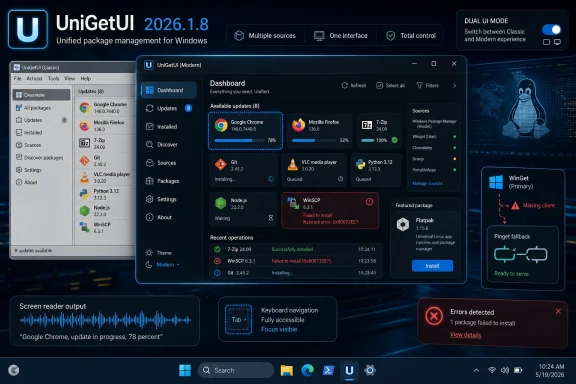
UniGetUI 2026.1.8 arrived on May 5, 2026, bringing a redesigned Avalonia-based Windows interface, a new Pinget fallback for WinGet, Flatpak support, accessibility fixes, and several package-manager reliability improvements to the open-source software management front end. The release looks, at first glance, like a tidy cosmetic update for a beloved Windows utility. It is more than that. UniGetUI is becoming a test case for whether Windows software management can be made approachable without pretending the underlying ecosystem is clean.
Windows has never lacked ways to install applications. It has lacked one obvious, dependable, user-friendly way to manage them after the fact.
That is the opening UniGetUI has occupied for years. It does not replace WinGet, Chocolatey, Scoop, Pip, NPM, and the rest so much as it gives them a common control room. For power users, that means fewer terminal sessions. For ordinary users, it means package management can feel like a software updater instead of a shell exercise.
This matters because Windows 11 remains a strange hybrid of old and new distribution models. Microsoft Store apps, traditional Win32 installers, MSI packages, portable ZIPs, developer tools, language ecosystems, and third-party repositories all coexist on the same desktop. UniGetUI’s appeal is not that it makes this elegant. Its appeal is that it admits the mess exists and gives users a practical way to survive it.
That is why a UI redesign in this particular app carries more weight than a UI redesign in a note-taking tool or media player. The interface is not decoration. It is the translation layer between Windows users and a sprawling software supply chain that was never designed around one consistent experience.
Avalonia is the interesting choice here. It gives developers a XAML-style model that feels familiar to many Windows developers, but it is not chained to Windows in the way Microsoft’s own WinUI is. That distinction matters because UniGetUI is no longer behaving like a Windows-only convenience wrapper with a few extra ambitions. It is increasingly acting like a cross-platform package-management shell that happens to have its deepest roots on Windows.
The risk is obvious. Windows users tend to be suspicious of cross-platform frameworks when they produce apps that feel slightly off: wrong spacing, strange focus behavior, sluggish controls, or menus that look native nowhere. Package management also punishes friction. If the UI gets in the way of finding updates, reviewing packages, or understanding errors, users will flee back to the old interface or the command line.
But the upside is equally clear. A cross-platform interface gives UniGetUI room to become more than a Windows helper. The same release that brings Avalonia to the front also adds Flatpak support, improves Linux resizing behavior, and fixes Fedora RPM installation failures. That is not coincidence. The design layer and the package-manager layer are moving in the same direction.
That sounds like housekeeping. It is not. It is a recognition that WinGet, despite being Microsoft’s official package manager for modern Windows, cannot always be treated as an immovable foundation. App Installer can be missing, damaged, restricted, outdated, or tangled in policy decisions. Some machines are clean consumer systems. Others are corporate images, lab boxes, stripped-down installs, or recovery environments where assumptions about Microsoft’s plumbing fail quickly.
Bundling the WinGet CLI was one answer to that problem. Moving to Pinget as a fallback is another. The difference is subtle but important: UniGetUI is trying to reduce its dependency on shipping Microsoft’s tool while still preserving a path when the host system cannot provide a working one.
For users, the practical outcome is simple. UniGetUI should be less likely to fall over just because WinGet itself is absent or unhappy. For the project, the architectural message is larger: the app wants to be resilient in the face of backend weirdness, not merely a prettier face for whatever happens to be installed.
That is the right instinct. GUI front ends for package managers live or die by how gracefully they handle failure. Users rarely care whether an error originated in WinGet, Chocolatey, Scoop, a repository manifest, a broken installer, a TLS problem, or a policy setting. They clicked “update,” something failed, and the app on screen gets blamed.
On Linux, the package manager is usually part of the operating system’s identity. On iOS and Android, app stores are the center of gravity, for better and worse. On Windows, the center never fully formed. The Microsoft Store exists, WinGet exists, vendor websites exist, enterprise deployment tools exist, and countless legacy installation patterns continue to exist.
UniGetUI’s popularity is a polite indictment of that state of affairs. If Windows package management felt finished, a third-party GUI aggregating multiple managers would be useful but not essential. Instead, tools like UniGetUI feel necessary because they acknowledge how Windows users actually acquire software.
That does not make UniGetUI a replacement for enterprise management platforms. It is not Intune, Configuration Manager, or a full endpoint lifecycle product. But it does sit in a fascinating middle ground: more approachable than command-line package management, more flexible than a single storefront, and more transparent than many vendor-specific updaters.
For enthusiasts and small-shop admins, that middle ground is valuable. A home user with dozens of utilities, a developer with language-specific tools, and an IT generalist maintaining a few unmanaged PCs all face the same basic problem: installed software sprawls faster than people remember to maintain it. UniGetUI gives that sprawl a dashboard.
Because UniGetUI’s center of gravity is shifting. Flatpak integration signals that the project is not merely collecting Windows package managers. It is building a broader abstraction over software sources. That is an ambitious move, and it changes how we should read the project.
There is a version of UniGetUI that remains mostly a Windows convenience app. It wraps WinGet, Chocolatey, Scoop, and similar tools, then focuses on being the best possible update dashboard for Windows enthusiasts. That version is useful and contained.
There is another version of UniGetUI that becomes a multi-platform software-management front end. It treats Windows and Linux package ecosystems as different backends under one user experience. That version is more ambitious, more difficult, and potentially more valuable.
Version 2026.1.8 points toward the second version. Avalonia helps the app travel across platforms. Flatpak gives it a real Linux-native package source to manage. Fedora RPM fixes show the developers are contending with actual Linux packaging friction rather than treating Linux as a marketing checkbox.
The challenge will be avoiding abstraction for abstraction’s sake. Package managers differ not just in syntax, but in philosophy. WinGet, Chocolatey, Scoop, Pip, NPM, and Flatpak do not all mean the same thing when they say “install,” “update,” or “remove.” A good GUI must simplify without lying.
A package manager is a high-consequence interface. It can install system tools, remove dependencies, trigger scripts, modify developer environments, and update applications people rely on for work. If the interface is confusing, inaccessible, or hostile to keyboard navigation, that is not merely an inclusivity failure. It is an operational risk.
Focus management is especially important in software that presents long lists of packages, update queues, confirmation dialogs, progress panels, and error messages. A user should know where they are, what action is selected, and what will happen if they press Enter. Screen reader users need that structure exposed consistently, but keyboard-first power users benefit from it too.
This is one of the areas where Devolutions’ stewardship may matter. Open-source utilities often excel at raw capability before they excel at polish, accessibility, documentation, and release discipline. Those less glamorous investments are what turn a tool people like into a tool people trust.
The point is not that UniGetUI has suddenly become an enterprise accessibility model. The point is that the project is spending release energy on details that mature software has to care about. That is a good sign.
Devolutions is known in IT circles for remote access, password, and privileged access management tools. That background makes sense around UniGetUI. Software inventory, update workflows, package sources, and endpoint maintenance are adjacent to the same administrative world. A polished UniGetUI could complement a broader IT toolkit even if it remains open source.
The optimistic reading is straightforward. Corporate stewardship can fund the boring work open-source projects struggle to sustain: signing, packaging, accessibility, translations, release automation, documentation, regression testing, and long-tail bug fixes. Version 2026.1.8 has exactly that flavor. It is not just one flashy feature; it is a bundle of reliability and usability improvements.
The skeptical reading is also fair. Users will watch for any sign that UniGetUI’s community-first identity is being narrowed, that enterprise priorities are taking over, or that a once-independent utility is becoming a funnel into a larger product ecosystem. Open-source trust is not secured by one statement or one license notice. It is renewed with each release.
So far, this release mostly supports the optimistic case. The classic UI remains available. The app is gaining backend resilience. Linux support is improving. Accessibility is receiving attention. Those are not the moves of a project being hollowed out.
Longtime UniGetUI users have muscle memory. They know where updates appear, how package details look, and what a normal operation feels like. If the new Avalonia interface changes too much too quickly, even objectively improved design can feel slower because users have to re-learn the tool.
Keeping the classic UI lowers the risk of adoption. Users can test the modern interface without committing to it. Admins can avoid changing workflows during sensitive maintenance windows. The developers can gather real-world feedback without forcing a hard break.
It also gives the project a fallback if Avalonia parity is not perfect on day one. Cross-platform UI frameworks are powerful, but they are not magic. Edge cases around display scaling, keyboard behavior, theming, accessibility APIs, and window management can take time to shake out. A toggle is not indecision. It is pragmatic release engineering.
Every backend has its own personality. Chocolatey has its packaging conventions and validation expectations. Fedora has its dependency and RPM realities. WinGet has its manifest ecosystem and App Installer dependencies. Scoop has its own bucket model. Pip and NPM bring language-specific assumptions that do not map neatly onto desktop software management.
UniGetUI’s job is to sit above these systems without pretending they are identical. That is difficult. A failure in one manager can appear to the user as a failure of UniGetUI itself. A validation quirk in Chocolatey or a dependency issue on Fedora becomes part of the front end’s reputation.
This is why maintenance releases matter. The health of a tool like UniGetUI is measured less by whether it can add yet another backend and more by whether it keeps existing backends behaving predictably. Package management is a trust business. Once users believe the dashboard is unreliable, they stop letting it touch their software.
A GUI can be a downgrade when it hides too much. But it can be an upgrade when it makes state visible. Installed packages, pending updates, package sources, operation history, and available actions are often easier to reason about in a well-designed interface than in a sequence of terminal outputs.
That is especially true when multiple package managers are involved. A developer might use WinGet for mainstream Windows applications, Scoop for portable developer tools, NPM for JavaScript tooling, Pip for Python packages, and Chocolatey for older automation habits. The problem is not that any one command is hard. The problem is remembering the whole environment.
UniGetUI gives users a map. The map is imperfect because the territory is inconsistent, but the map is still useful. Version 2026.1.8 improves that map by modernizing the interface, preserving the old one, and making the backend story less brittle.
WinGet is a major improvement for Windows, yet Microsoft has never fully turned it into the visible, integrated, user-facing software maintenance experience that many people expected. The Microsoft Store handles some scenarios. Settings handles some app management. WinGet handles command-line package operations. Enterprise tooling handles managed fleets. The seams remain visible.
Third-party tools grow in those seams. UniGetUI is useful because it bridges official and unofficial sources, command-line and graphical workflows, Windows and non-Windows package managers. That breadth would be difficult for Microsoft to own directly, but the demand signal is unmistakable.
Users want software updates to be centralized. They want to know what is installed. They want to remove things cleanly. They want fewer vendor updaters. They want less hunting through websites. They want power without ceremony.
Windows has the pieces of that story, but not always the experience. UniGetUI’s continuing relevance is evidence that the experience still matters.
The more interesting reading is that UniGetUI is being positioned for a wider role. It is less dependent on a single Windows component, less tied to a Windows-only UI framework, and more willing to treat Linux package formats as first-class citizens. That is not merely polish. That is direction.
There is danger in that direction. A project can become so broad that it loses the sharpness that made it beloved. Windows users do not want a generic package dashboard that forgets Windows-specific pain points. Linux users do not need a Windows-shaped abstraction that misunderstands their ecosystem. Cross-platform tools must earn each platform separately.
Still, this release suggests UniGetUI’s maintainers understand the balance. The classic interface remains. The Windows experience gets attention. Linux support improves. Accessibility and backend reliability are treated as product work, not afterthoughts.
Source: Neowin One of the most useful Windows 11 unofficial apps UniGetUI gets a new look and design
 UniGetUI Is Popular Because Windows Still Makes Software Feel Like Plumbing
Windows has never lacked ways to install applications. It has lacked one obvious, dependable, user-friendly way to manage them after the fact.That is the opening UniGetUI has occupied for years. It does not replace WinGet, Chocolatey, Scoop, Pip, NPM, and the rest so much as it gives them a common control room. For power users, that means fewer terminal sessions. For ordinary users, it means package management can feel like a software updater instead of a shell exercise.
This matters because Windows 11 remains a strange hybrid of old and new distribution models. Microsoft Store apps, traditional Win32 installers, MSI packages, portable ZIPs, developer tools, language ecosystems, and third-party repositories all coexist on the same desktop. UniGetUI’s appeal is not that it makes this elegant. Its appeal is that it admits the mess exists and gives users a practical way to survive it.
That is why a UI redesign in this particular app carries more weight than a UI redesign in a note-taking tool or media player. The interface is not decoration. It is the translation layer between Windows users and a sprawling software supply chain that was never designed around one consistent experience.
The New Look Is Really an Argument About the Future of the App
The headline change in UniGetUI 2026.1.8 is the modern Avalonia-based interface for Windows. Users can toggle between the classic and modern UIs, which is exactly the right compromise for a utility with a technically demanding audience. Nobody wants their software updater to become a design experiment on patch day.Avalonia is the interesting choice here. It gives developers a XAML-style model that feels familiar to many Windows developers, but it is not chained to Windows in the way Microsoft’s own WinUI is. That distinction matters because UniGetUI is no longer behaving like a Windows-only convenience wrapper with a few extra ambitions. It is increasingly acting like a cross-platform package-management shell that happens to have its deepest roots on Windows.
The risk is obvious. Windows users tend to be suspicious of cross-platform frameworks when they produce apps that feel slightly off: wrong spacing, strange focus behavior, sluggish controls, or menus that look native nowhere. Package management also punishes friction. If the UI gets in the way of finding updates, reviewing packages, or understanding errors, users will flee back to the old interface or the command line.
But the upside is equally clear. A cross-platform interface gives UniGetUI room to become more than a Windows helper. The same release that brings Avalonia to the front also adds Flatpak support, improves Linux resizing behavior, and fixes Fedora RPM installation failures. That is not coincidence. The design layer and the package-manager layer are moving in the same direction.
Pinget Is the Quietly Important Part of the Release
The most strategically interesting change is not the new interface. It is the removal of the bundled WinGet CLI and the integration of Pinget as a portable WinGet alternative when the official WinGet client is missing or unavailable.That sounds like housekeeping. It is not. It is a recognition that WinGet, despite being Microsoft’s official package manager for modern Windows, cannot always be treated as an immovable foundation. App Installer can be missing, damaged, restricted, outdated, or tangled in policy decisions. Some machines are clean consumer systems. Others are corporate images, lab boxes, stripped-down installs, or recovery environments where assumptions about Microsoft’s plumbing fail quickly.
Bundling the WinGet CLI was one answer to that problem. Moving to Pinget as a fallback is another. The difference is subtle but important: UniGetUI is trying to reduce its dependency on shipping Microsoft’s tool while still preserving a path when the host system cannot provide a working one.
For users, the practical outcome is simple. UniGetUI should be less likely to fall over just because WinGet itself is absent or unhappy. For the project, the architectural message is larger: the app wants to be resilient in the face of backend weirdness, not merely a prettier face for whatever happens to be installed.
That is the right instinct. GUI front ends for package managers live or die by how gracefully they handle failure. Users rarely care whether an error originated in WinGet, Chocolatey, Scoop, a repository manifest, a broken installer, a TLS problem, or a policy setting. They clicked “update,” something failed, and the app on screen gets blamed.
The Windows Package Manager Story Is Still Half-Finished
WinGet has improved the Windows software story, but it has not solved it. Microsoft gave Windows a credible command-line package manager, but the broader platform still lacks the cultural simplicity that Linux distributions and mobile app stores enjoy in very different ways.On Linux, the package manager is usually part of the operating system’s identity. On iOS and Android, app stores are the center of gravity, for better and worse. On Windows, the center never fully formed. The Microsoft Store exists, WinGet exists, vendor websites exist, enterprise deployment tools exist, and countless legacy installation patterns continue to exist.
UniGetUI’s popularity is a polite indictment of that state of affairs. If Windows package management felt finished, a third-party GUI aggregating multiple managers would be useful but not essential. Instead, tools like UniGetUI feel necessary because they acknowledge how Windows users actually acquire software.
That does not make UniGetUI a replacement for enterprise management platforms. It is not Intune, Configuration Manager, or a full endpoint lifecycle product. But it does sit in a fascinating middle ground: more approachable than command-line package management, more flexible than a single storefront, and more transparent than many vendor-specific updaters.
For enthusiasts and small-shop admins, that middle ground is valuable. A home user with dozens of utilities, a developer with language-specific tools, and an IT generalist maintaining a few unmanaged PCs all face the same basic problem: installed software sprawls faster than people remember to maintain it. UniGetUI gives that sprawl a dashboard.
Flatpak Support Makes the Windows App Less Windows-Centric
Flatpak support is the kind of changelog item that may confuse casual Windows users. Why should a Windows package-management GUI care about Flatpak, a Linux application distribution format?Because UniGetUI’s center of gravity is shifting. Flatpak integration signals that the project is not merely collecting Windows package managers. It is building a broader abstraction over software sources. That is an ambitious move, and it changes how we should read the project.
There is a version of UniGetUI that remains mostly a Windows convenience app. It wraps WinGet, Chocolatey, Scoop, and similar tools, then focuses on being the best possible update dashboard for Windows enthusiasts. That version is useful and contained.
There is another version of UniGetUI that becomes a multi-platform software-management front end. It treats Windows and Linux package ecosystems as different backends under one user experience. That version is more ambitious, more difficult, and potentially more valuable.
Version 2026.1.8 points toward the second version. Avalonia helps the app travel across platforms. Flatpak gives it a real Linux-native package source to manage. Fedora RPM fixes show the developers are contending with actual Linux packaging friction rather than treating Linux as a marketing checkbox.
The challenge will be avoiding abstraction for abstraction’s sake. Package managers differ not just in syntax, but in philosophy. WinGet, Chocolatey, Scoop, Pip, NPM, and Flatpak do not all mean the same thing when they say “install,” “update,” or “remove.” A good GUI must simplify without lying.
Accessibility Fixes Are Not Cosmetic in a Tool That Can Break Systems
The release also includes accessibility fixes for screen reader users and improved focus management, including navigation bar accessibility work. These are easy to skim past in a changelog. They should not be.A package manager is a high-consequence interface. It can install system tools, remove dependencies, trigger scripts, modify developer environments, and update applications people rely on for work. If the interface is confusing, inaccessible, or hostile to keyboard navigation, that is not merely an inclusivity failure. It is an operational risk.
Focus management is especially important in software that presents long lists of packages, update queues, confirmation dialogs, progress panels, and error messages. A user should know where they are, what action is selected, and what will happen if they press Enter. Screen reader users need that structure exposed consistently, but keyboard-first power users benefit from it too.
This is one of the areas where Devolutions’ stewardship may matter. Open-source utilities often excel at raw capability before they excel at polish, accessibility, documentation, and release discipline. Those less glamorous investments are what turn a tool people like into a tool people trust.
The point is not that UniGetUI has suddenly become an enterprise accessibility model. The point is that the project is spending release energy on details that mature software has to care about. That is a good sign.
Devolutions’ Branding Raises the Stakes
UniGetUI’s newer Devolutions branding is more than a splash-screen detail. It reminds users that the project has entered a different phase, one in which corporate backing may bring resources, but also scrutiny.Devolutions is known in IT circles for remote access, password, and privileged access management tools. That background makes sense around UniGetUI. Software inventory, update workflows, package sources, and endpoint maintenance are adjacent to the same administrative world. A polished UniGetUI could complement a broader IT toolkit even if it remains open source.
The optimistic reading is straightforward. Corporate stewardship can fund the boring work open-source projects struggle to sustain: signing, packaging, accessibility, translations, release automation, documentation, regression testing, and long-tail bug fixes. Version 2026.1.8 has exactly that flavor. It is not just one flashy feature; it is a bundle of reliability and usability improvements.
The skeptical reading is also fair. Users will watch for any sign that UniGetUI’s community-first identity is being narrowed, that enterprise priorities are taking over, or that a once-independent utility is becoming a funnel into a larger product ecosystem. Open-source trust is not secured by one statement or one license notice. It is renewed with each release.
So far, this release mostly supports the optimistic case. The classic UI remains available. The app is gaining backend resilience. Linux support is improving. Accessibility is receiving attention. Those are not the moves of a project being hollowed out.
The Classic UI Toggle Is a Necessary Escape Hatch
The ability to switch between classic and modern UIs may sound like a transitional courtesy, but it is one of the smartest decisions in the release. Redesigns often fail when they treat familiarity as a defect. In utilities, familiarity is often the product.Longtime UniGetUI users have muscle memory. They know where updates appear, how package details look, and what a normal operation feels like. If the new Avalonia interface changes too much too quickly, even objectively improved design can feel slower because users have to re-learn the tool.
Keeping the classic UI lowers the risk of adoption. Users can test the modern interface without committing to it. Admins can avoid changing workflows during sensitive maintenance windows. The developers can gather real-world feedback without forcing a hard break.
It also gives the project a fallback if Avalonia parity is not perfect on day one. Cross-platform UI frameworks are powerful, but they are not magic. Edge cases around display scaling, keyboard behavior, theming, accessibility APIs, and window management can take time to shake out. A toggle is not indecision. It is pragmatic release engineering.
Chocolatey and Fedora Fixes Show the Real Work Behind the Screenshots
The changelog includes fixes for Chocolatey installer validation and Fedora 38-plus RPM installation failures tied to dependency problems. These are not glamorous items, but they are the sort of fixes that determine whether people keep using a package-management front end after the novelty wears off.Every backend has its own personality. Chocolatey has its packaging conventions and validation expectations. Fedora has its dependency and RPM realities. WinGet has its manifest ecosystem and App Installer dependencies. Scoop has its own bucket model. Pip and NPM bring language-specific assumptions that do not map neatly onto desktop software management.
UniGetUI’s job is to sit above these systems without pretending they are identical. That is difficult. A failure in one manager can appear to the user as a failure of UniGetUI itself. A validation quirk in Chocolatey or a dependency issue on Fedora becomes part of the front end’s reputation.
This is why maintenance releases matter. The health of a tool like UniGetUI is measured less by whether it can add yet another backend and more by whether it keeps existing backends behaving predictably. Package management is a trust business. Once users believe the dashboard is unreliable, they stop letting it touch their software.
The App Is Becoming a Power-User Bridge, Not a Beginner Crutch
It is tempting to describe UniGetUI as a beginner-friendly wrapper for command-line tools. That is true, but incomplete. The app is just as important for power users who know the commands and would rather not spend their day typing them.A GUI can be a downgrade when it hides too much. But it can be an upgrade when it makes state visible. Installed packages, pending updates, package sources, operation history, and available actions are often easier to reason about in a well-designed interface than in a sequence of terminal outputs.
That is especially true when multiple package managers are involved. A developer might use WinGet for mainstream Windows applications, Scoop for portable developer tools, NPM for JavaScript tooling, Pip for Python packages, and Chocolatey for older automation habits. The problem is not that any one command is hard. The problem is remembering the whole environment.
UniGetUI gives users a map. The map is imperfect because the territory is inconsistent, but the map is still useful. Version 2026.1.8 improves that map by modernizing the interface, preserving the old one, and making the backend story less brittle.
Microsoft Should Notice the Tools Growing Around WinGet
Microsoft does not need to copy UniGetUI feature for feature. But it should pay attention to why UniGetUI exists.WinGet is a major improvement for Windows, yet Microsoft has never fully turned it into the visible, integrated, user-facing software maintenance experience that many people expected. The Microsoft Store handles some scenarios. Settings handles some app management. WinGet handles command-line package operations. Enterprise tooling handles managed fleets. The seams remain visible.
Third-party tools grow in those seams. UniGetUI is useful because it bridges official and unofficial sources, command-line and graphical workflows, Windows and non-Windows package managers. That breadth would be difficult for Microsoft to own directly, but the demand signal is unmistakable.
Users want software updates to be centralized. They want to know what is installed. They want to remove things cleanly. They want fewer vendor updaters. They want less hunting through websites. They want power without ceremony.
Windows has the pieces of that story, but not always the experience. UniGetUI’s continuing relevance is evidence that the experience still matters.
The New UniGetUI Is a Maintenance Release With Roadmap Energy
The most concrete reading of UniGetUI 2026.1.8 is that users get a better app today. The modern Avalonia UI offers a fresh Windows experience. Pinget fallback makes WinGet-dependent workflows more resilient. Flatpak support broadens the platform story. Accessibility fixes make the app more usable. Package-manager bug fixes reduce friction.The more interesting reading is that UniGetUI is being positioned for a wider role. It is less dependent on a single Windows component, less tied to a Windows-only UI framework, and more willing to treat Linux package formats as first-class citizens. That is not merely polish. That is direction.
There is danger in that direction. A project can become so broad that it loses the sharpness that made it beloved. Windows users do not want a generic package dashboard that forgets Windows-specific pain points. Linux users do not need a Windows-shaped abstraction that misunderstands their ecosystem. Cross-platform tools must earn each platform separately.
Still, this release suggests UniGetUI’s maintainers understand the balance. The classic interface remains. The Windows experience gets attention. Linux support improves. Accessibility and backend reliability are treated as product work, not afterthoughts.
The Details WindowsForum Readers Should Carry Forward
UniGetUI 2026.1.8 is worth reading as both a practical update and a strategic signal. It gives Windows users a new interface to try, but its deeper importance lies in how it reduces dependency on fragile assumptions and prepares the app for a broader package-management role.- UniGetUI 2026.1.8 removes the bundled WinGet CLI and uses Pinget as an automatic fallback when the official WinGet client is missing or unavailable.
- The new Avalonia-based interface gives Windows users a modern UI while preserving the classic interface for those who need continuity.
- Flatpak support makes the project’s cross-platform ambitions harder to dismiss as a side experiment.
- Accessibility and focus-management fixes matter because package management is too consequential to be mouse-only or visually fragile.
- The Chocolatey and Fedora fixes show that the project is investing in backend reliability, not just screenshots.
- Devolutions’ stewardship raises expectations, but this release mostly points toward a more mature and better-supported UniGetUI.
Source: Neowin One of the most useful Windows 11 unofficial apps UniGetUI gets a new look and design
