

Devolutions has released UniGetUI 2026.2.3, a performance-focused update for its Windows package-manager front end. The July 14 release makes NativeAOT the default build mode for all release packages, which the project says reduces runtime overhead and improves startup performance.
UniGetUI provides a graphical layer over package managers including WinGet, Chocolatey, Scoop, Pip, npm, and .NET Tool. For Windows users who use it as a single update console, the practical changes are mostly about responsiveness rather than new package sources or automation policy changes.
According to the project’s GitHub release notes, 2026.2.3 reduces GPU activity by removing unnecessary indeterminate progress-bar animations. It also changes package icon loading and memory handling, with the stated aim of reducing memory use while keeping the package browser responsive.
The release further targets a familiar pain point in large software inventories: scrolling. Package lists and DataGrid views have been optimized for smoother browsing, which should be most noticeable for users with long installed-package or update lists.
NativeAOT is the more consequential under-the-hood change. Rather than relying on the usual managed runtime behavior at launch, the app is compiled ahead of time into native code for its shipped packages. Devolutions says this produces a leaner runtime and faster application startup. Users should not need to enable or configure the feature themselves.
Other workflow changes include toast notifications, expanded operation feedback, and a new manual mode for install, update, and uninstall tasks. The notes do not spell out every behavioral difference in that manual mode, but it is intended to provide more direct control over package operations instead of relying entirely on the application’s normal flow.
Smaller usability changes include independently remembered sorting for each package-list page, operation logs that retain their current scroll position as output arrives, revised loading and empty-state artwork, and adjusted title-bar search styling.
For Windows specifically, UniGetUI 2026.2.3 fixes a bug that could cause the main window to gradually grow after restarting the application. It also fixes title-bar search clipping when the window is maximized, dark-theme readability in the release-notes flyout, theme-switching log colors, and several installer-script issues.
The published release notes list no security fixes or breaking configuration changes, so existing users can treat this as a routine upgrade, with the main benefit being a quicker and less resource-hungry interface.
The update also addresses WinGet and COM initialization reliability, adds safeguards for NativeAOT startup stability, and fixes PowerShell module installations that ignored the selected installation scope.
For users who installed 2026.2.3, this supersedes the earlier recommendation to treat it as a routine performance upgrade: update promptly to 2026.2.4, especially where WinGet is a primary package source.

 www.neowin.net
UniGetUI provides a graphical layer over package managers including WinGet, Chocolatey, Scoop, Pip, npm, and .NET Tool. For Windows users who use it as a single update console, the practical changes are mostly about responsiveness rather than new package sources or automation policy changes.
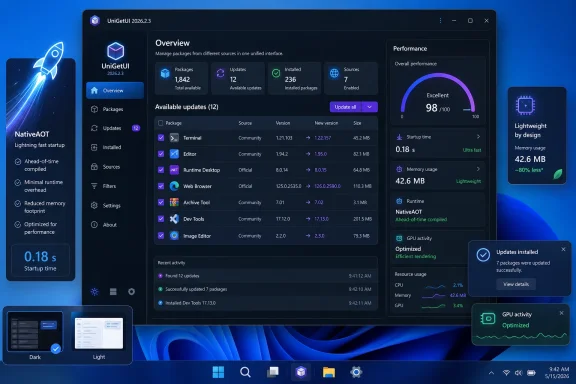 Faster interface, lower overhead
According to the project’s GitHub release notes, 2026.2.3 reduces GPU activity by removing unnecessary indeterminate progress-bar animations. It also changes package icon loading and memory handling, with the stated aim of reducing memory use while keeping the package browser responsive.The release further targets a familiar pain point in large software inventories: scrolling. Package lists and DataGrid views have been optimized for smoother browsing, which should be most noticeable for users with long installed-package or update lists.
NativeAOT is the more consequential under-the-hood change. Rather than relying on the usual managed runtime behavior at launch, the app is compiled ahead of time into native code for its shipped packages. Devolutions says this produces a leaner runtime and faster application startup. Users should not need to enable or configure the feature themselves.
UI controls and Windows fixes
The update restores the dockable navigation pane. It can now operate in adaptive, docked, or overlay modes, giving users more control over how the sidebar behaves at different window sizes.Other workflow changes include toast notifications, expanded operation feedback, and a new manual mode for install, update, and uninstall tasks. The notes do not spell out every behavioral difference in that manual mode, but it is intended to provide more direct control over package operations instead of relying entirely on the application’s normal flow.
Smaller usability changes include independently remembered sorting for each package-list page, operation logs that retain their current scroll position as output arrives, revised loading and empty-state artwork, and adjusted title-bar search styling.
For Windows specifically, UniGetUI 2026.2.3 fixes a bug that could cause the main window to gradually grow after restarting the application. It also fixes title-bar search clipping when the window is maximized, dark-theme readability in the release-notes flyout, theme-switching log colors, and several installer-script issues.
The published release notes list no security fixes or breaking configuration changes, so existing users can treat this as a routine upgrade, with the main benefit being a quicker and less resource-hungry interface.
Update: UniGetUI 2026.2.4 fixes WinGet source regression (July 15, 2026)
Devolutions released UniGetUI 2026.2.4 on July 15 as a hotfix for problems introduced with the NativeAOT-based 2026.2.3 build. According to Neowin’s report on the new release notes, affected installations could show WinGet sources as empty, preventing the application from finding packages through WinGet.The update also addresses WinGet and COM initialization reliability, adds safeguards for NativeAOT startup stability, and fixes PowerShell module installations that ignored the selected installation scope.
For users who installed 2026.2.3, this supersedes the earlier recommendation to treat it as a routine performance upgrade: update promptly to 2026.2.4, especially where WinGet is a primary package source.
This useful unofficial Windows 11 app gets a significant upgrade you should feel immediately | Neowin
This useful unofficial Windows 11 app has received a significant upgrade, delivering faster performance and smoother functionality that users should feel immediately.
www.neowin.net
References
- Primary source: Neowin
Published: 2026-07-14T16:46:01+00:00
UniGetUI 2026.2.3 | Neowin
User-friendly graphical interface for the Windows Package Manager (winget). It simplifies app installation on Windows 10/11 and enables users to browse and install apps from a visual interface.
www.neowin.net
Last edited:

