

Microsoft’s Universal Print Badge API, roadmap ID 561921, is in development as of June 29, 2026, with preview planned for December 2026 and general availability listed for June 2027 across commercial Microsoft 365, GCC, GCC High, and DoD clouds. The feature lets administrators map badge credentials such as cards or NFC tokens to Microsoft 365 user identities so compatible printers can release held jobs with a tap. The thesis is simple: Microsoft is not merely adding another release option to cloud printing; it is trying to turn the employee badge into a first-class Microsoft 365 identity signal. That move is modest on the surface, but it cuts into a surprisingly durable corner of office infrastructure where cloud identity, physical access, vendor firmware, and end-user patience all collide.
For years, enterprise printing has lived in a strange half-modern state. The laptop may be Entra-joined, the app may be SaaS, and the admin may manage policy from Intune, but the printer still often expects a local queue, a device-specific driver, a print server, a release station, or a vendor-managed badge database sitting slightly outside the rest of the identity estate.
Universal Print was Microsoft’s attempt to drag that world into Microsoft 365. Its pitch has always been broader than “print without a server.” It is a bet that print infrastructure should behave like the rest of cloud-managed endpoint and productivity infrastructure: centrally administered, identity-aware, policy-driven, and less dependent on brittle on-premises plumbing.
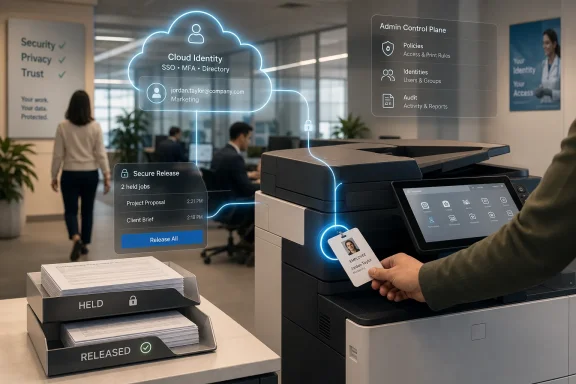
The Badge API extends that argument into the last few feet of the workflow. Submitting a print job is already an identity event. Releasing that job at the device should be one too. If Microsoft can make the badge tap resolve cleanly to a cloud user identity, then the printer stops being a semi-detached island and becomes another endpoint in the Microsoft 365 control plane.
That is why the feature matters more than its plain-language description suggests. “Tap your badge to print” is not new. “Map that badge credential to a Microsoft 365 identity through a standardized cloud model” is the part that changes the balance of power.
Microsoft already supports secure release flows in Universal Print, including QR-code release through the Microsoft 365 mobile app and printer-supported methods such as badge tap, PIN, or biometric release where the device and vendor support them. The current model works, but it can be awkward. Microsoft’s own guidance acknowledges that if a badge release system is not integrated with Universal Print, users may face double release flows: first approving the cloud-held job, then satisfying the printer’s separate badge mechanism.
The Badge API is designed to close that seam. Instead of letting the printer’s badge system and Universal Print operate like two adjacent security checkpoints, Microsoft wants a shared identity mapping layer. The user taps once. The printer knows which cloud identity that badge represents. Universal Print can release the correct jobs without forcing the user into an app, a PIN pad, or a second authentication ritual.
That is the practical selling point. But the deeper appeal is administrative. Once badge-to-user mapping lives in the Microsoft 365 orbit, the organization gains a more coherent place to manage one of the messiest physical-world identifiers in the office.
QR-code release is clever because it works across registered printers and uses a phone most employees already carry. But it still assumes the user has a compatible Microsoft 365 app installed, is signed into the right work account, has a functioning camera, can scan the correct code, and is willing to work through a mobile confirmation flow for an office chore that used to require no ceremony at all. For some organizations, that trade-off is fine. For others, it is friction dressed as modernization.
PIN release has the opposite problem. It is familiar and device-local, but it adds another secret, another input step, and another opportunity for shoulder-surfing, mistyping, reuse, or help-desk irritation. In many offices, PIN release is accepted because it is less bad than abandoned documents in a tray, not because users love it.
Badge tap is the workflow that users already understand. They tap to enter a building, access a floor, unlock a locker, or pay in a cafeteria. Extending that gesture to print release feels natural, especially in hospitals, universities, government offices, warehouses, call centers, and shared-desk environments where users move between devices and locations all day.
Microsoft’s calculation is that the secure option must become the easiest option. If secure release feels slower than direct printing, users and departments will lobby around it. If secure release becomes a tap, the security control can disappear into muscle memory.
Microsoft’s cloud model replaces that with a service boundary. That is cleaner in theory, but it changes the failure modes. A broken print server used to be a local infrastructure problem. A cloud print disruption can become a tenant, network, licensing, identity, connector, or device compatibility problem. For sysadmins, “serverless” only counts as progress if the operational burden actually goes down.
The Badge API should be read against that backdrop. It is not only about making release easier for users. It is about reducing the number of parallel systems administrators must reconcile. A badge database here, a printer vendor release database there, a Microsoft 365 user identity somewhere else, and a set of device-specific mappings maintained by a facilities team is not modernization. It is fragmentation with a cloud logo.
If Microsoft can give admins a standard badge mapping model inside Universal Print, it removes one more reason to maintain a separate print-management identity island. That does not eliminate vendor tooling, and it does not make every printer magically compatible. But it nudges the center of gravity away from the print server and toward Microsoft 365.
Badge release depends on hardware behavior. The printer or multifunction device must detect a card or NFC credential, communicate the relevant identity signal, and participate in the release flow in a way Universal Print understands. Microsoft can define the cloud mapping, but it cannot ship firmware for every copier in the fleet. The ecosystem has to come along.
That makes the Badge API a platform move. Microsoft is effectively saying: if you build badge-aware printers or secure release systems, map into our identity model rather than maintaining a wholly separate one. For vendors, that may be attractive because Microsoft 365 is already the customer’s identity and productivity center. It may also be threatening, because standardization can flatten differentiation.
The old print-management market thrived on solving exactly these messy problems: pull printing, badge release, accounting, quotas, cost centers, delegated administration, and secure workflows across mixed fleets. Universal Print has been expanding into that territory step by step. A badge mapping API does not replace the whole market, but it does absorb one more formerly specialized function into Microsoft’s platform layer.
The likely result is not the death of print-management vendors. It is a sorting. Vendors that add fleet analytics, complex accounting, advanced rules, multi-cloud support, or deep vertical workflows still have room. Vendors whose pitch is mainly “we connect badge taps to cloud print release” may find Microsoft standing uncomfortably close.
Government and defense environments are often badge-heavy by design. Physical credentials are already woven into access control, identity proofing, facility movement, and audit culture. If print release can align with those existing credential habits while staying inside a compliant Microsoft 365 cloud boundary, the feature becomes easier to justify.
That does not mean every government tenant will flip it on in 2027. Badge credentials are sensitive. Mapping them to user identities raises questions about governance, lifecycle management, audit retention, vendor trust, and whether the badge identifier used for printing should be the same one used for building access. A feature being available in DoD cloud does not automatically make a deployment simple.
Still, the inclusion of sovereign and government cloud instances changes the character of the roadmap item. Microsoft is not treating badge release as a lightweight amenity for commercial tenants only. It is positioning it as part of the secure workplace stack.
A Badge API will surface those inconsistencies quickly. If a badge is mapped to the wrong user, secure print release becomes a privacy incident. If a terminated employee’s badge credential remains mapped after their account lifecycle changes, the organization has a governance problem. If one person carries multiple cards or shared department badges exist, the clean identity story starts to blur.
The most serious deployments will treat badge mapping as identity data, not printer configuration. That means ownership must be clear. Is the source of truth HR, physical security, Entra ID, a card access platform, or Universal Print itself? Who can create, update, or remove mappings? Are changes logged? Are they reviewed? Can mappings be bulk imported and reconciled? What happens when a contractor changes sponsor, role, or building access?
Microsoft’s roadmap description does not answer those questions, and it should not be expected to in a short roadmap entry. But admins should not miss the point: the API may simplify the user experience by moving complexity into governance. That is usually the right trade, but only if someone owns the complexity.
Universal Print changes the relationship by making the print job the controlled object. The job can be held in the cloud, released only when the user is present, and associated with a Microsoft 365 identity. Badge release strengthens that model because the act at the printer can be tied back to the same identity that submitted the job.
That is useful for privacy, but also for accountability. In environments where printing is audited, charged back, restricted, or monitored for data loss risk, release identity matters. It is not enough to know that a document was submitted to a queue. The organization may need to know whether it was actually released, when, where, and by whom.
The Badge API could make those events cleaner, but it also raises expectations. Once Microsoft makes badge release a standard cloud-aware capability, customers will expect reporting, diagnostics, role-based administration, and lifecycle tooling that match the rest of Microsoft 365. A feature that feels elegant to the user can still fail the admin if troubleshooting requires bouncing among printer firmware, vendor portals, Entra data, and Universal Print logs.
The six-month gap between preview and GA gives Microsoft time to test the administrative model and gives printer vendors time to validate device behavior. It also gives enterprise customers time to pilot against real badge populations rather than lab identities. That matters because the difficult bugs will not be abstract API errors; they will be cases where a night-shift nurse, shared lab printer, replacement badge, or contractor identity breaks the assumed model.
Roadmap dates can move, and Microsoft 365 roadmap items often do. The current listing supplied for this feature says preview in December 2026 and GA in June 2027, even though roadmap mirrors and archives may preserve earlier date snapshots. For planning purposes, administrators should treat the official current roadmap as directional rather than contractual.
That is especially true because hardware availability may lag service availability. A cloud API reaching preview does not mean an existing printer fleet will support it on day one. Some devices may need firmware updates. Some may never support it. Some organizations will depend on print-management vendors to bridge the gap.
That is good news for mixed environments. Universal Print’s value proposition is stronger when Windows, macOS, mobile workflows, shared devices, and browser-based work all need to coexist. Badge release fits that cross-platform posture because the release action happens at the printer, not inside a Windows-only client experience.
But Windows still matters. Most enterprise print jobs still originate from Windows endpoints, and Windows admins will be the ones asked why a job did not appear, why a printer is not discoverable, or why a user can release on one device but not another. The more Universal Print moves intelligence to the cloud, the more Windows troubleshooting becomes a distributed exercise.
The Badge API does not remove that burden. It changes its shape. Instead of debugging only spooler queues and drivers, admins will debug identity mapping, release methods, cloud-held jobs, device capabilities, and user presence at the printer. That is arguably more modern. It is not automatically simpler.
The organizations least ready will have mixed fleets acquired over many years, local badge databases maintained by facilities, third-party print tools deployed inconsistently, and no single owner for physical credential lifecycle. For them, the feature may first function as an audit of everything that is messy.
This is a common pattern in Microsoft 365 modernization. A new cloud feature arrives promising centralization, but its first real effect is to reveal how decentralized the current environment is. That is not a reason to reject the feature. It is a reason to budget for the cleanup that the feature makes visible.
Admins should resist the temptation to treat Badge API adoption as a printer project. It is a printer project only in the same way passwordless authentication is a keyboard project. The device is where the user notices the change, but identity is where the project succeeds or fails.
The status quo has inertia. Copier contracts are long. Print systems are often invisible until they break. Facilities, security, and IT may share ownership in ways that make change slow. Users dislike new print rituals, and executives only notice printing when confidential documents go missing or a board deck fails to emerge before a meeting.
Badge release attacks that inertia from both sides. It gives security teams a privacy argument and gives users a convenience argument. It gives admins a standardization argument and gives Microsoft a platform argument. That combination is stronger than a purely technical pitch.
The risk is overpromising. If the experience is not truly one tap, if compatibility is narrow, if badge mapping is clumsy, or if diagnostics are weak, the feature will be judged harshly. Printing has no glamour buffer. Users do not give printers credit for almost working.
This is the narrow band of facts admins should carry into planning:
Microsoft’s Badge API will not make printing exciting, and that may be its highest compliment if it works. The best version of this feature is almost invisible: the user taps, the right jobs print, the wrong jobs stay private, and administrators have one less identity silo to reconcile. Between now and the planned 2027 general availability, the real story will be whether Microsoft and its hardware partners can make that invisible moment reliable enough for the offices, hospitals, agencies, and campuses that still depend on paper more than anyone likes to admit.
 Microsoft Wants the Badge to Become a Cloud Identity Primitive
For years, enterprise printing has lived in a strange half-modern state. The laptop may be Entra-joined, the app may be SaaS, and the admin may manage policy from Intune, but the printer still often expects a local queue, a device-specific driver, a print server, a release station, or a vendor-managed badge database sitting slightly outside the rest of the identity estate.Universal Print was Microsoft’s attempt to drag that world into Microsoft 365. Its pitch has always been broader than “print without a server.” It is a bet that print infrastructure should behave like the rest of cloud-managed endpoint and productivity infrastructure: centrally administered, identity-aware, policy-driven, and less dependent on brittle on-premises plumbing.
The Badge API extends that argument into the last few feet of the workflow. Submitting a print job is already an identity event. Releasing that job at the device should be one too. If Microsoft can make the badge tap resolve cleanly to a cloud user identity, then the printer stops being a semi-detached island and becomes another endpoint in the Microsoft 365 control plane.
That is why the feature matters more than its plain-language description suggests. “Tap your badge to print” is not new. “Map that badge credential to a Microsoft 365 identity through a standardized cloud model” is the part that changes the balance of power.
The Printer Has Always Been a Security Exception With a Paper Tray
Secure print release exists because the normal print model is absurdly trusting. A user clicks Print, walks away, and a document containing payroll data, medical records, contracts, legal drafts, or acquisition rumors may sit in a tray until someone collects it. In high-compliance environments, the difference between printing immediately and printing only when the user is present is not a convenience feature; it is a data-handling control.Microsoft already supports secure release flows in Universal Print, including QR-code release through the Microsoft 365 mobile app and printer-supported methods such as badge tap, PIN, or biometric release where the device and vendor support them. The current model works, but it can be awkward. Microsoft’s own guidance acknowledges that if a badge release system is not integrated with Universal Print, users may face double release flows: first approving the cloud-held job, then satisfying the printer’s separate badge mechanism.
The Badge API is designed to close that seam. Instead of letting the printer’s badge system and Universal Print operate like two adjacent security checkpoints, Microsoft wants a shared identity mapping layer. The user taps once. The printer knows which cloud identity that badge represents. Universal Print can release the correct jobs without forcing the user into an app, a PIN pad, or a second authentication ritual.
That is the practical selling point. But the deeper appeal is administrative. Once badge-to-user mapping lives in the Microsoft 365 orbit, the organization gains a more coherent place to manage one of the messiest physical-world identifiers in the office.
The “No App, No PIN” Promise Is Really an Adoption Strategy
The most important phrase in the roadmap description is not “Badge API.” It is “no app, PIN, or sign-in required at the device.” Microsoft knows exactly where cloud print workflows can fail: not in the architecture diagram, but in front of a multifunction printer while someone is late for a meeting.QR-code release is clever because it works across registered printers and uses a phone most employees already carry. But it still assumes the user has a compatible Microsoft 365 app installed, is signed into the right work account, has a functioning camera, can scan the correct code, and is willing to work through a mobile confirmation flow for an office chore that used to require no ceremony at all. For some organizations, that trade-off is fine. For others, it is friction dressed as modernization.
PIN release has the opposite problem. It is familiar and device-local, but it adds another secret, another input step, and another opportunity for shoulder-surfing, mistyping, reuse, or help-desk irritation. In many offices, PIN release is accepted because it is less bad than abandoned documents in a tray, not because users love it.
Badge tap is the workflow that users already understand. They tap to enter a building, access a floor, unlock a locker, or pay in a cafeteria. Extending that gesture to print release feels natural, especially in hospitals, universities, government offices, warehouses, call centers, and shared-desk environments where users move between devices and locations all day.
Microsoft’s calculation is that the secure option must become the easiest option. If secure release feels slower than direct printing, users and departments will lobby around it. If secure release becomes a tap, the security control can disappear into muscle memory.
Universal Print Is Still Fighting the Ghost of the Print Server
Universal Print has always had a credibility problem among hardened Windows admins: printing is one of those domains where every “simple” modernization eventually meets a finisher option, a legacy driver, a label printer, a departmental copier contract, or a vendor agent that refuses to die. The print server was annoying, but it was also familiar. It gave administrators a place to stage drivers, manage queues, script deployments, and blame something tangible when print jobs vanished.Microsoft’s cloud model replaces that with a service boundary. That is cleaner in theory, but it changes the failure modes. A broken print server used to be a local infrastructure problem. A cloud print disruption can become a tenant, network, licensing, identity, connector, or device compatibility problem. For sysadmins, “serverless” only counts as progress if the operational burden actually goes down.
The Badge API should be read against that backdrop. It is not only about making release easier for users. It is about reducing the number of parallel systems administrators must reconcile. A badge database here, a printer vendor release database there, a Microsoft 365 user identity somewhere else, and a set of device-specific mappings maintained by a facilities team is not modernization. It is fragmentation with a cloud logo.
If Microsoft can give admins a standard badge mapping model inside Universal Print, it removes one more reason to maintain a separate print-management identity island. That does not eliminate vendor tooling, and it does not make every printer magically compatible. But it nudges the center of gravity away from the print server and toward Microsoft 365.
The API Is a Signal to Printer Makers as Much as to Admins
The roadmap lists the feature under Developer and Web platforms, which is telling. This is not just a new toggle for the Universal Print portal. It is a contract for device makers, print-management vendors, and integration partners.Badge release depends on hardware behavior. The printer or multifunction device must detect a card or NFC credential, communicate the relevant identity signal, and participate in the release flow in a way Universal Print understands. Microsoft can define the cloud mapping, but it cannot ship firmware for every copier in the fleet. The ecosystem has to come along.
That makes the Badge API a platform move. Microsoft is effectively saying: if you build badge-aware printers or secure release systems, map into our identity model rather than maintaining a wholly separate one. For vendors, that may be attractive because Microsoft 365 is already the customer’s identity and productivity center. It may also be threatening, because standardization can flatten differentiation.
The old print-management market thrived on solving exactly these messy problems: pull printing, badge release, accounting, quotas, cost centers, delegated administration, and secure workflows across mixed fleets. Universal Print has been expanding into that territory step by step. A badge mapping API does not replace the whole market, but it does absorb one more formerly specialized function into Microsoft’s platform layer.
The likely result is not the death of print-management vendors. It is a sorting. Vendors that add fleet analytics, complex accounting, advanced rules, multi-cloud support, or deep vertical workflows still have room. Vendors whose pitch is mainly “we connect badge taps to cloud print release” may find Microsoft standing uncomfortably close.
Government Cloud Support Makes This More Than an Office Convenience
The roadmap’s cloud list matters. Microsoft is planning the Badge API not only for Worldwide multi-tenant Microsoft 365, but also for GCC, GCC High, and DoD. That tells us the company sees badge-based secure release as relevant to regulated and public-sector customers, not merely to corporate campuses with modern copiers.Government and defense environments are often badge-heavy by design. Physical credentials are already woven into access control, identity proofing, facility movement, and audit culture. If print release can align with those existing credential habits while staying inside a compliant Microsoft 365 cloud boundary, the feature becomes easier to justify.
That does not mean every government tenant will flip it on in 2027. Badge credentials are sensitive. Mapping them to user identities raises questions about governance, lifecycle management, audit retention, vendor trust, and whether the badge identifier used for printing should be the same one used for building access. A feature being available in DoD cloud does not automatically make a deployment simple.
Still, the inclusion of sovereign and government cloud instances changes the character of the roadmap item. Microsoft is not treating badge release as a lightweight amenity for commercial tenants only. It is positioning it as part of the secure workplace stack.
The Hidden Work Is Credential Hygiene
The road from “tap to print” to a safe production deployment runs through credential hygiene. Badge systems often predate the cloud identity architecture now expected of Microsoft 365 tenants. Some organizations have multiple badge formats across regions, acquired companies, contractors, temporary workers, and physical security providers. Others have stale badge assignments that are fixed only when a door access problem occurs.A Badge API will surface those inconsistencies quickly. If a badge is mapped to the wrong user, secure print release becomes a privacy incident. If a terminated employee’s badge credential remains mapped after their account lifecycle changes, the organization has a governance problem. If one person carries multiple cards or shared department badges exist, the clean identity story starts to blur.
The most serious deployments will treat badge mapping as identity data, not printer configuration. That means ownership must be clear. Is the source of truth HR, physical security, Entra ID, a card access platform, or Universal Print itself? Who can create, update, or remove mappings? Are changes logged? Are they reviewed? Can mappings be bulk imported and reconciled? What happens when a contractor changes sponsor, role, or building access?
Microsoft’s roadmap description does not answer those questions, and it should not be expected to in a short roadmap entry. But admins should not miss the point: the API may simplify the user experience by moving complexity into governance. That is usually the right trade, but only if someone owns the complexity.
The Endpoint Is a Printer, but the Control Plane Is Identity
Modern endpoint management has trained IT teams to think of devices as policy targets. Printers, however, are awkward endpoints. They are shared, long-lived, vendor-managed, firmware-dependent, often under copier leases, and physically exposed. They sit in hallways and copy rooms rather than under a single user’s control.Universal Print changes the relationship by making the print job the controlled object. The job can be held in the cloud, released only when the user is present, and associated with a Microsoft 365 identity. Badge release strengthens that model because the act at the printer can be tied back to the same identity that submitted the job.
That is useful for privacy, but also for accountability. In environments where printing is audited, charged back, restricted, or monitored for data loss risk, release identity matters. It is not enough to know that a document was submitted to a queue. The organization may need to know whether it was actually released, when, where, and by whom.
The Badge API could make those events cleaner, but it also raises expectations. Once Microsoft makes badge release a standard cloud-aware capability, customers will expect reporting, diagnostics, role-based administration, and lifecycle tooling that match the rest of Microsoft 365. A feature that feels elegant to the user can still fail the admin if troubleshooting requires bouncing among printer firmware, vendor portals, Entra data, and Universal Print logs.
Microsoft’s Timeline Is Sensible Because the Ecosystem Has to Move
Preview in December 2026 and general availability in June 2027 may feel slow for a feature that sounds straightforward. It is not. Badge release lives at the intersection of cloud APIs, hardware capabilities, identity mapping, admin UX, compliance boundaries, and partner implementation. A rushed launch would produce exactly the kind of half-integrated workflow Microsoft is trying to eliminate.The six-month gap between preview and GA gives Microsoft time to test the administrative model and gives printer vendors time to validate device behavior. It also gives enterprise customers time to pilot against real badge populations rather than lab identities. That matters because the difficult bugs will not be abstract API errors; they will be cases where a night-shift nurse, shared lab printer, replacement badge, or contractor identity breaks the assumed model.
Roadmap dates can move, and Microsoft 365 roadmap items often do. The current listing supplied for this feature says preview in December 2026 and GA in June 2027, even though roadmap mirrors and archives may preserve earlier date snapshots. For planning purposes, administrators should treat the official current roadmap as directional rather than contractual.
That is especially true because hardware availability may lag service availability. A cloud API reaching preview does not mean an existing printer fleet will support it on day one. Some devices may need firmware updates. Some may never support it. Some organizations will depend on print-management vendors to bridge the gap.
The Windows Angle Is Smaller Than the Microsoft 365 Angle, and That Is the Point
Windows enthusiasts tend to look at printing through the OS lens: drivers, spooler behavior, printer discovery, IPP class drivers, deployment policy, and the long tail of Win32 print weirdness. Universal Print deliberately shifts attention away from the client. In Microsoft’s preferred future, Windows is one participant in a cloud print workflow, not the place where all print complexity must be solved.That is good news for mixed environments. Universal Print’s value proposition is stronger when Windows, macOS, mobile workflows, shared devices, and browser-based work all need to coexist. Badge release fits that cross-platform posture because the release action happens at the printer, not inside a Windows-only client experience.
But Windows still matters. Most enterprise print jobs still originate from Windows endpoints, and Windows admins will be the ones asked why a job did not appear, why a printer is not discoverable, or why a user can release on one device but not another. The more Universal Print moves intelligence to the cloud, the more Windows troubleshooting becomes a distributed exercise.
The Badge API does not remove that burden. It changes its shape. Instead of debugging only spooler queues and drivers, admins will debug identity mapping, release methods, cloud-held jobs, device capabilities, and user presence at the printer. That is arguably more modern. It is not automatically simpler.
Badge Release Will Expose the Divide Between Modern and Merely Managed Fleets
The organizations best positioned for this feature will have relatively modern printers, strong Microsoft 365 identity hygiene, a coherent badge system, and a willingness to standardize print release workflows. For them, the Badge API could reduce friction and make Universal Print feel more complete.The organizations least ready will have mixed fleets acquired over many years, local badge databases maintained by facilities, third-party print tools deployed inconsistently, and no single owner for physical credential lifecycle. For them, the feature may first function as an audit of everything that is messy.
This is a common pattern in Microsoft 365 modernization. A new cloud feature arrives promising centralization, but its first real effect is to reveal how decentralized the current environment is. That is not a reason to reject the feature. It is a reason to budget for the cleanup that the feature makes visible.
Admins should resist the temptation to treat Badge API adoption as a printer project. It is a printer project only in the same way passwordless authentication is a keyboard project. The device is where the user notices the change, but identity is where the project succeeds or fails.
The Real Competition Is the Status Quo
Microsoft does not need to convince every customer that Universal Print badge release is superior to a sophisticated incumbent print-management platform. It needs to convince enough customers that the Microsoft 365-native option is good enough, easier to govern, and less painful than maintaining a separate stack.The status quo has inertia. Copier contracts are long. Print systems are often invisible until they break. Facilities, security, and IT may share ownership in ways that make change slow. Users dislike new print rituals, and executives only notice printing when confidential documents go missing or a board deck fails to emerge before a meeting.
Badge release attacks that inertia from both sides. It gives security teams a privacy argument and gives users a convenience argument. It gives admins a standardization argument and gives Microsoft a platform argument. That combination is stronger than a purely technical pitch.
The risk is overpromising. If the experience is not truly one tap, if compatibility is narrow, if badge mapping is clumsy, or if diagnostics are weak, the feature will be judged harshly. Printing has no glamour buffer. Users do not give printers credit for almost working.
The Badge Tap Becomes the Test of Microsoft’s Print Ambition
The most concrete lesson from the roadmap item is that Microsoft is still investing in Universal Print as an active Microsoft 365 workload, not letting it sit as a niche replacement for print servers. The Badge API takes the service deeper into real-world office operations, where identity has to meet hardware and habit.This is the narrow band of facts admins should carry into planning:
- Microsoft lists Universal Print Badge API as in development, with preview planned for December 2026 and general availability planned for June 2027.
- The feature is meant to map card or NFC badge credentials to Microsoft 365 user identities for secure print release at compatible printers.
- The user-facing goal is a one-tap release flow without requiring a mobile app, PIN entry, or device sign-in at the printer.
- The administrative goal is a standardized cloud identity mapping model rather than separate badge-release databases living beside Universal Print.
- Compatibility will depend on printer and partner support, so fleet readiness will matter as much as tenant readiness.
- The inclusion of GCC, GCC High, and DoD clouds signals that Microsoft sees badge-based secure release as relevant to regulated environments, not only ordinary office convenience.
Microsoft’s Badge API will not make printing exciting, and that may be its highest compliment if it works. The best version of this feature is almost invisible: the user taps, the right jobs print, the wrong jobs stay private, and administrators have one less identity silo to reconcile. Between now and the planned 2027 general availability, the real story will be whether Microsoft and its hardware partners can make that invisible moment reliable enough for the offices, hospitals, agencies, and campuses that still depend on paper more than anyone likes to admit.
References
- Primary source: Microsoft 365 Roadmap
Published: 2026-06-29T23:02:39.0286478Z
Microsoft 365 Roadmap | Microsoft 365
The Microsoft 365 Roadmap lists updates that are currently planned for applicable subscribers. Check here for more information on the status of new features and updates.www.microsoft.com
- Official source: learn.microsoft.com
Secure Release with QR Code - Universal Print | Microsoft Learn
Describes how to configure QR code secure release for printers.learn.microsoft.com - Official source: support.microsoft.com
Modern Print Platform and Windows Protected Print Mode | Microsoft Learn
Describes the modern print platform and Windows protected print mode.support.microsoft.com - Related coverage: techradar.com
Microsoft's new print feature will mean an end to secrets being left in the printer for everyone to see | TechRadar
Universal Print anywhere now on general availabilitywww.techradar.com - Official source: download.microsoft.com
- Official source: cdn-dynmedia-1.microsoft.com
- Related coverage: printix.net
The title should speak to the integration of your solution with Windows Virtual Desktop.
PDF documentprintix.net
- Official source: techcommunity.microsoft.com
