

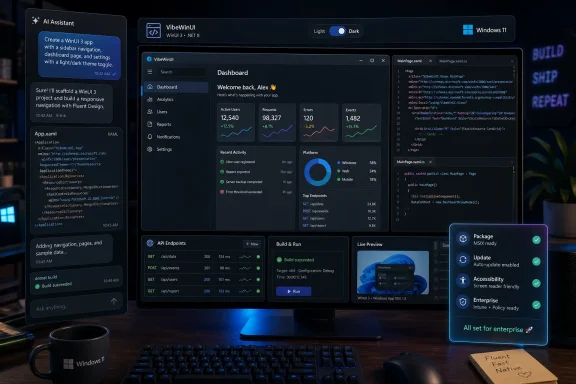
Paul Thurrott published a June 3, 2026 post showing a “vibe-coded” WinUI 3 native Windows 11 app, turning a small developer experiment into a useful snapshot of where Microsoft’s desktop platform now stands. The point is not that one app proves the Windows renaissance has arrived. It is that AI-assisted coding is colliding with Microsoft’s long-running native-app problem at exactly the moment Redmond is trying to make WinUI 3 credible again. For Windows users and IT pros, that collision matters because the next generation of “native” Windows software may be written as much by prompts, templates, and agents as by hand-tuned desktop developers.
The phrase vibe coding began as a half-joke about using AI tools to build software by intent rather than by painstakingly writing every line. In practice, it means describing what an app should do, letting an assistant generate the scaffolding, then iterating through errors, missing features, and visual polish until something usable appears. That workflow has already become common for web apps, scripts, prototypes, and throwaway utilities.
What makes Thurrott’s WinUI 3 experiment more interesting is the target. The modern Windows desktop has not been the easiest place for casual app creation. Web stacks are familiar, Electron is forgiving, and Python scripts can be assembled from snippets. WinUI 3, by contrast, asks the developer to understand XAML, C# or C++, project packaging, app manifests, the Windows App SDK, deployment choices, and a platform history littered with partially superseded frameworks.
That is why a “vibe-coded” native Windows 11 app lands differently from yet another AI-generated React demo. It suggests that Microsoft’s desktop stack may finally be approachable to people who are not already steeped in years of Windows client development. The result may not be elegant. It may not be maintainable. But it lowers the psychological barrier that has kept many developers from even trying.
The question, then, is not whether AI can generate a WinUI 3 app. It plainly can, at least for modest scenarios. The bigger question is whether this is the beginning of a healthier native Windows ecosystem — or merely a faster way to produce the same brittle, inconsistent software Windows users already complain about.
That calculation reshaped the Windows experience. Apps that should have felt local became browser panes with desktop chrome. Microsoft itself embraced web wrappers and hybrid shells when convenient, even as it continued to talk up Fluent Design, Windows App SDK, and native performance. Users noticed. They may not know whether a particular app is Electron, React Native, WebView2, UWP, WPF, or WinUI, but they know when a simple utility consumes absurd memory, resizes poorly, launches slowly, or feels alien beside the rest of the OS.
WinUI 3 was supposed to offer a more coherent answer. It is Microsoft’s modern native UI framework for Windows desktop applications, delivered through the Windows App SDK rather than locked to a specific Windows release. It promises Fluent controls, modern rendering, Windows 10 and Windows 11 reach, and a better bridge between the old Win32 world and the newer Windows application model.
The problem is that frameworks do not win because they are architecturally tidy. They win because developers trust them, because documentation is sufficient, because samples are current, because errors are searchable, because deployment does not become a weekend project, and because the platform owner uses them consistently. Windows has struggled on every one of those fronts.
A vibe-coded WinUI 3 app therefore becomes a small but revealing stress test. If AI tools can navigate the rough edges well enough to produce working applications, Microsoft gets a second chance to make native Windows development feel accessible. If those tools simply paper over confusion with generated code that breaks under pressure, WinUI 3 risks becoming another layer in the same old Windows abstraction pile.
That shift is especially important for WinUI 3 because the framework has historically suffered from discovery problems. Developers searching for answers often find a maze of WinUI 2, UWP, WPF, Windows Forms, Windows App SDK, Project Reunion, and old GitHub issues. The official story may be coherent if read carefully from the beginning, but real developers rarely approach a platform that way. They arrive with a task and a deadline.
An AI assistant can compress that mess into a direct instruction: create a WinUI 3 app, add a navigation view, bind a list, persist settings, package it for distribution. Done well, that hides enough ceremony to make Windows development feel modern again. Done poorly, it can hallucinate APIs, mix framework generations, generate obsolete project settings, or produce code that works only on the assistant’s imagined machine.
This is where Microsoft’s recent emphasis on AI-assisted Windows development becomes more than marketing. If the company wants WinUI 3 to benefit from the vibe-coding wave, it must make the model’s job easier. That means better canonical samples, clearer migration guidance, stricter naming, fewer abandoned paths, and templates that reflect the platform as it exists now rather than as it existed during the Project Reunion era.
The ironic possibility is that AI could succeed where traditional evangelism failed. Developers who would never sit down to “learn WinUI 3” may happily prompt their way into a working native app. But the assistant will only be as good as the platform’s public shape. If Microsoft’s own ecosystem remains ambiguous, AI will faithfully reproduce that ambiguity at scale.
But “native” is not a magic spell. A bad WinUI 3 app can still be sluggish, inaccessible, ugly, crash-prone, or overengineered. A well-built web app can still outperform a careless native shell. Users do not experience frameworks; they experience latency, visual consistency, keyboard behavior, battery drain, update reliability, and whether the app remembers its window size.
This is the trap Microsoft must avoid as it pushes WinUI 3 back into the spotlight. The company cannot simply replace “web app slop” with AI-generated native slop and declare victory. If vibe coding makes it easier to create Windows apps, it also makes it easier to flood the ecosystem with half-finished utilities that look native at first glance but fall apart in edge cases.
That danger is not theoretical. AI-generated code often optimizes for plausibility. It can produce a clean-looking settings page without understanding long-term maintainability, localization, accessibility, high-DPI behavior, error handling, or enterprise deployment. Those are precisely the details that separate a weekend prototype from software an administrator will tolerate across hundreds or thousands of machines.
The native-app revival therefore needs a quality argument, not just a framework argument. WinUI 3 must be fast, but it must also be predictable. AI tools must generate code, but they must also steer developers toward patterns that survive updates. Otherwise, Windows gets a new wave of pretty demos and the same old trust deficit.
That is why reports of Microsoft focusing on more fully native Windows 11 experiences matter. The Start menu, File Explorer, inbox apps, and system surfaces are not just components of the OS. They are public evidence of Microsoft’s confidence in its own framework. If those pieces become faster, smoother, and more consistent through WinUI 3 work, developers get a reason to believe the platform is not another temporary initiative.
Performance claims also need to show up in the hand, not only in engineering posts. Users should feel faster launches, cleaner resizing, lower idle resource use, and fewer moments where a modern Windows surface visibly tears, flashes, or pauses. WinUI 3 has carried enough reputation baggage that Microsoft no longer gets credit for saying performance is a priority. It has to make the daily experience measurably better.
This is where Thurrott’s experiment fits into the larger story. A single app created through AI assistance is not a benchmark. But it sits alongside a broader push: Microsoft talking more seriously about native Windows UI, the Windows App SDK becoming the center of modern desktop development, and AI tools being trained to understand migration paths from Electron, React Native, .NET MAUI, and other stacks.
If Microsoft can make its own Windows 11 surfaces demonstrably better while also making third-party WinUI development easier, the platform story changes. If it cannot, vibe coding will simply expose the same cracks to a larger audience.
IT departments care about deployment, updating, identity, security boundaries, compatibility, logging, and supportability. A vibe-coded app that solves a workflow problem in an afternoon may be attractive to a department head, but terrifying to the people responsible for maintaining endpoints. The easier AI makes it to generate small Windows utilities, the more organizations will need rules around who can build them, how they are reviewed, and where they can run.
This is not a reason to dismiss AI-assisted WinUI development. Quite the opposite. Internal line-of-business apps are exactly where native Windows software can still make sense. A small tool that integrates with local files, scanners, serial devices, Windows Hello, notifications, or corporate identity may be better as a native app than as yet another browser tab.
But the enterprise version of vibe coding must be more disciplined than the hobbyist version. The prompt is only the start. The generated project needs source control, code review, dependency scanning, signing, packaging, update management, and a clear owner. Otherwise, organizations will rediscover the old Access database problem in a modern form: business-critical software created quickly by people who eventually move on.
Microsoft has an opportunity here if it connects WinUI 3, Windows App SDK, GitHub tooling, Dev Box-style environments, Intune deployment, and security review into a coherent pipeline. The promise would not be “anyone can make apps with vibes.” It would be “teams can rapidly create native Windows tools without abandoning governance.” That is a much more credible pitch to administrators.
AI complicates that trajectory. Local models, NPUs, hardware-backed security, file-system access, device integration, and offline inference all make the client machine matter again. A browser can expose some of that through APIs, but the deepest integration still belongs to native software. If Windows is to become a serious local AI platform, it needs more than cloud-connected web panes.
WinUI 3 therefore sits at the intersection of two Microsoft narratives. One narrative says Windows should feel like a modern, coherent, responsive operating system again. The other says Windows should be the best place to build and run AI-enhanced applications on local hardware. Those stories reinforce each other only if developers can build polished native apps without fighting the platform.
Vibe coding could accelerate that shift by letting developers prototype Windows-first ideas cheaply. A sysadmin could generate a dashboard for local diagnostics. A hobbyist could build a native markdown editor. A small business could create a focused workflow app that talks to Windows APIs directly. A developer could port a web utility into a native shell and replace pieces incrementally.
But Windows-first thinking will return only if the results are worth the trade-off. Developers are not nostalgic charities. They will choose WinUI 3 when it helps them deliver a better experience, reach the users they need, and maintain the code over time. AI reduces the cost of entry, but it does not erase the cost of ownership.
That is why the WinUI 3 conversation is often emotionally charged. For some, it represents the long-overdue future of Windows app development. For others, it is another Microsoft platform that might be de-emphasized once the next strategic memo arrives. AI assistants do not eliminate that trust problem. In some ways, they intensify it, because they can make it easy to start down a path before the developer understands the platform’s long-term implications.
Microsoft’s strongest move would be boring consistency. Keep improving WinUI 3 performance. Keep the Windows App SDK moving. Keep documentation current. Keep samples clean. Use the framework in Windows itself. Avoid renaming the story every two years. Make packaging less mysterious. Treat developer complaints as product signals rather than community noise.
The company also needs to be honest about where WinUI 3 fits. Not every app should be rewritten. Not every Electron app is a crime. Not every cross-platform framework is a betrayal of Windows. The right argument is narrower and stronger: when an app is Windows-focused, performance-sensitive, deeply integrated, or meant to feel at home on the desktop, WinUI 3 should be the obvious choice.
If vibe coding helps developers reach that choice faster, it is useful. If it becomes a marketing gloss over unresolved platform complexity, developers will notice quickly.
The real test begins after the demo. Does the app handle theme changes correctly? Does it respect accessibility settings? Does it scale across monitors? Does it recover from bad input? Does it package cleanly? Does it update without drama? Does it avoid hauling in unnecessary dependencies? Does the generated code make sense to a human maintainer two months later?
Those questions are where AI-generated native apps will either mature or stall. A hobby app can survive on vibes. A real app needs engineering. The best version of this future is not one where developers stop caring about code, but one where AI removes enough grunt work that humans can spend more time on architecture, UX, testing, and product judgment.
That is also why Microsoft’s own AI guidance for Windows development matters. Assistants need to know not only how to create a project, but how to create the right project. They need to distinguish WinUI 3 from UWP-era APIs, understand packaged versus unpackaged deployment, choose sensible patterns, and avoid producing code that passes a demo while violating platform conventions.
The screenshot may attract the click. The maintainability story will decide whether this becomes a movement.
The modern software economy pushed against that model. App stores, cloud sync, SaaS subscriptions, telemetry, cross-platform frameworks, and browser-based workflows all favored larger, service-connected experiences. Small Windows-first apps still existed, but they felt less central to the platform’s identity.
AI-assisted WinUI 3 development could make the small native app viable again. Not necessarily as a mass-market business model, and not necessarily as a return to the shareware era. More likely, it returns as a practical toolmaking pattern: personal utilities, team-specific apps, admin consoles, diagnostics, workflow helpers, and focused front ends for local or cloud services.
That matters because Windows has always been strongest when users and administrators can bend it to their needs. The PC’s advantage is not just that it runs Office, games, and browsers. It is that it can become a workstation, lab instrument, kiosk, dev box, media rig, repair bench, or enterprise endpoint. Native app creation reinforces that flexibility.
The risk is that Microsoft mistakes quantity for health. A thousand generated WinUI apps mean little if they are abandoned, insecure, or unpleasant. But a modest revival of well-made Windows-first utilities would do more for the platform’s credibility than another round of glossy Copilot integrations.
It also captures the awkwardness of this moment. Microsoft is trying to sell Windows as both a cloud-connected AI surface and a renewed native platform. Users want responsiveness and less bloat. Developers want stable tools and fewer dead ends. AI promises to bridge gaps, but it can also generate new messes faster than old processes ever could.
For Windows enthusiasts, the temptation is to treat any native WinUI 3 app as a win. For skeptics, the temptation is to dismiss vibe-coded software as unserious. Both reactions are too simple. The real story is that AI has lowered the cost of testing Microsoft’s native-app claims. More people can now try WinUI 3, and that means more people will discover whether the platform is ready.
That is healthy pressure. Microsoft has spent years explaining what modern Windows development is supposed to be. Now the assistants are going to generate it, users are going to run it, and developers are going to find the rough edges in public.
 Vibe Coding Has Reached the Windows Desktop
The phrase vibe coding began as a half-joke about using AI tools to build software by intent rather than by painstakingly writing every line. In practice, it means describing what an app should do, letting an assistant generate the scaffolding, then iterating through errors, missing features, and visual polish until something usable appears. That workflow has already become common for web apps, scripts, prototypes, and throwaway utilities.What makes Thurrott’s WinUI 3 experiment more interesting is the target. The modern Windows desktop has not been the easiest place for casual app creation. Web stacks are familiar, Electron is forgiving, and Python scripts can be assembled from snippets. WinUI 3, by contrast, asks the developer to understand XAML, C# or C++, project packaging, app manifests, the Windows App SDK, deployment choices, and a platform history littered with partially superseded frameworks.
That is why a “vibe-coded” native Windows 11 app lands differently from yet another AI-generated React demo. It suggests that Microsoft’s desktop stack may finally be approachable to people who are not already steeped in years of Windows client development. The result may not be elegant. It may not be maintainable. But it lowers the psychological barrier that has kept many developers from even trying.
The question, then, is not whether AI can generate a WinUI 3 app. It plainly can, at least for modest scenarios. The bigger question is whether this is the beginning of a healthier native Windows ecosystem — or merely a faster way to produce the same brittle, inconsistent software Windows users already complain about.
Microsoft’s Native-App Problem Was Never Just Technical
Microsoft has spent more than a decade trying to persuade developers that there is a modern way to build Windows apps. The names changed, the packaging story shifted, and the architectural diagrams became more polished. Yet for many developers, the practical choice remained brutally simple: build once for the web, wrap it if necessary, and avoid tying your product too tightly to a Windows-only framework.That calculation reshaped the Windows experience. Apps that should have felt local became browser panes with desktop chrome. Microsoft itself embraced web wrappers and hybrid shells when convenient, even as it continued to talk up Fluent Design, Windows App SDK, and native performance. Users noticed. They may not know whether a particular app is Electron, React Native, WebView2, UWP, WPF, or WinUI, but they know when a simple utility consumes absurd memory, resizes poorly, launches slowly, or feels alien beside the rest of the OS.
WinUI 3 was supposed to offer a more coherent answer. It is Microsoft’s modern native UI framework for Windows desktop applications, delivered through the Windows App SDK rather than locked to a specific Windows release. It promises Fluent controls, modern rendering, Windows 10 and Windows 11 reach, and a better bridge between the old Win32 world and the newer Windows application model.
The problem is that frameworks do not win because they are architecturally tidy. They win because developers trust them, because documentation is sufficient, because samples are current, because errors are searchable, because deployment does not become a weekend project, and because the platform owner uses them consistently. Windows has struggled on every one of those fronts.
A vibe-coded WinUI 3 app therefore becomes a small but revealing stress test. If AI tools can navigate the rough edges well enough to produce working applications, Microsoft gets a second chance to make native Windows development feel accessible. If those tools simply paper over confusion with generated code that breaks under pressure, WinUI 3 risks becoming another layer in the same old Windows abstraction pile.
The AI Assistant Is Becoming the New SDK Surface
For years, the developer experience was defined by documentation, templates, IntelliSense, Stack Overflow, and sample projects. AI coding assistants change that hierarchy. The first “surface” many developers now encounter is not a Microsoft Learn page or a Visual Studio project wizard; it is a chat box inside an IDE.That shift is especially important for WinUI 3 because the framework has historically suffered from discovery problems. Developers searching for answers often find a maze of WinUI 2, UWP, WPF, Windows Forms, Windows App SDK, Project Reunion, and old GitHub issues. The official story may be coherent if read carefully from the beginning, but real developers rarely approach a platform that way. They arrive with a task and a deadline.
An AI assistant can compress that mess into a direct instruction: create a WinUI 3 app, add a navigation view, bind a list, persist settings, package it for distribution. Done well, that hides enough ceremony to make Windows development feel modern again. Done poorly, it can hallucinate APIs, mix framework generations, generate obsolete project settings, or produce code that works only on the assistant’s imagined machine.
This is where Microsoft’s recent emphasis on AI-assisted Windows development becomes more than marketing. If the company wants WinUI 3 to benefit from the vibe-coding wave, it must make the model’s job easier. That means better canonical samples, clearer migration guidance, stricter naming, fewer abandoned paths, and templates that reflect the platform as it exists now rather than as it existed during the Project Reunion era.
The ironic possibility is that AI could succeed where traditional evangelism failed. Developers who would never sit down to “learn WinUI 3” may happily prompt their way into a working native app. But the assistant will only be as good as the platform’s public shape. If Microsoft’s own ecosystem remains ambiguous, AI will faithfully reproduce that ambiguity at scale.
Native Does Not Automatically Mean Good
The Windows enthusiast reflex is to cheer anything that is not a web wrapper. That instinct is understandable. Native apps can start faster, use less memory, integrate better with system features, respect Windows conventions, and feel less like a tab cosplaying as software. On laptops and Arm devices, the efficiency argument becomes even stronger.But “native” is not a magic spell. A bad WinUI 3 app can still be sluggish, inaccessible, ugly, crash-prone, or overengineered. A well-built web app can still outperform a careless native shell. Users do not experience frameworks; they experience latency, visual consistency, keyboard behavior, battery drain, update reliability, and whether the app remembers its window size.
This is the trap Microsoft must avoid as it pushes WinUI 3 back into the spotlight. The company cannot simply replace “web app slop” with AI-generated native slop and declare victory. If vibe coding makes it easier to create Windows apps, it also makes it easier to flood the ecosystem with half-finished utilities that look native at first glance but fall apart in edge cases.
That danger is not theoretical. AI-generated code often optimizes for plausibility. It can produce a clean-looking settings page without understanding long-term maintainability, localization, accessibility, high-DPI behavior, error handling, or enterprise deployment. Those are precisely the details that separate a weekend prototype from software an administrator will tolerate across hundreds or thousands of machines.
The native-app revival therefore needs a quality argument, not just a framework argument. WinUI 3 must be fast, but it must also be predictable. AI tools must generate code, but they must also steer developers toward patterns that survive updates. Otherwise, Windows gets a new wave of pretty demos and the same old trust deficit.
Windows 11 Needs Its Own Software to Prove the Point
Microsoft’s biggest WinUI 3 evangelism problem has always been Microsoft. Developers watch what the platform owner does, not just what it says. When built-in Windows experiences use a jumble of technologies, and when high-profile Microsoft apps shift between native implementations and web wrappers, third-party developers learn the obvious lesson: the Windows client stack is optional, even inside Microsoft.That is why reports of Microsoft focusing on more fully native Windows 11 experiences matter. The Start menu, File Explorer, inbox apps, and system surfaces are not just components of the OS. They are public evidence of Microsoft’s confidence in its own framework. If those pieces become faster, smoother, and more consistent through WinUI 3 work, developers get a reason to believe the platform is not another temporary initiative.
Performance claims also need to show up in the hand, not only in engineering posts. Users should feel faster launches, cleaner resizing, lower idle resource use, and fewer moments where a modern Windows surface visibly tears, flashes, or pauses. WinUI 3 has carried enough reputation baggage that Microsoft no longer gets credit for saying performance is a priority. It has to make the daily experience measurably better.
This is where Thurrott’s experiment fits into the larger story. A single app created through AI assistance is not a benchmark. But it sits alongside a broader push: Microsoft talking more seriously about native Windows UI, the Windows App SDK becoming the center of modern desktop development, and AI tools being trained to understand migration paths from Electron, React Native, .NET MAUI, and other stacks.
If Microsoft can make its own Windows 11 surfaces demonstrably better while also making third-party WinUI development easier, the platform story changes. If it cannot, vibe coding will simply expose the same cracks to a larger audience.
The Enterprise Angle Is Less Romantic and More Important
WindowsForum readers know the consumer debate: native apps feel better, web wrappers feel lazy, and everyone has a favorite example of a bloated desktop app doing the work of a glorified settings panel. In enterprise environments, the stakes are less aesthetic. They are operational.IT departments care about deployment, updating, identity, security boundaries, compatibility, logging, and supportability. A vibe-coded app that solves a workflow problem in an afternoon may be attractive to a department head, but terrifying to the people responsible for maintaining endpoints. The easier AI makes it to generate small Windows utilities, the more organizations will need rules around who can build them, how they are reviewed, and where they can run.
This is not a reason to dismiss AI-assisted WinUI development. Quite the opposite. Internal line-of-business apps are exactly where native Windows software can still make sense. A small tool that integrates with local files, scanners, serial devices, Windows Hello, notifications, or corporate identity may be better as a native app than as yet another browser tab.
But the enterprise version of vibe coding must be more disciplined than the hobbyist version. The prompt is only the start. The generated project needs source control, code review, dependency scanning, signing, packaging, update management, and a clear owner. Otherwise, organizations will rediscover the old Access database problem in a modern form: business-critical software created quickly by people who eventually move on.
Microsoft has an opportunity here if it connects WinUI 3, Windows App SDK, GitHub tooling, Dev Box-style environments, Intune deployment, and security review into a coherent pipeline. The promise would not be “anyone can make apps with vibes.” It would be “teams can rapidly create native Windows tools without abandoning governance.” That is a much more credible pitch to administrators.
The Return of Windows-First Thinking
For much of the last decade, “Windows-first” sounded like a constraint. Developers wanted reach, and the web offered it. Microsoft itself helped normalize that worldview by making Edge, Microsoft 365, Teams, OneDrive, and Copilot central to the Windows experience. The PC became a container for services.AI complicates that trajectory. Local models, NPUs, hardware-backed security, file-system access, device integration, and offline inference all make the client machine matter again. A browser can expose some of that through APIs, but the deepest integration still belongs to native software. If Windows is to become a serious local AI platform, it needs more than cloud-connected web panes.
WinUI 3 therefore sits at the intersection of two Microsoft narratives. One narrative says Windows should feel like a modern, coherent, responsive operating system again. The other says Windows should be the best place to build and run AI-enhanced applications on local hardware. Those stories reinforce each other only if developers can build polished native apps without fighting the platform.
Vibe coding could accelerate that shift by letting developers prototype Windows-first ideas cheaply. A sysadmin could generate a dashboard for local diagnostics. A hobbyist could build a native markdown editor. A small business could create a focused workflow app that talks to Windows APIs directly. A developer could port a web utility into a native shell and replace pieces incrementally.
But Windows-first thinking will return only if the results are worth the trade-off. Developers are not nostalgic charities. They will choose WinUI 3 when it helps them deliver a better experience, reach the users they need, and maintain the code over time. AI reduces the cost of entry, but it does not erase the cost of ownership.
The Framework War Is Really a Trust War
Windows developers have been burned before. Silverlight, UWP, Windows 8-style apps, Project Reunion branding, shifting Store rules, packaging confusion, and Microsoft’s inconsistent first-party choices all left scars. Even when the technical path improves, the memory remains.That is why the WinUI 3 conversation is often emotionally charged. For some, it represents the long-overdue future of Windows app development. For others, it is another Microsoft platform that might be de-emphasized once the next strategic memo arrives. AI assistants do not eliminate that trust problem. In some ways, they intensify it, because they can make it easy to start down a path before the developer understands the platform’s long-term implications.
Microsoft’s strongest move would be boring consistency. Keep improving WinUI 3 performance. Keep the Windows App SDK moving. Keep documentation current. Keep samples clean. Use the framework in Windows itself. Avoid renaming the story every two years. Make packaging less mysterious. Treat developer complaints as product signals rather than community noise.
The company also needs to be honest about where WinUI 3 fits. Not every app should be rewritten. Not every Electron app is a crime. Not every cross-platform framework is a betrayal of Windows. The right argument is narrower and stronger: when an app is Windows-focused, performance-sensitive, deeply integrated, or meant to feel at home on the desktop, WinUI 3 should be the obvious choice.
If vibe coding helps developers reach that choice faster, it is useful. If it becomes a marketing gloss over unresolved platform complexity, developers will notice quickly.
The App Screenshot Is the Least Important Part
The interesting thing about a vibe-coded WinUI 3 app is not the screenshot. Screenshots flatten software into decoration. They show whether an app resembles Windows 11, not whether it behaves like a good Windows citizen.The real test begins after the demo. Does the app handle theme changes correctly? Does it respect accessibility settings? Does it scale across monitors? Does it recover from bad input? Does it package cleanly? Does it update without drama? Does it avoid hauling in unnecessary dependencies? Does the generated code make sense to a human maintainer two months later?
Those questions are where AI-generated native apps will either mature or stall. A hobby app can survive on vibes. A real app needs engineering. The best version of this future is not one where developers stop caring about code, but one where AI removes enough grunt work that humans can spend more time on architecture, UX, testing, and product judgment.
That is also why Microsoft’s own AI guidance for Windows development matters. Assistants need to know not only how to create a project, but how to create the right project. They need to distinguish WinUI 3 from UWP-era APIs, understand packaged versus unpackaged deployment, choose sensible patterns, and avoid producing code that passes a demo while violating platform conventions.
The screenshot may attract the click. The maintainability story will decide whether this becomes a movement.
The Small Native App Is Back on the Table
There was a time when Windows was full of small native utilities. Some were beautiful, some were ugly, and many were indispensable. They launched quickly, did one thing well, and made the PC feel like a personal machine rather than a terminal for subscription services.The modern software economy pushed against that model. App stores, cloud sync, SaaS subscriptions, telemetry, cross-platform frameworks, and browser-based workflows all favored larger, service-connected experiences. Small Windows-first apps still existed, but they felt less central to the platform’s identity.
AI-assisted WinUI 3 development could make the small native app viable again. Not necessarily as a mass-market business model, and not necessarily as a return to the shareware era. More likely, it returns as a practical toolmaking pattern: personal utilities, team-specific apps, admin consoles, diagnostics, workflow helpers, and focused front ends for local or cloud services.
That matters because Windows has always been strongest when users and administrators can bend it to their needs. The PC’s advantage is not just that it runs Office, games, and browsers. It is that it can become a workstation, lab instrument, kiosk, dev box, media rig, repair bench, or enterprise endpoint. Native app creation reinforces that flexibility.
The risk is that Microsoft mistakes quantity for health. A thousand generated WinUI apps mean little if they are abandoned, insecure, or unpleasant. But a modest revival of well-made Windows-first utilities would do more for the platform’s credibility than another round of glossy Copilot integrations.
The Thurrott Experiment Points to a Bigger Windows Test
Thurrott’s post is best read as a signal, not a verdict. A prominent Windows watcher can now use AI assistance to create a native Windows 11 app quickly enough that the process itself becomes the story. That says something about the state of AI tooling, something about WinUI 3’s accessibility, and something about the appetite for software that feels like it belongs on the PC.It also captures the awkwardness of this moment. Microsoft is trying to sell Windows as both a cloud-connected AI surface and a renewed native platform. Users want responsiveness and less bloat. Developers want stable tools and fewer dead ends. AI promises to bridge gaps, but it can also generate new messes faster than old processes ever could.
For Windows enthusiasts, the temptation is to treat any native WinUI 3 app as a win. For skeptics, the temptation is to dismiss vibe-coded software as unserious. Both reactions are too simple. The real story is that AI has lowered the cost of testing Microsoft’s native-app claims. More people can now try WinUI 3, and that means more people will discover whether the platform is ready.
That is healthy pressure. Microsoft has spent years explaining what modern Windows development is supposed to be. Now the assistants are going to generate it, users are going to run it, and developers are going to find the rough edges in public.
The Native Revival Has to Survive Contact With Real Users
The most concrete lessons from this moment are practical rather than philosophical. AI-assisted WinUI 3 development is promising, but only if Microsoft and developers treat it as a starting point instead of a substitute for platform discipline.- AI tools can make WinUI 3 approachable to developers who would otherwise default to web wrappers or avoid Windows-native development entirely.
- Microsoft still has to prove WinUI 3 through its own Windows 11 surfaces, because first-party inconsistency remains the platform’s most damaging credibility problem.
- Native apps can deliver better performance and integration, but poor generated code can still produce slow, fragile, or inaccessible software.
- Enterprise use will depend on governance, signing, deployment, update management, and review rather than on how impressive a prototype looks.
- The biggest opportunity is not replacing every web app, but reviving focused Windows-first utilities that benefit from local integration and responsive UI.
- The next phase of Windows app development will be judged less by whether AI can create demos and more by whether humans can maintain what AI creates.
References
- Primary source: thurrott.com
Published: Wed, 03 Jun 2026 19:51:20 GMT
vibe-coded-winui3 - Thurrott.com
 www.thurrott.com
- Related coverage: windowslatest.com
Microsoft commits to native UI for Windows 11 as users push back against web app slop
Windows 11 is finally ditching web apps. Microsoft is doubling down on WinUI 3 to deliver a faster, fully native, and highly responsive OS. www.windowslatest.com
- Related coverage: windowscentral.com
Microsoft will open source the Windows App SDK, it confirms | Windows Central
The company has confirmed that WinUI 3 is on the path to become open-source, but there's lots of work to be done first before that can happen.www.windowscentral.com - Related coverage: windowsreport.com
Microsoft Is Fixing Choppy WinUI 3 App Resizing in Windows 11 This Summer
Microsoft is fixing WinUI 3 resizing issues in Windows 11, reducing tearing and black borders in modern apps. windowsreport.com
- Related coverage: theregister.com
Microsoft aims to speed Windows with 'leap forward' in WinUI 3 perf
Bittersweet post tells devs what they already knew: The framework is too slowwww.theregister.com - Related coverage: tutorialr.com
