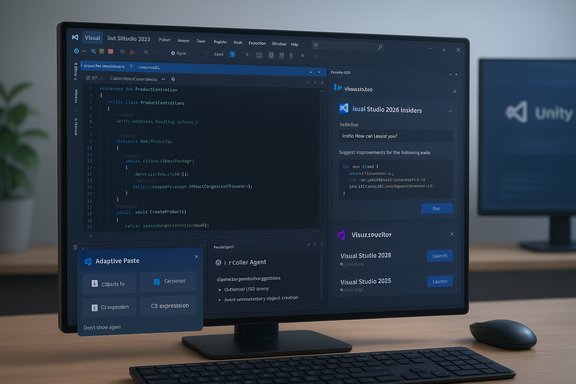
Visual Studio 2026’s Insiders release is a careful, pragmatic step forward — a familiar IDE with a sharpened UI, faster underpinnings, and AI more tightly woven into everyday workflows rather than a radical reinvention of how developers write and ship code. The experience I tested reads like evolution, not revolution: the app installs side‑by‑side with existing Visual Studio builds, respects extensions (including Unity tooling), and surfaces Copilot in more places — but it still leaves core build, debug, and test responsibilities in the developer’s hands.
Visual Studio 2026 (internal versioning in the 18.x family and distributed through a monthly Insiders channel) is positioned as the first “AI‑native” edition of Microsoft’s flagship IDE. The guiding story is clear: fold GitHub Copilot and agent‑style automation into the IDE’s fabric, modernize the UI with Fluent-inspired polish, and align toolchains to .NET 10 and C# 14 while preserving extension compatibility so existing teams don’t face a cliff during migration. Early documentation and hands‑on previews emphasize three practical commitments: performance gains for large solutions, a more consistent Copilot surface across edit/profiler/debug flows, and side‑by‑side Insiders builds so teams can pilot features without disrupting stable developer machines.
Key practical notes from hands‑on testing:
Agentic workflows can also run multi‑step modernization tasks (analysis → transform → build validation → security scans) with human approvals. This is a powerful productivity step for refactors and repo modernization, but it introduces important operational responsibilities around agent permissions, identity, and audit trails. Treat agentic automation as an operational feature that requires governance, not a checkbox to flip indiscriminately.
Key risks and mitigation steps:
The essential verdict is: try it, but pilot it. Visual Studio 2026 is an evolutionary — and sensible — step toward an AI‑augmented development environment. It removes many small frictions and offers practical automation, but it also expands the governance and operational surface that teams must manage carefully. If you value controlled, incremental change and want to evaluate where AI can shave minutes (or hours) from routine tasks, the Insiders channel is the right place to start. If your priority is production stability above all else, wait for the GA maturity cycle while watching how model routing, quotas, and enterprise governance settle into predictable patterns.
Source: The New Stack Visual Studio 2026 First Look: Evolution, Not Revolution
 Overview
Visual Studio 2026 (internal versioning in the 18.x family and distributed through a monthly Insiders channel) is positioned as the first “AI‑native” edition of Microsoft’s flagship IDE. The guiding story is clear: fold GitHub Copilot and agent‑style automation into the IDE’s fabric, modernize the UI with Fluent-inspired polish, and align toolchains to .NET 10 and C# 14 while preserving extension compatibility so existing teams don’t face a cliff during migration. Early documentation and hands‑on previews emphasize three practical commitments: performance gains for large solutions, a more consistent Copilot surface across edit/profiler/debug flows, and side‑by‑side Insiders builds so teams can pilot features without disrupting stable developer machines. Background and context
Why this matters now
The last major, widely distributed Visual Studio release was the 2022 family; the 2026 release bundles years of incremental AI work (adaptive paste, Copilot Chat, agent experiments) into one opinionated product. The timing dovetails with .NET 10 and C# 14, creating an upgrade moment that affects runtime characteristics, language ergonomics, and the IDE that developers use every day. That makes Visual Studio 2026 both a UI/UX refresh and a delivery vehicle for language/runtime shifts.Platform alignment and support
Microsoft’s system‑requirements and support guidance shows Visual Studio 2026 runs on supported Windows 11 and supported Windows 10 editions, explicitly preserving compatibility for developers who haven’t moved to the newest OS. The Visual Studio 2026 system requirements page names Windows 10 as supported for the product family, and recommends modern hardware for best results. This directly addresses a common worry from long‑time users: your Windows 10 development box is not immediately orphaned by the 2026 release. .NET 10 is released as an LTS platform (with support windows documented in Microsoft lifecycle materials), so the IDE’s alignment with .NET 10 is meaningful for teams planning production upgrades. Getting Visual Studio and the runtime in sync simplifies adoption planning for organizations that standardize on LTS runtimes.Installing the Insiders build: what to expect
The Insiders channel is intentionally designed for side‑by‑side installs so you can test without wrecking your work environment. During install you’ll see familiar questions about workloads and extension compatibility; Visual Studio attempts to preserve extensions built for prior releases and flags items that might be out of support. In practice the installer is conservative and straightforward: you choose workloads, it resolves dependencies, and the new Visual Studio sits next to your stable install.Key practical notes from hands‑on testing:
- Installer prompts for identity and model-related authentication for Copilot features (GitHub sign‑in and enforced two‑step authentication if you plan to use Copilot).
- Visual cues (icons and spacing) are refreshed; be prepared for slightly different icons so you don’t click the wrong Visual Studio when multiple installs are present.
- Extensions for common platforms such as Unity are respected in the Insiders build — that’s crucial for game developers and studios that depend on third‑party tooling.
UI and performance: subtle but purposeful
A lighter, cleaner shell
The UI changes are incremental and mostly ergonomic: crisper icons, improved spacing, and new tinted themes that reduce visual noise. The goal isn’t to retrain developers, it’s to reduce friction during long coding sessions and make controls easier to parse. If you’re picturing a radical rework, that’s not what you’ll get; instead expect tighter visuals and a more legible editor shell.Real‑world performance claims and what I measured
Microsoft published engineered scenarios showing notable improvements (faster F5 debug launches and faster solution load/navigation on large repositories). Early hands‑on usage matches that direction: solution load times felt snappier in many cases and incremental build/debug cycles were modestly quicker on my test hardware. Build times will always vary by project size, installed extensions, and hardware; the Insiders channel’s improvements target large solutions and heavy workloads where small optimizations compound. Treat publicized percentage improvements as indicative not absolute — measure against your own repositories before committing.Copilot and the “Intelligent Developer Environment”
Microsoft positions Visual Studio 2026 as an “Intelligent Developer Environment” by integrating GitHub Copilot into many more IDE surfaces. But it’s not about replacing coding with AI; instead it’s about giving developers more options to let AI minimize mundane friction.Where Copilot shows up now
- Editor completions: Copilot remains the main completion engine for many flows, with smoother inline suggestions and less aggressive prompts in my testing.
- Copilot Chat: A persistent chat pane you can pin to any side of the editor; it can reference the open solution and support multi‑file reasoning.
- Context menu actions: “Explain this code”, “Generate tests”, “Optimize”, and other Copilot actions are available from right‑click menus so assistance can be invoked without changing contexts.
- Adaptive Paste: When you paste a snippet, Copilot can propose a context‑adapted version (imports, names, idioms) with a preview diff before applying. This single micro‑feature reduces many tiny, repeated edits.
Model choice, BYOM, and “auto model selection”
Visual Studio 2026 exposes a Manage Models control that lets you bring your own API keys and select third‑party models (OpenAI, Anthropic, Google flavors) for the Copilot Chat surface. For enterprises, that BYOM (Bring Your Own Model) capability helps with governance, latency, and cost control. At the same time, Microsoft’s Copilot still retains a completion pipeline that may route through GitHub’s managed infrastructure for speed and safety. Microsoft and GitHub have experimented with “auto model selection” that can pick an optimal model for chat requests (examples surfaced in preview notes include choices like GPT‑5, GPT‑5 mini, GPT‑4.1 and Claude variants). Early previews and Microsoft commentary show this is rolling out as a way to balance latency, cost, and capability; treat specific model names as implementation details that can change over time. If you need strict guarantees about which model saw your code, verify that configuration and logs before enabling BYOM or auto routing. Caution: model names and plumbing change rapidly. Items reported as “GPT‑5 mini” or similar in early previews may reflect vendor naming and auto‑routing policies rather than an explicit Microsoft promise to surface a particular model in every context. Validate by checking your Copilot settings and, in enterprise scenarios, enforce model routing via policy.Putting Copilot to the test: test generation and coverage
Hands‑on, I asked Copilot to generate unit tests for an area of code with low coverage. Copilot created reasonable test templates that matched my style (Mocks where appropriate) and produced working fixtures, but the immediate coverage uplift was modest. In my run:- Copilot added a new test fixture and some focused tests.
- Running tests from Unity (my target runtime) showed the new tests executed but only increased coverage by a few lines.
- Copilot can accelerate test creation and reduce mechanical effort, but it doesn’t guarantee broad coverage increases out of the box.
- For projects where test orchestration occurs outside Visual Studio (game engines, platform‑specific runners), the IDE can generate tests but cannot always execute or validate them in the target environment without additional automation.
The profiler, agentic tooling, and automation
Visual Studio 2026 adds agent‑style diagnostics surfaces to the profiler and debugger. The new Profiler Agent is designed to analyze CPU/memory hotspots, propose benchmark scenarios, and surface prioritized fixes — sometimes even proposing code changes or micro‑optimizations. In principle this compresses the usual “run profiler → interpret traces → hypothesize → validate” loop into a more conversational workflow.Agentic workflows can also run multi‑step modernization tasks (analysis → transform → build validation → security scans) with human approvals. This is a powerful productivity step for refactors and repo modernization, but it introduces important operational responsibilities around agent permissions, identity, and audit trails. Treat agentic automation as an operational feature that requires governance, not a checkbox to flip indiscriminately.
Risks, governance, and practical caveats
The Insiders build is an evaluation surface and not a drop‑in replacement for production environments. Early adopters should plan pilots and guardrails.Key risks and mitigation steps:
- Entitlements and quotas: Copilot interactions may be rate‑limited or counted differently depending on chosen models; organizations must understand quota models and potential multipliers for premium model use. Monitor and configure budgets before enabling high‑velocity agentic flows.
- Data residency and leakage: BYOM helps, but some infrastructure (embeddings, indexing) might still interact with managed services. Use enterprise controls (private model routing, restricted MCP connectors) and audit trails where source code or IP is sensitive.
- Extension compatibility and stability: Although Visual Studio 2026 aims to run extensions built for 2022, side‑by‑side Insiders builds will surface edge cases. Validate mission‑critical extensions in a pilot ring before broad rollout.
- Agent safety: Agentic features that can apply code changes across repositories or run external tools multiply blast radius. Enforce least privilege, approval gates, and per‑agent identities to prevent accidental or malicious changes.
- Over‑reliance on LLM output: AI can scaffold tests and suggest fixes, but human reviewers must verify correctness, edge cases, and test completeness; LLMs can hallucinate plausible but incorrect behavior.
- Create a two‑week Insiders pilot on non‑production workstations.
- Inventory and test your top 10 extensions for compatibility.
- Define a Copilot policy: allowed models, logging, retention, and cost controls.
- Configure approval gates for any agent actions that modify repositories.
- Add CI protections to reject or flag AI‑suggested changes until a human reviewer clears them.
Recommendations for developers and teams
- If you rely on Visual Studio 2022 and value stability, use the Insiders build on a secondary machine or in a small pilot ring. The side‑by‑side install model makes this straightforward.
- For teams planning to adopt .NET 10, start aligning SDKs and build pipelines and use Insiders to validate new language features and templates. .NET 10 is LTS and will be supported through its documented lifecycle — that makes it a sensible target for production planning.
- For individual developers curious about Copilot integration: try adaptive paste, Copilot Chat, and test generation on low‑risk code to evaluate whether the behaviors match your workflow. Expect useful scaffolding and modest automation, not magical, instant migration of engineering work.
- For security and platform teams: draft governance rules for BYOM, MCP connectors, and agent permissions before enabling these features across a fleet. The new model choices add flexibility but also operational complexity.
Strengths, limitations, and the bottom line
Strengths
- Practical, incremental upgrade path: side‑by‑side Insiders builds and claimed extension compatibility reduce migration friction.
- Productivity features that save friction: adaptive paste, context actions, and test scaffolding remove repetitive interruptions.
- Alignment with .NET 10 and C# 14: bundling new language/runtime support into the IDE simplifies adoption planning for teams.
- Model choice and enterprise control: BYOM and model management give organizations levers to control latency, costs, and data residency.
Limitations and open questions
- Agent trust and safety: agentic automation is promising but doubles the need for robust governance — identity, auditing, and runtime enforcement are essential.
- Real coverage and test completeness: auto‑generated tests accelerate initial scaffolding but don’t remove the need for considered test design and coverage strategies.
- Model naming and guarantees: product previews refer to models like GPT‑5 mini or Claude variants. These names and routing behaviors are subject to change and may differ by tenant, subscription, or auto‑routing policies — confirm configuration for regulated projects.
Practical install and pilot plan (step‑by‑step)
- Prepare a non‑production evaluation machine (or a dedicated VM) and confirm your Windows edition is supported by Visual Studio 2026.
- Install Visual Studio 2026 Insiders side‑by‑side with your stable build. Note the new icons and shell spacing to avoid confusion.
- Sign into GitHub to unlock Copilot features; enable two‑factor authentication as required for model access.
- Run a representative solution and benchmark: solution load time, clean build, F5 debug time. Record baselines to evaluate claimed improvements.
- Enable Copilot in a conservative mode: try adaptive paste and context menu actions first, then evaluate agentic profiler features with human oversight.
- Create governance rules for BYOM: allowed providers, retention, and logging; pilot BYOM only in an approved tenant or sandbox.
Conclusion
Visual Studio 2026 layers refined UI work, performance engineering, and deeper Copilot integration into a familiar IDE shell. The Insiders build gives developers an accessible way to explore adaptive paste, Copilot Chat, model choice, and agentic profiling without forcing immediate migration of production workflows. For teams aligned with .NET 10, the timing is convenient: the IDE, runtime, and language changes arrive together and create a clear path for validation and adoption.The essential verdict is: try it, but pilot it. Visual Studio 2026 is an evolutionary — and sensible — step toward an AI‑augmented development environment. It removes many small frictions and offers practical automation, but it also expands the governance and operational surface that teams must manage carefully. If you value controlled, incremental change and want to evaluate where AI can shave minutes (or hours) from routine tasks, the Insiders channel is the right place to start. If your priority is production stability above all else, wait for the GA maturity cycle while watching how model routing, quotas, and enterprise governance settle into predictable patterns.
Source: The New Stack Visual Studio 2026 First Look: Evolution, Not Revolution