

Teams should pilot Visual Studio 2026 now, but most production organizations should wait for a controlled rollout rather than replacing Visual Studio 2022 immediately; the practical reason is not the refreshed UI or the AI pitch, but Microsoft’s new update model and the arrival of Update on Close. Visual Studio 2026 became generally available on November 11, 2025, and its Stable channel now receives monthly feature updates while Insiders receives changes faster. That makes this release less like a once-every-few-years IDE migration and more like adopting a continuously serviced developer workstation platform.
For individual developers, enthusiasts, small open-source projects, and teams already comfortable with fast-moving tooling, the answer is simple: install Visual Studio 2026 side by side with Visual Studio 2022 and start using it on non-critical work. For larger teams, the better move is to test Visual Studio 2026 now, document extension and workload compatibility, decide whether Update on Close fits your policy, and then move developers in waves.
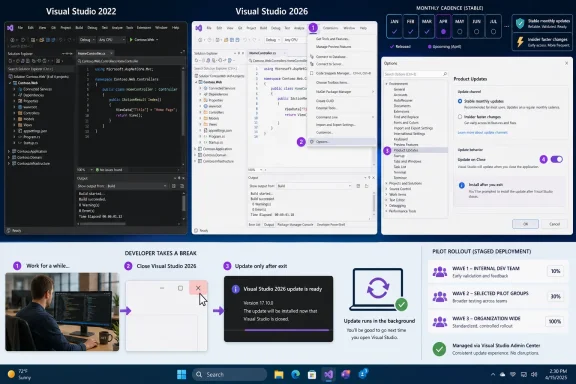
The setting readers came for lives inside the IDE: go to Tools > Options > Environment > Product Updates and configure the product update behavior there. Visual Studio also surfaces Update on Close through the update notification flow, where an available update can be deferred until the IDE exits. Microsoft says Update on Close is enabled by default for Community and Team Explorer, while Enterprise and Professional users on Stable must opt in.
Visual Studio upgrades used to be easy to explain and difficult to execute. A new major version arrived, the release notes filled with language features, workloads, designers, project-system tweaks, and a few performance claims, and teams eventually asked the familiar question: do we move now, or do we wait for the first servicing update?
Visual Studio 2026 changes the question. The core decision is no longer whether a particular headline feature is attractive enough to justify a migration. It is whether your team is ready for Visual Studio itself to behave more like a continuously updated product.
That is why Update on Close matters more than it first appears. It is not glamorous in the way AI agents, debugger assistance, profiler improvements, or UI polish are glamorous. But it attacks the daily irritation that makes IDE updates feel disruptive: the moment when a developer opens Visual Studio to fix something, only to be greeted by an update workflow that competes with actual work.
With Visual Studio 2026, Microsoft is trying to move that friction to a less hostile part of the day. The IDE can download and install updates after you exit, so the next launch begins from a current build rather than from an interrupted session. That is a small change in interface design and a large change in behavior.
For WindowsForum readers, especially sysadmins and development leads, the key point is this: the feature is not just a convenience toggle. It is the friendly face of a much bigger lifecycle shift.
For Community and Team Explorer, Microsoft has made that behavior the default. For Enterprise and Professional on the Stable channel, it is opt-in. That distinction is not accidental; it reflects the difference between personal or lightweight usage and managed professional environments where update timing can affect regulated builds, extension compatibility, training, and support desks.
The permanent control is found at Tools > Options > Environment > Product Updates. That is the first place teams should look during evaluation, because Update on Close is not merely a button in a one-time notification. It can become the standing behavior of a Visual Studio instance.
The before-and-after is easy to imagine. In the old pattern, a developer starts the IDE, sees an update prompt, clicks through details, waits for setup, possibly reopens the solution, and loses the productive context they were trying to regain. In the new pattern, Visual Studio waits until the session is done, then updates during the natural boundary between work periods.
That sounds mundane, but developer tooling succeeds or fails on mundane things. If an IDE update feels like an ambush, developers postpone it. If it happens after they close the IDE, staying current becomes easier to tolerate.
That is a very Microsoft 2026 move. Windows, Edge, Microsoft 365, Teams, and developer services have all trained users to expect constant servicing. Visual Studio was never frozen in amber, but its center of gravity was different: enterprise developers expected an IDE they could keep stable long enough to standardize.
Now Microsoft is trying to have both things. It wants Visual Studio to move quickly enough to keep Copilot-era development features fresh, but predictably enough that professional teams do not feel trapped inside a rolling preview. The Stable channel is supposed to be the compromise: validated monthly features rather than a quarterly or multi-year lump.
The upgrade risk, then, is not simply “Visual Studio 2026 might have bugs.” Every release might have bugs. The more important risk is that your organization’s tolerance for IDE change may not match Microsoft’s new default rhythm.
That is why teams should not treat Visual Studio 2026 as a normal workstation refresh. The question to ask is not “does it install?” The question is “what does our support model look like when the IDE changes every month?”
Side-by-side installation is the right first step because it allows Visual Studio 2026 to live next to Visual Studio 2022 while developers test real solutions, workloads, extensions, and build assumptions. It lets a team prove compatibility with actual repositories rather than trusting a marketing line about continuity. It also gives developers a fallback when a workflow depends on something that has not caught up.
Rollback matters for the same reason. A continuously updated IDE needs a credible path backward, because monthly feature delivery raises the odds that some change will collide with an extension, project template, workload, or organizational process. Microsoft’s promise of rollback is therefore not a luxury feature; it is part of the social contract required to make faster updates acceptable.
But the existence of side-by-side and rollback should not tempt organizations into casual deployment. If anything, it should encourage a more disciplined pilot. Install Visual Studio 2026 next to 2022, run the projects that matter, validate the developer experience, and only then decide whether to let Update on Close keep machines current automatically.
The best migration is boring. Developers should barely notice the transition except for a newer IDE, a cleaner update process, and fewer forced interruptions.
That tells us Microsoft knows the audience is divided. A hobbyist or individual developer usually wants fewer prompts and faster access to current bits. An enterprise team may need change windows, validation rings, internal support notes, and a clear answer when a developer asks why Visual Studio changed overnight.
For Professional and Enterprise users, the decision should be made deliberately. Enabling Update on Close for everyone may be sensible in a team that already accepts monthly IDE movement and has low dependence on fragile extensions. In a more conservative environment, it may be better to enable it first for a pilot group, then expand once the team has lived through at least one monthly update cycle.
The risk is not that Update on Close is hostile. Quite the opposite: it is user-friendly enough that developers may forget how much change it represents. An update that happens after exit feels less intrusive, but it is still an update. It can still alter the IDE surface, introduce new behavior, or expose an incompatibility the next morning.
That makes communication important. If a team opts in, developers should know what Update on Close does, when it runs, and what to do if the next launch behaves differently. The support desk should know the same thing.
The safer view is that Visual Studio 2022 remains the conservative baseline, while Visual Studio 2026 becomes the forward track. Teams that need the newest IDE experiences, monthly feature flow, and the smoother update model have a reason to move. Teams that value stability above all can test without rushing.
This is especially relevant for Windows developers maintaining older applications, internal line-of-business systems, or mixed technology stacks. The IDE is only one piece of the workstation. Build tools, SDKs, extensions, source-control integrations, test adapters, and deployment tooling all have to behave.
Microsoft says Visual Studio updates are decoupled from build tools in important ways, and that is precisely the argument it needs to make for enterprise adoption. Developers may be willing to accept a changing shell if their actual build environment remains under control. But that claim still needs to be validated against each organization’s reality.
WindowsForum has been tracking the broader Visual Studio 2026 story for months, including the Insiders-era framing around AI-driven development and Microsoft’s earlier positioning of Visual Studio as a more intelligent IDE. Those stories matter, but they should not distract from the workstation-management question. AI may sell the release; update behavior will determine whether teams live comfortably with it.
But AI features are not the thing every developer touches every day. Updates are. The update model determines when developers are interrupted, how quickly bug fixes land, how often support teams must explain changes, and whether the organization can stay current without turning every IDE patch into a mini-project.
That is why Update on Close is more consequential than it sounds. It is Microsoft admitting that faster cadence requires better manners. If the IDE is going to change monthly, the least it can do is wait until the developer is finished using it.
There is a broader lesson here for Windows software. Users do not necessarily hate updates. They hate updates that seize control at the wrong moment, conceal what changed, or break assumptions without giving them a safety net. Visual Studio 2026’s update system is interesting because it tries to solve the first of those problems without pretending the other two do not exist.
The remaining burden falls on teams. Microsoft can make the update feel less disruptive, but it cannot decide your risk tolerance for you.
Developers should test solution load, restore, build, debug, unit test, source-control workflows, package restore, local deployment, and extension-dependent features. If a team depends on specialized designers, proprietary templates, code generators, or older project types, those deserve early attention. Thin testing produces false confidence.
Admins should test update behavior separately from feature behavior. Enable Update on Close for a pilot instance and observe what happens across a normal workweek. Then test the same machine with the setting disabled or left on demand. The question is not whether the feature works in a lab; the question is whether it fits the rhythm of your developers’ machines.
This is also where rollout timing matters. Do not enable a new monthly update model for an entire department the night before a release branch closes, a compliance audit starts, or a customer hotfix window opens. Visual Studio is a tool, but in many shops it is also part of the production line.
Professional and Enterprise are more nuanced. Microsoft says Visual Studio Subscription customers continue signing in as before and receiving updates through the modern lifecycle. Stand-alone Professional license users, however, should pay attention to the annual-version model, because purchasing expectations may differ from the old mental model of a long-lived major version.
That does not mean Visual Studio 2026 is automatically a bad deal. It means procurement and IT need to understand the new rhythm before standardizing on it. A tool that updates monthly and advances annually should be budgeted, supported, and communicated as such.
The temptation is to separate licensing from technical rollout. In practice, they are linked. If the organization’s licensing model encourages staying current, then the technical controls around testing and update timing become more important, not less.
The edge cases are where migrations usually become real. A solution may compile, but a designer may behave differently. A test adapter may lag. An extension may load but expose broken commands. A build may succeed locally but produce a different developer experience because a workload component changed around it.
None of that means “do not upgrade.” It means “do not confuse launch success with migration success.” The first successful startup of Visual Studio 2026 is the beginning of evaluation, not the end.
Windows enthusiasts may enjoy installing the newest IDE immediately, and there is nothing wrong with that on a personal machine. Professional teams need a slower definition of “works.” In a business context, an IDE works when developers can complete ordinary tasks for several days without special instructions, workarounds, or rollback.
That is why Enterprise and Professional teams should decide whether the setting belongs under developer control, team guidance, or administrative policy. A small team may be comfortable letting developers choose. A larger organization may want a ring-based rollout: early adopters first, broader engineering later, locked-down groups last.
The opt-out story is just as important as the opt-in story. If a developer is working on a fragile release, a customer escalation, or a known extension issue, the ability to avoid automatic update-on-exit behavior can be the difference between a useful convenience and a surprise.
The best policy is not universal enthusiasm or universal refusal. It is matching Update on Close to the team’s risk profile.
Visual Studio is especially sensitive because it is both a user-facing application and a build environment gateway. Developers run it interactively, but what happens inside the IDE can influence source control, package restore, test execution, local debugging, and deployment preparation. A change to the IDE may not be a production change, but it can affect the people who create production changes.
That is why the right owner for the rollout may not be only the developer tools team or only desktop engineering. It should involve both. Developer leads know the workflows; endpoint admins know the update controls, machine constraints, and support implications.
The same theme shows up in the forum’s earlier coverage of Visual Studio Code and Visual Studio 2022 updates. Developers want modern tooling, but Windows shops need a sane update story. Visual Studio 2026 makes that tension explicit.
If you are a small team, begin a pilot now. Pick developers who work on representative projects, install Visual Studio 2026 side by side, opt into Update on Close where appropriate, and review the experience after a monthly Stable update has landed. The first month is where theory meets habit.
If you are an enterprise team, do not replace Visual Studio 2022 fleet-wide just because Visual Studio 2026 is generally available. Build a rollout plan. Decide who gets Stable immediately, who tests Insiders separately, who stays on Visual Studio 2022 for now, and how rollback will be handled if a monthly update creates friction.
If you are managing build servers, be even more conservative. The article here is about the IDE experience, not a blanket recommendation to move every build component at once. Keep developer workstation rollout and build infrastructure changes conceptually separate unless your organization has tested them together.
For individual developers, enthusiasts, small open-source projects, and teams already comfortable with fast-moving tooling, the answer is simple: install Visual Studio 2026 side by side with Visual Studio 2022 and start using it on non-critical work. For larger teams, the better move is to test Visual Studio 2026 now, document extension and workload compatibility, decide whether Update on Close fits your policy, and then move developers in waves.
The setting readers came for lives inside the IDE: go to Tools > Options > Environment > Product Updates and configure the product update behavior there. Visual Studio also surfaces Update on Close through the update notification flow, where an available update can be deferred until the IDE exits. Microsoft says Update on Close is enabled by default for Community and Team Explorer, while Enterprise and Professional users on Stable must opt in.
 The Upgrade Decision Has Shifted From “New IDE” to “New Operating Rhythm”
Visual Studio upgrades used to be easy to explain and difficult to execute. A new major version arrived, the release notes filled with language features, workloads, designers, project-system tweaks, and a few performance claims, and teams eventually asked the familiar question: do we move now, or do we wait for the first servicing update?Visual Studio 2026 changes the question. The core decision is no longer whether a particular headline feature is attractive enough to justify a migration. It is whether your team is ready for Visual Studio itself to behave more like a continuously updated product.
That is why Update on Close matters more than it first appears. It is not glamorous in the way AI agents, debugger assistance, profiler improvements, or UI polish are glamorous. But it attacks the daily irritation that makes IDE updates feel disruptive: the moment when a developer opens Visual Studio to fix something, only to be greeted by an update workflow that competes with actual work.
With Visual Studio 2026, Microsoft is trying to move that friction to a less hostile part of the day. The IDE can download and install updates after you exit, so the next launch begins from a current build rather than from an interrupted session. That is a small change in interface design and a large change in behavior.
For WindowsForum readers, especially sysadmins and development leads, the key point is this: the feature is not just a convenience toggle. It is the friendly face of a much bigger lifecycle shift.
Update on Close Is the Feature Developers Will Notice First
The basic workflow is straightforward. When Visual Studio detects an update, the developer can choose to apply it immediately or defer the update until Visual Studio closes. If configured permanently, Visual Studio applies the latest available update on close once Visual Studio and related processes are shut down.For Community and Team Explorer, Microsoft has made that behavior the default. For Enterprise and Professional on the Stable channel, it is opt-in. That distinction is not accidental; it reflects the difference between personal or lightweight usage and managed professional environments where update timing can affect regulated builds, extension compatibility, training, and support desks.
The permanent control is found at Tools > Options > Environment > Product Updates. That is the first place teams should look during evaluation, because Update on Close is not merely a button in a one-time notification. It can become the standing behavior of a Visual Studio instance.
The before-and-after is easy to imagine. In the old pattern, a developer starts the IDE, sees an update prompt, clicks through details, waits for setup, possibly reopens the solution, and loses the productive context they were trying to regain. In the new pattern, Visual Studio waits until the session is done, then updates during the natural boundary between work periods.
That sounds mundane, but developer tooling succeeds or fails on mundane things. If an IDE update feels like an ambush, developers postpone it. If it happens after they close the IDE, staying current becomes easier to tolerate.
Microsoft Is Trading Big-Bang Releases for Monthly Motion
Visual Studio 2026’s real story is cadence. Microsoft says Stable now receives monthly feature updates, while Insiders gets new work sooner. The familiar idea of a major Visual Studio version as a relatively static platform is giving way to an annual release line fed by monthly change.That is a very Microsoft 2026 move. Windows, Edge, Microsoft 365, Teams, and developer services have all trained users to expect constant servicing. Visual Studio was never frozen in amber, but its center of gravity was different: enterprise developers expected an IDE they could keep stable long enough to standardize.
Now Microsoft is trying to have both things. It wants Visual Studio to move quickly enough to keep Copilot-era development features fresh, but predictably enough that professional teams do not feel trapped inside a rolling preview. The Stable channel is supposed to be the compromise: validated monthly features rather than a quarterly or multi-year lump.
The upgrade risk, then, is not simply “Visual Studio 2026 might have bugs.” Every release might have bugs. The more important risk is that your organization’s tolerance for IDE change may not match Microsoft’s new default rhythm.
That is why teams should not treat Visual Studio 2026 as a normal workstation refresh. The question to ask is not “does it install?” The question is “what does our support model look like when the IDE changes every month?”
Side-by-Side Installs Are the Escape Hatch, Not the Strategy
Microsoft says side-by-side installs and rollback are available to reduce upgrade risk. That is good, and teams should use it. It is also not a substitute for policy.Side-by-side installation is the right first step because it allows Visual Studio 2026 to live next to Visual Studio 2022 while developers test real solutions, workloads, extensions, and build assumptions. It lets a team prove compatibility with actual repositories rather than trusting a marketing line about continuity. It also gives developers a fallback when a workflow depends on something that has not caught up.
Rollback matters for the same reason. A continuously updated IDE needs a credible path backward, because monthly feature delivery raises the odds that some change will collide with an extension, project template, workload, or organizational process. Microsoft’s promise of rollback is therefore not a luxury feature; it is part of the social contract required to make faster updates acceptable.
But the existence of side-by-side and rollback should not tempt organizations into casual deployment. If anything, it should encourage a more disciplined pilot. Install Visual Studio 2026 next to 2022, run the projects that matter, validate the developer experience, and only then decide whether to let Update on Close keep machines current automatically.
The best migration is boring. Developers should barely notice the transition except for a newer IDE, a cleaner update process, and fewer forced interruptions.
Professional and Enterprise Teams Should Treat the Toggle as a Policy Decision
The most interesting eligibility detail is the default split. Community and Team Explorer get Update on Close enabled by default. Enterprise and Professional on Stable require an opt-in setting.That tells us Microsoft knows the audience is divided. A hobbyist or individual developer usually wants fewer prompts and faster access to current bits. An enterprise team may need change windows, validation rings, internal support notes, and a clear answer when a developer asks why Visual Studio changed overnight.
For Professional and Enterprise users, the decision should be made deliberately. Enabling Update on Close for everyone may be sensible in a team that already accepts monthly IDE movement and has low dependence on fragile extensions. In a more conservative environment, it may be better to enable it first for a pilot group, then expand once the team has lived through at least one monthly update cycle.
The risk is not that Update on Close is hostile. Quite the opposite: it is user-friendly enough that developers may forget how much change it represents. An update that happens after exit feels less intrusive, but it is still an update. It can still alter the IDE surface, introduce new behavior, or expose an incompatibility the next morning.
That makes communication important. If a team opts in, developers should know what Update on Close does, when it runs, and what to do if the next launch behaves differently. The support desk should know the same thing.
Visual Studio 2022 Is Not Suddenly Obsolete
The move to Visual Studio 2026 should not be framed as a panic migration away from Visual Studio 2022. Microsoft’s own positioning says there are no lifecycle changes for Visual Studio 2022, Visual Studio 2019, and Visual Studio 2017. That matters because many professional teams are not waiting for permission to chase the newest IDE; they are waiting for confidence that moving will not disturb working builds.The safer view is that Visual Studio 2022 remains the conservative baseline, while Visual Studio 2026 becomes the forward track. Teams that need the newest IDE experiences, monthly feature flow, and the smoother update model have a reason to move. Teams that value stability above all can test without rushing.
This is especially relevant for Windows developers maintaining older applications, internal line-of-business systems, or mixed technology stacks. The IDE is only one piece of the workstation. Build tools, SDKs, extensions, source-control integrations, test adapters, and deployment tooling all have to behave.
Microsoft says Visual Studio updates are decoupled from build tools in important ways, and that is precisely the argument it needs to make for enterprise adoption. Developers may be willing to accept a changing shell if their actual build environment remains under control. But that claim still needs to be validated against each organization’s reality.
WindowsForum has been tracking the broader Visual Studio 2026 story for months, including the Insiders-era framing around AI-driven development and Microsoft’s earlier positioning of Visual Studio as a more intelligent IDE. Those stories matter, but they should not distract from the workstation-management question. AI may sell the release; update behavior will determine whether teams live comfortably with it.
The AI Story Is Loud, but the Update Story Is Stickier
Most coverage of Visual Studio 2026 understandably gravitates toward AI. Debugger help, profiler assistance, testing workflows, code review support, and Copilot-connected experiences are easy to demonstrate and easier to headline. They also fit Microsoft’s current developer-platform narrative.But AI features are not the thing every developer touches every day. Updates are. The update model determines when developers are interrupted, how quickly bug fixes land, how often support teams must explain changes, and whether the organization can stay current without turning every IDE patch into a mini-project.
That is why Update on Close is more consequential than it sounds. It is Microsoft admitting that faster cadence requires better manners. If the IDE is going to change monthly, the least it can do is wait until the developer is finished using it.
There is a broader lesson here for Windows software. Users do not necessarily hate updates. They hate updates that seize control at the wrong moment, conceal what changed, or break assumptions without giving them a safety net. Visual Studio 2026’s update system is interesting because it tries to solve the first of those problems without pretending the other two do not exist.
The remaining burden falls on teams. Microsoft can make the update feel less disruptive, but it cannot decide your risk tolerance for you.
The Practical Pilot Should Start With Real Solutions, Not Release Notes
A sensible Visual Studio 2026 evaluation starts with side-by-side installation, not replacement. Keep Visual Studio 2022 in place, install Visual Studio 2026 on the Stable channel, and use real repositories rather than sample projects. The goal is not to admire the new IDE; it is to find out whether your actual work survives the new cadence.Developers should test solution load, restore, build, debug, unit test, source-control workflows, package restore, local deployment, and extension-dependent features. If a team depends on specialized designers, proprietary templates, code generators, or older project types, those deserve early attention. Thin testing produces false confidence.
Admins should test update behavior separately from feature behavior. Enable Update on Close for a pilot instance and observe what happens across a normal workweek. Then test the same machine with the setting disabled or left on demand. The question is not whether the feature works in a lab; the question is whether it fits the rhythm of your developers’ machines.
This is also where rollout timing matters. Do not enable a new monthly update model for an entire department the night before a release branch closes, a compliance audit starts, or a customer hotfix window opens. Visual Studio is a tool, but in many shops it is also part of the production line.
Pricing and Licensing Are Part of the Timing Question
For Community users, the economics are straightforward: the edition remains the free path for eligible users, including open-source projects, education, and small organizations. For those users, the upgrade decision is mostly about compatibility and comfort with change.Professional and Enterprise are more nuanced. Microsoft says Visual Studio Subscription customers continue signing in as before and receiving updates through the modern lifecycle. Stand-alone Professional license users, however, should pay attention to the annual-version model, because purchasing expectations may differ from the old mental model of a long-lived major version.
That does not mean Visual Studio 2026 is automatically a bad deal. It means procurement and IT need to understand the new rhythm before standardizing on it. A tool that updates monthly and advances annually should be budgeted, supported, and communicated as such.
The temptation is to separate licensing from technical rollout. In practice, they are linked. If the organization’s licensing model encourages staying current, then the technical controls around testing and update timing become more important, not less.
The Compatibility Edge Cases Will Decide the Real Rollout
Microsoft’s compatibility message is designed to reassure. Existing projects, solutions, and extensions are supposed to keep working, and build tools are positioned as separable from the IDE’s monthly feature movement. That is the correct message for Microsoft to send, but teams should treat it as a hypothesis to validate.The edge cases are where migrations usually become real. A solution may compile, but a designer may behave differently. A test adapter may lag. An extension may load but expose broken commands. A build may succeed locally but produce a different developer experience because a workload component changed around it.
None of that means “do not upgrade.” It means “do not confuse launch success with migration success.” The first successful startup of Visual Studio 2026 is the beginning of evaluation, not the end.
Windows enthusiasts may enjoy installing the newest IDE immediately, and there is nothing wrong with that on a personal machine. Professional teams need a slower definition of “works.” In a business context, an IDE works when developers can complete ordinary tasks for several days without special instructions, workarounds, or rollback.
Opt-Outs Matter Because Convenience Can Become Drift
Update on Close is attractive because it makes updates feel invisible. But invisibility is a double-edged sword. The less visible the update, the easier it is for machines to drift from the internally tested state.That is why Enterprise and Professional teams should decide whether the setting belongs under developer control, team guidance, or administrative policy. A small team may be comfortable letting developers choose. A larger organization may want a ring-based rollout: early adopters first, broader engineering later, locked-down groups last.
The opt-out story is just as important as the opt-in story. If a developer is working on a fragile release, a customer escalation, or a known extension issue, the ability to avoid automatic update-on-exit behavior can be the difference between a useful convenience and a surprise.
The best policy is not universal enthusiasm or universal refusal. It is matching Update on Close to the team’s risk profile.
The Windows Workstation Angle Is Bigger Than Visual Studio
For sysadmins, Visual Studio 2026 is another example of desktop software adopting cloud-service cadence while still living on locally managed Windows machines. That creates a familiar tension. Vendors want rapid delivery; IT wants repeatability.Visual Studio is especially sensitive because it is both a user-facing application and a build environment gateway. Developers run it interactively, but what happens inside the IDE can influence source control, package restore, test execution, local debugging, and deployment preparation. A change to the IDE may not be a production change, but it can affect the people who create production changes.
That is why the right owner for the rollout may not be only the developer tools team or only desktop engineering. It should involve both. Developer leads know the workflows; endpoint admins know the update controls, machine constraints, and support implications.
The same theme shows up in the forum’s earlier coverage of Visual Studio Code and Visual Studio 2022 updates. Developers want modern tooling, but Windows shops need a sane update story. Visual Studio 2026 makes that tension explicit.
The Sensible Answer Is “Pilot Now, Standardize Later”
If you are an individual developer using Community, upgrade now if your extensions and workloads are compatible, and enjoy the less intrusive update flow. Update on Close is enabled by default, and the side-by-side path gives you a practical fallback if you keep Visual Studio 2022 installed.If you are a small team, begin a pilot now. Pick developers who work on representative projects, install Visual Studio 2026 side by side, opt into Update on Close where appropriate, and review the experience after a monthly Stable update has landed. The first month is where theory meets habit.
If you are an enterprise team, do not replace Visual Studio 2022 fleet-wide just because Visual Studio 2026 is generally available. Build a rollout plan. Decide who gets Stable immediately, who tests Insiders separately, who stays on Visual Studio 2022 for now, and how rollback will be handled if a monthly update creates friction.
If you are managing build servers, be even more conservative. The article here is about the IDE experience, not a blanket recommendation to move every build component at once. Keep developer workstation rollout and build infrastructure changes conceptually separate unless your organization has tested them together.
The New Visual Studio Contract in Plain English
Visual Studio 2026 is worth evaluating immediately because its update model is the product change, not just a delivery mechanism. The teams that get the most from it will be the ones that treat Update on Close as part of their workstation strategy rather than as a nice checkbox buried in Options.- Visual Studio 2026 is generally available as of November 11, 2025, and teams can begin testing it now without removing Visual Studio 2022.
- The Stable channel now receives monthly feature updates, so adopting Visual Studio 2026 means accepting a faster IDE cadence than many teams are used to.
- Update on Close is enabled by default for Community and Team Explorer, while Enterprise and Professional users on Stable must opt in.
- The permanent setting is configured in Visual Studio under Tools > Options > Environment > Product Updates.
- Side-by-side installs and rollback reduce migration risk, but they do not replace a pilot plan using real solutions and real extensions.
- Most production teams should pilot Visual Studio 2026 now and standardize only after they have validated one or more update cycles.
References
- Primary source: devblogs.microsoft.com
Visual Studio – Built for the Speed of Modern Development - Visual Studio Blog
Visual Studio will adopt the Modern Support Lifecycle as a continuously updated IDE designed to deliver innovation as soon as it is ready, while maintaining the reliability and stability you count on every day with control over your build tools choices.devblogs.microsoft.com - Independent coverage: visualstudio.microsoft.com
Understanding Visual Studio Subscriptions Administration Guide for VLSC
PDF documentvisualstudio.microsoft.com
- Primary source: WindowsForum
Exciting New Features in Visual Studio Code 1.97 for Windows Developers | Windows Forum
In today’s fast-paced development environment, staying ahead with the latest tools is non-negotiable. Visual Studio Code (VS Code) has once again pushed the...windowsforum.com
