

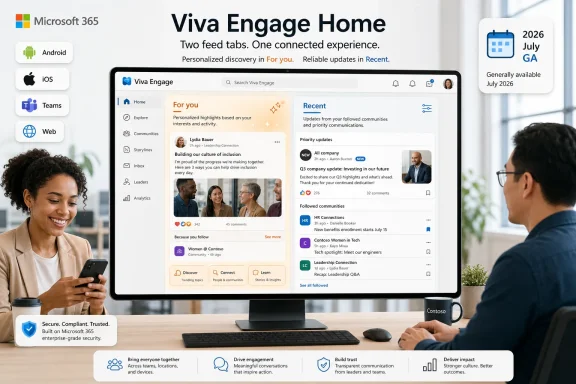
Microsoft is preparing a new Recent feed for Viva Engage Home, listed on the Microsoft 365 Roadmap as ID 559482. The reader takeaway is straightforward: this feature adds a second Home feed that gives users a more predictable view of followed and priority communications, while preserving the existing personalized “For you” experience. Microsoft lists the feature for Android, iOS, Teams and Surface Devices, and the web in the Worldwide Standard Multi-Tenant cloud instance. The Roadmap entry was created on 2026-04-01, last updated on 2026-07-08, has a General Availability target of 2026-07, and remains marked In development.
For users, the immediate action is simple: understand that Viva Engage Home is expected to gain an additional feed option, not lose the personalized one. For admins, communicators, and community managers, the practical work today is limited but useful: prepare training language, monitor the rollout, and update internal documentation and screenshots once the UI actually appears in your tenant. Do not promise exact tab placement, default behavior, tenant controls, or client-by-client behavior until Microsoft ships the experience to your environment.
The feature Microsoft describes is plain enough: “Recent feed in Viva Engage,” a new feed in Home intended to surface followed and priority communications in a more predictable way. It is not described as a replacement for the personalized “For you” feed. It is an additional view, and the Roadmap still lists the feature as In development with General Availability set for 2026-07.
That is the confirmed product story. The workplace story is that Microsoft appears to be acknowledging a common enterprise communications problem: employees often need a place to catch up on what they deliberately follow, not only a place where the system recommends what may be relevant.
Viva Engage sits in the middle of the Microsoft 365 experience. It is social enough to contain informal discussion, but formal enough to carry organizational communication. A feed change in that context can affect how employees perceive visibility, timeliness, and trust. If a user wants discovery, a personalized feed can help. If a user wants to answer, “What did I miss from the people, communities, or priority communications I care about?” predictability matters.
That is the useful distinction in this Roadmap item. Microsoft is not saying the current personalized experience is going away. It is saying users will have another way to view Home content. The best way to explain the change internally is concise: “For you” remains the personalized feed; Recent is intended for a more predictable view of followed and priority communications.
But personalized feeds have a trust problem. When employees cannot easily understand why they are seeing one item instead of another, they may still browse the feed, but they are less likely to treat it as a dependable catch-up surface. In workplace software, that matters. Employees are not only scrolling for interest; they may be looking for a benefits update, a departmental notice, a community response, a leadership post, or a time-sensitive internal message.
That is where a Recent feed has value. It does not need to replace personalization to be useful. It can give users a second mental model:
That narrower conclusion is still important. It gives organizations a better training story and gives users a clearer reason to choose one feed over the other.
That matters for adoption. If a user asks, “Where do I go to see what Viva Engage thinks is most relevant to me?” the answer remains For you. If a user asks, “Where do I go for a more predictable view of followed and priority communications?” the answer becomes Recent, once the feature is available in the tenant.
The important word in Microsoft’s description is “preserving.” Recent is additive. That framing should help admins and communicators avoid overcorrecting their training. There is no need to tell users that the old Home experience is being removed based on the verified Roadmap facts. The better message is that Viva Engage Home is expected to offer another way to consume content.
This avoids a false choice between two feed philosophies. Some employees want relevance and discovery. Others want a more legible way to catch up. Many will use both depending on the moment.
The platform list for Roadmap ID 559482 reinforces that this is not described as a web-only adjustment. Microsoft lists Android, iOS, Teams and Surface Devices, and Web. That suggests the feature is intended for the major places where users may encounter Viva Engage Home, though the Roadmap entry does not specify exact client behavior, layout, or timing by device.
The Roadmap also lists the cloud instance as Worldwide Standard Multi-Tenant. That is the verified deployment context in the entry. It should not be stretched into claims about sovereign clouds, special previews, licensing entitlements, or tenant controls that are not stated in the Roadmap details.
The operational point is still clear. Viva Engage is not only a destination app. For many organizations, it is part of the daily Microsoft 365 communications fabric. A second Home feed can change user expectations about where to look for recent activity and how to interpret differences between feed views.
The Roadmap entry does not provide enough detail to make claims about new admin controls, muting behavior, announcement behavior, leadership-specific features, default feed settings, or policy options. Those should not be invented. Admins should assume only what Microsoft has stated: a new Recent feed is planned for Viva Engage Home, it is intended to provide a more predictable view of followed and priority communications, and it preserves the existing personalized For you experience.
That is still enough to prepare. The help desk should be ready to explain that different feed views can show content differently by design. Communications teams should be ready to tell employees when to use each feed. Community managers should be ready for members to ask whether following a person or community affects what they see in Recent; the safe answer is to refer to Microsoft’s wording about followed and priority communications, then wait for tenant-specific UI behavior before giving procedural instructions.
The main admin risk is overpromising. If internal documentation says, for example, that Recent will always appear in a certain location, always sort in a certain way, or expose a specific setting, it may be wrong when the feature lands. Keep the initial guidance simple and update it after the interface is visible.
The practical gain is more modest but still useful. Communicators can tell employees that, once available, Recent is the place to check for a more predictable view of followed and priority communications. That is a better instruction than asking users to rely entirely on a personalized feed for both discovery and catch-up.
This may be especially helpful during recurring internal communication moments: benefits enrollment, office moves, organizational updates, policy reminders, campaign launches, or community-driven Q&A. In those cases, employees often want to know what has changed recently in the areas they follow. A feed designed around predictability can reduce friction.
But the feature also raises the bar for communications discipline. If employees use Recent to catch up, the quality of the underlying content environment matters. Too many overlapping communities, unclear naming, excessive posting, or poorly targeted messages can still create noise. Recent can make followed and priority communications easier to locate, but it cannot fix an organization’s content strategy.
The best communications teams should treat Recent as a trust-building tool, not as a loophole. It should help users understand where to look. It should not encourage every department to treat every update as priority communication.
A Recent feed makes the promise easier to explain. Once the feature is available, community managers can point members to a named Home feed intended for a more predictable view of followed and priority communications. That does not mean every community post is guaranteed to appear in a specific position. The Roadmap entry does not say that. But it does give users a clearer place to look when they want a less opaque catch-up experience.
This is also a chance for community managers to review the basics. Are community names clear? Are duplicate communities confusing users? Are old communities still active or should they be archived according to internal governance practices? Are members being encouraged to follow the right communities and people? Recent may expose existing community sprawl because a more predictable feed is only as useful as the network it reflects.
That is a familiar Microsoft 365 pattern. New surfaces often reveal old governance debt. Teams revealed channel sprawl. SharePoint home experiences revealed intranet complexity. Viva Engage Recent may reveal whether users’ followed communities and communication habits are well organized.
Recent is a small example of a larger product-design principle: enterprise software needs both intelligence and legibility. A personalized feed can help employees discover relevant items. A more predictable feed can help them check what happened. Those are different needs.
This does not make Recent an anti-personalization feature. It is better understood as a companion to personalization. Microsoft is keeping For you while adding another Home feed. That combination recognizes that employees do not always want the system’s best guess. Sometimes they want a clearer view tied to the people, communities, and communications they have chosen to follow or that the product identifies as priority communications.
The Roadmap entry leaves room for product interpretation, so it should not be described as a pure chronological feed unless Microsoft documents that behavior elsewhere. The careful phrasing is important: more predictable is not the same as strictly chronological, and followed and priority communications is not the same as every post from every community.
For WindowsForum readers who manage Microsoft 365 environments, the lesson is practical: when Microsoft adds intelligence to a workflow, watch for the control surface or alternate view that helps users recover trust. In this case, Recent appears to be that alternate view for Viva Engage Home.
That is enough to report the change. It is not enough to assert:
“In development” also matters. As of the verified Roadmap details last updated on 2026-07-08, the feature remains marked In development even though the General Availability target is 2026-07. That combination means admins should prepare, but they should not assume the final experience is already present for every user.
The safest admin posture is to prepare training and support language now, then update procedural documentation after the tenant UI appears. This avoids stale screenshots, inaccurate click paths, and premature claims about behavior that Microsoft has not confirmed in the Roadmap entry.
Start with education. Employees need simple language:
“For you is personalized. Recent gives you a more predictable view of followed and priority communications.”
That sentence should be enough for most launch posts and training blurbs. If the explanation becomes too complicated, the rollout will feel more confusing than it needs to be.
Support teams need similarly direct wording. If a user asks why the two feeds do not match, the answer should begin with the model: the feeds are designed for different purposes. For you is personalized; Recent is intended to be more predictable. Differences between the two views should not automatically be treated as defects.
Communications teams should also be cautious with analytics assumptions. A new feed may change how employees browse, but the Roadmap entry does not prove what engagement effect it will have. It might increase catch-up behavior for followed communities. It might split attention between two views. It might be adopted quickly by some groups and ignored by others. Those are plausible outcomes, not confirmed facts.
Content strategy matters as well. If an organization has unclear community ownership, overlapping groups, or too many low-value posts, Recent will not fix that. It may make the problem more visible. A predictable feed rewards clear audience choices and disciplined posting.
This is where Microsoft’s decision to preserve For you helps. Organizations can frame the change as additive, not disruptive. Employees do not need to abandon the personalized experience. They gain another way to read Home.
The Recent feed should help three groups first.
First, mobile and frontline users may benefit from a clearer catch-up view when they have only a few minutes to check updates. The Roadmap lists Android and iOS, so mobile should be part of the planned platform coverage, though exact rollout behavior should be verified in each tenant.
Second, knowledge workers may benefit from separating discovery from catch-up. They can use For you when they want personalized relevance and Recent when they want a more predictable view of followed and priority communications.
Third, communications and community teams gain a simpler instruction. Instead of telling employees to rely on one feed for every scenario, they can explain the difference between personalized discovery and predictable catch-up.
IT benefits indirectly. Clearer feed purpose can reduce confusion. When users understand that two feed views may behave differently, support teams can focus on actual access, availability, or rendering problems rather than treating every feed difference as a bug.
Still, this is not a cure for poor information architecture. If an organization has not defined which communities are authoritative, who owns major communication channels, or how employees should choose what to follow, Recent will not solve that. It can make followed and priority communications easier to approach, but it cannot determine what employees should have followed in the first place.
Admins should begin with training language. A short internal note can explain that Microsoft is adding a Recent feed to Viva Engage Home, targeted for 2026-07, and that it is intended to provide a more predictable view of followed and priority communications while keeping For you available.
Communications teams should review their Viva Engage guidance. If current internal docs say “check Home” without explaining feed behavior, those docs may need an update after the feature ships. But screenshots and exact steps should wait until the interface appears.
Help desk teams should prepare a basic response for early questions:
Finally, tenant owners should monitor the Roadmap and their own Viva Engage clients during the July 2026 window. Because the verified entry says In development, the status should be checked before broad announcements claim that the feature is live.
The confirmed facts are limited but useful:
That is a clean and practical change. Microsoft is preserving personalization while giving employees a more understandable way to catch up. In enterprise communications, that kind of predictability is not a luxury. It is part of trust.
For users, the immediate action is simple: understand that Viva Engage Home is expected to gain an additional feed option, not lose the personalized one. For admins, communicators, and community managers, the practical work today is limited but useful: prepare training language, monitor the rollout, and update internal documentation and screenshots once the UI actually appears in your tenant. Do not promise exact tab placement, default behavior, tenant controls, or client-by-client behavior until Microsoft ships the experience to your environment.
 Microsoft Gives the Feed Back a Clock
The feature Microsoft describes is plain enough: “Recent feed in Viva Engage,” a new feed in Home intended to surface followed and priority communications in a more predictable way. It is not described as a replacement for the personalized “For you” feed. It is an additional view, and the Roadmap still lists the feature as In development with General Availability set for 2026-07.That is the confirmed product story. The workplace story is that Microsoft appears to be acknowledging a common enterprise communications problem: employees often need a place to catch up on what they deliberately follow, not only a place where the system recommends what may be relevant.
Viva Engage sits in the middle of the Microsoft 365 experience. It is social enough to contain informal discussion, but formal enough to carry organizational communication. A feed change in that context can affect how employees perceive visibility, timeliness, and trust. If a user wants discovery, a personalized feed can help. If a user wants to answer, “What did I miss from the people, communities, or priority communications I care about?” predictability matters.
That is the useful distinction in this Roadmap item. Microsoft is not saying the current personalized experience is going away. It is saying users will have another way to view Home content. The best way to explain the change internally is concise: “For you” remains the personalized feed; Recent is intended for a more predictable view of followed and priority communications.
The Personalized Feed Was Doing Too Many Jobs
The existing “For you” experience has an ambitious role. It is meant to help users find relevant activity in a busy organization. That kind of personalization is useful because a large enterprise network can produce far more posts than any employee can review manually. A latest-first feed in a large company can quickly become dominated by the most active spaces rather than the most useful ones.But personalized feeds have a trust problem. When employees cannot easily understand why they are seeing one item instead of another, they may still browse the feed, but they are less likely to treat it as a dependable catch-up surface. In workplace software, that matters. Employees are not only scrolling for interest; they may be looking for a benefits update, a departmental notice, a community response, a leadership post, or a time-sensitive internal message.
That is where a Recent feed has value. It does not need to replace personalization to be useful. It can give users a second mental model:
- “For you” is for personalized discovery.
- Recent is for a more predictable view of followed and priority communications.
That narrower conclusion is still important. It gives organizations a better training story and gives users a clearer reason to choose one feed over the other.
Recent Versus For You Is Really Predictability Versus Personalization
Microsoft’s Roadmap language is careful. Recent gives users a more predictable view of followed and priority communications while preserving the existing personalized “For you” experience. The company is not saying the current feed is broken. It is saying the current feed is not the only way employees may want to consume workplace communication.That matters for adoption. If a user asks, “Where do I go to see what Viva Engage thinks is most relevant to me?” the answer remains For you. If a user asks, “Where do I go for a more predictable view of followed and priority communications?” the answer becomes Recent, once the feature is available in the tenant.
| Feed experience | Primary purpose | Ordering model | Best fit | Tradeoff |
|---|---|---|---|---|
| Recent | More predictable catch-up on followed and priority communications | Microsoft has not provided full ordering details in the Roadmap entry | Users checking what has changed in areas they follow or in priority communications | May be less discovery-oriented than a personalized feed |
| For you | Personalized discovery and relevance | Personalized Home experience | Users browsing content Microsoft considers relevant to them | Less predictable as a catch-up surface |
This avoids a false choice between two feed philosophies. Some employees want relevance and discovery. Others want a more legible way to catch up. Many will use both depending on the moment.
Viva Engage Has Become Infrastructure, Not Just a Social App
Viva Engage began as the successor to Yammer in many organizations’ daily habits, but Microsoft now positions it within the broader Viva and Microsoft 365 employee experience. That means feed behavior is not a minor design choice. It affects how people encounter community discussion, internal communications, and organizational updates.The platform list for Roadmap ID 559482 reinforces that this is not described as a web-only adjustment. Microsoft lists Android, iOS, Teams and Surface Devices, and Web. That suggests the feature is intended for the major places where users may encounter Viva Engage Home, though the Roadmap entry does not specify exact client behavior, layout, or timing by device.
The Roadmap also lists the cloud instance as Worldwide Standard Multi-Tenant. That is the verified deployment context in the entry. It should not be stretched into claims about sovereign clouds, special previews, licensing entitlements, or tenant controls that are not stated in the Roadmap details.
The operational point is still clear. Viva Engage is not only a destination app. For many organizations, it is part of the daily Microsoft 365 communications fabric. A second Home feed can change user expectations about where to look for recent activity and how to interpret differences between feed views.
The Feed Problem Is an Admin Problem in Disguise
For end users, Recent is a convenience. For admins and communicators, it is a support and governance signal. Any new feed surface can generate questions: why something appeared, why something did not appear, why two users see different content, or why mobile and web experiences do not look identical during rollout.The Roadmap entry does not provide enough detail to make claims about new admin controls, muting behavior, announcement behavior, leadership-specific features, default feed settings, or policy options. Those should not be invented. Admins should assume only what Microsoft has stated: a new Recent feed is planned for Viva Engage Home, it is intended to provide a more predictable view of followed and priority communications, and it preserves the existing personalized For you experience.
That is still enough to prepare. The help desk should be ready to explain that different feed views can show content differently by design. Communications teams should be ready to tell employees when to use each feed. Community managers should be ready for members to ask whether following a person or community affects what they see in Recent; the safe answer is to refer to Microsoft’s wording about followed and priority communications, then wait for tenant-specific UI behavior before giving procedural instructions.
The main admin risk is overpromising. If internal documentation says, for example, that Recent will always appear in a certain location, always sort in a certain way, or expose a specific setting, it may be wrong when the feature lands. Keep the initial guidance simple and update it after the interface is visible.
Action checklist for admins
- Prepare a short training note explaining that For you remains personalized and Recent is intended as a more predictable view of followed and priority communications.
- Monitor the Microsoft 365 Roadmap entry and tenant experience during the 2026-07 General Availability window.
- Brief help desk and communications teams before publishing broad user guidance.
- Avoid promising exact UI placement, default behavior, administrative controls, or feed-ordering rules until the feature appears in your tenant.
- Ask community managers to collect early employee questions once the new feed becomes visible.
- Update internal screenshots, quick-start guides, and Viva Engage training pages only after the UI ships in your environment.
- Review existing employee communications guidance for clarity, especially instructions about when to use Viva Engage, Teams, email, or intranet pages.
- Keep launch messaging practical: this is an added Home feed, not a guaranteed delivery mechanism for every post.
Communicators Gain Predictability, But Not a Guaranteed Megaphone
Corporate communications teams may be tempted to read Recent as a fix for message reach. That would overstate the Roadmap entry. Microsoft says the new feed provides a more predictable view of followed and priority communications. It does not say every corporate message will be seen. It does not say Recent turns Viva Engage into an inbox. It does not provide a delivery guarantee.The practical gain is more modest but still useful. Communicators can tell employees that, once available, Recent is the place to check for a more predictable view of followed and priority communications. That is a better instruction than asking users to rely entirely on a personalized feed for both discovery and catch-up.
This may be especially helpful during recurring internal communication moments: benefits enrollment, office moves, organizational updates, policy reminders, campaign launches, or community-driven Q&A. In those cases, employees often want to know what has changed recently in the areas they follow. A feed designed around predictability can reduce friction.
But the feature also raises the bar for communications discipline. If employees use Recent to catch up, the quality of the underlying content environment matters. Too many overlapping communities, unclear naming, excessive posting, or poorly targeted messages can still create noise. Recent can make followed and priority communications easier to locate, but it cannot fix an organization’s content strategy.
The best communications teams should treat Recent as a trust-building tool, not as a loophole. It should help users understand where to look. It should not encourage every department to treat every update as priority communication.
Community Managers Get a Clearer Contract With Members
Community managers have a different stake in the change. Their informal promise to members is simple: if you join or follow this community, you should be able to keep up with it. Personalized feeds can complicate that promise because visibility may not always match user expectation. A community may be important to a member even if the personalized feed emphasizes something else.A Recent feed makes the promise easier to explain. Once the feature is available, community managers can point members to a named Home feed intended for a more predictable view of followed and priority communications. That does not mean every community post is guaranteed to appear in a specific position. The Roadmap entry does not say that. But it does give users a clearer place to look when they want a less opaque catch-up experience.
This is also a chance for community managers to review the basics. Are community names clear? Are duplicate communities confusing users? Are old communities still active or should they be archived according to internal governance practices? Are members being encouraged to follow the right communities and people? Recent may expose existing community sprawl because a more predictable feed is only as useful as the network it reflects.
That is a familiar Microsoft 365 pattern. New surfaces often reveal old governance debt. Teams revealed channel sprawl. SharePoint home experiences revealed intranet complexity. Viva Engage Recent may reveal whether users’ followed communities and communication habits are well organized.
Microsoft Is Balancing Personalization With Human Expectations
The timing is notable because Microsoft 365 continues to move deeper into AI-assisted and personalized experiences. Search, recommendations, summaries, activity streams, and productivity surfaces increasingly depend on inference. That can be helpful, but workplace users still need simple ways to orient themselves.Recent is a small example of a larger product-design principle: enterprise software needs both intelligence and legibility. A personalized feed can help employees discover relevant items. A more predictable feed can help them check what happened. Those are different needs.
This does not make Recent an anti-personalization feature. It is better understood as a companion to personalization. Microsoft is keeping For you while adding another Home feed. That combination recognizes that employees do not always want the system’s best guess. Sometimes they want a clearer view tied to the people, communities, and communications they have chosen to follow or that the product identifies as priority communications.
The Roadmap entry leaves room for product interpretation, so it should not be described as a pure chronological feed unless Microsoft documents that behavior elsewhere. The careful phrasing is important: more predictable is not the same as strictly chronological, and followed and priority communications is not the same as every post from every community.
For WindowsForum readers who manage Microsoft 365 environments, the lesson is practical: when Microsoft adds intelligence to a workflow, watch for the control surface or alternate view that helps users recover trust. In this case, Recent appears to be that alternate view for Viva Engage Home.
The Roadmap Entry Is Sparse, So Do Not Overread It
There is a limit to what can responsibly be concluded from Roadmap ID 559482. The verified details establish the feature name, product, platforms, cloud instance, Roadmap status, created date, last updated date, and planned General Availability month. They also establish the basic description: a new Recent feed in Viva Engage Home that gives users a more predictable view of followed and priority communications while preserving For you.That is enough to report the change. It is not enough to assert:
- exact UI placement;
- whether the feed opens by default;
- whether user preference roams across clients;
- tenant-level policy controls;
- licensing differences;
- exact ranking signals;
- detailed mobile layout;
- special behavior for announcements, leadership posts, or muted content;
- service behavior in clouds not listed in the Roadmap entry.
“In development” also matters. As of the verified Roadmap details last updated on 2026-07-08, the feature remains marked In development even though the General Availability target is 2026-07. That combination means admins should prepare, but they should not assume the final experience is already present for every user.
Timeline
| Date | Roadmap detail |
|---|---|
| 2026-04-01 | Microsoft created the Roadmap entry for Recent feed in Viva Engage. |
| 2026-07 | Microsoft lists the feature for General Availability. |
| 2026-07-08 | Microsoft last updated the Roadmap entry; the verified status remains In development. |
The Surface Area Is Bigger Than the Tab
A new feed tab is never just a tab in Microsoft 365. It touches user education, support expectations, content strategy, and adoption measurement.Start with education. Employees need simple language:
“For you is personalized. Recent gives you a more predictable view of followed and priority communications.”
That sentence should be enough for most launch posts and training blurbs. If the explanation becomes too complicated, the rollout will feel more confusing than it needs to be.
Support teams need similarly direct wording. If a user asks why the two feeds do not match, the answer should begin with the model: the feeds are designed for different purposes. For you is personalized; Recent is intended to be more predictable. Differences between the two views should not automatically be treated as defects.
Communications teams should also be cautious with analytics assumptions. A new feed may change how employees browse, but the Roadmap entry does not prove what engagement effect it will have. It might increase catch-up behavior for followed communities. It might split attention between two views. It might be adopted quickly by some groups and ignored by others. Those are plausible outcomes, not confirmed facts.
Content strategy matters as well. If an organization has unclear community ownership, overlapping groups, or too many low-value posts, Recent will not fix that. It may make the problem more visible. A predictable feed rewards clear audience choices and disciplined posting.
This is where Microsoft’s decision to preserve For you helps. Organizations can frame the change as additive, not disruptive. Employees do not need to abandon the personalized experience. They gain another way to read Home.
Where This Helps Windows and Microsoft 365 Shops Most
For Windows-heavy organizations, Viva Engage often lives inside a broader Microsoft 365 workflow. Users may encounter it through Teams, a browser, mobile apps, or other Microsoft 365 entry points. That makes feed behavior part of the everyday employee experience rather than a narrow social-network detail.The Recent feed should help three groups first.
First, mobile and frontline users may benefit from a clearer catch-up view when they have only a few minutes to check updates. The Roadmap lists Android and iOS, so mobile should be part of the planned platform coverage, though exact rollout behavior should be verified in each tenant.
Second, knowledge workers may benefit from separating discovery from catch-up. They can use For you when they want personalized relevance and Recent when they want a more predictable view of followed and priority communications.
Third, communications and community teams gain a simpler instruction. Instead of telling employees to rely on one feed for every scenario, they can explain the difference between personalized discovery and predictable catch-up.
IT benefits indirectly. Clearer feed purpose can reduce confusion. When users understand that two feed views may behave differently, support teams can focus on actual access, availability, or rendering problems rather than treating every feed difference as a bug.
Still, this is not a cure for poor information architecture. If an organization has not defined which communities are authoritative, who owns major communication channels, or how employees should choose what to follow, Recent will not solve that. It can make followed and priority communications easier to approach, but it cannot determine what employees should have followed in the first place.
What Admins and Communicators Should Do Now
Because the feature is still marked In development, the right response is preparation, not overengineering.Admins should begin with training language. A short internal note can explain that Microsoft is adding a Recent feed to Viva Engage Home, targeted for 2026-07, and that it is intended to provide a more predictable view of followed and priority communications while keeping For you available.
Communications teams should review their Viva Engage guidance. If current internal docs say “check Home” without explaining feed behavior, those docs may need an update after the feature ships. But screenshots and exact steps should wait until the interface appears.
Help desk teams should prepare a basic response for early questions:
- For you is personalized.
- Recent is intended to be more predictable.
- The two feeds may not look identical.
- Internal documentation will be updated after the tenant UI is available.
Finally, tenant owners should monitor the Roadmap and their own Viva Engage clients during the July 2026 window. Because the verified entry says In development, the status should be checked before broad announcements claim that the feature is live.
Microsoft’s Small Feed Change Carries a Large Product Lesson
The most concrete lesson is that Microsoft is no longer relying on one personalized Viva Engage Home feed to satisfy every employee communication scenario. That is meaningful even if the UI change itself is modest.The confirmed facts are limited but useful:
- Roadmap ID 559482 adds a new Recent feed to Viva Engage Home.
- The feature is intended to provide a more predictable view of followed and priority communications.
- The existing personalized For you experience is preserved.
- Microsoft lists the platforms as Android, iOS, Teams and Surface Devices, and Web.
- Microsoft lists the cloud instance as Worldwide Standard Multi-Tenant.
- The Roadmap entry was created on 2026-04-01.
- The Roadmap entry was last updated on 2026-07-08.
- The General Availability target is 2026-07.
- The verified status remains In development.
That is a clean and practical change. Microsoft is preserving personalization while giving employees a more understandable way to catch up. In enterprise communications, that kind of predictability is not a luxury. It is part of trust.
References
- Primary source: Microsoft 365 Roadmap
Published: 2026-07-08T23:11:07.7961302Z
Loading…
www.microsoft.com - Official source: support.microsoft.com
Loading…
support.microsoft.com - Official source: techcommunity.microsoft.com
Loading…
techcommunity.microsoft.com - Official source: learn.microsoft.com
Loading…
learn.microsoft.com - Related coverage: mwpro.co.uk
Loading…
mwpro.co.uk - Related coverage: mspoweruser.com
Loading…
mspoweruser.com