

Microsoft is preparing to give Viva Glint administrators a clearer view of what happens after employees complete a survey. The forthcoming Action Taking Analysis Report, listed under Microsoft 365 Roadmap ID 498923, will expose platform-activity measures such as report views, completed Team Conversations, created Focus Areas, and other action-related events in a filterable report. Scheduled for worldwide general availability on the web in October 2026, the feature could close one of employee-listening programs’ most persistent measurement gaps: determining whether leaders and managers actually engage with results and convert feedback into visible follow-through.
Microsoft Viva Glint is designed to help organizations collect employee feedback, analyze sentiment, identify organizational strengths and weaknesses, and guide managers toward action. It occupies a specialized position within the wider Microsoft Viva portfolio, focusing on employee listening rather than communications, learning, goals, or collaboration analytics alone.
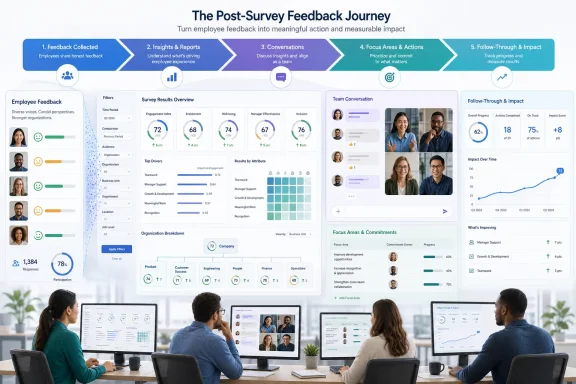
The platform’s value proposition has never been limited to running surveys. Its larger promise is to create a repeatable loop in which employees provide feedback, leaders interpret it, teams discuss it, and managers establish Focus Areas and action items that can improve the employee experience.
The harder question comes later: What did managers do with the results? Organizations can achieve an impressive response rate and still undermine trust if employees never hear about the findings or see any resulting action.
Viva Glint already provides several mechanisms for moving from measurement to action. Team Summary dashboards help managers interpret results, Team Conversations structure discussions with employees, and Focus Areas turn selected priorities into trackable commitments. The new report appears intended to connect these activities into a more coherent adoption and accountability view.
That timeline matters because roadmap dates describe Microsoft’s plans rather than an immutable release commitment. Customers should treat October as a planning target and watch for tenant documentation, Message Center notices, licensing details, and administrator guidance as the release approaches.
This distinction makes the report an adoption and process-analysis tool. It can show whether intended actions occurred in Viva Glint, but it cannot automatically prove that those actions were useful, sincere, or effective.
A report-view metric can help administrators identify populations that have not reached even that first stage. Filters could make it possible to compare viewing behavior by organizational unit, user role, survey cycle, geography, or another supported attribute, although Microsoft has not yet published the final filter schema.
Views still require careful interpretation. One manager may open a report several times while preparing a thoughtful team session, while another may open it once and fully understand the material. A third may generate a recorded view without meaningfully reading anything.
The useful question is therefore not simply which group produced the most views. It is whether the expected population accessed its results within a reasonable period and then advanced to later action-taking stages.
A completion count can tell HR teams whether managers recorded that structured conversation as complete. This is valuable because discussion is often where an employee-listening program either gains credibility or begins to fail.
Employees who provide candid feedback expect acknowledgment. A manager-led conversation demonstrates that someone received the message, while a silent dashboard creates the impression that survey participation disappears into an administrative system.
Tracking Focus Areas created should help program owners see whether managers move beyond reviewing results. It can also reveal whether certain divisions routinely create commitments while others stop at report consumption or conversation completion.
However, a high creation rate does not necessarily signal a healthy program. Managers may create vague or repetitive Focus Areas merely to satisfy a requirement. The analysis must eventually consider quality, status, completion, relevance, and employee perception alongside volume.
A hypothetical funnel might show that 95 percent viewed a report, 72 percent completed a Team Conversation, and 43 percent created a Focus Area. That would immediately expose where momentum declined, even though further investigation would still be needed to explain why.
The funnel concept is analytically powerful because it moves the conversation away from one isolated completion target. Instead, HR teams can evaluate the transition rate between stages and determine which interventions are appropriate.
Administrators can also export Focus Area usage and action-item data. Depending on permissions, those exports may include employee identity fields, Focus Area details, due dates, action descriptions, status, suggested-item indicators, and comments.
That report is primarily centered on the Focus Area object and its status. The new Action Taking Analysis Report appears broader because it will include other platform activities, including report views and Team Conversation completions.
Audit records are useful when security, support, governance, or compliance teams need to determine who performed a specific administrative operation. They are not necessarily optimized for measuring manager adoption of employee-feedback workflows.
The Action Taking Analysis Report should therefore not be treated as a replacement for the Activity Audit Log, Microsoft Purview auditing, or Microsoft Entra sign-in logs. It is better understood as a business-facing analytics report about engagement with action-taking functionality.
Blurring these purposes can produce flawed conclusions. An audit event proves that a recorded system operation occurred; an adoption metric shows participation in a workflow; and an outcome metric attempts to determine whether the workflow improved something important.
A global completion average can conceal major disparities. One region may follow the process consistently while another has not received access, another may be delayed by local consultation requirements, and another may have managers unable to see results because team sizes fall below confidentiality thresholds.
Filters would allow administrators to ask targeted questions such as:
Viva Glint already associates Focus Areas with survey cycles rather than the older goal-period model. The Action Taking Analysis Report will be most useful if its filters and exports preserve this context and help administrators distinguish current activity from historical records.
A centralized report could reduce that fragmented administration. It may also give HR business partners and executive sponsors a more consistent basis for discussing adoption with business leaders.
Filtered activity data could support scheduled governance reviews in which program owners identify exceptions and assign targeted support. Rather than sending broad reminders to every manager, they could focus communication on users who have not reached the relevant stage.
This approach can reduce notification fatigue. It also avoids penalizing managers who have already completed their responsibilities but continue receiving generic reminders because the central team lacks current data.
If conversations are completed but Focus Areas remain rare, managers may need help turning broad themes into specific actions. Conversely, low report-view rates may indicate access problems, unclear communications, competing priorities, or a poorly timed release.
The report will not identify the cause by itself. It should make the location and stage of the problem easier to see, allowing program owners to deploy the right intervention.
Executives could review action-taking adoption alongside response rates and sentiment results. The important safeguard is to avoid turning the dashboard into a simplistic manager-ranking system, particularly when teams differ in size, access dates, confidentiality eligibility, survey design, and organizational circumstances.
That transparency can be constructive when paired with enablement. Managers who need help can be identified earlier, and those who are progressing can avoid unnecessary reminders.
It can become counterproductive if activity counts are treated as performance scores without context. Managers may respond by checking boxes, recording premature completions, or creating low-value Focus Areas simply to appear compliant.
A credible employee-listening program should make the feedback loop visible. Employees need to know what the organization heard, what it will address, what it cannot change immediately, and when they can expect an update.
The new report can help administrators detect missing steps, but it cannot substitute for that human communication. Transparency about manager activity is useful only when it leads to transparency with employees.
Organizations should define what each metric does and does not mean before distributing dashboards or establishing targets.
Likewise, one well-designed Focus Area may be more valuable than five generic ones. Volume can reveal participation, but it cannot measure the specificity, feasibility, ownership, or impact of the commitment.
Program owners should combine activity data with qualitative checks, employee pulse questions, progress updates, and later survey results. The report should initiate better questions rather than end the analysis.
High-performing managers may be more likely both to use Viva Glint features and to maintain engaged teams. Organizational changes, staffing conditions, compensation decisions, restructuring, or external events may also influence results.
More mature analysis could compare patterns over multiple cycles, account for timing, and examine whether completed actions correspond to changes in the targeted survey items. Even then, organizations should be cautious about causal claims.
Team Conversations also depend on program configuration, user-role settings, access timing, survey status, and confidentiality requirements. A manager who never received an eligible conversation should not be counted in the same way as one who received it and ignored it.
Before using the report for accountability, administrators should verify the denominator, exclusions, status rules, handling of inactive users, and treatment of deleted or draft objects.
This does not necessarily expose employee responses, but it can still affect workplace trust. Organizations should establish a clear purpose, access model, retention approach, and communication strategy.
That means low activity may sometimes reflect privacy protections rather than manager neglect. Administrators must preserve the distinction when interpreting missing conversations or unavailable results.
Reports should not create an indirect method for inferring whether a small group responded or what its members said. Final documentation should clarify how the new metrics interact with confidentiality rules, suppressed data, small teams, and broader-team reporting.
Organizations should document who can access the report and for what purposes. They should also determine whether local labor agreements, works councils, employee-monitoring policies, or data-protection requirements affect deployment.
The safest operating principle is proportionality. Collect and use the information necessary to improve the feedback process, while avoiding unrelated behavioral scoring or excessive individual scrutiny.
A Service Admin may require organization-wide visibility, while an HR business partner may need access only to a defined population. Managers should not automatically receive information about peers or employees outside their permitted hierarchy.
Customers should test the report using representative roles before broad release. Administrative preview or “View As” capabilities may help validate the experience, but those activities should themselves remain governed and auditable.
Survey creation has become only one part of the buying decision. Enterprise customers want to know whether a platform can drive repeatable behavior across thousands of managers without creating an unsustainable administrative burden.
Its strategic advantage could come from connecting feedback behavior with other organizational signals while maintaining appropriate privacy boundaries. Microsoft already offers workplace-pattern analysis in scenarios where Viva Glint and Viva Insights are integrated, illustrating the direction toward more connected employee-experience analytics.
The risk is complexity. Customers may struggle to distinguish among survey reports, action reports, workplace analytics, audit logs, sign-in logs, and custom business-intelligence outputs unless Microsoft provides clear documentation and consistent terminology.
This can improve consistency and reveal broken workflows. It can also encourage organizations to optimize for visible system activity rather than genuine leadership behavior.
Viva Glint’s competitive success will therefore depend on whether the report helps customers create better conversations and actions—not merely more recorded events.
Customers should also watch the roadmap entry for changes to its status and October 2026 target. A transition from “In development” toward rollout would signal that tenant availability is approaching, but Microsoft may still release the feature gradually.
Team Conversation completion also requires a precise definition. Microsoft should explain whether completion is manager-declared, workflow-generated, reversible, or tied to particular conversation windows.
Focus Area measures will need similar clarity around drafts, deletions, multiple areas per manager, 360-feedback programs, action-item status, inactive employees, and organizational reassignment.
An application programming interface or supported data integration would offer greater automation, but Microsoft has not announced one for this report. Organizations should not assume that every on-screen measure will be immediately available through an API.
That analysis will require patience and restraint. Employee experience changes slowly, and a single survey movement can reflect many factors beyond a recorded conversation or Focus Area.
Microsoft’s Action Taking Analysis Report could become one of Viva Glint’s more consequential administrative additions because it focuses on the space where employee-listening programs most often lose credibility: the distance between collecting feedback and acting on it. If Microsoft delivers clear calculations, strong filtering, appropriate permissions, and useful exports, the report should give enterprises a much better map of their post-survey process. The ultimate test, however, will not be how many managers generate visible activity in Viva Glint, but whether that transparency helps organizations create better conversations, make credible commitments, and show employees that speaking up leads to thoughtful and sustained action.
 Background
Microsoft Viva Glint is designed to help organizations collect employee feedback, analyze sentiment, identify organizational strengths and weaknesses, and guide managers toward action. It occupies a specialized position within the wider Microsoft Viva portfolio, focusing on employee listening rather than communications, learning, goals, or collaboration analytics alone.The platform’s value proposition has never been limited to running surveys. Its larger promise is to create a repeatable loop in which employees provide feedback, leaders interpret it, teams discuss it, and managers establish Focus Areas and action items that can improve the employee experience.
The action gap in employee listening
Survey deployment and response rates are relatively straightforward to measure. Administrators can see who received a survey, how many people responded, and whether participation reached the threshold required for meaningful reporting.The harder question comes later: What did managers do with the results? Organizations can achieve an impressive response rate and still undermine trust if employees never hear about the findings or see any resulting action.
Viva Glint already provides several mechanisms for moving from measurement to action. Team Summary dashboards help managers interpret results, Team Conversations structure discussions with employees, and Focus Areas turn selected priorities into trackable commitments. The new report appears intended to connect these activities into a more coherent adoption and accountability view.
A year-long roadmap journey
Microsoft created the roadmap entry on July 24, 2025, and most recently updated it on July 21, 2026. The item remains in development, with general availability currently targeted for October 2026 in Worldwide Standard Multi-Tenant environments.That timeline matters because roadmap dates describe Microsoft’s plans rather than an immutable release commitment. Customers should treat October as a planning target and watch for tenant documentation, Message Center notices, licensing details, and administrator guidance as the release approaches.
What the Action Taking Analysis Report Will Measure
Microsoft’s roadmap description is concise, but its named metrics reveal the report’s intended role. Rather than analyzing employee sentiment directly, it will measure how dashboard users interact with reports and action-taking workflows.This distinction makes the report an adoption and process-analysis tool. It can show whether intended actions occurred in Viva Glint, but it cannot automatically prove that those actions were useful, sincere, or effective.
Report views as the first engagement signal
Report views are the earliest observable step in the post-survey workflow. Before managers can discuss feedback or create Focus Areas, they generally need to open and interpret their results.A report-view metric can help administrators identify populations that have not reached even that first stage. Filters could make it possible to compare viewing behavior by organizational unit, user role, survey cycle, geography, or another supported attribute, although Microsoft has not yet published the final filter schema.
Views still require careful interpretation. One manager may open a report several times while preparing a thoughtful team session, while another may open it once and fully understand the material. A third may generate a recorded view without meaningfully reading anything.
The useful question is therefore not simply which group produced the most views. It is whether the expected population accessed its results within a reasonable period and then advanced to later action-taking stages.
Team Conversations as evidence of dialogue
Team Conversations provide a more substantial activity signal. Viva Glint uses these structured experiences to help managers share survey results, invite team input, prioritize opportunities, and select Focus Areas.A completion count can tell HR teams whether managers recorded that structured conversation as complete. This is valuable because discussion is often where an employee-listening program either gains credibility or begins to fail.
Employees who provide candid feedback expect acknowledgment. A manager-led conversation demonstrates that someone received the message, while a silent dashboard creates the impression that survey participation disappears into an administrative system.
Focus Areas as recorded commitments
Focus Areas represent the transition from discussion to an explicit improvement priority. They can contain action items, status information, due dates, descriptions, suggested actions, and supporting comments, depending on configuration and permissions.Tracking Focus Areas created should help program owners see whether managers move beyond reviewing results. It can also reveal whether certain divisions routinely create commitments while others stop at report consumption or conversation completion.
However, a high creation rate does not necessarily signal a healthy program. Managers may create vague or repetitive Focus Areas merely to satisfy a requirement. The analysis must eventually consider quality, status, completion, relevance, and employee perception alongside volume.
How the Report Fits the Viva Glint Workflow
The report makes the most sense when viewed as an analytical layer across the major post-survey stages. Viva Glint already guides managers from results toward action; the new feature should give administrators more visibility into movement through that journey.From feedback collection to action
A simplified Viva Glint action-taking sequence looks like this:- Employees submit survey feedback, subject to the organization’s confidentiality and reporting rules.
- Viva Glint processes the results and makes authorized dashboards available according to live or phased access settings.
- Managers view their reports and identify strengths, opportunities, comments, and relevant comparisons.
- Managers conduct Team Conversations to share findings and involve employees in prioritizing areas for improvement.
- Managers create Focus Areas and action items that record the team’s intended next steps.
- Leaders and administrators monitor progress, reinforce expectations, and evaluate whether later survey results indicate meaningful change.
A potential adoption funnel
The named metrics suggest that customers may be able to treat the report like an action-taking funnel. For example, administrators could compare the number of managers expected to access results with the numbers who viewed reports, completed Team Conversations, and created Focus Areas.A hypothetical funnel might show that 95 percent viewed a report, 72 percent completed a Team Conversation, and 43 percent created a Focus Area. That would immediately expose where momentum declined, even though further investigation would still be needed to explain why.
The funnel concept is analytically powerful because it moves the conversation away from one isolated completion target. Instead, HR teams can evaluate the transition rate between stages and determine which interventions are appropriate.
The Difference Between Analysis, Reporting, and Auditing
Viva Glint already contains reporting and logging capabilities, so administrators will need to understand how the new report differs from existing tools. Similar-looking activity data can serve very different operational, governance, and compliance purposes.Existing Focus Area reporting
The current Focus Area Overview report provides information about Focus Area participation and completion across teams. It can show employees with and without Focus Areas, total Focus Areas, status distributions, and completion information.Administrators can also export Focus Area usage and action-item data. Depending on permissions, those exports may include employee identity fields, Focus Area details, due dates, action descriptions, status, suggested-item indicators, and comments.
That report is primarily centered on the Focus Area object and its status. The new Action Taking Analysis Report appears broader because it will include other platform activities, including report views and Team Conversation completions.
Activity Audit Log boundaries
Viva Glint’s Activity Audit Log serves a different purpose. It records selected administrative and platform events such as data imports, exports, user-role changes, user deletion, administrative sign-ins, configuration changes, and “View As” activity.Audit records are useful when security, support, governance, or compliance teams need to determine who performed a specific administrative operation. They are not necessarily optimized for measuring manager adoption of employee-feedback workflows.
The Action Taking Analysis Report should therefore not be treated as a replacement for the Activity Audit Log, Microsoft Purview auditing, or Microsoft Entra sign-in logs. It is better understood as a business-facing analytics report about engagement with action-taking functionality.
Why the distinction matters
If an organization needs to investigate an unauthorized export, it should use the appropriate audit and security records. If it wants to know which business units are failing to discuss survey results, the new analysis report is likely to be the more suitable tool.Blurring these purposes can produce flawed conclusions. An audit event proves that a recorded system operation occurred; an adoption metric shows participation in a workflow; and an outcome metric attempts to determine whether the workflow improved something important.
Filterability Could Be the Defining Capability
Microsoft explicitly says the new activity measures will be visible and filterable. That may sound like a routine reporting feature, but filtering is essential when analyzing a large, hierarchical organization.A global completion average can conceal major disparities. One region may follow the process consistently while another has not received access, another may be delayed by local consultation requirements, and another may have managers unable to see results because team sizes fall below confidentiality thresholds.
Organizational segmentation
The final value will depend heavily on which filters Microsoft supports. Useful dimensions could include survey program, cycle, user role, manager hierarchy, business unit, geography, function, tenure range, or supported organizational attributes.Filters would allow administrators to ask targeted questions such as:
- Which eligible managers have not viewed results since access was released?
- Which divisions have strong Team Conversation completion but weak Focus Area creation?
- Do senior leaders and frontline managers behave differently after receiving results?
- Are certain survey programs generating more follow-through than others?
- Does action-taking activity vary across recurring, ad hoc, or specialized feedback programs?
Time and survey-cycle context
Action-taking metrics are meaningful only when tied to an appropriate time window or survey cycle. A manager cannot reasonably complete a Team Conversation before receiving results, and a newly created Focus Area should not be judged overdue immediately.Viva Glint already associates Focus Areas with survey cycles rather than the older goal-period model. The Action Taking Analysis Report will be most useful if its filters and exports preserve this context and help administrators distinguish current activity from historical records.
Enterprise Impact
For large organizations, the report could replace a substantial amount of manual reconciliation. Employee-listening teams often combine survey dashboards, spreadsheets, exported Focus Area records, communications lists, and manager-completion trackers to understand post-survey behavior.A centralized report could reduce that fragmented administration. It may also give HR business partners and executive sponsors a more consistent basis for discussing adoption with business leaders.
Better program governance
Enterprise programs need more than a company-wide completion percentage. They need to know whether the process is functioning at each organizational level and whether designated leaders are fulfilling their responsibilities.Filtered activity data could support scheduled governance reviews in which program owners identify exceptions and assign targeted support. Rather than sending broad reminders to every manager, they could focus communication on users who have not reached the relevant stage.
This approach can reduce notification fatigue. It also avoids penalizing managers who have already completed their responsibilities but continue receiving generic reminders because the central team lacks current data.
Resource allocation and coaching
Patterns in the report may help organizations determine where additional coaching is needed. If managers consistently view reports but do not complete Team Conversations, the obstacle may involve facilitation confidence, time, local leadership expectations, or uncertainty about confidentiality.If conversations are completed but Focus Areas remain rare, managers may need help turning broad themes into specific actions. Conversely, low report-view rates may indicate access problems, unclear communications, competing priorities, or a poorly timed release.
The report will not identify the cause by itself. It should make the location and stage of the problem easier to see, allowing program owners to deploy the right intervention.
Executive accountability
Leadership teams frequently ask whether employee feedback produced action, but HR teams may have only partial evidence. A standard analysis report can make those discussions more concrete.Executives could review action-taking adoption alongside response rates and sentiment results. The important safeguard is to avoid turning the dashboard into a simplistic manager-ranking system, particularly when teams differ in size, access dates, confidentiality eligibility, survey design, and organizational circumstances.
Manager and Employee Impact
Although the report is described as providing transparency into dashboard-user activity, its effects will extend beyond administrators. Managers may experience stronger follow-up expectations, while employees may see more consistent communication about survey results.Implications for managers
Managers should assume that key in-platform steps may become more visible to program owners. Opening a report, completing a Team Conversation, and creating a Focus Area may no longer be activities known only to the manager and immediate team.That transparency can be constructive when paired with enablement. Managers who need help can be identified earlier, and those who are progressing can avoid unnecessary reminders.
It can become counterproductive if activity counts are treated as performance scores without context. Managers may respond by checking boxes, recording premature completions, or creating low-value Focus Areas simply to appear compliant.
Implications for employees
Employees do not benefit directly from another administrative dashboard. They benefit if the information causes managers and leaders to communicate more consistently, select meaningful priorities, and demonstrate progress.A credible employee-listening program should make the feedback loop visible. Employees need to know what the organization heard, what it will address, what it cannot change immediately, and when they can expect an update.
The new report can help administrators detect missing steps, but it cannot substitute for that human communication. Transparency about manager activity is useful only when it leads to transparency with employees.
Metrics Need Responsible Interpretation
Adoption analytics are attractive because they appear objective. A report can count views, completed conversations, and created Focus Areas with precision, but precision does not guarantee that the resulting interpretation is valid.Organizations should define what each metric does and does not mean before distributing dashboards or establishing targets.
Activity is not quality
A completed Team Conversation may represent a candid, inclusive discussion in which employees shaped the next steps. It may also represent a short meeting where a manager presented several slides and marked the workflow complete.Likewise, one well-designed Focus Area may be more valuable than five generic ones. Volume can reveal participation, but it cannot measure the specificity, feasibility, ownership, or impact of the commitment.
Program owners should combine activity data with qualitative checks, employee pulse questions, progress updates, and later survey results. The report should initiate better questions rather than end the analysis.
Correlation is not causation
Suppose teams with higher Focus Area creation rates later show stronger engagement scores. That relationship would be encouraging, but it would not prove that creating Focus Areas caused the improvement.High-performing managers may be more likely both to use Viva Glint features and to maintain engaged teams. Organizational changes, staffing conditions, compensation decisions, restructuring, or external events may also influence results.
More mature analysis could compare patterns over multiple cycles, account for timing, and examine whether completed actions correspond to changes in the targeted survey items. Even then, organizations should be cautious about causal claims.
Denominators determine meaning
Every percentage needs a clearly defined eligible population. Focus Area participation, for example, may depend on which users have the permission to create Focus Areas rather than every employee in the tenant.Team Conversations also depend on program configuration, user-role settings, access timing, survey status, and confidentiality requirements. A manager who never received an eligible conversation should not be counted in the same way as one who received it and ignored it.
Before using the report for accountability, administrators should verify the denominator, exclusions, status rules, handling of inactive users, and treatment of deleted or draft objects.
Privacy, Confidentiality, and Workplace Trust
Employee-feedback systems contain sensitive organizational information even when individual survey responses remain confidential. Activity analytics introduce another category of data: information about how managers and leaders interact with the platform.This does not necessarily expose employee responses, but it can still affect workplace trust. Organizations should establish a clear purpose, access model, retention approach, and communication strategy.
Protecting survey confidentiality
Viva Glint uses confidentiality thresholds to prevent reporting on groups that are too small. Team Conversations generate only when managers have results that satisfy the relevant threshold requirements.That means low activity may sometimes reflect privacy protections rather than manager neglect. Administrators must preserve the distinction when interpreting missing conversations or unavailable results.
Reports should not create an indirect method for inferring whether a small group responded or what its members said. Final documentation should clarify how the new metrics interact with confidentiality rules, suppressed data, small teams, and broader-team reporting.
Monitoring perceptions
Managers may view action-taking analysis as support, oversight, or surveillance depending on how the organization deploys it. Quietly using the data in performance discussions would likely produce a different reaction from openly explaining that the report will guide coaching and program improvement.Organizations should document who can access the report and for what purposes. They should also determine whether local labor agreements, works councils, employee-monitoring policies, or data-protection requirements affect deployment.
The safest operating principle is proportionality. Collect and use the information necessary to improve the feedback process, while avoiding unrelated behavioral scoring or excessive individual scrutiny.
Role-based access
Viva Glint already relies heavily on user roles, reporting permissions, profile access, and survey-program configuration. The new report will need similarly precise authorization controls.A Service Admin may require organization-wide visibility, while an HR business partner may need access only to a defined population. Managers should not automatically receive information about peers or employees outside their permitted hierarchy.
Customers should test the report using representative roles before broad release. Administrative preview or “View As” capabilities may help validate the experience, but those activities should themselves remain governed and auditable.
Preparing for the October 2026 Rollout
Organizations do not need to wait until general availability to prepare. The most useful work involves clarifying the operating model rather than guessing at the final interface.A practical readiness plan
- Map the existing post-survey workflow. Document when managers receive results, how they are expected to discuss them, and when Focus Areas should be created or updated.
- Inventory current reports and manual trackers. Identify spreadsheets, exports, reminder lists, local dashboards, and duplicated reporting processes that the new report might replace.
- Review Viva Glint user roles and permissions. Confirm that dashboard access, Team Conversations, Team Summary, and Focus Area capabilities are assigned to the intended populations.
- Validate confidentiality scenarios. Test how small teams, insufficient response counts, reorganizations, inactive users, and phased access affect current workflows.
- Define each metric operationally. Decide what a report view, completed Team Conversation, and created Focus Area should mean within the organization’s governance model.
- Establish an escalation philosophy. Determine when missing activity should trigger technical support, coaching, a reminder, or leadership intervention.
- Prepare manager communications. Explain what activity may be visible, why the organization is reviewing it, and how the information will and will not be used.
- Pilot before enforcing targets. Use the first available data to validate denominators and exceptions before incorporating metrics into formal scorecards.
Questions for Microsoft documentation
Several details remain unresolved in the roadmap entry. Administrators should watch for confirmation of:- The complete list of included activity metrics.
- Supported filters and organizational attributes.
- Available date ranges and historical-data coverage.
- Export formats and programmatic access options.
- Refresh frequency and latency.
- Role and permission requirements.
- Treatment of deleted, draft, reassigned, or inactive-user activity.
- Support for custom Viva Glint terminology.
- Interaction with survey-cycle, hierarchy, and confidentiality settings.
- Licensing or service-plan prerequisites.
Competitive and Strategic Implications
The addition reinforces Microsoft’s effort to make Viva Glint an end-to-end employee-listening platform rather than a survey engine with separate action-planning tools. Vendors in this market increasingly compete on workflow, manager enablement, analytics, integrations, and measurable follow-through.Survey creation has become only one part of the buying decision. Enterprise customers want to know whether a platform can drive repeatable behavior across thousands of managers without creating an unsustainable administrative burden.
Strengthening the Microsoft ecosystem
Viva Glint already sits alongside Microsoft Entra, Purview, Viva Insights, Teams, and the broader Microsoft 365 identity and compliance environment. An action-taking report adds another analytical layer within that ecosystem.Its strategic advantage could come from connecting feedback behavior with other organizational signals while maintaining appropriate privacy boundaries. Microsoft already offers workplace-pattern analysis in scenarios where Viva Glint and Viva Insights are integrated, illustrating the direction toward more connected employee-experience analytics.
The risk is complexity. Customers may struggle to distinguish among survey reports, action reports, workplace analytics, audit logs, sign-in logs, and custom business-intelligence outputs unless Microsoft provides clear documentation and consistent terminology.
From measurement to behavioral infrastructure
The feature also reflects a broader shift in enterprise software. Platforms increasingly measure not only business outcomes but the steps users take within prescribed management processes.This can improve consistency and reveal broken workflows. It can also encourage organizations to optimize for visible system activity rather than genuine leadership behavior.
Viva Glint’s competitive success will therefore depend on whether the report helps customers create better conversations and actions—not merely more recorded events.
Strengths and Opportunities
The Action Taking Analysis Report has the potential to improve both administration and organizational follow-through when deployed carefully.- It can expose the post-survey drop-off. Administrators should be able to identify where users stop progressing from results access to discussion and action planning.
- It can reduce manual reconciliation. A centralized report may replace spreadsheets assembled from dashboard checks, exports, communications records, and local completion trackers.
- It can enable targeted support. Filters should help HR teams direct coaching and reminders toward specific populations instead of sending generic messages to everyone.
- It can improve leadership accountability. Executives can review whether business units are participating in agreed employee-listening practices.
- It can strengthen program design. Repeated drop-off at one stage may reveal that the workflow, communications, timing, or manager guidance needs redesign.
- It can support longitudinal analysis. If survey-cycle and date filters are sufficiently robust, organizations may be able to compare action-taking behavior over time.
- It can reinforce employee trust. Better visibility into missing follow-up can help organizations ensure that feedback receives acknowledgment and a documented response.
- It can clarify the value of Viva Glint workflows. Customers will gain a more direct way to assess whether Team Conversations and Focus Areas are being adopted at scale.
Risks and Concerns
The same transparency could produce unintended consequences if organizations treat activity data as an unquestionable measure of management quality.- Metrics may become checkbox targets. Managers may complete workflows or create Focus Areas for compliance rather than because the activities are meaningful.
- Counts may be mistaken for outcomes. Views and completions show system activity, not improved employee experience, higher trust, or successful organizational change.
- Eligibility may be misunderstood. Permissions, phased access, survey configuration, confidentiality thresholds, and employee status can alter who should appear in a denominator.
- Individual monitoring may damage trust. Managers may resist the feature if organizations introduce it without explaining its purpose, access controls, and limits.
- Local requirements may complicate deployment. Multinational organizations may need to consider works councils, labor consultation, privacy law, and internal employee-monitoring policies.
- Data may be fragmented across tools. Customers could encounter inconsistent interpretations if the analysis report, Focus Area reports, exports, audit logs, and custom dashboards use different scopes or refresh schedules.
- Roadmap timing may change. The October 2026 general-availability date remains a forward-looking target while the feature is in development.
- Over-enforcement may reduce candor. If managers feel pressured to demonstrate activity immediately, they may rush sensitive team discussions or avoid authentic debate about difficult findings.
What to Watch Next
The most important next development will be Microsoft’s detailed administrator documentation. Screenshots, permissions, filter definitions, calculation rules, export behavior, and retention limits will reveal whether this is a lightweight adoption dashboard or a major new analytical capability.Customers should also watch the roadmap entry for changes to its status and October 2026 target. A transition from “In development” toward rollout would signal that tenant availability is approaching, but Microsoft may still release the feature gradually.
Calculation and scope details
The quality of the report will depend on its definitions. Administrators need to know whether report views count unique users, total sessions, individual report openings, or some other event.Team Conversation completion also requires a precise definition. Microsoft should explain whether completion is manager-declared, workflow-generated, reversible, or tied to particular conversation windows.
Focus Area measures will need similar clarity around drafts, deletions, multiple areas per manager, 360-feedback programs, action-item status, inactive employees, and organizational reassignment.
Exports and integrations
Many enterprises will want to combine the report with internal program data. Export support could enable analysis in Excel, Power BI, or another approved reporting environment, provided governance and identity controls remain intact.An application programming interface or supported data integration would offer greater automation, but Microsoft has not announced one for this report. Organizations should not assume that every on-screen measure will be immediately available through an API.
Evidence of real impact
Once the report is available, the most valuable customer learning will concern how activity patterns relate to employee perceptions over multiple survey cycles. Organizations should look beyond whether usage rises and examine whether employees increasingly agree that leaders listen, communicate results, and act on feedback.That analysis will require patience and restraint. Employee experience changes slowly, and a single survey movement can reflect many factors beyond a recorded conversation or Focus Area.
Microsoft’s Action Taking Analysis Report could become one of Viva Glint’s more consequential administrative additions because it focuses on the space where employee-listening programs most often lose credibility: the distance between collecting feedback and acting on it. If Microsoft delivers clear calculations, strong filtering, appropriate permissions, and useful exports, the report should give enterprises a much better map of their post-survey process. The ultimate test, however, will not be how many managers generate visible activity in Viva Glint, but whether that transparency helps organizations create better conversations, make credible commitments, and show employees that speaking up leads to thoughtful and sustained action.
References
- Primary source: Microsoft 365 Roadmap
Published: 2026-07-21T22:37:32.0478671Z
Microsoft 365 Roadmap | Microsoft 365
The Microsoft 365 Roadmap lists updates that are currently planned for applicable subscribers. Check here for more information on the status of new features and updates.www.microsoft.com
- Official source: learn.microsoft.com
Use Viva Glint's Focus Area Overview report | Microsoft Learn
Provides a status of the completion of Focus Areas across teams, at-a-glance critical insights, and access to other details.learn.microsoft.com - Official source: techcommunity.microsoft.com