

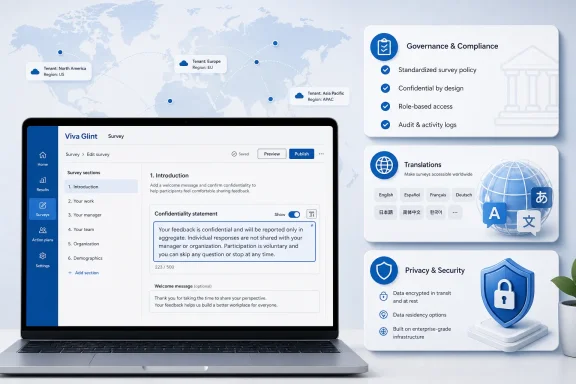
Microsoft has launched a Viva Glint feature that lets Company Admins replace the default Microsoft confidentiality statement with custom survey privacy messaging in the worldwide multi-tenant cloud, with general availability listed for June 2026. The Microsoft 365 Roadmap entry, ID 557982, was last updated on July 6, 2026, and Microsoft Learn now documents how the setting works inside Glint’s general settings. The change looks small because it is text on a survey screen; it matters because survey trust is often won or lost in exactly that text. For HR, compliance, and IT teams, Microsoft is handing over a piece of the employee-feedback contract that used to carry Microsoft’s own standardized language.
Viva Glint sits in one of Microsoft 365’s more sensitive corners: the place where employees are asked to tell management what they really think. Unlike Teams chat retention, Exchange transport rules, or Entra conditional access, survey confidentiality is not only a technical control. It is a promise, and employees read it as one.
Until now, Microsoft’s default confidentiality statement did much of that front-end work. It explained whether a survey was confidential or identifiable, how responses were aggregated, and when reporting thresholds prevented small groups from being exposed. Microsoft Learn describes that statement as appearing at the start of a survey, where it tells respondents how their answers may be reported and protected.
The new roadmap item changes the ownership model. Company Admins can turn off the default Microsoft statement and define custom confidentiality and non-confidentiality language aligned to their own program settings. In plain English, Microsoft is saying: if the default words do not match your legal posture, HR policy, country-specific obligations, or employee-relations tone, you can now write your own.
That is useful, but it is not automatically safer. The default statement had the advantage of consistency and vendor-backed phrasing. Custom wording gives organizations control, but it also gives them room to be vague, overconfident, or accidentally contradictory.
That distinction is easy to blur in an enterprise rollout. A newly customized statement may feel like a new confidentiality model because it is the part survey takers actually see. But the operational controls remain in Viva Glint’s survey configuration: confidential versus identifiable programs, minimum response thresholds, comment thresholds, raw data export settings, roles, permissions, and suppression behavior.
Microsoft’s own documentation says confidential surveys aggregate responses before reporting results, and that results are shown only when the relevant response threshold is met. It also says identifiable surveys can allow respondents to be directly or indirectly identified in reporting, which is why lifecycle scenarios such as exit surveys often need different handling.
For administrators, the lesson is blunt: writing “your responses are confidential” is not the same as configuring confidentiality. The statement should describe the system as configured, not the system as HR wishes employees would perceive it.
That is not boilerplate. It is a compact disclosure about aggregation, thresholds, comments, raw data, and organizational access. Many employees will not read a privacy policy, but they may read the paragraph at the top of a survey before deciding how candid to be.
By allowing that paragraph to be replaced, Microsoft is acknowledging that the default cannot fit every customer. A multinational employer may need language that reflects works council expectations in Europe, employee privacy expectations in California, and HR practices in Asia-Pacific. A regulated company may want tighter language around who can access raw exports. A smaller company may want less Microsoft-flavored prose and more direct internal accountability.
The catch is that Microsoft’s default statement was also a guardrail. It kept the message tethered to product behavior. When customers author their own statements, they inherit the obligation to keep wording synchronized with every relevant Glint setting.
That is convenient, but it introduces a governance problem. A global statement that applies across programs must be accurate for engagement surveys, lifecycle surveys, always-on surveys, and any program where raw data access may differ. If one sentence is too broad, it can become misleading in some contexts.
Microsoft’s documentation requires organizations using custom statements to enter both a confidentiality statement and a non-confidentiality statement. That is a sensible design choice because Glint supports both confidential and identifiable survey experiences. It also forces an uncomfortable internal conversation: if some programs are identifiable, what exactly will employees be told before they answer?
This is where IT and HR need to resist the temptation to treat the new feature as a copywriting task. It is a policy-control interface. The right people in the room are not only the Viva admin and the HR communications lead, but also privacy counsel, employee relations, security, and whoever owns data retention and export controls.
That recommendation is the quiet center of the launch. Raw response export is where confidentiality language becomes tangible. Aggregated dashboards and thresholds are one thing; a raw export that may include identifiable answers is another.
Organizations often want the analytical flexibility of raw data and the participation benefits of confidentiality messaging. Those goals can coexist only if the disclosure is precise. If a limited group can access identifiable raw responses, employees should not have to infer that from a generic statement about privacy policies or aggregation.
This is also where Microsoft’s product design shows the tension between enterprise flexibility and employee trust. The platform can support nuanced configurations, but nuance is exactly what short survey statements tend to flatten. A custom statement that says too little may increase response rates in the short term and damage credibility later.
This is a necessary warning, not a footnote. Survey confidentiality is not the kind of text that should be machine-translated casually or left inconsistent across languages. A statement that is carefully vetted in English but loosely translated into German, French, Japanese, or Spanish can create different promises for different employees.
For multinational employers, the translation burden may be heavier than the authoring burden. Legal concepts such as “confidential,” “anonymous,” “identifiable,” “aggregate,” and “raw data” do not always map cleanly across jurisdictions or workplace cultures. Even when the translation is linguistically correct, the employee’s interpretation may differ.
That makes this feature a test of operational maturity. Companies that already manage localized privacy notices, HR policies, and employee communications will absorb it. Companies that do not may discover that customizing the statement is easy; maintaining it across regions is the hard part.
That last point is crucial. Custom statements should be treated as launch-critical material, not as an afterthought after survey invitations go out. If the statement describes a threshold, that number needs to match the program configuration before launch. If the program later changes, the statement needs to change with it.
Suppression adds another layer. Thresholds prevent small groups from being reported directly, but suppression can also hide adjacent results to prevent someone from deriving a small group’s score through simple math. Employees do not need a statistics lecture at the top of a survey, but they do need an honest summary of how individual privacy is protected.
The danger is that custom statements become more reassuring than accurate. “Your responses are confidential” is a powerful sentence. In a tool with configurable thresholds, raw exports, identifiable survey types, and role-based access, it is also an incomplete sentence unless the surrounding language explains what confidentiality means in that specific program.
That is why custom confidentiality statements are a logical addition. Enterprise HR teams rarely want vendor-standard language to be the final word on employee trust. They want wording that matches internal policy, legal review, union or works council commitments, and the organization’s established voice.
Microsoft’s roadmap entry says the feature is launched for Microsoft Viva on the web, in the worldwide standard multi-tenant cloud, with general availability in June 2026. That scope tells us this is not a niche preview or a private-sector carveout. It is mainstream Viva Glint functionality for the commercial cloud.
The broader pattern is familiar across Microsoft 365. Microsoft provides the platform defaults, then progressively exposes more knobs to tenant administrators as customers demand local control. That works well for branding, retention labels, and access policies. It becomes more delicate when the knob controls the language employees rely on to decide whether to speak candidly.
A good statement should tell employees whether the survey is confidential or identifiable, whether responses are reported only in aggregate, what minimum thresholds apply, whether comments may be shown verbatim, who may access raw responses if export is enabled, and where employees can find the organization’s privacy policy. It should avoid words like “anonymous” unless the configuration truly supports that claim.
It should also be auditable. If a dispute arises, the organization should be able to show what statement was displayed, in which language, for which survey program, at what point in time. That may sound bureaucratic, but employee-feedback systems live in the real world of grievances, investigations, labor relations, and regulatory scrutiny.
IT teams can help by treating the statement as configuration-managed content. Store approved text, translations, review dates, and associated survey settings in a controlled process. The admin center field may be a text box, but the process around it should not be ad hoc.
That has implications for role design. Not every Glint admin should necessarily be able to alter confidentiality language without review. If the organization uses privileged access workflows for security-sensitive changes, it should consider comparable controls for HR privacy-sensitive changes.
Change management also matters. If a company switches from Microsoft’s default statement to custom language, employees may notice. If the wording changes between survey cycles, some will ask why. That is not a reason to avoid customization, but it is a reason to communicate deliberately.
The best outcome is that the custom statement becomes clearer than the default. The worst outcome is that it becomes more comfortable for the organization and less informative for employees. The difference will come down to governance, not technology.
 Microsoft Moves the Trust Boundary From Redmond to the Tenant
Viva Glint sits in one of Microsoft 365’s more sensitive corners: the place where employees are asked to tell management what they really think. Unlike Teams chat retention, Exchange transport rules, or Entra conditional access, survey confidentiality is not only a technical control. It is a promise, and employees read it as one.Until now, Microsoft’s default confidentiality statement did much of that front-end work. It explained whether a survey was confidential or identifiable, how responses were aggregated, and when reporting thresholds prevented small groups from being exposed. Microsoft Learn describes that statement as appearing at the start of a survey, where it tells respondents how their answers may be reported and protected.
The new roadmap item changes the ownership model. Company Admins can turn off the default Microsoft statement and define custom confidentiality and non-confidentiality language aligned to their own program settings. In plain English, Microsoft is saying: if the default words do not match your legal posture, HR policy, country-specific obligations, or employee-relations tone, you can now write your own.
That is useful, but it is not automatically safer. The default statement had the advantage of consistency and vendor-backed phrasing. Custom wording gives organizations control, but it also gives them room to be vague, overconfident, or accidentally contradictory.
The Feature Is Not a New Privacy Control, and That Distinction Matters
The most important thing about this launch is what it does not do. Custom confidentiality statements do not change the underlying reporting mechanics of Viva Glint. Microsoft Learn states that thresholds and suppression rules still apply; the custom statement is the message shown to employees, not the engine that determines which results appear in reports.That distinction is easy to blur in an enterprise rollout. A newly customized statement may feel like a new confidentiality model because it is the part survey takers actually see. But the operational controls remain in Viva Glint’s survey configuration: confidential versus identifiable programs, minimum response thresholds, comment thresholds, raw data export settings, roles, permissions, and suppression behavior.
Microsoft’s own documentation says confidential surveys aggregate responses before reporting results, and that results are shown only when the relevant response threshold is met. It also says identifiable surveys can allow respondents to be directly or indirectly identified in reporting, which is why lifecycle scenarios such as exit surveys often need different handling.
For administrators, the lesson is blunt: writing “your responses are confidential” is not the same as configuring confidentiality. The statement should describe the system as configured, not the system as HR wishes employees would perceive it.
Viva Glint’s Default Language Was Doing More Than Filling Space
Microsoft’s default Viva Glint confidentiality language has always carried a lot of burden. According to Microsoft Learn, default confidential survey statements can explain that responses are reported in aggregate groups, that comments may be shown verbatim only after a threshold is met, and that employees should avoid identifying themselves in comments. In some configurations, the statement also tells employees that a limited number of people may have access to identifiable survey responses when raw response export is enabled.That is not boilerplate. It is a compact disclosure about aggregation, thresholds, comments, raw data, and organizational access. Many employees will not read a privacy policy, but they may read the paragraph at the top of a survey before deciding how candid to be.
By allowing that paragraph to be replaced, Microsoft is acknowledging that the default cannot fit every customer. A multinational employer may need language that reflects works council expectations in Europe, employee privacy expectations in California, and HR practices in Asia-Pacific. A regulated company may want tighter language around who can access raw exports. A smaller company may want less Microsoft-flavored prose and more direct internal accountability.
The catch is that Microsoft’s default statement was also a guardrail. It kept the message tethered to product behavior. When customers author their own statements, they inherit the obligation to keep wording synchronized with every relevant Glint setting.
Admin Convenience Becomes a Governance Problem
The setting lives where many such tenant-wide choices live: in administrative configuration. Microsoft Learn’s guidance for Viva Glint general settings says organizations can switch off “Show default Microsoft statements” and enter their own confidentiality statement and non-confidentiality statement. The same documentation says the custom statements apply across survey programs, with the system selecting the relevant statement depending on the program’s confidentiality threshold.That is convenient, but it introduces a governance problem. A global statement that applies across programs must be accurate for engagement surveys, lifecycle surveys, always-on surveys, and any program where raw data access may differ. If one sentence is too broad, it can become misleading in some contexts.
Microsoft’s documentation requires organizations using custom statements to enter both a confidentiality statement and a non-confidentiality statement. That is a sensible design choice because Glint supports both confidential and identifiable survey experiences. It also forces an uncomfortable internal conversation: if some programs are identifiable, what exactly will employees be told before they answer?
This is where IT and HR need to resist the temptation to treat the new feature as a copywriting task. It is a policy-control interface. The right people in the room are not only the Viva admin and the HR communications lead, but also privacy counsel, employee relations, security, and whoever owns data retention and export controls.
The Raw Export Sentence Is the One Everyone Will Argue About
Microsoft Learn notes an optional raw data export statement that can be used to tell survey takers their responses may be identifiable in raw survey data exports when that feature is enabled. The documentation says including that statement is strongly recommended when raw data exports are enabled, because transparency helps build trust with participants.That recommendation is the quiet center of the launch. Raw response export is where confidentiality language becomes tangible. Aggregated dashboards and thresholds are one thing; a raw export that may include identifiable answers is another.
Organizations often want the analytical flexibility of raw data and the participation benefits of confidentiality messaging. Those goals can coexist only if the disclosure is precise. If a limited group can access identifiable raw responses, employees should not have to infer that from a generic statement about privacy policies or aggregation.
This is also where Microsoft’s product design shows the tension between enterprise flexibility and employee trust. The platform can support nuanced configurations, but nuance is exactly what short survey statements tend to flatten. A custom statement that says too little may increase response rates in the short term and damage credibility later.
Localization Turns One Statement Into a Fleet of Promises
The roadmap item may describe a single feature, but Microsoft’s implementation is multilingual. Microsoft Learn says organizations are responsible for translating customized statements into configured survey languages, and that if translations are not added for a survey language, survey takers in that language see a default message indicating that customized privacy messaging is not included.This is a necessary warning, not a footnote. Survey confidentiality is not the kind of text that should be machine-translated casually or left inconsistent across languages. A statement that is carefully vetted in English but loosely translated into German, French, Japanese, or Spanish can create different promises for different employees.
For multinational employers, the translation burden may be heavier than the authoring burden. Legal concepts such as “confidential,” “anonymous,” “identifiable,” “aggregate,” and “raw data” do not always map cleanly across jurisdictions or workplace cultures. Even when the translation is linguistically correct, the employee’s interpretation may differ.
That makes this feature a test of operational maturity. Companies that already manage localized privacy notices, HR policies, and employee communications will absorb it. Companies that do not may discover that customizing the statement is easy; maintaining it across regions is the hard part.
Thresholds Are Still the Machinery Beneath the Message
Viva Glint’s confidentiality model depends heavily on thresholds. Microsoft Learn says the default threshold for rated or multiple-choice items is five responses, while comments commonly use a higher threshold, and administrators can adjust certain thresholds within product limits. The documentation also warns that thresholds cannot be changed for programs or cycles after they have launched and collected response data.That last point is crucial. Custom statements should be treated as launch-critical material, not as an afterthought after survey invitations go out. If the statement describes a threshold, that number needs to match the program configuration before launch. If the program later changes, the statement needs to change with it.
Suppression adds another layer. Thresholds prevent small groups from being reported directly, but suppression can also hide adjacent results to prevent someone from deriving a small group’s score through simple math. Employees do not need a statistics lecture at the top of a survey, but they do need an honest summary of how individual privacy is protected.
The danger is that custom statements become more reassuring than accurate. “Your responses are confidential” is a powerful sentence. In a tool with configurable thresholds, raw exports, identifiable survey types, and role-based access, it is also an incomplete sentence unless the surrounding language explains what confidentiality means in that specific program.
Microsoft Is Letting Customers Speak in Their Own Voice Because Viva Has Become HR Infrastructure
Viva began life as Microsoft’s employee-experience layer for Microsoft 365, but products like Glint have pushed it deeper into HR infrastructure. Glint is not just another app tile. It is a system of record for employee sentiment, engagement programs, lifecycle feedback, and leadership reporting.That is why custom confidentiality statements are a logical addition. Enterprise HR teams rarely want vendor-standard language to be the final word on employee trust. They want wording that matches internal policy, legal review, union or works council commitments, and the organization’s established voice.
Microsoft’s roadmap entry says the feature is launched for Microsoft Viva on the web, in the worldwide standard multi-tenant cloud, with general availability in June 2026. That scope tells us this is not a niche preview or a private-sector carveout. It is mainstream Viva Glint functionality for the commercial cloud.
The broader pattern is familiar across Microsoft 365. Microsoft provides the platform defaults, then progressively exposes more knobs to tenant administrators as customers demand local control. That works well for branding, retention labels, and access policies. It becomes more delicate when the knob controls the language employees rely on to decide whether to speak candidly.
The Best Custom Statement Will Be Boring, Specific, and Auditable
There is a temptation to use custom confidentiality messaging as an employee-engagement exercise. Make it warmer. Make it more human. Make it sound less like Microsoft and more like the company. Those are reasonable goals, but they should come after accuracy.A good statement should tell employees whether the survey is confidential or identifiable, whether responses are reported only in aggregate, what minimum thresholds apply, whether comments may be shown verbatim, who may access raw responses if export is enabled, and where employees can find the organization’s privacy policy. It should avoid words like “anonymous” unless the configuration truly supports that claim.
It should also be auditable. If a dispute arises, the organization should be able to show what statement was displayed, in which language, for which survey program, at what point in time. That may sound bureaucratic, but employee-feedback systems live in the real world of grievances, investigations, labor relations, and regulatory scrutiny.
IT teams can help by treating the statement as configuration-managed content. Store approved text, translations, review dates, and associated survey settings in a controlled process. The admin center field may be a text box, but the process around it should not be ad hoc.
The Small Text Box Now Carries Enterprise Risk
For WindowsForum readers, the practical significance is not that Viva Glint gained another admin switch. It is that Microsoft 365 continues to blur the line between productivity administration and organizational governance. The person who can change a tenant setting may now be changing the words that define employee trust.That has implications for role design. Not every Glint admin should necessarily be able to alter confidentiality language without review. If the organization uses privileged access workflows for security-sensitive changes, it should consider comparable controls for HR privacy-sensitive changes.
Change management also matters. If a company switches from Microsoft’s default statement to custom language, employees may notice. If the wording changes between survey cycles, some will ask why. That is not a reason to avoid customization, but it is a reason to communicate deliberately.
The best outcome is that the custom statement becomes clearer than the default. The worst outcome is that it becomes more comfortable for the organization and less informative for employees. The difference will come down to governance, not technology.
The Admin Checklist Microsoft Quietly Made Necessary
This launch deserves more than a casual glance in the Microsoft 365 admin center because it changes who owns the survey privacy narrative. Before using it, organizations should slow down long enough to compare the words they want with the controls they actually configured.- Organizations should verify whether each Viva Glint program is confidential or identifiable before replacing Microsoft’s default statement.
- Administrators should confirm the exact response, rating, comment, and suppression thresholds that the statement describes.
- If raw response exports are enabled, the custom language should plainly disclose who may access identifiable data and under what circumstances.
- Translations should be reviewed as policy language, not treated as ordinary product localization.
- Change records should preserve the statement shown for each survey cycle, including language versions and approval history.
- Viva Glint admin permissions should be reviewed so that confidentiality messaging cannot be changed casually by the wrong role.
References
- Primary source: Microsoft 365 Roadmap
Published: 2026-07-06T23:00:50.6928566Z
Loading…
www.microsoft.com - Related coverage: m365admin.handsontek.net
Loading…
m365admin.handsontek.net - Official source: learn.microsoft.com
Loading…
learn.microsoft.com - Official source: support.microsoft.com
Loading…
support.microsoft.com - Official source: cdn-dynmedia-1.microsoft.com
- Official source: adoption.microsoft.com
Loading…
adoption.microsoft.com