

Visual Studio Code 1.129.1 is now rolling out with an experimental Modern UI preview that changes the workbench itself—not merely its color palette—while a new agent-host architecture pushes Microsoft’s coding assistant work deeper into the editor. The feature is off by default in the stable Windows build, but it is already enabled in VS Code Insiders.
Microsoft published VS Code 1.129 on July 15, 2026, then issued the 1.129.1 servicing update on July 17. As detailed in Microsoft’s release notes and first highlighted by Linuxiac, the release combines a cosmetic preview with more consequential changes to how Copilot, Claude, and Codex agent sessions can run and be reviewed inside VS Code.
For Windows developers, the immediate practical change is optional: search Settings for
The Modern UI preview recasts VS Code’s familiar dark workbench into a more layered arrangement. Rather than letting the Explorer, editor groups, panel, Activity Bar, menus, and toolbars visually run together, the design separates them with spacing, rounded corners, and softer borders.
Linuxiac’s early look describes floating-style menus and card-like panel surfaces, while Microsoft’s own release notes characterize it more cautiously as a modernized appearance for the editor workbench. The distinction matters: this is not a Windows 11-specific rewrite or a new rendering platform. It is a redesign of the interface users already see across Windows, macOS, Linux, and the web-oriented VS Code family.
The payoff is primarily visual orientation. In a crowded workspace—Explorer on the left, terminal below, a pair of split editors, source control activity, and an AI chat panel competing for attention—clearer boundaries can make it easier to see where one task ends and another begins. The trade-off is that additional gaps and rounded containers consume a little visual real estate, a recurring point of contention in developer tools where density is often valued as highly as polish.
This first preview does not promise a permanent replacement for the current VS Code layout. Microsoft has deliberately put the feature behind
Administrators who distribute VS Code should treat the setting as a user-experience experiment rather than a new baseline. There is no stated requirement to enable it for the agent features arriving in the same release, and there is little reason to standardize on an experimental presentation layer before Microsoft settles its behavior across themes, DPI configurations, accessibility tooling, and extensions.
According to Microsoft, that process can host agent harnesses including GitHub Copilot, Claude, and Codex. Because the session exists independently of a single editor window, the same session can be connected to and rendered from multiple VS Code windows. That is a meaningful shift from the simpler model of an AI conversation being tied to the one window where it was started.
The agent host is still being rolled out, and it is opt-in through
That management angle is worth watching. A dedicated host creates a more unified experience for agent sessions, but it also centralizes a category of work that can touch repositories, terminals, worktrees, source-control operations, and credentials. The architecture does not remove VS Code’s existing approval model, yet it expands the ways an agent can coordinate work across sessions.
In 1.129, agents running through the host can list sessions, inspect recent conversation context, create a session or chat for a subtask, and act on other sessions. Microsoft says sending a message to another session still requires user confirmation, and the product caps bursts of session sends to prevent one request from multiplying into an uncontrolled tree of agent activity.
That last safeguard is not a footnote. It reflects the difference between a chatbot that answers in one pane and an agent system that can delegate work, coordinate multiple threads, and interact with development environments. The first is mostly a productivity feature; the second begins to look like a workflow platform.
With
The design is a practical response to a common problem with AI-assisted programming: generating code is easy; reviewing it carefully is not. By placing diffs inside an interface that behaves like VS Code’s primary editor, Microsoft is trying to reduce the friction between an agent’s proposed changes and the developer’s normal inspection workflow.
That does not make the review process inherently safer. Side-by-side diffs and restored tabs can make inspection more efficient, but they do not replace code review, testing, branch protections, or an understanding of what an agent has modified. For teams using Git worktrees, the new-session flow now exposes worktree isolation as a checkbox, making it easier to keep an agent’s changes in a separate folder before they are merged.
For experienced developers, this could remove a few clicks when alternating between a conversation and the integrated terminal. It also makes the chat pane a more powerful control surface, which reinforces why organizations should review their agent-host policies, workspace-trust practices, and approval settings before enabling the feature broadly.
Microsoft has limited the command capability to agent-host sessions in the editor and Agents window. It is not presented as a general replacement for the integrated terminal, and it should not be mistaken for an autonomous shell: the usefulness and risk profile will depend on the chosen agent harness, project permissions, workspace contents, and the command itself.
The same release extends Copilot agent-host support to Bring Your Own Key models and adds GitHub Enterprise authentication for Copilot in the host. Previously, Microsoft says a GitHub Enterprise-backed Copilot subscription could not complete the required sign-in because the authentication flow targeted GitHub.com. The new support lets users select their GitHub Enterprise instance for authentication and token requests.
Windows users interested in the new appearance can enable the Modern UI preview now in VS Code 1.129.1, while Insiders users will see it by default. For developers and IT teams, the more consequential milestone will be Microsoft’s next decisions on the agent host: whether it remains an opt-in experiment, how its controls mature, and how much of the emerging multi-agent workflow becomes standard VS Code behavior.
Microsoft published VS Code 1.129 on July 15, 2026, then issued the 1.129.1 servicing update on July 17. As detailed in Microsoft’s release notes and first highlighted by Linuxiac, the release combines a cosmetic preview with more consequential changes to how Copilot, Claude, and Codex agent sessions can run and be reviewed inside VS Code.
For Windows developers, the immediate practical change is optional: search Settings for
workbench.experimental.modernUI, enable it, and reload the application. Teams that prefer a predictable editor environment can leave it alone. Microsoft labels the workbench overhaul experimental, which is a sensible warning for users with elaborate layouts, accessibility settings, custom themes, and extension-heavy installations.
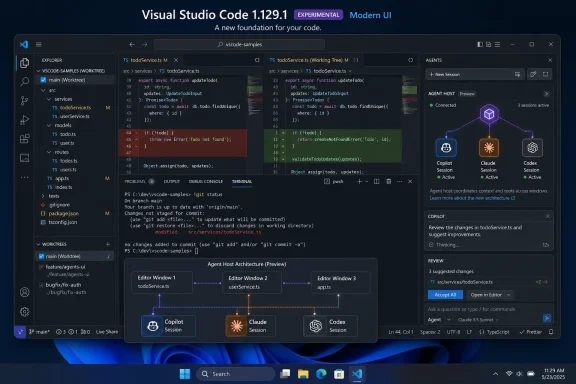 The Workbench Is Becoming a Set of Distinct Surfaces
The Modern UI preview recasts VS Code’s familiar dark workbench into a more layered arrangement. Rather than letting the Explorer, editor groups, panel, Activity Bar, menus, and toolbars visually run together, the design separates them with spacing, rounded corners, and softer borders.Linuxiac’s early look describes floating-style menus and card-like panel surfaces, while Microsoft’s own release notes characterize it more cautiously as a modernized appearance for the editor workbench. The distinction matters: this is not a Windows 11-specific rewrite or a new rendering platform. It is a redesign of the interface users already see across Windows, macOS, Linux, and the web-oriented VS Code family.
The payoff is primarily visual orientation. In a crowded workspace—Explorer on the left, terminal below, a pair of split editors, source control activity, and an AI chat panel competing for attention—clearer boundaries can make it easier to see where one task ends and another begins. The trade-off is that additional gaps and rounded containers consume a little visual real estate, a recurring point of contention in developer tools where density is often valued as highly as polish.
This first preview does not promise a permanent replacement for the current VS Code layout. Microsoft has deliberately put the feature behind
workbench.experimental.modernUI in stable releases while turning it on by default in Insiders. That split gives the company a large enough testing audience without forcing production users to adjust to a different visual hierarchy overnight.Administrators who distribute VS Code should treat the setting as a user-experience experiment rather than a new baseline. There is no stated requirement to enable it for the agent features arriving in the same release, and there is little reason to standardize on an experimental presentation layer before Microsoft settles its behavior across themes, DPI configurations, accessibility tooling, and extensions.
The More Important Change Runs Behind the Chat Window
The headline UI redesign may be the most visible part of VS Code 1.129, but the new agent host is the architectural change with longer-term implications. Microsoft is moving supported coding-agent sessions into a dedicated process based on the Agent Host Protocol, or AHP.According to Microsoft, that process can host agent harnesses including GitHub Copilot, Claude, and Codex. Because the session exists independently of a single editor window, the same session can be connected to and rendered from multiple VS Code windows. That is a meaningful shift from the simpler model of an AI conversation being tied to the one window where it was started.
The agent host is still being rolled out, and it is opt-in through
chat.agentHost.enabled. Microsoft also notes that the setting can be managed at the organization level, which gives enterprises an important policy point: developers may not be able to activate the feature themselves if their administrator controls it.That management angle is worth watching. A dedicated host creates a more unified experience for agent sessions, but it also centralizes a category of work that can touch repositories, terminals, worktrees, source-control operations, and credentials. The architecture does not remove VS Code’s existing approval model, yet it expands the ways an agent can coordinate work across sessions.
In 1.129, agents running through the host can list sessions, inspect recent conversation context, create a session or chat for a subtask, and act on other sessions. Microsoft says sending a message to another session still requires user confirmation, and the product caps bursts of session sends to prevent one request from multiplying into an uncontrolled tree of agent activity.
That last safeguard is not a footnote. It reflects the difference between a chatbot that answers in one pane and an agent system that can delegate work, coordinate multiple threads, and interact with development environments. The first is mostly a productivity feature; the second begins to look like a workflow platform.
Agent Reviews Get a More Editor-Like Home
VS Code’s separate Agents window also receives an experimental editor panel in 1.129. It brings the files and diffs generated by an agent into a docked editor next to the conversation, with a shared tab bar intended to make review feel closer to normal editor work.With
sessions.layout.singlePaneDetailPanel enabled and the window reloaded, users can open generated files and diffs alongside the chat. The panel supports inline and side-by-side diff views, bulk expand or collapse for changed files, persistent open editors and pane widths across session switches, and actions such as creating a pull request from the editor tab area.The design is a practical response to a common problem with AI-assisted programming: generating code is easy; reviewing it carefully is not. By placing diffs inside an interface that behaves like VS Code’s primary editor, Microsoft is trying to reduce the friction between an agent’s proposed changes and the developer’s normal inspection workflow.
That does not make the review process inherently safer. Side-by-side diffs and restored tabs can make inspection more efficient, but they do not replace code review, testing, branch protections, or an understanding of what an agent has modified. For teams using Git worktrees, the new-session flow now exposes worktree isolation as a checkbox, making it easier to keep an agent’s changes in a separate folder before they are merged.
A Bang Prefix Brings the Terminal Into the Conversation
The release also adds a terse new interaction model for agent-host chats: prefix a prompt with! to run it as a terminal command. In effect, a message beginning with that character becomes a direct command invocation rather than a natural-language instruction for the agent.For experienced developers, this could remove a few clicks when alternating between a conversation and the integrated terminal. It also makes the chat pane a more powerful control surface, which reinforces why organizations should review their agent-host policies, workspace-trust practices, and approval settings before enabling the feature broadly.
Microsoft has limited the command capability to agent-host sessions in the editor and Agents window. It is not presented as a general replacement for the integrated terminal, and it should not be mistaken for an autonomous shell: the usefulness and risk profile will depend on the chosen agent harness, project permissions, workspace contents, and the command itself.
The same release extends Copilot agent-host support to Bring Your Own Key models and adds GitHub Enterprise authentication for Copilot in the host. Previously, Microsoft says a GitHub Enterprise-backed Copilot subscription could not complete the required sign-in because the authentication flow targeted GitHub.com. The new support lets users select their GitHub Enterprise instance for authentication and token requests.
A Preview Worth Testing, Not Deploying as Policy
VS Code 1.129 is a notable release because its two main themes point in different directions. The Modern UI is a cautious attempt to make a dense cross-platform editor feel more legible and contemporary. The agent host is a more substantial attempt to make AI sessions persistent, shareable, and increasingly capable across the development workflow.Windows users interested in the new appearance can enable the Modern UI preview now in VS Code 1.129.1, while Insiders users will see it by default. For developers and IT teams, the more consequential milestone will be Microsoft’s next decisions on the agent host: whether it remains an opt-in experiment, how its controls mature, and how much of the emerging multi-agent workflow becomes standard VS Code behavior.