

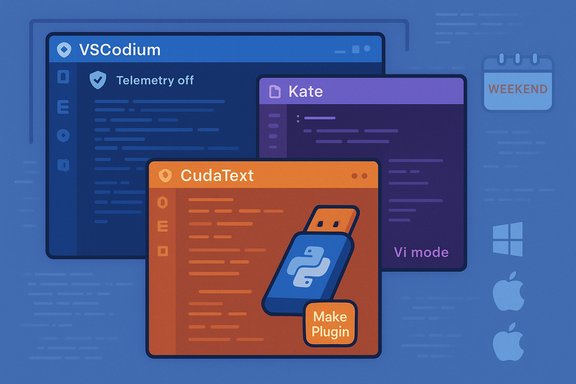
The coding editor landscape is crowded, but sometimes the best tools are the ones you haven’t heard of yet — compact, opinionated, and fast. A recent weekend-ready roundup highlights three under-the-radar Windows-friendly programming editors — VSCodium, Kate, and CudaText — each offering a distinct balance of privacy, cross-platform polish, and portability that makes them worth testing this weekend.
The last decade saw Visual Studio Code popularize a new breed of editor: lightweight out of the box, extensible by design, and comfortable enough to replace heavier IDEs in many workflows. That success brought a predictable side effect: large vendor-backed builds, embedded telemetry, and a sprawling extension marketplace that can feel like lock-in. Alternatives such as VSCodium, or long-standing cross-platform editors like Kate and CudaText, aim to capture the useful parts of modern editors while removing either telemetry, platform lock-in, or heavyweight installers. This article summarizes what each tool offers, verifies the key technical claims, and evaluates practical tradeoffs so you can decide which to try first.
Conclusion: if your editing workflow feels sluggish, overly telemetered, or just overly opinionated by a single vendor, download one of these and run it alongside your regular tools this weekend. The friction to try them is low; the potential upside — speed, privacy, and a more focused editing experience — is high.
Source: How-To Geek 3 obscure Windows programming apps to try this weekend
 Background / Overview
The last decade saw Visual Studio Code popularize a new breed of editor: lightweight out of the box, extensible by design, and comfortable enough to replace heavier IDEs in many workflows. That success brought a predictable side effect: large vendor-backed builds, embedded telemetry, and a sprawling extension marketplace that can feel like lock-in. Alternatives such as VSCodium, or long-standing cross-platform editors like Kate and CudaText, aim to capture the useful parts of modern editors while removing either telemetry, platform lock-in, or heavyweight installers. This article summarizes what each tool offers, verifies the key technical claims, and evaluates practical tradeoffs so you can decide which to try first.Why these three editors matter
- They span three useful use cases for Windows developers:
- VSCodium — a telemetry-free build of the VS Code codebase with near-identical features and extension compatibility (modulo marketplace differences).
- Kate — a fast, full-featured KDE-origin editor tuned for multi-file editing, with deep language support, LSP integration, and Vi-mode for keyboard-first users.
- CudaText — an ultralight, portable editor with a Python-based plugin system that’s easy to run from a USB stick and tailor with small add-ons.
VSCodium — VS Code without Microsoft-run telemetry
What it is and why it exists
VSCodium is a community project that builds Visual Studio Code from the upstream open-source sources and ships binaries that omit Microsoft-specific branding, telemetry endpoints, and the proprietary Marketplace endpoint. The result is a near‑drop‑in substitute for VS Code that defaults to telemetry off and uses the Open VSX registry instead of the Visual Studio Marketplace.Verified features and claims
- Built from the upstream vscode repository and published as nightly/periodic binaries.
- Uses the community Open VSX registry for extension discovery by default; extensions published only to Microsoft’s closed Marketplace may be absent.
- Telemetry and product-specific endpoints configured out of the delivered build so that the VSCodium binaries do not call Microsoft telemetry by default — though extensions themselves can still collect telemetry if they are written to do so.
Strengths
- Familiar UX: Because VSCodium is compiled from the same open-source base, the editing experience, keybindings, and most extension APIs match VS Code closely.
- Privacy-first defaults: telemetry is disabled in the shipped product config, so casual telemetry collection by the host editor is effectively removed.
- Cross-platform parity: Windows, macOS, and Linux binaries are available; daily build automation is visible in the project workflows.
Practical caveats & risks
- Extension availability: Some extensions are published only to Microsoft’s Marketplace or are subject to licensing that prohibits use outside the MS distribution. Those extensions won’t show up in Open VSX. You can sideload .vsix packages, but that requires manual update management and may violate a publisher’s distribution terms.
- Extension telemetry: Even with VSCodium’s telemetry removed, third‑party extensions may send their own telemetry. Audit critical extensions before use.
- Enterprise policies: Corporate platforms that standardize on Microsoft-branded Visual Studio Code (for licensing or support) may block the unbranded builds. Confirm with IT before mass deployment.
How to try it this weekend (quick steps)
- Download the official VSCodium release for Windows from the project releases page and verify the checksum.
- Install and open Settings → Telemetry to confirm telemetryLevel is not set to “all” (VSCodium’s default product.json sets telemetry off).
- Install core extensions you need — if an extension is missing from Open VSX, look for a .vsix on the author’s repo or consider upstream VS Code only extensions as potential blockers.
Kate — KDE Advanced Text Editor on Windows
What it is
Kate is KDE’s advanced text editor designed for programmers. It’s matured in the KDE Application ecosystem and provides robust multi-document editing, built-in terminal support, LSP integration, syntax highlighting for 300+ languages, and an optional Vi-mode for keyboard-first editing. Kate is available cross-platform, including a Windows build (and historically has been published on the Microsoft Store and package managers).Verified features and claims
- 300+ language syntaxes and features such as code folding, multiple cursors, integrated terminal, and LSP-based auto-completion are listed on the official project pages.
- Vi mode (modal keybindings emulating classic Vim behavior) and plugin extensibility are first-class features in the Kate release notes and documentation.
Strengths
- Full-featured, editor-focused: Kate offers robust language support, multi-view layouts, and project handling without being a full IDE; it’s especially attractive for developers who prefer a consistent, native-looking app across Linux and Windows.
- LSP & modern editor integrations: Kate supports Language Server Protocol clients, which enables modern editor tooling (auto-complete, go-to-definition, diagnostics).
- Polished keyboard-first options: Vi mode and many keyboard-driven features make Kate productive for users who prefer a strong keyboard workflow.
Practical caveats & risks
- Windows distribution channels vary: KDE apps have multiple distribution channels on Windows (native installers, winget, or Microsoft Store), which can sometimes lead to confusion about the “official” build to download. Prefer the KDE project pages or the Windows package manager for consistent updates.
- Plugin ecosystem maturity: Kate’s plugin ecosystem is powerful, but fewer commercial extensions exist compared with VS Code; heavy IDE capabilities (native debugging, deep refactoring) may still require pairing with other tools.
How to try it this weekend (quick steps)
- Get Kate via the KDE applications page or via the Windows package manager (winget / Microsoft Store where available). Confirm the build is from KDE.
- Open a project or folder, enable LSP for any languages you use (install the appropriate language server separately), and try the Vi mode if you’re keyboard-centric.
- Customize the integrated terminal and file tree to match your workflow: Kate’s settings let you map actions and split windows aggressively for multi-file tasks.
CudaText — the ultralight, portable power editor
What it is
CudaText is an aggressively lightweight, cross-platform text editor with deep syntax support and a Python-based plugin system. It’s distributed as a portable ZIP for Windows, meaning no installer and easy USB deployment, and it ships with a “Make Plugin” helper and a Python plugin API so you can script new functionality quickly. Official project pages and PortableApps packaging confirm portable builds and broad language coverage.Verified features and claims
- Portable ZIP/executable builds for Windows so users can run CudaText without installation (a PortableApps package is also maintained).
- Python plugin API with “Make Plugin” scaffolding, letting you create commands, hotkeys, and event-driven behaviors right inside the editor. That tooling is documented in the project’s plugin wiki and shipped plugin examples.
- 300+ lexers / syntax highlighting are claimed on the project pages (the project’s lexer count and the feature set are stable project claims).
Strengths
- Tiny startup cost: CudaText launches quickly on older hardware and is highly responsive, making it a solid choice for low-powered machines or quick edits.
- Truly portable: The ZIP distribution and the PortableApps packaging make it convenient to carry on a flash drive or use on machines where you cannot install software.
- Scriptable via Python: The plugin API and "Make Plugin" generator let you prototype editor actions fast, including code-formatting, snippets, or custom commands.
Practical caveats & risks
- UX and polish tradeoffs: The editor’s minimal footprint means some niceties (deep UI polish, bundled integrations) found in larger editors may be missing; you’ll often rely on plugins or external tools.
- Plugin quality variance: The ease of extending via Python invites a wide range of addons; as with any community addon ecosystem, quality varies. Test plugins in a disposable environment if you depend on them for production work.
- Compatibility with very old Windows builds: While many users have run CudaText on older Windows versions, verify the particular binary’s compatibility (Windows 7/8/10/11 support can vary between releases). Use the PortableApps or project release notes to confirm compatibility for your target OS.
How to try it this weekend (quick steps)
- Download the ZIP portable package from the official project downloads or PortableApps and extract it to a folder or flash drive. Run the executable — no installer required.
- Try “Plugins → Make Plugin” to scaffold a tiny Python plugin (e.g., a snippet inserter or a file transform) and restart to see it appear in the menu.
- Add a few lexers or the add-ons pack if you need extra syntax support; test large files and performance if you rely on large log parsing or binary viewers.
Side-by-side comparison (practical lens)
- Use VSCodium if you want the VS Code experience but prefer an upstream build without Microsoft-managed telemetry or branding. It’s the easiest swap for teams that already use VS Code’s keybindings and extensions — except you may need alternative extension sources or manual VSIX sideloading for some Microsoft-only extensions.
- Use Kate if you prefer a cross-platform, feature-dense editor with native GTK/Qt polish, integrated terminal, and robust LSP support; it’s especially attractive for users who toggle between Linux and Windows machines.
- Use CudaText if you need something ultra-lightweight, portable, and scriptable with Python — a great “editor on a stick” for sysadmins, support engineers, or anyone who hops between machines.
Security, compatibility, and maintenance checklist
- Verify download origins: always use official project sites, GitHub releases, or trusted package managers (winget, PortableApps) and check checksums when provided.
- Audit extensions/plugins: extensions can introduce telemetry or supply remote endpoints. Disable or avoid plugins you can’t verify.
- Test in a sandbox: for critical workflows, trial the editor and any plugin combinations on a non-production profile or virtual machine before migrating daily work.
- Maintain update discipline: community projects sometimes have fast release cadences; pick a stable release for mission-critical workflows and test plugin updates before committing.
What to watch for (risks and limitations)
- Claims about exact extension counts, “7,500+ plugins” or similar marketplace numbers change over time and are poor anchors for decision-making. Treat numeric extension counts as indicative rather than definitive; focus instead on whether the extensions you need exist and are maintained. (If you need a hard count for reporting, fetch the marketplace stats before making a migration decision. Unverifiable claims about exact extension totals are flagged here as time-sensitive.
- Enterprise constraints: corporate device policies, application whitelists, or security controls may prohibit non-store or unsigned binaries. Coordinate with IT if you plan broad rollouts.
- Extension and licensing traps: Some commercial extensions or debug adapters are explicitly licensed for Microsoft’s build only. If you rely on a proprietary extension, confirm license and compatibility before switching to an alternative build.
Verdict — Pick your weekend experiment
- If you want the familiar VS Code experience with telemetry removed: install VSCodium, verify the extensions you need are available on Open VSX or as a manual .vsix, and keep a fallback plan (plain VS Code) if a key extension is incompatible.
- If you want a full-featured editor that behaves consistently across Linux and Windows: try Kate — enable LSP for your major languages and test its multi-pane workflows.
- If you want a pocketable, low-resource editor with a scripting surface: drop CudaText on a flash drive and prototype a Python plugin to automate a repetitive edit task — you’ll be surprised how many editor chores you can automate in just a few lines.
Final notes and practical next steps
- Pick one editor and give it a two-hour test: open a representative project, enable language servers, run a few edits, and try your standard extensions or plugins. Keep a short test log of what worked and what didn’t.
- If privacy is the motivating factor, audit each installed extension for network calls; disable everything non-essential and opt for open-source plugins where possible.
- If you decide to adopt any of these editors permanently in a team or enterprise setting, formalize a test plan: compatibility matrix, extension whitelist, and an update cadence to avoid surprises.
Conclusion: if your editing workflow feels sluggish, overly telemetered, or just overly opinionated by a single vendor, download one of these and run it alongside your regular tools this weekend. The friction to try them is low; the potential upside — speed, privacy, and a more focused editing experience — is high.
Source: How-To Geek 3 obscure Windows programming apps to try this weekend
