

The article’s core claim is straightforward: Kate has become a credible lightweight Notepad++ replacement for Windows users who want something faster, cleaner, and more capable than a plain text box without jumping all the way to VS Code. The appeal comes from its native feel, session restore, split views, built-in terminal, LSP support, and a plugin set that ships ready to use rather than demanding constant extension hunting. For users frustrated by Notepad++’s tab persistence or startup overhead, the switch can feel less like a compromise and more like an upgrade. That same pattern shows up repeatedly in Windows editor discussions: users want just enough power without paying the usual cost in clutter or lag, and Kate hits that sweet spot more often than not
The broader story here is not really about one editor replacing another. It is about the growing divide between tools that are merely familiar and tools that still feel pleasant to use after years of daily repetition. Notepad++ has long occupied a valuable middle ground for Windows users, but once an editor starts feeling sluggish, its strengths can stop mattering in the moment and become theoretical instead. That is exactly the kind of friction that pushes people to look elsewhere.
Kate’s pitch is compelling because it does not ask you to give up the things that matter most in a daily text editor. It preserves tabs, document sessions, syntax highlighting, multi-pane editing, and a straightforward interface, while also opening the door to more advanced workflows if you need them. That combination is rare in the Windows ecosystem, where “lightweight” often means “limited,” and “powerful” often means “bloated.”
The article also reflects a common Windows trend: users are increasingly willing to adopt cross-platform open-source software if it behaves like a first-class native app. That matters because many alternatives still feel like transplanted web wrappers or awkward ports. Kate’s Windows build is presented as a proper native experience, which is part of why the switch feels sustainable rather than experimental
There is also a practical subtext worth noting. When a simple editor starts remembering too much, loading too much, or surfacing tabs you do not want, it stops feeling lightweight even if the feature list looks small on paper. Kate earns attention precisely because it solves that everyday annoyance without demanding a workflow rewrite. That is a stronger argument than any benchmark table could make.
Kate’s value proposition is that it behaves like an advanced tool only when you need it to. Otherwise, it stays out of the way. That balance is what makes it worth comparing to Notepad++, and also what makes it more appealing than jumping immediately to VS Code.
That historical stability gives Kate a different personality from many modern editor competitors. It is not a product designed around hype cycles or subscription value narratives. Instead, it is an old-school open-source utility that has quietly accumulated enough capability to become a serious daily driver. That calm competence is exactly what the article celebrates.
On Windows, the key point is that Kate is not treated as a curiosity. The article emphasizes that it runs as a proper native app, which is important because many cross-platform tools feel compromised the moment they leave their home environment. Kate avoids that impression by behaving like software that belongs on the machine rather than merely visiting it.
A native editor also tends to integrate more cleanly into everyday Windows routines. File associations, window behavior, keyboard habits, and general responsiveness all shape whether an app becomes default or remains occasional. Kate appears to have crossed that threshold for the author.
That matters especially in contrast to editors that either forget too much or remember too aggressively. Restoring the right things at the right time is what distinguishes a helpful app from an annoying one. Kate’s session handling seems to land in the useful middle.
Kate’s built-in terminal also strengthens the multitasking story. Having F4 drop down a terminal pane means the editor can support quick shell work without forcing a context switch. Even if you only use that occasionally, its presence signals that the tool understands how power users actually work.
The minimap and sidebar complete the sense of a well-composed workspace. None of these features are flashy on their own, but together they create a flow that many users only expect from a heavier editor. The difference is that Kate packages those elements without making the interface feel like a dashboard.
The built-in terminal matters for the same reason. It lets the editor absorb small workflow tasks that would otherwise trigger app switching. That subtle reduction in friction is often what defines a favorite tool.
The article’s emphasis on comfort is important. Many editors are technically powerful but physically tiring to use because they make every task feel like an expedition. Kate’s layout seems designed to reduce that sensation.
The article makes clear that Kate’s language support is extensive, but not self-contained in the way many users might expect. You need to install the relevant language server separately, which is standard LSP behavior but still worth noting. In practice, that means Kate rewards users who are comfortable assembling a workflow rather than demanding that every feature be bundled by default.
Once a language server is in place, the payoff is immediate: completions, diagnostics, and variable information appear in the editor itself. That can make a simple text file feel much more like a lightweight development surface. For users who only script occasionally, that is probably enough.
That said, the external dependency is part of the tradeoff. Kate is powerful, but it is not trying to own every language package or tooling layer. For many users, that is exactly the right balance.
The Vi mode is especially notable because it is not a gimmick. The article describes a surprisingly faithful Vim-like experience, including normal, insert, and visual modes, classic motions, and colon commands. For anyone with Vim muscle memory, that is a serious advantage.
That approach has a clear upside: fewer decisions, fewer surprises, and less time spent searching for add-ons. The article suggests that most users will find the built-in options sufficient, which is a strong sign that the base product is already well-rounded. In other words, Kate does not need a huge marketplace to feel complete.
The downside is equally clear. Third-party plugin discovery is not as smooth, and that can matter if you are used to browsing an ecosystem for niche workflows. For some users, the difference between “included” and “installable” is the difference between adoption and hesitation.
This is one of the reasons Kate feels practical instead of flashy. Its features line up with things people actually do in text editors, not with a laundry list designed for marketing. That restraint helps preserve its lightweight identity.
Still, the article’s broader conclusion is persuasive: the built-in list covers most needs. For a lightweight editor, that is arguably the better design philosophy anyway.
That means Kate is not ideal if your workflow depends on broad, ad hoc folder management from inside the editor. You can see why this might frustrate users who think of a project pane as a direct filesystem browser. Kate’s model is more disciplined, and discipline is not always what people want.
Git support is another area where expectations need to be calibrated. The article says it is useful, but not a replacement for a dedicated Git client or VS Code’s more elaborate SCM interface. That is a fair assessment and probably the right way to judge it.
That distinction matters because it sets the tone for the whole app. Kate is strong when it stays in its lane, but some users may want it to do more than its design intends.
Markdown preview is the clearest example of friction. The article mentions that getting it working can require extra components, and on Windows that can be awkward. That is the sort of friction that weakens the “it just works” feeling, even if the core editor remains excellent.
Kate offers that quieter experience while still covering the important bases. It handles coding better than a plain editor, multitasking better than many lightweight alternatives, and session continuity better than tools that treat every launch as a clean slate. That makes it feel like a mature personal default rather than a test drive.
The article also hints at a broader emotional factor. Users get tired of editor churn. If one tool can become the one reliable place for notes, scripts, markdown drafts, and log inspection, that kind of stability can be more valuable than a hundred extra features.
Kate appears to win on exactly those terms. It is capable enough to avoid becoming limiting, but restrained enough to avoid becoming noisy. That combination is difficult to engineer and even harder to maintain.
That is why Kate’s value is so contextual. For some users, Notepad++ will remain the better fit. For others, Kate’s balance of openness, polish, and restraint will feel like the more modern answer.
Its biggest advantage is not just features, but feature discipline. The editor gives enough power to be genuinely useful, yet avoids the kind of sprawl that makes even good software feel tiring. That restraint is a competitive asset in a world where many tools keep inflating.
There is also the risk of overestimating how much casual Windows users will tolerate even small setup steps. Lightweight tools often win because they are easy to adopt on a whim. If a feature requires too much explanation or too many extra components, some users will simply return to what they already know.
If Kate continues to improve its Windows experience, smooth out plugin access, and refine the rough edges around previews and project handling, it could become a default recommendation for users who want a polished text editor without the gravitational pull of a full development suite. That would place it in a very attractive position in the Windows utilities landscape. The editor already has the ingredients; the next step is reducing the last bits of friction that separate “excellent” from “habit-forming.”
What to watch next:
Source: MakeUseOf I replaced Notepad++ with this lightweight editor and never looked back
 Overview
The broader story here is not really about one editor replacing another. It is about the growing divide between tools that are merely familiar and tools that still feel pleasant to use after years of daily repetition. Notepad++ has long occupied a valuable middle ground for Windows users, but once an editor starts feeling sluggish, its strengths can stop mattering in the moment and become theoretical instead. That is exactly the kind of friction that pushes people to look elsewhere.Kate’s pitch is compelling because it does not ask you to give up the things that matter most in a daily text editor. It preserves tabs, document sessions, syntax highlighting, multi-pane editing, and a straightforward interface, while also opening the door to more advanced workflows if you need them. That combination is rare in the Windows ecosystem, where “lightweight” often means “limited,” and “powerful” often means “bloated.”
The article also reflects a common Windows trend: users are increasingly willing to adopt cross-platform open-source software if it behaves like a first-class native app. That matters because many alternatives still feel like transplanted web wrappers or awkward ports. Kate’s Windows build is presented as a proper native experience, which is part of why the switch feels sustainable rather than experimental
There is also a practical subtext worth noting. When a simple editor starts remembering too much, loading too much, or surfacing tabs you do not want, it stops feeling lightweight even if the feature list looks small on paper. Kate earns attention precisely because it solves that everyday annoyance without demanding a workflow rewrite. That is a stronger argument than any benchmark table could make.
Why lightweight editors still matter
A lightweight editor is not just about launch speed. It is about reducing the friction between thought and action, especially when you are opening a quick note, editing a config file, or cleaning up a markdown draft. In those moments, a heavyweight IDE can feel like bringing a workshop to sharpen a pencil.Kate’s value proposition is that it behaves like an advanced tool only when you need it to. Otherwise, it stays out of the way. That balance is what makes it worth comparing to Notepad++, and also what makes it more appealing than jumping immediately to VS Code.
- Fast launch time matters more than many users realize.
- Session handling can be a feature or a nuisance.
- Native apps usually feel more predictable on Windows.
- Users want depth only when they actually need depth.
- A clean interface often beats a crowded feature surface.
Kate’s Core Identity
Kate is KDE’s Advanced Text Editor, and that origin matters because KDE has long treated desktop software as something that should be useful without being ceremonial. The editor has been around since 2001, and its longevity helps explain why it feels mature rather than trendy. It is not trying to be the newest thing on the block; it is trying to be a dependable one.That historical stability gives Kate a different personality from many modern editor competitors. It is not a product designed around hype cycles or subscription value narratives. Instead, it is an old-school open-source utility that has quietly accumulated enough capability to become a serious daily driver. That calm competence is exactly what the article celebrates.
On Windows, the key point is that Kate is not treated as a curiosity. The article emphasizes that it runs as a proper native app, which is important because many cross-platform tools feel compromised the moment they leave their home environment. Kate avoids that impression by behaving like software that belongs on the machine rather than merely visiting it.
Native feel on Windows
The native experience is one of the article’s strongest selling points. It means Kate is judged not as “good for a Linux app” but as simply “good.” That distinction matters more than users sometimes admit, because platform friction is often what kills adoption after the novelty phase.A native editor also tends to integrate more cleanly into everyday Windows routines. File associations, window behavior, keyboard habits, and general responsiveness all shape whether an app becomes default or remains occasional. Kate appears to have crossed that threshold for the author.
- Native behavior improves trust.
- Cross-platform availability reduces learning overhead.
- KDE-backed software usually prioritizes consistency.
- Longevity suggests maintenance rather than abandonment.
- Familiar UI patterns shorten the adjustment period.
Session management as a quiet superpower
One of the article’s most practical observations is that Kate restores workspaces and sessions in a way that feels genuinely useful. For users juggling multiple projects, this is not a minor convenience. It is a form of continuity that makes the editor feel like part of your workflow memory rather than just a window.That matters especially in contrast to editors that either forget too much or remember too aggressively. Restoring the right things at the right time is what distinguishes a helpful app from an annoying one. Kate’s session handling seems to land in the useful middle.
Editing Comfort and Multitasking
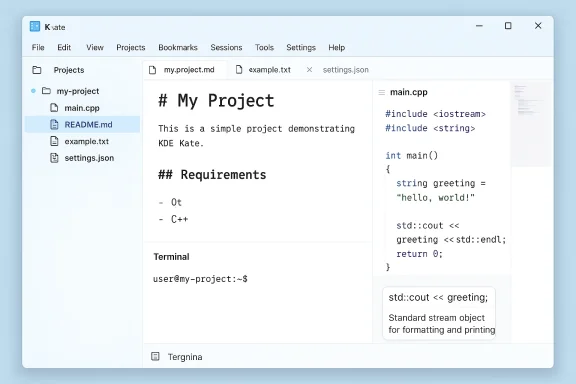
The author’s praise for split views gets at something that matters more in real life than in feature checklists. Being able to split the editor vertically or horizontally turns Kate from a simple file viewer into a practical comparison workspace. That is especially useful for markdown drafting, configuration editing, or side-by-side reference work.Kate’s built-in terminal also strengthens the multitasking story. Having F4 drop down a terminal pane means the editor can support quick shell work without forcing a context switch. Even if you only use that occasionally, its presence signals that the tool understands how power users actually work.
The minimap and sidebar complete the sense of a well-composed workspace. None of these features are flashy on their own, but together they create a flow that many users only expect from a heavier editor. The difference is that Kate packages those elements without making the interface feel like a dashboard.
Split views and pane workflow
Split editing is one of those features that seems optional until you use it regularly. After that, it becomes hard to imagine going back. The article correctly frames this as one of the reasons Kate feels closer to a productive workspace than a bare editor.The built-in terminal matters for the same reason. It lets the editor absorb small workflow tasks that would otherwise trigger app switching. That subtle reduction in friction is often what defines a favorite tool.
- Side-by-side comparisons become trivial.
- Markdown and raw text can be viewed together.
- Shell commands stay close to the file being edited.
- Multiple projects feel easier to keep mentally separated.
- The editor becomes a work surface, not just a viewer.
Visual organization and navigability
The left sidebar and right-side minimap are not just decorative flourishes. They help turn long documents into manageable spaces, especially for users dealing with logs, scripts, or long notes. That kind of navigational scaffolding is a big part of why some editors feel fast even when they are doing a lot.The article’s emphasis on comfort is important. Many editors are technically powerful but physically tiring to use because they make every task feel like an expedition. Kate’s layout seems designed to reduce that sensation.
Coding Features Without the IDE Bloat
One of the article’s most interesting themes is that Kate can support coding workflows without pretending to be an IDE. That distinction matters because many users want syntax support, jump-to-definition, and completions, but do not want to inherit the overhead of a full development environment. Kate’s LSP integration gives it that middle layer of intelligence.The article makes clear that Kate’s language support is extensive, but not self-contained in the way many users might expect. You need to install the relevant language server separately, which is standard LSP behavior but still worth noting. In practice, that means Kate rewards users who are comfortable assembling a workflow rather than demanding that every feature be bundled by default.
Once a language server is in place, the payoff is immediate: completions, diagnostics, and variable information appear in the editor itself. That can make a simple text file feel much more like a lightweight development surface. For users who only script occasionally, that is probably enough.
LSP support in practice
LSP support is the bridge between editing and coding. It is what lets a lightweight editor behave like a smarter tool without becoming a monolithic IDE. The article’s example with Python is useful because it shows the feature is not theoretical.That said, the external dependency is part of the tradeoff. Kate is powerful, but it is not trying to own every language package or tooling layer. For many users, that is exactly the right balance.
- Completion suggestions can appear automatically.
- Error diagnostics improve confidence.
- Jump-to-definition saves time.
- Variable metadata reduces guesswork.
- Language support scales with installed servers.
Keybinding flexibility and Vi mode
The keybinding story is another strong point. Kate’s remapping flexibility means users can personalize the editor without wrestling with extension systems. That makes a difference if you live in keyboard-driven workflows and want the interface to adapt to you rather than the other way around.The Vi mode is especially notable because it is not a gimmick. The article describes a surprisingly faithful Vim-like experience, including normal, insert, and visual modes, classic motions, and colon commands. For anyone with Vim muscle memory, that is a serious advantage.
Plugins and Built-In Extensibility
Kate’s plugin model is different from Notepad++’s in ways that matter. Notepad++ is often praised for its easy plugin discovery and installation flow, while Kate takes a more curated route. Rather than opening the door to everything, it ships with a substantial built-in set that you enable as needed.That approach has a clear upside: fewer decisions, fewer surprises, and less time spent searching for add-ons. The article suggests that most users will find the built-in options sufficient, which is a strong sign that the base product is already well-rounded. In other words, Kate does not need a huge marketplace to feel complete.
The downside is equally clear. Third-party plugin discovery is not as smooth, and that can matter if you are used to browsing an ecosystem for niche workflows. For some users, the difference between “included” and “installable” is the difference between adoption and hesitation.
What Kate includes out of the box
The article points to a useful set of native plugins: color picking, project navigation, Git actions, LSP support, and a build plugin for commands. That is a compact but meaningful toolkit. It means many real-world tasks can be solved without leaving the editor.This is one of the reasons Kate feels practical instead of flashy. Its features line up with things people actually do in text editors, not with a laundry list designed for marketing. That restraint helps preserve its lightweight identity.
- Color Picker for front-end work.
- Project sidebar for file organization.
- Git integration for quick repository tasks.
- LSP client for smarter code editing.
- Build plugin for command execution.
The cost of a less open plugin model
The one real weakness is discoverability. If a plugin is not already there, getting it may feel more cumbersome than in environments with one-click extension stores. That will not bother everyone, but it does create a ceiling for users who love customizing every corner of their tools.Still, the article’s broader conclusion is persuasive: the built-in list covers most needs. For a lightweight editor, that is arguably the better design philosophy anyway.
Where Kate Stumbles
The article is at its best when it refuses to oversell the switch. Kate has flaws, and some are meaningful depending on how you work. The project view is the most obvious example, since it is described as closely tied to version control and not as freeform as a full file explorer.That means Kate is not ideal if your workflow depends on broad, ad hoc folder management from inside the editor. You can see why this might frustrate users who think of a project pane as a direct filesystem browser. Kate’s model is more disciplined, and discipline is not always what people want.
Git support is another area where expectations need to be calibrated. The article says it is useful, but not a replacement for a dedicated Git client or VS Code’s more elaborate SCM interface. That is a fair assessment and probably the right way to judge it.
Project tree limitations
The project tree’s historical Git dependency is an important caveat. If you expect it to function like a general-purpose file manager, you may feel boxed in. It is better thought of as a project navigator than as a full filesystem control center.That distinction matters because it sets the tone for the whole app. Kate is strong when it stays in its lane, but some users may want it to do more than its design intends.
Git support and preview quirks
The built-in Git actions are enough for routine work: status checks, commits, diffs, and blame. That is useful. But the article rightly notes that anything more complex still pushes you toward the terminal or a separate tool.Markdown preview is the clearest example of friction. The article mentions that getting it working can require extra components, and on Windows that can be awkward. That is the sort of friction that weakens the “it just works” feeling, even if the core editor remains excellent.
- Project handling is more structured than exploratory.
- Git support is helpful but not deep.
- Third-party plugin installation is less seamless.
- Markdown preview can require extra components.
- Some features feel stronger on paper than in practice.
Why the Switch Makes Sense
What makes the move from Notepad++ to Kate persuasive is not that Kate is perfect. It is that it solves the particular annoyances that can make a lightweight editor stop feeling lightweight. If an app remembers too many tabs, takes too long to settle, or constantly asks for small compromises, users start looking for a quieter tool.Kate offers that quieter experience while still covering the important bases. It handles coding better than a plain editor, multitasking better than many lightweight alternatives, and session continuity better than tools that treat every launch as a clean slate. That makes it feel like a mature personal default rather than a test drive.
The article also hints at a broader emotional factor. Users get tired of editor churn. If one tool can become the one reliable place for notes, scripts, markdown drafts, and log inspection, that kind of stability can be more valuable than a hundred extra features.
Practical reasons people stick with editors
This is where the human side matters. Most people do not choose editors by spec sheet. They choose them because they feel safe, fast, and dependable on ordinary days.Kate appears to win on exactly those terms. It is capable enough to avoid becoming limiting, but restrained enough to avoid becoming noisy. That combination is difficult to engineer and even harder to maintain.
A note on Notepad++
Notepad++ still has real strengths, especially in the Windows ecosystem. It remains a familiar, flexible, and lightweight choice for many users. But familiarity alone does not guarantee loyalty when launch behavior or session handling becomes irritating.That is why Kate’s value is so contextual. For some users, Notepad++ will remain the better fit. For others, Kate’s balance of openness, polish, and restraint will feel like the more modern answer.
Strengths and Opportunities
Kate’s strongest opportunity is to occupy the narrow but valuable space between a barebones editor and a full IDE. That space is larger than it looks, because a lot of people spend most of their day in exactly that middle zone. If Kate keeps improving while staying lean, it can remain the kind of app users reinstall on every new PC without hesitation.Its biggest advantage is not just features, but feature discipline. The editor gives enough power to be genuinely useful, yet avoids the kind of sprawl that makes even good software feel tiring. That restraint is a competitive asset in a world where many tools keep inflating.
- Native Windows feel without compatibility-layer weirdness.
- Cross-platform consistency across Linux, Windows, and macOS.
- Session restore that helps multi-project users.
- Split views for real multitasking.
- LSP support for coding without a full IDE.
- Built-in plugins that cover most common needs.
- Open-source credibility for users who value transparency.
- Keyboard customization that supports power users.
- Vi mode for Vim-oriented workflows.
- Low-friction daily use for writing and lightweight coding.
Risks and Concerns
The main risk is that Kate’s strengths may not fully translate for users who want a more freeform or extensible experience. The project view limitations and plugin-discovery friction are real, and they matter more the deeper your workflow goes. If you need a broad ecosystem, Kate may eventually feel curated rather than limitless.There is also the risk of overestimating how much casual Windows users will tolerate even small setup steps. Lightweight tools often win because they are easy to adopt on a whim. If a feature requires too much explanation or too many extra components, some users will simply return to what they already know.
- Project navigation may feel too tied to structured workflows.
- Plugin discovery is less convenient than marketplace-style systems.
- Markdown preview can be awkward on Windows.
- Git features are useful but not comprehensive.
- External LSP setup adds a small barrier.
- Feature familiarity may be lower than with Notepad++.
- Some users may still prefer a more established Windows-native habit.
Looking Ahead
The most interesting thing about Kate is not whether it can dethrone Notepad++ globally. It probably will not. The real question is whether it can become the editor people quietly stop thinking about because it already fits their day so well. That is a much more durable kind of success.If Kate continues to improve its Windows experience, smooth out plugin access, and refine the rough edges around previews and project handling, it could become a default recommendation for users who want a polished text editor without the gravitational pull of a full development suite. That would place it in a very attractive position in the Windows utilities landscape. The editor already has the ingredients; the next step is reducing the last bits of friction that separate “excellent” from “habit-forming.”
What to watch next:
- Whether Kate’s Windows build continues to feel fully native.
- Whether plugin management becomes easier to discover and install.
- Whether project navigation becomes more flexible for non-Git workflows.
- Whether Markdown preview and related components get smoother on Windows.
- Whether more Notepad++ users discover Kate as a true daily driver.
Source: MakeUseOf I replaced Notepad++ with this lightweight editor and never looked back
Last edited:
