

Notepad++ can still open a 500MB log file quickly on Windows, but a MakeUseOf test published around large-file editing found that Geany stayed more responsive than Notepad++, Sublime Text, Notepad3, and Kate during scrolling and search. That result matters because Windows users have long treated Notepad++ as the safe default when Microsoft’s own Notepad feels too small for the job. The test does not prove that one editor wins every workload, but it does expose a blind spot in how we talk about “lightweight” Windows software. Opening the file is no longer the benchmark; surviving the next click is.
For years, the Windows troubleshooting ritual was simple. If Notepad choked, install Notepad++. If Notepad++ choked, something had gone badly wrong with the file, the machine, or the person who created the log in the first place.
That reflex made sense. Notepad++ is fast, free, familiar, and deeply embedded in the muscle memory of developers, sysadmins, students, modders, and anyone who has ever had to edit a configuration file at 1:00 a.m. It occupies that rare category of Windows utility that feels less like an app and more like infrastructure.
But infrastructure ages in odd ways. The old test was whether a tool could open a file that Windows Notepad could not. The new test is whether the tool remains usable after opening it, especially when the file is not a tidy script or INI file but a half-gigabyte mess of timestamps, stack traces, request IDs, and repeated warnings from a service that has been screaming all weekend.
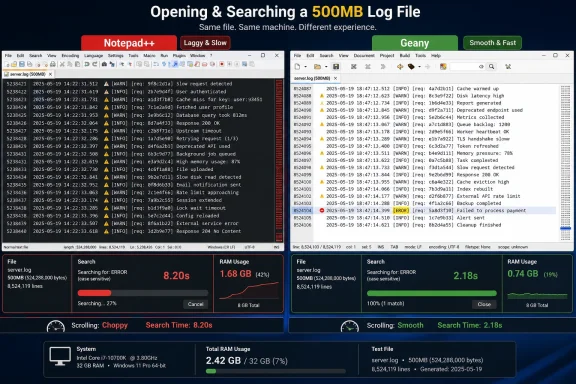
That is where the MakeUseOf test lands with uncomfortable force. Notepad++ reportedly opened a generated 500MB log in just over two seconds and used less memory than several rivals. On the numbers most people would screenshot for a comparison table, it looked excellent. In actual interaction, it stuttered while scrolling and took almost 11 seconds to find a string near the end of the file.
The lesson is not that Notepad++ is suddenly bad. The lesson is that fast to launch and fast to work in are now separate promises, and Windows users have too often treated them as the same thing.
That is precisely why large-file performance is such a trap. A tool can win the opening ceremony and lose the job. A log file is rarely opened for admiration; it is opened because someone needs to find a specific request, follow a failure chain, compare before and after behavior, or confirm whether an error is still happening.
Once the file is open, the user’s real work begins. They scroll. They search. They jump near the end. They select lines. They follow patterns. They repeat the search after changing the query because the first guess was wrong.
In that workflow, latency compounds. A two-second open followed by an 11-second search is not a two-second editor; it is an editor that gives you optimism and then invoices you in small pauses. The user starts hesitating, and hesitation is poison in diagnostic work.
The older Windows utility culture prized low memory use and quick launches because those were once the defining constraints. On modern machines, especially the 16GB and 32GB laptops now common among developers and IT staff, the more relevant question is whether spending extra RAM buys responsiveness. In this test, it did.
Yet in this specific test, Geany reportedly did the thing that matters. It opened the 500MB log in 2.10 seconds, searched near the end in 8.20 seconds, and remained smooth while scrolling. It used about 1.1GB of RAM, which is not nothing, but it converted that memory cost into a better interactive session.
That trade-off is the heart of the story. A text editor handling a giant file is not merely storing characters. It is tracking line boundaries, rendering visible regions, maintaining search state, managing encodings, and keeping the interface responsive enough that the user does not wonder whether Windows has frozen.
Memory use, in other words, is not automatically bloat. Sometimes it is the price of not wasting the human’s time. The MakeUseOf result suggests Geany paid that price more effectively than the better-known Windows default alternative.
There is a broader Windows lesson here. The “lightweight” label has become almost meaningless unless we ask lightweight for what? Lightweight at idle is not the same as lightweight under load. Lightweight for a 2KB hosts-file edit is not lightweight for a 500MB log triage session.
Geany’s victory is not that it is the prettiest editor or the deepest IDE. It is that it behaved like a tool built to keep moving when the file stopped being polite.
But once loaded, Sublime apparently delivered the kind of smooth scrolling users expect from it. That matters. Sublime Text has long occupied a particular niche: not as heavy as a full IDE, not as bare as a Notepad replacement, and engineered with enough care that large, awkward files often feel less awkward than they should.
The problem is the first wait. For someone opening one monster file and staying in it, Sublime’s upfront cost may be acceptable. For someone repeatedly opening rotated logs, comparing snapshots, or jumping in and out during an incident, 11 seconds becomes a tax.
The other tax is literal. Sublime Text is commercial software, with a paid license model rather than the pure freeware or open-source pitch that helped make Notepad++ ubiquitous. Many professionals will pay for a tool that saves time, but “buy this editor to open big logs” is a harder sell when Geany exists and performed better in this particular test.
Sublime is still a credible recommendation. It just was not the clean winner here. Its strength appears to be settled responsiveness after a slower load, while Geany paired quick opening with quick interaction.
But the test makes it look poorly suited to the large-file role. It reportedly opened the 500MB log in 4.37 seconds, used around 1.2GB of RAM, took roughly 19 seconds to search near the end, and still felt sluggish while scrolling. That is a bad combination: more memory than Notepad++, slower opening than Notepad++, slower search than Notepad++, and no obvious payoff in responsiveness.
The absence of tabs also matters more than it sounds. For a tiny editor, one-document-per-window can be a virtue. For real diagnostic work, where a user may want a current log, an archived log, a config file, and a scratch note open at once, it becomes friction.
Notepad3 may still be a good Notepad replacement for ordinary small-file work. That is a valid job. But the large-file use case is not ordinary small-file work scaled upward; it is a different class of workload.
This is where branding can mislead users. A “fast Notepad replacement” sounds like the thing you should reach for when Notepad is not enough. The test suggests that once the file grows into hundreds of megabytes, the replacement metaphor collapses.
That is why it makes sense as a daily editor. For writing, scripting, and routine code edits, Kate can feel like the right balance between capability and restraint. It is not trying to be a full IDE, but it is not pretending that modern text work begins and ends with plain editing.
The 500MB log, however, exposed a boundary. The test reported a 38.12-second search for a string near the end of the file, the slowest result in the field. Scrolling was not as bad as the worst offenders, but it was sluggish enough to matter.
This is not a moral failure. Editors have architectures, and architectures have trade-offs. A tool optimized for pleasant daily editing, multi-document workflows, and developer niceties may not be optimized for brute-force navigation through enormous logs.
The mistake would be treating one poor result as a reason to dismiss Kate. The better reading is more practical: Kate may be an excellent everyday editor and still not be the editor you want when a production log has ballooned into a forensic artifact.
That does not make GUI editors irrelevant. Sometimes you really do need to inspect context manually. Sometimes the system is offline, the log is local, the incident is messy, and the fastest path is to open the thing and start moving.
But the larger the file gets, the more the editor becomes a convenience layer over a search problem. If the question is “where does this request ID appear,” a streaming search tool can answer without asking the interface to render half a gigabyte of text. If the question is “what changed around the first crash,” splitting or filtering the file may be smarter than feeding the whole mass to a general-purpose editor.
This is why the 500MB test is useful but not final. It tests a common human behavior, not necessarily the best operational workflow. People open big logs in editors because editors are familiar; good tooling should meet users where they are, but good practice should also teach users when not to do that.
On Windows, that cultural shift is still incomplete. Many users who are comfortable with Notepad++ are not equally comfortable piping logs through PowerShell or using Unix-style tools under WSL. For them, a responsive GUI editor remains the practical bridge between habit and better diagnostics.
But Notepad was never really the contender in this large-file fight. The interesting comparison is between the tools users install because they already know Notepad will not be enough. Notepad++ became the default answer because it preserved the simplicity people wanted while adding the features Microsoft left out.
That position is now more vulnerable. If the user’s complaint is “Microsoft is making Notepad too busy,” Notepad++ remains a comforting alternative. If the complaint is “I need to work inside a 500MB file without losing patience,” the answer may be Geany, Sublime Text, a log viewer, or a command-line search tool instead.
This is the fragmentation of the old Notepad++ consensus. There is no longer one obvious replacement for every kind of plain-text work. There is the quick editor, the daily editor, the code editor, the giant-file viewer, the log analyzer, and the terminal pipeline.
That fragmentation is annoying, but it is also healthy. It means Windows users are finally treating text workflows as workflows rather than as a single icon pinned to the taskbar.
At 500MB, that assumption breaks down. Line wrapping can be expensive. Syntax detection can be expensive. Search indexing can be expensive. Rendering can be expensive. Plugins and background features can turn a simple load into a chain of hidden work.
This is also why results vary from machine to machine and file to file. A 500MB file with very long lines can behave differently from a 500MB file with predictable log entries. Encoding, line endings, syntax highlighting, antivirus scanning, storage speed, and editor settings can all affect the experience.
Still, the comparative result is meaningful because users experience the whole stack, not the theoretical purity of the editor engine. If scrolling stutters, the reason may be complicated, but the consequence is simple: the user waits.
The old Windows instinct was to ask whether an app is lightweight. The better question is whether it degrades gracefully. An editor that becomes slightly slower under stress is tolerable. An editor that makes every action feel uncertain quickly loses trust.
Many organizations do not answer that until the moment of failure. A developer tries Notepad++. A sysadmin tries to open the same file over a remote session. Someone else copies it to a workstation with more memory. A fourth person runs a half-remembered command that almost filters the right lines. Time disappears into tooling improvisation.
That is avoidable. Teams already standardize browsers, terminals, VPN clients, endpoint tools, and IDEs. They should also standardize basic log-handling practices, especially in Windows-heavy environments where GUI habits are strong and production logs often end up on local desktops during triage.
The recommendation does not need to be dogmatic. It might be as simple as documenting which editor to use for files under a certain size, which viewer or search tool to use above that, and how to split or filter logs safely without modifying originals. The goal is not to turn every Windows admin into a Unix greybeard. The goal is to remove tool choice from the crisis path.
Geany’s performance in this test makes it a candidate for that escape route. Sublime Text may fit teams that already license it. Specialized log viewers may be better still. The key is to decide before the server is down and the log is the only witness.
This is not unusual in other categories. Developers use different browsers for testing and daily browsing. Administrators use different terminals for local work and remote sessions. Security teams use both rich dashboards and blunt command-line tools. Text editing has simply been slower to admit the same specialization.
Notepad++ still deserves its place. It remains an excellent utility for small files, quick edits, plugin-driven workflows, and the vast middle of Windows text work. Its familiarity is an asset, and for many users it will continue to be the first thing installed on a fresh machine.
But the big-file crown is different. It belongs to the editor that stays interactive after the open dialog closes. In this test, that editor was Geany.
Source: MakeUseOf Notepad++ isn't the best app for huge files anymore — I tested the alternatives
 The Old Windows Reflex Is Starting to Betray Power Users
For years, the Windows troubleshooting ritual was simple. If Notepad choked, install Notepad++. If Notepad++ choked, something had gone badly wrong with the file, the machine, or the person who created the log in the first place.That reflex made sense. Notepad++ is fast, free, familiar, and deeply embedded in the muscle memory of developers, sysadmins, students, modders, and anyone who has ever had to edit a configuration file at 1:00 a.m. It occupies that rare category of Windows utility that feels less like an app and more like infrastructure.
But infrastructure ages in odd ways. The old test was whether a tool could open a file that Windows Notepad could not. The new test is whether the tool remains usable after opening it, especially when the file is not a tidy script or INI file but a half-gigabyte mess of timestamps, stack traces, request IDs, and repeated warnings from a service that has been screaming all weekend.
That is where the MakeUseOf test lands with uncomfortable force. Notepad++ reportedly opened a generated 500MB log in just over two seconds and used less memory than several rivals. On the numbers most people would screenshot for a comparison table, it looked excellent. In actual interaction, it stuttered while scrolling and took almost 11 seconds to find a string near the end of the file.
The lesson is not that Notepad++ is suddenly bad. The lesson is that fast to launch and fast to work in are now separate promises, and Windows users have too often treated them as the same thing.
A Benchmark That Measures the Wrong Victory Still Looks Like a Win
The most interesting part of the test is that Notepad++ did not lose in the obvious way. It did not crash. It did not refuse the file. It did not gulp down absurd amounts of memory compared with the field. It opened the 500MB log in 2.18 seconds and sat at roughly 540MB of RAM, which looks efficient beside editors using around a gigabyte or more.That is precisely why large-file performance is such a trap. A tool can win the opening ceremony and lose the job. A log file is rarely opened for admiration; it is opened because someone needs to find a specific request, follow a failure chain, compare before and after behavior, or confirm whether an error is still happening.
Once the file is open, the user’s real work begins. They scroll. They search. They jump near the end. They select lines. They follow patterns. They repeat the search after changing the query because the first guess was wrong.
In that workflow, latency compounds. A two-second open followed by an 11-second search is not a two-second editor; it is an editor that gives you optimism and then invoices you in small pauses. The user starts hesitating, and hesitation is poison in diagnostic work.
The older Windows utility culture prized low memory use and quick launches because those were once the defining constraints. On modern machines, especially the 16GB and 32GB laptops now common among developers and IT staff, the more relevant question is whether spending extra RAM buys responsiveness. In this test, it did.
Geany Wins by Spending Memory Where It Counts
Geany’s result is the surprise because it is not the fashionable answer. Sublime Text has the reputation. VS Code has the ecosystem. Notepad++ has the Windows loyalty. Kate has cross-platform open-source credibility. Geany, by comparison, often feels like the editor someone mentions in a Linux forum thread after the obvious names are exhausted.Yet in this specific test, Geany reportedly did the thing that matters. It opened the 500MB log in 2.10 seconds, searched near the end in 8.20 seconds, and remained smooth while scrolling. It used about 1.1GB of RAM, which is not nothing, but it converted that memory cost into a better interactive session.
That trade-off is the heart of the story. A text editor handling a giant file is not merely storing characters. It is tracking line boundaries, rendering visible regions, maintaining search state, managing encodings, and keeping the interface responsive enough that the user does not wonder whether Windows has frozen.
Memory use, in other words, is not automatically bloat. Sometimes it is the price of not wasting the human’s time. The MakeUseOf result suggests Geany paid that price more effectively than the better-known Windows default alternative.
There is a broader Windows lesson here. The “lightweight” label has become almost meaningless unless we ask lightweight for what? Lightweight at idle is not the same as lightweight under load. Lightweight for a 2KB hosts-file edit is not lightweight for a 500MB log triage session.
Geany’s victory is not that it is the prettiest editor or the deepest IDE. It is that it behaved like a tool built to keep moving when the file stopped being polite.
Sublime Text Remains the Premium Escape Hatch, but Not the Instant One
Sublime Text’s showing is a reminder that polish and responsiveness are not always visible at startup. In the test, it reportedly took 11.14 seconds to open the file and used around 758MB of RAM. Search near the end took 16.83 seconds during the measured run, which makes it look worse than its reputation might suggest.But once loaded, Sublime apparently delivered the kind of smooth scrolling users expect from it. That matters. Sublime Text has long occupied a particular niche: not as heavy as a full IDE, not as bare as a Notepad replacement, and engineered with enough care that large, awkward files often feel less awkward than they should.
The problem is the first wait. For someone opening one monster file and staying in it, Sublime’s upfront cost may be acceptable. For someone repeatedly opening rotated logs, comparing snapshots, or jumping in and out during an incident, 11 seconds becomes a tax.
The other tax is literal. Sublime Text is commercial software, with a paid license model rather than the pure freeware or open-source pitch that helped make Notepad++ ubiquitous. Many professionals will pay for a tool that saves time, but “buy this editor to open big logs” is a harder sell when Geany exists and performed better in this particular test.
Sublime is still a credible recommendation. It just was not the clean winner here. Its strength appears to be settled responsiveness after a slower load, while Geany paired quick opening with quick interaction.
Notepad3 Shows the Danger of Winning the Wrong Replacement War
Notepad3 is an appealing idea: take the spirit of Windows Notepad, add features serious users actually need, and keep the result small enough that it does not become a project in itself. It has syntax highlighting, code-folding features, line navigation tools, and the sort of enhancements that make it a sensible replacement for Microsoft’s increasingly busy Notepad.But the test makes it look poorly suited to the large-file role. It reportedly opened the 500MB log in 4.37 seconds, used around 1.2GB of RAM, took roughly 19 seconds to search near the end, and still felt sluggish while scrolling. That is a bad combination: more memory than Notepad++, slower opening than Notepad++, slower search than Notepad++, and no obvious payoff in responsiveness.
The absence of tabs also matters more than it sounds. For a tiny editor, one-document-per-window can be a virtue. For real diagnostic work, where a user may want a current log, an archived log, a config file, and a scratch note open at once, it becomes friction.
Notepad3 may still be a good Notepad replacement for ordinary small-file work. That is a valid job. But the large-file use case is not ordinary small-file work scaled upward; it is a different class of workload.
This is where branding can mislead users. A “fast Notepad replacement” sounds like the thing you should reach for when Notepad is not enough. The test suggests that once the file grows into hundreds of megabytes, the replacement metaphor collapses.
Kate Is the Editor You Want Until the Log Gets Ugly
Kate’s result is the most sympathetic failure in the group. It is a capable editor with real cross-platform appeal, a serious open-source pedigree, and features that make it far more than a Notepad clone. Split views, plugins, terminal integration, syntax support, and Vim mode put it in a different category from minimalist Windows utilities.That is why it makes sense as a daily editor. For writing, scripting, and routine code edits, Kate can feel like the right balance between capability and restraint. It is not trying to be a full IDE, but it is not pretending that modern text work begins and ends with plain editing.
The 500MB log, however, exposed a boundary. The test reported a 38.12-second search for a string near the end of the file, the slowest result in the field. Scrolling was not as bad as the worst offenders, but it was sluggish enough to matter.
This is not a moral failure. Editors have architectures, and architectures have trade-offs. A tool optimized for pleasant daily editing, multi-document workflows, and developer niceties may not be optimized for brute-force navigation through enormous logs.
The mistake would be treating one poor result as a reason to dismiss Kate. The better reading is more practical: Kate may be an excellent everyday editor and still not be the editor you want when a production log has ballooned into a forensic artifact.
The Real Rival Is Not Another Editor, but the Command Line
There is an uncomfortable truth beneath every GUI editor comparison: for genuinely huge logs, a text editor may be the wrong first tool. Windows users increasingly have access to PowerShell, Windows Terminal, WSL, ripgrep, Select-String, findstr, log viewers, and purpose-built observability platforms. Opening the whole file in a GUI is often what people do when they are trying to avoid thinking about the shape of the problem.That does not make GUI editors irrelevant. Sometimes you really do need to inspect context manually. Sometimes the system is offline, the log is local, the incident is messy, and the fastest path is to open the thing and start moving.
But the larger the file gets, the more the editor becomes a convenience layer over a search problem. If the question is “where does this request ID appear,” a streaming search tool can answer without asking the interface to render half a gigabyte of text. If the question is “what changed around the first crash,” splitting or filtering the file may be smarter than feeding the whole mass to a general-purpose editor.
This is why the 500MB test is useful but not final. It tests a common human behavior, not necessarily the best operational workflow. People open big logs in editors because editors are familiar; good tooling should meet users where they are, but good practice should also teach users when not to do that.
On Windows, that cultural shift is still incomplete. Many users who are comfortable with Notepad++ are not equally comfortable piping logs through PowerShell or using Unix-style tools under WSL. For them, a responsive GUI editor remains the practical bridge between habit and better diagnostics.
Microsoft’s Own Notepad Has Drifted Into a Different Conversation
The shadow over all of this is Microsoft Notepad itself. Windows Notepad has changed more in recent years than many people expected, gaining tabs and other modern touches while also becoming part of the broader debate about how much Microsoft should add to once-minimal inbox apps. For some users, that modernization is welcome. For others, it violates the whole point of Notepad.But Notepad was never really the contender in this large-file fight. The interesting comparison is between the tools users install because they already know Notepad will not be enough. Notepad++ became the default answer because it preserved the simplicity people wanted while adding the features Microsoft left out.
That position is now more vulnerable. If the user’s complaint is “Microsoft is making Notepad too busy,” Notepad++ remains a comforting alternative. If the complaint is “I need to work inside a 500MB file without losing patience,” the answer may be Geany, Sublime Text, a log viewer, or a command-line search tool instead.
This is the fragmentation of the old Notepad++ consensus. There is no longer one obvious replacement for every kind of plain-text work. There is the quick editor, the daily editor, the code editor, the giant-file viewer, the log analyzer, and the terminal pipeline.
That fragmentation is annoying, but it is also healthy. It means Windows users are finally treating text workflows as workflows rather than as a single icon pinned to the taskbar.
The Big-File Test Punishes Editors That Pretend Text Is Simple
Plain text has a reputation for being easy because it looks easy. A log file is not a Photoshop document. It has no layers, no embedded media, no elaborate layout. It is just bytes and line breaks, which tempts users to assume any competent editor should handle it gracefully.At 500MB, that assumption breaks down. Line wrapping can be expensive. Syntax detection can be expensive. Search indexing can be expensive. Rendering can be expensive. Plugins and background features can turn a simple load into a chain of hidden work.
This is also why results vary from machine to machine and file to file. A 500MB file with very long lines can behave differently from a 500MB file with predictable log entries. Encoding, line endings, syntax highlighting, antivirus scanning, storage speed, and editor settings can all affect the experience.
Still, the comparative result is meaningful because users experience the whole stack, not the theoretical purity of the editor engine. If scrolling stutters, the reason may be complicated, but the consequence is simple: the user waits.
The old Windows instinct was to ask whether an app is lightweight. The better question is whether it degrades gracefully. An editor that becomes slightly slower under stress is tolerable. An editor that makes every action feel uncertain quickly loses trust.
IT Shops Should Standardize the Escape Route Before the Incident
For individual users, the answer is easy enough: keep more than one editor installed. For IT teams, the question is more procedural. When someone is handed a giant log during an outage, what is the recommended path?Many organizations do not answer that until the moment of failure. A developer tries Notepad++. A sysadmin tries to open the same file over a remote session. Someone else copies it to a workstation with more memory. A fourth person runs a half-remembered command that almost filters the right lines. Time disappears into tooling improvisation.
That is avoidable. Teams already standardize browsers, terminals, VPN clients, endpoint tools, and IDEs. They should also standardize basic log-handling practices, especially in Windows-heavy environments where GUI habits are strong and production logs often end up on local desktops during triage.
The recommendation does not need to be dogmatic. It might be as simple as documenting which editor to use for files under a certain size, which viewer or search tool to use above that, and how to split or filter logs safely without modifying originals. The goal is not to turn every Windows admin into a Unix greybeard. The goal is to remove tool choice from the crisis path.
Geany’s performance in this test makes it a candidate for that escape route. Sublime Text may fit teams that already license it. Specialized log viewers may be better still. The key is to decide before the server is down and the log is the only witness.
The New Rule Is Two Editors, Not One
The MakeUseOf author’s practical conclusion is the right one: keep a daily editor and a large-file editor. That sounds inelegant, but it reflects how people actually work. The tool that feels best for writing a script is not necessarily the tool that behaves best when chewing through hundreds of megabytes of repetitive machine output.This is not unusual in other categories. Developers use different browsers for testing and daily browsing. Administrators use different terminals for local work and remote sessions. Security teams use both rich dashboards and blunt command-line tools. Text editing has simply been slower to admit the same specialization.
Notepad++ still deserves its place. It remains an excellent utility for small files, quick edits, plugin-driven workflows, and the vast middle of Windows text work. Its familiarity is an asset, and for many users it will continue to be the first thing installed on a fresh machine.
But the big-file crown is different. It belongs to the editor that stays interactive after the open dialog closes. In this test, that editor was Geany.
The 500MB Log File Has Rewritten the Windows Editor Shortlist
The practical message is not that everyone should uninstall Notepad++ tonight. It is that Windows users should stop assuming the old default is automatically the right tool when a file crosses into hundreds of megabytes. The test points toward a more specialized, less sentimental shortlist.- Geany was the strongest performer in this 500MB log test because it combined fast opening, fast search, and smooth scrolling.
- Notepad++ still opened quickly and used relatively little memory, but its laggy scrolling and slower search made it feel worse during actual work.
- Sublime Text remained smooth once loaded, but its slower startup and paid model make it a more conditional recommendation.
- Kate still makes sense as a daily editor for writing and coding, but this test suggests it is a poor fit for very large logs.
- Notepad3 may be a useful Notepad replacement for small files, but it did not show a compelling advantage over Notepad++ in this large-file scenario.
- Teams that handle large logs regularly should document a standard workflow instead of letting every outage become an editor bake-off.
Source: MakeUseOf Notepad++ isn't the best app for huge files anymore — I tested the alternatives
