

WhatsApp’s freshly redesigned desktop client has quietly arrived in Pakistan — a milestone that signals the end of the older native Windows app and the beginning of a WebView2-wrapped, web-first experience that brings feature parity with the web and mobile clients but also a heavier resource footprint and a noticeably different Windows experience.
WhatsApp’s Windows story has swung between approaches over the years: from web wrappers to Electron-style packages to a genuinely native UWP/WinUI app that many Windows users preferred for its integration and efficiency. The latest shift replaces that native binary with a WebView2-hosted instance of web.whatsapp.com, effectively packaging the web client inside Microsoft’s Edge runtime so the same code can run across Windows, macOS, Linux and the web. This migration is rolling out regionally, with Pakistan among the markets seeing the early transition. Meta’s publicly stated rationale — and the industry’s pragmatic reading of it — is straightforward: maintain a single cross-platform codebase, speed up feature parity (Channels, Status, Communities), and reduce platform-specific engineering costs. The trade-off is a move away from a Windows-native UX toward a single web code path that’s easier to ship but less optimized for desktop subtleties. Multiple independent reports and community testers have documented that trade-off in both functionality and system-impact terms.
A gradual erosion of flagship native apps reduces incentives for third-party developers to prioritize Windows-first experiences, and users may find the desktop becoming a container for browser-like experiences rather than a host for deeply integrated applications. That’s a strategic platform risk that extends beyond WhatsApp itself and will be worth watching for platform advocates and enterprise IT teams.
The move is not unique to WhatsApp; it’s part of an industry shift toward web-first desktop experiences that trade platform-specific polish for engineering scale. The outcomes to watch next are concrete: WebView2 runtime optimizations from Microsoft, subsequent WhatsApp updates from Meta that narrow the memory and notification gaps, and how quickly enterprises and the market at large adapt. Until then, users should treat the new WhatsApp Desktop as a heavier, more web-like tool — powerful for feature parity, but carrying costs that matter on constrained hardware.
Source: 247news.com.pk Brand-New WhatsApp Desktop App Officially Launches in Pakistan - 247News
 Background / Overview
WhatsApp’s Windows story has swung between approaches over the years: from web wrappers to Electron-style packages to a genuinely native UWP/WinUI app that many Windows users preferred for its integration and efficiency. The latest shift replaces that native binary with a WebView2-hosted instance of web.whatsapp.com, effectively packaging the web client inside Microsoft’s Edge runtime so the same code can run across Windows, macOS, Linux and the web. This migration is rolling out regionally, with Pakistan among the markets seeing the early transition. Meta’s publicly stated rationale — and the industry’s pragmatic reading of it — is straightforward: maintain a single cross-platform codebase, speed up feature parity (Channels, Status, Communities), and reduce platform-specific engineering costs. The trade-off is a move away from a Windows-native UX toward a single web code path that’s easier to ship but less optimized for desktop subtleties. Multiple independent reports and community testers have documented that trade-off in both functionality and system-impact terms. What changed: technical anatomy of the new WhatsApp Desktop
From UWP/WinUI to WebView2
The previous WhatsApp for Windows used native Windows UI frameworks (UWP/WinUI), compiled to interact directly with Windows APIs for rendering, notifications, and background lifecycle. The current Windows package launches a WebView2 control — Microsoft Edge’s embeddable Chromium runtime — that loads the same web interface desktop users get from web.whatsapp.com. That means WhatsApp Desktop is now primarily the web UI running inside a Chromium-based runtime rather than a native WinUI binary.WebView2’s multiprocess model and why memory jumps happen
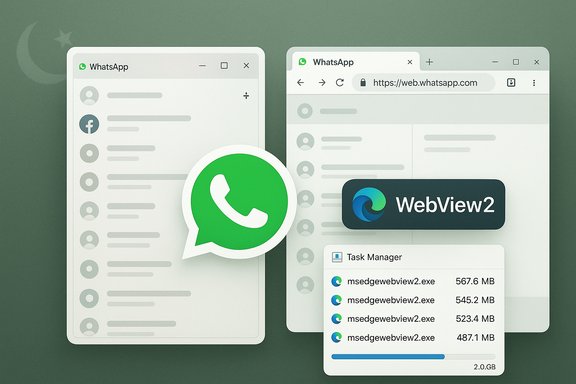
WebView2 mirrors Chromium’s multi-process architecture: a browser process, one or more renderer processes, a GPU process, and several helper utilities. Each WebView2 instance (or distinct origin rendered in the same user data folder) can spawn renderer processes, and complex web content can cause more helper processes to appear. That design improves reliability and security, but it also increases baseline process count and memory allocation compared with a tightly optimized native client. Microsoft’s documentation explicitly explains this process model and notes that memory/CPU use is influenced heavily by the web content being rendered. Practical consequence: Task Manager will often show several msedgewebview2.exe child processes when WhatsApp is open, which is a normal part of the runtime but also the technical reason many users see higher RAM usage. Community tests and several technology outlets confirm the same effect in real-world use.What’s new — features and UX trade-offs
Feature wins
- Channels, Status, Communities parity: The web-first path brings parity with features that were previously slower to arrive on desktop. The new client supports richer Status experiences, Channels feeds, and Communities functionality more consistently with the mobile and web clients.
- Faster cross-platform updates: Shipping once for the web speeds rollout of new features and bug fixes across all OSes simultaneously. This reduces fragmentation and shortcuts the need for parallel native engineering work.
UX compromises
- Less native Windows feel: Visual polish tied to WinUI (Mica, native animations, fluent design cues) is diminished. The wrapped app looks and behaves more like a browser tab in a window than a first-class native Windows application. Many users find the interface “bare-bones” compared with the old native client.
- Changed notification behavior: Because the wrapper relies on web notification semantics and the WebView2 runtime, some OS-level behaviors — notification grouping, Do Not Disturb integration, and certain accessibility hooks — can behave differently or less predictably than in the native app.
Performance and resource impact: what testing shows
Reported memory figures and why to treat numbers cautiously
Several hands-on tests and community reports documented notable memory increases when the WebView2-wrapped WhatsApp is under load. One widely reported peak figure is around 2 GB under heavy-use scenarios on certain machines, contrasted with older native-client observations in the low hundreds of megabytes (roughly ~120–150 MB in some tests). However, these figures vary widely by machine, number of loaded chats, pinned channels, embedded media, WebView2 runtime version, and caching behavior — meaning they are indicative rather than universal. Industry outlets reproduced the trend of materially higher RAM usage while cautioning that exact numbers are machine-specific. Important caveat: the most load-bearing memory numbers circulating in coverage come from particular test rigs and community testers; Meta has not published universal telemetry confirming a single, global memory baseline. Treat specific megabyte claims as illustrative of a trend, not as a hard guaranteed figure for every device.What users actually reported in early rollouts
- Sluggishness under heavy chat loads, especially with many media-heavy group chats open.
- Higher baseline memory visible as multiple msedgewebview2.exe processes in Task Manager.
- Occasional notification delays or missed taskbar peeks, particularly when Focus Assist or Do Not Disturb were active.
- Audio and voice-note regressions reported by some users (distortion or playback issues), likely arising from differences in how the web stack interfaces with local audio APIs compared to native clients. Community threads and user reports amplified these issues as the new client arrived in broader testing rings.
Practical mitigation: what Windows users and IT admins should do now
The rollout is incremental; not every user in every country will see the update simultaneously. For users and administrators concerned about performance and integration, here’s a practical playbook based on independent reporting and community-tested workarounds.Short-term steps for individuals
- If your machine is resource-constrained, delay the Store update where possible until you can test the new client on a spare device.
- Install the Progressive Web App (PWA) version from Edge or Chrome: open web.whatsapp.com → browser menu → Apps → Install this site as an app. Browser PWAs are often better managed by the browser’s memory model than single-purpose wrappers.
- Enable WhatsApp Secure Storage and set a recovery PIN on your phone before migrating if you care about preserving E2EE message history across devices. Verify the restoration flow on a second device.
- Keep Microsoft Edge and the WebView2 runtime updated — runtime updates can include performance and security fixes that materially affect behavior.
Deployment checklist for IT admins
- Inventory endpoints relying on WhatsApp and identify low-RAM or battery-sensitive machines.
- Pilot the new client in a small ring before broad deployment.
- Where required, block the updated Store package via MDM (Intune) or Store controls until compatibility testing completes.
- Update helpdesk playbooks to cover forced re‑auth flows and PWA installation steps.
Why Meta did it — the engineering calculus
Meta’s decision follows a pattern visible across multiple large consumer internet firms: prioritize engineering efficiency and feature parity by consolidating onto a single web code path. The advantages are clear:- Faster rollout of cross-platform features.
- Lower per-platform engineering and QA costs.
- A single place to ship and iterate UI changes and bug fixes.
The broader platform question: what this means for Windows
If several flagship apps migrate from native to web-wrapped experiences, the cumulative effect risks dulling Windows’ differentiation as a platform for high-quality native desktop software. Native toolkits like WinUI offer closer OS integration, more predictable background lifecycle management, and lighter resource use — benefits that are meaningful across productivity workflows and enterprise environments.A gradual erosion of flagship native apps reduces incentives for third-party developers to prioritize Windows-first experiences, and users may find the desktop becoming a container for browser-like experiences rather than a host for deeply integrated applications. That’s a strategic platform risk that extends beyond WhatsApp itself and will be worth watching for platform advocates and enterprise IT teams.
Balanced assessment: strengths vs risks
Strengths (what Meta and many users gain)
- Feature parity and speed: Users across devices get the same new features at the same time.
- Lower maintenance overhead: Single web codebase simplifies QA and rollout.
- Easier security patching for shared runtime: WebView2 and Edge runtime updates can patch common vulnerabilities across wrapped apps.
Risks (what users and the Windows ecosystem lose)
- Resource bloat: Increased RAM and CPU draw on many devices, especially older or budget machines. Some testers reported peak footprints approaching 2 GB under load, which is a meaningful hit on an 8 GB system.
- Weaker OS integration: Notification reliability, Do Not Disturb behavior, accessibility hooks, and native file-handling flows are more fragile or altered.
- Ecosystem signal: Repeated deprecation of native experiences by major vendors risks lowering the bar for the Windows app marketplace, with longer-term consequences for platform differentiation.
What remains unverified — and what to watch
- Exact universal memory numbers remain machine-specific; no official Meta telemetry has been published to confirm a single global baseline. The 2 GB figure is real in some hands-on tests but is not a guaranteed outcome on every PC. Flag these performance figures as indicative rather than universal.
- Any internal Meta staffing or strategy narratives tied directly to this technical decision remain speculative until corroborated by official statements. Treat personnel-linked stories as context, not proof.
- Exact dates for forced logouts or mandatory cutoffs vary by region and have sometimes been reported imprecisely; users should always verify any in‑app migration prompts and Meta’s help pages for authoritative timing.
- WebView2 runtime patches from Microsoft that address memory or process throttling.
- Meta updates or in‑app guidance clarifying migration timelines and Secure Storage behavior.
- Community telemetry and independent benchmarks that publish controlled comparisons across hardware tiers.
Practical recommendations — a concise action list
- For casual users on modern desktops: update, test, and if needed, switch to the browser PWA for better lifecycle handling.
- For users on 8 GB or less RAM machines: delay the Store update where possible; use the browser PWA or free up RAM before launching WhatsApp Desktop.
- For enterprises: pilot the new client in a narrow ring, update helpdesk scripts, and consider MDM-based rollout controls until you validate notifications and accessibility in your environment.
- For developers and platform watchers: track WebView2 runtime releases closely — Microsoft’s runtime improvements are the most plausible immediate path to reducing the resource gap.
Conclusion
WhatsApp’s desktop migration in Pakistan is a live example of a broader trade-off: Meta gains development velocity and cross-platform parity by packaging the web client with Microsoft’s WebView2 runtime, while Windows users and administrators face a less-native experience and measurable increases in memory and process overhead. For many users on well‑resourced hardware, the change will be tolerable and might even feel like progress because of feature parity. For those on older PCs, budget hardware, or managed enterprise fleets that rely on deterministic native integrations and notification fidelity, the migration is a genuine downgrade that demands mitigations — from delaying updates to adopting browser PWAs and piloting across controlled rings.The move is not unique to WhatsApp; it’s part of an industry shift toward web-first desktop experiences that trade platform-specific polish for engineering scale. The outcomes to watch next are concrete: WebView2 runtime optimizations from Microsoft, subsequent WhatsApp updates from Meta that narrow the memory and notification gaps, and how quickly enterprises and the market at large adapt. Until then, users should treat the new WhatsApp Desktop as a heavier, more web-like tool — powerful for feature parity, but carrying costs that matter on constrained hardware.
Source: 247news.com.pk Brand-New WhatsApp Desktop App Officially Launches in Pakistan - 247News
