

WhatsApp’s Windows client has quietly been recast as a Chromium-based web wrapper and the fallout is now visible in everyday use: a substantially higher memory footprint, weaker Windows integration, and a small but growing movement of users who are sideloading older native builds to get the lean client back. What began as staged beta changes has turned into a broad rollout for many users, and the practical consequences—spiking RAM, choppier UI, and forced re‑auth flows—have prompted hands‑on testing, community workarounds, and clear warnings about security and longevity.
For most people the right approach is to treat the web client (or PWA) as the primary desktop option while administrators and power users weigh staged sideloading only as a short‑term mitigation. Whatever path is chosen, back up systems, verify package integrity, and expect that server‑side changes by Meta can make any workaround ephemeral. The trade‑off here is emblematic of a larger industry trend: easier engineering and faster feature parity at the cost of native performance and platform polish.
Source: Windows Latest I uninstalled Windows 11's WhatsApp WebView2 and replaced it with the old native app with a new trick
 Background
From native WinUI to WebView2
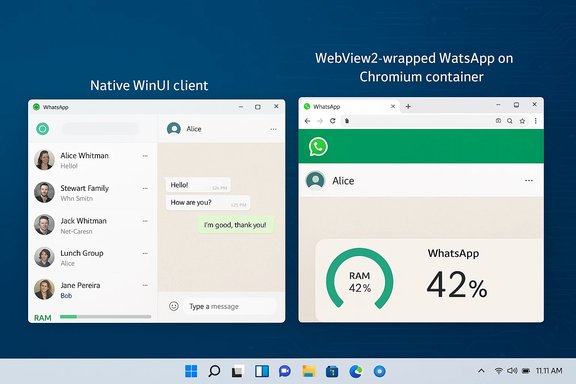
WhatsApp’s Windows history is a loop: early web wrappers and Electron builds gave way to a genuine Windows-native client (UWP/WinUI) that prioritized low idle memory use, faster cold starts, and tight integration with Windows 11 features. In 2025 Meta began shipping a new Windows package that embeds the web client (web.whatsapp.com) inside Microsoft Edge’s WebView2 runtime, turning the desktop app into a dedicated Chromium container rather than a native process. The company’s practical motivation is straightforward: maintain one web codebase, accelerate feature parity (Channels, Communities, Status), and reduce platform-specific engineering. Multiple independent reports and hands‑on tests confirm the runtime swap and its observable side effects.What WebView2 brings (and takes away)
WebView2 (Edge/Chromium) offers cross-platform parity and consistent UI across desktop and web, but its process model (browser process, one or more renderer processes, GPU and utility helpers) naturally increases observable memory and CPU use. That model also changes how notifications, background behaviour, and local storage are handled—behaviours that were more tightly controlled by native WinUI clients. Community and press testing shows a consistent pattern: the WebView2-based WhatsApp uses many times more RAM in typical scenarios and feels less snappy.What changed in practice: performance and UX
Memory and CPU: the headline numbers
Hands‑on measurements from a range of testers and outlets show a broad, reproducible trend: the WebView2-wrapped client consumes significantly more RAM than the old native client. Reported figures vary by device, chat history, and media load, but the pattern is consistent:- Idle/login-screen memory: often hundreds of megabytes (commonly ~300–600 MB) for the WebView2 build versus single-digit or low‑hundreds MB for the native client.
- Active usage: typical sessions can push the wrapper to ~1.0–1.5 GB; media‑heavy use and rapid chat scrolling occasionally spike usage toward 2–3 GB on some machines.
Responsiveness and Windows integration
Beyond memory, users report choppier animations, slower conversation switching, and less reliable integration with Windows 11 features (Action Center toast behaviour, Do Not Disturb/Focus interactions, jump lists, and instant preview). The wrapper behaves like a browser-hosted single‑page app inside a container, and that changes expectations for a desktop messaging client.Forced logouts and migration flow
Multiple users have seen in‑app prompts informing them a migration will log them out and require re‑authentication from their phone. That enforced re‑auth has been used to push the WebView2 build in waves, accelerating adoption even for users who otherwise would defer updates. Community reporting documents these forced‑logout flows and subsequent login steps.The workaround: restoring an older native MSIX package
A growing number of technically proficient users have documented a workaround: extract an older MSIX/MSIXBUNDLE (a November 2025 native build), modify its manifest/package identity, mark it unsigned (or adjust OID), and register it locally with PowerShell so Windows treats it as a distinct, sideloaded package. The process has multiple variants in community writeups, but the common steps look like this:- Enable Developer Mode on Windows (Settings → System → Advanced → Developer Mode). This allows sideloading and registration of unpackaged apps. (Windows documentation confirms Developer Mode enables folder-based app registration for development/testing).
- Download the older WhatsApp msix/msixbundle file (community‑shared mirrors and archive sites host older packages). Note: third‑party hosting can carry risk—verify integrity before use.
- Extract the bundle with 7‑Zip to reveal the contained .msix or Appx package.
- Open the extracted .msix in the MSIX Packaging Tool (available from the Microsoft Store). Edit the package identity (Name and/or Version) and choose an unsigned packaging option (or inject the special OID required for unsigned packages), then save the modified package. Microsoft’s MSIX guidance documents how unsigned packages and OID markers work and why they are necessary for local registration.
- Re‑extract the saved package and locate AppxManifest.xml. In an elevated PowerShell window, run Add‑AppxPackage -Register "C:\Path\To\AppxManifest.xml" (or Add‑AppxPackage -Path <file> -AllowUnsigned / with appropriate flags) to register the app in development mode. Microsoft’s Add‑AppxPackage documentation explains the -Register flag and development‑mode registration details.
Step‑by‑step (condensed, typical commands)
- Turn on Developer Mode (Settings → System → Advanced → Developer Mode).
- Extract msixbundle with 7‑Zip.
- Open the extracted msix in MSIX Packaging Tool, edit Package Name and Version, select “Do not sign package”, save new package.
- Extract saved package, copy path to AppxManifest.xml. In an elevated PowerShell:
Add‑AppxPackage -Register "C:\WhatsApp\AppxManifest.xml"
(If the package is unsigned and contains executables, admin rights and -AllowUnsigned or proper OID may be required; consult MSIX docs).
Why this hack works — and why it will likely be temporary
Two engineering reasons make the trick work today:- Package identity change: editing the manifest to a different Package Name/Identity prevents Windows Store from recognizing it as the Store package, so the Store won’t automatically replace it via its update channel. Community writeups explicitly cite changing the Identity Name and bumping version numbers as the core technique.
- Unsigned/local registration: registering as an unpackaged or unsigned package with the special OID permits local registration for development and testing on Windows 11; Microsoft documents that unsigned packages require special manifest OIDs and may be installed with elevated Add‑AppxPackage flags.
Security, privacy and legal risks
Installing and running modified or unsigned packages is not without risk. Key concerns:- Unsigned packages may bypass integrity checks and leave you running binaries that are not trust‑anchored to a certificate; tampered packages could introduce malware. MSIX signing exists to preserve package integrity and Windows enforces package integrity for signed packages. Installing unsigned packages is intended for development/testing only.
- Third‑party mirrors (Mega, Uptodown, etc. are often the only source for legacy msix bundles. These sources are not official and can be altered—verify checksums and prefer repositories you trust. Community posts that point to such downloads are helpful but cannot vouch for file integrity.
- Functional regressions: older native clients may lack server-side feature compatibility, security patches, or API updates; they might lose functionality (calls, some newer features) or be forcibly disabled later. Community reporting already documents intermittent expiry and forced logout events for older builds.
- Enterprise policy and compliance: sideloading and registry or policy changes to block Store updates may violate organizational deployment rules, introduce support burdens, and complicate archiving/eDiscovery workflows because local storage semantics differ between native and web clients.
Practical recommendations for users and admins
If the WebView2 migration affects you, here’s a practical, prioritized list of options—ranked for safety and long‑term correctness:- Use the web client (web.whatsapp.com) or install it as a PWA from your browser. PWAs run under the browser’s process management and often offer better lifecycle and update control than a poorly optimized wrapper. This is the least risky and most sustainable option.
- Pause Microsoft Store automatic updates (short‑term stopgap) to delay the forced WebView2 update on machines where the native client still works. This is temporary and consumer-facing only; enterprise deployment tools (Intune/Group Policy) are the proper mechanism for longer control.
- If you are technically confident and accept the security tradeoffs, follow the community workaround to sideload an older native MSIX package—but treat it as a short‑term mitigation and only use packages from sources you trust. Back up your system and create a restore point before proceeding.
- For organizations: pilot the WebView2 build on a small ring, update helpdesk runbooks for forced re‑auth and re‑linking flows, and consider blocking the new Store package on constrained endpoints until you can vet notification and accessibility behaviour. Use MDM/Intune to stage rollouts and deploy the PWA alternative where appropriate.
Longer‑term implications for Windows native ecosystem
This WhatsApp migration is part of a broader pattern: major cross‑platform vendors favor web‑first clients and consolidation into a single codebase. That helps product teams ship features faster but erodes the incentive to maintain platform‑specific polish and performance optimizations. The practical result: more flagship apps on Windows will look and behave like browser windows rather than fully native experiences—an outcome with real consequences for users on mid‑range and lower‑end hardware. For Microsoft and the Windows ecosystem, this trend raises strategic questions about how to keep native toolkits attractive to developers and how to preserve the unique benefits of a native desktop OS.What we verified (and what remains uncertain)
- Verified: the switch to a WebView2‑wrapped WhatsApp client on Windows was observed in staged rollouts and is widely reported; hands‑on tests show the wrapper noticeably increases RAM usage and changes integration behaviour. Independent outlets and community tests corroborate the trend.
- Verified: the sideloading technique (modify manifest, change package identity, use MSIX Packaging Tool, register with Add‑AppxPackage -Register) is documented by multiple community contributors and matches MSIX/PowerShell capabilities described in Microsoft documentation. The MSIX Packaging Tool supports unsigned packages for local/dev scenarios; Add‑AppxPackage -Register is the supported registration method for unpackaged apps.
- Not fully verifiable (flagged): precise claims about fixed dates, package expiries, or a specific package file hosted on a particular cloud drive (for example, an exact Mega link or a permanent November 2025 package) should be treated as provisional. These are community‑reported and can change or be taken down; Meta can alter server checks at any time to block older clients. Treat those claims as fragile and time‑sensitive.
Conclusion
Meta’s move to a WebView2-hosted WhatsApp on Windows is a pragmatic engineering choice for the company—but a regression for Windows users who valued the old native client’s low memory use and tight OS integration. The user community has produced a credible, technical workaround that can restore the older native experience for a window of time, but that path carries security, compatibility, and longevity risks and is not a recommended default for non‑technical users.For most people the right approach is to treat the web client (or PWA) as the primary desktop option while administrators and power users weigh staged sideloading only as a short‑term mitigation. Whatever path is chosen, back up systems, verify package integrity, and expect that server‑side changes by Meta can make any workaround ephemeral. The trade‑off here is emblematic of a larger industry trend: easier engineering and faster feature parity at the cost of native performance and platform polish.
Source: Windows Latest I uninstalled Windows 11's WhatsApp WebView2 and replaced it with the old native app with a new trick
