

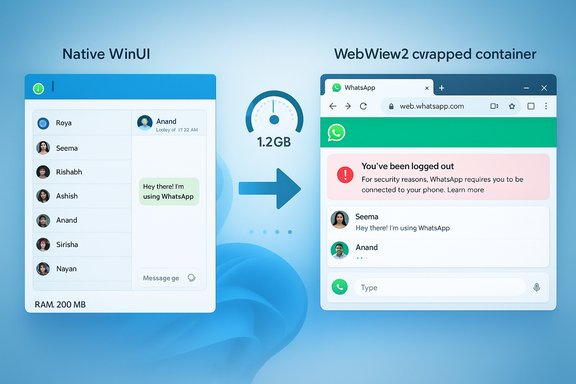
WhatsApp is warning an expanding group of Windows 11 users that they will be forcibly logged out of the desktop app to complete an update that replaces the native Windows client with a Chromium-based WebView2 wrapper — a migration that early hands‑on tests show produces materially higher RAM use, slower responsiveness, and weaker Windows integration for many machines.
Background
WhatsApp’s Windows client has bounced between architectures for years: from simple web wrappers to Electron-style shells, then to a praised native WinUI/UWP client that delivered a snappy, low‑memory experience for Windows 11 users. In mid‑2025 Meta began rolling a different approach in beta channels that packages the web client (web.whatsapp.com) into a WebView2 (Microsoft Edge Chromium) container for the store app. That beta work has now reached a broader set of stable users, accompanied by in‑app notices telling users they will be logged out to complete the transition.This is not a routine update message. The notices explicitly state that devices will be signed out and that users will need their phone to re‑authenticate when they log back in. Some users first saw a message indicating a forced logout on earlier dates, and WhatsApp’s more recent warning specified a restart window beginning 9 December 2025 for the next wave of logouts. Those notices frame the change as enabling features such as Channels, revamped Status handling, and Communities on the desktop client.
What exactly is changing?
From native WinUI/UWP to WebView2 (Chromium) wrapper
The previous Windows client was built using Windows UI frameworks and platform APIs, which allowed for tighter OS integration, smaller memory footprints, and faster cold startups. The replacement app largely hosts the web UI (web.whatsapp.com) inside Microsoft Edge’s WebView2 control — effectively converting the desktop app into a packaged browser window backed by Chromium. The WebView2 model spawns multiple helper processes (renderers, GPU, utility processes) similar to a browser tab, so the runtime and memory characteristics now resemble a Chromium environment more than a native Windows binary.The user-facing migration flow
WhatsApp’s notices make two things clear: users will be logged out during the migration, and they will need their phone to complete sign‑in and re‑link their desktop client. The company also promises a chat history sync window (promoted as up to a year of history sync in some messages), but the specifics of how that history is stored locally and how it maps to existing native‑app caches differ between the native and web models. Because the new client relies on web storage and WebView2 user data, local storage semantics change and administrators should treat claims about preserved local history with careful verification.Performance: what testers are seeing (and what is unverified)
Early hands‑on testing and community reports have reproduced a consistent pattern: the WebView2‑wrapped app consumes significantly more memory and feels less responsive than the native WinUI client on comparable hardware. Reported behaviors include:- Cold launch idle footprints often in the several‑hundreds-of‑megabytes range shortly after open, with active usage driving memory into the high hundreds and around the 1 GB mark. Peak memory in media‑heavy sessions has been reported to climb to 1.2 GB and beyond in some tests.
- Noticeable lag when switching conversations and choppier scrolling behavior compared with the native client’s near‑instant transitions.
- Longer chat‑load times after a system restart; testers reported waiting 10–20 seconds for the app to reconstruct chat lists and previews, producing a less “instant” feel for what users expect from a messaging client.
- The precise memory numbers vary by machine, number of open chats, presence of media previews, WebView2 runtime version, and whether the shared msedgewebview2.exe runtime is present and updated. These per‑machine test results are directional rather than official telemetry; Meta has not published global memory telemetry for the rollout. Treat specific figures as measured outcomes on particular test systems rather than universal constants.
Why Meta chose this path (the engineering rationale)
Meta’s engineering motives are straightforward and consistent with broader industry practice:- Single codebase across web and desktop reduces duplicated work and maintenance overhead.
- Faster feature parity: features developed for the web can appear on desktop with minimal platform‑specific work, enabling Meta to ship Channels, Communities, and Status changes more quickly across platforms.
- Simplified QA and deployment pipelines: web‑first development minimizes multiple native release cycles, which is attractive for global feature rollouts.
User impact: features gained, polish lost
Gains (what the WebView2 approach delivers)
- Faster desktop access to web‑first features such as Channels and Communities, with near‑identical behavior across devices.
- Centralized bug fixes and UI updates on the web codebase that propagate to all wrapped clients without rebuilding native binaries.
- Greater consistency for cross‑platform users who expect identical behavior across Windows, macOS, and the web.
Losses (what Windows users will feel)
- Higher RAM footprint and potential battery penalties on laptops — a practical problem for devices with 8 GB of RAM or less.
- Weaker Windows integration: notifications, Do Not Disturb / Focus interactions, and native accessibility hooks may not perform as reliably as in a native client. Users report less consistent toast behavior and mismatches with Windows 11 visual idioms.
- Perceived sluggishness: slower chat switching, choppy scrolling, and longer startup times degrade the instant messaging experience.
- Local storage and backup semantics change: WebView2 and web storage rely on browser-style caches and service workers instead of native storage stacks, altering forensic, archiving, and backup behaviors for enterprises.
Short‑term mitigations for everyday users
If your desktop experience is important and you rely on WhatsApp for real‑time notifications or low‑resource usage, here are practical steps to reduce disruption:- Pause Microsoft Store automatic updates (to delay the forced rollout):
- Open Microsoft Store.
- Click your profile icon at the top right → Store settings.
- Turn off App updates (the first toggle). This prevents the Store from auto‑updating the WhatsApp package, though updates will remain visible in the Store for manual installation.
- Use the web client or install the PWA instead of the Store app:
- Navigate to web.whatsapp.com in Edge or Chrome and sign in via your phone.
- Install as a Progressive Web App (Edge menu → Apps → Install this site as an app).
- PWAs run under the browser’s process management and can be less resource‑hungry than a poorly optimized WebView2 wrapper.
- If you’ve already migrated:
- Keep Microsoft Edge and the WebView2 runtime updated, as WebView2‑side fixes often arrive with Edge updates and can materially affect performance.
- Limit the number of heavy media chats left open and periodically clear cache if the app exposes that option.
- For critical workflows:
- Consider fallback channels for urgent notifications (SMS, Teams, Signal) until the wrapper proves stable on your devices.
- Encourage contacts or support escalation paths to accept alternate notification channels when necessary.
Steps for IT administrators and organizations
- Audit endpoints that depend on WhatsApp for business workflows and identify machines with constrained RAM (≤8 GB) or strict battery requirements.
- Use MDM (Microsoft Intune or equivalent) to stage or block the Store package rollout while you pilot the new client on a small ring.
- Provide support documentation and scripts for moving users to the browser PWA and for handling the re‑authentication process that follows the forced logout.
- Revalidate any archiving or eDiscovery workflows that depended on the native client; web‑first clients can complicate deterministic capture of desktop traffic and local storage artifacts.
Security and privacy considerations
- End‑to‑end encryption (E2EE) at the protocol layer remains intact between endpoints, but the local storage model changes: web storage and service worker caches differ from native encrypted store semantics, so local encryption artifacts and backup behavior can change.
- Because the updated client shares the WebView2 runtime, the security posture is partly dependent on keeping the Edge/WebView2 runtime patched. Administrators should prioritize those updates as part of operational hygiene.
- Claims about migrated chat history retention should be treated carefully — while WhatsApp advertises up to a year of chat history sync in some notices, the mechanics and timing of how that sync operates across the native→web migration should be verified before relying on it for compliance or archiving.
Critical analysis — strengths, weaknesses, and long‑term implications
Strengths
- Operational efficiency for Meta: one codebase reduces duplication, costs, and time to ship features across platforms.
- Faster parity for features: desktop users get web features more quickly.
- Easier iterative fixes: web deployments can be rolled back or patched faster than native binaries across multiple app stores and OS variants.
Weaknesses and user risks
- Degraded desktop experience: native polish, low memory footprint, and instant responsiveness are supplanted by browser-like behavior that many users will perceive as a regression.
- Resource bloat: higher RAM usage is not just cosmetic — it materially impacts multitasking, battery life, and perceived system performance on mid‑range and older machines.
- Ecosystem signal: repeated deprecation of native apps in favor of wrappers risks eroding the incentives for deep Windows integration among major app vendors, which is a negative for users who chose Windows for its desktop strengths.
Long‑term implications
If other flagship apps follow the same path, the Windows desktop could see a steady decline in truly native, optimized experiences. That matters for power users, enterprises with strict resource constraints, and for the perceived quality of Windows as a desktop‑first platform. The trade‑off between engineering scale and platform polish is real, and this WhatsApp migration is a clear bellwether of that tension.What Meta and Microsoft could (and should) do
- Meta should publish transparent performance telemetry and optimization timelines or provide a low‑memory mode in the wrapped client that defers chat rendering and aggressively evicts in‑memory chat state. This would give users and admins a path to reduced resource use when necessary.
- Microsoft should continue enhancing WebView2 with host API features that enable better memory targets, suspension behavior, and tighter notification bridges to native Windows APIs, and it should document best practices that prevent naive wrappers from consuming excessive RAM. Collaboration between Microsoft and app vendors to standardize low‑memory patterns would materially reduce user pain.
- Both companies should coordinate guidance for enterprise management so admins can reliably stage the transition, retain control over updates, and protect mission‑critical workflows during the migration window.
Practical checklist: what Windows users should do now
- If you rely on WhatsApp for real‑time work and want to avoid the new wrapper for now:
- Pause Microsoft Store auto‑updates on machines where you want to keep the native client.
- Install the WhatsApp PWA via a browser and pin it to the taskbar as a stopgap.
- Keep Edge and WebView2 patched if you must run the new client; runtime updates can fix important performance and security bugs.
- IT admins should:
- Inventory endpoints that rely on WhatsApp for workflows.
- Pilot the new client on a small ring and test notifications, accessibility, and battery usage.
- Provide PWA installation scripts and helpdesk guidance for re‑authentication flows.
Conclusion
WhatsApp’s migration of its Windows client from a native WinUI/UWP implementation to a WebView2 (Chromium) wrapper is a clear engineering trade‑off: faster cross‑platform feature parity for Meta at the expense of resource efficiency and desktop polish for Windows users. Early testing and community reports document higher RAM use, slower responsiveness, and weaker Windows integration in many scenarios, and the enforced logout flow scheduled in waves (notably a rollback window starting 9 December 2025 for some users) makes this a live operational issue for anyone who uses WhatsApp on Windows daily.For now the most pragmatic path for worried users is to delay the Store update, switch to the web PWA, or pilot the new client on non‑critical machines while waiting for optimization fixes. For enterprises, this transition warrants a controlled rollout, updated support playbooks, and careful verification of archiving, notification, and accessibility behaviors before broad deployment. The migration is emblematic of a broader industry pattern — efficiency for vendors versus craft for platforms — and how it resolves will shape the Windows desktop experience for years to come.
Source: Windows Latest WhatsApp is logging more Windows 11 users out to push its new slow web-wrapper app
