

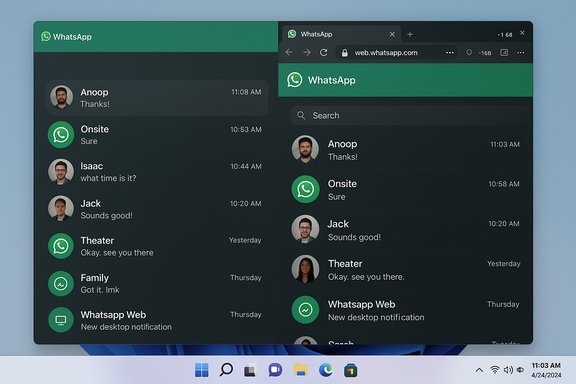
Meta has quietly yanked the native Windows 11 WhatsApp client and replaced it with a WebView2-wrapped instance of the web app, a change that is already rolling out and which — according to multiple independent tests and community reports — produces markedly higher RAM usage, weaker Windows integration, and a notably different user experience than the native WinUI/UWP client it replaces.
Background
WhatsApp’s Windows history has been a series of technical pivots. The app began life as a web wrapper, later migrated through Electron-like models, and then received a true native rewrite built on Windows UI frameworks (UWP/WinUI). That native client — introduced and refined in recent years — was praised for being lightweight, responsive, and well-integrated with Windows 11 system behaviors. In mid‑2025 and continuing into late 2025, WhatsApp’s beta channels began shipping a different approach: instead of a native WinUI binary, the Windows app now hosts web.whatsapp.com inside Microsoft Edge’s Chromium-based WebView2 runtime. Several outlets and hands-on testers document the change and its consequences. Why this matters: the architecture shift replaces a compiled, platform‑specific client with a browser engine in a container. That architecture brings the advantages of a single cross‑platform codebase and rapid feature parity, but it also imports browser-style memory and process behavior into what used to feel like a native desktop app. Early testing suggests that the practical trade-offs are already visible on real machines.What changed, technically
From WinUI/UWP to WebView2
- The previous native client used Windows platform UI frameworks (WinUI/UWP) and native APIs for rendering, notifications, and background management.
- The new build packages the website (web.whatsapp.com) inside a WebView2 control. WebView2 is Microsoft’s official web embedding component that uses the Edge (Chromium) engine to render web content inside desktop apps.
- The WebView2 model spawns multiple processes (renderer(s), GPU, network, utilities) much like a Chromium browser tab; these subprocesses are visible in Task Manager and contribute to elevated RAM use.
Why WebView2?
Meta’s decision aligns with a broader industry pattern: maintaining a single web codebase dramatically reduces duplicate engineering work across Windows, macOS, Linux, and browsers. A WebView2 wrapper simplifies cross-platform QA, speeds parity for features like Channels and Communities, and lets product teams iterate in one place rather than maintaining multiple native clients. That operational economy is the primary rationale cited in coverage and in industry analysis.Memory and performance: what the tests show
The headline numbers (range and caveats)
Multiple hands-on tests report a clear increase in memory usage after the switch to WebView2. The exact numbers differ between testers and hardware, but the pattern is consistent:- Idle/login-screen memory for the new WebView2 client: roughly ~300 MB in some tests.
- Logged-in idle background usage commonly reported in the ~1 GB range, with spikes to ~2 GB while loading extensive chat histories or media-heavy conversations.
- The older native WinUI client, by comparison, commonly measured in the low hundreds of MB or even tens of MB on an idle login screen in the same testers’ runs.
Why memory jumps happen
- Chromium-based runtimes keep more in-memory state for DOM, JavaScript heaps, cached media, and service workers.
- WebView2 spawns support processes (GPU, network, utilities), which increase process count and combined memory.
- The web UI is a complex single-page app with heavy JavaScript bundles meant to run in browsers — that code is now executed inside the embedded runtime rather than a tightly optimized native C++/WinRT binary.
Perceived sluggishness and UI regressions
Beyond raw RAM numbers, testers and users report:- Slower navigation between conversations and less fluid animations.
- Delays or irregular behavior in Windows 11 notification handling and Focus/Do Not Disturb interactions.
- A visual presentation that looks more like a browser tab than a WinUI-native app (loss of Fluent design polish, Mica, WinUI-specific visuals).
Integration, notifications, and Windows 11 behaviors
The native WhatsApp client used Windows APIs for reliable notifications, taskbar integration, and background optimizations. The WebView2 wrapper relies on the embedded browser runtime’s notification model and service worker behavior, which can differ from native OS-level handling.Practical impacts reported by users and testers include:
- Less reliable or delayed desktop notifications, especially under Focus/Do Not Disturb modes.
- Differences in background throttling: service worker semantics and browser-like lifecycle policies can suspend or deprioritize tasks differently than a native background service.
- Reduced fidelity for OS-level accessibility hooks and some platform-specific shortcuts.
Security, end-to-end encryption, and backups
One persistent concern when clients change shape is the impact on end-to-end encrypted (E2EE) history and backups. Meta’s migration flow ties into its Secure Storage and device restoration mechanisms:- Secure Storage: Meta’s Secure Storage or PIN-based recovery flows are the official method to preserve E2EE history across device migrations. Users should enable Secure Storage and set a recovery PIN before the migration if they want guaranteed cross-device restoration.
- Re-authentication: the forced logout and re-login flow typically requires the phone (or the primary device) to reauthorize the desktop session, at which point history is synced according to Meta’s encryption and retention rules.
Why Meta did it — the corporate calculus
This move is classic engineering triage for large platforms: by standardizing on a single web code path, Meta achieves:- Faster cross‑platform feature parity (Channels, Communities, Status).
- Lowered platform-specific engineering headcount and QA surface area.
- Faster iteration cycles (web updates can deploy faster than store binaries in some contexts).
Impact: who wins, who loses
- Likely winners:
- Meta/WhatsApp product and web engineering teams (simpler pipeline).
- Users on modern, well-resourced desktops where extra RAM is not a constraint and who value immediate feature parity with mobile/web.
- Likely losers:
- Users on RAM-constrained or battery-sensitive devices (older laptops, light ultrabooks, tablets).
- Enterprises and power users who rely on predictable native integrations, reliable notifications, and efficient background behavior.
- Windows ecosystem advocates who champion native-first apps.
Practical mitigation: what to do now (users and IT)
If you rely on WhatsApp on Windows, here’s a concise playbook.For individual users
- Delay the update where possible on machines you depend on for performance. If the Store update is optional, postpone until you’ve confirmed behavior on a test device.
- Enable Secure Storage and set a recovery PIN on your mobile WhatsApp now if you care about preserving E2EE history across devices. Verify restoration on another device.
- Use the browser PWA: installing web.whatsapp.com as a PWA from a modern browser (Edge or Chrome) often gives better lifecycle and runtime management than single-purpose wrappers. Pin the PWA to the taskbar for an “app-like” feel.
- Monitor WebView2 runtime: keep Microsoft Edge and the WebView2 runtime updated — some performance and security fixes may hinge on runtime updates.
For IT admins and enterprises
- Pilot the new client in a small ring before broad deployment. Validate notification and accessibility behavior with your assistive tech stack.
- Policy controls: use update-blocking policies or Store controls to manage rollout schedules across fleets where native behavior is required.
- Retention & compliance: revalidate any desktop-based retention or eDiscovery workflows; web clients can complicate deterministic capture unless enterprise archiving is prepared to handle authenticated web sessions.
Alternatives and workarounds
- Install web.whatsapp.com as a PWA from Edge/Chrome and run it in a dedicated browser profile.
- Use the official web client directly in a trusted browser with site notifications enabled.
- For privacy-minded users, consider alternatives like Signal or Telegram if a fully native, open-source client is a hard requirement — but accept network‑effect trade-offs (most contacts are often on WhatsApp).
Critical analysis: strengths, risks, and the longer-term picture
Strengths
- Operational efficiency: Single codebase reduces duplication and speeds feature parity.
- Faster iteration: Web deployments can be rolled out faster than discrete native packages, enabling quicker fixes and feature tests.
- Consistent UX across platforms: For users who prioritize identical behavior across devices, the web-first model minimizes fragmentation.
Risks and costs
- Resource bloat: Chromium-based runtimes generally require more memory than optimized native clients; that cost is real for lower-end hardware and for battery life.
- Platform regression: Native features (notifications, accessibility hooks, background reliability) degrade in many scenarios, reducing the overall quality of the Windows desktop experience.
- Increased Chromium reliance: Broad adoption of WebView2 and Chromium wrappers further consolidates browser runtime dependency on Chromium-based engines, with implications for platform diversity.
- Trust and lifecycle issues: Wrappers that simply host the web client inherit web storage, cookies, and service worker behavior; this changes the threat model and local storage semantics for E2EE artifacts.
The ecosystem signal
Meta’s move is part of a broader trend among large consumer internet companies to prioritize engineering scale and feature parity over platform-specific polish. For Windows, the cumulative effect of major apps adopting web-first strategies is a diminished set of flagship native experiences — a worrying signal for users who chose Windows for its desktop-first heritage. Whether browser engines will shrink the efficiency gap with native code over time remains to be seen; for now, the trade-offs are tangible.What to watch next
- Telemetry and fixes: Meta could publish performance telemetry or roll optimizations that narrow the memory delta; watch for subsequent updates to the WebView2 wrapper and WebView runtime patches.
- Store and runtime updates: Microsoft’s WebView2 runtime and Edge updates may reduce certain regressions; keep those patched.
- Policy responses: Enterprise management guidance, Microsoft Store policy clarifications, or platform-level changes could influence how broadly vendors adopt wrappers in the future.
Conclusion
Meta’s shift to a WebView2-wrapped WhatsApp for Windows is a pragmatic engineering move that delivers faster feature parity and lower maintenance costs for the company — but it is a clear user-level downgrade for many Windows desktop users who valued the previous native client’s efficiency and deep OS integration. The web wrapper brings heavier RAM use, browser-style process behavior, and observable regressions in notification and Focus interactions, while offering the upside of rapid access to features like Channels and Communities.For everyday users with modern, well-provisioned hardware the change will be manageable; for users on older devices, battery-sensitive laptops, or within enterprise environments that rely on predictable native integrations, the migration is a tangible regression that requires active mitigation (delay updates, use PWAs, enable Secure Storage, pilot in controlled rings). The move also intensifies an ongoing debate about native-first versus web-first strategies on desktop platforms: pragmatic and scalable for vendors, but costly in terms of platform polish and efficiency for users.
This story is still evolving — expect follow-up updates as Meta, Microsoft, and independent testers publish further details and as WebView2 runtime updates and WhatsApp web optimizations arrive.
Source: Gizmochina Meta drops native WhatsApp app for Windows 11, RAM usage spikes massively - Gizmochina
