

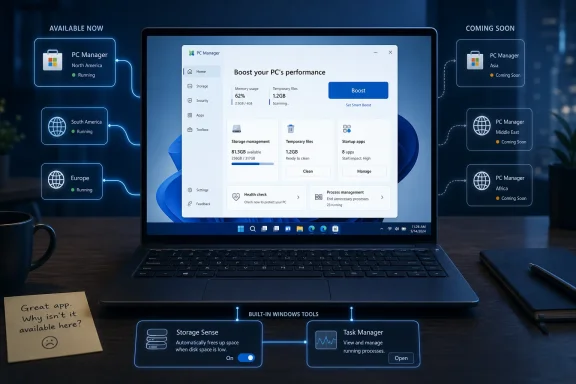
Microsoft’s PC Manager is a free Windows 10 and Windows 11 cleanup-and-optimization app that reached general availability through the Microsoft Store in early 2024, but as of June 2026 it still appears officially unavailable in some regions despite working when users change region settings or obtain it through other Microsoft-linked routes. That contradiction is the story: not whether PC Manager is revolutionary, but why Microsoft keeps treating a basic Windows maintenance dashboard like a cautious market experiment. The app is useful precisely because it is boring, and that makes the regional lockout harder to defend. For a company trying to make Windows feel more coherent, PC Manager shows how often Microsoft still hides the front door.
PC Manager is not a radical new layer on top of Windows. It is closer to a friendly wrapper around tools that already exist: Storage Sense, app cleanup, process management, startup control, temporary-file removal, and shortcuts to common system tasks. Its pitch is not “we invented maintenance.” Its pitch is “we put maintenance where ordinary users can find it.”
That distinction matters. Windows has long had the pieces required to clean up a sluggish machine, but those pieces are scattered across Settings, Control Panel leftovers, Task Manager, Disk Cleanup, Defender-adjacent panels, and buried storage pages. PC Manager takes that sprawl and compresses it into a consumer-facing dashboard with a large “Boost” button and obvious cleanup flows.
For enthusiasts, that can look simplistic. For the family member who has 80GB of downloads, three old printer utilities, a browser cache the size of a small SSD, and no idea why the laptop feels “full,” simplicity is the product. Windows does not need another power-user console as much as it needs a sane maintenance lane for everyone else.
That is why the Windows Central account lands so cleanly. The writer reportedly cleared more than 100GB in a few minutes, much of it from an overgrown Downloads folder, but also from caches, temporary files, unused apps, duplicate files, and large-file discovery. None of that is magic. It is still valuable.
The app’s best feature is not optimization in the old snake-oil sense. It is aggregation. It makes Windows’ maintenance features feel like they belong to the same operating system.
That is not a technical explanation. It is a product-management shrug.
Regional rollouts make sense for services that depend on licensing, language support, payment rails, regulatory approvals, local data processing, or backend infrastructure. PC Manager is not obviously one of those products. It cleans files, points at built-in Windows features, offers a few convenience utilities, and nudges users toward some Microsoft services. If the app is safe enough for users in the United States, China, India, and other supported markets, Microsoft has not clearly explained why comparable Windows users elsewhere should be left with workarounds.
The workaround culture is itself revealing. Users can often change Windows region settings, visit alternate Store paths, or download installers from other sources. But a maintenance utility is exactly the kind of software that should not train people to hunt around. If the safe answer is “get it from Microsoft,” Microsoft should make that answer easy.
The result is a trust gap. Microsoft has an official app that many users may want because it carries Microsoft’s name, yet the official path tells some of those users to wait indefinitely. That pushes them toward unofficial downloads, region spoofing, and forum instructions — the very behaviors that security-minded admins spend years discouraging.
For WindowsForum readers, this is not a small irony. Microsoft has spent the last decade telling users to prefer the Store, verify sources, avoid dubious cleaners, and distrust random optimization utilities. PC Manager’s regional limbo weakens that message because it makes the legitimate version feel artificially withheld.
Windows 11 has improved Settings in many ways, but it remains a maze once users move beyond the obvious. Storage Sense is useful, but many people do not know where it is, what it does, or whether it is safe. Task Manager is powerful, but it is not a cleanup assistant. Defender is familiar, but system health, app hygiene, storage cleanup, startup pressure, and taskbar repair do not live together in a way that feels intentional.
PC Manager effectively says: here is the version of Windows maintenance we would build if we assumed the user does not already know the map.
That should be humbling for Microsoft. The company has spent years rebuilding Settings while still leaving enough friction that a separate “PC Manager” app feels necessary. If the answer to clutter is another app, the operating system has not fully solved clutter. But if the app is genuinely useful, then restricting it by region looks even more self-defeating.
There is a familiar Microsoft pattern here. PowerToys gives enthusiasts the features Windows itself often should have had. Windows Terminal modernized command-line life before older shells fully faded from view. Winget helped fix software installation, but still coexists awkwardly with Store behavior, vendor updaters, MSI installers, and enterprise deployment tooling. PC Manager sits in that same family: a useful adjunct that doubles as an indictment.
The difference is audience. PowerToys is for people who know they want window zones, keyboard remapping, file locksmithing, and command palette workflows. PC Manager is for people who simply want the computer to stop feeling messy. That makes its limited availability more baffling, because the target user is less likely to know how to bypass the restriction safely.
But PC Manager’s boost concept appears more modest than the worst of that genre. Freeing memory and clearing temporary files can help in specific moments, even if it is not a substitute for more RAM, better storage, fewer background apps, or a clean Windows install. The value is not that “Boost” transforms the machine. The value is that it gives non-technical users a safe-feeling first step.
There is a danger in that framing. Windows should not imply that RAM use is inherently bad or that a healthy system must constantly purge memory. Modern operating systems cache aggressively because unused RAM is wasted RAM. A cleanup app that encourages compulsive button pressing can teach the wrong lesson.
Still, the alternative is not a world where average users become OS memory theorists. The alternative is usually a browser search that ends at an ad-heavy third-party cleaner. In that context, a conservative Microsoft utility is preferable, provided it avoids misleading claims and does not interfere with Windows’ own optimization logic.
This is where PC Manager’s tone matters. If it presents cleanup as housekeeping, it is helpful. If it presents normal Windows behavior as illness, it becomes part of the problem it is supposed to solve.
That may sound minor, and in isolation it is. Nobody is being forced to use PC Manager. Nobody is required to install Bing Wallpaper. The taskbar search box can be changed elsewhere in Windows settings. But Microsoft’s problem is cumulative, not isolated.
Windows users have already seen Edge prompts, search defaults, Start menu recommendations, Microsoft account pressure, OneDrive nudges, Copilot placement changes, and a long-running campaign to make Bing harder to ignore. A maintenance utility that folds in Bing-adjacent defaults does not arrive in a vacuum. It arrives in an ecosystem where users are already primed to interpret convenience as funneling.
That perception matters because PC Manager is supposed to feel like a trusted janitor, not a sales kiosk. When an app’s job is to clean up clutter, even a small promotional surface feels louder than it would elsewhere. A shortcut to a wallpaper app is not scandalous. It is just tacky in the one place where Microsoft should be performing restraint.
The “Taskbar repair” example is more revealing. Repair should restore user intent and remove unwanted modification. If the option also defaults toward a Microsoft-preferred search surface, it blurs the line between fixing Windows and reasserting Microsoft’s defaults. That is exactly the line Microsoft should avoid.
Administrators do not usually want users running cleanup tools just because the button is friendly. They want predictable behavior, policy controls, logging, deployment clarity, update discipline, and documentation. A utility that can delete files, recommend app removal, alter taskbar state, surface promotional defaults, and gather system-management actions into a consumer UI will not automatically be welcomed into managed environments.
That does not mean PC Manager is unsafe. It means Microsoft needs to communicate like this is an endpoint-adjacent utility, not a downloadable toy. If the app belongs in the Windows ecosystem, it needs administrative controls worthy of that ecosystem. Region locking is only one symptom of a broader ambiguity: Microsoft has not made sufficiently clear whether PC Manager is a consumer helper, a quasi-official Windows component, or a Microsoft-branded experiment from a regional product group that escaped into the Store.
That ambiguity matters because Windows already has enterprise-grade tools for storage policy, endpoint health, Defender management, Intune, Group Policy, PowerShell, and update orchestration. PC Manager is not built to replace those. But if users can install it from the Store, admins need to know what it touches and how to govern it.
The consumer story and enterprise story can coexist. Microsoft already does this with many Windows features. But coexistence requires crisp boundaries, and PC Manager’s current distribution story is fuzzy.
In an enterprise context, “not available in your region unless you change settings” is not merely annoying. It is a deployment red flag. If Microsoft cannot explain availability, many administrators will choose the simpler posture: block it, ignore it, or treat it as unsupported.
PC Manager should have been a showcase for that progress. A free Microsoft utility, delivered through the Store, kept up to date, signed, discoverable, and safe from the download-site swamp — that is the dream version of Windows software distribution.
Instead, the app shows how the Store can still inherit Microsoft’s internal seams. Availability varies. The official website may not match user reality. Search results and regional pages can disagree. Users see screenshots and recommendations from one country, then encounter a dead end in another.
This is not only about PC Manager. It is about whether Microsoft can make Windows software feel globally coherent. The company sells Windows as a platform, but too often ships first-party experiences as if they are regional trials with unclear graduation dates.
For third-party developers, the message is awkward. Microsoft wants the Store to be trusted, yet one of its own free utilities is easier to discuss than to obtain in some markets. If Microsoft cannot keep the front door open for Microsoft PC Manager, it should not be surprised when users keep relying on search engines, GitHub releases, vendor sites, and community mirrors.
Its real competitor is the operating system’s own ability to explain itself.
If Windows Settings offered a beautifully designed “Keep this PC healthy” page with storage cleanup, startup impact, duplicate-file discovery, update status, security posture, app cleanup, and clear explanations, PC Manager would be less necessary. If Storage Sense were more discoverable and more confidence-inspiring, fewer users would need a separate cleanup dashboard. If Windows had a first-run and ongoing maintenance experience that taught users what mattered, the market for “boost” buttons would shrink.
Microsoft seems to understand this in pieces. Windows already includes many of the underlying tools. The company knows users need a simplified maintenance path. It knows people like one-click reassurance. It knows the Store can distribute first-party utilities cleanly.
What it has not done is decide whether PC Manager is a bridge to a better Settings app or a permanent parallel interface. That matters because parallel interfaces are a Microsoft specialty and a Microsoft weakness. They solve short-term usability problems while creating long-term fragmentation.
PC Manager can be justified as a bridge. It is harder to justify as a semi-hidden sidecar app that some users can install and others cannot.
By 2024, general availability through the Microsoft Store suggested the experiment had matured. By 2026, continued regional confusion looks less like prudent testing and more like neglect. At some point, “Coming Soon” stops being a roadmap and becomes a shrug in HTML.
The issue is not that every country must receive every Microsoft app simultaneously. Local laws, languages, telemetry policies, and support models can complicate releases. But if those are the blockers, Microsoft should say so. Silence invites the simplest interpretation: nobody owns the global rollout strongly enough to finish it.
That is a bad look for a company that increasingly wants users to accept Windows as a managed, service-like environment. If Microsoft can push Copilot entry points, Store policy changes, Edge integrations, and cloud-account prompts across massive portions of the Windows base, it can explain the availability plan for a cleanup utility.
PC Manager is small, but small things expose habits. The habit here is Microsoft’s tendency to let useful tools live in limbo while more commercially strategic surfaces get relentless distribution.
For Microsoft, the path forward is even clearer.
Microsoft’s Windows strategy keeps oscillating between consolidation and clutter: one Settings app, but many legacy panels; one Store, but many distribution paths; one operating system, but a growing constellation of sidecar utilities that fix what Windows has not yet made obvious. PC Manager could be a small win in that larger story — an official, safe, approachable maintenance tool for people who do not want to become Windows mechanics. But to become that, Microsoft has to stop treating it like a regional experiment and start treating it like part of the Windows user experience it already claims to improve.
 Microsoft Built a Windows Utility for the People Who Never Open Settings
PC Manager is not a radical new layer on top of Windows. It is closer to a friendly wrapper around tools that already exist: Storage Sense, app cleanup, process management, startup control, temporary-file removal, and shortcuts to common system tasks. Its pitch is not “we invented maintenance.” Its pitch is “we put maintenance where ordinary users can find it.”That distinction matters. Windows has long had the pieces required to clean up a sluggish machine, but those pieces are scattered across Settings, Control Panel leftovers, Task Manager, Disk Cleanup, Defender-adjacent panels, and buried storage pages. PC Manager takes that sprawl and compresses it into a consumer-facing dashboard with a large “Boost” button and obvious cleanup flows.
For enthusiasts, that can look simplistic. For the family member who has 80GB of downloads, three old printer utilities, a browser cache the size of a small SSD, and no idea why the laptop feels “full,” simplicity is the product. Windows does not need another power-user console as much as it needs a sane maintenance lane for everyone else.
That is why the Windows Central account lands so cleanly. The writer reportedly cleared more than 100GB in a few minutes, much of it from an overgrown Downloads folder, but also from caches, temporary files, unused apps, duplicate files, and large-file discovery. None of that is magic. It is still valuable.
The app’s best feature is not optimization in the old snake-oil sense. It is aggregation. It makes Windows’ maintenance features feel like they belong to the same operating system.
The Region Lock Makes the App Look Smaller Than It Is
The oddity is that Microsoft has already done the hardest part. PC Manager spent roughly two years moving from beta-era curiosity to broader availability, then arrived through the Microsoft Store in 2024 for Windows 10 and Windows 11. Yet users in some countries still see an official site that says “Coming Soon,” while others can install it normally.That is not a technical explanation. It is a product-management shrug.
Regional rollouts make sense for services that depend on licensing, language support, payment rails, regulatory approvals, local data processing, or backend infrastructure. PC Manager is not obviously one of those products. It cleans files, points at built-in Windows features, offers a few convenience utilities, and nudges users toward some Microsoft services. If the app is safe enough for users in the United States, China, India, and other supported markets, Microsoft has not clearly explained why comparable Windows users elsewhere should be left with workarounds.
The workaround culture is itself revealing. Users can often change Windows region settings, visit alternate Store paths, or download installers from other sources. But a maintenance utility is exactly the kind of software that should not train people to hunt around. If the safe answer is “get it from Microsoft,” Microsoft should make that answer easy.
The result is a trust gap. Microsoft has an official app that many users may want because it carries Microsoft’s name, yet the official path tells some of those users to wait indefinitely. That pushes them toward unofficial downloads, region spoofing, and forum instructions — the very behaviors that security-minded admins spend years discouraging.
For WindowsForum readers, this is not a small irony. Microsoft has spent the last decade telling users to prefer the Store, verify sources, avoid dubious cleaners, and distrust random optimization utilities. PC Manager’s regional limbo weakens that message because it makes the legitimate version feel artificially withheld.
PC Manager Is a Quiet Admission That Windows Still Has a Discoverability Problem
The deeper point is that PC Manager exists because Windows still cannot surface its own maintenance model cleanly enough.Windows 11 has improved Settings in many ways, but it remains a maze once users move beyond the obvious. Storage Sense is useful, but many people do not know where it is, what it does, or whether it is safe. Task Manager is powerful, but it is not a cleanup assistant. Defender is familiar, but system health, app hygiene, storage cleanup, startup pressure, and taskbar repair do not live together in a way that feels intentional.
PC Manager effectively says: here is the version of Windows maintenance we would build if we assumed the user does not already know the map.
That should be humbling for Microsoft. The company has spent years rebuilding Settings while still leaving enough friction that a separate “PC Manager” app feels necessary. If the answer to clutter is another app, the operating system has not fully solved clutter. But if the app is genuinely useful, then restricting it by region looks even more self-defeating.
There is a familiar Microsoft pattern here. PowerToys gives enthusiasts the features Windows itself often should have had. Windows Terminal modernized command-line life before older shells fully faded from view. Winget helped fix software installation, but still coexists awkwardly with Store behavior, vendor updaters, MSI installers, and enterprise deployment tooling. PC Manager sits in that same family: a useful adjunct that doubles as an indictment.
The difference is audience. PowerToys is for people who know they want window zones, keyboard remapping, file locksmithing, and command palette workflows. PC Manager is for people who simply want the computer to stop feeling messy. That makes its limited availability more baffling, because the target user is less likely to know how to bypass the restriction safely.
The “Boost” Button Is Mostly Theater, but Useful Theater Has a Place
The word “Boost” will make many veteran Windows users wince. The PC world has a long history of utilities promising speed through registry scrubbing, RAM clearing, prefetch tampering, startup voodoo, and pseudo-scientific health scores. Microsoft entering that category was always going to raise eyebrows.But PC Manager’s boost concept appears more modest than the worst of that genre. Freeing memory and clearing temporary files can help in specific moments, even if it is not a substitute for more RAM, better storage, fewer background apps, or a clean Windows install. The value is not that “Boost” transforms the machine. The value is that it gives non-technical users a safe-feeling first step.
There is a danger in that framing. Windows should not imply that RAM use is inherently bad or that a healthy system must constantly purge memory. Modern operating systems cache aggressively because unused RAM is wasted RAM. A cleanup app that encourages compulsive button pressing can teach the wrong lesson.
Still, the alternative is not a world where average users become OS memory theorists. The alternative is usually a browser search that ends at an ad-heavy third-party cleaner. In that context, a conservative Microsoft utility is preferable, provided it avoids misleading claims and does not interfere with Windows’ own optimization logic.
This is where PC Manager’s tone matters. If it presents cleanup as housekeeping, it is helpful. If it presents normal Windows behavior as illness, it becomes part of the problem it is supposed to solve.
The Bing Nudges Turn a Maintenance Tool Into a Familiar Microsoft Argument
PC Manager’s usefulness comes with a predictable Microsoft tax: the app appears to include promotional paths toward Bing-powered experiences. Windows Central points to a “Taskbar repair” option that defaults to enabling the search box on the taskbar, which uses Bing for web results. The same account notes a shortcut encouraging installation of the Bing Wallpaper app.That may sound minor, and in isolation it is. Nobody is being forced to use PC Manager. Nobody is required to install Bing Wallpaper. The taskbar search box can be changed elsewhere in Windows settings. But Microsoft’s problem is cumulative, not isolated.
Windows users have already seen Edge prompts, search defaults, Start menu recommendations, Microsoft account pressure, OneDrive nudges, Copilot placement changes, and a long-running campaign to make Bing harder to ignore. A maintenance utility that folds in Bing-adjacent defaults does not arrive in a vacuum. It arrives in an ecosystem where users are already primed to interpret convenience as funneling.
That perception matters because PC Manager is supposed to feel like a trusted janitor, not a sales kiosk. When an app’s job is to clean up clutter, even a small promotional surface feels louder than it would elsewhere. A shortcut to a wallpaper app is not scandalous. It is just tacky in the one place where Microsoft should be performing restraint.
The “Taskbar repair” example is more revealing. Repair should restore user intent and remove unwanted modification. If the option also defaults toward a Microsoft-preferred search surface, it blurs the line between fixing Windows and reasserting Microsoft’s defaults. That is exactly the line Microsoft should avoid.
Enterprise IT Will Not Treat This as a Free Gift
For home users, PC Manager is a convenience app. For IT departments, it is more complicated.Administrators do not usually want users running cleanup tools just because the button is friendly. They want predictable behavior, policy controls, logging, deployment clarity, update discipline, and documentation. A utility that can delete files, recommend app removal, alter taskbar state, surface promotional defaults, and gather system-management actions into a consumer UI will not automatically be welcomed into managed environments.
That does not mean PC Manager is unsafe. It means Microsoft needs to communicate like this is an endpoint-adjacent utility, not a downloadable toy. If the app belongs in the Windows ecosystem, it needs administrative controls worthy of that ecosystem. Region locking is only one symptom of a broader ambiguity: Microsoft has not made sufficiently clear whether PC Manager is a consumer helper, a quasi-official Windows component, or a Microsoft-branded experiment from a regional product group that escaped into the Store.
That ambiguity matters because Windows already has enterprise-grade tools for storage policy, endpoint health, Defender management, Intune, Group Policy, PowerShell, and update orchestration. PC Manager is not built to replace those. But if users can install it from the Store, admins need to know what it touches and how to govern it.
The consumer story and enterprise story can coexist. Microsoft already does this with many Windows features. But coexistence requires crisp boundaries, and PC Manager’s current distribution story is fuzzy.
In an enterprise context, “not available in your region unless you change settings” is not merely annoying. It is a deployment red flag. If Microsoft cannot explain availability, many administrators will choose the simpler posture: block it, ignore it, or treat it as unsupported.
The Store Was Supposed to Solve This Kind of Confusion
The Microsoft Store’s comeback has been one of the quieter successes of the Windows 11 era. It is faster, more useful, less hostile to traditional desktop apps, and increasingly credible as a place to fetch mainstream software. That progress is real.PC Manager should have been a showcase for that progress. A free Microsoft utility, delivered through the Store, kept up to date, signed, discoverable, and safe from the download-site swamp — that is the dream version of Windows software distribution.
Instead, the app shows how the Store can still inherit Microsoft’s internal seams. Availability varies. The official website may not match user reality. Search results and regional pages can disagree. Users see screenshots and recommendations from one country, then encounter a dead end in another.
This is not only about PC Manager. It is about whether Microsoft can make Windows software feel globally coherent. The company sells Windows as a platform, but too often ships first-party experiences as if they are regional trials with unclear graduation dates.
For third-party developers, the message is awkward. Microsoft wants the Store to be trusted, yet one of its own free utilities is easier to discuss than to obtain in some markets. If Microsoft cannot keep the front door open for Microsoft PC Manager, it should not be surprised when users keep relying on search engines, GitHub releases, vendor sites, and community mirrors.
The App’s Real Competitor Is Not CCleaner, but Windows Itself
It is tempting to frame PC Manager as Microsoft’s answer to CCleaner. That comparison is obvious but incomplete. Yes, PC Manager occupies some of the same cleanup territory. Yes, it appeals to users who want an official alternative to third-party optimizers. But its most important competitor is not Piriform, WinToys, Winhance, or any other cleanup suite.Its real competitor is the operating system’s own ability to explain itself.
If Windows Settings offered a beautifully designed “Keep this PC healthy” page with storage cleanup, startup impact, duplicate-file discovery, update status, security posture, app cleanup, and clear explanations, PC Manager would be less necessary. If Storage Sense were more discoverable and more confidence-inspiring, fewer users would need a separate cleanup dashboard. If Windows had a first-run and ongoing maintenance experience that taught users what mattered, the market for “boost” buttons would shrink.
Microsoft seems to understand this in pieces. Windows already includes many of the underlying tools. The company knows users need a simplified maintenance path. It knows people like one-click reassurance. It knows the Store can distribute first-party utilities cleanly.
What it has not done is decide whether PC Manager is a bridge to a better Settings app or a permanent parallel interface. That matters because parallel interfaces are a Microsoft specialty and a Microsoft weakness. They solve short-term usability problems while creating long-term fragmentation.
PC Manager can be justified as a bridge. It is harder to justify as a semi-hidden sidecar app that some users can install and others cannot.
Regional Caution Made Sense in 2022; It Looks Stale in 2026
There was a reasonable version of this story in 2022. Microsoft, or a Microsoft regional team, tests a PC maintenance app in limited markets. It gathers telemetry, localizes strings, studies support issues, adjusts cleanup logic, and decides whether the product deserves broader distribution. That is normal software development.By 2024, general availability through the Microsoft Store suggested the experiment had matured. By 2026, continued regional confusion looks less like prudent testing and more like neglect. At some point, “Coming Soon” stops being a roadmap and becomes a shrug in HTML.
The issue is not that every country must receive every Microsoft app simultaneously. Local laws, languages, telemetry policies, and support models can complicate releases. But if those are the blockers, Microsoft should say so. Silence invites the simplest interpretation: nobody owns the global rollout strongly enough to finish it.
That is a bad look for a company that increasingly wants users to accept Windows as a managed, service-like environment. If Microsoft can push Copilot entry points, Store policy changes, Edge integrations, and cloud-account prompts across massive portions of the Windows base, it can explain the availability plan for a cleanup utility.
PC Manager is small, but small things expose habits. The habit here is Microsoft’s tendency to let useful tools live in limbo while more commercially strategic surfaces get relentless distribution.
The Useful Little Cleaner That Makes Microsoft Look Indecisive
The practical advice is not complicated, but the implications are. PC Manager is worth considering for ordinary Windows users who want a simpler way to clean storage, review large files, manage some startup and app clutter, and find common maintenance tools without spelunking through Settings. It is not a miracle performance engine, and users should be cautious about treating any one-click booster as a substitute for understanding what is consuming storage, memory, or CPU.For Microsoft, the path forward is even clearer.
- Microsoft should make PC Manager officially available in every region where Windows 10 and Windows 11 users can safely run it.
- Microsoft should explain any remaining regional exclusions in plain language rather than leaving users to infer policy from Store errors and “Coming Soon” pages.
- Microsoft should remove promotional defaults from repair-oriented flows, especially anything that makes Bing placement look like system maintenance.
- Microsoft should publish clearer administrative guidance so IT departments know whether to allow, block, or manage the app.
- Microsoft should fold the best parts of PC Manager back into Windows Settings instead of letting another parallel maintenance surface drift indefinitely.
Microsoft’s Windows strategy keeps oscillating between consolidation and clutter: one Settings app, but many legacy panels; one Store, but many distribution paths; one operating system, but a growing constellation of sidecar utilities that fix what Windows has not yet made obvious. PC Manager could be a small win in that larger story — an official, safe, approachable maintenance tool for people who do not want to become Windows mechanics. But to become that, Microsoft has to stop treating it like a regional experiment and start treating it like part of the Windows user experience it already claims to improve.
References
- Primary source: Windows Central
Published: Fri, 19 Jun 2026 12:04:18 GMT
I tried Microsoft's region-locked PC Manager and now I wish everyone could use it | Windows Central
PC Manager has been out for years, but it's still limited to certain regions.www.windowscentral.com - Official source: pcmanager.microsoft.com
Cleanup PC, protection for your computer | Microsoft PC Manager
Official Microsoft PC Manage website; thorough analysis, thorough cleaning, toolkit. Releasing occupied resources and cleaning system fragments will make your Windows run like new.pcmanager.microsoft.com
- Related coverage: pcworld.com
Microsoft's free PC optimizer makes it easy to free up storage space | PCWorld
Adios, CCleaner? Microsoft has added helpful new features to its free PC Manager, but mind those Repair suggestions.www.pcworld.com - Related coverage: windowslatest.com
Microsoft's CCleaner-like PC Manager for Windows 11 is now widely available via the Store
Want a free and secure alternative to CCleaner? Use Microsoft PC Manager app which is a blend of useful tools and an ad-free design.www.windowslatest.com - Related coverage: petri.com
Microsoft's New PC Manager App Lands on the Microsoft Store
Microsoft’s new PC Manager app is now available for all users on Windows 10 and Windows 11 devices. The app has been available in public beta in select petri.com
- Official source: learn.microsoft.com
Microsoft PC Manager is not available in Windows Store - Microsoft Q&A
I'm using Windows 10 Version 22H2, Build 19045.4046, but Microsoft PC Manager is not available in the Windows Store. Can you tell me if the Microsoft PC Manager will be available for this version?learn.microsoft.com
- Related coverage: gbnews.com
Two years later than expected, Microsoft app to boost performance on Windows 10 and 11 PCs finally launches
PC Manager is a one-stop-shop with tools to supercharge your PCwww.gbnews.com - Related coverage: tomshardware.com
Microsoft Store change removes the ability to stop App updates — pausing automatic updates now limited to a 5-week duration | Tom's Hardware
You get updates, you get updates, everybody gets updates!www.tomshardware.com - Related coverage: en.softonic.com
- Related coverage: windowsarea.de
Microsoft bringt seinen PC Manager in den Store
Microsofts PC-Manager ist als Alternative zu vielen Reinigungstools gedacht, welcher System-Tools zur Verbesserung der Performance nutzt.windowsarea.de - Related coverage: 01net.com
Microsoft PC Manager : comment installer l’appli de nettoyage et d’optimisation dès maintenant ?
Microsoft propose désormais son outil de nettoyage et d’optimisation PC Manager sur le Microsoft Store. Téléchargeable gratuitement, l’utilitaire ne semble pas être encore disponible chez tous les utilisateurs en France. Il est toutefois possible de l’installer sans attendre. Voici comment. www.01net.com
