

Microsoft has confirmed that the new
For most Windows 11 users, the appearance of a new folder under
In this case, Microsoft says the folder is there by design. It contains PowerShell scripts intended for organizations that are actively managing Secure Boot certificate updates across fleets of PCs. Those scripts can help detect whether the new certificates are installed, check update status, and make sure the Windows task responsible for applying the certificate changes is enabled.
That sounds mundane, but the timing is not. Secure Boot’s original Microsoft certificates, dating from the Windows 8 era, begin aging out in 2026. A mechanism that lived mostly below the waterline for more than a decade now needs a careful, staged handoff across consumer PCs, business laptops, servers, virtual machines, gaming rigs, and oddball firmware combinations that nobody at Redmond can perfectly simulate.
The
That invisibility has a cost. When Secure Boot breaks, it can break in a place users do not normally troubleshoot. A certificate or firmware problem can appear as a boot failure, a BitLocker recovery prompt, a Linux dual-boot surprise, or a vague Windows Security warning rather than a friendly dialog explaining the trust model of UEFI variables.
Windows 11 raised the stakes by making Secure Boot part of the platform’s modern security posture. Microsoft did not merely recommend it; the company made it part of the baseline identity of a supported Windows 11 PC. That decision made sense in a world of ransomware, credential theft, and increasingly sophisticated boot-level attacks, but it also means certificate maintenance is no longer a niche OEM concern.
The 2026 certificate transition is the moment when a long-deferred systems problem becomes a household one. Millions of devices are being asked to accept a new set of trust anchors, often through Windows Update, while relying on firmware written by many different vendors across many years of hardware.
Microsoft’s replacement certificates are generally referred to as the 2023 Secure Boot certificates, and they are meant to supersede the older 2011 chain. The transition includes new certificates for Windows boot components and for broader UEFI signing scenarios, including option ROMs and third-party boot components. The details matter more to firmware engineers than to home users, but the practical point is simple: devices need the newer trust material before the older certificates become a security liability.
This does not mean every Windows PC suddenly stops booting the moment a calendar date passes. Certificate expiration in firmware trust chains is more complicated than a browser warning on an HTTPS site, and Microsoft has repeatedly framed this as a degraded-security issue rather than an instant mass-bricking event. But “not instantly dead” is not the same as “nothing to worry about.”
The problem is especially awkward because Secure Boot depends on cooperation between Windows, firmware, OEM update practices, and sometimes third-party boot software. Microsoft can deliver a lot through Windows Update, but it cannot magically make every older firmware implementation behave well. That is why the company has been pushing administrators to inventory devices, test representative models, monitor event logs, and pay attention to OEM firmware availability.
One script checks certificate update status and records output in a structured format. Another helps ensure the scheduled task used for the Secure Boot certificate update process is enabled. Others are aimed at the kind of fleet monitoring and remediation work that enterprise IT teams need when they are staring at thousands of devices, dozens of models, and a shrinking timeline.
The awkward part is that Microsoft placed those tools on broadly eligible Windows 11 systems, including consumer editions where no administrator will ever use them. That choice is defensible from an engineering standpoint: one Windows image, one servicing path, fewer special cases. It is less elegant from a communication standpoint, because unexplained folders in
This has become a familiar Windows servicing pattern. Microsoft makes a technically reasonable change, documents it late or sparsely, and then the enthusiast community reverse-engineers the intent before the company’s message catches up. That may be tolerable for a Start menu experiment. It is less ideal when the subject is Secure Boot.
For home users, the practical guidance is straightforward: do not delete the folder because you think it is leftover update clutter. Windows may remove or change it later, and future servicing logic may assume those files are present. Deleting it is unlikely to improve anything and could make troubleshooting harder if Microsoft or an administrator expects the scripts to be available.
The more useful action is to check Windows Security. Microsoft has surfaced Secure Boot certificate status through the Windows Security app, which gives users a more direct signal than spelunking through firmware menus or event logs. A green state means the device is where Microsoft expects it to be; yellow or red means the user or administrator may need to investigate.
That is a notable shift. Secure Boot was once the kind of feature many users encountered only while installing Linux or changing BIOS settings. Now Windows is trying to expose certificate health as part of normal device security, which is exactly what should happen when the trust chain becomes an active maintenance item rather than a static factory setting.
Microsoft’s guidance to IT professionals reflects that reality. The company wants organizations to inventory models, BIOS versions, baseboard details, and firmware dates before pushing the transition broadly. It recommends representative testing because two laptops with the same Windows build can behave differently if their firmware histories diverge.
For managed environments, that is tedious but familiar. Enterprises already know that “all Windows 11 devices” is not a homogeneous category. A fleet can include current-generation business laptops, aging desktops, specialty workstations, virtual machines, kiosk hardware, and devices that technically still run Windows but are long past their OEM’s attention span.
For consumers, the story is messier. Many people never update firmware unless Windows Update does it for them. Some OEM update utilities are excellent; others are intrusive, confusing, or abandoned. If a machine needs a firmware update before it can complete the Secure Boot certificate transition, the average user may not know where to look until Windows Security turns yellow.
The better concern is drift. Some PCs will update smoothly. Some will need a reboot or two after monthly cumulative updates. Some will sit in a pending state until a firmware update arrives. Some older or unusual systems may never receive a clean path, especially if the OEM has moved on.
That unevenness is what makes Secure Boot certificate renewal an IT operations problem rather than a simple patch note. A failed browser certificate is obvious. A lagging Secure Boot certificate can hide behind a reassuringly normal desktop until someone checks the right status panel or tries to deploy a future boot component signed under the new chain.
There is also a cultural problem. Windows power users have been trained by years of update mishaps to distrust mysterious changes. When Microsoft adds a folder without clearly flagging it in the original release notes, it feeds the reflex to delete, disable, or “debloat” first and ask questions later. In this case, that reflex is exactly wrong.
Dual-boot users should be especially attentive. A Windows PC that looks healthy from Microsoft’s perspective may still depend on third-party boot components that need their own updated signing path. The same goes for specialized tools that hook early in the boot process, including some disk encryption and recovery environments.
Virtual machines add another wrinkle. A VM’s Secure Boot behavior depends on the virtual firmware supplied by Hyper-V, VMware, cloud platforms, or another virtualization stack. Existing VMs may need the certificate updates applied through the guest operating system, while new VMs may depend on whether the platform provider has updated its templates and virtual firmware.
This is why Microsoft’s administrator guidance spends so much time on monitoring and staged rollout. The company knows that Secure Boot is an ecosystem feature masquerading as a Windows feature. The Windows Update mechanism can carry the payload, but the blast radius includes everything trusted before the operating system loads.
This is not merely a public relations complaint. Security depends on user trust, and unexplained changes in privileged locations weaken that trust. When users cannot distinguish a legitimate Microsoft servicing artifact from something suspicious, they either panic or become numb. Neither reaction helps security.
Microsoft has improved Windows transparency in some areas, especially with known issue dashboards and more detailed deployment guidance for enterprise scenarios. But the company still often writes documentation for administrators who already know what question to ask. The broader Windows audience needs plainer release notes when changes affect visible system files, security status, or boot behavior.
The irony is that the underlying engineering choice may be sensible. Shipping sample scripts with the OS ensures they are available and version-aligned. It gives IT teams a common baseline. It avoids asking administrators to copy tooling from a web page during a deadline-driven security transition. But a sensible implementation can still be a poor user experience if it appears without context.
Administrators have a heavier lift. They should not treat the presence of the folder as proof that the certificate migration is complete. The folder is tooling; the actual state lives in firmware variables, Windows status, event logs, and management telemetry. A script sitting on disk is not the same thing as a successful update.
The distinction matters because Microsoft’s rollout model is confidence-based and staged. Devices may receive the update path at different times depending on hardware class, telemetry, firmware behavior, and known issues. A device that has installed KB5089549 may still need time, reboots, or firmware remediation before it reaches the desired Secure Boot 2023 state.
This is where Windows enthusiasts can help rather than hinder. The correct community response is not to publish cleanup scripts that remove unfamiliar folders. It is to document which devices update cleanly, which firmware versions lag, and which OEMs provide fixes before the deadline becomes an emergency.
The new folder in
Source: Windows Latest Microsoft confirms the new Secure Boot folder in Windows 11 isn't a bug, you don't need to delete it
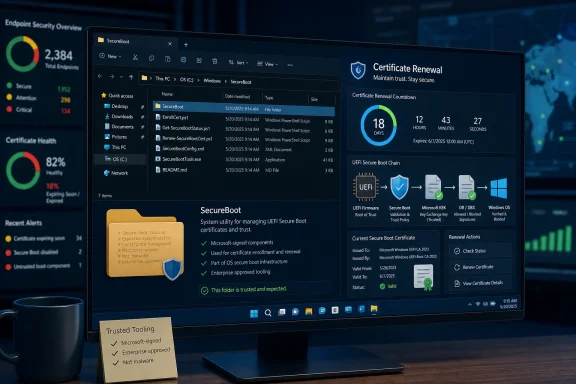
C:\Windows\SecureBoot folder appearing after Windows 11’s May 2026 cumulative update, KB5089549, is expected behavior, not a bug, and exists to support the ongoing rollout of replacement Secure Boot certificates before older 2011-era certificates expire this year. The folder is not malware, not update debris, and not something ordinary users need to clean up. But its sudden arrival is a revealing example of how Microsoft’s most sensitive Windows plumbing often changes in public before the company has fully explained the change. The real story is not the folder; it is the deadline underneath it.
 A Small Folder Points to a Much Larger Clock
For most Windows 11 users, the appearance of a new folder under C:\Windows is the kind of thing that sets off exactly the right instinct: suspicion. The Windows directory is not a junk drawer, and anything new there deserves scrutiny, especially when it arrives without a clear line in the release notes.In this case, Microsoft says the folder is there by design. It contains PowerShell scripts intended for organizations that are actively managing Secure Boot certificate updates across fleets of PCs. Those scripts can help detect whether the new certificates are installed, check update status, and make sure the Windows task responsible for applying the certificate changes is enabled.
That sounds mundane, but the timing is not. Secure Boot’s original Microsoft certificates, dating from the Windows 8 era, begin aging out in 2026. A mechanism that lived mostly below the waterline for more than a decade now needs a careful, staged handoff across consumer PCs, business laptops, servers, virtual machines, gaming rigs, and oddball firmware combinations that nobody at Redmond can perfectly simulate.
The
SecureBoot folder is therefore less a surprise feature than a visible seam in a massive trust-chain renovation. Microsoft is trying to move the foundation while the building is occupied.Secure Boot Was Supposed to Be Invisible Until It Wasn’t
Secure Boot is one of those Windows security features that succeeds best when users never think about it. It sits in the UEFI firmware layer and helps verify that early boot components are trusted before Windows itself takes control. Its job is to make pre-OS malware, bootkits, and unauthorized boot loaders harder to slip into the startup chain.That invisibility has a cost. When Secure Boot breaks, it can break in a place users do not normally troubleshoot. A certificate or firmware problem can appear as a boot failure, a BitLocker recovery prompt, a Linux dual-boot surprise, or a vague Windows Security warning rather than a friendly dialog explaining the trust model of UEFI variables.
Windows 11 raised the stakes by making Secure Boot part of the platform’s modern security posture. Microsoft did not merely recommend it; the company made it part of the baseline identity of a supported Windows 11 PC. That decision made sense in a world of ransomware, credential theft, and increasingly sophisticated boot-level attacks, but it also means certificate maintenance is no longer a niche OEM concern.
The 2026 certificate transition is the moment when a long-deferred systems problem becomes a household one. Millions of devices are being asked to accept a new set of trust anchors, often through Windows Update, while relying on firmware written by many different vendors across many years of hardware.
The 2011 Trust Chain Is Reaching Its Expiration Date
The original Secure Boot certificates were issued in 2011, when UEFI Secure Boot was becoming a mainstream Windows PC feature. At the time, 2026 felt comfortably far away. Fifteen years later, it is now a deployment deadline.Microsoft’s replacement certificates are generally referred to as the 2023 Secure Boot certificates, and they are meant to supersede the older 2011 chain. The transition includes new certificates for Windows boot components and for broader UEFI signing scenarios, including option ROMs and third-party boot components. The details matter more to firmware engineers than to home users, but the practical point is simple: devices need the newer trust material before the older certificates become a security liability.
This does not mean every Windows PC suddenly stops booting the moment a calendar date passes. Certificate expiration in firmware trust chains is more complicated than a browser warning on an HTTPS site, and Microsoft has repeatedly framed this as a degraded-security issue rather than an instant mass-bricking event. But “not instantly dead” is not the same as “nothing to worry about.”
The problem is especially awkward because Secure Boot depends on cooperation between Windows, firmware, OEM update practices, and sometimes third-party boot software. Microsoft can deliver a lot through Windows Update, but it cannot magically make every older firmware implementation behave well. That is why the company has been pushing administrators to inventory devices, test representative models, monitor event logs, and pay attention to OEM firmware availability.
Microsoft Is Shipping Scripts Because Automation Has Limits
The newC:\Windows\SecureBoot folder contains scripts, not a hidden executable payload that unilaterally rewrites your PC. That distinction is important. The scripts are samples and aids for administrators; they do not, merely by existing, perform the certificate migration on their own.One script checks certificate update status and records output in a structured format. Another helps ensure the scheduled task used for the Secure Boot certificate update process is enabled. Others are aimed at the kind of fleet monitoring and remediation work that enterprise IT teams need when they are staring at thousands of devices, dozens of models, and a shrinking timeline.
The awkward part is that Microsoft placed those tools on broadly eligible Windows 11 systems, including consumer editions where no administrator will ever use them. That choice is defensible from an engineering standpoint: one Windows image, one servicing path, fewer special cases. It is less elegant from a communication standpoint, because unexplained folders in
C:\Windows invite exactly the sort of speculation Microsoft then has to clean up.This has become a familiar Windows servicing pattern. Microsoft makes a technically reasonable change, documents it late or sparsely, and then the enthusiast community reverse-engineers the intent before the company’s message catches up. That may be tolerable for a Start menu experiment. It is less ideal when the subject is Secure Boot.
The May Update Turns Certificate Maintenance Into a Consumer Event
KB5089549 is not merely another cumulative update in the ordinary Patch Tuesday sense. It lands during the final approach to a Secure Boot certificate deadline that Microsoft and OEMs have been preparing for across multiple releases. That makes even a small artifact like a folder feel larger than it would in a quieter month.For home users, the practical guidance is straightforward: do not delete the folder because you think it is leftover update clutter. Windows may remove or change it later, and future servicing logic may assume those files are present. Deleting it is unlikely to improve anything and could make troubleshooting harder if Microsoft or an administrator expects the scripts to be available.
The more useful action is to check Windows Security. Microsoft has surfaced Secure Boot certificate status through the Windows Security app, which gives users a more direct signal than spelunking through firmware menus or event logs. A green state means the device is where Microsoft expects it to be; yellow or red means the user or administrator may need to investigate.
That is a notable shift. Secure Boot was once the kind of feature many users encountered only while installing Linux or changing BIOS settings. Now Windows is trying to expose certificate health as part of normal device security, which is exactly what should happen when the trust chain becomes an active maintenance item rather than a static factory setting.
Firmware Is the Weak Link Microsoft Cannot Fully Own
The uncomfortable part of this transition is firmware. Windows Update can stage certificates, run scheduled tasks, and report status, but the firmware ultimately has to accept and store Secure Boot variables correctly. That means the success of the rollout depends on code that may be years old, vendor-specific, and inconsistently maintained.Microsoft’s guidance to IT professionals reflects that reality. The company wants organizations to inventory models, BIOS versions, baseboard details, and firmware dates before pushing the transition broadly. It recommends representative testing because two laptops with the same Windows build can behave differently if their firmware histories diverge.
For managed environments, that is tedious but familiar. Enterprises already know that “all Windows 11 devices” is not a homogeneous category. A fleet can include current-generation business laptops, aging desktops, specialty workstations, virtual machines, kiosk hardware, and devices that technically still run Windows but are long past their OEM’s attention span.
For consumers, the story is messier. Many people never update firmware unless Windows Update does it for them. Some OEM update utilities are excellent; others are intrusive, confusing, or abandoned. If a machine needs a firmware update before it can complete the Secure Boot certificate transition, the average user may not know where to look until Windows Security turns yellow.
The Risk Is Not Panic, It Is Drift
The worst reading of this situation is that Windows PCs are about to fall off a cliff in June 2026. That overstates the case. Microsoft has been rolling out the new certificates in stages, and many newer devices already have what they need.The better concern is drift. Some PCs will update smoothly. Some will need a reboot or two after monthly cumulative updates. Some will sit in a pending state until a firmware update arrives. Some older or unusual systems may never receive a clean path, especially if the OEM has moved on.
That unevenness is what makes Secure Boot certificate renewal an IT operations problem rather than a simple patch note. A failed browser certificate is obvious. A lagging Secure Boot certificate can hide behind a reassuringly normal desktop until someone checks the right status panel or tries to deploy a future boot component signed under the new chain.
There is also a cultural problem. Windows power users have been trained by years of update mishaps to distrust mysterious changes. When Microsoft adds a folder without clearly flagging it in the original release notes, it feeds the reflex to delete, disable, or “debloat” first and ask questions later. In this case, that reflex is exactly wrong.
Linux, Virtual Machines, and Edge Cases Keep the Story Complicated
Secure Boot is not only a Windows story, even when Microsoft is the central certificate authority in practice. Many Linux distributions, third-party boot loaders, recovery tools, encryption utilities, and hardware option ROMs have lived within the Microsoft-signed Secure Boot ecosystem for years. That makes the certificate transition broader than a Windows 11 maintenance chore.Dual-boot users should be especially attentive. A Windows PC that looks healthy from Microsoft’s perspective may still depend on third-party boot components that need their own updated signing path. The same goes for specialized tools that hook early in the boot process, including some disk encryption and recovery environments.
Virtual machines add another wrinkle. A VM’s Secure Boot behavior depends on the virtual firmware supplied by Hyper-V, VMware, cloud platforms, or another virtualization stack. Existing VMs may need the certificate updates applied through the guest operating system, while new VMs may depend on whether the platform provider has updated its templates and virtual firmware.
This is why Microsoft’s administrator guidance spends so much time on monitoring and staged rollout. The company knows that Secure Boot is an ecosystem feature masquerading as a Windows feature. The Windows Update mechanism can carry the payload, but the blast radius includes everything trusted before the operating system loads.
Microsoft’s Documentation Lag Makes a Good Change Look Suspicious
The most avoidable part of this episode is the communication gap. If Microsoft knew KB5089549 would add aSecureBoot folder under C:\Windows, the update documentation should have said so clearly from the start. Instead, users noticed the folder, asked whether it was safe, and only then did the clarification become the headline.This is not merely a public relations complaint. Security depends on user trust, and unexplained changes in privileged locations weaken that trust. When users cannot distinguish a legitimate Microsoft servicing artifact from something suspicious, they either panic or become numb. Neither reaction helps security.
Microsoft has improved Windows transparency in some areas, especially with known issue dashboards and more detailed deployment guidance for enterprise scenarios. But the company still often writes documentation for administrators who already know what question to ask. The broader Windows audience needs plainer release notes when changes affect visible system files, security status, or boot behavior.
The irony is that the underlying engineering choice may be sensible. Shipping sample scripts with the OS ensures they are available and version-aligned. It gives IT teams a common baseline. It avoids asking administrators to copy tooling from a web page during a deadline-driven security transition. But a sensible implementation can still be a poor user experience if it appears without context.
The Folder Is Harmless, the Deadline Is Not
The right response to theSecureBoot folder is restraint. Leave it alone, keep Windows updated, reboot when updates ask for it, and check Windows Security if you want to know whether your device is in good shape. For most users, that is likely to be enough.Administrators have a heavier lift. They should not treat the presence of the folder as proof that the certificate migration is complete. The folder is tooling; the actual state lives in firmware variables, Windows status, event logs, and management telemetry. A script sitting on disk is not the same thing as a successful update.
The distinction matters because Microsoft’s rollout model is confidence-based and staged. Devices may receive the update path at different times depending on hardware class, telemetry, firmware behavior, and known issues. A device that has installed KB5089549 may still need time, reboots, or firmware remediation before it reaches the desired Secure Boot 2023 state.
This is where Windows enthusiasts can help rather than hinder. The correct community response is not to publish cleanup scripts that remove unfamiliar folders. It is to document which devices update cleanly, which firmware versions lag, and which OEMs provide fixes before the deadline becomes an emergency.
The May 2026 Lesson for Windows Users
Microsoft’s explanation narrows the immediate mystery, but it also gives Windows users a practical checklist for the next several weeks. The Secure Boot folder itself is not the thing to obsess over. The certificate state behind it is.- You should leave
C:\Windows\SecureBootin place because Microsoft says it is expected behavior tied to Secure Boot certificate servicing. - You should install cumulative updates and complete required restarts because the certificate rollout can depend on scheduled tasks and post-update boot cycles.
- You should check Windows Security’s Device Security area if you want a user-facing indication of Secure Boot certificate health.
- You should update system firmware from your PC maker if Windows reports a warning or if your organization identifies a model-specific issue.
- You should not assume that every PC in a fleet is safe just because it installed KB5089549; administrators still need inventory, event monitoring, and representative testing.
- You should pay extra attention to dual-boot systems, older hardware, virtual machines, and devices whose OEM support has gone quiet.
The new folder in
C:\Windows is a small, slightly clumsy artifact of a much bigger migration: Microsoft is trying to renew the trust roots of the Windows boot ecosystem before time does it the hard way. If the rollout works, most users will never remember the folder existed. If it falters, the machines left behind will become case studies in why platform security is not a one-time switch but a long, inconvenient promise that has to be renewed before the calendar runs out.Source: Windows Latest Microsoft confirms the new Secure Boot folder in Windows 11 isn't a bug, you don't need to delete it
