

Windows 11 updates have become noticeably larger, and the latest investigation from Windows Latest gives a useful look at why monthly cumulative update packages are now reaching sizes that would have seemed excessive only a couple of years ago. The short version is that AI is part of the reason, but it is not the whole reason. The bigger issue is the way Windows servicing works: cumulative updates, checkpoint baselines, hardware applicability rules, bundled feature payloads, enterprise distribution needs, and Microsoft’s long-standing commitment to keeping Windows installable across a huge range of devices.
The most eye-catching number is the Microsoft Update Catalog size. Some Windows 11 cumulative update packages are now crossing 4 GB, and recent packages are reportedly approaching or exceeding 5 GB. When extracted, one package expanded to almost 9 GB. That sounds outrageous if you think of a monthly update as “just this month’s bug fixes,” but that is not how modern Windows updates are structured.
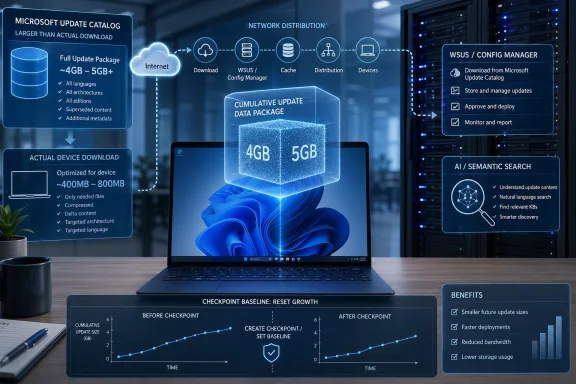
A catalog package is not the same thing as the exact download that every PC receives. The Microsoft Update Catalog shows the full package before Windows Update narrows it down for a particular device. Windows Update still uses applicability checks, delta logic, and delivery optimizations to avoid downloading every single component on every machine. A home user may see a much smaller actual download than the catalog listing suggests. Still, the catalog size matters, especially for administrators, offline servicing, WSUS, Configuration Manager, and anyone who handles update packages directly.
Windows 11 quality updates are cumulative. That means each monthly cumulative update does not contain only the changes from that month. It includes the necessary update chain to bring an eligible system to the current state, even if previous updates were skipped.
This model has a clear benefit: reliability. A user or administrator can install the latest cumulative update and know the machine has the fixes that came before it. There is no need to hunt down a long chain of older patches in the correct order. For a consumer PC, this is mostly invisible. For IT teams, it simplifies compliance because “install the latest cumulative update” becomes the primary servicing instruction.
The drawback is size. If each update carries more historical payload, metadata, binary differentials, components, and applicability information, the package naturally grows over time. Microsoft has improved how much data gets downloaded to a client, but the package itself can still become larger because it has to support many starting points and configurations.
This is the core tension in Windows servicing: Microsoft wants updates to be reliable, self-contained, recoverable, and deployable across wildly different hardware and software environments. Smaller update packages are desirable, but not if that creates dependency failures, missing components, or machines that cannot boot after patching.
In theory, that should reduce update size because subsequent packages only need to carry changes since the latest checkpoint. Microsoft described the approach as a way to produce smaller downloads, reduce bandwidth usage, save storage, and improve sustainability for distribution infrastructure.
That logic makes sense. If Windows 11 24H2 ships, and then months of updates accumulate, the update chain grows. A checkpoint resets the practical baseline. Systems that already have the checkpoint do not need to keep receiving update differentials from the original 24H2 release. They can receive smaller payloads based on the checkpoint state.
The problem, according to the Windows Latest analysis, is that the size savings have eroded. After a September 2024 checkpoint, Windows 11 24H2 cumulative updates remained relatively small for a while, but the May 2025 update jumped sharply. The investigation says the April 2025 cumulative update was about 1,287 MB, while the May 2025 package rose to about 4,369 MB. That is a massive increase in one month.
The key point is that checkpoint updates are not magic. They reduce growth when checkpoints are used regularly and when the payload added after a checkpoint remains reasonably small. If Microsoft adds large new components after a checkpoint and then does not create another checkpoint for a long time, the same growth problem begins again.
That matters because these are not traditional “security fix” files in the way many people imagine a Patch Tuesday update. They are feature components, and several appear connected to on-device AI and semantic indexing features that Microsoft has been building into Windows 11.
Semantic search is one of the newer AI-adjacent areas of Windows. Instead of only searching filenames and basic indexed text, Windows can use richer recognition and semantic understanding to locate images, documents, or content based on meaning. That sort of feature requires models, runtimes, processors, tokenizers, and integration layers. Those components can be large, and they may need different variants depending on hardware support.
This is where AI becomes a real part of the update size story. If Microsoft bundles AI-related MSIX packages into the main cumulative update pipeline, the catalog package grows. Even if many devices do not actually install or download every one of those components, the master package still carries them.
However, it would be misleading to say “Copilot made Windows Update 5 GB.” The issue is broader. AI components contributed to the spike, but the servicing model determines why they are inside such a large package in the first place. The update system is designed to package and distribute Windows components across a huge ecosystem, not just deliver a single app update to one known hardware platform.
The Microsoft Update Catalog is useful for manual downloads, offline servicing, enterprise distribution, and administrators who need access to standalone packages. But the catalog file is not necessarily what Windows Update downloads in full on a consumer PC.
Windows Update performs applicability checks. It looks at the machine’s hardware, installed components, current patch state, architecture, and supported features. If a component does not apply to that PC, Windows Update should not download and install it. The Windows Latest test reportedly used a fresh Windows 11 25H2 virtual machine with no updates installed, which should have been a worst-case download scenario. Even then, the system downloaded only around 1.7 GB from a catalog package that was over 4 GB because the semantic search MSIX components did not apply to that VM.
This is why many home users do not notice a 5 GB monthly update. The catalog package may be huge, but the actual download to an endpoint can be much smaller thanks to applicability logic, Express updates, Unified Update Platform behavior, Delivery Optimization, and differential downloading.
In Settings, users can check this more directly. The Delivery Optimization Activity monitor shows how much data came from Microsoft, local network peers, and cache. That can be more useful than looking at the catalog number and assuming the entire package landed on the device.
The answer is that Microsoft already does this to some extent. Windows uses differential update technologies so a client can download changed portions of binaries rather than full replacement files. The Unified Update Platform and Express-style update delivery exist to reduce client download size.
That is why a 4 GB catalog listing might result in a 1.5 GB or 2 GB client download. Microsoft is not simply forcing every endpoint to download every byte of the standalone update package.
The harder problem is not endpoint download optimization. The harder problem is package design. The standalone update must support many installation states and deployment models. It needs enough payload and metadata to service devices that are at different patch levels, support offline installation, integrate with Windows servicing stack behavior, and allow enterprise tools to deploy updates reliably.
In other words, Microsoft can reduce what your device downloads, but the full package still has to exist for scenarios where Windows Update’s cloud-side intelligence is not doing all the tailoring in real time.
Those are fair questions, and in some cases Microsoft probably could separate more features into Store-delivered packages or Features on Demand. But Windows is not a small, isolated app. It is a platform with deep dependencies across servicing, recovery, boot, identity, search, shell, security, drivers, language packs, optional features, and enterprise deployment tooling.
A true modular update system must handle dependency ordering perfectly. If component A expects version X of component B and the system has version W, the machine may fail to install the update, break a feature, or fail to boot. Windows also has to support offline servicing of images, repair operations, rollback, component cleanup, language packs, optional capabilities, and systems that have been configured in nonstandard enterprise ways.
This is why Microsoft tends to prioritize predictable cumulative packages. They are bigger, but they reduce the risk that a machine is missing some obscure dependency.
The tradeoff is especially visible with Windows because of the hardware ecosystem. Microsoft has to service devices with Intel, AMD, Qualcomm, different generations of GPUs, countless Wi-Fi adapters, varying firmware, third-party security software, older drivers, business VPN clients, industrial peripherals, and enterprise management agents. Apple has far fewer combinations to support, which gives macOS more room to be aggressive about pruning old components and targeting update payloads more narrowly.
If a semantic search runtime applies only to certain hardware classes, it could be delivered on demand. If image recognition or text recognition packages are feature-specific, they could come through the Microsoft Store, Windows Feature Experience Pack-style channels, or optional component downloads. If an organization does not want these features deployed, enterprise controls could prevent them from being staged.
That would reduce the burden on the monthly cumulative update pipeline. Patch Tuesday could focus more narrowly on security and core OS quality, while AI feature payloads could use a separate update mechanism.
The argument against this is consistency. Microsoft may want core AI search components serviced with the same reliability and compliance guarantees as the OS. Security fixes for those components may need to arrive on a strict monthly cadence. Enterprise administrators may also prefer one compliance mechanism rather than multiple update channels.
Still, the size spike shows the downside of bundling everything into the core servicing path. If AI features continue expanding across more hardware, cumulative update packages may keep absorbing more model and runtime variants.
Organizations using WSUS, Configuration Manager, offline servicing, distribution points, or image maintenance workflows often deal with full update packages. A single large cumulative update may need to be downloaded, stored, replicated, and distributed across multiple sites. If each monthly package is 4 GB or 5 GB per architecture, the storage and bandwidth impact grows quickly.
The Windows Latest analysis estimated that yearly storage cost per architecture, per distribution point, has risen from roughly 11 GB in the earlier cadence to around 52 GB in the 2026 cadence. Multiply that by several distribution points, multiple architectures, test rings, retained superseded updates, and offline images, and the footprint becomes significant.
This is not just a disk space issue. Large packages affect sync times, backup windows, replication schedules, branch office bandwidth, cache sizing, and cleanup policies. Many enterprise environments already struggle with update content sprawl. If cleanup is not handled carefully, superseded updates and old content can accumulate until distribution points are carrying far more data than expected.
Delivery Optimization and peer-to-peer caching help endpoints, but they do not fully eliminate the upstream infrastructure cost. The package still has to enter the organization, be approved, staged, and made available.
Apple controls the hardware stack. It knows which Macs exist, which processors they use, which GPUs they contain, which firmware they run, and when older models can be dropped. That gives Apple much tighter control over update packaging. macOS updates can be targeted to a narrower set of hardware and Apple can move more aggressively when it no longer wants to support an older platform.
Microsoft does not have that luxury. Windows runs on a huge range of PCs from many OEMs, with endless combinations of hardware and drivers. Microsoft also supports enterprise deployment patterns that Apple does not have to match at the same scale. Windows updates must work through Windows Update, Windows Update for Business, Autopatch, WSUS, Configuration Manager, Microsoft Update Catalog, DISM image servicing, and offline installation workflows.
Apple also does not follow the same monthly Patch Tuesday model. Microsoft ships predictable monthly security updates because enterprises need a consistent rhythm for risk management and compliance. That predictability has value, but it also means payloads get bundled according to a fixed cadence.
So, yes, Apple can often get away with smaller or more targeted incremental updates because its ecosystem is more controlled. Windows has to optimize for breadth, compatibility, and administrative predictability.
That suggests some of the newly added payloads may already be compressed or less compressible. AI models, MSIX packages, and certain packaged resources may not compress as efficiently as plain binaries or text-like payloads. If a payload is already compressed internally, wrapping it in another compressed archive does not save much space.
This is another reason AI-related components can have an outsized effect. Models and packaged runtimes may be large and compression-resistant. Adding many variants for different device classes or hardware capabilities can balloon the catalog package even if no single file appears shockingly huge on its own.
The investigation also noted that there were over 28,000 files in the extracted update, and no single file seemed responsible for the entire increase. That points to a broad payload expansion rather than one obvious giant binary.
On Windows 11, go to:
Settings > Windows Update > Advanced options > Delivery Optimization > Activity monitor
This shows how much data was downloaded from Microsoft, how much came from other PCs on the local network or internet, and how much was uploaded to peers if peer sharing is enabled. It gives a clearer picture of what actually happened on the endpoint.
For deeper troubleshooting, Windows Update logs can be generated with PowerShell using Get-WindowsUpdateLog. Event Viewer also contains Windows Update and servicing-related events, though interpreting them can be tedious.
Administrators can also examine SoftwareDistribution, Delivery Optimization cache behavior, Configuration Manager content library usage, WSUS content folders, and DISM servicing logs depending on how updates are managed.
The important point is that a 5 GB catalog package does not automatically mean every managed PC downloaded 5 GB from Microsoft. But it does mean someone, somewhere, may be storing and distributing that 5 GB package.
First, it could create new checkpoints more frequently. If Windows 11 24H2 had a checkpoint in September 2024 and then no new checkpoint for an extended period, the cumulative growth problem naturally returned. More regular checkpoints could reset the baseline before packages balloon again.
Second, Microsoft could separate feature payloads from security payloads more aggressively. AI models, semantic search packages, and hardware-specific runtimes could be delivered as optional components or Store-managed packages where appropriate. This would keep monthly security updates leaner.
Third, Microsoft could provide clearer reporting for catalog size versus endpoint download size. Many users and even some administrators see a catalog package size and assume that is the exact amount downloaded by every device. Better transparency in Windows Update history, Settings, or admin portals would reduce confusion.
Fourth, enterprise tooling could improve deduplication and cleanup experiences. If large packages are unavoidable, administrators need better default cleanup behavior, clearer supersedence handling, and more efficient distribution point storage management.
Finally, Microsoft could give organizations stronger controls over AI feature payloads. If a business does not deploy Copilot+ PCs or does not want semantic search, it should not have to carry large payloads throughout its update infrastructure unless those components are genuinely required for security or servicing consistency.
The underlying reason Windows 11 update packages are so large is the servicing model. Windows cumulative updates are built for reliability, broad compatibility, offline deployment, enterprise manageability, rollback, and applicability across an enormous hardware ecosystem. That design produces large packages even when a given PC only needs a fraction of the payload.
For individual users, the situation is less alarming than the catalog numbers suggest. Windows Update usually downloads less than the full package. Delivery Optimization and differential downloads reduce the actual transfer size. Many users will never see a 5 GB download for a monthly update.
For enterprises, the problem is more serious. Full packages must often be downloaded, stored, replicated, injected into images, or distributed across management infrastructure. As catalog sizes grow from hundreds of megabytes to several gigabytes, the cumulative burden becomes real.
The concern is not just “Windows updates are big.” The concern is that Windows 11 update growth appears to be accelerating, and AI-era feature components are arriving inside the same servicing channel that already carries the weight of cumulative patching. Unless Microsoft creates new checkpoints more regularly or moves some feature payloads outside the main cumulative update package, the monthly update footprint is unlikely to shrink soon.
Source: Windows Latest I investigated Windows 11's massive 5GB monthly .msu updates. AI is only part of the problem.
The most eye-catching number is the Microsoft Update Catalog size. Some Windows 11 cumulative update packages are now crossing 4 GB, and recent packages are reportedly approaching or exceeding 5 GB. When extracted, one package expanded to almost 9 GB. That sounds outrageous if you think of a monthly update as “just this month’s bug fixes,” but that is not how modern Windows updates are structured.
A catalog package is not the same thing as the exact download that every PC receives. The Microsoft Update Catalog shows the full package before Windows Update narrows it down for a particular device. Windows Update still uses applicability checks, delta logic, and delivery optimizations to avoid downloading every single component on every machine. A home user may see a much smaller actual download than the catalog listing suggests. Still, the catalog size matters, especially for administrators, offline servicing, WSUS, Configuration Manager, and anyone who handles update packages directly.
 Why cumulative updates keep growing
Windows 11 quality updates are cumulative. That means each monthly cumulative update does not contain only the changes from that month. It includes the necessary update chain to bring an eligible system to the current state, even if previous updates were skipped.This model has a clear benefit: reliability. A user or administrator can install the latest cumulative update and know the machine has the fixes that came before it. There is no need to hunt down a long chain of older patches in the correct order. For a consumer PC, this is mostly invisible. For IT teams, it simplifies compliance because “install the latest cumulative update” becomes the primary servicing instruction.
The drawback is size. If each update carries more historical payload, metadata, binary differentials, components, and applicability information, the package naturally grows over time. Microsoft has improved how much data gets downloaded to a client, but the package itself can still become larger because it has to support many starting points and configurations.
This is the core tension in Windows servicing: Microsoft wants updates to be reliable, self-contained, recoverable, and deployable across wildly different hardware and software environments. Smaller update packages are desirable, but not if that creates dependency failures, missing components, or machines that cannot boot after patching.
Checkpoint cumulative updates were supposed to help
Microsoft introduced checkpoint cumulative updates with Windows 11 version 24H2 to address exactly this problem. The idea is simple enough: instead of measuring every new cumulative update against the original release-to-manufacturing baseline, Microsoft can periodically declare a newer cumulative update to be a checkpoint. After that, future updates can be built against the checkpoint rather than the original baseline.In theory, that should reduce update size because subsequent packages only need to carry changes since the latest checkpoint. Microsoft described the approach as a way to produce smaller downloads, reduce bandwidth usage, save storage, and improve sustainability for distribution infrastructure.
That logic makes sense. If Windows 11 24H2 ships, and then months of updates accumulate, the update chain grows. A checkpoint resets the practical baseline. Systems that already have the checkpoint do not need to keep receiving update differentials from the original 24H2 release. They can receive smaller payloads based on the checkpoint state.
The problem, according to the Windows Latest analysis, is that the size savings have eroded. After a September 2024 checkpoint, Windows 11 24H2 cumulative updates remained relatively small for a while, but the May 2025 update jumped sharply. The investigation says the April 2025 cumulative update was about 1,287 MB, while the May 2025 package rose to about 4,369 MB. That is a massive increase in one month.
The key point is that checkpoint updates are not magic. They reduce growth when checkpoints are used regularly and when the payload added after a checkpoint remains reasonably small. If Microsoft adds large new components after a checkpoint and then does not create another checkpoint for a long time, the same growth problem begins again.
The May 2025 jump appears tied to AI and semantic search components
The investigation found that the May 2025 cumulative update contained a large number of MSIX payloads that were not present in the prior month’s package. These included components associated with semantic search, text recognition, image search, query processing, tokenization, and Microsoft’s Onyx runtime.That matters because these are not traditional “security fix” files in the way many people imagine a Patch Tuesday update. They are feature components, and several appear connected to on-device AI and semantic indexing features that Microsoft has been building into Windows 11.
Semantic search is one of the newer AI-adjacent areas of Windows. Instead of only searching filenames and basic indexed text, Windows can use richer recognition and semantic understanding to locate images, documents, or content based on meaning. That sort of feature requires models, runtimes, processors, tokenizers, and integration layers. Those components can be large, and they may need different variants depending on hardware support.
This is where AI becomes a real part of the update size story. If Microsoft bundles AI-related MSIX packages into the main cumulative update pipeline, the catalog package grows. Even if many devices do not actually install or download every one of those components, the master package still carries them.
However, it would be misleading to say “Copilot made Windows Update 5 GB.” The issue is broader. AI components contributed to the spike, but the servicing model determines why they are inside such a large package in the first place. The update system is designed to package and distribute Windows components across a huge ecosystem, not just deliver a single app update to one known hardware platform.
Why your PC may not download the full 4 GB or 5 GB
One of the most important distinctions is between catalog package size and actual client download size.The Microsoft Update Catalog is useful for manual downloads, offline servicing, enterprise distribution, and administrators who need access to standalone packages. But the catalog file is not necessarily what Windows Update downloads in full on a consumer PC.
Windows Update performs applicability checks. It looks at the machine’s hardware, installed components, current patch state, architecture, and supported features. If a component does not apply to that PC, Windows Update should not download and install it. The Windows Latest test reportedly used a fresh Windows 11 25H2 virtual machine with no updates installed, which should have been a worst-case download scenario. Even then, the system downloaded only around 1.7 GB from a catalog package that was over 4 GB because the semantic search MSIX components did not apply to that VM.
This is why many home users do not notice a 5 GB monthly update. The catalog package may be huge, but the actual download to an endpoint can be much smaller thanks to applicability logic, Express updates, Unified Update Platform behavior, Delivery Optimization, and differential downloading.
In Settings, users can check this more directly. The Delivery Optimization Activity monitor shows how much data came from Microsoft, local network peers, and cache. That can be more useful than looking at the catalog number and assuming the entire package landed on the device.
Differential updates already exist
A common reaction is: “Why can’t Microsoft just send the files that changed?”The answer is that Microsoft already does this to some extent. Windows uses differential update technologies so a client can download changed portions of binaries rather than full replacement files. The Unified Update Platform and Express-style update delivery exist to reduce client download size.
That is why a 4 GB catalog listing might result in a 1.5 GB or 2 GB client download. Microsoft is not simply forcing every endpoint to download every byte of the standalone update package.
The harder problem is not endpoint download optimization. The harder problem is package design. The standalone update must support many installation states and deployment models. It needs enough payload and metadata to service devices that are at different patch levels, support offline installation, integrate with Windows servicing stack behavior, and allow enterprise tools to deploy updates reliably.
In other words, Microsoft can reduce what your device downloads, but the full package still has to exist for scenarios where Windows Update’s cloud-side intelligence is not doing all the tailoring in real time.
Why Microsoft cannot treat Windows like a small modular app
On paper, modular updates sound easy. If a new AI search component applies only to Copilot+ PCs, why not ship it separately? If a feature applies only to Snapdragon systems, why include it in a package that also serves Intel and AMD machines? If a PC does not use a component, why should administrators have to store it?Those are fair questions, and in some cases Microsoft probably could separate more features into Store-delivered packages or Features on Demand. But Windows is not a small, isolated app. It is a platform with deep dependencies across servicing, recovery, boot, identity, search, shell, security, drivers, language packs, optional features, and enterprise deployment tooling.
A true modular update system must handle dependency ordering perfectly. If component A expects version X of component B and the system has version W, the machine may fail to install the update, break a feature, or fail to boot. Windows also has to support offline servicing of images, repair operations, rollback, component cleanup, language packs, optional capabilities, and systems that have been configured in nonstandard enterprise ways.
This is why Microsoft tends to prioritize predictable cumulative packages. They are bigger, but they reduce the risk that a machine is missing some obscure dependency.
The tradeoff is especially visible with Windows because of the hardware ecosystem. Microsoft has to service devices with Intel, AMD, Qualcomm, different generations of GPUs, countless Wi-Fi adapters, varying firmware, third-party security software, older drivers, business VPN clients, industrial peripherals, and enterprise management agents. Apple has far fewer combinations to support, which gives macOS more room to be aggressive about pruning old components and targeting update payloads more narrowly.
AI components should arguably be delivered separately
Even if Windows servicing complexity explains the size increase, it does not mean every decision is ideal. AI and semantic search components are a good example of something Microsoft could potentially handle differently.If a semantic search runtime applies only to certain hardware classes, it could be delivered on demand. If image recognition or text recognition packages are feature-specific, they could come through the Microsoft Store, Windows Feature Experience Pack-style channels, or optional component downloads. If an organization does not want these features deployed, enterprise controls could prevent them from being staged.
That would reduce the burden on the monthly cumulative update pipeline. Patch Tuesday could focus more narrowly on security and core OS quality, while AI feature payloads could use a separate update mechanism.
The argument against this is consistency. Microsoft may want core AI search components serviced with the same reliability and compliance guarantees as the OS. Security fixes for those components may need to arrive on a strict monthly cadence. Enterprise administrators may also prefer one compliance mechanism rather than multiple update channels.
Still, the size spike shows the downside of bundling everything into the core servicing path. If AI features continue expanding across more hardware, cumulative update packages may keep absorbing more model and runtime variants.
The enterprise impact is worse than the consumer impact
For home users, the catalog size is often more alarming than the real-world download. For enterprises, the story is different.Organizations using WSUS, Configuration Manager, offline servicing, distribution points, or image maintenance workflows often deal with full update packages. A single large cumulative update may need to be downloaded, stored, replicated, and distributed across multiple sites. If each monthly package is 4 GB or 5 GB per architecture, the storage and bandwidth impact grows quickly.
The Windows Latest analysis estimated that yearly storage cost per architecture, per distribution point, has risen from roughly 11 GB in the earlier cadence to around 52 GB in the 2026 cadence. Multiply that by several distribution points, multiple architectures, test rings, retained superseded updates, and offline images, and the footprint becomes significant.
This is not just a disk space issue. Large packages affect sync times, backup windows, replication schedules, branch office bandwidth, cache sizing, and cleanup policies. Many enterprise environments already struggle with update content sprawl. If cleanup is not handled carefully, superseded updates and old content can accumulate until distribution points are carrying far more data than expected.
Delivery Optimization and peer-to-peer caching help endpoints, but they do not fully eliminate the upstream infrastructure cost. The package still has to enter the organization, be approved, staged, and made available.
Why macOS updates can appear smaller
The Windows Latest article also compared Windows to macOS, and the comparison is useful but not perfect.Apple controls the hardware stack. It knows which Macs exist, which processors they use, which GPUs they contain, which firmware they run, and when older models can be dropped. That gives Apple much tighter control over update packaging. macOS updates can be targeted to a narrower set of hardware and Apple can move more aggressively when it no longer wants to support an older platform.
Microsoft does not have that luxury. Windows runs on a huge range of PCs from many OEMs, with endless combinations of hardware and drivers. Microsoft also supports enterprise deployment patterns that Apple does not have to match at the same scale. Windows updates must work through Windows Update, Windows Update for Business, Autopatch, WSUS, Configuration Manager, Microsoft Update Catalog, DISM image servicing, and offline installation workflows.
Apple also does not follow the same monthly Patch Tuesday model. Microsoft ships predictable monthly security updates because enterprises need a consistent rhythm for risk management and compliance. That predictability has value, but it also means payloads get bundled according to a fixed cadence.
So, yes, Apple can often get away with smaller or more targeted incremental updates because its ecosystem is more controlled. Windows has to optimize for breadth, compatibility, and administrative predictability.
Compression is not the whole explanation
One interesting detail from the Windows Latest investigation is that the compressed MSU grew by roughly 3 GB while the decompressed contents grew by around 2.5 GB. Normally, one expects the extracted size to grow by more than the compressed size, not the other way around in relative terms.That suggests some of the newly added payloads may already be compressed or less compressible. AI models, MSIX packages, and certain packaged resources may not compress as efficiently as plain binaries or text-like payloads. If a payload is already compressed internally, wrapping it in another compressed archive does not save much space.
This is another reason AI-related components can have an outsized effect. Models and packaged runtimes may be large and compression-resistant. Adding many variants for different device classes or hardware capabilities can balloon the catalog package even if no single file appears shockingly huge on its own.
The investigation also noted that there were over 28,000 files in the extracted update, and no single file seemed responsible for the entire increase. That points to a broad payload expansion rather than one obvious giant binary.
What users can check on their own machines
Anyone curious about real update download size should not rely only on the Microsoft Update Catalog number. The better place to look is Delivery Optimization Activity monitor.On Windows 11, go to:
Settings > Windows Update > Advanced options > Delivery Optimization > Activity monitor
This shows how much data was downloaded from Microsoft, how much came from other PCs on the local network or internet, and how much was uploaded to peers if peer sharing is enabled. It gives a clearer picture of what actually happened on the endpoint.
For deeper troubleshooting, Windows Update logs can be generated with PowerShell using Get-WindowsUpdateLog. Event Viewer also contains Windows Update and servicing-related events, though interpreting them can be tedious.
Administrators can also examine SoftwareDistribution, Delivery Optimization cache behavior, Configuration Manager content library usage, WSUS content folders, and DISM servicing logs depending on how updates are managed.
The important point is that a 5 GB catalog package does not automatically mean every managed PC downloaded 5 GB from Microsoft. But it does mean someone, somewhere, may be storing and distributing that 5 GB package.
What Microsoft could do next
There are several ways Microsoft could improve the situation.First, it could create new checkpoints more frequently. If Windows 11 24H2 had a checkpoint in September 2024 and then no new checkpoint for an extended period, the cumulative growth problem naturally returned. More regular checkpoints could reset the baseline before packages balloon again.
Second, Microsoft could separate feature payloads from security payloads more aggressively. AI models, semantic search packages, and hardware-specific runtimes could be delivered as optional components or Store-managed packages where appropriate. This would keep monthly security updates leaner.
Third, Microsoft could provide clearer reporting for catalog size versus endpoint download size. Many users and even some administrators see a catalog package size and assume that is the exact amount downloaded by every device. Better transparency in Windows Update history, Settings, or admin portals would reduce confusion.
Fourth, enterprise tooling could improve deduplication and cleanup experiences. If large packages are unavoidable, administrators need better default cleanup behavior, clearer supersedence handling, and more efficient distribution point storage management.
Finally, Microsoft could give organizations stronger controls over AI feature payloads. If a business does not deploy Copilot+ PCs or does not want semantic search, it should not have to carry large payloads throughout its update infrastructure unless those components are genuinely required for security or servicing consistency.
The practical takeaway
The Windows Latest investigation is useful because it avoids the simplistic answer. AI is not innocent. AI-related semantic search and runtime packages appear to have contributed heavily to at least one major update size jump. But AI is not the only issue.The underlying reason Windows 11 update packages are so large is the servicing model. Windows cumulative updates are built for reliability, broad compatibility, offline deployment, enterprise manageability, rollback, and applicability across an enormous hardware ecosystem. That design produces large packages even when a given PC only needs a fraction of the payload.
For individual users, the situation is less alarming than the catalog numbers suggest. Windows Update usually downloads less than the full package. Delivery Optimization and differential downloads reduce the actual transfer size. Many users will never see a 5 GB download for a monthly update.
For enterprises, the problem is more serious. Full packages must often be downloaded, stored, replicated, injected into images, or distributed across management infrastructure. As catalog sizes grow from hundreds of megabytes to several gigabytes, the cumulative burden becomes real.
The concern is not just “Windows updates are big.” The concern is that Windows 11 update growth appears to be accelerating, and AI-era feature components are arriving inside the same servicing channel that already carries the weight of cumulative patching. Unless Microsoft creates new checkpoints more regularly or moves some feature payloads outside the main cumulative update package, the monthly update footprint is unlikely to shrink soon.
Source: Windows Latest I investigated Windows 11's massive 5GB monthly .msu updates. AI is only part of the problem.
