

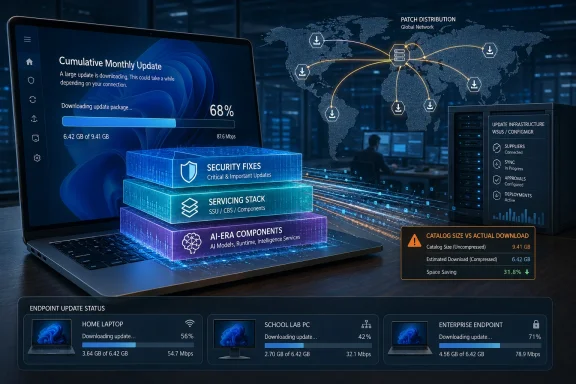
Windows updates keep getting bigger because Microsoft now ships Windows 11 servicing as large cumulative monthly packages that include prior fixes, hardware-dependent components, and new platform features, including AI-era bits, with recent catalog downloads often reaching several gigabytes on Patch Tuesday. The bloat is not an accident so much as the visible cost of Microsoft’s servicing philosophy: one predictable update stream, one cumulative safety net, one Windows codebase trying to satisfy wildly different PCs. That model is defensible if your priority is patch reliability at planetary scale. It is much harder to defend when a home laptop, a school lab, and a global enterprise all end up hauling around payloads they may never meaningfully use.
For years, Windows servicing was a mess of prerequisites, supersedence chains, hotfixes, service packs, and the kind of “install this before that” logic that made patch management feel like archaeology. Cumulative updates were Microsoft’s answer to that problem. If every monthly update contains everything needed to bring a machine current, the risk of missing one critical patch drops sharply.
That bargain made sense in an era when the alternative was worse. A cumulative update is simpler for consumers, easier for support teams to reason about, and safer for unmanaged machines that may disappear from the internet for weeks at a time. The machine comes back, Windows Update checks its state, and Microsoft can bring it forward without reconstructing a fragile patch history.
But cumulative servicing has an obvious gravitational pull: packages tend to grow. Every month adds another layer of fixes, component revisions, servicing-stack assumptions, and compatibility safeguards. Microsoft has spent years using compression, express downloads, differential delivery, and newer checkpoint mechanisms to fight that growth, but the direction of travel is still clear to anyone watching the Microsoft Update Catalog: Windows updates are no longer the few-hundred-megabyte chores many users remember.
The result is an update system that is technically more robust but emotionally less trusted. When a user sees a multi-gigabyte download for a “quality update,” they do not think, “Ah, what a beautifully resilient servicing model.” They think Windows is getting fat.
That distinction matters because some of the most alarming numbers — 4GB, 5GB, even larger cumulative update packages — often describe the full offline installer rather than the actual transfer a device performs through Windows Update. Enterprises, admins, and power users who manually download
Still, Microsoft does not get a free pass here. The offline package is not an imaginary number; it is real storage, real bandwidth, real distribution pressure, and real confusion for admins maintaining WSUS, Configuration Manager, offline images, recovery media, or staged deployment shares. If the “real” update is smaller only when you use Microsoft’s preferred plumbing, that still leaves a lot of serious Windows environments staring at oversized payloads.
This is the modern Windows servicing paradox. Microsoft can truthfully say it has invested heavily in reducing what devices need to download. Users and admins can truthfully say the update artifacts they must manage have become enormous. Both things can be true because Windows Update is no longer a simple file download; it is a negotiation between package design, device state, delivery channel, and policy.
That is why recent reporting about AI components inside large Windows 11 update packages has struck a nerve. If the package contains components that apply only to certain Copilot+ PCs, the average user reasonably asks why their non-AI machine had to encounter that payload at all. Microsoft’s answer is usually some version of applicability detection: the system downloads or installs only what applies. The user’s answer is simpler: then why does the package look so huge?
Microsoft is trying to service Windows as a platform rather than a static operating system. In that model, AI features are not add-ons in the old sense; they become part of the shell, search stack, inbox apps, runtime dependencies, and local model infrastructure. That integration makes features feel seamless when they work, but it also means feature plumbing travels alongside security plumbing.
The deeper problem is not merely size. It is consent. Users who bought a general-purpose operating system are now watching Microsoft thread AI capability through the monthly servicing channel, whether or not they asked for it. Even if the device ultimately installs only a fraction of the payload, the optics are terrible: Windows Update looks less like maintenance and more like a delivery vehicle for Microsoft’s strategic priorities.
For that world, cumulative updates are a mercy. A machine does not need to install January, then February, then March, then April in sequence. It can take the latest cumulative update and land in a known state. That is not just convenient; it is a security architecture.
The cost is that the latest package must carry enough history to repair neglect. It must account for devices at different patch levels, different language packs, different optional features, different hardware capabilities, and different servicing baselines. The update is not just a patch; it is a map from many possible old states to one intended new state.
Microsoft’s challenge is that it sells this as simplicity while admins experience it as bulk. Cumulative servicing reduces dependency hell, but it centralizes complexity inside the package. The pain moved; it did not disappear.
In theory, that should make packages smaller and installs faster. In practice, the story has been messier. Checkpoints can reduce what applies to a device, but they also introduce more moving parts into offline servicing and manual installation workflows. If a package depends on a checkpoint relationship that an admin’s deployment process does not handle cleanly, the elegance of the architecture becomes another troubleshooting tree.
This is where Microsoft’s scale collides with IT reality. The company can optimize Windows Update for the happy path: connected devices, supported configurations, modern management, cloud distribution, current baselines. But many organizations still depend on offline media, golden images, local update repositories, maintenance windows, and strict change controls. For them, a theoretical reduction in client download size does not erase the operational burden of handling larger and more complex update packages.
Checkpoint servicing is the right idea, but it has not ended the argument. It shows Microsoft knows the size problem is real. It also shows that solving update bloat inside Windows is like renovating a moving train.
That predictability is valuable, and comparisons to Apple’s more fluid update model can be misleading. Apple controls a narrower hardware ecosystem, a smaller set of OS deployment patterns, and a different enterprise footprint. Microsoft services an operating system that must run on machines assembled from almost every component combination the PC industry can imagine.
Still, the monthly train encourages bundling. If the train leaves once a month, everyone wants their cargo on it: security fixes, reliability changes, feature enablement, AI plumbing, app updates, driver-adjacent compatibility work, servicing-stack improvements, and whatever else must reach the installed base. The update becomes a platform shipment, not a narrow patch.
This is why Windows users often feel they are receiving too much at once. Microsoft has separated some experiences through Store updates, controlled feature rollouts, enablement packages, and configuration flags, but the monthly cumulative update remains the center of gravity. It is the one channel Microsoft knows will reach almost everyone.
But Apple is not operating Windows. It does not have to support the same range of third-party hardware, legacy enterprise tooling, line-of-business applications, or decades of accumulated compatibility expectations. Microsoft’s patching system is large partly because Windows itself is large in its obligations.
Even so, Microsoft should worry about the comparison. Users judge outcomes, not architectural excuses. If Apple can make updates feel more intentional while Windows makes them feel compulsory and obese, Microsoft loses the perception battle even when its engineering constraints are harder.
The right lesson is not that Microsoft should copy Apple’s cadence wholesale. It is that Windows Update needs to feel less like a monthly freight train and more like a set of precise interventions. The more Microsoft adds strategic platform features to the same channel as emergency security fixes, the more users will suspect they are being force-fed.
Large cumulative packages stress distribution points, VPN concentrators, branch office links, cache servers, and storage quotas. They complicate maintenance windows because download, staging, installation, rollback, and cleanup all need time. They also increase the blast radius of failures: when the one big monthly update misbehaves, it can hold the entire patch cycle hostage.
Microsoft offers tools to soften the blow. Delivery Optimization can share content across local peers. Microsoft Connected Cache can reduce repeated internet downloads. Intune, Windows Update for Business, Configuration Manager, and WSUS all provide ways to stage and control rollout. But those tools are mitigations, not proof that the payload problem has vanished.
The uncomfortable truth is that Microsoft’s modern update model assumes a fairly mature management environment. Organizations with good caching, modern policy, and current baselines can make the system tolerable. Organizations still relying on older patching habits encounter the full weight of the cumulative model — and then blame Windows, often with justification.
The issue becomes sharper on low-cost devices. Education fleets, thin business laptops, embedded systems, and older machines upgraded into Windows 11 often have limited storage headroom. A multi-gigabyte update can fail not because the machine is ancient, but because the servicing process needs temporary working space the user never thinks about.
Disk cleanup has improved, but cleanup does not solve planning. Admins must still ensure devices can receive updates reliably. When patching requires storage triage, the update system has crossed from background maintenance into operational debt.
This is where “bloat” becomes more than a complaint. If a security update is too large for marginal machines to install smoothly, the size itself becomes a security risk. The endpoint that cannot patch is the endpoint attackers eventually find.
Users do not see the model; they see the symptom. They see a 4GB or 5GB package and assume Microsoft has lost control. They see AI features arriving in Windows whether or not their hardware supports them and assume Windows Update is being used to advance a business strategy over their preferences.
Microsoft needs clearer disclosure at the update level. Not a novella in Settings, but a plain accounting of what is security-critical, what is reliability work, what is feature plumbing, and what is applicable only to certain hardware. If Windows Update can determine that a component does not apply, it should be able to explain that distinction in human terms.
The current opacity invites suspicion. When every update is branded as cumulative and necessary, users lose the ability to distinguish medicine from marketing. That is dangerous for Microsoft because patch compliance depends on trust.
The better goal is not merely smaller updates; it is more targeted servicing without returning to dependency chaos. AI components should be delivered with sharper hardware and policy boundaries. Optional feature plumbing should be decoupled where possible from urgent security payloads. Offline packages should be easier for admins to reason about without downloading a platform omnibus every month.
Microsoft has already moved in this direction with express downloads, unified update platform work, feature enablement techniques, Store-delivered app components, and checkpoints. The complaint is not that Microsoft has done nothing. The complaint is that the visible user experience still feels heavy, and the strategic direction of Windows suggests more components, not fewer.
AI will make that harder. Local models, semantic indexes, privacy-preserving inference, NPU-targeted features, and deeper shell integration all require servicing. If those capabilities become part of Windows rather than optional applications, the update channel will carry them. The monthly payload will keep reflecting Microsoft’s ambition.
But “bloat” captures something engineering language misses. It captures the feeling that the operating system is doing too much on behalf of too many constituencies. Security teams, AI product managers, OEMs, enterprise admins, accessibility engineers, app platform teams, and cloud service strategists all have legitimate claims on Windows. The user just wants the laptop to restart quickly and stop eating disk.
That tension is the story of modern Windows. Microsoft is trying to turn Windows into a continuously serviced platform while users still emotionally treat it like an operating system they own. Updates are where that conflict becomes visible.
The size of the package is therefore a proxy for a bigger argument: who gets to decide what Windows is becoming? If the answer is always Microsoft, delivered monthly and cumulatively, users will keep calling it bloat even when the engineering is defensible.
Source: PCWorld Why Windows updates keep getting bigger and more bloated
 Microsoft Solved One Update Problem by Creating Another
For years, Windows servicing was a mess of prerequisites, supersedence chains, hotfixes, service packs, and the kind of “install this before that” logic that made patch management feel like archaeology. Cumulative updates were Microsoft’s answer to that problem. If every monthly update contains everything needed to bring a machine current, the risk of missing one critical patch drops sharply.That bargain made sense in an era when the alternative was worse. A cumulative update is simpler for consumers, easier for support teams to reason about, and safer for unmanaged machines that may disappear from the internet for weeks at a time. The machine comes back, Windows Update checks its state, and Microsoft can bring it forward without reconstructing a fragile patch history.
But cumulative servicing has an obvious gravitational pull: packages tend to grow. Every month adds another layer of fixes, component revisions, servicing-stack assumptions, and compatibility safeguards. Microsoft has spent years using compression, express downloads, differential delivery, and newer checkpoint mechanisms to fight that growth, but the direction of travel is still clear to anyone watching the Microsoft Update Catalog: Windows updates are no longer the few-hundred-megabyte chores many users remember.
The result is an update system that is technically more robust but emotionally less trusted. When a user sees a multi-gigabyte download for a “quality update,” they do not think, “Ah, what a beautifully resilient servicing model.” They think Windows is getting fat.
The Catalog Size Is the Scariest Number, Not Always the Real Download
The most important distinction in this debate is also the easiest to miss: the package size shown in the Microsoft Update Catalog is not always the amount a normal Windows Update client will download. Catalog packages are blunt instruments. Windows Update itself can be more selective, using metadata and applicability checks to fetch only the pieces a device needs.That distinction matters because some of the most alarming numbers — 4GB, 5GB, even larger cumulative update packages — often describe the full offline installer rather than the actual transfer a device performs through Windows Update. Enterprises, admins, and power users who manually download
.msu packages see the monster in its full form. Consumer PCs often see something smaller, depending on configuration and update state.Still, Microsoft does not get a free pass here. The offline package is not an imaginary number; it is real storage, real bandwidth, real distribution pressure, and real confusion for admins maintaining WSUS, Configuration Manager, offline images, recovery media, or staged deployment shares. If the “real” update is smaller only when you use Microsoft’s preferred plumbing, that still leaves a lot of serious Windows environments staring at oversized payloads.
This is the modern Windows servicing paradox. Microsoft can truthfully say it has invested heavily in reducing what devices need to download. Users and admins can truthfully say the update artifacts they must manage have become enormous. Both things can be true because Windows Update is no longer a simple file download; it is a negotiation between package design, device state, delivery channel, and policy.
AI Makes the Payload Feel More Wasteful
The AI angle is particularly inflammatory because it changes how users interpret update growth. Security patches feel necessary, even when they are large. Copilot-era features, semantic search components, Recall-related plumbing, neural processing unit dependencies, and other hardware-gated features feel optional — especially to anyone using a desktop with no NPU, a business laptop with AI features disabled, or a VM that will never run the flashy bits.That is why recent reporting about AI components inside large Windows 11 update packages has struck a nerve. If the package contains components that apply only to certain Copilot+ PCs, the average user reasonably asks why their non-AI machine had to encounter that payload at all. Microsoft’s answer is usually some version of applicability detection: the system downloads or installs only what applies. The user’s answer is simpler: then why does the package look so huge?
Microsoft is trying to service Windows as a platform rather than a static operating system. In that model, AI features are not add-ons in the old sense; they become part of the shell, search stack, inbox apps, runtime dependencies, and local model infrastructure. That integration makes features feel seamless when they work, but it also means feature plumbing travels alongside security plumbing.
The deeper problem is not merely size. It is consent. Users who bought a general-purpose operating system are now watching Microsoft thread AI capability through the monthly servicing channel, whether or not they asked for it. Even if the device ultimately installs only a fraction of the payload, the optics are terrible: Windows Update looks less like maintenance and more like a delivery vehicle for Microsoft’s strategic priorities.
Cumulative Updates Are a Safety Net With a Bandwidth Bill
The cumulative model remains Microsoft’s strongest defense. Windows is installed across consumer laptops, corporate fleets, kiosks, lab machines, gaming rigs, industrial endpoints, and virtual desktops. Many of those systems miss updates. Many are managed badly. Many sit behind brittle policies created years ago by people who have since left the company.For that world, cumulative updates are a mercy. A machine does not need to install January, then February, then March, then April in sequence. It can take the latest cumulative update and land in a known state. That is not just convenient; it is a security architecture.
The cost is that the latest package must carry enough history to repair neglect. It must account for devices at different patch levels, different language packs, different optional features, different hardware capabilities, and different servicing baselines. The update is not just a patch; it is a map from many possible old states to one intended new state.
Microsoft’s challenge is that it sells this as simplicity while admins experience it as bulk. Cumulative servicing reduces dependency hell, but it centralizes complexity inside the package. The pain moved; it did not disappear.
Checkpoint Updates Were Supposed to Bend the Curve
Windows 11 version 24H2 introduced checkpoint cumulative updates, an idea that sounds like common sense: periodically establish a new baseline so future updates do not have to carry deltas all the way back to the original release. Instead of every update comparing itself to the beginning of the version’s life, later updates can build from a more recent checkpoint.In theory, that should make packages smaller and installs faster. In practice, the story has been messier. Checkpoints can reduce what applies to a device, but they also introduce more moving parts into offline servicing and manual installation workflows. If a package depends on a checkpoint relationship that an admin’s deployment process does not handle cleanly, the elegance of the architecture becomes another troubleshooting tree.
This is where Microsoft’s scale collides with IT reality. The company can optimize Windows Update for the happy path: connected devices, supported configurations, modern management, cloud distribution, current baselines. But many organizations still depend on offline media, golden images, local update repositories, maintenance windows, and strict change controls. For them, a theoretical reduction in client download size does not erase the operational burden of handling larger and more complex update packages.
Checkpoint servicing is the right idea, but it has not ended the argument. It shows Microsoft knows the size problem is real. It also shows that solving update bloat inside Windows is like renovating a moving train.
Patch Tuesday Is Predictable, but Predictability Has a Price
Microsoft’s monthly cadence is one of the great stabilizing rituals of enterprise IT. The second Tuesday of the month gives administrators a calendar, a test window, a deployment rhythm, and a language for risk. Security teams can plan around it. Change advisory boards can schedule around it. Vendors can prepare around it.That predictability is valuable, and comparisons to Apple’s more fluid update model can be misleading. Apple controls a narrower hardware ecosystem, a smaller set of OS deployment patterns, and a different enterprise footprint. Microsoft services an operating system that must run on machines assembled from almost every component combination the PC industry can imagine.
Still, the monthly train encourages bundling. If the train leaves once a month, everyone wants their cargo on it: security fixes, reliability changes, feature enablement, AI plumbing, app updates, driver-adjacent compatibility work, servicing-stack improvements, and whatever else must reach the installed base. The update becomes a platform shipment, not a narrow patch.
This is why Windows users often feel they are receiving too much at once. Microsoft has separated some experiences through Store updates, controlled feature rollouts, enablement packages, and configuration flags, but the monthly cumulative update remains the center of gravity. It is the one channel Microsoft knows will reach almost everyone.
Apple Is Not the Perfect Counterexample, but It Is the Painful One
The PCWorld comparison to Apple lands because Apple updates often feel less bureaucratic. macOS and iOS updates arrive when Apple decides they are ready, and the user experience tends to present fewer categories, fewer channels, and fewer visible servicing mechanics. Apple’s model feels cleaner because Apple hides more of the machinery and owns more of the stack.But Apple is not operating Windows. It does not have to support the same range of third-party hardware, legacy enterprise tooling, line-of-business applications, or decades of accumulated compatibility expectations. Microsoft’s patching system is large partly because Windows itself is large in its obligations.
Even so, Microsoft should worry about the comparison. Users judge outcomes, not architectural excuses. If Apple can make updates feel more intentional while Windows makes them feel compulsory and obese, Microsoft loses the perception battle even when its engineering constraints are harder.
The right lesson is not that Microsoft should copy Apple’s cadence wholesale. It is that Windows Update needs to feel less like a monthly freight train and more like a set of precise interventions. The more Microsoft adds strategic platform features to the same channel as emergency security fixes, the more users will suspect they are being force-fed.
Enterprises Feel the Bloat Before Consumers Do
Home users mostly experience large updates as annoyance: bandwidth spikes, long install times, disk cleanup chores, or a laptop fan screaming during a meeting. Enterprises experience them as infrastructure pressure. A few extra gigabytes multiplied across tens of thousands of endpoints is not a nuisance; it is a network event.Large cumulative packages stress distribution points, VPN concentrators, branch office links, cache servers, and storage quotas. They complicate maintenance windows because download, staging, installation, rollback, and cleanup all need time. They also increase the blast radius of failures: when the one big monthly update misbehaves, it can hold the entire patch cycle hostage.
Microsoft offers tools to soften the blow. Delivery Optimization can share content across local peers. Microsoft Connected Cache can reduce repeated internet downloads. Intune, Windows Update for Business, Configuration Manager, and WSUS all provide ways to stage and control rollout. But those tools are mitigations, not proof that the payload problem has vanished.
The uncomfortable truth is that Microsoft’s modern update model assumes a fairly mature management environment. Organizations with good caching, modern policy, and current baselines can make the system tolerable. Organizations still relying on older patching habits encounter the full weight of the cumulative model — and then blame Windows, often with justification.
The Storage Crisis Is Not Just About Disk Space
It is tempting to reduce update bloat to “buy a bigger SSD,” but that misses the enterprise reality. Storage problems appear in many places: endpoint free space, update cache directories, software distribution repositories, VM templates, offline images, backup sets, and recovery partitions. Windows servicing consumes space before, during, and after installation.The issue becomes sharper on low-cost devices. Education fleets, thin business laptops, embedded systems, and older machines upgraded into Windows 11 often have limited storage headroom. A multi-gigabyte update can fail not because the machine is ancient, but because the servicing process needs temporary working space the user never thinks about.
Disk cleanup has improved, but cleanup does not solve planning. Admins must still ensure devices can receive updates reliably. When patching requires storage triage, the update system has crossed from background maintenance into operational debt.
This is where “bloat” becomes more than a complaint. If a security update is too large for marginal machines to install smoothly, the size itself becomes a security risk. The endpoint that cannot patch is the endpoint attackers eventually find.
Microsoft’s Communication Problem Is Bigger Than Its Compression Problem
Microsoft often explains Windows servicing in accurate but bloodless language. Cumulative updates improve reliability. Differential downloads reduce transfer size. Checkpoints create new baselines. Delivery Optimization lowers bandwidth. All true, and all insufficient.Users do not see the model; they see the symptom. They see a 4GB or 5GB package and assume Microsoft has lost control. They see AI features arriving in Windows whether or not their hardware supports them and assume Windows Update is being used to advance a business strategy over their preferences.
Microsoft needs clearer disclosure at the update level. Not a novella in Settings, but a plain accounting of what is security-critical, what is reliability work, what is feature plumbing, and what is applicable only to certain hardware. If Windows Update can determine that a component does not apply, it should be able to explain that distinction in human terms.
The current opacity invites suspicion. When every update is branded as cumulative and necessary, users lose the ability to distinguish medicine from marketing. That is dangerous for Microsoft because patch compliance depends on trust.
Smaller Is Not Always Safer, but More Targeted Usually Is
There is a lazy version of this argument that says Microsoft should simply make updates smaller. That is true in spirit and difficult in practice. Smaller packages can mean more fragmentation, more prerequisites, more edge cases, and more ways for machines to drift into unsupported combinations.The better goal is not merely smaller updates; it is more targeted servicing without returning to dependency chaos. AI components should be delivered with sharper hardware and policy boundaries. Optional feature plumbing should be decoupled where possible from urgent security payloads. Offline packages should be easier for admins to reason about without downloading a platform omnibus every month.
Microsoft has already moved in this direction with express downloads, unified update platform work, feature enablement techniques, Store-delivered app components, and checkpoints. The complaint is not that Microsoft has done nothing. The complaint is that the visible user experience still feels heavy, and the strategic direction of Windows suggests more components, not fewer.
AI will make that harder. Local models, semantic indexes, privacy-preserving inference, NPU-targeted features, and deeper shell integration all require servicing. If those capabilities become part of Windows rather than optional applications, the update channel will carry them. The monthly payload will keep reflecting Microsoft’s ambition.
The Word “Bloat” Is Crude, but the Instinct Is Right
Technically, much of what users call bloat is not waste. It is compatibility data, rollback capability, componentized servicing, language and hardware applicability, security hardening, and repair logic. Windows is not a phone OS on a single vendor’s hardware; it is an ecosystem treaty.But “bloat” captures something engineering language misses. It captures the feeling that the operating system is doing too much on behalf of too many constituencies. Security teams, AI product managers, OEMs, enterprise admins, accessibility engineers, app platform teams, and cloud service strategists all have legitimate claims on Windows. The user just wants the laptop to restart quickly and stop eating disk.
That tension is the story of modern Windows. Microsoft is trying to turn Windows into a continuously serviced platform while users still emotionally treat it like an operating system they own. Updates are where that conflict becomes visible.
The size of the package is therefore a proxy for a bigger argument: who gets to decide what Windows is becoming? If the answer is always Microsoft, delivered monthly and cumulatively, users will keep calling it bloat even when the engineering is defensible.
The Bottom Line
Windows updates are getting bigger because Microsoft has chosen reliability, cumulative safety, hardware breadth, and platform evolution over minimal patch payloads. That trade may be rational, but it is no longer invisible.- Windows cumulative updates simplify patch compliance by letting devices move to the latest state without installing every missed monthly update in sequence.
- Microsoft Update Catalog package sizes can look much larger than what a device actually downloads through Windows Update, but those large packages still matter for admins and offline servicing.
- AI-era Windows features make update growth feel more wasteful because many components apply only to specific hardware or policy configurations.
- Checkpoint cumulative updates are a serious attempt to reduce download and install overhead, but they add complexity for some deployment workflows.
- Enterprises feel update bloat as bandwidth, storage, caching, and maintenance-window pressure long before consumers notice anything beyond a slow restart.
- Microsoft’s biggest near-term fix may be clearer separation and explanation of security fixes, platform features, and hardware-specific components.
Source: PCWorld Why Windows updates keep getting bigger and more bloated
