
When Microsoft rewrote Windows’s shell for Windows 11, it didn’t just shift icons to the center — it deliberately traded decades of user-facing flexibility for a tightly curated, symmetrical experience, and that trade-off explains why the taskbar in Windows 11 behaves so differently from the versions of Windows that preceded it.
Windows has shipped with a moveable taskbar since Windows 95. Power users, multi‑monitor workers, and people running tall displays came to rely on the ability to place the taskbar on the left or right side, or to move it to the top of the screen. Windows 11, however, launched with a redesigned shell and a simplified taskbar locked to the bottom. For years that change has been a major point of friction between Microsoft and users who regard taskbar placement as a core personalisation and productivity setting.
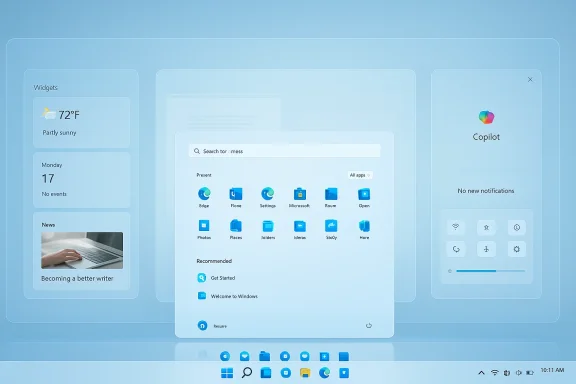
In mid‑February 2026 a senior former Microsoft engineering leader publicly explained — in blunt, short form — why that choice was made: the Windows 11 redesign introduced a set of deliberate, left/right “panes” (widgets/news on the left; notifications/quick settings on the right) with the Start menu intentionally centred to create a balanced composition. That composition, the former executive said, conflicted with the idea of a vertical taskbar, and the team opted for a single, consistent anchor point at the bottom of the screen. The remark re‑energised a debate that is both aesthetic and technical: was the taskbar removed because it was ugly, or because it was untenable inside a new shell architecture? The answer, it turns out, is: a bit of both.
Put simply: the team traded one form of complexity (multiple layout permutations) for another (a unified, curated presentation). The unit cost was customization. The practical result for users became immediate and visible: a taskbar that can be aligned within itself (center or left alignment of taskbar contents) but cannot be physically moved to another screen edge or freely resized.
That development, if it ships, marks a meaningful pivot: the firm would be acknowledging that certain legacy customization features remain valuable, especially for power users with tall or multiple monitors. Importantly, the prospective reintroduction of movement and resizing is being approached as a compatibility and quality problem, not merely a UI tweak. That means Microsoft is trying to avoid simply slapping orientation back on top of the current shell — the company appears to be designing the plumbing, APIs, and compatibility shims necessary to reduce breakage.
The candid remarks from a former senior Microsoft engineering leader provide useful context: the choice was debated inside the company, and some leaders argued to retain the vertical option. Now, after years of user feedback and ecosystem friction, Microsoft appears to be prototyping a return of taskbar movement and resizing. If the company follows through, the critical test will be how it reintroduces the capability: as a rushed toggle or as a carefully engineered, compatible feature set that restores choice without undermining platform stability.
For users who rely on vertical taskbars, the tentative news is welcome. For Microsoft, the real work is proving it can listen to long‑standing user pain, do the engineering heavy lifting to fix it properly, and document the path so power users and enterprises can plan confidently. The taskbar is a small element of a huge OS, but in the end it matters because it sits where people spend most of their attention — and getting that right is as much a human problem as a technical one.
Source: theregister.com Why is Windows 11 taskbar like that? Ex-Windows man explains
 Background
Windows has shipped with a moveable taskbar since Windows 95. Power users, multi‑monitor workers, and people running tall displays came to rely on the ability to place the taskbar on the left or right side, or to move it to the top of the screen. Windows 11, however, launched with a redesigned shell and a simplified taskbar locked to the bottom. For years that change has been a major point of friction between Microsoft and users who regard taskbar placement as a core personalisation and productivity setting.In mid‑February 2026 a senior former Microsoft engineering leader publicly explained — in blunt, short form — why that choice was made: the Windows 11 redesign introduced a set of deliberate, left/right “panes” (widgets/news on the left; notifications/quick settings on the right) with the Start menu intentionally centred to create a balanced composition. That composition, the former executive said, conflicted with the idea of a vertical taskbar, and the team opted for a single, consistent anchor point at the bottom of the screen. The remark re‑energised a debate that is both aesthetic and technical: was the taskbar removed because it was ugly, or because it was untenable inside a new shell architecture? The answer, it turns out, is: a bit of both.
Overview: “Symmetric panes,” design choices, and the price of visual unity
The core design idea behind Windows 11’s shell was visual symmetry and predictability. Designers grouped interactive system surfaces into logical sides of the screen:- Right side: notification center, quick settings, and system controls.
- Left side: Widgets, weather, and informational panels.
- Center: Start menu, placed for a visually balanced layout on modern widescreen displays.
Put simply: the team traded one form of complexity (multiple layout permutations) for another (a unified, curated presentation). The unit cost was customization. The practical result for users became immediate and visible: a taskbar that can be aligned within itself (center or left alignment of taskbar contents) but cannot be physically moved to another screen edge or freely resized.
The technical anatomy of the decision
Removing—or rather not supporting—taskbar movement in Windows 11 wasn’t merely a one‑line policy choice. The Windows shell (explorer and its supporting frameworks) was largely rewritten when Windows 11 was built. That rewrite introduced numerous assumptions and dependencies that make reintroducing multi‑edge taskbar placement non‑trivial:- Work area and hit‑testing assumptions: Many Windows UI components and third‑party shell extensions expect the taskbar to occupy the bottom work area. Reflowing the work area to accept a vertical bar requires recalculating window placement, drag/drop hit targets, and other subtle metrics across thousands of application windows.
- Flyout and popup geometry: Quick Settings, notifications, and Widgets — along with new surfaces such as the Copilot/search panel — are coded to anchor and animate relative to specific edges. Changing the anchor dramatically increases the number of edge cases for animation, focus, and occlusion.
- Accessibility and keyboard navigation: Vertical taskbars alter tab and arrow key navigation paths. Ensuring consistent keyboard and screen‑reader behaviour across multiple orientations requires dedicated accessibility testing.
- Shell extension and third‑party compatibility: Many classic shell extensions, toolbars, and enterprise imaging scripts depended on the taskbar’s bottom orientation. Reintroducing orientation options risks breaking those integrations unless Microsoft provides compatibility layers or an API update for extension authors.
- Surface proliferation: Windows is used on a wide variety of devices (laptops, desktops, tablets, all‑in‑one, foldables). A single, consistent default reduces the testing matrix for many shell features; multiple allowed positions multiply permutations exponentially.
What the recent reporting means: Microsoft’s tentative course correction
By early 2026, multiple Windows‑focused outlets reported that Microsoft is prototyping the ability to both move the taskbar to the top, left, or right and to resize it — features many users have requested since Windows 11 launched. These reports describe the work as prototyping rather than a committed ship plan; they place a potential Insider preview in mid‑2026 and a broader rollout later, subject to quality gates.That development, if it ships, marks a meaningful pivot: the firm would be acknowledging that certain legacy customization features remain valuable, especially for power users with tall or multiple monitors. Importantly, the prospective reintroduction of movement and resizing is being approached as a compatibility and quality problem, not merely a UI tweak. That means Microsoft is trying to avoid simply slapping orientation back on top of the current shell — the company appears to be designing the plumbing, APIs, and compatibility shims necessary to reduce breakage.
Why many users care: productivity, muscle memory, and ultrawide workflows
The debate over the taskbar can feel trivial until you map it against real workflows:- Vertical taskbars reclaim vertical pixels on widescreen and ultrawide monitors, which is precisely the scarce real estate modern productivity users prize. For people who write code, draft documents, or edit video, losing that vertical column (the bottom bar’s horizontal footprint) is often an immediate usability loss.
- Muscle memory matters. Many users have used a left‑or‑right taskbar since Windows 95. Relearning window docking, alt‑tab habits, and pointer travel distance is non‑trivial.
- Specialist hardware: vertical docked displays, portrait‑oriented monitors, and multi‑display rigs simply map better to a taskbar placed on the side.
- Power‑user tools and third‑party utilities filled the gap. The popularity of third‑party replacements and registry workarounds is itself a vote that the capability is meaningful to a non‑trivial subset of users.
Strengths of Microsoft’s original design argument — and why they mattered
While critics focused on lost flexibility, the choices behind Windows 11’s taskbar also had clear upsides:- Consistency and predictability. With a single anchor point, the shell can provide uniform interactions, reducing visual noise and the number of corner cases developers must handle.
- Modern design language. Centering the Start menu and treating widgets and notifications as distinct, side‑anchored areas supports a more modern, phone‑and‑tablet‑inspired composition, which aligns with Microsoft’s longer‑term vision for converged experiences across device types.
- Reduced testing surface. A consistent default reduces the permutations of device orientation and layout that the Windows team must validate, enabling more focused resource allocation on performance and security.
- Opportunity to layer AI and new services. Anchoring emerging surfaces (Copilot, agentic assistants, contextual search) to known positions simplifies integration and helps Microsoft orchestrate the user’s mental model around where interactive elements appear.
The costs and risks of the original approach
That same approach introduced real costs:- Erosion of user control. For a platform long celebrated for flexibility, the move signalled a philosophical shift toward centralized design authority — and users noticed.
- Third‑party ecosystem fragmentation. Tools that previously restored or augmented shell behaviour either became deprecated or had to work around a new, less‑cooperative system. That fractured the ecosystem and pushed some users to unsupported hacks.
- Backlash and trust erosion. Customer frustration is a reputational risk. When simple features vanish, user trust in a platform’s stewardship is strained, and reverting that perception is hard.
- Technical debt when pivoting later. If Microsoft later reintroduces movement and resizing, the company will face the technical debt of re‑adding a capability into a shell not originally designed to support it — that creates a higher cost than preserving the option initially.
What reintroducing a movable/resizable taskbar must solve
If Microsoft follows through with prototypes and ships a reintroduction, doing so responsibly requires more than a toggle in Settings. Practical implementation should include:- A compatibility shim and API contract so third‑party shell extensions and enterprise imaging scripts can detect and adapt to taskbar orientation changes.
- Per‑monitor taskbar placement rules and a clear default that respects user choice without breaking existing workflows.
- Accessibility parity so keyboard navigation, screen readers, and focus models work identically across orientations.
- Flyout and animation recalculations to avoid occlusion, focus loss, or animation jank when the taskbar is vertical.
- Group Policy and management controls for enterprise administrators who need predictable deployments.
- Documentation and developer guidance for apps to handle dynamic work area changes and to avoid layout regressions.
Practical advice for users today
For users who miss the old flexibility, there are pragmatic options and trade‑offs to consider:- Use a well‑maintained third‑party shell tool if you need immediate vertical taskbar behaviour. Such tools restore classic features but carry support and security trade‑offs, and they may not be compatible with future Windows updates.
- Consider per‑app and window placement workflows (virtual desktops, snap layouts, keyboard shortcuts) to partially reclaim efficiency without changing the taskbar.
- Keep an eye on Insider builds if you want previews; Microsoft generally tests major shell changes in the Insider channels before user‑facing rollouts.
- For enterprise admins: don’t plan immediate migration strategies off an unconfirmed prototype. Evaluate the cost of depending on unofficial workarounds versus the benefit of staying current with security updates.
How Microsoft can restore trust while preserving its design goals
If Microsoft genuinely intends to bring back taskbar positioning and resizing, it should treat that effort as an opportunity to rebuild trust with power users and enterprise customers:- Be transparent. Publish a clear engineering note describing the compatibility hurdles and the concrete steps the team will take to preserve third‑party integrations.
- Ship a compatibility API. Give extension and management tooling vendors the hooks they need so reintroduction isn’t an entitlement only for Microsoft teams.
- Provide enterprise controls. Allow administrators to lock taskbar position via Group Policy or Intune, ensuring predictable fleet behaviour.
- Offer migration help. If reintroduction changes default behaviour on upgrade, offer a one‑time prompt explaining the change and providing an easy “restore legacy layout” option for users who prefer it.
- Test for accessibility parity. Prioritise assistive technology testing across orientations to avoid regressions for users who depend on those features.
Broader implications: design orthodoxy vs. user agency
The taskbar story is a microcosm of a broader platform tension: when should a company prioritise a curated, consistent experience over user agency? That tension is evident across mobile and desktop platforms today. There are three reasonable approaches:- Prioritise design orthodoxy: build a single, curated experience and accept reduced customization.
- Prioritise user agency: keep numerous options and empower users to shape behaviour at the cost of a larger testing surface.
- Hybrid: provide a curated default but preserve easy escape hatches and developer contracts so power users can opt in without breaking the platform.
Conclusion
Windows 11’s anchored, non‑moveable taskbar was not an accident; it was a product decision grounded in a specific visual philosophy — the “symmetric panes” model — and implemented as part of a broad shell rewrite. That design delivered a cleaner, more predictable look and simplified a number of engineering and design problems. But it also removed a small feature with outsized practical value for many users, and the silence around why added to user frustration.The candid remarks from a former senior Microsoft engineering leader provide useful context: the choice was debated inside the company, and some leaders argued to retain the vertical option. Now, after years of user feedback and ecosystem friction, Microsoft appears to be prototyping a return of taskbar movement and resizing. If the company follows through, the critical test will be how it reintroduces the capability: as a rushed toggle or as a carefully engineered, compatible feature set that restores choice without undermining platform stability.
For users who rely on vertical taskbars, the tentative news is welcome. For Microsoft, the real work is proving it can listen to long‑standing user pain, do the engineering heavy lifting to fix it properly, and document the path so power users and enterprises can plan confidently. The taskbar is a small element of a huge OS, but in the end it matters because it sits where people spend most of their attention — and getting that right is as much a human problem as a technical one.
Source: theregister.com Why is Windows 11 taskbar like that? Ex-Windows man explains
