

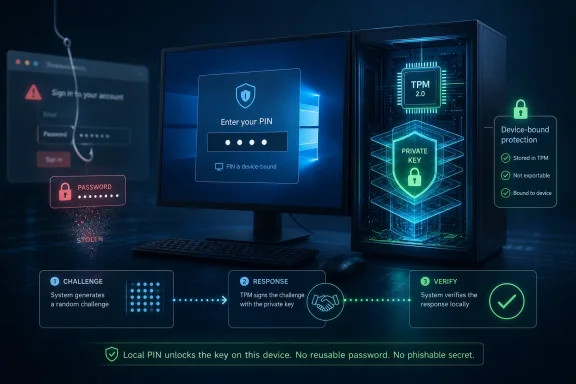
A Windows Hello for Business PIN can be stronger than a conventional enterprise password because it is created for one specific Windows device, remains local to that device, and unlocks a protected cryptographic key rather than acting as a reusable secret sent to a server. That is the central fact behind a security model that still feels counterintuitive to many users and, frankly, to more than a few administrators. The enterprise question is no longer whether a four- or six-digit PIN “looks secure.” It is whether the organization has deployed Windows Hello for Business as device-bound, TPM-backed, policy-enforced authentication instead of treating it as a nicer lock screen.
For decades, enterprise security culture trained users to respect length, complexity, and rotation. A password with symbols and mixed case looked serious; a short PIN looked like the thing protecting a debit card or a child’s tablet. That visual instinct is hard to shake, and attackers have benefited from it because it keeps organizations focused on the wrong part of the authentication ceremony.
A password is a portable secret. It may be transmitted inside encrypted channels, hashed at rest, wrapped in MFA, and filtered through conditional access rules, but the user still knows something that can be typed somewhere else. The entire phishing industry exists because “somewhere else” can be made to look convincing.
Windows Hello for Business changes the shape of the credential. The PIN is not the credential that proves identity to Microsoft Entra ID or other enterprise services. It is the local gesture that allows the device to use a private key generated during provisioning and bound to that user-device relationship.
That distinction is not marketing trivia. A stolen password can often be tried from another machine, another country, or another web session. A stolen Windows Hello PIN, by itself, is much less useful because the attacker also needs the enrolled device and access to the protected key material on it.
Today’s sign-in surface is scattered across SaaS portals, VPN clients, identity providers, mobile apps, browser sessions, support tools, and help-desk workflows. The password followed the user into all of them. It became the one secret that could bridge a legitimate employee, a fake login page, and a remote attacker.
This is why NIST and other identity authorities increasingly frame phishing resistance as a property of the authentication method, not of user awareness. A password plus a one-time code can still be proxied in real time. A push notification can still be abused through fatigue or social engineering. A reusable secret can still be reused.
Windows Hello for Business does not make social engineering vanish. It does, however, remove one of the most valuable prizes from many phishing campaigns: the credential that can be replayed somewhere else. When the private key remains on the device and authentication is performed through a challenge-response flow, the attacker’s fake page has a much harder time turning user compliance into account takeover.
In an enterprise deployment, the device creates a public-private key pair during provisioning. The public key is registered with the identity provider, while the private key remains protected on the endpoint. The PIN, fingerprint, or facial recognition gesture authorizes local use of that private key.
That makes the Windows PC part of the identity system. The endpoint is no longer just the place where the user types a secret; it becomes a possession factor. This is why the PIN’s length is the least interesting part of the design.
The best version of this model depends on the Trusted Platform Module. TPM-backed key protection gives Windows Hello for Business hardware isolation that a software-only implementation cannot match. Administrators can still make policy choices that weaken the outcome, but the target architecture is clear: the key should be hard to extract, the PIN should be local, and the authentication event should be bound to the enrolled device.
There is a meaningful difference between convenience sign-in and Windows Hello for Business. A consumer-style PIN on a local account may make device access easier, but it is not the same as enterprise key-based or certificate-based authentication. The name and visual flow are similar enough to invite confusion.
This matters during Windows 10-to-Windows 11 migration planning. Many organizations are refreshing hardware, extending the life of older devices, or mixing Windows 10 extended support planning with Windows 11 readiness work. A fleet can present users with the same modern sign-in experience while hiding inconsistent TPM availability, firmware settings, enrollment state, and identity policy.
That inconsistency is where security programs get embarrassed. Executives hear that “Hello is deployed.” Auditors see gaps in phishing-resistant coverage. Help desks preserve password fallback because it reduces tickets. Attackers do not need to defeat Windows Hello for Business if exceptions and legacy paths quietly route around it.
When the private key is generated and protected with TPM support, attempts to extract it or brute-force the PIN face hardware-backed defenses. The PIN is not stored in a server-side password database waiting to be breached. It is local entropy used to unlock a key operation on that device.
That is why a short PIN can be rational in this model. The attacker is not supposed to get unlimited online guesses against a remote account. The attacker must contend with the enrolled device, the TPM, local anti-hammering protections, and whatever device management controls the organization layers on top.
But the word “can” is doing work. If administrators allow weaker software-based key operations, tolerate unmanaged endpoints, or fail to verify TPM state across the fleet, the architecture degrades. The PIN is not magic. It is strong because of the system around it.
Microsoft Entra authentication strengths allow administrators to require phishing-resistant methods for sensitive resources. Windows Hello for Business can sit in that stronger category alongside FIDO2 security keys and certificate-based authentication. That is powerful only if the policy is actually enforced where risk is highest.
If a sensitive application still accepts password-plus-SMS, password-plus-OTP, or broad “any MFA” combinations, the organization has not really required phishing-resistant access. It has created a stronger front door beside an older side entrance. Attackers are good at finding side entrances.
Privileged accounts deserve particular scrutiny. Administrators, security staff, finance approvers, and help-desk roles often have exactly the access attackers want. Those accounts should not be protected by weaker fallback paths just because they are operationally annoying to migrate.
Break-glass accounts are the harder case. Enterprises need emergency access when identity systems fail, but emergency access is also a tempting loophole. The answer is not to pretend break-glass accounts do not exist; it is to isolate them, monitor them, and keep their authentication story deliberately separate from everyday convenience.
Windows Hello for Business requires operational design. Enrollment must be reliable. Recovery must be tested. Device replacement must be routine rather than heroic. Remote workers must not get trapped in a broken state because hybrid join, VPN timing, certificate trust, or TPM readiness was assumed rather than verified.
This is where security architecture meets employee experience. A system that is theoretically strong but painful to recover will create pressure for exceptions. A system that is easy to use and predictable to support can reduce both password exposure and help-desk friction.
The best passwordless deployments treat the user journey as part of the security perimeter. That does not mean weakening policy every time someone complains. It means making the secure path the path that actually works.
Windows 11’s hardware baseline gives enterprises a chance to standardize on TPM-capable devices and modern management assumptions. That does not automatically create a secure Windows Hello for Business deployment, but it removes some of the legacy ambiguity that plagued older fleets. If a company is already touching every endpoint, rechecking identity posture is not extra work; it is overdue work.
There is also a budget argument. Security teams often struggle to fund identity improvements when the current system appears to function. Migration projects create a rare moment when hardware, management, compliance, and user training are already in motion.
The risk is that organizations will use the migration to preserve old habits in a new shell. A Windows 11 desktop with a familiar password dependency is not a modern identity strategy. It is a better-looking version of the same phishable model.
That reality strengthens the case for device-bound authentication. If an attacker can produce a better fake login page, write a better pretext, or imitate an executive more convincingly, the authentication method must be harder to relay or reuse. Training still matters, but training is not a cryptographic control.
A reusable password asks the user to make a correct judgment every time. A phishing-resistant credential changes what the attacker can steal even when the user is fooled. That is the more durable defense.
This is not an argument that Windows Hello for Business solves every AI-driven identity attack. Session theft, malicious OAuth consent, device compromise, remote access abuse, and help-desk fraud remain serious problems. But reducing dependence on reusable passwords is one of the few moves that directly attacks the business model of credential phishing.
Hardware security keys remain attractive for highly privileged users, shared workstation scenarios, contractors, and recovery workflows. They are portable in a way Windows Hello for Business is not, which can be a strength when carefully managed. They also create their own inventory, loss, replacement, and user-training demands.
Windows Hello for Business is compelling because it uses hardware most users already have: the PC. It can reduce friction at scale while moving everyday authentication away from passwords. That makes it a pragmatic enterprise control, not just an elegant security concept.
The right architecture is usually layered. Use Windows Hello for Business for managed Windows endpoints. Use FIDO2 or certificate-based methods where portability or higher assurance is required. Use Conditional Access to decide which methods are acceptable for which resources, instead of pretending all MFA is equivalent.
That is why Windows Hello for Business should be understood as part of a larger identity and endpoint control stack. It improves the authentication ceremony, but it does not eliminate the need for browser governance, extension controls, endpoint detection, data-loss prevention, and session risk monitoring.
The distinction matters because passwordless branding can oversell the outcome. Users may believe they are safe because they no longer type a password. Administrators may believe the attack surface has collapsed. In reality, one attack class has been constrained while others remain active.
A phishing-resistant sign-in is still a major improvement. It is just not the end of identity security. The enterprise must protect the session after authentication, not merely the moment of authentication.
That means inventorying TPM state, Windows versions, enrollment status, Intune or Group Policy configuration, and Conditional Access rules. It means confirming that privileged workflows require phishing-resistant authentication rather than merely “MFA.” It means testing recovery paths before a real outage or executive laptop failure turns into a policy exception.
It also means communicating clearly to users. The message should not be “your short PIN is secretly a better password.” That phrasing reinforces the wrong model. The better message is that the PIN unlocks this specific work device, and the device performs the secure sign-in.
Security teams should be careful not to oversimplify. If users think the PIN works everywhere, they may reuse it elsewhere. If they think biometrics are being sent to Microsoft, they may resist enrollment. If they think passwordless means no more account risk, they may ignore browser and consent warnings. Good communication is a control.
Windows Hello for Business embodies that shift on the Windows endpoint. The user still performs a familiar gesture, but the proof of identity comes from a protected key associated with the device and the account. The user’s memory no longer carries the whole burden.
That is why the short PIN debate is so misleading. A longer password can still be phished if it is reusable. A shorter PIN can be safer if it never leaves the device and only unlocks a protected private key. Security is not a beauty contest between strings.
The enterprise challenge is making sure the architecture users are promised is the architecture they actually have. That requires hardware readiness, management discipline, policy enforcement, and a willingness to retire weaker fallback paths.
 The Short PIN Wins Because It Stops Behaving Like a Password
For decades, enterprise security culture trained users to respect length, complexity, and rotation. A password with symbols and mixed case looked serious; a short PIN looked like the thing protecting a debit card or a child’s tablet. That visual instinct is hard to shake, and attackers have benefited from it because it keeps organizations focused on the wrong part of the authentication ceremony.A password is a portable secret. It may be transmitted inside encrypted channels, hashed at rest, wrapped in MFA, and filtered through conditional access rules, but the user still knows something that can be typed somewhere else. The entire phishing industry exists because “somewhere else” can be made to look convincing.
Windows Hello for Business changes the shape of the credential. The PIN is not the credential that proves identity to Microsoft Entra ID or other enterprise services. It is the local gesture that allows the device to use a private key generated during provisioning and bound to that user-device relationship.
That distinction is not marketing trivia. A stolen password can often be tried from another machine, another country, or another web session. A stolen Windows Hello PIN, by itself, is much less useful because the attacker also needs the enrolled device and access to the protected key material on it.
The Password Was Always the Roaming Liability
The old enterprise password model was built for a world in which the domain boundary mattered more than the browser tab. Users logged into managed PCs, applications lived on corporate networks, and attackers had to do more work to make credential theft pay at scale. That world is gone.Today’s sign-in surface is scattered across SaaS portals, VPN clients, identity providers, mobile apps, browser sessions, support tools, and help-desk workflows. The password followed the user into all of them. It became the one secret that could bridge a legitimate employee, a fake login page, and a remote attacker.
This is why NIST and other identity authorities increasingly frame phishing resistance as a property of the authentication method, not of user awareness. A password plus a one-time code can still be proxied in real time. A push notification can still be abused through fatigue or social engineering. A reusable secret can still be reused.
Windows Hello for Business does not make social engineering vanish. It does, however, remove one of the most valuable prizes from many phishing campaigns: the credential that can be replayed somewhere else. When the private key remains on the device and authentication is performed through a challenge-response flow, the attacker’s fake page has a much harder time turning user compliance into account takeover.
Microsoft’s Real Bet Is Device-Bound Identity
The important phrase in Windows Hello for Business is not “Hello.” It is “for Business.” Consumer Windows Hello and enterprise Windows Hello for Business can look similar to the person at the keyboard, but they do not carry the same administrative meaning.In an enterprise deployment, the device creates a public-private key pair during provisioning. The public key is registered with the identity provider, while the private key remains protected on the endpoint. The PIN, fingerprint, or facial recognition gesture authorizes local use of that private key.
That makes the Windows PC part of the identity system. The endpoint is no longer just the place where the user types a secret; it becomes a possession factor. This is why the PIN’s length is the least interesting part of the design.
The best version of this model depends on the Trusted Platform Module. TPM-backed key protection gives Windows Hello for Business hardware isolation that a software-only implementation cannot match. Administrators can still make policy choices that weaken the outcome, but the target architecture is clear: the key should be hard to extract, the PIN should be local, and the authentication event should be bound to the enrolled device.
A Familiar Prompt Can Hide Very Different Security Postures
The danger for IT teams is that the user experience can flatten the differences. A user sees a PIN prompt and thinks they are using Windows Hello. An administrator sees a successful sign-in and assumes the password risk has been reduced. Neither assumption is safe without checking the underlying configuration.There is a meaningful difference between convenience sign-in and Windows Hello for Business. A consumer-style PIN on a local account may make device access easier, but it is not the same as enterprise key-based or certificate-based authentication. The name and visual flow are similar enough to invite confusion.
This matters during Windows 10-to-Windows 11 migration planning. Many organizations are refreshing hardware, extending the life of older devices, or mixing Windows 10 extended support planning with Windows 11 readiness work. A fleet can present users with the same modern sign-in experience while hiding inconsistent TPM availability, firmware settings, enrollment state, and identity policy.
That inconsistency is where security programs get embarrassed. Executives hear that “Hello is deployed.” Auditors see gaps in phishing-resistant coverage. Help desks preserve password fallback because it reduces tickets. Attackers do not need to defeat Windows Hello for Business if exceptions and legacy paths quietly route around it.
TPM 2.0 Is Not a Checkbox, It Is the Security Boundary
The TPM has become a familiar acronym because of Windows 11 hardware requirements, but its role in authentication deserves more attention. In the Windows Hello for Business story, TPM support is not ornamental. It is where the local secret stops being merely local and starts being meaningfully protected.When the private key is generated and protected with TPM support, attempts to extract it or brute-force the PIN face hardware-backed defenses. The PIN is not stored in a server-side password database waiting to be breached. It is local entropy used to unlock a key operation on that device.
That is why a short PIN can be rational in this model. The attacker is not supposed to get unlimited online guesses against a remote account. The attacker must contend with the enrolled device, the TPM, local anti-hammering protections, and whatever device management controls the organization layers on top.
But the word “can” is doing work. If administrators allow weaker software-based key operations, tolerate unmanaged endpoints, or fail to verify TPM state across the fleet, the architecture degrades. The PIN is not magic. It is strong because of the system around it.
Phishing Resistance Dies in the Exceptions
The largest authentication failures in enterprises rarely come from a single bad setting. They come from compromises made for compatibility, convenience, executive escalation, legacy applications, and emergency access. Windows Hello for Business is no exception.Microsoft Entra authentication strengths allow administrators to require phishing-resistant methods for sensitive resources. Windows Hello for Business can sit in that stronger category alongside FIDO2 security keys and certificate-based authentication. That is powerful only if the policy is actually enforced where risk is highest.
If a sensitive application still accepts password-plus-SMS, password-plus-OTP, or broad “any MFA” combinations, the organization has not really required phishing-resistant access. It has created a stronger front door beside an older side entrance. Attackers are good at finding side entrances.
Privileged accounts deserve particular scrutiny. Administrators, security staff, finance approvers, and help-desk roles often have exactly the access attackers want. Those accounts should not be protected by weaker fallback paths just because they are operationally annoying to migrate.
Break-glass accounts are the harder case. Enterprises need emergency access when identity systems fail, but emergency access is also a tempting loophole. The answer is not to pretend break-glass accounts do not exist; it is to isolate them, monitor them, and keep their authentication story deliberately separate from everyday convenience.
The Help Desk Is Part of the Threat Model
Passwordless projects often stumble on the same mundane obstacle: support. Users forget PINs, replace laptops, damage cameras, change phones, fail biometric enrollment, and show up at inconvenient times. If the help desk solves every problem by resetting a password and bypassing stronger controls, the deployment’s security value shrinks.Windows Hello for Business requires operational design. Enrollment must be reliable. Recovery must be tested. Device replacement must be routine rather than heroic. Remote workers must not get trapped in a broken state because hybrid join, VPN timing, certificate trust, or TPM readiness was assumed rather than verified.
This is where security architecture meets employee experience. A system that is theoretically strong but painful to recover will create pressure for exceptions. A system that is easy to use and predictable to support can reduce both password exposure and help-desk friction.
The best passwordless deployments treat the user journey as part of the security perimeter. That does not mean weakening policy every time someone complains. It means making the secure path the path that actually works.
Windows 11 Migration Raises the Stakes
The timing of this debate is not accidental. As organizations plan Windows 11 migrations and decide what to do with remaining Windows 10 hardware, authentication architecture becomes part of endpoint strategy. A device refresh is also an identity refresh, whether IT leaders admit it or not.Windows 11’s hardware baseline gives enterprises a chance to standardize on TPM-capable devices and modern management assumptions. That does not automatically create a secure Windows Hello for Business deployment, but it removes some of the legacy ambiguity that plagued older fleets. If a company is already touching every endpoint, rechecking identity posture is not extra work; it is overdue work.
There is also a budget argument. Security teams often struggle to fund identity improvements when the current system appears to function. Migration projects create a rare moment when hardware, management, compliance, and user training are already in motion.
The risk is that organizations will use the migration to preserve old habits in a new shell. A Windows 11 desktop with a familiar password dependency is not a modern identity strategy. It is a better-looking version of the same phishable model.
AI Makes Reusable Secrets Even Less Defensible
The rise of AI-assisted attacks does not change the fundamentals of phishing, but it changes the economics. More convincing lures, faster personalization, automated reconnaissance, voice cloning, and plausible help-desk impersonation all make user-dependent defenses less reliable. The human being at the keyboard is under more pressure than ever.That reality strengthens the case for device-bound authentication. If an attacker can produce a better fake login page, write a better pretext, or imitate an executive more convincingly, the authentication method must be harder to relay or reuse. Training still matters, but training is not a cryptographic control.
A reusable password asks the user to make a correct judgment every time. A phishing-resistant credential changes what the attacker can steal even when the user is fooled. That is the more durable defense.
This is not an argument that Windows Hello for Business solves every AI-driven identity attack. Session theft, malicious OAuth consent, device compromise, remote access abuse, and help-desk fraud remain serious problems. But reducing dependence on reusable passwords is one of the few moves that directly attacks the business model of credential phishing.
FIDO2 Still Has a Role Beside Hello
Windows Hello for Business is not the only phishing-resistant answer, and enterprises should resist turning it into a monoculture. FIDO2 security keys, certificate-based authentication, smart cards in some environments, and platform passkeys all have roles depending on risk, user population, and operational reality.Hardware security keys remain attractive for highly privileged users, shared workstation scenarios, contractors, and recovery workflows. They are portable in a way Windows Hello for Business is not, which can be a strength when carefully managed. They also create their own inventory, loss, replacement, and user-training demands.
Windows Hello for Business is compelling because it uses hardware most users already have: the PC. It can reduce friction at scale while moving everyday authentication away from passwords. That makes it a pragmatic enterprise control, not just an elegant security concept.
The right architecture is usually layered. Use Windows Hello for Business for managed Windows endpoints. Use FIDO2 or certificate-based methods where portability or higher assurance is required. Use Conditional Access to decide which methods are acceptable for which resources, instead of pretending all MFA is equivalent.
The Browser Remains a Weak Link
Even with strong device-bound sign-in, the browser remains one of the most contested parts of the enterprise endpoint. Extensions, fake add-ons, malicious OAuth prompts, session token theft, and lookalike services can all sidestep the tidy mental model of “user signs in securely and then works safely.”That is why Windows Hello for Business should be understood as part of a larger identity and endpoint control stack. It improves the authentication ceremony, but it does not eliminate the need for browser governance, extension controls, endpoint detection, data-loss prevention, and session risk monitoring.
The distinction matters because passwordless branding can oversell the outcome. Users may believe they are safe because they no longer type a password. Administrators may believe the attack surface has collapsed. In reality, one attack class has been constrained while others remain active.
A phishing-resistant sign-in is still a major improvement. It is just not the end of identity security. The enterprise must protect the session after authentication, not merely the moment of authentication.
The Audit Should Start Under the Sign-In Screen
The practical work begins by refusing to audit the user interface alone. Seeing a PIN prompt is not enough. The organization needs to know what kind of Windows Hello deployment exists, what protects the keys, which devices are enrolled, and which policies decide when weaker methods are allowed.That means inventorying TPM state, Windows versions, enrollment status, Intune or Group Policy configuration, and Conditional Access rules. It means confirming that privileged workflows require phishing-resistant authentication rather than merely “MFA.” It means testing recovery paths before a real outage or executive laptop failure turns into a policy exception.
It also means communicating clearly to users. The message should not be “your short PIN is secretly a better password.” That phrasing reinforces the wrong model. The better message is that the PIN unlocks this specific work device, and the device performs the secure sign-in.
Security teams should be careful not to oversimplify. If users think the PIN works everywhere, they may reuse it elsewhere. If they think biometrics are being sent to Microsoft, they may resist enrollment. If they think passwordless means no more account risk, they may ignore browser and consent warnings. Good communication is a control.
The Real Migration Is From Memory to Possession
For years, enterprise identity relied on what users could remember. Password managers improved that model. MFA patched it. Conditional Access made it more adaptive. But the deeper migration is from memory-based authentication to possession-backed, cryptographic proof.Windows Hello for Business embodies that shift on the Windows endpoint. The user still performs a familiar gesture, but the proof of identity comes from a protected key associated with the device and the account. The user’s memory no longer carries the whole burden.
That is why the short PIN debate is so misleading. A longer password can still be phished if it is reusable. A shorter PIN can be safer if it never leaves the device and only unlocks a protected private key. Security is not a beauty contest between strings.
The enterprise challenge is making sure the architecture users are promised is the architecture they actually have. That requires hardware readiness, management discipline, policy enforcement, and a willingness to retire weaker fallback paths.
The PIN Is the Smallest Part of the Story
The useful lesson from the Windows Hello for Business debate is not that every PIN is safe or every password is obsolete. It is that authentication strength depends on where the secret lives, how it is protected, and whether an attacker can reuse it remotely. The PIN is just the visible tip of a much larger identity design.- A Windows Hello for Business PIN is stronger than it looks when it is local to one managed device and unlocks a protected private key.
- TPM-backed key protection is central to the security model and should be verified across the fleet rather than assumed.
- Convenience Windows Hello and Windows Hello for Business can look similar to users but do not provide the same enterprise assurance.
- Conditional Access policies should require phishing-resistant methods for sensitive systems instead of accepting broad password-plus-MFA fallbacks.
- Migration to Windows 11 is a natural moment to standardize device-bound authentication and retire legacy password habits.
- Passwordless deployments must include recovery, help-desk, browser, and session-security planning or exceptions will erode the gains.
References
- Primary source: TechRepublic
Published: Thu, 02 Jul 2026 14:20:38 GMT
Why a Windows Hello PIN Beats a Password for Enterprise Security - TechRepublic
With phishing and AI-driven identity attacks rising, Windows Hello PIN security depends on TPM-backed keys, enterprise enrollment, and access policies.www.techrepublic.com
- Official source: learn.microsoft.com
Windows Hello for Business overview | Microsoft Learn
Learn how Windows Hello for Business replaces passwords with strong two-factor authentication on Windows devices.learn.microsoft.com - Official source: support.microsoft.com
Configure Windows Hello | Microsoft Support
Learn how to sign into your PC with Windows Hello using a PIN, facial recognition, or fingerprint.support.microsoft.com - Related coverage: windowsforum.com
Why Windows Hello PINs Are Safer Than Passwords (TPM and Device-Bound Crypto) | Windows Forum
Windows Hello PINs are safer than many people assume, but the reason has less to do with the four digits you type and more to do with the cryptography...windowsforum.com
