

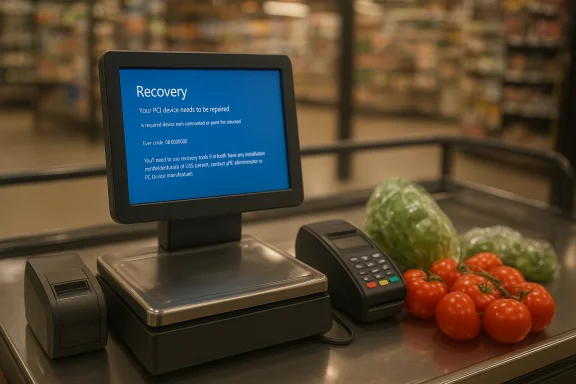
A glance at a supermarket weighing machine stuck on a Windows recovery screen — an error code of 0xc0000001 glaring from the display — is both comic and cautionary: comic because the scene seems absurd, and cautionary because it exposes a fragile choice in the architecture of a simple retail task. The Register’s photo of a Marks & Spencer self-service produce scale in recovery mode is a small incident with broader implications about platform selection, lifecycle management, and operational resilience for point-of-sale and kiosk devices.
Self-service scales and label printers in supermarkets have migrated from purely mechanical instruments to networked, digital appliances over the last two decades. The migration promised better inventory control, dynamic pricing, auditing, and integrated receipts and loyalty features — but it also introduced new points of failure: operating systems, file systems, drivers, and update mechanisms. Many modern self-service devices are not simple microcontrollers; they are compact PCs or embedded panel PCs that can run full desktop-class operating systems such as Windows IoT Enterprise, Windows 10/11, Android, or Linux variants depending on vendor choices. Vendor product pages and hardware manufacturers explicitly advertise Windows IoT Enterprise, Ubuntu, or Android as supported OS options for kiosks and POS terminals. At the center of the recent viral snapshot is an error code: 0xc0000001. That hex code is a generic Windows status (
However, operators should be explicit about the trade-offs:
Retailers that continue to deploy Windows on POS and kiosk devices should do so deliberately: choose the right edition (IoT Enterprise LTSC where stability matters), apply write-filtering and image immutability, build robust remote management and recovery, and design hardware/software separations so that a UI crash does not stop the scale from weighing produce. For many smaller or constrained deployments, a leaner Linux- or Android-based controller, or a microcontroller-backed scale with a thin UI node, will deliver the same customer-facing function with less operational risk.
In short: the right tool for the job is rarely the most feature-rich; it is the most appropriate. The photographed “bork” is amusing — and fixable — but it should also prod retail IT teams to ask whether their architecture favors convenience today but risks outages tomorrow.
Source: theregister.com Windows fails to tip the scales in grocery store deployment
 Background
Self-service scales and label printers in supermarkets have migrated from purely mechanical instruments to networked, digital appliances over the last two decades. The migration promised better inventory control, dynamic pricing, auditing, and integrated receipts and loyalty features — but it also introduced new points of failure: operating systems, file systems, drivers, and update mechanisms. Many modern self-service devices are not simple microcontrollers; they are compact PCs or embedded panel PCs that can run full desktop-class operating systems such as Windows IoT Enterprise, Windows 10/11, Android, or Linux variants depending on vendor choices. Vendor product pages and hardware manufacturers explicitly advertise Windows IoT Enterprise, Ubuntu, or Android as supported OS options for kiosks and POS terminals. At the center of the recent viral snapshot is an error code: 0xc0000001. That hex code is a generic Windows status (STATUS_UNSUCCESSFUL) and commonly appears when the boot configuration data (BCD) is missing or corrupted, when NTFS or other disk structures are unreadable, or when a critical component cannot initialize. In practice that often points to disk or boot record trouble, corrupted system files, or UEFI/firmware/driver initialization failures — all conditions that force Windows into Recovery mode until an administrator (or automated recovery media) fixes the underlying problem. Overview: What The Register image actually shows — and what it doesn’t
The Register’s write-up is short, cheeky, and accurate in what it does: a Windows recovery page, an error code, and reasonable inference. The article suggests the machine is likely a Windows 10 device and speculates about Extended Security Updates (ESU) being enabled by the retailer. Those inferences are plausible but not provable from a single photograph; the exact edition (Windows 10 vs Windows IoT vs Windows 11 IoT Enterprise LTSC) and whether ESU is active on that particular device cannot be determined from the screen capture alone. That ambiguity should be flagged as speculation rather than fact. What we can say with confidence:- The device shows a Windows recovery screen with the code 0xc0000001. That code frequently correlates with a BCD/boot or disk/NTFS issue.
- Many retail kiosks and POS terminals are indeed shipped with Windows IoT or Windows IoT Enterprise as an option; vendors explicitly list Windows IoT Enterprise among supported OS choices for self-service kiosks and POS hardware.
- Windows 10 consumer and many mainstream editions reached end of support on October 14, 2025, and Microsoft has a Consumer ESU program to extend security updates for eligible devices for a limited period. For embedded and LTSC IoT variants, lifecycle rules differ: LTSC releases can receive extended servicing for years beyond 2025. These lifecycle facts are confirmed by Microsoft’s lifecycle and ESU documentation.
Technical anatomy of 0xc0000001 — how a scale can go down
A retail weighing scale that runs a full Windows stack behaves like a small PC: it boots firmware (UEFI/BIOS), loads a bootloader/BCD, mounts and validates an NTFS or other file system, loads drivers (scale sensor, printers), and then starts a kiosk app. A failure can occur at any step:- Disk corruption or failing flash/SSD: sudden power losses, hardware defects, or storage wear can render the OS volume unreadable or corrupt the BCD, triggering the Recovery screen and codes like 0xc0000001.
- Boot configuration errors: missing or damaged \EFI\Microsoft\Boot\BCD, or failed BCD initialization, can prevent Windows from locating the OS. Microsoft’s community guidance often points to BOOTREC repair commands as a first-line fix.
- Driver or firmware initialization failures: a failing storage controller driver or an early firmware (UEFI) initialization issue can break the boot chain (B1InitializeLibrary failures mapping to 0xc0000001 are an example encountered in some device failure reports).
- File-system journal/NTFS inconsistencies: NTFS journal corruption or unreadable metadata can halt boot because Windows relies on consistent filesystem state to proceed.
Why Windows gets used in kiosks and where that choice makes sense
There are concrete reasons retail vendors and kiosk manufacturers choose Windows variants:- Familiar development stack: Windows offers mature tools, .NET and Win32 compatibility, and large developer pools for legacy POS software. Many existing enterprise POS suites and third-party hardware drivers target Windows.
- Enterprise endpoint management and security features: Windows IoT Enterprise and LTSC editions support Group Policy, Windows Defender, TPM, BitLocker, and management tooling that enterprises expect. These capabilities are useful when secure cardholder data handling and centralized device management are required.
- Long-term servicing options for IoT/LTSC: Microsoft supports IoT Enterprise LTSC releases for extended windows (commonly 10 years), which matches device refresh cycles in retail and industrial deployments. That makes Windows IoT an attractive option for predictable lifecycle support.
Why Windows can be overkill — and where a different architecture helps
At the same time, Windows presents disadvantages when used in constrained, single-purpose appliances:- Attack surface and complexity: a full desktop OS includes services, update mechanisms, and drivers that can fail or be targeted by malware. For single-purpose tasks (weighing produce, printing a label), a slim platform with minimal runtime is often safer and more reliable.
- Update and lifecycle friction: mainstream Windows 10 support ended on October 14, 2025. Retailers that didn’t migrate to Windows 11 IoT Enterprise LTSC, an LTSC release, or enroll eligible devices into an ESU program were left to manage risk and patching themselves. ESU enrollment and licensing add operational complexity and — in consumer channels — potential costs and account requirements.
- Hardware wear and write-amplification: many kiosk devices use eMMC or low-end flash; frequent writes (logs, temporary files) accelerate wear. Write-filtering and read-only strategies can help, but they require careful configuration. Microsoft’s Unified Write Filter (UWF) is one tool to mitigate such risks on Windows IoT devices.
- Embedded Linux or Android for kiosk: lower footprint, simpler update mechanisms (A/B updates, signed images), and many lightweight kiosk frameworks exist. Raspberry Pi and other SBC platforms are frequently used for single-purpose kiosks.
- Microcontroller-based controllers for the scale sensor and label printer, with a modest host for user interface only: separating critical real-time hardware control from the UI reduces the blast radius of a UI-level OS crash. Vendors sometimes pair a hardened scale controller and a separate host for printing/labeling. (Vendor design guidance and product architectures illustrate these separations.
Hardening Windows kiosks: what retail IT should do right now
For retailers committed to a Windows-based kiosk or POS fleet, several proven mitigations reduce the likelihood and impact of incidents like the one pictured:- Use Windows IoT Enterprise LTSC and LTSC servicing models where long-term stability is required. LTSC releases are designed for fixed-function devices and support long servicing windows. Windows IoT Enterprise LTSC releases are supported for extended periods (for example, a 10-year servicing window).
- Deploy Unified Write Filter (UWF) or similar write-filtering to make the system image effectively read-only in production. UWF intercepts writes and redirects them to a transient overlay, protecting the underlying image from corruption and limiting wear on flash media. Use UWF servicing mode for planned updates.
- Implement a dual-controller architecture where the scale sensor and label printing control logic run on a hardened, minimal realtime controller or microcontroller; the Windows UI should be a superordinate, replaceable interface rather than the sole controller for critical hardware operations. Vendor architectures often show I/O separation for durability.
- Make recovery automatic and safe: configure devices with a verified, signed image and an automated recovery path (A/B partitions or a watchdog that boots into a last-known-good image). Test the recovery path regularly. This prevents “stuck in recovery” from becoming a persistent outage.
- Centralized device monitoring and alerting: telemetry should track boot loops, disk health, UWF overlay saturation, and update status. An automated alert should trigger local or remote remediation (a reboot to recovery image or L3 engineer intervention) before a customer-facing outage occurs.
- Controlled update strategy: use phased/canary deployments and remote servicing tools to avoid wide-scale regressions. Apply updates in small batches and monitor metrics before enterprise-wide rollouts.
- Physical and procedural fallbacks: retain a quick human intervention path (trained staff with a documented service process) and keep essential physical fallbacks (e.g., manual weighing with a printed label template) in case an automated system fails.
Quick triage for a device showing 0xc0000001 (practical steps)
If a kiosk in the field displays a Windows Recovery screen with 0xc0000001, the usual triage sequence is:- Attempt a remote reboot via out-of-band management (if available) to see if it clears a transient condition.
- If remote recovery fails, use a specially prepared USB recovery image from the OEM or IT operations console to boot into recovery tools. Microsoft community guidance commonly recommends BOOTREC utilities and BCD rebuild commands when the BCD is the culprit. Typical sequences include:
- bootrec /fixmbr
- bootrec /fixboot
- bootrec /rebuildbcd
These commands can repair boot records and rebuild BCD entries, but they require appropriate access and caution because incorrect use can delete partitions or trigger data loss. - If disk failure is suspected (device not seen by recovery media, repeated I/O errors, SMART failure indicators), swap the storage device or replace the terminal with the spare image and retire the failing unit for forensic analysis.
- If the device is UWF-protected, enter servicing mode per UWF procedures to safely apply an update, clear overlays, or perform a durable change. Never attempt to modify the protected image without following servicing-mode steps.
- Record telemetry and root-cause indicators for long-term remediation: overlay fill rates, firmware crash dumps, SMART logs, and Windows Event logs.
Business and operational trade-offs: costs, security and vendor lock-in
Choosing Windows for kiosks is rarely a purely technical decision. It is frequently driven by software ecosystem compatibility, in-place operational expertise, and the ability to reuse existing Windows-centric tools for inventory integrations and point-of-sale software. That is a legitimate business rationale.However, operators should be explicit about the trade-offs:
- Licensing and lifecycle costs: Windows IoT Enterprise LTSC licensing and Extended Security Update programs have cost and account requirements. After October 14, 2025, consumer Windows versions reached end-of-support; Microsoft’s ESU program exists but has caveats — including account and feature requirements and limited extension windows — and vendor communications on ESU terms have evolved. Retailers should evaluate the total cost of ownership, including compliance and patching costs, when choosing an OS.
- Update management and operational overhead: Windows-based fleets demand careful update orchestration. A failed update or a buggy firmware driver can incapacitate many devices at once unless the rollout is controlled. Retailers with thousands of endpoints must invest in MDM/UEM tooling and testing pipelines.
- Device resilience vs. convenience: Using Windows offers convenience for developers but may increase the blast radius of failures. Platforms designed for immutability or microcontroller-based control chains reduce that risk but may require reengineering for bespoke retail workflows.
Strengths, risks and a balanced recommendation
Strengths of Windows for retail kiosks:- Mature dev ecosystem and large vendor support for peripherals and payment processing.
- Enterprise management and security features available in Windows IoT Enterprise and LTSC editions.
- Clear lifecycle paths for LTSC and IoT Enterprise variants that match long device service windows.
- Complexity of a full desktop OS increases operational burden and introduces more failure modes than a minimal appliance.
- Patch and support windows for mainstream Windows (consumer editions) closed in October 2025; ESU and LTSC options exist but require careful governance and possible additional cost/requirements.
- Storage wear and file-system corruption on low-cost flash can cause device outages if write filtering/overlay strategies are not used. UWF is a mitigation but must be properly configured and monitored.
- For large-scale, mission-critical kiosk fleets (self-checkout, weighing, label printing), adopt a hardened architecture: use an LTSC IoT edition where Windows is necessary, apply UWF in production, separate scale control logic from the UI, and implement automated, signed recovery images with robust telemetry. Where Windows is unnecessary, evaluate lightweight alternatives (Android/Linux/SBC appliances) that provide simpler update models and reduced attack surface. Vendor-supplied hardware often supports both Windows IoT and Linux; choose what matches your operational competence and lifecycle discipline.
Final analysis: a modest, human remedy for a techno-centric world
The snapshot of a supermarket scale frozen on a Windows recovery screen is a small, human moment: shoppers inconvenienced, staff perhaps scrambling, and a public reminder that automation is only as reliable as the architecture that supports it. The Register’s observation is a useful nudge: for single-purpose devices, overpowered and overcomplicated platforms can produce embarrassing, avoidable outages. But the lesson is not an indictment of Windows per se — it is a call to better architecture, lifecycle planning, and operational discipline.Retailers that continue to deploy Windows on POS and kiosk devices should do so deliberately: choose the right edition (IoT Enterprise LTSC where stability matters), apply write-filtering and image immutability, build robust remote management and recovery, and design hardware/software separations so that a UI crash does not stop the scale from weighing produce. For many smaller or constrained deployments, a leaner Linux- or Android-based controller, or a microcontroller-backed scale with a thin UI node, will deliver the same customer-facing function with less operational risk.
In short: the right tool for the job is rarely the most feature-rich; it is the most appropriate. The photographed “bork” is amusing — and fixable — but it should also prod retail IT teams to ask whether their architecture favors convenience today but risks outages tomorrow.
Source: theregister.com Windows fails to tip the scales in grocery store deployment
