

Microsoft’s consumer Extended Security Updates (ESU) for Windows 10 is rolling out unevenly—and for a meaningful minority of users the in‑product enrollment flow either refuses to appear or returns cryptic errors that push them toward a Windows 11 upgrade instead.
Microsoft set a firm end‑of‑support date for Windows 10: October 14, 2025. After that date, devices not enrolled in an Extended Security Updates program will no longer receive free security patches or the normal servicing cadence from Windows Update. This is a hard lifecycle milestone that shifts risk and responsibility to device owners and administrators. To soften the transition, Microsoft introduced a narrow consumer ESU bridge that delivers security‑only updates for eligible Windows 10 devices through October 13, 2026. The consumer ESU enrollment options are intentionally simple: sign in with a Microsoft account and sync settings (free in many cases), redeem 1,000 Microsoft Rewards points, or make a one‑time purchase (documented at roughly $30 USD or a local‑currency equivalent). Microsoft also reiterated that ESU enrollment is being phased and will appear as an in‑product prompt under Settings → Windows Update when prerequisite updates are installed. Yet the reality in the field is more complicated. Since the rollout began, users in several regions—particularly inside the European Economic Area (EEA)—and some users in the United States have reported that the ESU option is either missing or returns an error message such as “ESU Enrollment available soon” or “We can’t enroll you in Extended Security Updates right now. Close this window and try again.” Those reports are not isolated; troubleshooting patterns and Microsoft’s public statements point to three distinct causes that explain most cases.
Ultimately, treat ESU as a planning window. It is temporary, narrowly scoped, and—when it works—useful. It is not an architectural substitute for migrating to a supported platform, whether that is Windows 11, a cloud PC, or a well‑supported alternative OS. The combination of Microsoft’s phased rollout and regional compliance changes means some users will see enrollment only after a delay; others will need to take alternative mitigation steps immediately. The clock for guaranteed vendor OS patches is no longer theoretical—October 14, 2025 has passed—and the practical work of migration, inventory, and risk reduction must happen now.
Source: Windows Latest Windows 10 ESU won't work on some PCs, offering Windows 11 instead
 Background / Overview
Microsoft set a firm end‑of‑support date for Windows 10: October 14, 2025. After that date, devices not enrolled in an Extended Security Updates program will no longer receive free security patches or the normal servicing cadence from Windows Update. This is a hard lifecycle milestone that shifts risk and responsibility to device owners and administrators. To soften the transition, Microsoft introduced a narrow consumer ESU bridge that delivers security‑only updates for eligible Windows 10 devices through October 13, 2026. The consumer ESU enrollment options are intentionally simple: sign in with a Microsoft account and sync settings (free in many cases), redeem 1,000 Microsoft Rewards points, or make a one‑time purchase (documented at roughly $30 USD or a local‑currency equivalent). Microsoft also reiterated that ESU enrollment is being phased and will appear as an in‑product prompt under Settings → Windows Update when prerequisite updates are installed. Yet the reality in the field is more complicated. Since the rollout began, users in several regions—particularly inside the European Economic Area (EEA)—and some users in the United States have reported that the ESU option is either missing or returns an error message such as “ESU Enrollment available soon” or “We can’t enroll you in Extended Security Updates right now. Close this window and try again.” Those reports are not isolated; troubleshooting patterns and Microsoft’s public statements point to three distinct causes that explain most cases. What Microsoft says and what the product displays
Microsoft’s official position
Microsoft’s public documentation and blog posts make two things clear: (1) Windows 10 mainstream support ends October 14, 2025; and (2) consumer ESU is available through October 13, 2026 with multiple enrollment methods and a phased rollout that may vary by market. Microsoft explicitly warns that the ESU enrollment wizard will not appear until the device is on the required servicing baseline (Windows 10, version 22H2 with the latest cumulative updates) and that the rollout is phased across regions.What users actually see
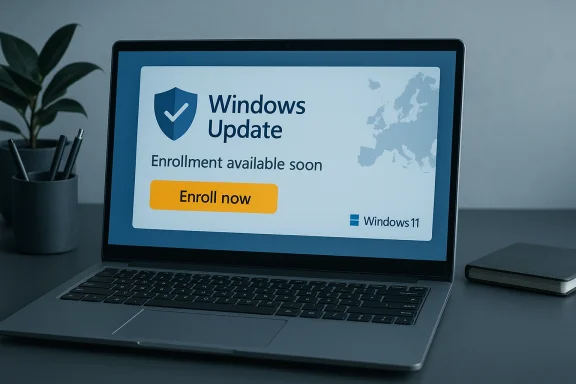
In several widely circulated screenshots and first‑hand reports, Windows Update displays the usual end‑of‑support warning and offers an “Enroll now” button—but tapping that button sometimes leads to one of the following responses:- “ESU enrollment available soon” / “Enrollment for Windows 10 Extended Security Updates is temporarily unavailable in your region.”
- “We can’t enroll you in Extended Security Updates right now. Close this window and try again.” or the shorter “Something went wrong.”
Why ESU enrollment may not work (the three common causes)
1) Missing prerequisite updates or the wrong Windows build
Consumer ESU requires devices to be running Windows 10, version 22H2 and to have the latest servicing stack and cumulative updates installed. If a PC is missing the prerequisite updates, the enrollment wizard will not appear. This is the single most common and easily fixable cause. Run Windows Update, install all available updates (including SSUs), reboot, and check again.2) Regional rollout and regulatory adjustments (EEA nuance)
Microsoft has acknowledged that enrollment experiences may vary by region and that EEA customers may see different enrollment mechanics due to legal and consumer‑protection considerations. The company signalled a staged rollout for Europe and said the ESU enrollment would begin appearing to EEA customers in early October, with coverage starting October 15, 2025. In practice this regional phasing means some European users still see “Enrollment available soon” prompts even after October’s initial waves.3) Device identified as an enterprise / managed PC
If Windows determines the device is managed—domain‑joined, MDM‑enrolled, or historically connected to a work or school account—it will block the consumer ESU flow and require enterprise licensing. That manifests as the generic “Something went wrong” or an enrollment denial message. The consumer ESU is explicitly for unmanaged, consumer PCs; managed devices must use commercial ESU channels (volume licensing or CSP partners). Many consumer PCs are misclassified because of leftover traces of a previous work account or school connection; that stray metadata can flip a device into the enterprise bucket and block consumer enrollment.Troubleshooting steps (practical repair checklist)
If the ESU enrollment UI is missing or returns an error, follow this ordered checklist. Each step is short and actionable.- Confirm Windows build
- Open Settings → System → About and verify you are running Windows 10, version 22H2. If not, install the feature update to 22H2 and the latest cumulative updates.
- Install all pending updates and SSUs
- Run Windows Update repeatedly until no more updates are offered and reboot. Missing servicing stack updates are the most common blocker.
- Sign in with a Microsoft account (MSA) that is an administrator
- Consumer enrollment paths require an MSA if you want the free or Rewards options. If you are using a local account, be prepared to sign in with an MSA when the wizard runs.
- Check for enterprise traces and disconnect work/school accounts
- Go to Settings → Accounts → Access work or school and remove any stale connections.
- Delete residual folders related to a previous organization sign‑in (for example, stale MDM or workplace profiles under %LOCALAPPDATA% and %PROGRAMDATA%), but back up first and be cautious—this step should be done only if you are confident the device is truly a consumer PC. Reports show leftover profiles can incorrectly classify a PC as a corporate device and block ESU enrollment.
- Reboot and try Settings → Update & Security → Windows Update → Check for updates → Enroll now
- If the Enroll now link appears, follow the wizard and choose your preferred enrollment method (sync, Rewards, or purchase).
- If the product still refuses to enroll, try the Windows Update troubleshooter and collect logs
- Run the Windows Update Troubleshooter, then review SetupDiag and C:\Windows\WindowsUpdate.log for obvious blocking errors. If you need help, capture the exact error text; that will speed any escalation.
- As a last resort for persistent misclassification, consider a clean local backup and a fresh Windows 10 22H2 install followed immediately by enrollment
- This is heavier but eliminates configuration artifacts that can cause misclassification. Back up your data and create a full image before attempting a clean install.
Why Windows Update sometimes offers Windows 11 instead
When Windows Update detects a device can be upgraded to Windows 11, Microsoft surfaces the upgrade option because migrating to Windows 11 is the publisher’s long‑term servicing choice. For eligible devices the Windows 11 upgrade restores full vendor servicing and removes any need for ESU. But this behavior can frustrate users who simply want to stay on Windows 10 and enroll in ESU. Independent reporting and Microsoft’s guidance both show that Windows Update will continue to prompt eligible devices to upgrade to Windows 11 rather than remain on Windows 10—but that is the intended user experience for machines meeting Windows 11 hardware requirements. For older devices that lack TPM 2.0, Secure Boot, or a supported CPU, Windows Update will not offer the official Windows 11 upgrade. Those users either enroll in ESU, buy replacement hardware, or adopt an alternative OS such as Linux or ChromeOS Flex. Community workarounds exist to install Windows 11 on unsupported hardware, but Microsoft does not support those configurations and they can compromise future updates and platform guarantees.Regional and regulatory complexities: why Europe looks different
European consumer‑protection rules and privacy requirements have forced Microsoft to adjust the ESU enrollment mechanics for the EEA. Those changes both preserve certain consumer rights and impose operational differences—such as periodic re‑authentication for free entitlements and different account‑linking requirements—that can delay the rollout and complicate messaging inside the product. Microsoft has said enrollment in the EEA will be phased and that the enrollment experience may differ from other markets; that aligns with the on‑the‑ground reports of “temporarily unavailable in your region” messages. This regulatory nuance matters: a blanket “Enroll now” button that behaves differently depending on jurisdiction is an interface pattern that invites confusion, and the phased rollout amplifies disparities in user experience between regions. Microsoft’s public guidance stresses the same core point—devices must meet prerequisites and the option will appear as the phased rollout reaches them—but it does not provide granular timelines for every country, which leaves affected consumers uncertain.Consumer tradeoffs: security, privacy, and cost
- Security: ESU provides critical and important security updates only. It does not restore feature updates, driver fixes, or normal technical support. Over time, third‑party vendors may also stop testing or supporting Windows 10, increasing compatibility risk. Treat ESU as a time‑boxed bridge—not a long‑term solution.
- Privacy and account policy: Many users who prefer local accounts will find ESU enrollment requires a Microsoft account for the free or Rewards paths. Microsoft documented options to preserve local‑account users via a paid one‑time purchase, but the change has angered some privacy‑conscious users. This is a deliberate vendor choice that favors cloud‑account management and telemetry requirements for entitlement.
- Cost and timing: Consumer ESU is cheap relative to enterprise licensing—approximately $30 for a one‑time purchase in many markets—but it’s limited to one year and is meant to give users time to plan a migration. Organizations have multi‑year commercial ESU options at far higher per‑device rates. Financially, ESU is tactical insurance while replacement or a permanent migration is the strategic solution.
When ESU fails: the bigger operational and security implications
If your device cannot enroll in ESU and cannot be upgraded to Windows 11, the options become stark:- Migrate to a supported OS (Windows 11 on compatible hardware).
- Move workloads to cloud‑hosted Windows (Windows 365 / Azure Virtual Desktop), which Microsoft treats differently for entitlement and may include ESU coverage for the hosted environment.
- Install a modern Linux distribution or ChromeOS Flex to keep the device usable and secure with continued upstream patching.
- Continue running Windows 10 without vendor OS patches—an increasingly risky option that raises exposure to kernel‑level vulnerabilities, compliance failures for businesses, and elevated insurance and audit risks.
Recommended short‑term plan for affected users
- Back up immediately: full system image and critical file copies off the device.
- Update to Windows 10, version 22H2 and install every pending update.
- Try the enrollment flow after signing in with a Microsoft account.
- If the enrollment UI still refuses to appear, follow the “disconnect work account” checklist, reboot, and try again.
- If you are blocked due to region or enterprise classification, plan alternative mitigations: Windows 11 upgrade, cloud PC, Linux, or hardware replacement.
- Use the ESU window to schedule a migration strategy, not to defer indefinitely.
Verdict and critical assessment
Microsoft designed consumer ESU as a pragmatic, time‑boxed bridge, and the vendor has published clear technical prerequisites and straightforward enrollment paths. That design is a strength: ESU provides a low‑cost, limited‑scope option for consumers who cannot immediately upgrade. Microsoft also documented requirements and the phased rollout. But the execution and messaging have notable shortcomings:- The phased rollout and EEA adjustments have created real confusion for end users who see an “Enroll now” button that either does nothing or triggers a regional denial message with no timeline. That mismatch of interface and action is a usability failure for a high‑stakes lifecycle event.
- The account requirement and regional variations create friction for privacy‑sensitive consumers and those using local accounts—groups precisely likely to resist migrating to cloud‑tied services. While one‑time paid options exist, the account‑linking requirement feels like a policy squeeze.
- The error messaging lacks actionable guidance. Generic “Something went wrong” popups without a clear remediation path or links to tailored troubleshooting are poor UX for a process that affects device security and compliance. Microsoft should provide a clearer diagnostics path inside Settings (for example, detect and explain enterprise traces, show the missing SSU, or display the region‑phasing status).
Conclusion
The consumer ESU program is an honest attempt to buy time for millions of Windows 10 devices, but the phased rollout, EEA regulatory adjustments, and a few brittle classification rules have produced real user pain: missing enrollment options, opaque error messages, and a visible nudge toward Windows 11. For individual users and small organisations the immediate priorities are simple and urgent: back up data, ensure the PC is on Windows 10 22H2 with the latest updates, sign in with a Microsoft account if you intend to use ESU, and follow the troubleshooting checklist to remove stale enterprise traces.Ultimately, treat ESU as a planning window. It is temporary, narrowly scoped, and—when it works—useful. It is not an architectural substitute for migrating to a supported platform, whether that is Windows 11, a cloud PC, or a well‑supported alternative OS. The combination of Microsoft’s phased rollout and regional compliance changes means some users will see enrollment only after a delay; others will need to take alternative mitigation steps immediately. The clock for guaranteed vendor OS patches is no longer theoretical—October 14, 2025 has passed—and the practical work of migration, inventory, and risk reduction must happen now.
Source: Windows Latest Windows 10 ESU won't work on some PCs, offering Windows 11 instead
