Microsoft’s hard stop on Windows 10 support has left an enormous tail of still‑working machines exposed, prompted consumer and environmental outcry, and forced a practical reckoning about what “end of support” actually means for hundreds of millions of users around the world.
Background
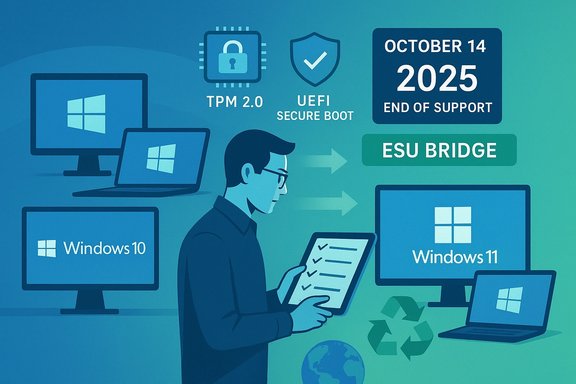
Microsoft launched Windows 10 in 2015 with the promise of a continuously serviced platform. That promise came with a documented lifecycle: routine security, quality, and feature updates would continue for a fixed period. Microsoft published a firm end‑of‑support date — October 14, 2025 — after which routine monthly cumulative updates for consumer Windows 10 editions ceased unless a device was enrolled in a limited Extended Security Updates (ESU) program.This is a calendar‑driven, vendor‑policy decision, not a technical “remote shutdown.” Devices running Windows 10 continue to boot, run applications, and access data after the cutoff, but they no longer receive the regular OS‑level fixes that close newly discovered kernel, driver, and platform vulnerabilities — unless the owner enrolls in ESU or uses other migration paths.
At the same time, Windows 11 enforces stricter hardware requirements — notably TPM 2.0, UEFI Secure Boot, and a curated CPU compatibility list — that leave a sizable fraction of Windows 10 systems ineligible for an official in‑place upgrade. That hardware incompatibility is the technical pivot around which much of the controversy revolves.
What the headlines claim — and what’s verified
Headlines that said Microsoft “shut down” Windows 10 or “bricked 400 million PCs” compress several separate facts and estimates into a dramatic claim. The verified core facts are:- Windows 10’s formal routine support ended on October 14, 2025. That calendar fact is documented in Microsoft’s lifecycle materials and repeatedly confirmed in reporting.
- Microsoft published a consumer ESU path that extends security‑only updates for enrolled devices for a limited period (one year for consumer ESU, with enterprise multi‑year ESU options sold under volume licensing). ESU is explicitly a time‑boxed bridge, not indefinite support.
- Estimates that “up to 400 million” Windows 10 PCs are ineligible for Windows 11 are model‑based and originate from advocacy groups and asset‑management scans; they are not a Microsoft‑published device census. Treat the 400 million figure as a scale estimate, not a verified device count.
Why “end of support” looks like “bricking” to many users
For everyday users the practical experience of losing vendor patches can feel indistinguishable from being “bricked” in two ways:- Security and functionality regression: New, actively exploited vulnerabilities in the platform will no longer receive vendor fixes for unenrolled Windows 10 devices. Over time this increases risk of compromise and may force app vendors and service providers to withdraw support or impose compatibility requirements.
- Feature and service gating: Microsoft has tied some app and service experiences — or their fully supported versions — to Windows 11. For organizations relying on Microsoft 365, this coupling raised urgent migration pressure because the desktop productivity stack and its supported scenarios increasingly assume a modern OS baseline. That contributes to a perception that the device is functionally obsolete even if it still boots.
How reliable is the “400 million” number?
The “400 million” headline is a high‑level estimate that aggregates two uncertain inputs: the size of the active Windows 10 install base and the share of those devices that fail Windows 11 compatibility checks (TPM, Secure Boot, CPU family, memory, and storage). Public telemetry, OEM comments, and asset‑management scans produce ranges rather than precise counts:- Market trackers showed Windows 10 still commanding a large minority of desktop Windows telemetry into 2025, implying hundreds of millions of active devices.
- Independent inventory scans (enterprise and vendor sampling) and advocacy extrapolations produced incompatible‑rate estimates commonly cited between roughly 200 million and 400 million devices. These scans depend heavily on sample bias and the definition of “ineligible.”
The technical mechanics that matter to IT and end users
Understanding the binary distinction between “device runs” and “device supported” is critical.- What ended: vendor‑issued, cumulative OS security and quality updates for mainstream Windows 10 SKUs; free Microsoft technical support for consumer editions; and routine feature updates.
- What continues: some application‑layer servicing (notably selected Microsoft 365 app updates for a limited period) and Microsoft Defender signature updates — though these do not substitute for OS‑level mitigations of kernel and driver vulnerabilities.
- Available bridges: consumer ESU (one year, with enrollment mechanics), commercial ESU (multi‑year, paid via volume licensing), and formal upgrade paths to Windows 11 for compatible devices. ESU enrollment routes included Microsoft account‑linked backup, rewards redemption, or a paid one‑time consumer license in many markets.
Security tradeoffs: staying vs upgrading vs unsupported workarounds
Each path forward comes with distinct security tradeoffs.- Staying on unsupported Windows 10 without ESU: progressively larger exposure to unpatched platform bugs. Over time, application vendors and security tooling may reduce support for these environments, increasing operational risk.
- Enrolling in ESU: buys time by exposing only critical and important security fixes for a limited period. ESU is a tactical mitigation, not a strategic substitute for migration. It also often imposes administrative and account requirements that are contentious with privacy and equity advocates.
- Unsupported upgrades or third‑party “lightweight” Windows variants (Tiny11 and similar projects): these can restore a modern UI or sharded features on old hardware but sacrifice vendor signing, update entitlement, and often break app compatibility or security primitives. Microsoft explicitly disowns unsupported forks and warns of increased risk.
- Installing Windows 11 via bypass methods (registry tweaks, Rufus, FlyBy11): feasible in many cases but creates a legal/operational gray zone. Unsupported upgrades may work but can carry driver issues, lose update entitlement, and require careful testing and backups.
Environmental and equity considerations
Public interest groups argued that a hard calendar cutoff combined with Windows 11’s hardware baseline risks accelerating device turnover in ways that exacerbate e‑waste and widen the digital divide. Their requests to Microsoft included extending free security updates for consumers who cannot upgrade and avoiding account‑gated enrollment mechanics that disadvantage lower‑income households. Those concerns are not speculative policy fear‑mongering — they reflect measurable impacts when a huge installed base faces either paid bridge options or device replacement.The UN’s global e‑waste figures put the environmental stakes in perspective: the world already generates tens of millions of tonnes of e‑waste annually, and a concentrated surge of PC replacements would strain recycling and reuse infrastructures. That broader context helps explain why the technical lifecycle decision produced a political and social response beyond pure IT operations.
Real‑world operational pain points we’ve seen
Field reports and OEM commentary highlighted concrete failure modes:- Recovery and WinRE regressions: a reported update caused WinRE to lose USB input handling in some configurations, making recovery workflows impossible on USB‑only machines. That kind of regression heightens the risk that a non‑booting PC becomes effectively unrecoverable at home without technical support.
- Firmware update dependencies: devices that require OEM BIOS/UEFI updates before accepting OS‑driven certificate rotations are at the highest operational risk — particularly older or vendor‑neglected machines.
- Uneven upgrade readiness: many corporate fleets show a split between machines that are technically upgradeable but not upgraded and machines that are genuinely ineligible, complicating blanket policies and increasing helpdesk load.
Practical recommendations — what end users and IT teams should do now
- Inventory first: run a device census that captures OS build, CPU family, TPM state, UEFI mode, available firmware versions, and whether devices accept OS‑driven firmware writes. Accurate inventory is the foundation for all subsequent decisions.
- Prioritize by risk: identify critical endpoints (financial, health, compliance) and ensure they are either upgraded to a supported platform or enrolled in ESU/enterprise support. Treat ESU as an emergency bridge.
- Test upgrades: for upgradeable machines, pilot Windows 11 installs in a controlled ring and validate application compatibility and driver behavior before broad rollout. Use golden images and test recovery paths.
- Prepare recovery media and firmware update plans: create bootable installers and ensure firmware update windows are scheduled — OEM BIOS updates may be required before you can accept OS‑driven certificate updates.
- Consider alternatives judiciously: for hobbyists and tech‑savvy users, Linux or officially supported light configurations offer safer pathways than unsupported Windows forks. Unsupported workarounds can leave you isolated from security patches.
- For consumers: if your PC is incompatible with Windows 11 and you cannot replace hardware immediately, enroll in the consumer ESU if available and eligible while planning a replacement or migration to alternate software.
- For small businesses: budget for commercial ESU or hardware refreshes where compliance dictates; treat ESU as a tactical budget item, not a long‑term solution.
Strengths of Microsoft’s approach — and why some of those strengths backfire
Microsoft’s decision to set a fixed lifecycle date and to raise the hardware baseline for Windows 11 had defensible motivations:- Security baseline: requiring TPM 2.0 and Secure Boot raises the minimum platform trust and helps mitigate entire classes of firmware/boot attacks that have become common in recent years. That hardening can materially improve security across the ecosystem.
- Manageable servicing: a single supported platform family simplifies long‑term maintenance, development, and feature innovation for Microsoft and application vendors.
- Equity gap: raising the hardware bar leaves economically vulnerable users on unsupported platforms or forced into paid bridges. Public advocates framed this as a fairness and public‑safety issue.
- Operational complexity: OS lifecycle decisions necessarily intersect with firmware and OEM update practices, producing edge cases where devices get into update or recovery limbo. That operational friction is what drove the “bricking” headlines for some audiences.
Risks and unresolved questions
- Measurement uncertainty: without an audited, vendor‑level device inventory, headline device counts (200M–400M) remain estimates. Policy responses should be proportional to credible inventories rather than top‑line press numbers.
- Long‑tail security exposure: large amounts of unpatched device-years create lucrative targets for attackers. The longer the tail persists outside ESU, the greater the risk to shared infrastructure.
- Environmental burden: the policy tradeoff between short‑term security gains and longer‑term environmental cost is unresolved. If the transition accelerates device replacement at scale, recycling systems and secondary‑market supply will be stressed.
- Vendor lock‑in and account gating: enrollment mechanics that link free ESU eligibility to specific account behaviors or reward systems complicate privacy and equity considerations. Those mechanics became focal points for advocacy groups pressing Microsoft for alternatives.
A measured conclusion
The Windows 10 end‑of‑support episode is a case study in how platform lifecycle policy, hardware security requirements, and real‑world device diversity interact in ways that ripple beyond IT desks into environmental policy, consumer equity, and national cyber resilience. The technical facts are clear: Microsoft ended routine support on October 14, 2025, and provided limited, paid or account‑gated bridges to mitigate the immediate exposure. The more explosive claims that millions of PCs were “bricked” by a remote kill switch are overstated; the real danger comes from a large installed base that is now unsupported, the economic pressure on users to replace hardware, and the operational complexities vendors must manage (firmware certificate rotation, WinRE regressions, recovery workflows).The pragmatic path forward is straightforward: inventory, prioritize, and act deliberately. For administrators, treat ESU as time‑boxed triage and accelerate tested migrations. For consumers, weigh the costs of temporary paid coverage or hardware replacement against the security and privacy risks of remaining on an unpatched platform. And for policy makers and vendors, the episode should prompt discussion about sustainable product lifecycles and fairness in platform transitions — because security improvements must be balanced against the societal cost of forced obsolescence.
Microsoft’s calendar decision did not electrically destroy hundreds of millions of devices overnight. But it did expose an uncomfortable reality: a decade of heterogeneous hardware, uneven firmware maintenance, and vendor lifecycle choices can conspire to leave very large populations of devices vulnerable, costly, and environmentally costly to replace — and dealing with that reality will require coordinated action from vendors, OEMs, administrators, and public advocates alike.
Source: MSN https://www.msn.com/en-us/video/mon....com/series/best-windows-apps-this-week-231/]