Windows 10 ESU 2026: Free vs Paid Enrollment and Secure Boot Certificate Rollout

  • Thread Author
Microsoft has pushed the first Extended Security Updates (ESU) package for 2026 and confirmed what many administrators feared and some hoped for: a mandatory, high‑priority security rollout that fixes a large number of vulnerabilities and begins the phased replacement of Secure Boot certificates that begin expiring later this year. The update — included in the January cumulative servicing for supported Windows 10 builds — carries urgent changes that range from driver removals to firmware trust‑chain adjustments, and it comes with a new consumer enrollment model for Extended Security Updates that ties free coverage to a Microsoft account or an alternative paid option through the end of the ESU program on 13 October 2026.

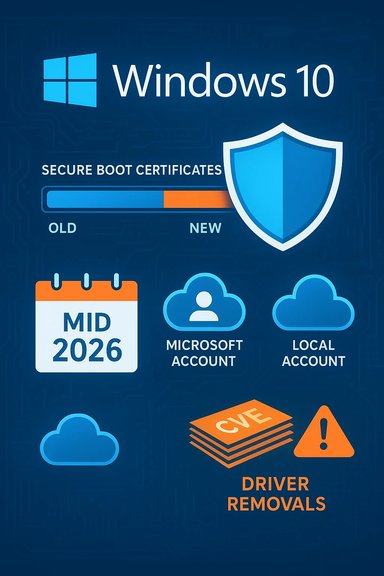
A digital visualization related to the article topic.Background / Overview​

Windows 10 reached its formal end of mainstream support in mid‑October of the previous year, and the vendor introduced a consumer ESU program to give users an extra year of critical and important security updates. That program continues through 13 October 2026, and this month’s cumulative update is the first full ESU delivery window of the new calendar year.
This release is notable for three overlapping reasons:
  • It distributes a substantial security patch bundle that addresses over a hundred vulnerabilities across Windows and related components.
  • It begins or accelerates the replacement of long‑running Secure Boot certificates used to validate pre‑OS and boot manager components, a change tied to certificate expirations in mid‑ to late‑2026.
  • It reinforces how Microsoft is enforcing consumer ESU eligibility: free coverage is available if users enroll with a Microsoft Account and meet the stated sync/sign‑in conditions; otherwise the consumer may pay a one‑time fee to receive ESU coverage through the program end date.
Across the Windows ecosystem this combination raises immediate patching priorities and operational questions: will firmware vendors and device OEMs provision the new certificates in time? Will home users accept the account and cloud‑sync conditions? And what mitigation steps should administrators and individual users take now?

What Microsoft confirmed — ESU enrollment and the January update​

Free ESU vs paid enrollment: the practical choices​

Microsoft’s consumer ESU model offers two practical enrollment paths for personal devices that meet the prerequisites (Windows 10 version 22H2 and up‑to‑date servicing):
  • A free option that requires signing in with a Microsoft Account and keeping that account linked to the device; in certain jurisdictions this requires syncing Windows settings to the cloud or periodically signing in.
  • A paid alternative (a one‑time purchase) that lets users keep a local account after enrollment; the purchase must initially be completed while signed in with a Microsoft Account.
Enrollment remains open until 13 October 2026, but Microsoft warns that devices are more vulnerable until they are enrolled. The free path is intended to reach consumers who already use a Microsoft Account and rely on the platform’s cloud tooling; the paid option is a fallback for users who prefer to avoid ongoing cloud‑sync requirements.

The January cumulative update and KB identifier​

The January servicing includes the ESU‑applicable cumulative update for the Windows 10 servicing branch. The package installs necessary servicing stack updates and contains a number of security fixes. Because this is an ESU rollout for devices that remain on Windows 10, administrators and users should treat this cumulative update as a required step to keep devices eligible and secure under the extended program.

Deep dive: Secure Boot certificates — what’s changing and why it matters​

Why Secure Boot certificates are not a routine detail​

Secure Boot enforces a cryptographic trust chain during system boot. Firmware stores several protected databases and keys — the platform key (PK), key exchange key (KEK), the allowed signature database (db) and the revoked signature database (dbx). Certificates and keys held in those stores act as trust anchors for bootloaders, firmware option ROMs and pre‑OS components. Those certificates are time‑bound: they have expiration dates and must be rotated before they lapse.
When the certificates used to sign future pre‑boot components expire, two problems emerge:
  • Devices lacking the new trust anchors cannot accept updates to pre‑boot components signed with the replacement certificates. That blocks future security fixes targeted at the earliest boot stages.
  • Firmware may refuse to trust newly signed boot components, potentially causing boot or recovery failures for affected configurations (dual‑boot setups, third‑party shims, updated installers).
The vendors responsible for those trust anchors published a replacement certificate family in 2023; the January servicing includes device targeting metadata and OS‑side updates intended to seed eligible systems with the new certificates ahead of expirations that begin in mid‑2026 and continue into October 2026.

The phased, confidence‑based rollout​

Rather than attempt an immediate worldwide swap of root certificates, Microsoft’s servicing strategy is explicitly phased: devices must demonstrate successful update telemetry and other health signals before receiving the replacement certificates. The idea is to reduce rollout risk — minimizing incidents where firmware incompatibilities or OEM firmware restrictions would create unbootable systems or other untenable outcomes.
However, the phased approach is a double‑edged sword:
  • For many consumer devices that receive automatic Microsoft‑managed updates and have firmware that supports OS‑initiated variable writes, the transition should be automatic and transparent.
  • For older hardware, custom motherboards, or firmware that restricts operating system writes to UEFI variables, the rollout may stall. Those systems must rely on OEM firmware updates (BIOS/UEFI packages) or manual firmware provisioning to install the new certificates.

Operational implications for administrators and power users​

  • Treat Secure Boot certificate migration as a high‑priority operational task. The first expiration window starts in mid‑2026; missing the update window may prevent future pre‑OS security fixes from being applied.
  • Validate firmware readiness for your device fleet: check OEM update channels and include firmware/BIOS updates in your patching cycles.
  • Virtual machines, pre‑OS tooling, and dual‑boot setups should be tested. Some Linux distributions and boot manager shims rely on the pre‑existing Microsoft signing model; ensure installed bootloaders are signed under an accepted chain after the migration.
  • Avoid ad‑hoc rollback attempts. Certain DBX (revocation) operations are effectively irreversible on affected systems, and recovering from an unsupported state may require reimaging or firmware‑level intervention.

The security landscape: how many vulnerabilities and what types were fixed?​

The January cumulative servicing for Windows and related Microsoft components addressed a very large set of flaws — over one hundred distinct vulnerabilities across the product family. The mix was dominated by elevation‑of‑privilege issues, with tens of privilege escalation fixes, several information disclosure and remote code execution vulnerabilities, and a small number of spoofing, tampering and denial‑of‑service items.
A few points to keep in mind when interpreting the counts:
  • Public reporting of the patch bundle varies by aggregator; different security services count items slightly differently depending on whether they include third‑party components and related products.
  • The release included at least one actively exploited vulnerability that was being observed in the wild at the time of release, and the batch contained multiple high‑priority privilege‑escalation fixes that make rapid patching important.
  • The update also removed legacy modem drivers that remain in some Windows images — a change that can disable dependent hardware and must be tested in environments that rely on older modem hardware.
From an operational standpoint, the priority list for most organizations should be:
  • Rapidly deploy the servicing stack updates and cumulative update to devices that must remain on Windows 10 under ESU.
  • Test and stage firmware/BIOS updates on representative hardware, especially where Secure Boot is enabled and the vendor’s firmware is older.
  • Prioritize systems exposed to user interaction, remote services, or sensitive data for immediate patching because elevation and RCE flaws increase the risk of lateral movement and privilege escalation after initial compromise.

Market context: adoption trends and what they imply for the transition​

Adoption metrics for the latest Windows release and the old generation have been a moving target. Aggregate trackers show narrow margins and month‑to‑month shifts; in many regions Windows 10 remains widely used, often on older hardware that does not meet the stricter requirements of the newer OS. Those patterns help explain why extended updates are both necessary and widely consumed.
Key takeaways from adoption trends:
  • A significant proportion of the installed base remains on Windows 10, meaning ESU coverage is important not only for hobbyist and legacy users but for sizable consumer and small‑business populations.
  • Upgrade pressure is asymmetrical: users on modern, brand‑new devices are more likely to have migrated, while older desktops and laptops — including many corporate BYOD and home setups — continue to run the older OS.
  • The ESU program, and the conditions attached to the free tier, functionally slow the shock of a hard cutoff by providing one more year of critical security maintenance; however, this is a bridge, not a long‑term support model.
Because market measurement methodologies differ (web telemetry vs sampling vs commercial telemetry), exact percentages change depending on the tracker and time window used. Interpret those numbers as directional rather than definitive.

Privacy and ecosystem tradeoffs: the Microsoft Account and OneDrive requirement​

The free ESU path requires device enrollment with a Microsoft Account, and in some non‑jurisdictional variants that enrollment route also asks users to sync settings via the cloud backup tool. This introduces two interlocking concerns:
  • Privacy and data flow: syncing settings to cloud storage introduces telemetry and account linkages that some privacy‑conscious users will resist. Even if only “settings” are synced, the act of linking an account changes device management dynamics.
  • Platform lock‑in implications: tying free security coverage to an account encourages users to remain within the vendor’s ecosystem. For consumers, that may be an acceptable trade; for those who deliberately avoid cloud accounts, the paid ESU alternative is the only practical option.
In certain regulatory regions the vendor relaxed the cloud‑sync requirement for free ESU, but still requires account sign‑in (with periodic signin checks). These regional differences are important to understand when advising geographically distributed users.

Practical checklist — what to do now​

  • Confirm eligibility: ensure devices are running the required Windows 10 build (22H2) and have recent servicing stack updates installed.
  • Enroll (if you intend to use ESU):
  • Sign in with your Microsoft Account and follow the enrollment wizard on the Windows Update pane; or
  • If you prefer not to remain signed in, complete the paid one‑time ESU purchase while signed in, then you may switch back to a local account if desired.
  • Install the January cumulative update (the ESU package) immediately on production and home systems that will remain on Windows 10. Prioritize endpoints with elevated privileges, exposed services, or internet‑facing roles.
  • Verify Secure Boot and firmware readiness:
  • Check Secure Boot state in UEFI/firmware settings.
  • Inventory firmware versions and available BIOS/UEFI updates from OEMs.
  • Test the certificate installation process on representative hardware before mass deployment.
  • Backup critical devices and create a rollback plan. Because some driver removals or DBX operations can be disruptive, ensure you have disaster recovery steps.
  • For dual‑boot or custom configurations, test boot flows after applying the update and the new certificates. Some third‑party boot utilities may require updated signing or firmware support.
  • Monitor telemetry and update health. Watch for failed updates or boot issues after the phased certificate rollouts; reimage or apply OEM firmware fixes where necessary.

Strengths, risks, and final assessment​

Strengths​

  • The ESU program buys a crucial one‑year window for devices that cannot migrate immediately, reducing the immediate attack surface for millions of endpoints.
  • The vendor’s phased, telemetry‑driven rollout for replacement certificates reduces the risk of mass failures; it is a cautious approach that prioritizes device stability.
  • Consolidating a large set of fixes into the January release ensures many known flaws are addressed at once, simplifying patch policy for administrators.

Risks and open questions​

  • Firmware fragmentation is the largest operational unknown. Many devices rely on OEM firmware updates to accept new KEK/db changes; if OEMs lag, devices may miss crucial pre‑boot fixes.
  • The account and sync requirements for free ESU will be unpopular among privacy‑focused users, potentially leaving some users to defer enrollment and remain exposed.
  • Some changes in the cumulative package — notably legacy driver removals and DBX additions — can lead to immediate functional impacts on older hardware. Testing and inventory are non‑negotiable.
  • Public reporting of the vulnerability counts varies slightly across security outlets; administrators should rely on the vendor’s official security update guide for the authoritative list of CVEs to prioritize mitigations.

Final assessment​

This ESU update cycle is a necessary technical and policy stopgap. It reduces immediate systemic risk by delivering critical fixes and preparing the platform for a certificate rotation that cannot be postponed beyond calendar deadlines. At the same time, the rollout underscores how modern operating system security now depends on an ecosystem of firmware vendors, signature ecosystems, and account‑linked enrollment flows. For organizations and careful consumers, the practical risk management strategy is clear: patch quickly, verify firmware support, and plan to migrate off legacy platforms in the medium term. The ESU program delivers breathing room — not a permanent solution.

This month’s update is not an ordinary “install when you have time” release. It contains boot‑level trust changes and an unusually large set of security remediations. Treat it as an operational priority: confirm eligibility, stage updates, coordinate firmware vendors, and validate recovery paths. The ESU window remains open through 13 October 2026, but the timeline for safe certificate migration is fixed — the clock for pre‑boot trust anchors is already ticking.

Source: Forbes Microsoft Confirms First Free Windows Update For 2026
 

Microsoft’s early‑2026 Windows update rollout has a careful framing: it is not a sweeping, feature‑rich new edition of Windows being handed out for free, but a combination of time‑boxed security coverage, platform maintenance, and certificate refreshes that together look like a “free update” only when read through the right lens. What Microsoft actually announced and shipped in late 2025 and January 2026 is a pragmatic mix of consumer Extended Security Updates (ESU) enrollment options — including no‑cost routes for many users — alongside targeted platform work (Secure Boot certificate refreshes and a Canary build that surfaces Windows 11, version 26H1) intended to smooth the transition from Windows 10 and to prepare devices for next‑generation hardware.

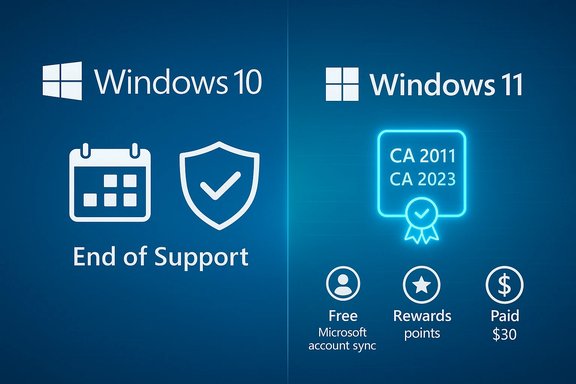
Windows 10 ends support; Windows 11 shows a certificate, rewards, and paid options.Background / Overview​

Microsoft’s Windows lifecycle decisions in 2025–2026 created two overlapping realities for users and IT managers. First, Windows 10 reached its official end of support on October 14, 2025, ending routine, free monthly security and feature updates for consumer editions. Second, Microsoft introduced a narrowly scoped consumer Extended Security Updates (ESU) program to provide security‑only updates for eligible Windows 10 devices through October 13, 2026. The company made enrerately flexible: a free path tied to signing into a Microsoft account and syncing settings, a redeemable 1,000 Microsoft Rewards points route, and a one‑time paid option (commonly reported around $30 USD, with regional variations). Concurrently, Microsoft shipped focused platform work that matters for 2026:
  • An Insider Canary build (Build 28000) that updates the Windows version string to Windows 11, version 26H1, intended as a platform baseline for next‑generation silicon rather than a mainstream consumer feature update.
  • A set of Secure Boot certificate updates to replace expiring certificate authorities (CA 2011 → CA 2023), which Microsoft began rolling out in updates planned through June 2026 to prevent boot‑time trust failures and to maintain compatibility with anti‑cheat and low‑level security systems.
These changes — security coverage mechanisms, certificate refreshes, and a platform version bump — are the facts behind headlines about “free updates” and a new Windows branch in 2026. What they are not is a mass, free consumer feature upgrade equivalent to a Windows 11‑style release for all existing devices.

What Microsoft actually announced (the hard facts)​

Consumer ESU: scope, timing, and enrollment routes​

  • Coverage window: Security‑only updates for eligible Windows 10, version 22H2 devices through October 13, 2026. This is strictly security patches — no feature updates, no non‑security quality fixes, and no broad technical support.
  • Enrollment options for consumers:
  • Free route: Sign in with a Microsoft Account and enable Windows Backup / settings sync — this path can grant ESU entitlement at no additional cash cost for many users.
  • Rewards route: Redeem 1,000 Microsoft Rewards points for a one‑year ESU entitlement (availability and mechanics vary by region).
  • Paid route: A one‑time paid purchase (widely reported around $30 USD) if users prefer not to link or redeem points.
  • Eligibility prerequisites: Devices must be running Windows 10, version 22H2 and be fully patched with required servicing stack updates before enrollment. Enrollment is surfaced via a Settings → Windows Update “Enroll now” wizard for qualifying systems.
These facts were published on Microsoft’s own Windows Experience channels and the support pages documenting Windows 10 end‑of‑support and the ESU program. The messaging frames ESU as a one‑year bridge to migration, not a permanent policy reversal.

Platform maintenance: Secure Boot certificates and why they matter​

Secure Boot certificates used by the platform — and depended upon by kernel‑level components and anti‑cheat systems — had CA certificates scheduled to expire in mid‑2026. Microsoft began seeding new Secure Boot certificates in Windows updates to prevent devices from failing to boot or from losing trust in firmware‑level protections. This work includes rollout controls that evaluate device update reliability before applying changes at scale. For devices with older firmware, vendor firmware updates or manual action may still be required.

Windows 11 versioning: Build 28000 and 26H1​

Microsoft released Windows 11 Insider Preview Build 28000 to the Canary Channel, which updates the version identifier to 26H1. Microsoft explicitly stated this branch is platform‑focused, designed to support next‑generation silicon and managed device images (e.g., next‑gen Copilot+ ARM laptops), rather than to deliver a broad set of consumer features. In practical terms, most users will continue to receive feature work through the regular annual H2 feature releases.

Why the “free update” headline is misleading — and why context matters​

A short headline saying “Microsoft Announces Free Windows Update Debuting in 2026” conflates several distinct items that are easy to misread:
  • The consumer ESU free enrollment is not a new feature update to Windows; it gives many users continued access to security patches for an additional year if they enroll via the free paths. That is a security entitlement, not a functional upgrade.
  • The Windows 11 26H1/Build 28000 identifier is a developer/platform change; it does not equate to a mass rollout of new consumer features for all machines.
  • Secure Boot certificate refreshes are essential maintenance that can require firmware cooperation — they will be delivered as part of updatedalone consumer‑visible feature.
In short: consumers can obtain an extra year of protection through free enrollment methods in the ESU program, and Microsoft is shipping platform updates to keep devices secure and compatible — but that is materially different from Microsoft declaring that it will deliver a sweeping “free Windows update” in the sense of a full OS feature upgrade.
Community discussion and troubleshooting threads captured during the rollout reiterate this nuance: the ESU experience is a narrow, account‑centric, time‑boxed safety valve intended to buy migration time, not an open‑ended extension of Windows 10’s lifecycle.

What this means for Windows 10 users today​

Immediate actions (practical checklist)​

  • Confirm your OS version: open Settings → System → About or run winver and verify you’re on Windows 10, version 22H2. Only this final Windows 10 release qualifies for the consumer ESU pathway.
  • Update the servicing stack and latest cumulative updates: install the most recent Servicing Stack Update (SSU) and the latest LCU before attempting enrollment; Microsoft issued out‑of‑band fixes in late 2025 to correct enrollment issues for some devices.
  • Decide an ESU path: pick from the free Microsoft Account sync route, 1,000 Rewards points, or the paid $30 one‑time purchase if you prefer a local account. Understand the trade‑offs: free enrollment often ties your device to a Microsoft Account and cloud sync.
  • Back up before enrollment: create a system image or at minimum a full file backup. Enrollment and update sequencing can sometimes surface driver or firmware incompatibilities.

When to upgrade instead of using ESU​

  • If your device meets Windows 11 hardware requirements (TPM 2.0, Secure Boot, compatible CPU, 4 GB RAM, 64 GB storage), the long‑term best practice is to upgrade to Windows 11 to remain on a supported OS with new features. Microsoft’s lifecycle guidance and upgrade tooling remain the authoritative path.
  • Use ESU only as a planned bridge while you migrate hardware or perform application compatibility testing; do not treat it as a permanent substitute for modernization. Community guidance and Microsoft messaging both stress ESU’s temporary nature.

Technical and operational implications for IT and OEMs​

Secure Boot certificate rollout — OEM and firmware coordination​

The Secure Boot CA updates affect firmware‑level chains of trust and anti‑cheat approach is to selectively roll the certificate update to devices that demonstrate reliable update performance; older firmware or blocked telemetry paths might need manual OEM firmware updates. Large organizations and gaming PCs relying on third‑party anti‑cheat suites should validate certificate status and coordinate with OEMs and antivirus/anti‑cheat vendors to prevent boot or compatibility issues.

Platform image and procurement decisions​

The 26H1 platform baseline signals that some OEMs will begin shipping new hardware (notably Copilot+ ARM laptops) with platform‑first OS images optimized for next‑gen silicon. Procurement teams should verify the specific image and servicing expectations for such devices — they may not be parallel to the mainstream Windows 11 H2 feature stream. This matters for imaging, driver certification, and lifecycle planning.

Patch management and compliance​

For organizations, ESU remains a commercial product for enterprise environments with multi‑year options; the consumer ESU is intentionally short. Mapping CVEs to KBs across SKUs and ensuring prioritized rollout to internet‑exposed and admin hosts must remain standard operating procedure. Recent out‑of‑band updates highlight the need for careful servicing stack sequencing to avoid broken enrollment flows.

Strengths of Microsoft’s approach — and real risks​

Notable strengths​

  • Pragmatism: Microsoft provided a clear, time‑boxed path (ESU) to prevent a sudden security cliff for ineligible devices, a practical move given the slow hardware transition for many users.
  • Multiple enrollment paths: Offering free or low‑cost options via Microsoft Account sync or Rewards lowers barriers for consumers who need time to migrate.
  • Platform foresight: Proactive Secure Boot certificate updates and a platform baseline (26H1) help avoid boot‑time trust failures and set a clean foundation for next‑gen silicon.

Key risks and caveats​

  • Privacy and account trade‑offs: The free ESU path that uses Microsoft Account synchronization will be a serious concern for privacy‑conscious users who prefer local accounts. That trade‑off is baked into the entitlement model and can drive backlash. ([tomshardware.com]([url="]Microsoft no longer permits local Windows 10 accounts if you want Consumer Extended Security Updates — support beyond EOL requires a Microsoft Account link-up even if you pay $30[/url] security:** ESU provides only security‑only fixes; users on ESU must not assume they have full support or feature‑level bug fixes. Over‑reliance on ESU could increase technical debt and operational costs over time.
  • Firmware dependencies for Secure Boot updates: The certificate refresh requires firmware cooperation; devices with outdated or non‑compliant firmware could fail to receive updates automatically, risking boot issues if not addressed proactively.
  • Coine risk: Simplified headlines about a “free Windows update” can create confusion and unrealistic expectations, leading to user frustration when the offering is understood to be a limited security entitlement rather than a full OS upgrade. Community threads and support pages reflect that confusion and show the need for clearer messaging.

How to verify and follow up (trusted steps)​

  • Check Microsoft’s Windows 10 end‑of‑support and ESU pages for the official program details and any regional differences.
  • Use the Windows Insider Blog for precise versioning and build notes about the Canary 26H1 branch and Build 28000.
  • Monitor update KB release notes and the Windows Update Catalog for Secure Boot certificate packages and the servicing stack updates required to install them.
  • If you saw the “free update” coverage on third‑party sites like Filmogaz, verify the specific claims against Microsoft’s official posts and documentation before acting — some outlets condense separate announcements into a single, attention‑grabbing headline. Filmogaz and other outlets reported on January 2026 patches and the ESU mechanics, but the authoritative statements are on Microsoft’s channels.

Final verdict — practical guidance for Windows users and IT teams​

Microsoft’s early‑2026 activity should be read as careful lifecycle management rather than a consumer gifting of a new Windows edition. For most users, the sensible immediate plan is:
  • If your PC is Windows 11‑eligible, upgrade to Windows 11 and remain on the main feature and security cadence.
  • If your PC is not eligible for Windows 11 and you need more time, enroll in ESU using the free Microsoft Account or Rewards point route where available — but treat ESU as a bridge, not a destination. Back up data, ensure SSUs and LCUs are installed, and confirm enrollment via Settings → Windows Update.
  • For IT and procurement: validate firmware and driver support for Secure Boot certificate updates and confirm which OEM images will ship on new Copilot+ or ARM devices. Plan device refresh cycles and imaging workflows around the 26H1/Build 28000 platform baseline where appropriate.
The headlines about a “free Windows update debuting in 2026” contain grains of truth: Microsoft provided free ESU enrollment paths and shipped important platform and certificate updates in late 2025 and early 2026. Those moves materially reduce the immediate security risk for many users, but they do not replace the long‑term imperative to migrate to a supported platform, update firmware where necessary, and design patching and procurement strategies that reflect the new Windows lifecycle reality.

Conclusion
This transition period is an operational challenge and an opportunity. Microsoft’s ESU program and targeted updates offer a controlled runway — often free for consumers who accept Microsoft Account‑linked enrollment — to migrate devices responsibly. At the same time, the Secure Boot certificate refresh and the 26H1 platform baseline underline that 2026 will be a year of device renewal, firmware cooperation, and closer attention to update telemetry. Treat ESU as breathing room to plan, test, and execute migrations; treat platform updates as essential maintenance to avoid unexpected failures; and verify every claim about “free updates” against Microsoft’s official posts and the update KBs before acting.
Source: filmogaz.com https://www.filmogaz.com/104123]
 

Back
Top