

Microsoft has extended the consumer Windows 10 Extended Security Updates program through October 12, 2027, giving enrolled personal PCs another year of critical and important security patches after Windows 10’s official end of support on October 14, 2025. The change was quiet, but not small. It is Microsoft admitting, without quite saying so, that Windows 10 is too widely installed, too useful, and too entangled with older hardware to cut loose on the original schedule.
As noted by WindowsLatest, Ars Technica, Windows Central, and other outlets after Microsoft’s support language changed, this is not a revival of Windows 10 as a living platform. It is a longer safety net. But in practical terms, for millions of home users and small offices staring at a perfectly functional PC that cannot officially run Windows 11, the difference between “unsupported” and “still patched” is enormous.
Windows 10’s mainstream story ended on October 14, 2025. That date had been circled for years: the point at which Microsoft would stop providing normal free updates, technical assistance, and security fixes to most consumer Windows 10 machines. The company’s preferred answer was clear enough: upgrade to Windows 11, buy a new Windows 11 PC, or enroll in Extended Security Updates if you needed more time.
The consumer ESU program was originally framed as a one-year bridge. It carried Windows 10 users from October 2025 into October 2026, but the message was that this was a temporary reprieve, not a new lifecycle. Microsoft’s updated documentation now lists a second consumer ESU year, ending October 12, 2027.
That date matters because it changes the psychology of the Windows 10 transition. A one-year extension feels like a grace period. A two-year extension starts to look like an acknowledgment that the migration path is harder than Microsoft’s Windows 11 marketing implied.
Microsoft’s official posture remains disciplined. ESU is not a feature pipeline, not a performance update channel, and not an invitation to standardize on Windows 10 indefinitely. It exists to deliver critical and important security updates, as defined through Microsoft’s security-response process, to eligible enrolled devices.
Still, support policy is product strategy in another form. By extending consumer ESU, Microsoft has effectively conceded that a hard landing in 2026 would leave too many real-world PCs outside the patching ecosystem.
That argument was not frivolous. Windows security in the 2020s depends heavily on hardware-backed isolation, measured boot, virtualization-based security, and credential protection. Microsoft has spent years trying to move the PC ecosystem away from the anything-goes compatibility model that defined earlier Windows eras.
But the consequence was predictable. Large numbers of PCs that run Windows 10 acceptably, and in many cases comfortably, are blocked from official Windows 11 upgrades. Some are old enough that replacement is reasonable. Many others are not.
For consumers, the distinction between “unsupported processor” and “broken computer” is not meaningful. If the machine boots quickly, runs a browser, handles Office, joins Zoom, prints tax forms, and plays the occasional game, it still feels like a working PC. Microsoft may see an aging endpoint; the owner sees a sunk cost that has not yet failed.
That gap is the heart of the Windows 10 problem. Microsoft is trying to raise the floor of the Windows ecosystem, but the installed base was built during a period when Windows prided itself on stretching across nearly every x86 device that could plausibly run it. The new security model collides with the old compatibility promise.
That distinction is important for WindowsForum readers because it affects what advice you give family members, clients, schools, nonprofits, and small businesses. A Windows 10 PC enrolled in ESU is safer than an unpatched Windows 10 PC. It is not equivalent to a supported Windows 11 system receiving the full weight of Microsoft’s current client-development work.
There will be no meaningful Windows 10 feature renaissance. The Start menu is not getting a rethink. The Settings app is not being modernized into parity with Windows 11. New platform investments around Copilot, NPUs, app frameworks, and security defaults will overwhelmingly follow Windows 11 and its successors.
But security updates are not a trivial consolation prize. For many ordinary users, the biggest danger after end of support is not missing a feature. It is running a widely deployed operating system that attackers know will no longer be patched for newly discovered vulnerabilities. ESU keeps those enrolled devices from becoming instant low-hanging fruit.
The second year buys time, and time is exactly what the Windows 10 base needed. It gives households a longer replacement cycle, gives refurbishers more room to plan, and gives small shops a less panicked runway to decide whether to force Windows 11 onto marginal hardware, replace machines, or move some workloads elsewhere.
A decade later, the ESU extension shows the limits of that model. Windows can be serviced continuously, but hardware cannot be made modern by policy memo. Firmware, CPUs, security chips, drivers, and OEM support lifecycles all create hard constraints that software updates can only paper over for so long.
The tension is sharper because Windows 10 was, for many users, the stable middle ground. It corrected much of Windows 8’s touch-first overreach while avoiding some of Windows 11’s early friction around taskbar behavior, default apps, hardware checks, and interface changes. Even users who are not ideologically attached to Windows 10 often see no urgent reason to move.
Microsoft has been pushing Windows 11 with a mixture of carrots and nudges. The carrots are better security defaults, newer interface conventions, ongoing support, and access to the company’s newest AI-era PC features. The nudges are end-of-support warnings, compatibility messaging, and the steady gravitational pull of new PCs shipping with Windows 11.
The ESU extension softens the nudge. It says, in effect, that Microsoft still wants the migration but does not want the security and public-relations fallout of forcing the issue too quickly. That is a pragmatic choice, and probably the correct one.
The circumstantial case is strong. If the Windows 10 base had collapsed quickly after the 2025 deadline, there would be little reason to expand the consumer ESU runway. If Windows 11-compatible replacement cycles were moving fast enough, Microsoft could have held the line at October 2026 and treated the remaining users as laggards.
Instead, Microsoft changed the date. That is the relevant fact. The company looked at the installed base, the threat environment, the upgrade funnel, and the support burden, then decided another year of patching was better than a cliff.
There is also a regulatory and reputational dimension. Consumer groups in Europe had already pressured Microsoft over the environmental and financial implications of pushing users off otherwise usable PCs. E-waste arguments have real force here, particularly when the blocker is not day-to-day performance but a security baseline many consumers did not know existed when they bought their machines.
Microsoft’s updated stance does not erase those concerns. It merely reduces the urgency. A PC that gets another year of security updates is still eventually heading toward replacement, but that replacement can happen through normal failure, resale, donation, or budget planning rather than a forced deadline.
A properly enrolled Windows 10 system receiving ESU is preferable to an unmanaged straggler. But every Windows 10 endpoint after October 2025 should still be visible in inventory, assigned an owner, and tied to a migration or retirement plan. The second ESU year is not a reason to stop tracking risk; it is a reason to track it more calmly.
Organizations also need to distinguish consumer ESU from commercial arrangements. Business, education, and managed environments have their own licensing and deployment paths, and some Windows 10 LTSC or IoT variants follow different lifecycle rules. The consumer extension is most relevant to personal devices and lightly managed PCs, not to every Windows 10 machine in a corporate estate.
That distinction matters in hybrid environments where users blur the line between home and work. A personal Windows 10 laptop enrolled in consumer ESU may still be inappropriate for sensitive business workflows if it lacks device management, disk encryption policy, endpoint detection, or conditional access controls. Security posture is more than patch availability.
For small businesses without mature IT, the practical guidance is straightforward: enroll eligible PCs if they must remain on Windows 10, but do not treat enrollment as a retirement plan. Use the extra year to budget, replace the worst machines first, and avoid the classic small-office habit of waiting until a dead motherboard makes the decision for you.
For a local technician, the advice can now be more nuanced. Last year, the conversation often sounded binary: upgrade, replace, or accept risk. Now there is a middle option that is easier to defend, especially for users whose needs are modest and whose hardware remains reliable.
That does not mean every old PC deserves another year. Machines with failing drives, weak batteries, unsupported peripherals, or painfully slow CPUs may still be poor candidates for extended life. ESU protects against security vulnerabilities; it does not make a 2014 bargain laptop pleasant to use in 2026.
But for a 2018 desktop with a solid-state drive, 16GB of RAM, and a processor just outside Microsoft’s official Windows 11 support list, the calculus changes. Replacing that machine purely because of the support deadline is harder to justify when security updates can continue into 2027.
This is where Microsoft’s environmental story and customer story overlap. Extending security support is not just a concession to stubborn users. It is a recognition that the PC ecosystem contains a lot of useful hardware that does not fit neatly into the Windows 11 box.
The ESU extension may even help Windows 11 by reducing resentment. Forced migrations create backlash, especially when users believe the old system still works. A longer runway makes the transition feel less like coercion and more like planning.
But Microsoft still has a persuasion problem. Windows 11 is better than it was at launch, yet for many Windows 10 users the upgrade does not feel transformative. If the strongest reason to move is that the old thing will become unsafe, then extending safety weakens the emotional urgency of the move.
That is the paradox Microsoft has created for itself. The company is doing the responsible thing by keeping Windows 10 patched longer, but every month of safe Windows 10 usage gives users another month to ask why they need Windows 11 at all. Security policy can buy time; it cannot manufacture desire.
The answer may come less from Windows 11 upgrades than from PC replacement. As older systems fail and new systems arrive with Windows 11 preinstalled, the installed base will continue to shift. Microsoft’s extension suggests it is willing to let that process happen more gradually than the original consumer ESU schedule allowed.
For users and admins, the new date should change behavior without changing the destination.
As noted by WindowsLatest, Ars Technica, Windows Central, and other outlets after Microsoft’s support language changed, this is not a revival of Windows 10 as a living platform. It is a longer safety net. But in practical terms, for millions of home users and small offices staring at a perfectly functional PC that cannot officially run Windows 11, the difference between “unsupported” and “still patched” is enormous.
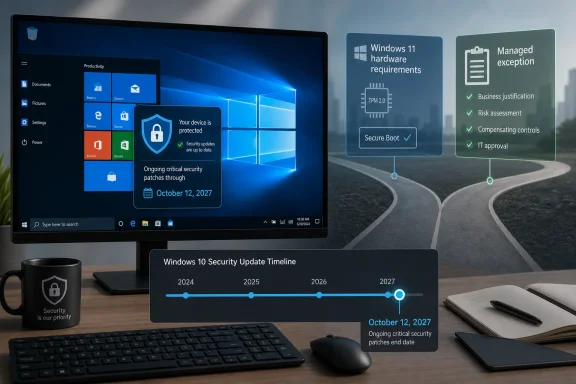 Microsoft Moves the Finish Line Without Reopening the Race
Windows 10’s mainstream story ended on October 14, 2025. That date had been circled for years: the point at which Microsoft would stop providing normal free updates, technical assistance, and security fixes to most consumer Windows 10 machines. The company’s preferred answer was clear enough: upgrade to Windows 11, buy a new Windows 11 PC, or enroll in Extended Security Updates if you needed more time.The consumer ESU program was originally framed as a one-year bridge. It carried Windows 10 users from October 2025 into October 2026, but the message was that this was a temporary reprieve, not a new lifecycle. Microsoft’s updated documentation now lists a second consumer ESU year, ending October 12, 2027.
That date matters because it changes the psychology of the Windows 10 transition. A one-year extension feels like a grace period. A two-year extension starts to look like an acknowledgment that the migration path is harder than Microsoft’s Windows 11 marketing implied.
Microsoft’s official posture remains disciplined. ESU is not a feature pipeline, not a performance update channel, and not an invitation to standardize on Windows 10 indefinitely. It exists to deliver critical and important security updates, as defined through Microsoft’s security-response process, to eligible enrolled devices.
Still, support policy is product strategy in another form. By extending consumer ESU, Microsoft has effectively conceded that a hard landing in 2026 would leave too many real-world PCs outside the patching ecosystem.
The Hardware Wall Was Always the Real Deadline
Windows 11 was not just another Windows upgrade. It arrived with a sharper hardware line than many users expected, including requirements around TPM 2.0, Secure Boot capability, supported processors, and modern platform security features. Microsoft argued that this baseline was necessary for a more secure Windows future.That argument was not frivolous. Windows security in the 2020s depends heavily on hardware-backed isolation, measured boot, virtualization-based security, and credential protection. Microsoft has spent years trying to move the PC ecosystem away from the anything-goes compatibility model that defined earlier Windows eras.
But the consequence was predictable. Large numbers of PCs that run Windows 10 acceptably, and in many cases comfortably, are blocked from official Windows 11 upgrades. Some are old enough that replacement is reasonable. Many others are not.
For consumers, the distinction between “unsupported processor” and “broken computer” is not meaningful. If the machine boots quickly, runs a browser, handles Office, joins Zoom, prints tax forms, and plays the occasional game, it still feels like a working PC. Microsoft may see an aging endpoint; the owner sees a sunk cost that has not yet failed.
That gap is the heart of the Windows 10 problem. Microsoft is trying to raise the floor of the Windows ecosystem, but the installed base was built during a period when Windows prided itself on stretching across nearly every x86 device that could plausibly run it. The new security model collides with the old compatibility promise.
ESU Is a Pressure Valve, Not a Product Strategy
Extended Security Updates are often misunderstood because they sit in the uncomfortable space between support and abandonment. They do not mean Windows 10 is “back.” They do not mean Microsoft is developing the operating system again. They mean the company is willing to keep issuing the most important security patches for enrolled machines while users finish the migration Microsoft still wants them to make.That distinction is important for WindowsForum readers because it affects what advice you give family members, clients, schools, nonprofits, and small businesses. A Windows 10 PC enrolled in ESU is safer than an unpatched Windows 10 PC. It is not equivalent to a supported Windows 11 system receiving the full weight of Microsoft’s current client-development work.
There will be no meaningful Windows 10 feature renaissance. The Start menu is not getting a rethink. The Settings app is not being modernized into parity with Windows 11. New platform investments around Copilot, NPUs, app frameworks, and security defaults will overwhelmingly follow Windows 11 and its successors.
But security updates are not a trivial consolation prize. For many ordinary users, the biggest danger after end of support is not missing a feature. It is running a widely deployed operating system that attackers know will no longer be patched for newly discovered vulnerabilities. ESU keeps those enrolled devices from becoming instant low-hanging fruit.
The second year buys time, and time is exactly what the Windows 10 base needed. It gives households a longer replacement cycle, gives refurbishers more room to plan, and gives small shops a less panicked runway to decide whether to force Windows 11 onto marginal hardware, replace machines, or move some workloads elsewhere.
The Free Upgrade Era Has Met the Subscription Era
Windows 10 launched in 2015 with one of Microsoft’s most aggressive consumer pitches: a free upgrade for many Windows 7 and Windows 8.1 users. It was the beginning of “Windows as a service,” the idea that Windows would become a continuously updated platform rather than a boxed product with a clean break every few years.A decade later, the ESU extension shows the limits of that model. Windows can be serviced continuously, but hardware cannot be made modern by policy memo. Firmware, CPUs, security chips, drivers, and OEM support lifecycles all create hard constraints that software updates can only paper over for so long.
The tension is sharper because Windows 10 was, for many users, the stable middle ground. It corrected much of Windows 8’s touch-first overreach while avoiding some of Windows 11’s early friction around taskbar behavior, default apps, hardware checks, and interface changes. Even users who are not ideologically attached to Windows 10 often see no urgent reason to move.
Microsoft has been pushing Windows 11 with a mixture of carrots and nudges. The carrots are better security defaults, newer interface conventions, ongoing support, and access to the company’s newest AI-era PC features. The nudges are end-of-support warnings, compatibility messaging, and the steady gravitational pull of new PCs shipping with Windows 11.
The ESU extension softens the nudge. It says, in effect, that Microsoft still wants the migration but does not want the security and public-relations fallout of forcing the issue too quickly. That is a pragmatic choice, and probably the correct one.
The Adoption Story Is Written Between the Lines
Microsoft has not said, “Windows 11 adoption was too slow, so we extended Windows 10 ESU.” It does not need to. Companies rarely narrate strategy in the blunt language outsiders prefer.The circumstantial case is strong. If the Windows 10 base had collapsed quickly after the 2025 deadline, there would be little reason to expand the consumer ESU runway. If Windows 11-compatible replacement cycles were moving fast enough, Microsoft could have held the line at October 2026 and treated the remaining users as laggards.
Instead, Microsoft changed the date. That is the relevant fact. The company looked at the installed base, the threat environment, the upgrade funnel, and the support burden, then decided another year of patching was better than a cliff.
There is also a regulatory and reputational dimension. Consumer groups in Europe had already pressured Microsoft over the environmental and financial implications of pushing users off otherwise usable PCs. E-waste arguments have real force here, particularly when the blocker is not day-to-day performance but a security baseline many consumers did not know existed when they bought their machines.
Microsoft’s updated stance does not erase those concerns. It merely reduces the urgency. A PC that gets another year of security updates is still eventually heading toward replacement, but that replacement can happen through normal failure, resale, donation, or budget planning rather than a forced deadline.
Security Teams Should Still Treat Windows 10 as a Managed Exception
For IT pros, the headline should not be “Windows 10 is fine until 2027.” The better reading is that Microsoft has made it easier to manage exceptions without pretending they are best practice.A properly enrolled Windows 10 system receiving ESU is preferable to an unmanaged straggler. But every Windows 10 endpoint after October 2025 should still be visible in inventory, assigned an owner, and tied to a migration or retirement plan. The second ESU year is not a reason to stop tracking risk; it is a reason to track it more calmly.
Organizations also need to distinguish consumer ESU from commercial arrangements. Business, education, and managed environments have their own licensing and deployment paths, and some Windows 10 LTSC or IoT variants follow different lifecycle rules. The consumer extension is most relevant to personal devices and lightly managed PCs, not to every Windows 10 machine in a corporate estate.
That distinction matters in hybrid environments where users blur the line between home and work. A personal Windows 10 laptop enrolled in consumer ESU may still be inappropriate for sensitive business workflows if it lacks device management, disk encryption policy, endpoint detection, or conditional access controls. Security posture is more than patch availability.
For small businesses without mature IT, the practical guidance is straightforward: enroll eligible PCs if they must remain on Windows 10, but do not treat enrollment as a retirement plan. Use the extra year to budget, replace the worst machines first, and avoid the classic small-office habit of waiting until a dead motherboard makes the decision for you.
The Local Repair Shop Just Got a Different Conversation
The extension will be felt most clearly outside enterprise IT: at kitchen tables, school offices, town libraries, repair counters, and small professional practices. These are the places where Windows 10’s end of support was not an abstract lifecycle milestone but a confusing prompt on a working machine.For a local technician, the advice can now be more nuanced. Last year, the conversation often sounded binary: upgrade, replace, or accept risk. Now there is a middle option that is easier to defend, especially for users whose needs are modest and whose hardware remains reliable.
That does not mean every old PC deserves another year. Machines with failing drives, weak batteries, unsupported peripherals, or painfully slow CPUs may still be poor candidates for extended life. ESU protects against security vulnerabilities; it does not make a 2014 bargain laptop pleasant to use in 2026.
But for a 2018 desktop with a solid-state drive, 16GB of RAM, and a processor just outside Microsoft’s official Windows 11 support list, the calculus changes. Replacing that machine purely because of the support deadline is harder to justify when security updates can continue into 2027.
This is where Microsoft’s environmental story and customer story overlap. Extending security support is not just a concession to stubborn users. It is a recognition that the PC ecosystem contains a lot of useful hardware that does not fit neatly into the Windows 11 box.
Windows 11 Still Wins by Default, Not by Debate
None of this changes the long-term direction. Windows 11 is where Microsoft is placing its client-side bets. New devices, new silicon, new security defaults, Copilot+ PC features, and future platform work will live there.The ESU extension may even help Windows 11 by reducing resentment. Forced migrations create backlash, especially when users believe the old system still works. A longer runway makes the transition feel less like coercion and more like planning.
But Microsoft still has a persuasion problem. Windows 11 is better than it was at launch, yet for many Windows 10 users the upgrade does not feel transformative. If the strongest reason to move is that the old thing will become unsafe, then extending safety weakens the emotional urgency of the move.
That is the paradox Microsoft has created for itself. The company is doing the responsible thing by keeping Windows 10 patched longer, but every month of safe Windows 10 usage gives users another month to ask why they need Windows 11 at all. Security policy can buy time; it cannot manufacture desire.
The answer may come less from Windows 11 upgrades than from PC replacement. As older systems fail and new systems arrive with Windows 11 preinstalled, the installed base will continue to shift. Microsoft’s extension suggests it is willing to let that process happen more gradually than the original consumer ESU schedule allowed.
The Second Reprieve Turns a Deadline Into a Budget Cycle
The most useful way to read Microsoft’s decision is not as mercy, panic, or marketing. It is lifecycle realism. Windows 10 is no longer the future of Windows, but it is still part of the present, and pretending otherwise would make the ecosystem less secure.For users and admins, the new date should change behavior without changing the destination.
- Windows 10’s normal support ended on October 14, 2025, but enrolled consumer PCs can now receive ESU security updates through October 12, 2027.
- The ESU extension provides critical and important security updates, not new Windows 10 features or a renewed mainstream support lifecycle.
- Eligible users who already joined the consumer ESU program should receive the extended coverage automatically under Microsoft’s updated policy language.
- PCs blocked from Windows 11 by TPM, CPU, or other hardware requirements now have more time, but they still need a replacement or migration plan.
- IT pros should treat post-2025 Windows 10 systems as managed exceptions, even when they are patched.
- The extension reduces immediate security risk, but it does not change Microsoft’s strategic focus on Windows 11 and newer hardware.
References
- Primary source: Wareham, MA News
Published: Tue, 07 Jul 2026 15:16:49 GMT
Loading…
theweektoday.com - Related coverage: tomshardware.com
Microsoft extends free Windows 10 security updates for a second year — program now ends on October 12, 2027 | Tom's Hardware
Just as the memory shortage pushes PC prices even higher.www.tomshardware.com - Related coverage: windowscentral.com
Microsoft quietly extends Windows 10's extra security updates program for free: Users can now stay on Windows 10 until October 2027 securely | Windows Central
Windows 10's ESU program has been quietly extended by an extra year, now ending on October 12, 2027 instead of October 2026.www.windowscentral.com - Related coverage: techspot.com
Windows 10's free security updates now extend to October 2027 | TechSpot
Microsoft's support page explaining how to continue receiving security updates on Windows 10 now states that the company will continue providing patches through October 12, 2027 –...www.techspot.com - Related coverage: techradar.com
Microsoft extends Windows 10 support out of the blue — consumers now get updates for another year to October 2027 | TechRadar
Windows 10 stays alive for another year with an extension for extended supportwww.techradar.com - Related coverage: gadgets360.com
Loading…
www.gadgets360.com
- Official source: microsoft.com
Loading…
www.microsoft.com - Related coverage: games.gg
Windows 10 Extended Security Updates Now Run Until October 2027 | GAMES.GG
Microsoft has extended Windows 10 Extended Security Updates to October 2027. Here's what it means for PC gamers still running the older OS.games.gg - Related coverage: arstechnica.com
Microsoft adds another year to Windows 10 extended update program - Ars Technica
About a quarter of PCs are still running Microsoft's previous operating system.arstechnica.com - Related coverage: thurrott.com
Microsoft Quietly Extends Windows 10 ESU For One More Year - Thurrott.com
Microsoft will extend the Windows 10 Extended Security Updates (ESU) for one more year, it appears.www.thurrott.com - Official source: techcommunity.microsoft.com
Windows 10's extended support ends in eight months | Microsoft Community Hub
Windows 10’s extended support ends in eight months, but users are still rejecting Windows 11, at least in Germany.Windows 10 support officially ended on... techcommunity.microsoft.com
- Related coverage: notebookcheck.net
Microsoft quietly extends Windows 10 security update support to 2027 - Notebookcheck News
Microsoft has extended Windows 10 Extended Security Updates through October 12, 2027, giving enrolled users an additional year of security patch coverage after mainstream support ends. The move offers a reprieve for millions of users delaying Windows 11 upgrades amid rising hardware costs. www.notebookcheck.net
- Related coverage: pcgamer.com
Windows 10 gets yet another year of life as Microsoft extends security updates into 2027 | PC Gamer
Vive la Windows 10!www.pcgamer.com - Related coverage: aha.org
</rdf:Alt> </dc:title> <dc:description> <rdf:Alt> <rdf:li xml:lang="x-default"/> </rdf:Alt> </dc:description> <dc:creator> <rdf:Seq> <rdf:li>Katheri
</rdf:Alt> </dc:description> <dc:creator> <rdf:Seq> <rdf:li>Katherine Higgins (SLALOM INC)www.aha.org
- Related coverage: euroconsumers.org
- Official source: support.microsoft.com
Loading…
support.microsoft.com - Official source: learn.microsoft.com
Windows 10 end of support and Microsoft 365 Apps - Microsoft 365 Apps | Microsoft Learn
Provides Office admins with information about the implications of Windows 10 end of support on Microsoft 365 Apps.learn.microsoft.com