

The first Extended Security Update (ESU) rollup for Windows 10, KB5068781, began shipping on November 11, 2025 — but the rollout has been marred by an unexpected installation failure that blocks the update on certain company‑licensed machines, leaving a subset of Windows 10 devices stuck between end‑of‑support and critical protection. Microsoft has acknowledged the problem, identified the narrow activation path that triggers it, and published an out‑of‑band repair for the consumer enrollment flow; however, enterprise‑licensed systems remain affected in some configurations and there is no universal workaround at time of writing.
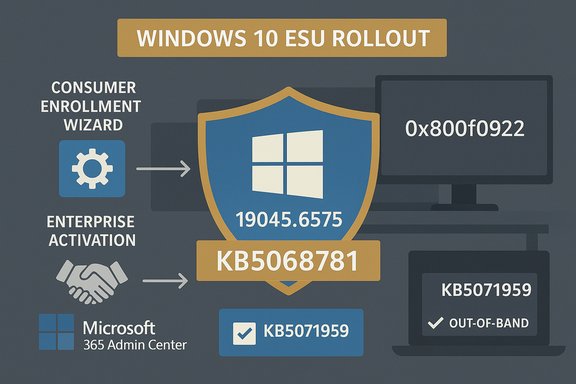
Windows 10 reached its mainstream support cutoff in mid‑October 2025. To give customers more time to migrate, Microsoft released a time‑boxed Extended Security Updates (ESU) program that delivers security‑only fixes for eligible Windows 10 22H2 devices through October 13, 2026. The first ESU cumulative (KB5068781) arrived on November 11, 2025 and advances the 22H2 build to 19045.6575 (and the LTSC variants to 19044.6575). The rollup includes high‑priority security fixes — by multiple counts, roughly sixty‑plus vulnerabilities — and at least one vulnerability that had seen active exploitation prior to the patch. At the same time, an enrollment and activation issue surfaced that prevented a subset of devices from receiving ESU entitlements or applying this first rollup cleanly. For consumer devices, Microsoft issued an out‑of‑band repair (KB5071959) that targets a broken ESU enrollment wizard so affected home PCs can complete enrollment and receive KB5068781. For certain devices tied to company / volume licensing activation paths, however, administrators reported KB5068781 appearing to install successfully but then rolling back with error 0x800f0922 after reboot — an outcome Microsoft is investigating.
Source: PCWorld The first Windows 10 ESU update is failing on these PCs with no workaround
 Background / Overview
Windows 10 reached its mainstream support cutoff in mid‑October 2025. To give customers more time to migrate, Microsoft released a time‑boxed Extended Security Updates (ESU) program that delivers security‑only fixes for eligible Windows 10 22H2 devices through October 13, 2026. The first ESU cumulative (KB5068781) arrived on November 11, 2025 and advances the 22H2 build to 19045.6575 (and the LTSC variants to 19044.6575). The rollup includes high‑priority security fixes — by multiple counts, roughly sixty‑plus vulnerabilities — and at least one vulnerability that had seen active exploitation prior to the patch. At the same time, an enrollment and activation issue surfaced that prevented a subset of devices from receiving ESU entitlements or applying this first rollup cleanly. For consumer devices, Microsoft issued an out‑of‑band repair (KB5071959) that targets a broken ESU enrollment wizard so affected home PCs can complete enrollment and receive KB5068781. For certain devices tied to company / volume licensing activation paths, however, administrators reported KB5068781 appearing to install successfully but then rolling back with error 0x800f0922 after reboot — an outcome Microsoft is investigating. What happened: chronology and symptoms
Timeline
- October 14, 2025: Windows 10 mainstream support ends. Microsoft publishes consumer and enterprise ESU options.
- November 11, 2025: Microsoft publishes KB5068781 (first ESU rollup) and, in parallel, an out‑of‑band repair KB5071959 targeted at consumer enrollment failures.
- Early reports: Some corporate‑licensed or organization‑tied devices show KB5068781 installing but failing to apply after restart, rolling back with 0x800f0922; consumer devices that could not enroll were offered KB5071959 to fix the enrollment wizard.
User‑facing symptoms
Affected devices have shown the following behaviors:- The update appears to download and begin installation, but after the required reboot the system reports that the update failed to apply and Windows rolls back to the prior build.
- Failure codes observed include 0x800f0922 — a Windows Update/SCSI/NET framework style error code often associated with installation/apply failures and servicing stack issues in cumulative installs. Microsoft has said the bug is linked to activation of Windows subscriptions via the Microsoft 365 Admin Center for company license paths, narrowing the root cause to enterprise entitlement activation rather than a broad installer corruption.
Technical breakdown: why some installs fail and others don't
Consumer vs. company licensing paths
Microsoft implemented two different ESU entitlements and activation flows:- Consumer ESU: Enrollment is handled by an in‑OS wizard (Settings → Windows Update → Enroll now) that binds the entitlement to a Microsoft Account or alternate consumer purchase paths. Early enrollment failures for consumer devices were addressed by an out‑of‑band cumulative (KB5071959) that fixes the wizard and related update sequencing issues.
- Enterprise / company ESU: Activation and entitlements are typically managed through Microsoft 365 Admin Center, volume licensing channels, or key management services. Reports indicate the KB5068781 application path is failing only on devices that rely on that subscription activation path — a scenario distinct from consumer enrollment. Microsoft has acknowledged this and is investigating the enterprise activation handshake as the likely trigger.
Common installation failure contributors
Even when the root cause is licensing activation, cumulative update installs can be sensitive to a handful of classic problems that amplify failures:- Outdated Servicing Stack Update (SSU) or missing prerequisite LCUs. Installing SSUs in the correct order is essential for cumulative transitive updates to apply successfully. Microsoft bundles or sequences SSUs for this reason.
- Device classification and residual account artifacts: machines that were once joined to Azure AD / Entra or tied to a work/school account can be misclassified and routed to the wrong ESU path. That mis‑routing can prevent entitlement activation or lead to activation failures.
- Disabled Windows services required for activation/sign‑in (wlidsvc, VaultSvc, LicenseManager). These are common culprits for enrollment or activation flows breaking.
Who is affected (scope and exclusions)
- Affected: Devices that use company / organizational ESU licensing activated via Microsoft 365 Admin Center and that attempt to install KB5068781 are the primary failure cohort. Administrators have posted that the update may download and report success but then fail to apply, with post‑reboot rollback. Microsoft has confirmed it is investigating this narrow activation/entitlement path.
- Not affected (broadly): Most consumer Windows 10 PCs that enroll via the in‑OS Consumer ESU wizard and those already properly enrolled typically can install KB5068781. Microsoft published an out‑of‑band fix (KB5071959) for consumer enrollment wizard failures, which restores enrollment and allows the rollup to be delivered. If your device is a home PC and was able to enroll, you should be able to get KB5068781 normally.
- Caveats: Devices misidentified as enterprise endpoints (residual Azure AD ties, domain‑joined artifacts) may still be blocked from the consumer enrollment path; conversely, enterprise systems with unusual licensing or activation states may experience unique failure modes not covered by public guidance. Microsoft’s targeted OOB fix does not change entitlement rules or volume licensing requirements.
Confirmed Microsoft guidance and fixes
Microsoft’s official KB pages state:- KB5068781: the first ESU cumulative for Windows 10, published November 11, 2025, advancing Windows 10 22H2 to OS Build 19045.6575 and resolving several issues including an erroneous “end of support” display on some devices. This package is intended for enrolled systems and is distributed automatically via Windows Update.
- KB5071959: an out‑of‑band cumulative released the same day for consumer devices that could not complete ESU enrollment; it explicitly “addresses an issue in the Windows 10 Consumer Extended Security Update (ESU) enrollment process, where the enrollment wizard may fail during enrollment.” Microsoft recommends installing KB5071959 (or obtaining it from the Microsoft Update Catalog) and rebooting before retrying enrollment.
Workarounds and remediation steps (what administrators and users should try)
Microsoft’s public guidance and community‑tested sequences converge on practical steps. These apply depending on whether you are a consumer device owner or an IT admin managing enterprise devices.For consumer devices that can’t enroll (recommended sequence)
- Check Windows version: run winver and confirm Windows 10 Version 22H2 (OS build in the 19044/19045 family).
- Check Windows Update for KB5071959 and install it if offered. If Windows Update doesn’t show it, download the package from the Microsoft Update Catalog and install the SSU first (if separate), then the OOB cumulative. Reboot.
- After reboot, open Settings → Windows Update → Enroll now and complete the consumer enrollment wizard (MSA sign‑in, rewards/purchase path, or sync option). Once enrolled, KB5068781 should be offered automatically.
For administrators and company‑licensed devices (troubleshooting guidance)
- Verify activation path: confirm whether the device is using enterprise/volume licensing or a consumer enrollment. Devices that were at some point joined to Azure AD or had work/school accounts may need cleanup of those associations before attempting enrollment or entitlement activation.
- Check servicing stack and prerequisites: ensure latest Servicing Stack Updates (SSUs) and prerequisite cumulative updates are applied. When using manual installers, install SSUs before LCUs as documented.
- Confirm required services are enabled: ensure the Microsoft Account Sign‑in Assistant (wlidsvc), Credential Manager (VaultSvc), and License Manager services are not disabled. Community tests show enabling these services can unblock enrollment/activation flows.
- Review WindowsUpdate log and CBS logs after failure: gather logs (SetupAPI, CBS) to correlate the rollback timing to entitlement activation errors. Error 0x800f0922 indicates an apply failure that can be caused by activation handshakes, servicing stack mismatches, or file locking. Use these logs when you escalate to Microsoft support.
- If the update fails but cannot be applied in place, consider offline patching: get the correct KB packages from the Microsoft Update Catalog and test on a representative machine, ensuring SSU sequencing is honored. For large fleets, consider staging via your update management tooling (WSUS, ConfigMgr) and validate with a pilot group.
Important caution
Do not attempt registry hacks or undocumented scripts unless you fully understand the implications and have tested in a sandbox. Some community “feature‑flag” overrides circulated early for consumer enrollment re‑evaluation; these can be effective, but they carry risk and should be used only with backups and clear rollback plans.Microsoft’s current stance and timeline
Microsoft has acknowledged the issue and narrowed the problem to the entitlement/activation handshake affecting devices that rely on subscription activation through the Microsoft 365 Admin Center. The company is investigating and has not yet published a definitive fix for enterprise‑licensed activation failures as of the latest updates. For consumer enrollment failures it shipped KB5071959 as an out‑of‑band repair and recommends installing that package prior to attempting enrollment. Microsoft’s official KB pages remain the authoritative reference for the exact file versions, build numbers, and installation notes. Multiple independent outlets (BleepingComputer, PCWorld, TechRadar, Tom’s Hardware) reached the same conclusions in their reporting: consumer enrollment failures are resolved by KB5071959, but administrators managing enterprise licensing may still encounter activation‑path failures and must await Microsoft's enterprise fix or follow remediation and logging steps.Critical analysis — strengths, shortcomings, and risks
Strengths
- Rapid response: Microsoft shipped an out‑of‑band cumulative (KB5071959) the same week the ESU program and first rollup appeared — a pragmatic move that reduced exposure for consumer devices that were blocked from enrolling. That quick, targeted remediation is the right operational choice when the delivery gate is broken.
- Targeted delivery: The out‑of‑band fix was scoped to consumer devices not yet enrolled, reducing blast radius for already enrolled or enterprise systems. Delivering SSUs and LCUs in paired sequences improved installation reliability.
- Clear messaging for consumers: Microsoft’s KB pages describe the OOB patch and the upgrade sequencing that most consumers will need to follow, making remediation accessible for most home users.
Shortcomings and risks
- Fragility of entitlement gating: The incident highlights a structural risk — a small UI flow (the enrollment wizard or the activation handshake) can become an operational single point of failure that prevents an entire class of devices from receiving critical security updates. For time‑boxed ESU programs this fragility is especially consequential.
- Enterprise exposure window: Company‑licensed devices failing to apply KB5068781 remain exposed to vulnerabilities patched in the first ESU rollup. Administrators who cannot apply the rollup due to activation errors must rely on compensating controls (segmentation, host hardening) until Microsoft issues an enterprise fix.
- Opaque failure modes: The reported behavior — “install appears to succeed, reboot, then rollback” — is alarming because it can leave admins uncertain whether an update applied correctly. Error codes like 0x800f0922 are generic and require log correlation (CBS/SetupAPI) to diagnose, slowing remediation.
- Regional and account complexity: The phased rollout and EEA‑specific variations increased confusion, with some users seeing “temporarily unavailable in your region” or varying enrollment options. That complexity is a real operational headache for support teams.
Flagged / unverifiable claims
- Exact counts of “how many CVEs” KB5068781 fixes vary by outlet and counting methodology. Some outlets reported 63; other trackers list different numbers depending on whether third‑party components and browser CVEs are included. For precise vulnerability tallies consult Microsoft’s Security Update Guide. Treat any single numeric tally from a secondary outlet as approximate until cross‑checked.
Practical recommendations (prioritized)
- For home/consumer PCs that failed to enroll: check Windows Update for KB5071959, install it, reboot, then retry the consumer enrollment wizard (Settings → Windows Update → Enroll now). This is the simplest, highest‑impact action for most affected users.
- For enterprise admins with company‑licensed devices that fail with 0x800f0922: collect logs (CBS, SetupAPI, WindowsUpdate) on a failing machine, confirm SSU/L UCU sequencing, verify the device’s entitlement/activation state in Microsoft 365 Admin Center, and open a support case with Microsoft if the activation handshake is involved. Use your management tooling to pilot offline installers and SSU sequencing.
- If you cannot immediately fix apply the ESU rollup on enterprise devices, implement compensating mitigations: restrict external exposure, harden endpoints, and increase monitoring for exploitation indicators tied to the CVEs addressed in KB5068781.
- Use the ESU window to plan migrations: ESU is a one‑year bridge for consumer devices (longer options exist for enterprise through multi‑year ESU purchases). Treat ESU as short‑term risk management, and prioritize upgrade paths to Windows 11 or replacement hardware where feasible.
Conclusion
KB5068781 is the first critical ESU rollup for Windows 10 and brings important security fixes to systems that must remain on 22H2. Microsoft acted quickly to repair consumer enrollment breakage with KB5071959, and most home users who were blocked can now enroll and receive the rollup. However, a distinct activation problem affecting company‑licensed or enterprise entitlement pathways has caused KB5068781 to apply then roll back on some corporate systems, with installs failing with 0x800f0922. Microsoft has confirmed it is investigating that enterprise activation path; meanwhile, administrators should gather logs, ensure SSU sequencing, verify device classification, and engage Microsoft support if necessary. The incident underscores that even small entitlement gates can create outsized security risks when they interrupt the delivery of critical patches — and it reinforces the need for careful rollout, logging, and a clear migration plan away from unsupported OS versions.Source: PCWorld The first Windows 10 ESU update is failing on these PCs with no workaround
