

Microsoft has pushed Windows 10 Insider Preview Build 18912 (20H1) to the Fast ring, a modest mid-cycle flight that centers on a small but thoughtful accessibility improvement for Narrator while delivering a broad set of bug fixes and a handful of known issues Insiders should be aware of.
Microsoft’s Windows Insider Program continues to be the primary pipeline for early testing of feature updates destined for Windows 10. The 20H1 development branch (internal versioning later referenced as Version 2004) is the first feature update scheduled for release in the first half of the year, and Fast-ring builds such as Build 18912 reflect active engineering work in the RS_PRERELEASE branch. This means Fast-ring builds often contain experimental changes, fixes and regressions that will be refined before final release. Insider flights are also where Microsoft continues to iterate on accessibility, input method editors (IMEs), and system reliability. Community feedback — from official forums to independent outlets and user threads — regularly influences what gets fixed, delayed or expanded as the branch matures.
At the same time, the documented known issues — especially around anti-cheat, drivers and security toggles — highlight the perennial tension of shipping platform updates in a hardware-diverse ecosystem. Microsoft’s cross-vendor collaboration (with anti-cheat vendors, Realtek and OEMs) is necessary but not instantaneous; Insiders will continue to see intermittent pain points until those partner fixes propagate broadly.
For Insiders and IT teams, the sensible path remains the same: test on non-production hardware, keep device drivers and games patched, verify security settings after updating, and use Feedback Hub to file clear, reproducible reports when you encounter problems. The Fast ring is where Microsoft polishes the platform; for anyone who depends on absolute stability, patience until the Slow or Release Preview rings is still the safest option.
Source: BetaNews Microsoft releases Windows 10 20H1 Build 18912 to the Fast ring
 Background
Microsoft’s Windows Insider Program continues to be the primary pipeline for early testing of feature updates destined for Windows 10. The 20H1 development branch (internal versioning later referenced as Version 2004) is the first feature update scheduled for release in the first half of the year, and Fast-ring builds such as Build 18912 reflect active engineering work in the RS_PRERELEASE branch. This means Fast-ring builds often contain experimental changes, fixes and regressions that will be refined before final release. Insider flights are also where Microsoft continues to iterate on accessibility, input method editors (IMEs), and system reliability. Community feedback — from official forums to independent outlets and user threads — regularly influences what gets fixed, delayed or expanded as the branch matures.What’s new in Build 18912
Narrator: “Click me” links get smarter
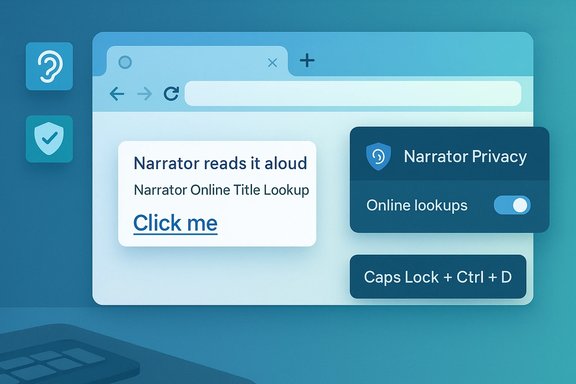
The clearest single user-facing feature in this flight is an enhancement to Narrator that addresses poor or ambiguous link text like “Click me.” When the Narrator cursor is on a hyperlink, pressing Caps Lock + Ctrl + D causes Narrator to take the hyperlink’s URL, query an online service for the page title, and then read that title aloud. This gives screen reader users a much better understanding of where a link actually goes without tabbing through multiple times. Microsoft also provides a privacy control in Narrator settings to disable all Narrator online-service usage if users prefer not to have URLs sent for title lookup. This is a pragmatic improvement: instead of trying to change how authors write link text across the web, Windows now gives assistive technology the ability to infer more useful metadata on demand. For many users with visual impairments, that shift reduces friction and improves navigation speed.Other functional fixes included in the flight
Build 18912 bundles a set of reliability and UI fixes across system components. Highlights include:- Fix for unexpected green screens that referenced win32k.sys in the prior flight.
- Fix for a frequent DWM crash that would briefly black out the screen before content returned.
- Fixes for Focus Assist erroneously enabling in full-screen scenarios after minimizing apps.
- Corrections to emoji/TTS behavior so certain emoji are now properly read by text-to-speech.
- A collection of fixes addressing East Asian IME candidate window issues, Pinyin/Wubi number-key selection problems and tooltip font-size inconsistencies.
Known issues and cautions
Microsoft’s blog post for Build 18912 calls out a set of known issues that Insiders may encounter after installing the build:- Home edition reporting: some devices may not see “update installed” on update history; download progress percent may not change.
- Anti-cheat compatibility: older anti-cheat drivers used by some games can cause crashes after updating to recent Insider builds. Microsoft is coordinating with vendors to mitigate this. Insiders should ensure their games and anti-cheat components are up to date before upgrading.
- Some Realtek SD card readers may stop functioning properly.
- Noticeable lag when dragging the emoji and dictation panels.
- Tamper Protection in Windows Security may be turned off after updating; it can be re-enabled manually.
- A Bopomofo IME issue where character width unexpectedly flips from Half width to Full width is under investigation.
Why this build matters — Accessibility, privacy and practical trade-offs
Accessibility gains that are disproportionate to size
At first glance, the Narrator “Click me” link solution is a small change. In practice, it is an example of targeted accessibility engineering that can greatly improve the web experience for screen reader users.- Reduced friction: The feature removes the need to tab unpredictably through repetitive or meaningless link text to figure out destination context.
- Smarter fallback: When web content lacks clear link labeling, Narrator can now supplement missing metadata by using the linked page’s title.
- Control for privacy: Microsoft explicitly exposes a setting to disable online title lookups for privacy-conscious users.
Privacy trade-offs
The Narrator enhancement depends on sending a hyperlink URL to an “online service” to retrieve a page title. Microsoft documents that the lookup is optional and can be turned off in Narrator Settings, but the default behavior raises a few considerations:- Telemetry and URL exposure: Even when the service only returns a title, URLs can contain sensitive query parameters or identifiers. Users who browse private or corporate pages should consider disabling online lookups until they understand how the service treats URLs.
- Control and transparency: Microsoft’s choice to expose a single on/off control is reasonable, but power users and organizations may prefer more explicit guidance about retention policies for URL lookups — who stores those requests, for how long, and for what purpose. Where possible, enterprise deployments should evaluate Narrator settings via group policy or deployment tooling before broad rollouts.
Reliability and compatibility risks for Fast-ring testers
Fast-ring Insiders are on the leading edge — that’s the point — but it carries measurable risks:- Anti-cheat and gaming compatibility: Several Insiders have experienced crashes after installing recent Insider builds because older anti-cheat software packages (notably BattlEye in earlier cycles) were incompatible with pre-release kernel or driver changes. Microsoft has previously placed compatibility holds for systems with certain anti-cheat versions; with 20H1 this remains an active area of coordination. Gamers and streamers should avoid Fast-ring builds unless they maintain current game patches and anti-cheat components.
- Third-party drivers and peripherals: The Realtek SD card reader regressions and various device-specific quirks show that pre-release kernel or driver interactions can generate functional regressions. Always check device driver updates from OEMs and avoid updating critical machines on Fast builds.
- Security settings toggling: The fact that Tamper Protection may be toggled off during update suggests that some system-level security settings can be nudged by build changes. Users should verify Windows Security post-update and re-enable protections if required.
Practical guidance for Insiders and IT pros
Below are pragmatic, ordered steps and recommendations for anyone considering Build 18912 on a test machine.- Back up your data and ensure you have a recovery plan (system image, restore point or full backup). Fast-ring builds are pre-release and can introduce difficult-to-recover failures.
- Check your game/anti-cheat software versions and update them before upgrading. If you rely on specific titles, consult developers’ advisories and consider postponing the update if compatibility patches are pending.
- If you use accessibility tools in production scenarios, test Narrator’s new online lookup with representative web content and decide whether to keep the online lookup enabled. Turn it off in Narrator Settings if you have privacy concerns.
- After installing, verify Windows Security and re-enable Tamper Protection if it was disabled by the update: open Windows Security > Virus & threat protection > Manage settings, and toggle Tamper Protection on. (If policy-managed in enterprise, reconcile via the endpoint management console.
- If you rely on Realtek SD readers or specific peripheral drivers, confirm OEM driver updates are available; if not, consider rolling back or skipping the build until a driver fix is published.
Community reaction and telemetry signals
Third-party coverage and forum threads for builds around 18912 show a typical Fast-ring mix: incremental fixes welcomed by testers, but a smattering of install and device-specific regressions reported in Feedback Hub, community threads and on Reddit.- Windows Central’s coverage of the 20H1 branch highlights continuing feature work — for example, File Explorer, Cortana, and Windows Ink updates in adjacent builds — and frames Build 18912 as an incremental reliability-focused flight rather than a major feature drop.
- BetaNews summarized the release with an emphasis on the Narrator improvement and reproduced Microsoft’s public change log for convenience; reporting echoed the official known issues and advisories.
- Microsoft’s own community threads include reports of update failures and GSODs tied to drivers such as aksfridge.sys, reinforcing that some installs may require troubleshooting or rollbacks. These community signals are consistent with the pace of Fast-ring development.
Technical and editorial analysis: strengths and risks
Strengths
- Targeted accessibility improvements: The Narrator link-title lookup is a clear, low-friction user experience win. It demonstrates Microsoft’s approach of solving accessibility gaps with pragmatic, backend-assisted features.
- Broad reliability sweep: The build addresses a range of high-impact reliability issues (win32k.sys GSODs, DWM crashes, Settings app crashes) which improves the platform’s baseline stability for downstream releases.
- Transparency on known issues: Microsoft publishes straightforward advisories for issues such as anti-cheat incompatibility and driver regressions, and notes remediation work with partners. This kind of vendor transparency helps IT pros and Insiders make informed decisions.
Risks and potential downsides
- Privacy posture of the online lookup: Even though Narrator offers an opt-out, the default reliance on an online service to resolve link titles could be controversial for privacy-sensitive users and enterprise environments. More granular controls or an on-premise lookup option would better address corporate privacy needs.
- Peripheral and driver fragility: The Realtek SD card reader issue and other driver-related regressions show the fragility of updating lower-level components in active development branches. Enterprises and power users must be cautious and validate driver compatibility before wide deployment.
- Security toggles during update: The reported temporary toggling of Tamper Protection flags the need for post-update verification of security posture. Any change that affects system defenses, even temporarily, requires clear documentation and a robust rollback plan.
Verdict: who should take Build 18912 and who should wait
- Take this build if:
- You are a Windows Insider who enjoys testing early accessibility improvements and reliability fixes.
- You have non-critical test hardware and are prepared to troubleshoot or roll back if necessary.
- You are a developer or IT pro validating compatibility across drivers, games or enterprise workloads.
- Wait / skip this build if:
- You rely on your PC for work or streaming where uptime and compatibility are essential.
- You play games that use older anti-cheat stacks or you depend on peripherals with limited driver update availability.
- You manage enterprise endpoints without a staged rollout strategy; stick to Release Preview or Slow ring until 20H1 reaches broader validation.
How Microsoft’s approach here signals the larger 20H1 strategy
Build 18912 reflects the iterative, accessibility-first posture Microsoft has been reinforcing across Windows engineering: small, high-value accessibility enhancements (like the Narrator link-title lookup) combined with a steady cadence of reliability fixes. That combo indicates the company is focused on making the platform more usable for everyone while cleaning up long-standing reliability and IME issues ahead of a major feature release.At the same time, the documented known issues — especially around anti-cheat, drivers and security toggles — highlight the perennial tension of shipping platform updates in a hardware-diverse ecosystem. Microsoft’s cross-vendor collaboration (with anti-cheat vendors, Realtek and OEMs) is necessary but not instantaneous; Insiders will continue to see intermittent pain points until those partner fixes propagate broadly.
Final takeaways
Build 18912 is a tidy, serviceable Insider flight: it doesn’t introduce headline-grabbing consumer features, but it brings an accessibility improvement that matters to screen reader users and a package of reliability fixes that reduce friction for power testers. The trade-offs — small privacy implications for the Narrator lookup, and a handful of device and driver compatibility issues — are manageable when approached carefully.For Insiders and IT teams, the sensible path remains the same: test on non-production hardware, keep device drivers and games patched, verify security settings after updating, and use Feedback Hub to file clear, reproducible reports when you encounter problems. The Fast ring is where Microsoft polishes the platform; for anyone who depends on absolute stability, patience until the Slow or Release Preview rings is still the safest option.
Source: BetaNews Microsoft releases Windows 10 20H1 Build 18912 to the Fast ring
