

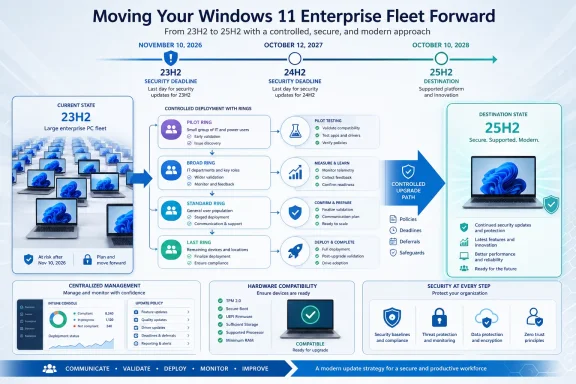
Windows 11 Enterprise 23H2 fleets should plan on Windows 11 25H2 as the default destination, not 24H2, unless a device group needs an earlier, controlled landing point. Microsoft’s support clock makes the choice clear: 23H2 reaches end of servicing on November 10, 2026; 24H2 expires on October 12, 2027; and 25H2 remains serviced until October 10, 2028.
That makes the next few months less about avoiding one deadline than choosing whether the organization wants to run another feature-update project roughly a year after this one. For most established Enterprise, Education, Enterprise multi-session, and IoT Enterprise environments, moving directly from 23H2 to 25H2 buys the longer runway with no reason to treat 26H1 as a universal alternative.
Microsoft’s lifecycle documentation places Windows 11 Enterprise and Education version 23H2 at end of servicing on November 10, 2026. The same date applies to Enterprise multi-session and IoT Enterprise under the applicable Windows 11 servicing schedule.
After that date, a 23H2 Enterprise device should no longer be treated as a normally supported, security-maintained endpoint. The immediate risk is not that the PC stops booting on November 11; it is that the monthly security and quality update stream ends, leaving unresolved security issues unpatched while the rest of the organization moves ahead.
That distinction matters because many IT teams have already lived through the consumer 23H2 cutoff. Windows 11 Home and Pro version 23H2 reached end of servicing on November 11, 2025, but Enterprise and Education were granted the longer lifecycle. WindowsForum’s earlier coverage of the consumer deadline correctly framed the operational danger of remaining on an unsupported build. Enterprise administrators now face the same basic exposure, with a larger decision: which release should replace it?
A practical migration plan should treat November 10 as the completion deadline, not the date to begin broad deployment. The final quarter before a servicing cutoff is the wrong time to discover that an application, driver, firmware configuration, or management policy blocks an upgrade.
The strongest argument for 24H2 is not that it is newer than 23H2; 25H2 is newer still. It is that a business may already have a tested 24H2 deployment package, a completed application-validation cycle, or a constrained operational window that makes a staged 23H2-to-24H2 move reasonable.
That can be a defensible decision for a particular ring. It is less convincing as the long-term standard for an entire estate when 25H2 is available and adds almost a full extra year before another end-of-servicing event.
Microsoft has made 25H2 available through Windows Server Update Services, Windows Update client policies, and the Microsoft 365 admin center. For devices already on a current 24H2 cumulative update, the 25H2 transition uses an enablement package. That makes a two-stage approach potentially useful for exceptional devices, but it should not become an accidental fleet-wide architecture without a documented reason.
Microsoft describes 26H1 as a hardware-specialized release designed for select new devices and silicon platforms. It is preinstalled on selected new hardware, is not offered through Windows Update, and is not an in-place update path for existing 23H2 devices. Microsoft explicitly identifies 24H2 and 25H2 as the recommended enterprise deployment releases for existing environments.
In other words, 26H1 is a purchasing and device-evaluation consideration, not the answer to a 23H2 migration program. An organization receiving new machines with 26H1 can evaluate them as a distinct hardware cohort while continuing its normal 23H2 migration toward 24H2 or, preferably, 25H2.
That separation prevents a familiar fleet-management failure: allowing a special-case device release to reset the deployment plan for every existing PC.
The working sequence should be straightforward:
Hardware readiness must be assessed as an operational state, not a checkbox inherited from the original Windows 11 deployment. A machine may have qualified for Windows 11 and still present upgrade friction because its firmware, drivers, endpoint tooling, or attached equipment is not ready for the target release. The same principle applies to applications: a successful installation is not proof that business workflows, authentication dependencies, printing, scanning, VPN access, or specialized integrations remain usable.
Organizations using Windows Autopatch should apply the same discipline. Automated servicing can reduce manual effort, but it does not replace ownership of exclusions, ring definitions, application testing, or executive decisions about devices that cannot move on schedule. A device that is excluded from automation is still part of the 23H2 risk register.
WSUS environments need equivalent clarity. Microsoft lists 25H2 as available through WSUS, so the planning question is not whether the release can enter the channel; it is whether approval, targeting, client policy, and reporting are aligned before large-scale deployment begins. A feature update approved too broadly can create avoidable disruption, while an update approved too narrowly can leave an organization discovering its true 23H2 population in October.
A useful operating timeline is:
The weak version of rollback planning is telling users to contact the help desk if something goes wrong. The useful version identifies the deployment group, the target release, the test criteria, the escalation owner, and the condition for resuming rollout.
Administrators should also resist the temptation to convert every exception into a permanent exemption. A hold is valuable when it creates time to solve a documented compatibility problem. It becomes technical debt when the organization loses track of why the device remained on 23H2 and who accepted the security consequence after November 10.
Can an existing 23H2 estate upgrade to 26H1? No. Microsoft says 26H1 is not offered through Windows Update and is not an in-place update path for existing devices.
Does the 23H2 deadline apply only to Enterprise? No. Microsoft lists November 10, 2026 for Enterprise, Education, Enterprise multi-session, and IoT Enterprise version 23H2.
Is moving to 24H2 enough? It restores the device to a supported enterprise release, but it leaves the fleet facing October 12, 2027. A direct move to 25H2 ordinarily reduces the likelihood of repeating the migration work soon afterward.
The important date is November 10, 2026, but the more important decision is the release standard chosen before that date arrives. A 23H2 fleet that completes a controlled move to 25H2 gains servicing through October 10, 2028; a fleet that defaults to 24H2 may find itself reopening the same project barely a year later.
That makes the next few months less about avoiding one deadline than choosing whether the organization wants to run another feature-update project roughly a year after this one. For most established Enterprise, Education, Enterprise multi-session, and IoT Enterprise environments, moving directly from 23H2 to 25H2 buys the longer runway with no reason to treat 26H1 as a universal alternative.
 November 10, 2026 is the hard security boundary
Microsoft’s lifecycle documentation places Windows 11 Enterprise and Education version 23H2 at end of servicing on November 10, 2026. The same date applies to Enterprise multi-session and IoT Enterprise under the applicable Windows 11 servicing schedule.After that date, a 23H2 Enterprise device should no longer be treated as a normally supported, security-maintained endpoint. The immediate risk is not that the PC stops booting on November 11; it is that the monthly security and quality update stream ends, leaving unresolved security issues unpatched while the rest of the organization moves ahead.
That distinction matters because many IT teams have already lived through the consumer 23H2 cutoff. Windows 11 Home and Pro version 23H2 reached end of servicing on November 11, 2025, but Enterprise and Education were granted the longer lifecycle. WindowsForum’s earlier coverage of the consumer deadline correctly framed the operational danger of remaining on an unsupported build. Enterprise administrators now face the same basic exposure, with a larger decision: which release should replace it?
A practical migration plan should treat November 10 as the completion deadline, not the date to begin broad deployment. The final quarter before a servicing cutoff is the wrong time to discover that an application, driver, firmware configuration, or management policy blocks an upgrade.
25H2 is usually the strategic target; 24H2 is the tactical one
The lifecycle difference is substantial enough to drive the default decision. Windows 11 Enterprise version 24H2 is supported through October 12, 2027. Version 25H2 extends that to October 10, 2028. Both are Microsoft-recommended enterprise deployment releases for existing environments, but 25H2 gives a 23H2 fleet nearly two years of remaining servicing after the migration deadline.| Fleet condition | Recommended destination | Why |
|---|---|---|
| A broadly compatible 23H2 fleet with time to validate the current release | Windows 11 25H2 | It provides the longest support runway available to existing deployments. |
| A group already approved for 24H2 or constrained by a near-term project | Windows 11 24H2 | It is a supported, recommended enterprise release and can reduce immediate change. |
| Devices already current on Windows 11 24H2 | Windows 11 25H2 | Microsoft says these devices use an enablement package for the 25H2 move. |
| Select newly purchased hardware specifically supplied with 26H1 | Windows 11 26H1 selectively | It is a specialized, preinstalled release for select new devices, not a fleet destination. |
That can be a defensible decision for a particular ring. It is less convincing as the long-term standard for an entire estate when 25H2 is available and adds almost a full extra year before another end-of-servicing event.
Microsoft has made 25H2 available through Windows Server Update Services, Windows Update client policies, and the Microsoft 365 admin center. For devices already on a current 24H2 cumulative update, the 25H2 transition uses an enablement package. That makes a two-stage approach potentially useful for exceptional devices, but it should not become an accidental fleet-wide architecture without a documented reason.
Do not mistake 26H1 for the next enterprise feature update
Windows 11 version 26H1 launched on February 10, 2026, and its later lifecycle date may tempt planners looking only at a spreadsheet. That would be the wrong reading of Microsoft’s guidance.Microsoft describes 26H1 as a hardware-specialized release designed for select new devices and silicon platforms. It is preinstalled on selected new hardware, is not offered through Windows Update, and is not an in-place update path for existing 23H2 devices. Microsoft explicitly identifies 24H2 and 25H2 as the recommended enterprise deployment releases for existing environments.
In other words, 26H1 is a purchasing and device-evaluation consideration, not the answer to a 23H2 migration program. An organization receiving new machines with 26H1 can evaluate them as a distinct hardware cohort while continuing its normal 23H2 migration toward 24H2 or, preferably, 25H2.
That separation prevents a familiar fleet-management failure: allowing a special-case device release to reset the deployment plan for every existing PC.
Start with a readiness inventory, then choose rings that expose real risk
The first task is to identify every device still on 23H2 and separate the estate by management method, hardware class, business role, and application profile. A fleet report that merely counts “Windows 11” devices is not enough; version 23H2 must be visible as its own compliance population until migration is complete.The working sequence should be straightforward:
- Inventory all 23H2 Enterprise, Education, Enterprise multi-session, and IoT Enterprise devices, including devices that rarely connect to the corporate network.
- Select 25H2 as the default target and document every exception that will first move to 24H2, including the named application, driver, device class, or project dependency behind the exception.
- Build a pilot ring that includes ordinary knowledge-worker devices as well as the unusual but business-critical combinations: specialized peripherals, line-of-business applications, remote-access configurations, and machines with nonstandard driver stacks.
- Validate the upgrade path, post-upgrade sign-in, application launch, device peripherals, connectivity, update behavior, and the organization’s ability to recover from a failed deployment before expanding the ring.
- Move through broader production rings while maintaining a distinct hold group for devices with confirmed issues, a named owner, and a planned disposition.
Hardware readiness must be assessed as an operational state, not a checkbox inherited from the original Windows 11 deployment. A machine may have qualified for Windows 11 and still present upgrade friction because its firmware, drivers, endpoint tooling, or attached equipment is not ready for the target release. The same principle applies to applications: a successful installation is not proof that business workflows, authentication dependencies, printing, scanning, VPN access, or specialized integrations remain usable.
Management tooling needs an end date, not an open-ended campaign
For Intune-managed fleets, feature-update targeting and compliance reporting should be configured around a specific target release and a specific completion date. Administrators should be able to answer three basic questions at any point: how many devices remain on 23H2, how many are actively moving, and why the remainder is blocked.Organizations using Windows Autopatch should apply the same discipline. Automated servicing can reduce manual effort, but it does not replace ownership of exclusions, ring definitions, application testing, or executive decisions about devices that cannot move on schedule. A device that is excluded from automation is still part of the 23H2 risk register.
WSUS environments need equivalent clarity. Microsoft lists 25H2 as available through WSUS, so the planning question is not whether the release can enter the channel; it is whether approval, targeting, client policy, and reporting are aligned before large-scale deployment begins. A feature update approved too broadly can create avoidable disruption, while an update approved too narrowly can leave an organization discovering its true 23H2 population in October.
A useful operating timeline is:
- Now through initial validation: Establish the 23H2 inventory, set 25H2 as the standard target, and test the pilot ring.
- After pilot acceptance: Expand in controlled production rings and begin resolving named exceptions rather than accumulating vague “upgrade issues.”
- Before the final quarter: Finish most standard-user migrations and reserve remaining capacity for difficult hardware, specialist applications, and disconnected devices.
- Before November 10, 2026: Reach zero supported devices remaining on 23H2, except for formally accepted exceptions with an explicit mitigation and retirement plan.
Rollback planning is part of readiness, not a sign of doubt
Every upgrade ring needs a recovery plan before it starts. That means defining who can pause further deployment, how the affected device is identified, what evidence is collected, and who decides whether the problem calls for a configuration fix, a driver change, an application remediation, or a temporary hold.The weak version of rollback planning is telling users to contact the help desk if something goes wrong. The useful version identifies the deployment group, the target release, the test criteria, the escalation owner, and the condition for resuming rollout.
Administrators should also resist the temptation to convert every exception into a permanent exemption. A hold is valuable when it creates time to solve a documented compatibility problem. It becomes technical debt when the organization loses track of why the device remained on 23H2 and who accepted the security consequence after November 10.
The decisions that still need an owner
Should every device go straight to 25H2? No. A 24H2 landing zone can make sense where it is already validated or where a specific device group needs it. But the burden should be on the exception, because 25H2 has the later end-of-servicing date.Can an existing 23H2 estate upgrade to 26H1? No. Microsoft says 26H1 is not offered through Windows Update and is not an in-place update path for existing devices.
Does the 23H2 deadline apply only to Enterprise? No. Microsoft lists November 10, 2026 for Enterprise, Education, Enterprise multi-session, and IoT Enterprise version 23H2.
Is moving to 24H2 enough? It restores the device to a supported enterprise release, but it leaves the fleet facing October 12, 2027. A direct move to 25H2 ordinarily reduces the likelihood of repeating the migration work soon afterward.
The important date is November 10, 2026, but the more important decision is the release standard chosen before that date arrives. A 23H2 fleet that completes a controlled move to 25H2 gains servicing through October 10, 2028; a fleet that defaults to 24H2 may find itself reopening the same project barely a year later.
References
- Primary source: learn.microsoft.com
Windows 11 Enterprise and Education - Microsoft Lifecycle | Microsoft Learn
Windows 11 Enterprise and Education follows the Modern Lifecycle Policy.learn.microsoft.com - Primary source: WindowsForum
Loading…
windowsforum.com