

Microsoft has quietly tightened one of Windows 11’s most controversial subsystems: Modern Standby, the sleep model that promised phone-like instant wake but too often delivered mystery battery drain, hot laptop bags, and unwanted wake events. Newly surfaced Microsoft documentation shows that Windows 11 24H2 introduced stricter wake controls and shorter default screen-and-sleep timers, changes that also carry forward into Windows 11 25H2 because the two releases share the same servicing foundation. The result is not a flashy feature launch, but it may be one of the more practical quality-of-life improvements Microsoft has made for everyday laptop users.
Windows sleep has always been a balancing act between responsiveness, battery life, and hardware compatibility. In the old PC world, the traditional S3 sleep state worked like a hard pause: most components powered down, system memory stayed refreshed, and the machine resumed when the user pressed a button or opened the lid. It was not always instant, but it was generally predictable.
Modern Standby changed that equation. Introduced during the Windows 8 era under the broader push toward thinner, tablet-like PCs, it moved Windows toward S0 low-power idle, where the system technically remains in the active power state while aggressively reducing activity. The aim was clear: a laptop should wake like a smartphone, maintain selected background tasks, and avoid the slow, clunky resume behavior associated with older machines.
The problem was that PCs are not phones. A Windows laptop may have dozens of drivers, USB devices, vendor utilities, background services, update agents, Bluetooth peripherals, and power-management firmware quirks all competing for attention. When those pieces behave badly, Modern Standby can become less like sleep and more like a dimly lit overnight shift.
That is why Microsoft’s latest changes matter. The company is not abandoning Modern Standby, but it is narrowing the situations in which sleeping PCs can be awakened by background activity. Combined with shorter default idle timers, this suggests a broader Windows 11 quality push focused less on headline features and more on eliminating the kinds of annoyances that undermine trust.
That matters for IT departments, OEMs, and consumers alike. If a device is on the 24H2/25H2 track, Microsoft’s updated Modern Standby behavior becomes part of the baseline Windows experience rather than a separate optional tweak.
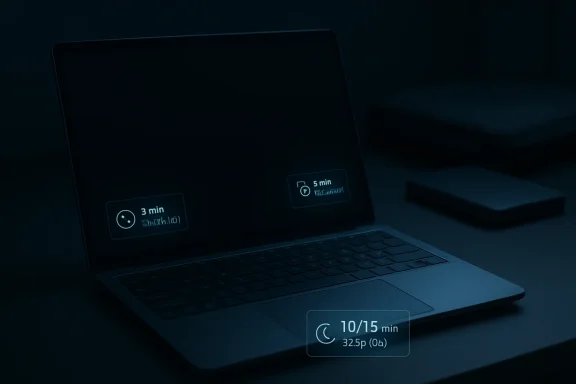
For traditional S3 systems, the screen timers have also been reduced to three minutes on battery and five minutes on AC power. Sleep itself remains longer than on Modern Standby devices, but it has still been shortened to 10 minutes on battery and 15 minutes when plugged in. These changes are subtle, but default settings matter because most users never customize them.
The bigger technical shift is in how Modern Standby handles wake events. Starting with Windows 11 24H2, if the system detects excessive battery drain during Modern Standby, Windows can disable most wake sources. In that restricted state, the machine is supposed to wake only through deliberate user actions such as opening the lid or pressing the power button.
The most common complaint has been battery drain while the laptop appears to be asleep. A machine left at 80 percent in the evening might open at 30 percent the next morning, or worse, feel warm after hours in a backpack. Even when the cause was a misbehaving driver or peripheral, the user’s conclusion was simple: Windows sleep is unreliable.
This is damaging because sleep behavior is one of the most emotionally visible parts of a laptop. Users may forgive a slow update or a clumsy settings page, but they remember when a PC dies overnight before a meeting. Power management is not glamorous, yet it directly shapes whether a device feels dependable.
Several categories can become problematic:
When Microsoft ships platform behavior through a shared servicing model, fixes can reach a broader population without waiting for a disruptive annual upgrade. This is one reason Windows 11 25H2 can inherit the Modern Standby work introduced in 24H2. It also makes the update story simpler for organizations already standardizing on 24H2.
For IT administrators, the shared branch reduces some testing complexity, but it does not eliminate it. Sleep behavior depends heavily on firmware, device drivers, OEM power profiles, docking hardware, and security tools. A change that improves one laptop fleet may expose edge cases in another.
The practical implications are clear:
This matters because clamshell behavior has always been a weak spot for laptops. A closed device should usually remain asleep unless the user clearly intends otherwise. Accidental input, pressure on a button, or peripheral noise should not turn the machine into a battery-draining heater inside a bag.
The rule changes when an external display is attached. If the laptop is closed but connected to a monitor, dock, or desktop setup, Windows allows different behavior because the user may be intentionally operating the laptop in clamshell mode. That distinction is sensible, but it also makes testing more complex.
Key distinctions include:
There are practical reasons for the retreat. Voice wake requires microphones, audio stacks, firmware, privacy controls, and low-power listening behavior to work reliably together. On a laptop, the battery cost and user trust issues can outweigh the convenience.
The removal also fits a broader recalibration around background activity. Microsoft has spent years promoting more ambient computing experiences, but Windows users increasingly want the OS to be quieter, more predictable, and less intrusive. Disabling voice wake from sleep is a small but symbolic shift toward restraint.
The shorter default timers may also interact with organizational policies. Many companies already enforce screen lock, sleep, or power plans through management tools. If Microsoft’s defaults become more aggressive, administrators need to verify whether their existing policies override, complement, or conflict with the new baseline.
Modern Standby has been a source of enterprise frustration because it is not always easy to diagnose. Two laptops with the same Windows build can behave differently because of firmware revisions, driver packages, BIOS settings, and connected accessories. Microsoft’s SleepStudy tool helps, but it still requires expertise to interpret.
A sensible test plan should include:
This does not mean every Modern Standby complaint disappears overnight. A device with poor firmware, outdated drivers, or problematic peripherals can still drain power. But Windows now has a stronger mechanism to respond when standby drain becomes excessive, and that could reduce the worst-case experiences.
The change also reflects a more realistic understanding of how people use laptops. Many users do not shut down every night. They close the lid, expect the machine to pause, and assume it will be ready later. If that basic expectation fails, no amount of AI integration or interface polish can compensate.
The consumer-facing benefits include:
Windows has a harder job. It must support a vast hardware ecosystem, from premium ultrabooks and gaming laptops to business desktops, detachables, handheld PCs, and custom-built systems. That flexibility is Windows’ greatest strength, but it also makes power management harder to standardize.
The Modern Standby changes are therefore partly defensive. Microsoft cannot control every driver or accessory, but it can make Windows less permissive when background activity causes measurable harm. That is a pragmatic way to narrow the experience gap without abandoning the PC ecosystem’s openness.
Important competitive pressure points include:
Against that backdrop, power-management changes may seem small. They are not. Reliability is cumulative, and the most valuable fixes are often the ones users stop noticing because the system simply behaves correctly.
The rumored internal “K2” quality initiative, if accurately characterized, reinforces the idea that Microsoft knows Windows 11 needs a trust reset. Whether that label represents a formal program or a broader internal push, the direction is consistent: performance, reliability, update quality, and fewer unnecessary interruptions.
The most important quality signals are:
Microsoft could improve that with better reporting inside Settings. Instead of requiring users to generate and interpret SleepStudy reports, Windows could surface plain-language summaries: what woke the device, how much battery was used, and whether wake restrictions were applied. That would make power management feel less like a black box.
For Windows 11 25H2 and future cumulative updates, the key areas to monitor are straightforward:
If Microsoft keeps tightening the basics, Windows 11 24H2 and 25H2 may be remembered not only for their shared servicing model, but for a quieter shift in priorities. A PC that sleeps properly is not a headline-grabbing innovation, but it is exactly the kind of improvement that makes an operating system feel mature, trustworthy, and ready for the next generation of hardware.
Source: Neowin Microsoft quietly improved Windows 11 25H2, 24H2 Modern Standby
 Background
Windows sleep has always been a balancing act between responsiveness, battery life, and hardware compatibility. In the old PC world, the traditional S3 sleep state worked like a hard pause: most components powered down, system memory stayed refreshed, and the machine resumed when the user pressed a button or opened the lid. It was not always instant, but it was generally predictable.Modern Standby changed that equation. Introduced during the Windows 8 era under the broader push toward thinner, tablet-like PCs, it moved Windows toward S0 low-power idle, where the system technically remains in the active power state while aggressively reducing activity. The aim was clear: a laptop should wake like a smartphone, maintain selected background tasks, and avoid the slow, clunky resume behavior associated with older machines.
The problem was that PCs are not phones. A Windows laptop may have dozens of drivers, USB devices, vendor utilities, background services, update agents, Bluetooth peripherals, and power-management firmware quirks all competing for attention. When those pieces behave badly, Modern Standby can become less like sleep and more like a dimly lit overnight shift.
That is why Microsoft’s latest changes matter. The company is not abandoning Modern Standby, but it is narrowing the situations in which sleeping PCs can be awakened by background activity. Combined with shorter default idle timers, this suggests a broader Windows 11 quality push focused less on headline features and more on eliminating the kinds of annoyances that undermine trust.
Why this surfaced now
The timing is notable because Windows 11 24H2 and 25H2 are closely linked. Version 25H2 is not a ground-up replacement for 24H2; it builds on the same servicing branch, which means many platform-level fixes and policy changes are shared between the two. In practice, a power-management improvement introduced in 24H2 can remain relevant throughout the 25H2 cycle.That matters for IT departments, OEMs, and consumers alike. If a device is on the 24H2/25H2 track, Microsoft’s updated Modern Standby behavior becomes part of the baseline Windows experience rather than a separate optional tweak.
What Microsoft Changed
Microsoft’s most visible change is the adjustment of default screen and sleep timers. On Modern Standby-capable devices, Windows now turns off the display after three minutes on battery power and five minutes when plugged in. The system sleep timing follows the same pattern, creating a tighter connection between display-off behavior and the lower-power idle state.For traditional S3 systems, the screen timers have also been reduced to three minutes on battery and five minutes on AC power. Sleep itself remains longer than on Modern Standby devices, but it has still been shortened to 10 minutes on battery and 15 minutes when plugged in. These changes are subtle, but default settings matter because most users never customize them.
The bigger technical shift is in how Modern Standby handles wake events. Starting with Windows 11 24H2, if the system detects excessive battery drain during Modern Standby, Windows can disable most wake sources. In that restricted state, the machine is supposed to wake only through deliberate user actions such as opening the lid or pressing the power button.
The new defaults at a glance
These timer changes are aimed at reducing idle power use before the device has a chance to waste meaningful battery. They also make Windows more aggressive about entering low-power behavior when a user walks away.- Modern Standby on battery: screen off and sleep after three minutes
- Modern Standby plugged in: screen off and sleep after five minutes
- S3 on battery: screen off after three minutes, sleep after 10 minutes
- S3 plugged in: screen off after five minutes, sleep after 15 minutes
- Energy goal: reduce unnecessary idle runtime
- User impact: fewer cases where laptops remain awake longer than expected
Modern Standby’s Long-Running Reputation Problem
Modern Standby was designed to make Windows PCs feel more modern. In theory, a user could close the lid, toss the laptop into a bag, and reopen it later with minimal delay and no meaningful battery loss. In practice, many users learned to distrust that promise.The most common complaint has been battery drain while the laptop appears to be asleep. A machine left at 80 percent in the evening might open at 30 percent the next morning, or worse, feel warm after hours in a backpack. Even when the cause was a misbehaving driver or peripheral, the user’s conclusion was simple: Windows sleep is unreliable.
This is damaging because sleep behavior is one of the most emotionally visible parts of a laptop. Users may forgive a slow update or a clumsy settings page, but they remember when a PC dies overnight before a meeting. Power management is not glamorous, yet it directly shapes whether a device feels dependable.
Why background wake events are tricky
Modern Standby allows certain activity because that is the point of the model. The OS may handle networking, notifications, maintenance tasks, or device events while the system is in a low-power state. The challenge is deciding which events are useful and which are wasteful.Several categories can become problematic:
- Network activity that prevents deep idle
- Bluetooth devices that trigger repeated wake behavior
- Drivers that fail to enter efficient power states
- Update components that perform maintenance at bad times
- Vendor utilities that keep polling hardware
- External displays or docks that change wake behavior
The 24H2 and 25H2 Connection
The Modern Standby improvements are especially relevant because Windows 11 24H2 and 25H2 share a servicing branch. That means 25H2 is less a traditional “big bang” feature release and more an enablement step over the 24H2 base. For power-management changes, this continuity is important.When Microsoft ships platform behavior through a shared servicing model, fixes can reach a broader population without waiting for a disruptive annual upgrade. This is one reason Windows 11 25H2 can inherit the Modern Standby work introduced in 24H2. It also makes the update story simpler for organizations already standardizing on 24H2.
For IT administrators, the shared branch reduces some testing complexity, but it does not eliminate it. Sleep behavior depends heavily on firmware, device drivers, OEM power profiles, docking hardware, and security tools. A change that improves one laptop fleet may expose edge cases in another.
Why enablement-style updates matter
Microsoft’s modern Windows release model is increasingly about continuous delivery rather than one dramatic annual event. Features, policy changes, and reliability improvements arrive through cumulative updates, controlled feature rollouts, and enablement packages. That makes the version number less important than the servicing baseline underneath it.The practical implications are clear:
- 24H2 users may already receive core 25H2-era improvements
- 25H2 inherits many 24H2 platform changes
- Testing should focus on build behavior, not just marketing version
- Enterprise deployment rings remain essential
- OEM firmware quality still determines many sleep outcomes
Input Suppression and Wake Behavior
One of the more technical changes involves input suppression. Beginning with Windows 11 24H2, Microsoft changed how certain input events behave when a laptop lid is closed. If the lid is shut and no external display is connected, pressing the power button no longer wakes the display in the same way.This matters because clamshell behavior has always been a weak spot for laptops. A closed device should usually remain asleep unless the user clearly intends otherwise. Accidental input, pressure on a button, or peripheral noise should not turn the machine into a battery-draining heater inside a bag.
The rule changes when an external display is attached. If the laptop is closed but connected to a monitor, dock, or desktop setup, Windows allows different behavior because the user may be intentionally operating the laptop in clamshell mode. That distinction is sensible, but it also makes testing more complex.
The clamshell distinction
Microsoft is effectively separating two scenarios that users experience very differently. A laptop closed in a backpack is not the same as a laptop closed on a desk while driving an external monitor. Good power management needs to understand that context.Key distinctions include:
- Closed lid with no external display: suppress accidental wake behavior
- Closed lid with external display: allow desktop-style usage
- Battery or AC power: input suppression now applies more broadly
- Power button behavior: treated more cautiously in clamshell scenarios
- User intent: prioritized over background or accidental input
Voice Wake Takes a Step Back
Microsoft has also removed voice wake as a supported wake source from sleep beginning with Windows 11 24H2. That is a telling decision. For years, the broader industry pushed always-listening experiences as part of the future of computing, but PCs have not followed the same path as smart speakers or phones.There are practical reasons for the retreat. Voice wake requires microphones, audio stacks, firmware, privacy controls, and low-power listening behavior to work reliably together. On a laptop, the battery cost and user trust issues can outweigh the convenience.
The removal also fits a broader recalibration around background activity. Microsoft has spent years promoting more ambient computing experiences, but Windows users increasingly want the OS to be quieter, more predictable, and less intrusive. Disabling voice wake from sleep is a small but symbolic shift toward restraint.
Convenience versus trust
Voice wake sounds useful in demos. In the real world, it raises questions that are harder to answer.- Is the microphone listening while the PC sleeps?
- How much power does the listening path consume?
- Can false positives wake the system unnecessarily?
- Do enterprise security policies allow it?
- Does the feature justify its complexity?
Enterprise Impact
For enterprise IT, these changes are not just about battery life. They affect device reliability, help desk volume, security posture, and fleet standardization. A laptop that wakes unexpectedly can drain battery, miss maintenance windows, trigger user complaints, or behave inconsistently across docking setups.The shorter default timers may also interact with organizational policies. Many companies already enforce screen lock, sleep, or power plans through management tools. If Microsoft’s defaults become more aggressive, administrators need to verify whether their existing policies override, complement, or conflict with the new baseline.
Modern Standby has been a source of enterprise frustration because it is not always easy to diagnose. Two laptops with the same Windows build can behave differently because of firmware revisions, driver packages, BIOS settings, and connected accessories. Microsoft’s SleepStudy tool helps, but it still requires expertise to interpret.
What administrators should test
Before broadly rolling out 24H2 or 25H2 across a managed fleet, IT teams should include sleep behavior in pilot validation. Too often, power management is tested only after complaints arrive.A sensible test plan should include:
- Battery drain during overnight Modern Standby
- Wake behavior with lid closed and no display attached
- Wake behavior with docks and external monitors
- Bluetooth keyboard and mouse wake scenarios
- VPN and endpoint security background activity
- Windows Update and maintenance wake patterns
- SleepStudy reports from multiple hardware models
- Select representative laptop models from the fleet.
- Update BIOS, firmware, and drivers to approved versions.
- Install Windows 11 24H2 or 25H2 with current cumulative updates.
- Run controlled overnight standby tests on battery and AC power.
- Compare SleepStudy data against real battery drain.
- Test clamshell behavior with and without docking stations.
- Adjust policy only after separating OS behavior from OEM issues.
Consumer Impact
For consumers, the most obvious benefit should be better battery life when idle. Shorter timers mean fewer minutes with the display on after the user walks away. More restrictive wake behavior means fewer chances for the laptop to wake itself unnecessarily during sleep.This does not mean every Modern Standby complaint disappears overnight. A device with poor firmware, outdated drivers, or problematic peripherals can still drain power. But Windows now has a stronger mechanism to respond when standby drain becomes excessive, and that could reduce the worst-case experiences.
The change also reflects a more realistic understanding of how people use laptops. Many users do not shut down every night. They close the lid, expect the machine to pause, and assume it will be ready later. If that basic expectation fails, no amount of AI integration or interface polish can compensate.
Why defaults matter for ordinary users
Power users often customize settings immediately. Ordinary users usually do not. That makes default behavior one of the most powerful design decisions in Windows.The consumer-facing benefits include:
- Less idle screen-on time
- Lower chance of overnight battery loss
- Fewer accidental wake events
- More predictable lid behavior
- Reduced heat risk in bags
- Better alignment with mobile-device expectations
Competitive Implications
Microsoft’s power-management work should be viewed against the broader laptop market. Apple Silicon MacBooks have set a high bar for standby efficiency, instant wake, and predictable battery behavior. ChromeOS devices, too, often benefit from tighter hardware-software integration and simpler background models.Windows has a harder job. It must support a vast hardware ecosystem, from premium ultrabooks and gaming laptops to business desktops, detachables, handheld PCs, and custom-built systems. That flexibility is Windows’ greatest strength, but it also makes power management harder to standardize.
The Modern Standby changes are therefore partly defensive. Microsoft cannot control every driver or accessory, but it can make Windows less permissive when background activity causes measurable harm. That is a pragmatic way to narrow the experience gap without abandoning the PC ecosystem’s openness.
Where Windows still has work to do
Microsoft’s rivals benefit from tighter control. Windows must improve through better diagnostics, stricter certification, and clearer defaults.Important competitive pressure points include:
- Mac-like standby reliability
- Phone-like instant resume
- Enterprise-grade manageability
- Gaming laptop thermal safety
- Docking consistency
- Transparent battery diagnostics
- OEM accountability
The Bigger Windows 11 Quality Push
The sleep improvements fit into a wider narrative around Windows 11 in 2026. Microsoft has been under pressure to make the OS feel faster, cleaner, and more reliable. Users have complained about inconsistent interface behavior, aggressive prompts, update friction, background resource use, and the sense that AI features sometimes arrived before core polish.Against that backdrop, power-management changes may seem small. They are not. Reliability is cumulative, and the most valuable fixes are often the ones users stop noticing because the system simply behaves correctly.
The rumored internal “K2” quality initiative, if accurately characterized, reinforces the idea that Microsoft knows Windows 11 needs a trust reset. Whether that label represents a formal program or a broader internal push, the direction is consistent: performance, reliability, update quality, and fewer unnecessary interruptions.
Less sparkle, more discipline
The Windows team has often been criticized for prioritizing visible features over fundamentals. These Modern Standby changes suggest a different emphasis.The most important quality signals are:
- Fewer surprise wake events
- More conservative background behavior
- Shorter idle exposure
- Better energy efficiency defaults
- Shared improvements across 24H2 and 25H2
- A stronger focus on measurable reliability
Strengths and Opportunities
Microsoft’s quiet Modern Standby refinements show a more disciplined approach to Windows 11 power management. Instead of relying on users to diagnose obscure wake sources or manually tune power plans, the OS is becoming more assertive when standby drain crosses a threshold.- Better default energy behavior should help users who never touch power settings.
- Restricted wake sources give Windows a stronger response to excessive battery drain.
- Improved clamshell logic better distinguishes travel use from docked desktop use.
- Shared 24H2 and 25H2 servicing allows improvements to reach more systems consistently.
- Reduced voice wake complexity removes a niche feature that could undermine predictability.
- Enterprise diagnostics can become more actionable when the OS suppresses noisy wake causes.
- Consumer confidence may improve if laptops stop losing large amounts of charge while “asleep.”
Risks and Concerns
The changes are welcome, but they do not magically solve every Modern Standby problem. Windows power behavior still depends on hardware quality, firmware maturity, drivers, peripherals, and OEM implementation, which means the experience will vary across devices.- Aggressive timers may frustrate users who prefer longer idle periods.
- Wake suppression could interfere with legitimate background workflows in edge cases.
- Docking behavior may remain inconsistent across USB-C and Thunderbolt accessories.
- Legacy applications may not handle tighter sleep timing gracefully.
- Enterprise policies could conflict with or obscure Microsoft’s new defaults.
- Poor OEM firmware can still cause battery drain even with better OS controls.
- Limited transparency may leave users unsure why a wake source was disabled.
What to Watch Next
The next question is whether Microsoft turns these quiet improvements into a clearer user-facing story. Modern Standby has suffered not only from technical issues but from poor communication. Many users do not know whether their system uses S0 low-power idle or S3, what wake sources are active, or why their battery fell overnight.Microsoft could improve that with better reporting inside Settings. Instead of requiring users to generate and interpret SleepStudy reports, Windows could surface plain-language summaries: what woke the device, how much battery was used, and whether wake restrictions were applied. That would make power management feel less like a black box.
For Windows 11 25H2 and future cumulative updates, the key areas to monitor are straightforward:
- Whether real-world battery drain complaints decline
- Whether OEMs update firmware to match Microsoft’s new assumptions
- Whether Settings gains clearer standby diagnostics
- Whether enterprise tools expose wake suppression events
- Whether Microsoft continues prioritizing reliability over novelty
If Microsoft keeps tightening the basics, Windows 11 24H2 and 25H2 may be remembered not only for their shared servicing model, but for a quieter shift in priorities. A PC that sleeps properly is not a headline-grabbing innovation, but it is exactly the kind of improvement that makes an operating system feel mature, trustworthy, and ready for the next generation of hardware.
Source: Neowin Microsoft quietly improved Windows 11 25H2, 24H2 Modern Standby
