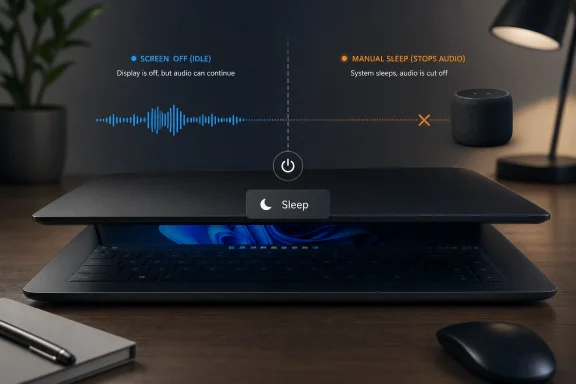
Microsoft has changed Windows 11 version 24H2 and later so that audio playback stops when a Modern Standby laptop is deliberately put to sleep by closing the lid, pressing the power button, or choosing Sleep from Start. The change is not a random media bug, nor is it limited to battery mode. It is Microsoft drawing a clearer line between a PC that has merely gone dark and a PC the user has intentionally told to sleep. That line may be technically defensible, but it also exposes the awkward bargain Windows laptops have been living with since Modern Standby replaced the older, more predictable sleep model.
For years, Windows laptop sleep has meant different things depending on the machine, the driver stack, the firmware, the power profile, the app, and occasionally the phase of the moon. On some systems, closing the lid was the end of activity. On others, it behaved more like a smartphone lock screen: the display went off, the network might stay alive, and audio could keep going.
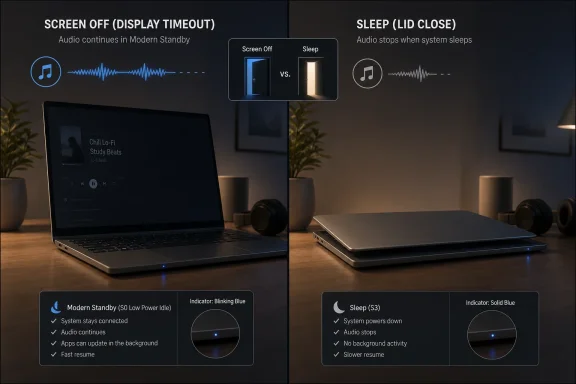
Windows 11 24H2 tightens that behavior. If the system enters Modern Standby through an explicit user action — lid close, power button press, or the Start menu’s Sleep command — audio playback is no longer supported. If the system simply idles until the screen turns off, audio can continue.
That distinction sounds small until it breaks a habit. Plenty of users have treated a laptop like a portable speaker: start a playlist, close the lid, and let the machine sit on a desk or shelf. On affected Windows 11 systems, that behavior now looks less like a feature and more like a loophole Microsoft has closed.
The company’s logic is easy enough to understand. Closing the lid is not the same thing as letting the display time out. One is passive inactivity; the other is an instruction. Windows is now treating that instruction more literally.
That promise has always been uneven. When Modern Standby works, it is barely noticed. The laptop wakes quickly, notifications behave sensibly, and battery drain is modest enough that nobody opens Event Viewer in anger. When it fails, it fails in ways users remember: a hot laptop in a backpack, a dead battery after a short trip, or a fan spinning inside a closed bag because something woke the system when it should have stayed quiet.
The audio change belongs to that history. Microsoft appears to be reducing the number of things a system is allowed to keep doing once the user has deliberately entered standby. Audio playback is not just an app-level detail; it keeps parts of the audio stack alive, may keep Bluetooth active, and complicates the system’s effort to settle into a predictable low-power state.
That does not mean the old behavior was irrational. A laptop playing music with the lid closed is a perfectly understandable user scenario. But it is also exactly the kind of ambiguous state Modern Standby has struggled with: the machine is supposedly asleep, yet still doing something users can hear.
That distinction matters because many users think of the lid as a screen switch rather than a sleep switch. In everyday use, closing the lid can mean “hide the display,” “carry the laptop,” “save power,” “dock it,” or “keep the music going without lighting up the room.” Windows has historically let OEMs and power settings blur those meanings.
In 24H2 and later, Microsoft is pushing back against the blur. An explicit standby action now means the system is expected to go quiet. Audio pausing on lid close is therefore not a regression in the narrow engineering sense. It is the new contract.
The problem is that Windows users rarely get contracts. They get behavior. If an older Windows 11 23H2 laptop keeps playing music when closed and a newer 24H2 or 25H2 system pauses it, the user experiences that as inconsistency, not architectural clarity.
That is not the same as restoring the previous behavior. It means the laptop is not sleeping. The display may be off, but the system remains in a more active condition than a user might assume if they simply close the lid and walk away.
This is the tradeoff Microsoft is forcing into the open. Users who want closed-lid audio can still have it, but they must choose a power policy that says the laptop should not sleep on lid close. That is a clearer model, but it is less convenient for anyone who liked the ambiguity.
For desktop-replacement laptops, docked systems, and machines that live mostly on AC power, “Do nothing” may be harmless. For thin-and-light laptops that travel in bags, it is risky if users forget what they changed. A system that does not sleep when the lid closes can keep generating heat, consuming power, and responding to background work in ways a traveler may not expect.
When a user closes a laptop, the safe assumption is that they want it to stop doing most things. Not everything, perhaps, but most things. If Windows keeps playing audio, downloading updates, waking for notifications, or draining battery under the banner of modern connected behavior, the user’s mental model breaks.
Microsoft has spent years trying to make Modern Standby more controlled. Recent Windows 11 changes have targeted unexpected wakes, excessive battery drain, and input behavior while the lid is closed. The direction is visible: fewer surprise wake paths, stricter suppression when a clamshell is shut, and more aggressive enforcement of low-power expectations.
Stopping audio on explicit standby fits that pattern. It removes one more exception from the sleep state. It also makes Windows easier for OEMs to validate, because “explicit sleep should not keep media playing” is easier to test than “sleep, except when an app and driver stack negotiate the right low-power audio path and the user maybe wanted it.”
The trouble is that Windows is not just an engineering platform. It is a habit platform. People build workflows around accidental affordances, and then those affordances become expected behavior.
This is a familiar Windows problem. The company makes a technically reasonable change deep in the platform, documents it for hardware partners and power-management readers, and then lets ordinary users encounter the behavioral shift as if it were a bug. By the time the explanation surfaces, the trust damage has already been done.
A Settings notice would have helped. So would clearer language in Power & battery settings explaining that Sleep entered by lid close disables audio playback on Modern Standby systems. Even a small first-run tooltip after a feature update would be better than burying the new rule in hardware design documentation.
The deeper issue is that Modern Standby remains largely invisible to the people most affected by it. Windows does not present it as a major operating mode with clear consequences. It simply ships on modern laptops, behaves differently from older sleep, and leaves users to infer the rules.
The audio change may actually help OEMs by removing one variable. If explicit standby no longer supports playback, manufacturers do not need to preserve that scenario while also meeting low-power expectations. In theory, that should make sleep behavior more predictable across Windows 11 hardware.
But OEMs also need to expose sane choices. A user who wants closed-lid music should not have to excavate legacy Control Panel paths or vendor utilities to understand the options. A business fleet admin should not have to guess whether a model’s lid-close policy will interact badly with Modern Standby, Bluetooth audio, docking stations, or conference-room workflows.
The best Windows laptops are already converging on a simpler promise: close the lid and the machine sleeps properly. The weaker machines are the reason users distrust that promise. Microsoft’s change helps the platform, but it does not absolve OEMs from delivering firmware that behaves like it belongs in 2026.
Admins should expect some user complaints after feature updates to 24H2 or later, especially from employees who use laptops for background audio while working in offices, labs, or shared spaces. The fix is not complicated, but it requires care. Setting lid close to “Do nothing” solves the media behavior while potentially undermining assumptions about sleep, transport, and power conservation.
For many organizations, the correct response will be to leave the new default alone. If a user closes a corporate laptop, the safer operational assumption is that it should stop active playback and enter a low-power state. That is especially true for mobile fleets where battery drain and heat are more expensive support problems than paused music.
There will be exceptions. Kiosks, conference-room systems, training stations, lab devices, and certain accessibility workflows may need explicit policies that keep a machine awake with the lid closed. Those should be treated as deliberate configuration decisions, not as attempts to claw back an old consumer convenience.
This matters most for media apps, communications tools, audio recorders, and any software that tries to maintain real-time activity across low-power transitions. The Windows power model is becoming less tolerant of “the app will keep doing its thing” assumptions once the user has requested standby.
The better user experience is not to fight the state change. It is to preserve position, avoid confusing errors, handle Bluetooth reconnection cleanly, and resume only when that makes sense. If the user closed the lid because they were done, blasting audio on wake may be as annoying as stopping it on sleep.
Microsoft’s distinction between idle screen-off and explicit standby also gives developers a useful conceptual split. If the screen times out while audio is playing, continuing playback can still be valid. If the user chooses Sleep, the user intent is different, and apps should treat it differently.
This is why the audio decision should be read alongside broader Modern Standby tightening. Microsoft has been reducing unexpected wake behavior and limiting what can bring a system back when battery drain becomes excessive. Input suppression on closed clamshell systems is part of the same philosophy: a closed laptop should not behave as though it is casually waiting for every possible signal.
That is the right direction. Windows laptops have suffered from too much ambiguity around sleep. Users should not need to know ACPI terminology to trust that a closed machine will not cook itself in a backpack.
But stricter behavior comes with a cost. Modern Standby was sold partly as a more capable sleep state — a world where PCs stayed connected, responsive, and useful even while “asleep.” If Microsoft now has to fence off more scenarios to make it reliable, it is quietly admitting that the smartphone-like vision only works when the operating system is disciplined about what “asleep” actually permits.
Yet the industry did not move away from S3 purely on a whim. Hardware platforms, security models, instant-resume expectations, and connected-device assumptions all pushed Windows toward a newer sleep architecture. Microsoft also needed a model that aligned better with Arm devices and increasingly mobile PC designs.
The real criticism is not that Modern Standby exists. It is that Microsoft and OEMs often shipped it before users could rely on it. A power model that works well on premium reference hardware but unpredictably across the PC ecosystem becomes a reputational problem for Windows itself.
The audio change is therefore both a fix and an admission. Microsoft is making Modern Standby more deterministic by removing a behavior some users liked. That may be necessary, but it confirms that the platform’s earlier flexibility carried real costs.
That principle is stronger than the opposing one. A user who wants audio to continue can configure the lid not to sleep. A user who expects a sleeping laptop to conserve power should not have to worry that a media session is keeping hardware active under the surface.
Still, Microsoft should not confuse correctness with communication. The company has a habit of treating power-management behavior as something only OEMs, driver authors, and enterprise admins need to understand. But sleep is one of the most visible features of a laptop. It is used dozens of times a week by people who will never read a hardware design page.
Windows needs a clearer sleep story in Settings. The operating system should explain the difference between screen-off, idle-to-standby, and explicit sleep in plain language. It should show the consequences of lid-close actions without sending users into legacy dialogs or vendor-specific control panels.
A modern power UI would not need to expose every ACPI detail. It would simply say what users care about: whether the laptop will sleep, whether audio can continue, whether external displays are affected, whether network activity is allowed, and whether the behavior differs on battery and AC power.
That should make users both reassured and wary. Reassured, because Microsoft appears to be taking Modern Standby’s worst failure modes seriously. Wary, because these changes can arrive as behavior shifts that are technically documented but poorly surfaced.
For Windows enthusiasts, this is another example of the operating system’s layered personality. The consumer-facing UI says “Sleep.” The hardware documentation says “explicit entry into Modern Standby.” The user says “why did my music stop?” All three are describing the same event, but only one of them is written in human language.
For IT pros, the lesson is to test power behavior as part of feature-update validation. Windows 11 24H2 and later are not just changing visible UI surfaces; they are altering assumptions around standby, wake, input, and background activity. Those changes may be beneficial, but they still affect workflows.
 Microsoft Turns “Sleep” Back Into a Command
For years, Windows laptop sleep has meant different things depending on the machine, the driver stack, the firmware, the power profile, the app, and occasionally the phase of the moon. On some systems, closing the lid was the end of activity. On others, it behaved more like a smartphone lock screen: the display went off, the network might stay alive, and audio could keep going.Windows 11 24H2 tightens that behavior. If the system enters Modern Standby through an explicit user action — lid close, power button press, or the Start menu’s Sleep command — audio playback is no longer supported. If the system simply idles until the screen turns off, audio can continue.
That distinction sounds small until it breaks a habit. Plenty of users have treated a laptop like a portable speaker: start a playlist, close the lid, and let the machine sit on a desk or shelf. On affected Windows 11 systems, that behavior now looks less like a feature and more like a loophole Microsoft has closed.
The company’s logic is easy enough to understand. Closing the lid is not the same thing as letting the display time out. One is passive inactivity; the other is an instruction. Windows is now treating that instruction more literally.
Modern Standby Was Supposed to Make PCs Feel Less Like PCs
Modern Standby was Microsoft’s attempt to drag Windows sleep into the phone era. Instead of the old S3 sleep state — where most of the system was suspended and wake behavior was relatively straightforward — Modern Standby keeps the machine in a low-power, ready-to-resume state. The promise was instant-on responsiveness, background connectivity, and a device that could behave more like an iPad than a 2009 business notebook.That promise has always been uneven. When Modern Standby works, it is barely noticed. The laptop wakes quickly, notifications behave sensibly, and battery drain is modest enough that nobody opens Event Viewer in anger. When it fails, it fails in ways users remember: a hot laptop in a backpack, a dead battery after a short trip, or a fan spinning inside a closed bag because something woke the system when it should have stayed quiet.
The audio change belongs to that history. Microsoft appears to be reducing the number of things a system is allowed to keep doing once the user has deliberately entered standby. Audio playback is not just an app-level detail; it keeps parts of the audio stack alive, may keep Bluetooth active, and complicates the system’s effort to settle into a predictable low-power state.
That does not mean the old behavior was irrational. A laptop playing music with the lid closed is a perfectly understandable user scenario. But it is also exactly the kind of ambiguous state Modern Standby has struggled with: the machine is supposedly asleep, yet still doing something users can hear.
The Lid Is No Longer a Media Control
The practical rule is now simple, even if Microsoft has not exactly advertised it from the rooftops. If Windows turns off the screen because the device has been idle, audio may keep playing. If the user closes the lid or explicitly selects Sleep, audio stops.That distinction matters because many users think of the lid as a screen switch rather than a sleep switch. In everyday use, closing the lid can mean “hide the display,” “carry the laptop,” “save power,” “dock it,” or “keep the music going without lighting up the room.” Windows has historically let OEMs and power settings blur those meanings.
In 24H2 and later, Microsoft is pushing back against the blur. An explicit standby action now means the system is expected to go quiet. Audio pausing on lid close is therefore not a regression in the narrow engineering sense. It is the new contract.
The problem is that Windows users rarely get contracts. They get behavior. If an older Windows 11 23H2 laptop keeps playing music when closed and a newer 24H2 or 25H2 system pauses it, the user experiences that as inconsistency, not architectural clarity.
“Do Nothing” Becomes the Workaround Microsoft Would Rather You Choose Deliberately
The immediate workaround is old-fashioned: change what happens when the lid closes. If the lid-close action is set to “Do nothing,” the PC should not enter standby merely because the lid is shut, and audio playback can continue according to the normal active-state rules of the machine.That is not the same as restoring the previous behavior. It means the laptop is not sleeping. The display may be off, but the system remains in a more active condition than a user might assume if they simply close the lid and walk away.
This is the tradeoff Microsoft is forcing into the open. Users who want closed-lid audio can still have it, but they must choose a power policy that says the laptop should not sleep on lid close. That is a clearer model, but it is less convenient for anyone who liked the ambiguity.
For desktop-replacement laptops, docked systems, and machines that live mostly on AC power, “Do nothing” may be harmless. For thin-and-light laptops that travel in bags, it is risky if users forget what they changed. A system that does not sleep when the lid closes can keep generating heat, consuming power, and responding to background work in ways a traveler may not expect.
The Change Is Really About Trust, Not Music
It is tempting to frame this as a minor annoyance for Spotify, YouTube Music, Apple Music, or local media playback. That misses the larger point. Modern Standby’s credibility problem has never been one isolated behavior; it has been whether Windows can be trusted to interpret user intent correctly.When a user closes a laptop, the safe assumption is that they want it to stop doing most things. Not everything, perhaps, but most things. If Windows keeps playing audio, downloading updates, waking for notifications, or draining battery under the banner of modern connected behavior, the user’s mental model breaks.
Microsoft has spent years trying to make Modern Standby more controlled. Recent Windows 11 changes have targeted unexpected wakes, excessive battery drain, and input behavior while the lid is closed. The direction is visible: fewer surprise wake paths, stricter suppression when a clamshell is shut, and more aggressive enforcement of low-power expectations.
Stopping audio on explicit standby fits that pattern. It removes one more exception from the sleep state. It also makes Windows easier for OEMs to validate, because “explicit sleep should not keep media playing” is easier to test than “sleep, except when an app and driver stack negotiate the right low-power audio path and the user maybe wanted it.”
The trouble is that Windows is not just an engineering platform. It is a habit platform. People build workflows around accidental affordances, and then those affordances become expected behavior.
Microsoft’s Silence Makes the Change Feel Sneakier Than It Is
There is a difference between a quiet documentation change and a stealthy product decision, but users rarely distinguish between the two. Microsoft documented the behavior, yet most users will discover it only when their music stops. That discovery path almost guarantees irritation.This is a familiar Windows problem. The company makes a technically reasonable change deep in the platform, documents it for hardware partners and power-management readers, and then lets ordinary users encounter the behavioral shift as if it were a bug. By the time the explanation surfaces, the trust damage has already been done.
A Settings notice would have helped. So would clearer language in Power & battery settings explaining that Sleep entered by lid close disables audio playback on Modern Standby systems. Even a small first-run tooltip after a feature update would be better than burying the new rule in hardware design documentation.
The deeper issue is that Modern Standby remains largely invisible to the people most affected by it. Windows does not present it as a major operating mode with clear consequences. It simply ships on modern laptops, behaves differently from older sleep, and leaves users to infer the rules.
OEMs Own Part of the Confusion
Microsoft defines the platform, but laptop makers shape the experience. Modern Standby behavior depends heavily on firmware, drivers, thermal design, battery tuning, and OEM power defaults. That is why one Windows laptop can behave beautifully while another becomes a cautionary tale in a sysadmin forum thread.The audio change may actually help OEMs by removing one variable. If explicit standby no longer supports playback, manufacturers do not need to preserve that scenario while also meeting low-power expectations. In theory, that should make sleep behavior more predictable across Windows 11 hardware.
But OEMs also need to expose sane choices. A user who wants closed-lid music should not have to excavate legacy Control Panel paths or vendor utilities to understand the options. A business fleet admin should not have to guess whether a model’s lid-close policy will interact badly with Modern Standby, Bluetooth audio, docking stations, or conference-room workflows.
The best Windows laptops are already converging on a simpler promise: close the lid and the machine sleeps properly. The weaker machines are the reason users distrust that promise. Microsoft’s change helps the platform, but it does not absolve OEMs from delivering firmware that behaves like it belongs in 2026.
For IT, This Is a Small Change With Policy Implications
In managed environments, the change is less about music and more about predictability. A laptop that continues audio playback in standby may sound like a consumer edge case, but the underlying question is whether endpoints obey power-state policy in consistent ways. That matters for battery health, device readiness, thermals, and support tickets.Admins should expect some user complaints after feature updates to 24H2 or later, especially from employees who use laptops for background audio while working in offices, labs, or shared spaces. The fix is not complicated, but it requires care. Setting lid close to “Do nothing” solves the media behavior while potentially undermining assumptions about sleep, transport, and power conservation.
For many organizations, the correct response will be to leave the new default alone. If a user closes a corporate laptop, the safer operational assumption is that it should stop active playback and enter a low-power state. That is especially true for mobile fleets where battery drain and heat are more expensive support problems than paused music.
There will be exceptions. Kiosks, conference-room systems, training stations, lab devices, and certain accessibility workflows may need explicit policies that keep a machine awake with the lid closed. Those should be treated as deliberate configuration decisions, not as attempts to claw back an old consumer convenience.
Developers Should Read the Signal
Application developers should not assume that background audio can survive every form of sleep. If a user explicitly puts a Windows 11 24H2 or later device into standby, the app should expect playback to pause and should resume gracefully on wake when appropriate. That is now the platform’s intended behavior.This matters most for media apps, communications tools, audio recorders, and any software that tries to maintain real-time activity across low-power transitions. The Windows power model is becoming less tolerant of “the app will keep doing its thing” assumptions once the user has requested standby.
The better user experience is not to fight the state change. It is to preserve position, avoid confusing errors, handle Bluetooth reconnection cleanly, and resume only when that makes sense. If the user closed the lid because they were done, blasting audio on wake may be as annoying as stopping it on sleep.
Microsoft’s distinction between idle screen-off and explicit standby also gives developers a useful conceptual split. If the screen times out while audio is playing, continuing playback can still be valid. If the user chooses Sleep, the user intent is different, and apps should treat it differently.
Modern Standby Is Becoming Stricter Because It Has To
The strongest argument for Microsoft’s change is that Modern Standby cannot survive as a loose collection of exceptions. The whole model depends on confidence that the device can enter a low-power state quickly, stay there, and wake when the user expects. Every feature allowed to continue during standby makes that harder.This is why the audio decision should be read alongside broader Modern Standby tightening. Microsoft has been reducing unexpected wake behavior and limiting what can bring a system back when battery drain becomes excessive. Input suppression on closed clamshell systems is part of the same philosophy: a closed laptop should not behave as though it is casually waiting for every possible signal.
That is the right direction. Windows laptops have suffered from too much ambiguity around sleep. Users should not need to know ACPI terminology to trust that a closed machine will not cook itself in a backpack.
But stricter behavior comes with a cost. Modern Standby was sold partly as a more capable sleep state — a world where PCs stayed connected, responsive, and useful even while “asleep.” If Microsoft now has to fence off more scenarios to make it reliable, it is quietly admitting that the smartphone-like vision only works when the operating system is disciplined about what “asleep” actually permits.
The Old S3 Nostalgia Is Understandable but Incomplete
Whenever Modern Standby causes friction, calls to bring back S3 sleep follow. The nostalgia is not irrational. Traditional sleep was conceptually cleaner: the machine slept, battery drain was usually modest, and wake behavior was less mysterious. For many users, S3 felt boring in the best possible way.Yet the industry did not move away from S3 purely on a whim. Hardware platforms, security models, instant-resume expectations, and connected-device assumptions all pushed Windows toward a newer sleep architecture. Microsoft also needed a model that aligned better with Arm devices and increasingly mobile PC designs.
The real criticism is not that Modern Standby exists. It is that Microsoft and OEMs often shipped it before users could rely on it. A power model that works well on premium reference hardware but unpredictably across the PC ecosystem becomes a reputational problem for Windows itself.
The audio change is therefore both a fix and an admission. Microsoft is making Modern Standby more deterministic by removing a behavior some users liked. That may be necessary, but it confirms that the platform’s earlier flexibility carried real costs.
The New Rule Makes Sense, but the User Experience Still Needs Work
There is a coherent product principle behind the new behavior: intentional sleep should be quiet. If the user chooses Sleep, presses the power button, or closes a lid configured to sleep, Windows should prioritize low power, low heat, and low surprise over continued entertainment.That principle is stronger than the opposing one. A user who wants audio to continue can configure the lid not to sleep. A user who expects a sleeping laptop to conserve power should not have to worry that a media session is keeping hardware active under the surface.
Still, Microsoft should not confuse correctness with communication. The company has a habit of treating power-management behavior as something only OEMs, driver authors, and enterprise admins need to understand. But sleep is one of the most visible features of a laptop. It is used dozens of times a week by people who will never read a hardware design page.
Windows needs a clearer sleep story in Settings. The operating system should explain the difference between screen-off, idle-to-standby, and explicit sleep in plain language. It should show the consequences of lid-close actions without sending users into legacy dialogs or vendor-specific control panels.
A modern power UI would not need to expose every ACPI detail. It would simply say what users care about: whether the laptop will sleep, whether audio can continue, whether external displays are affected, whether network activity is allowed, and whether the behavior differs on battery and AC power.
The Real Story Is Microsoft Narrowing the Gap Between Promise and Behavior
The immediate headline is that Windows 11 stops music when you close the lid on affected Modern Standby systems. The more important story is that Microsoft is still reshaping the boundaries of standby years after the feature became normal on premium laptops.That should make users both reassured and wary. Reassured, because Microsoft appears to be taking Modern Standby’s worst failure modes seriously. Wary, because these changes can arrive as behavior shifts that are technically documented but poorly surfaced.
For Windows enthusiasts, this is another example of the operating system’s layered personality. The consumer-facing UI says “Sleep.” The hardware documentation says “explicit entry into Modern Standby.” The user says “why did my music stop?” All three are describing the same event, but only one of them is written in human language.
For IT pros, the lesson is to test power behavior as part of feature-update validation. Windows 11 24H2 and later are not just changing visible UI surfaces; they are altering assumptions around standby, wake, input, and background activity. Those changes may be beneficial, but they still affect workflows.
The Lid-Close Era of Accidental Audio Is Ending
This change is not catastrophic, but it is concrete. It affects a familiar laptop behavior, it is tied to a controversial Windows power model, and it illustrates Microsoft’s current approach to improving reliability: reduce ambiguity, constrain background activity, and make sleep more literal.- Windows 11 version 24H2 and later no longer support audio playback when Modern Standby is entered explicitly through lid close, the power button, or the Start menu Sleep command.
- Audio can still continue when the system idles naturally to screen-off, because Microsoft treats passive display timeout differently from intentional sleep.
- The change applies on both battery and AC power, so plugging in a laptop does not preserve the old closed-lid playback behavior.
- Users who want audio to continue after closing the lid generally need to configure the lid-close action to do nothing, which means accepting different power and thermal tradeoffs.
- IT departments should treat any exception as a deliberate power-policy choice rather than a harmless media preference.
- The change is part of a broader effort to make Modern Standby less surprising, especially around battery drain, wake behavior, and closed-lid systems.
References
- Primary source: Windows Latest
Published: Sat, 23 May 2026 00:27:03 GMT
Microsoft quietly changed Windows 11 to stop playing audio when you close the lid or press Sleep, and it's due to Modern Standby
Microsoft confirms Windows 11 no longer play audio when you close the laptop lid, press the power button, or select Sleep. www.windowslatest.com
- Official source: learn.microsoft.com
Modern Standby Basic Test Scenarios | Microsoft Learn
Describes basic test scenarios for Modern Standby.learn.microsoft.com - Related coverage: pcworld.com
Microsoft finally lets Windows 11 shut down without installing updates | PCWorld
The latest Windows Insider update gives real control over the shutdown menu, so pending updates only install when you say so.www.pcworld.com - Related coverage: tomshardware.com
Microsoft purges Windows 11 printer drivers, putting millions of devices on borrowed time — legacy printers face extinction as Microsoft stops distributing V3 and V4 drivers | Tom's Hardware
Microsoft cuts off new third-party print driver releases via Windows Update.www.tomshardware.com - Related coverage: techspot.com
Microsoft is retiring legacy Windows printer drivers, one step at a time | TechSpot
Starting in January 2026, Microsoft will no longer distribute new "official" printer drivers through Windows Update. First announced back in 2023, the move is meant to improve...www.techspot.com - Related coverage: windowscentral.com
The 7 biggest Windows 11 Insider changes from early April — and why they matter for 2026 | Windows Central
Microsoft tests various refinements for Windows 11 in the first two weeks of April, and here's all you need to know.www.windowscentral.com