

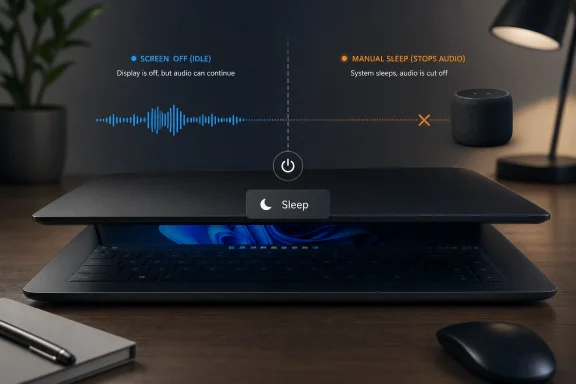
Microsoft has changed Windows 11 version 24H2 and later so that audio playback stops when a Modern Standby device is deliberately put to sleep by closing the lid, pressing the power button, or choosing Sleep from Start. That means the old “close the laptop and keep the music going” trick is no longer something users should expect to work consistently on newer Windows 11 builds. The change is not being framed as a bug; it is Microsoft tightening the meaning of sleep. The company is drawing a harder line between a PC that merely turns its screen off and one the user has explicitly told to stand down.
For years, Windows sleep has been less a single state than a collection of compromises between hardware design, driver behavior, user expectation, and power management policy. A user saw a lid close and assumed the laptop had gone to sleep. Windows, the firmware, and the audio stack might have seen something subtler: a low-power idle state in which some activity could continue.
That ambiguity is what Microsoft now appears to be reducing. In Windows 11 version 24H2 and later, Modern Standby systems no longer support audio playback when standby is entered through an explicit user action. The examples Microsoft gives are plain enough: pressing the power button, closing the lid, or selecting Sleep from the Start menu.
The important distinction is that audio is still supported when the device idles to screen-off on its own. If Windows decides the display should turn off because the user has stopped interacting with the machine, playback may continue. If the user tells the machine to sleep, Windows now treats that as a stronger instruction.
That is a small behavioral change with a large psychological footprint. The laptop lid has always been a gesture loaded with meaning. To some users, closing it means “pause everything.” To others, especially those using a laptop as a music source for headphones or speakers, it has meant “hide the screen and keep playing.” Microsoft has now chosen the first interpretation for Modern Standby sleep.
The problem is that Windows PCs are not phones. They are a sprawling ecosystem of chipsets, storage controllers, Wi-Fi adapters, audio devices, firmware choices, OEM utilities, antivirus engines, VPN clients, RGB software, telemetry services, and drivers of widely varying quality. A sleep model that depends on the whole stack behaving politely is only as good as the least polite participant.
That is why Modern Standby has had such a bruised reputation among power users. The complaints are familiar: laptops that wake in bags, batteries that drain overnight, machines that feel warm despite being “asleep,” and fans that spin when the owner thought the system was safely suspended. Some of these reports are anecdotal and device-specific, but the pattern has been persistent enough to make Modern Standby one of the most disliked pieces of invisible Windows plumbing.
Microsoft’s latest change should be read in that context. Stopping audio during explicit standby is not just an audio decision. It is part of a broader attempt to make manual sleep mean something more predictable and more power-conservative.
When a system idles to screen-off, the user has not made a command. They have simply stopped interacting with the device. In that case, continuing audio makes intuitive sense: music, podcasts, conferencing audio, and streaming playback often continue while the screen is off. A dark display does not necessarily mean a dormant session.
Closing the lid is different. It is an explicit physical gesture. Pressing Sleep is even clearer. Microsoft is saying that when the user performs one of those actions, Windows should favor power savings and quiescence over continuity.
That framing also helps explain why the restriction applies to both internal speakers and Bluetooth audio devices. This is not merely about whether a laptop’s built-in speaker should be muffled under a closed lid. It is about whether the system should keep the audio path alive after the user has intentionally entered standby. Microsoft’s answer, beginning with Windows 11 24H2, is no.
For users who relied on this behavior, the result will still feel like a regression. A feature does not have to be formally promised to become part of someone’s routine. If a Windows 11 23H2 laptop kept playing audio after the lid closed, and the same laptop no longer does so after moving to 24H2 or 25H2, the user experience has changed even if Microsoft calls the new behavior correct.
That matters because the Modern Standby controversy has never been about one single bug. It has been about trust. Users want to know that sleep will not silently become “awake enough to drain the battery, heat the chassis, and miss the point.” IT administrators want predictable fleet behavior. OEMs want machines that pass power and reliability expectations without generating support tickets. Microsoft wants Windows laptops to behave more like premium mobile devices without inheriting every failure mode of a general-purpose PC.
Stopping audio during explicit standby fits that trend. Audio playback is not a trivial activity from a power-management perspective. It may involve the application, the audio engine, a codec or Bluetooth radio, networking for streaming, and associated wake or activity patterns. Even if each component is efficient, the overall session is still activity.
The trade-off is obvious. Microsoft gains a cleaner sleep story and potentially fewer power surprises. Users lose one of the informal conveniences that made Modern Standby feel less like traditional sleep and more like a screen-off mode.
That is a defensible position. One of the long-running frustrations with Windows power management is that labels have not always matched outcomes. “Sleep” might mean suspended. It might mean connected standby. It might mean warm in your backpack. It might mean Wi-Fi activity continues. It might mean the system wakes for maintenance, notifications, or a badly behaved peripheral.
By enforcing a stricter behavior for manual standby, Microsoft is reducing the number of hidden exceptions. The computer no longer tries to infer that a lid close might mean “keep Spotify going.” It assumes the simplest possible command: the user asked for sleep.
The less generous reading is also fair. Microsoft is changing a daily behavior without making it obvious to the people affected. A user who updates Windows, closes the lid, and finds that their Bluetooth speaker goes silent is unlikely to think, “Ah, a clearer semantic boundary between idle screen-off and explicit Modern Standby entry.” They will think Windows broke something.
That is the communication gap Microsoft repeatedly creates with Windows power changes. The company adjusts deep platform behavior, documents it for hardware and developer audiences, and leaves everyday users to discover the consequences by surprise.
That solves one problem by creating another. A laptop configured to do nothing when the lid closes is easier to misuse. Put it in a bag while it is still awake, and the old fears return: heat, drain, and a machine that was not in the state the user assumed. For careful users who keep a laptop on a desk as a headless music player, that may be acceptable. For everyone else, it is a setting with consequences.
There may also be device-specific firmware or registry paths that affect Modern Standby support, but that is not a normal consumer escape hatch. Many modern laptops are designed around S0 low-power idle and do not expose classic S3 sleep as a supported alternative. Even when hacks appear to work on one machine, they can break wake behavior, driver assumptions, or OEM power tuning on another.
That leaves users with a more practical distinction. If you want audio, keep the PC awake and let only the screen turn off. If you want sleep, expect audio to stop. Microsoft’s change makes the line clearer, but it also forces users to be more deliberate about which side of the line they are on.
In managed environments, the key issue is expectation-setting. Users may report the change as an audio fault, a Bluetooth bug, or an app problem after moving to Windows 11 24H2 or 25H2. Help desks will need to recognize the pattern quickly: playback stops only when the system enters standby explicitly, but may continue when the display turns off through idle timeout.
That distinction matters for troubleshooting. If audio stops when the lid closes, that is now expected on affected Modern Standby systems. If audio stops merely because the screen turns off from inactivity, that may be a different issue. If the system fails to sleep, wakes unexpectedly, or drains heavily, that belongs to the broader Modern Standby diagnostic universe.
The change also gives administrators a cleaner policy conversation. They can decide whether lid close should sleep, do nothing, hibernate, or follow OEM defaults. What they should not assume is that the old gray area—closed lid, sleeping machine, continuing audio—will remain available as a stable behavior across Windows versions.
Microsoft’s newer behavior tells developers not to treat explicit standby as a place where playback can reliably continue. If the system enters Modern Standby because the user closed the lid or chose Sleep, audio is no longer supported. The app should be prepared for pause, suspension, or interruption rather than pretending it can negotiate with the power manager indefinitely.
That is not hostile to media apps. In fact, it may make the model easier to reason about. Screen off due to idle is one scenario. Explicit sleep is another. The first can preserve audio; the second should not be counted on.
The trouble, again, is the installed base. Windows developers must support users across Windows 10, Windows 11 23H2, Windows 11 24H2, Windows 11 25H2, and devices with different standby capabilities. A behavior that is correct on a new ultrabook may not match an older laptop or desktop. Windows remains Windows: one API surface, many lived realities.
Imagine a simple notification after upgrade on a Modern Standby laptop: “Audio will now stop when this PC is manually put to sleep. To keep audio playing with the lid closed, change lid-close behavior in Power settings.” That would not satisfy everyone, but it would prevent confusion. It would also frame the change as intentional rather than broken.
Instead, users usually discover these changes through friction. A podcast stops. A Bluetooth speaker goes quiet. A music stream pauses. The user searches forums, finds conflicting advice, and eventually learns that Windows 11 changed the rules.
This is a recurring Windows problem. Microsoft often documents platform changes, but documentation is not communication. Hardware partners, developers, and power users may find the explanation. The average laptop owner receives only the symptom.
That silence matters because sleep behavior is deeply personal. It is shaped by years of muscle memory. When Microsoft changes what the lid does in practice, it is changing one of the most repeated gestures in mobile computing.
Classic Control Panel power options still exist in various forms, while the modern Settings app continues to absorb pieces of the old power-management interface. The result is a split-brain configuration experience. Users often search for one setting, land in another, and encounter terms that were never designed for ordinary people.
Modern Standby makes that worse because it hides complexity under familiar words. “Sleep” looks the same in the Start menu whether the underlying machine supports S3, S0 low-power idle, hibernate-heavy policies, or OEM-specific tuning. Two laptops can present the same button and behave differently enough to confuse anyone.
If Microsoft wants users to accept stricter sleep behavior, it should give them clearer modes. A “screen off, keep playing audio” option would be easier to understand than asking users to infer behavior from lid-close policies and idle timers. A “sleep now, stop background activity” option would make the new rule feel like a feature rather than a surprise.
That means the affected users are not people who simply listen to music on a laptop. They are specifically people who use lid close, the power button, or the Start menu Sleep command as part of an audio-listening routine. The distinction is narrow, but for that group it is daily and noticeable.
It also means Bluetooth speakers and headphones are not exempt. The restriction is not about whether sound comes from the laptop chassis. It is about the standby entry path. If the system is explicitly put to sleep, the playback session should not be expected to survive.
The most reasonable adjustment is to use display timeout or lid-close “do nothing” behavior only when the laptop is staying on a desk, plugged in, and ventilated. For travel, sleep should remain sleep. The whole point of Microsoft’s change is to make that state less leaky.
 Microsoft Turns Sleep Back Into a Command
For years, Windows sleep has been less a single state than a collection of compromises between hardware design, driver behavior, user expectation, and power management policy. A user saw a lid close and assumed the laptop had gone to sleep. Windows, the firmware, and the audio stack might have seen something subtler: a low-power idle state in which some activity could continue.That ambiguity is what Microsoft now appears to be reducing. In Windows 11 version 24H2 and later, Modern Standby systems no longer support audio playback when standby is entered through an explicit user action. The examples Microsoft gives are plain enough: pressing the power button, closing the lid, or selecting Sleep from the Start menu.
The important distinction is that audio is still supported when the device idles to screen-off on its own. If Windows decides the display should turn off because the user has stopped interacting with the machine, playback may continue. If the user tells the machine to sleep, Windows now treats that as a stronger instruction.
That is a small behavioral change with a large psychological footprint. The laptop lid has always been a gesture loaded with meaning. To some users, closing it means “pause everything.” To others, especially those using a laptop as a music source for headphones or speakers, it has meant “hide the screen and keep playing.” Microsoft has now chosen the first interpretation for Modern Standby sleep.
Modern Standby Was Always a Promise With Footnotes
Modern Standby, technically tied to the S0 low-power idle model, was Microsoft’s answer to the instant-on, always-ready expectations created by phones and tablets. Instead of dropping into the old S3 sleep state, a Modern Standby PC remains in a deeply idle version of the working state. The pitch was faster wake, background freshness, and more graceful transitions between active and idle use.The problem is that Windows PCs are not phones. They are a sprawling ecosystem of chipsets, storage controllers, Wi-Fi adapters, audio devices, firmware choices, OEM utilities, antivirus engines, VPN clients, RGB software, telemetry services, and drivers of widely varying quality. A sleep model that depends on the whole stack behaving politely is only as good as the least polite participant.
That is why Modern Standby has had such a bruised reputation among power users. The complaints are familiar: laptops that wake in bags, batteries that drain overnight, machines that feel warm despite being “asleep,” and fans that spin when the owner thought the system was safely suspended. Some of these reports are anecdotal and device-specific, but the pattern has been persistent enough to make Modern Standby one of the most disliked pieces of invisible Windows plumbing.
Microsoft’s latest change should be read in that context. Stopping audio during explicit standby is not just an audio decision. It is part of a broader attempt to make manual sleep mean something more predictable and more power-conservative.
The Lid Close Is Now a Policy Boundary
The most interesting part of the change is not that audio stops. It is that Windows now distinguishes between idle transition and intentional standby in a way users can feel.When a system idles to screen-off, the user has not made a command. They have simply stopped interacting with the device. In that case, continuing audio makes intuitive sense: music, podcasts, conferencing audio, and streaming playback often continue while the screen is off. A dark display does not necessarily mean a dormant session.
Closing the lid is different. It is an explicit physical gesture. Pressing Sleep is even clearer. Microsoft is saying that when the user performs one of those actions, Windows should favor power savings and quiescence over continuity.
That framing also helps explain why the restriction applies to both internal speakers and Bluetooth audio devices. This is not merely about whether a laptop’s built-in speaker should be muffled under a closed lid. It is about whether the system should keep the audio path alive after the user has intentionally entered standby. Microsoft’s answer, beginning with Windows 11 24H2, is no.
For users who relied on this behavior, the result will still feel like a regression. A feature does not have to be formally promised to become part of someone’s routine. If a Windows 11 23H2 laptop kept playing audio after the lid closed, and the same laptop no longer does so after moving to 24H2 or 25H2, the user experience has changed even if Microsoft calls the new behavior correct.
The Battery-Drain Backstory Explains the Trade
Microsoft has also been tightening Modern Standby in other ways. Recent documentation and reporting point to new safeguards in Windows 11 24H2 and later that limit wake sources when the system detects abnormal battery drain. In practical terms, Windows can become more restrictive about what is allowed to wake a sleeping machine, favoring direct user actions such as opening the lid or pressing the power button.That matters because the Modern Standby controversy has never been about one single bug. It has been about trust. Users want to know that sleep will not silently become “awake enough to drain the battery, heat the chassis, and miss the point.” IT administrators want predictable fleet behavior. OEMs want machines that pass power and reliability expectations without generating support tickets. Microsoft wants Windows laptops to behave more like premium mobile devices without inheriting every failure mode of a general-purpose PC.
Stopping audio during explicit standby fits that trend. Audio playback is not a trivial activity from a power-management perspective. It may involve the application, the audio engine, a codec or Bluetooth radio, networking for streaming, and associated wake or activity patterns. Even if each component is efficient, the overall session is still activity.
The trade-off is obvious. Microsoft gains a cleaner sleep story and potentially fewer power surprises. Users lose one of the informal conveniences that made Modern Standby feel less like traditional sleep and more like a screen-off mode.
Windows Is Choosing Predictability Over Ambiguity
There is a generous reading of Microsoft’s decision: Windows is finally making the word “sleep” less slippery. If the user wants playback to continue, the user should not put the machine to sleep. If the user wants the system to conserve energy and stop background activity, sleep should actually do that.That is a defensible position. One of the long-running frustrations with Windows power management is that labels have not always matched outcomes. “Sleep” might mean suspended. It might mean connected standby. It might mean warm in your backpack. It might mean Wi-Fi activity continues. It might mean the system wakes for maintenance, notifications, or a badly behaved peripheral.
By enforcing a stricter behavior for manual standby, Microsoft is reducing the number of hidden exceptions. The computer no longer tries to infer that a lid close might mean “keep Spotify going.” It assumes the simplest possible command: the user asked for sleep.
The less generous reading is also fair. Microsoft is changing a daily behavior without making it obvious to the people affected. A user who updates Windows, closes the lid, and finds that their Bluetooth speaker goes silent is unlikely to think, “Ah, a clearer semantic boundary between idle screen-off and explicit Modern Standby entry.” They will think Windows broke something.
That is the communication gap Microsoft repeatedly creates with Windows power changes. The company adjusts deep platform behavior, documents it for hardware and developer audiences, and leaves everyday users to discover the consequences by surprise.
The Workaround Is Not Really a Workaround
The obvious advice is to change what closing the lid does. In Windows power settings, users can often configure lid-close behavior so that closing the laptop does nothing rather than entering sleep. If the lid no longer triggers sleep, audio can continue because the system remains awake or merely turns off the display according to other timers.That solves one problem by creating another. A laptop configured to do nothing when the lid closes is easier to misuse. Put it in a bag while it is still awake, and the old fears return: heat, drain, and a machine that was not in the state the user assumed. For careful users who keep a laptop on a desk as a headless music player, that may be acceptable. For everyone else, it is a setting with consequences.
There may also be device-specific firmware or registry paths that affect Modern Standby support, but that is not a normal consumer escape hatch. Many modern laptops are designed around S0 low-power idle and do not expose classic S3 sleep as a supported alternative. Even when hacks appear to work on one machine, they can break wake behavior, driver assumptions, or OEM power tuning on another.
That leaves users with a more practical distinction. If you want audio, keep the PC awake and let only the screen turn off. If you want sleep, expect audio to stop. Microsoft’s change makes the line clearer, but it also forces users to be more deliberate about which side of the line they are on.
IT Departments Will Mostly Welcome the Direction
For enterprise administrators, the change is easier to defend. Audio continuity after lid close is a convenience feature; reliable sleep behavior is an operational concern. A fleet of laptops that drains unexpectedly, wakes unpredictably, or behaves differently across models is far more expensive than a few users needing to adjust how they play music.In managed environments, the key issue is expectation-setting. Users may report the change as an audio fault, a Bluetooth bug, or an app problem after moving to Windows 11 24H2 or 25H2. Help desks will need to recognize the pattern quickly: playback stops only when the system enters standby explicitly, but may continue when the display turns off through idle timeout.
That distinction matters for troubleshooting. If audio stops when the lid closes, that is now expected on affected Modern Standby systems. If audio stops merely because the screen turns off from inactivity, that may be a different issue. If the system fails to sleep, wakes unexpectedly, or drains heavily, that belongs to the broader Modern Standby diagnostic universe.
The change also gives administrators a cleaner policy conversation. They can decide whether lid close should sleep, do nothing, hibernate, or follow OEM defaults. What they should not assume is that the old gray area—closed lid, sleeping machine, continuing audio—will remain available as a stable behavior across Windows versions.
Developers Are Being Nudged Out of the Gray Zone
The app story is subtler. Media apps have long lived in the complicated space between foreground activity, background playback, screen-off behavior, and system sleep. On phones, users expect audio apps to continue when the screen turns off. On laptops, expectations vary by hardware state and power configuration.Microsoft’s newer behavior tells developers not to treat explicit standby as a place where playback can reliably continue. If the system enters Modern Standby because the user closed the lid or chose Sleep, audio is no longer supported. The app should be prepared for pause, suspension, or interruption rather than pretending it can negotiate with the power manager indefinitely.
That is not hostile to media apps. In fact, it may make the model easier to reason about. Screen off due to idle is one scenario. Explicit sleep is another. The first can preserve audio; the second should not be counted on.
The trouble, again, is the installed base. Windows developers must support users across Windows 10, Windows 11 23H2, Windows 11 24H2, Windows 11 25H2, and devices with different standby capabilities. A behavior that is correct on a new ultrabook may not match an older laptop or desktop. Windows remains Windows: one API surface, many lived realities.
The User Experience Problem Is the Missing Explanation
Microsoft’s weakest move is not the power-management logic. It is the lack of visible explanation at the moment behavior changes.Imagine a simple notification after upgrade on a Modern Standby laptop: “Audio will now stop when this PC is manually put to sleep. To keep audio playing with the lid closed, change lid-close behavior in Power settings.” That would not satisfy everyone, but it would prevent confusion. It would also frame the change as intentional rather than broken.
Instead, users usually discover these changes through friction. A podcast stops. A Bluetooth speaker goes quiet. A music stream pauses. The user searches forums, finds conflicting advice, and eventually learns that Windows 11 changed the rules.
This is a recurring Windows problem. Microsoft often documents platform changes, but documentation is not communication. Hardware partners, developers, and power users may find the explanation. The average laptop owner receives only the symptom.
That silence matters because sleep behavior is deeply personal. It is shaped by years of muscle memory. When Microsoft changes what the lid does in practice, it is changing one of the most repeated gestures in mobile computing.
A Better Sleep Model Still Needs Better Controls
The direction Microsoft is taking may be correct, but Windows still needs clearer power controls for humans rather than platform engineers. The operating system should expose the difference between “turn off display,” “keep audio playing,” “sleep,” “hibernate,” and “do nothing on lid close” in language that reflects the consequences.Classic Control Panel power options still exist in various forms, while the modern Settings app continues to absorb pieces of the old power-management interface. The result is a split-brain configuration experience. Users often search for one setting, land in another, and encounter terms that were never designed for ordinary people.
Modern Standby makes that worse because it hides complexity under familiar words. “Sleep” looks the same in the Start menu whether the underlying machine supports S3, S0 low-power idle, hibernate-heavy policies, or OEM-specific tuning. Two laptops can present the same button and behave differently enough to confuse anyone.
If Microsoft wants users to accept stricter sleep behavior, it should give them clearer modes. A “screen off, keep playing audio” option would be easier to understand than asking users to infer behavior from lid-close policies and idle timers. A “sleep now, stop background activity” option would make the new rule feel like a feature rather than a surprise.
The New Rule Is Simple, but the Consequences Are Not
The practical advice is straightforward, even if the platform underneath is not. Windows 11 24H2 and later draw a firm line around explicit Modern Standby entry. If the user manually asks for sleep, audio should stop. If the machine merely idles until the display turns off, audio can still continue.That means the affected users are not people who simply listen to music on a laptop. They are specifically people who use lid close, the power button, or the Start menu Sleep command as part of an audio-listening routine. The distinction is narrow, but for that group it is daily and noticeable.
It also means Bluetooth speakers and headphones are not exempt. The restriction is not about whether sound comes from the laptop chassis. It is about the standby entry path. If the system is explicitly put to sleep, the playback session should not be expected to survive.
The most reasonable adjustment is to use display timeout or lid-close “do nothing” behavior only when the laptop is staying on a desk, plugged in, and ventilated. For travel, sleep should remain sleep. The whole point of Microsoft’s change is to make that state less leaky.
The Lid-Closed Music Era Ends Quietly
For users and administrators trying to translate the change into action, the important details are concrete rather than dramatic. This is not a universal Windows audio failure, and it is not necessarily a driver regression. It is a policy change tied to Modern Standby behavior in newer Windows 11 releases.- Windows 11 version 24H2 and later no longer support audio playback when a Modern Standby device enters standby through lid close, the power button, or the Start menu Sleep command.
- Audio may still continue when the system turns the screen off automatically after inactivity, because that path is treated differently from explicit standby.
- The change affects both built-in speakers and Bluetooth audio devices, so switching output devices is not a reliable workaround.
- Users who want lid-closed audio may need to change the lid-close action so the PC does not sleep, but that increases the need to manage heat and battery drain carefully.
- IT teams should treat post-upgrade reports of “audio stops when I close the lid” as expected behavior on affected Windows 11 builds rather than immediately chasing app or driver faults.
References
- Primary source: eTeknix
Published: Mon, 25 May 2026 15:50:15 GMT
Loading…
www.eteknix.com - Related coverage: windowslatest.com
Microsoft quietly changed Windows 11 to stop playing audio when you close the lid or press Sleep, and it's due to Modern Standby
Microsoft confirms Windows 11 no longer play audio when you close the laptop lid, press the power button, or select Sleep. www.windowslatest.com
- Official source: learn.microsoft.com

Modern Standby Basic Test Scenarios
Describes basic test scenarios for Modern Standby.learn.microsoft.com - Related coverage: pcworld.com
Loading…
www.pcworld.com - Related coverage: winbuzzer.com
Loading…
winbuzzer.com - Related coverage: windowsforum.com
Loading…
windowsforum.com