

Windows 11 25H2 is reasonable to deploy to developer endpoints only after each machine passes a short WSL2 canary test; do not treat it as a routine enablement-package update where WSL2 is part of the local build, container, or Linux tooling chain. The key distinction is whether the host can create the WSL virtual machine at all—not whether an existing Ubuntu prompt happens to look healthy after the upgrade.
Microsoft identifies Windows 11 version 25H2 as OS build 26200. That may suggest a small servicing transition in some deployment scenarios, but WSL2 depends on a deeper host path: Virtual Machine Platform, firmware virtualization, hypervisor launch configuration, and the services and communications plumbing that must work before a Linux distribution can start.
For IT teams, that makes 25H2 a platform validation decision for developer machines. A failed WSL VM creation can take down Docker-adjacent workflows, local Linux package tooling, test environments, and scripts before the user reaches their normal project directory.
Microsoft’s current Windows 11 25H2 Release Health page, updated July 14, 2026, does not list a WSL-specific known issue. That is important: there is no Microsoft-confirmed broad 25H2 defect that justifies a blanket freeze across every Windows 11 developer device.
But absence from Release Health is not the same as proof that every host configuration will survive the transition. A November 12, 2025 report in Microsoft’s WSL GitHub tracker described a Windows 11 25H2 build 26200.7171 system where WSL terminated during the
The report should be read correctly. It was a user report, not a confirmed fleet-wide 25H2 failure, and it does not establish that the OS update itself caused the condition. Still, it identifies the failure boundary that matters operationally: WSL can fail before a distribution VM exists, leaving a developer with no usable Linux environment rather than merely a broken package or an application-specific error.
A Microsoft WSL collaborator responding in that tracker said the error most likely pointed to an incorrectly configured hvsocket protocol provider. That moves the investigation toward host configuration and Hyper-V-related communication, rather than a simple “25H2 broke WSL” narrative. For deployment planning, that is more useful than a broad blame assignment: it tells administrators where to look and what to test.
Run this test on a representative canary group before moving 25H2 into the next servicing ring:
That is why the
The sensible response is therefore targeted caution, not a blanket 25H2 hold. General productivity endpoints without WSL2 dependence can follow the normal servicing process. Developer endpoints where WSL2 is a primary work surface should remain in a controlled ring until the canary sequence passes on hardware and VM profiles that resemble the production fleet.
This also avoids a common rollout mistake: letting the first warning come from the most specialized users. The machine that runs containers, local Kubernetes-adjacent tooling, cross-platform build scripts, or a Linux-first repository is exactly the machine where WSL2 is not an optional convenience.
WindowsForum readers have already been discussing the practical performance and workflow differences between WSL2 and native Ubuntu under Windows 11 25H2. That comparison matters here because even a fast, well-tuned WSL2 environment is still dependent on the Windows virtualization host being healthy. Performance tuning is secondary if the host cannot bring the Linux VM online.
At the same time, teams should not dismiss the report because it is isolated. An isolated configuration failure can still become a repeatable fleet issue if its underlying condition exists in a standard image, a virtualization template, a security baseline, or a device-management policy.
The most useful deployment questions are concrete:
That approach is particularly important for virtual desktop and lab environments. A physical PC with firmware virtualization enabled and a Windows guest VM lacking nested virtualization may present similar user symptoms—WSL2 will not deliver a working Linux VM—but the remediation belongs to different owners. The endpoint team may control the local feature state; the virtualization platform team may control whether the necessary exposure reaches the guest.
Before moving a developer ring, teams should identify which WSL distributions contain work that cannot be recreated quickly and use their established backup process to protect that data. The purpose is not to imply that 25H2 is expected to damage distributions; it is to remove the pressure to repair a host-side WSL failure while the only copy of active work remains inaccessible.
This is where development-channel history remains relevant even when the production target is 25H2. WindowsForum’s coverage of Windows 11 build 26200.8246 and WSL2 Ubuntu launch problems made the same operational point: preview systems are acceptable places to test changes, but they are poor places to keep the only viable copy of an active Linux development environment. The prudent policy applies equally to a controlled feature rollout.
Is checking that Ubuntu appears in
No. It verifies that Windows recognizes the distribution, but the readiness gate should also test a clean WSL shutdown and restart, plus registration or first launch on a controlled test distribution where possible. The risk described in the report is centered on service and VM creation.
The next 25H2 servicing-ring decision should therefore be made after a WSL2 VM-creation canary, not after a checkbox confirms that the update installed. For developer endpoints, the valuable outcome is not merely build 26200—it is a verified Linux environment that still starts when the team needs it most.
Microsoft identifies Windows 11 version 25H2 as OS build 26200. That may suggest a small servicing transition in some deployment scenarios, but WSL2 depends on a deeper host path: Virtual Machine Platform, firmware virtualization, hypervisor launch configuration, and the services and communications plumbing that must work before a Linux distribution can start.
For IT teams, that makes 25H2 a platform validation decision for developer machines. A failed WSL VM creation can take down Docker-adjacent workflows, local Linux package tooling, test environments, and scripts before the user reaches their normal project directory.
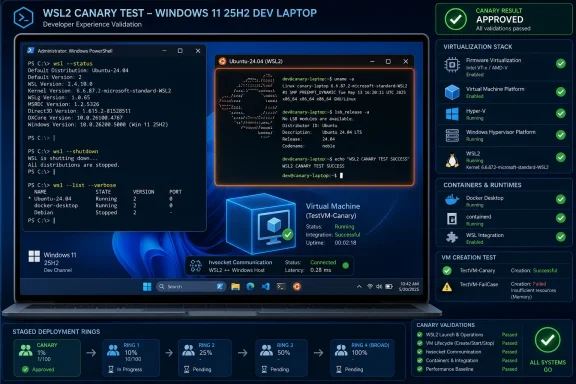 Treat WSL2 as a pre-rollout gate, not a post-upgrade help desk ticket
Microsoft’s current Windows 11 25H2 Release Health page, updated July 14, 2026, does not list a WSL-specific known issue. That is important: there is no Microsoft-confirmed broad 25H2 defect that justifies a blanket freeze across every Windows 11 developer device.But absence from Release Health is not the same as proof that every host configuration will survive the transition. A November 12, 2025 report in Microsoft’s WSL GitHub tracker described a Windows 11 25H2 build 26200.7171 system where WSL terminated during the
RegisterDistro/CreateVm phase, returning Wsl/InstallDistro/Service/RegisterDistro/CreateVm/0x8007273f.The report should be read correctly. It was a user report, not a confirmed fleet-wide 25H2 failure, and it does not establish that the OS update itself caused the condition. Still, it identifies the failure boundary that matters operationally: WSL can fail before a distribution VM exists, leaving a developer with no usable Linux environment rather than merely a broken package or an application-specific error.
A Microsoft WSL collaborator responding in that tracker said the error most likely pointed to an incorrectly configured hvsocket protocol provider. That moves the investigation toward host configuration and Hyper-V-related communication, rather than a simple “25H2 broke WSL” narrative. For deployment planning, that is more useful than a broad blame assignment: it tells administrators where to look and what to test.
The canary test should prove VM creation, not just report that WSL is installed
A readiness check needs to exercise the path that developers actually rely on. Seeing WSL enabled in Windows Features or finding an existing distribution listed bywsl --list --verbose is helpful, but it is not sufficient evidence that the service can register and create a Linux VM cleanly.Run this test on a representative canary group before moving 25H2 into the next servicing ring:
- Confirm that firmware virtualization is enabled and that the Windows hypervisor is configured to launch. WSL2 requires both firmware virtualization and an enabled hypervisor launch configuration, alongside the Virtual Machine Platform feature.
- Confirm that the Virtual Machine Platform Windows feature is enabled. If it is missing or disabled, WSL2 does not have the underlying virtualization layer it requires.
- Run
wsl --statusandwsl --list --verbosefrom an elevated Windows Terminal or PowerShell session. Record the installed distributions and whether they are operating as WSL version 2 before making the upgrade decision. - Stop the current WSL environment with
wsl --shutdown, then start a known working distribution again. This checks whether a fresh WSL startup succeeds rather than relying on a session that survived from an earlier state. - On a sacrificial canary device or a controlled test account, validate distribution registration and first launch. The meaningful test is whether WSL can progress through the service and VM-creation stages, not simply whether Windows accepts the
wslcommand. - Run a small developer workflow inside the distribution after startup: access the project location, invoke the team’s normal Linux command-line toolchain, and start the local container workflow if one is part of the endpoint’s baseline.
- If Windows itself is running as a virtual machine, verify that nested virtualization is exposed to that guest. Microsoft explicitly documents nested virtualization as an additional requirement in that scenario.
Why the failure boundary changes the upgrade recommendation
A developer whose WSL distribution launches but has a damaged toolchain has a repair problem. A developer whose host cannot complete WSL service startup or VM creation has an environment-access problem. The latter often blocks recovery steps that assume a functioning distribution is available in the first place.That is why the
CreateVm element of the reported error deserves attention. It suggests failure at the point where the Windows host must provide the virtualized Linux execution environment. Reinstalling a language runtime, refreshing a repository, or changing a project configuration will not resolve a host-side virtualization or protocol-provider misconfiguration.The sensible response is therefore targeted caution, not a blanket 25H2 hold. General productivity endpoints without WSL2 dependence can follow the normal servicing process. Developer endpoints where WSL2 is a primary work surface should remain in a controlled ring until the canary sequence passes on hardware and VM profiles that resemble the production fleet.
This also avoids a common rollout mistake: letting the first warning come from the most specialized users. The machine that runs containers, local Kubernetes-adjacent tooling, cross-platform build scripts, or a Linux-first repository is exactly the machine where WSL2 is not an optional convenience.
WindowsForum readers have already been discussing the practical performance and workflow differences between WSL2 and native Ubuntu under Windows 11 25H2. That comparison matters here because even a fast, well-tuned WSL2 environment is still dependent on the Windows virtualization host being healthy. Performance tuning is secondary if the host cannot bring the Linux VM online.
The hold decision should be tied to evidence, not fear of build 26200
Administrators should not infer from one GitHub issue that every Windows 11 25H2 device is at risk. Microsoft’s Release Health page does not currently identify WSL as a known 25H2 issue, and the WSL collaborator’s response points toward a potentially local hvsocket configuration problem.At the same time, teams should not dismiss the report because it is isolated. An isolated configuration failure can still become a repeatable fleet issue if its underlying condition exists in a standard image, a virtualization template, a security baseline, or a device-management policy.
The most useful deployment questions are concrete:
- Does the physical developer hardware expose and enable firmware virtualization consistently?
- Does the standard endpoint build keep Virtual Machine Platform enabled where WSL2 is approved?
- Does the hypervisor launch configuration remain enabled after the organization’s security and boot policies are applied?
- Do developer VMs receive nested virtualization rather than only the appearance of a WSL-capable Windows guest?
- Can a clean test distribution complete registration and startup after the 25H2 deployment sequence?
CreateVm failure pattern, pause only the affected developer ring, preserve the error text, compare the host’s virtualization configuration with a passing system, and investigate hvsocket-related configuration before attempting broad distro reinstalls.That approach is particularly important for virtual desktop and lab environments. A physical PC with firmware virtualization enabled and a Windows guest VM lacking nested virtualization may present similar user symptoms—WSL2 will not deliver a working Linux VM—but the remediation belongs to different owners. The endpoint team may control the local feature state; the virtualization platform team may control whether the necessary exposure reaches the guest.
Backup discipline matters because the Linux workspace is local state
A 25H2 readiness gate should include recovery planning, not just a pass/fail test. Developers often treat WSL distributions as disposable until they discover that source trees, package caches, local databases, SSH configuration, test fixtures, or container-related artifacts exist only inside the Linux filesystem.Before moving a developer ring, teams should identify which WSL distributions contain work that cannot be recreated quickly and use their established backup process to protect that data. The purpose is not to imply that 25H2 is expected to damage distributions; it is to remove the pressure to repair a host-side WSL failure while the only copy of active work remains inaccessible.
This is where development-channel history remains relevant even when the production target is 25H2. WindowsForum’s coverage of Windows 11 build 26200.8246 and WSL2 Ubuntu launch problems made the same operational point: preview systems are acceptable places to test changes, but they are poor places to keep the only viable copy of an active Linux development environment. The prudent policy applies equally to a controlled feature rollout.
Frequently Asked Questions
Should every organization block Windows 11 25H2 because of the WSL GitHub report?
No. The report from build 26200.7171 is a user-submitted issue, and Microsoft’s July 14, 2026 Release Health page does not list a WSL-specific known issue for 25H2. Hold or stage only WSL-dependent developer rings until their canary tests pass.Is checking that Ubuntu appears in wsl --list --verbose enough?
No. It verifies that Windows recognizes the distribution, but the readiness gate should also test a clean WSL shutdown and restart, plus registration or first launch on a controlled test distribution where possible. The risk described in the report is centered on service and VM creation.What is the first thing to verify if WSL cannot create a VM after 25H2?
Verify firmware virtualization, Virtual Machine Platform, and hypervisor launch configuration. If the affected Windows installation is itself a VM, verify nested virtualization as well; Microsoft documents it as required for WSL2 in that setup.Does an hvsocket reference prove that Windows 11 25H2 is defective?
No. A Microsoft WSL collaborator said the reported error most likely indicated an incorrectly configured hvsocket protocol provider. That points to a host-configuration investigation, not proof of a universal operating system regression.The next 25H2 servicing-ring decision should therefore be made after a WSL2 VM-creation canary, not after a checkbox confirms that the update installed. For developer endpoints, the valuable outcome is not merely build 26200—it is a verified Linux environment that still starts when the team needs it most.
References
- Primary source: learn.microsoft.com
Windows 11, version 25H2 known issues and notifications | Microsoft Learn
View announcements and review known issues and fixes for Windows 11, version 25H2learn.microsoft.com - Independent coverage: github.com
WSL Service Crashes During VM Creation on Windows 11 25H2 (Build 26200.7171) · Issue #13714 · microsoft/WSL · GitHub
Windows Version Microsoft Windows [Version 10.0.26200.7171] WSL Version 2.6.1.0 Are you using WSL 1 or WSL 2? WSL 2 WSL 1 Kernel Version No response Distro Version No response Other Software OS: Windows 11 Home (Official Stable Release) ... github.com
- Primary source: WindowsForum
WSL2 vs Native Ubuntu on Windows 11 25H2: Real-World Performance | Windows Forum
Microsoft’s own preview of Windows 11 25H2 may ship as a tiny enablement package, but running Ubuntu under WSL2 on that same Windows build is not...windowsforum.com