

Windows 11’s 25H2 update is less a flashy reboot and more a decisive turn toward intelligent computing — a carefully staged evolution that stitches generative AI, on‑device inference, stronger defaults for security, and practical usability polish into the operating system customers already know and manage.
Microsoft delivered Windows 11, version 25H2 as a measured, low‑friction update that acts as an enablement package for devices already on Windows 11 24H2. That delivery model means most eligible devices flip feature flags rather than performing a full OS rebase — a choice intended to reduce installation time, minimize reboots, and preserve application compatibility while resetting support windows. Microsoft published the 25H2 rollout on September 30, 2025, and signalled staged broader availability through enterprise channels like WSUS and Configuration Manager beginning October 14, 2025. This release is emblematic of a larger strategic shift: Windows as a platform and service rather than a boxed product that gets wholesale replaced every few years. The practical implication is continuity for IT and end users alike — stability and compatibility are preserved, while new experiences arrive incrementally through feature updates, cloud services, and hardware‑gated capabilities.
For professionals, editors, and organizations, the practical question is not whether AI belongs on the desktop — it already does — but how to adopt it responsibly: pilot the right hardware, configure governance early, and treat the rollout as a managed strategic program. In that disciplined approach, 25H2 is not merely an update; it is a turning point toward computing that is smarter, safer, and more inclusive.
Source: Indian Newslink Windows 11 25H2 heralds the dawn of Intelligent Computing
 Background / Overview
Microsoft delivered Windows 11, version 25H2 as a measured, low‑friction update that acts as an enablement package for devices already on Windows 11 24H2. That delivery model means most eligible devices flip feature flags rather than performing a full OS rebase — a choice intended to reduce installation time, minimize reboots, and preserve application compatibility while resetting support windows. Microsoft published the 25H2 rollout on September 30, 2025, and signalled staged broader availability through enterprise channels like WSUS and Configuration Manager beginning October 14, 2025. This release is emblematic of a larger strategic shift: Windows as a platform and service rather than a boxed product that gets wholesale replaced every few years. The practical implication is continuity for IT and end users alike — stability and compatibility are preserved, while new experiences arrive incrementally through feature updates, cloud services, and hardware‑gated capabilities.What 25H2 actually delivers — the essentials
25H2 bundles a set of overlapping priorities:- A Copilot‑first user experience that embeds generative and context‑aware AI across system surfaces (taskbar, selection overlays, File Explorer, and assistive flows).
- On‑device AI and Copilot+ hardware tiering that shifts latency‑sensitive inference to local NPUs on qualifying devices.
- Platform performance, reliability, and power improvements through engineering refinements and smaller servicing windows.
- Security hardening and stronger default protections (kernel‑level mitigations, expanded encryption and identity controls).
- Incremental design and accessibility polish: UI coherence, improved Narrator and Braille viewer, voice access upgrades, and energy‑saver refinements.
The Copilot‑First Desktop: integration, not ornament
Copilot becomes system fabric
Copilot has been reimagined from a standalone assistant to a context‑aware partner woven through the OS. Visible touchpoints include:- Ask Copilot on the taskbar (a one‑click access point for conversational assistance and Copilot Vision).
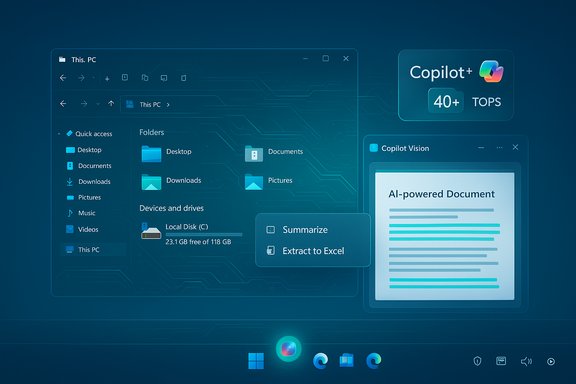
- Click to Do selection overlays that offer summarization, translation, table extraction, and inline prompts for selected text or images.
- Copilot Vision for scoped screen analysis (OCR and contextual UI insight), which operates with explicit permission and session‑based consent.
Subtlety over spectacle
A key strength in 25H2 is that AI features are designed to appear when useful and remain unobtrusive otherwise. For example, the selection overlay and File Explorer AI actions surface in context menus rather than forcing a persistent sidebar on every user. This approach reduces clutter and preserves conventional workflows while adding powerful shortcuts for productivity.On‑device AI and Copilot+ PCs: performance, privacy, and procurement
What makes a Copilot+ PC
Microsoft formalized a hardware tier — Copilot+ PCs — that pairs CPU and GPU with a high‑performance Neural Processing Unit (NPU). The spec widely referenced by Microsoft requires an NPU capable of 40+ TOPS (trillions of operations per second), which enables local inference for latency‑sensitive features such as Recall, Cocreator, Windows Studio Effects, and semantic search on the device. Microsoft documents this requirement and positions Copilot+ as the hardware tier that unlocks certain high‑responsiveness, privacy‑first experiences.Why local inference matters
- Latency: On‑device models avoid round trips to the cloud, delivering near‑instant results for interactive tasks like live translation or image editing.
- Privacy: Sensitive intermediate data can be kept on device for some flows, limiting cloud exposure when models run locally.
- Power efficiency: NPUs are optimized to run ML workloads more efficiently than general‑purpose CPUs, which can extend battery life when used judiciously.
Procurement and compatibility consequences
Specifying Copilot+ devices changes upgrade calculus for IT:- Hardware cost and lifecycle: Copilot+ PCs, especially early generations, carry a price premium and may force coordinated refresh cycles for organizations seeking the full set of AI features.
- Feature variability: Not all AI flows will run uniformly across devices — local‑only capabilities will be reserved for machines that meet Copilot+ criteria, while cloud‑backed equivalents may be available elsewhere under licensing.
- App compatibility: ARM‑based Copilot+ devices in earlier waves raised compatibility questions for legacy x86 apps; AMD/Intel Copilot+ silicon reduces that friction but IT should validate line‑of‑business software.
File Explorer, Click to Do, and productivity features
25H2 reframes File Explorer as an AI‑aware workspace rather than only a file browser. Notable additions:- AI actions in context menus — image edits (blur, remove background, erase objects) and a Summarize action for Microsoft 365 files stored in OneDrive or SharePoint. Some actions run locally on capable hardware; others use cloud assistance and Microsoft 365 entitlements.
- Convert to table / Extract to Excel — selection flows that identify simple on‑screen tables and convert them directly into a spreadsheet, saving manual copy/paste steps.
- Curated Microsoft 365 views — contextual Home views that surface shared files, people cards, and Copilot summaries for collaborative work.
Performance, reliability, and power: engineering under the hood
25H2’s engineering updates are intentionally incremental but meaningful:- Delivered as an enablement package over 24H2, 25H2 reduces download sizes and reboot windows for many systems, simplifying deployments.
- Microsoft emphasizes kernel‑level hardening, memory‑safety investments (incremental Rust adoption), and runtime vulnerability detection to reduce exploitation vectors over time.
- Power‑management tweaks such as Energy Saver defaults, adaptive CPU throttling based on user interaction, and refined sleep timeouts aim to improve battery life, particularly on laptops.
Security and privacy: stronger defaults, but expanded surface area
Windows 11 25H2 strengthens baseline protections while introducing new privacy questions:- Stronger defaults: Microsoft tightened default security posture, expanded encryption coverage, and improved identity flows (Windows Hello, passkeys).
- Enterprise controls: Admins gain new policy knobs to manage preinstalled Store apps, AI model usage, and recovery tooling — critical for governance at scale. WSUS delivery and enterprise channels were staged to begin October 14, 2025.
- Telemetry and data flows: Copilot Vision, Recall, and cloud fallbacks introduce more telemetry and cross‑service signals. Though Microsoft focuses on session‑based permissioning (for Vision) and local wake‑word detection before cloud audio capture, organizations must review data‑handling contracts and tenant configurations to manage risk.
- Licensing boundaries: Some Copilot experiences differ by paid Copilot seats and Microsoft 365 entitlements; improperly configured entitlements can produce inconsistent exposures across users.
Accessibility, design, and sustainability
25H2 continues Windows 11’s design evolution with a focus on clarity and inclusion:- Accessibility: Upgrades to Narrator, a Braille viewer, and more conversational Voice Access improve usability for people with disabilities. These are not minor additions — they expand who can participate with mainstream Windows devices.
- UI polish: Refinements to the Start menu, taskbar discoverability, and Settings reduce friction and clicks for everyday tasks; some UI elements are still being server‑gated and will roll out progressively.
- Energy efficiency: Small engineering refinements compound to measurable battery and idle power improvements, aligning platform evolution with sustainability goals.
Migration moment: Windows 10 retirement and what it means
Microsoft ended mainstream support for Windows 10 on October 14, 2025, creating a hard migration moment for many organizations and consumers. The company recommends upgrading eligible devices to Windows 11 or enrolling in the Consumer Extended Security Updates (ESU) program for a limited one‑year bridge. Microsoft’s guidance, lifecycle pages, and public communications have reiterated these options and the risks of remaining on an unsupported OS. For IT teams, three pragmatic paths emerge:- Upgrade in place on devices meeting Windows 11 requirements — a reasonable choice for compatible hardware.
- Purchase Copilot+ or modern Windows 11 devices to unlock full AI experiences and improved baseline security.
- Use ESU as a short bridge where hardware replacement is not immediately feasible.
Risks, unanswered questions, and caveats
Despite the clear benefits, 25H2 raises important considerations that must be acknowledged frankly.- Feature gating and fragmentation: The Copilot experience will vary across hardware and licensing tiers. Some on‑device flows are reserved for Copilot+ machines; cloud fallbacks and paid M365 Copilot seats create a patchwork of experiences that can be confusing for end users and administrators. Treat claims of “Copilot everywhere” with nuance — availability often depends on device class, tenant licensing, and staged rollout.
- Privacy and telemetry complexity: Session‑based permissions and local preprocessing reduce exposure, but any system that reasons across screen content, device history (Recall), and cloud models requires careful contractual and technical safeguards. Administrators should audit data flows and retention policies before enabling broad Copilot features.
- Procurement overhead: If organizations decide Copilot+ hardware is necessary, the capital and lifecycle planning consequences are non‑trivial. Early Copilot+ devices vary in cost and capability; IT will need to validate vendor claims (TOPS figures are useful but should be tested against real workloads).
- Unverifiable or evolving specifics: Some leaked or community‑reported details (codenames like “Next Valley” or prototype UI experiments) remain unconfirmed as product ship names or final designs. Treat these as design signals, not finished product commitments.
Practical guidance for IT and power users
For administrators and technically inclined users planning 25H2 adoption, the following checklist distills best practices and operational steps:- Inventory and compatibility check:
- Run PC Health Check and application compatibility tools.
- Flag devices that qualify for in‑place upgrade vs. those needing replacement.
- Pilot Copilot features and Copilot+ hardware:
- Test Copilot workflows on representative devices and with typical user data to validate performance and privacy settings.
- Evaluate whether local NPU acceleration materially changes workflows before approving Copilot+ procurement.
- Configure governance and privacy:
- Use Intune, Group Policy, and Microsoft 365 admin controls to set Copilot permissions, telemetry limits, and model usage policies.
- Document data retention and mapping for compliance teams.
- Plan phased rollouts:
- Leverage Windows Autopatch, Release Preview channels, and WSUS schedules (25H2 was staged to WSUS on October 14, 2025) to orchestrate controlled deployments.
- Train users and support teams:
- Prepare helpdesk scripts for common Copilot interactions and failing fallbacks (e.g., when local inference is unavailable).
- Communicate clearly about what features require licenses or Copilot+ hardware.
Critical analysis — strengths and long‑term implications
Windows 11 25H2’s strongest attributes are pragmatic and strategic rather than headline‑grabbing:- Strategic continuity: By treating Windows as a living service, Microsoft reduces migration churn, enabling organizations to adopt innovation without disruptive reimaging. This is a mature approach for an OS that increasingly functions as infrastructure.
- Meaningful productivity gains: Inline summarization, Click to Do table extraction, and File Explorer AI actions are the type of time‑savers that compound for knowledge workers and editors. When paired with tenant‑aware Copilot in M365, these features can materially shorten common tasks.
- Hardware‑aware optimization: Copilot+ and the 40+ TOPS threshold create a clear performance tier that vendors can target; that clarity accelerates silicon‑to‑software optimization and should yield an improving experience curve over time.
- Fragmented experience across hardware and license boundaries risks confusing users and imposing uneven productivity gains.
- Governance complexity: The richer the context AI consumes, the more meticulous IT and legal teams must be about consent, retention, and cross‑border data handling.
- Vendor lock‑in pressure: As Copilot becomes more central to workflows, organizations may face incentives to align closely with Microsoft’s cloud and device ecosystem to access the smoothest experiences. That trade‑off matters for long‑term flexibility.
Conclusion
Windows 11, version 25H2 does not announce a new era through spectacle; it composes one through careful, engineering‑led refinements that make intelligence useful, reliable, and more broadly available. By deepening Copilot’s role, defining Copilot+ hardware tiers, improving security defaults, and refining accessibility, Microsoft has positioned Windows to be a living, serviceable platform where AI augments human intent rather than eclipses it.For professionals, editors, and organizations, the practical question is not whether AI belongs on the desktop — it already does — but how to adopt it responsibly: pilot the right hardware, configure governance early, and treat the rollout as a managed strategic program. In that disciplined approach, 25H2 is not merely an update; it is a turning point toward computing that is smarter, safer, and more inclusive.
Source: Indian Newslink Windows 11 25H2 heralds the dawn of Intelligent Computing
