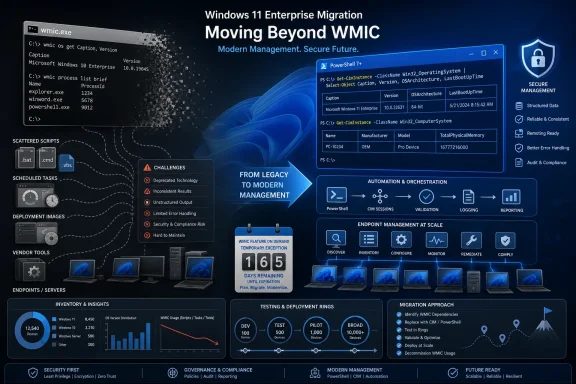
Windows 11 version 25H2 removes WMIC during the feature update, so organizations should treat every remaining
Microsoft deprecated the Windows Management Instrumentation Command-line utility in Windows 10 version 21H1, but the underlying WMI platform remains available. That distinction matters: administrators are not losing Windows instrumentation, only the legacy command-line interface used to query it.
Windows 11 version 25H2 became generally available on September 30, 2025. As detailed in Microsoft’s Windows documentation, the upgrade removes WMIC, although administrators can temporarily restore it through Optional Features or DISM.
A 25H2 pilot should begin with dependency discovery, not with clicking Download and install. Because 25H2 is delivered to Windows 11 24H2 devices as an enablement package, an update that looks operationally modest can expose inherited automation quickly.
If a pilot device has already been upgraded, first confirm whether the WMIC capability is present. Run PowerShell as an administrator:
To install the temporary compatibility feature through Settings:
Microsoft explicitly does not recommend treating this as the solution because WMIC is scheduled for complete removal in a future Windows release. The capability therefore buys migration time; it does not restore WMIC to supported strategic status.
Reinstall WMIC only when all of these conditions are true:
The following PowerShell example scans selected repositories for textual references to
Export the results when multiple teams need to triage them:
Scheduled tasks need a separate pass because a task action can contain an inline command or point to a wrapper stored elsewhere:
RMM systems deserve repository-level inspection rather than endpoint-only scanning. A component may download or generate a batch file at runtime, meaning no persistent local copy exists until the job executes. Export component definitions, script bodies, policies, monitors, and remediation packages from the RMM platform, then search those exports as text.
Inventory products and packaged applications also need an owner assigned even when the organization cannot edit their code. A vendor dependency is still an upgrade dependency; “third-party software” is not a remediation status.
Common translations include:
The migration should preserve the consumer’s expected contract. If another tool reads a CSV file, produce deliberate CSV rather than copying PowerShell’s formatted console table:
For structured integrations, JSON may be a better replacement:
Remote operations require additional testing. A WMIC command using remote-node and credential arguments should not be assumed to have identical authentication, firewall, delegation, or error behavior when converted to a CIM session.
Test remote replacements under the same service account, network boundary, privilege level, and management platform that will run them in production. An interactive success from an administrator workstation does not prove that an RMM agent running unattended will succeed.
Test the complete package lifecycle on a 25H2 device without WMIC:
Rollback testing must also verify data and job state, not merely whether Windows returns to the previous version. A management task may fail during the 25H2 test, record an incomplete inventory, and then remain “successful” after rollback because the scheduler only reports that the wrapper launched.
The safest pilot deliberately leaves WMIC absent. Reinstalling it before testing proves only that the compatibility bridge works; it does not reveal which scripts will break when that bridge disappears.
A practical remediation record should capture the device group, calling script or product, business owner, replacement, test status, temporary WMIC requirement, and removal deadline. This turns WMIC from a vague legacy concern into a finite change queue.
WindowsForum’s continuing coverage of WMIC removal and broader Windows legacy-component cleanup has emphasized PowerShell CIM/WMI migration, but the decisive work happens in local repositories and vendor relationships. The question is no longer whether administrators understand that WMIC is deprecated; it is whether they can name every process that still expects
Microsoft has not provided a specific date for WMIC’s complete future removal in the supplied guidance. That uncertainty makes a permanent reinstall strategy less defensible, not more: every temporary restoration should be treated as borrowed time, and every unmanaged dependency should keep its affected Windows 11 25H2 deployment ring closed.
wmic.exe dependency as an upgrade gate now. Reinstalling WMIC is defensible only as a documented, time-limited bridge for a known workload with an active migration owner; if the dependency is unknown, business-critical, vendor-controlled, or embedded in deployment media, migration and testing should block broad 25H2 deployment.Microsoft deprecated the Windows Management Instrumentation Command-line utility in Windows 10 version 21H1, but the underlying WMI platform remains available. That distinction matters: administrators are not losing Windows instrumentation, only the legacy command-line interface used to query it.
Windows 11 version 25H2 became generally available on September 30, 2025. As detailed in Microsoft’s Windows documentation, the upgrade removes WMIC, although administrators can temporarily restore it through Optional Features or DISM.
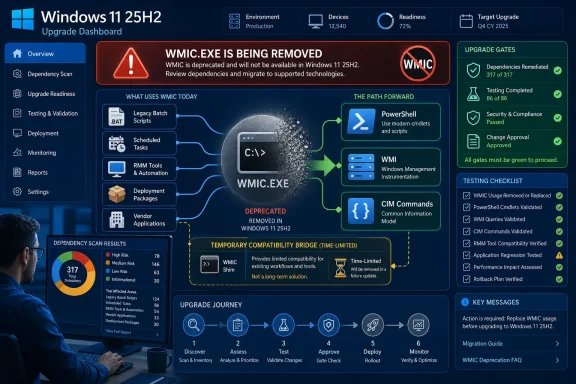 Make the Reinstall Decision Before the Upgrade
A 25H2 pilot should begin with dependency discovery, not with clicking Download and install. Because 25H2 is delivered to Windows 11 24H2 devices as an enablement package, an update that looks operationally modest can expose inherited automation quickly.If a pilot device has already been upgraded, first confirm whether the WMIC capability is present. Run PowerShell as an administrator:
Code:
Get-WindowsCapability -Online |
Where-Object Name -Like 'WMIC*'- Open Settings.
- Select System, followed by Optional features.
- Choose the option to view or add an optional feature.
- Search for WMIC.
- Select it and complete the installation.
DISM /Online /Add-Capability /CapabilityName:WMIC~~~~Microsoft explicitly does not recommend treating this as the solution because WMIC is scheduled for complete removal in a future Windows release. The capability therefore buys migration time; it does not restore WMIC to supported strategic status.
Reinstall WMIC only when all of these conditions are true:
- The exact dependent script, product, or management job has been identified.
- Its business owner has accepted a written retirement date.
- The dependency has a tested migration plan.
- The temporary installation can be tracked and removed centrally.
- A failed WMIC call will not silently corrupt inventory, compliance, deployment, or recovery data.
Find WMIC Where Administrators Rarely Look
The obvious search target is a shared scripts directory, but WMIC often survives inside old batch files, software packaging wrappers, scheduled tasks, logon scripts, RMM component libraries, and vendor-provided diagnostic tools. Searching only.ps1 files misses precisely the older automation most likely to call it.The following PowerShell example scans selected repositories for textual references to
wmic:
Code:
$Roots = @(
    'C:\Scripts',
    'C:\ProgramData',
    '\\FileServer\Automation',
    '\\FileServer\SoftwarePackages',
    '\\FileServer\RMM-Exports'
)

$Extensions = '*.bat', '*.cmd', '*.ps1', '*.vbs', '*.txt', '*.xml'

foreach ($Root in $Roots) {
    if (Test-Path $Root) {
        Get-ChildItem -Path $Root -Recurse -File -Include $Extensions `
            -ErrorAction SilentlyContinue |
        Select-String -Pattern '\bwmic(\.exe)?\b' |
        Select-Object Path, LineNumber, Line
    }
}
Code:
$Results = foreach ($Root in $Roots) {
    if (Test-Path $Root) {
        Get-ChildItem -Path $Root -Recurse -File -Include $Extensions `
            -ErrorAction SilentlyContinue |
        Select-String -Pattern '\bwmic(\.exe)?\b' |
        Select-Object Path, LineNumber, Line
    }
}

$Results | Export-Csv '.\WMIC-Dependencies.csv' -NoTypeInformation
Code:
Get-ScheduledTask | ForEach-Object {
    $Task = $_

    foreach ($Action in $Task.Actions) {
        $CommandLine = "$($Action.Execute) $($Action.Arguments)"

        if ($CommandLine -match '\bwmic(\.exe)?\b') {
            [pscustomobject]@{
                TaskPath    = $Task.TaskPath
                TaskName    = $Task.TaskName
                Execute     = $Action.Execute
                Arguments   = $Action.Arguments
            }
        }
    }
} | Export-Csv '.\WMIC-ScheduledTasks.csv' -NoTypeInformationInventory products and packaged applications also need an owner assigned even when the organization cannot edit their code. A vendor dependency is still an upgrade dependency; “third-party software” is not a remediation status.
Translate Behavior, Not Just Command Names
Most WMIC inventory queries map cleanly toGet-CimInstance, but a mechanical substitution is rarely sufficient. PowerShell returns objects, while legacy WMIC scripts frequently depend on fixed text, /value output, CSV formatting, aliases, and parsing with for /f or findstr.Common translations include:
wmic os get Caption,Version
Code:
Get-CimInstance -ClassName Win32_OperatingSystem |
    Select-Object Caption, Version
wmic computersystem get Manufacturer,Model,Name
Code:
Get-CimInstance -ClassName Win32_ComputerSystem |
    Select-Object Manufacturer, Model, Name
wmic logicaldisk get DeviceID,FreeSpace,Size
Code:
Get-CimInstance -ClassName Win32_LogicalDisk |
    Select-Object DeviceID, FreeSpace, Size
wmic process where "name='notepad.exe'" get ProcessId,CommandLine
Code:
Get-CimInstance -ClassName Win32_Process `
    -Filter "Name='notepad.exe'" |
    Select-Object ProcessId, CommandLine
Code:
Get-CimInstance -ClassName Win32_OperatingSystem |
    Select-Object Caption, Version |
    Export-Csv '.\OperatingSystem.csv' -NoTypeInformation
Code:
Get-CimInstance -ClassName Win32_ComputerSystem |
    Select-Object Manufacturer, Model, Name |
    ConvertTo-Json |
    Set-Content '.\ComputerSystem.json'
Code:
$Session = New-CimSession -ComputerName 'PC-01'

Get-CimInstance -ClassName Win32_OperatingSystem `
    -CimSession $Session |
    Select-Object Caption, Version

Remove-CimSession $SessionVendor Tools and Deployment Images Raise the Stakes
Packaged applications can invoke WMIC during installation, repair, removal, licensing, or hardware detection. That means a product may appear healthy after the 25H2 upgrade but fail months later when a repair action runs.Test the complete package lifecycle on a 25H2 device without WMIC:
- Install the application from a clean state.
- Launch it and exercise its hardware or inventory functions.
- Run its repair operation.
- Apply an available product update.
- Uninstall it.
- Review installer and application logs for failed command launches.
Rollback testing must also verify data and job state, not merely whether Windows returns to the previous version. A management task may fail during the 25H2 test, record an incomplete inventory, and then remain “successful” after rollback because the scheduler only reports that the wrapper launched.
The safest pilot deliberately leaves WMIC absent. Reinstalling it before testing proves only that the compatibility bridge works; it does not reveal which scripts will break when that bridge disappears.
The Upgrade Gate Needs an Owner and an Exit Date
Classify each discovery result by operational consequence. A cosmetic workstation report can usually migrate after a short validation cycle, while a dependency controlling software deployment, compliance, recovery, licensing, or remote remediation deserves a deployment hold.A practical remediation record should capture the device group, calling script or product, business owner, replacement, test status, temporary WMIC requirement, and removal deadline. This turns WMIC from a vague legacy concern into a finite change queue.
WindowsForum’s continuing coverage of WMIC removal and broader Windows legacy-component cleanup has emphasized PowerShell CIM/WMI migration, but the decisive work happens in local repositories and vendor relationships. The question is no longer whether administrators understand that WMIC is deprecated; it is whether they can name every process that still expects
wmic.exe to exist.Microsoft has not provided a specific date for WMIC’s complete future removal in the supplied guidance. That uncertainty makes a permanent reinstall strategy less defensible, not more: every temporary restoration should be treated as borrowed time, and every unmanaged dependency should keep its affected Windows 11 25H2 deployment ring closed.
References
- Primary source: learn.microsoft.com
Deprecated features in the Windows client | Microsoft Learn
Review the list of features that Microsoft is no longer actively developing in Windows 10 and Windows 11.learn.microsoft.com - Primary source: WindowsForum
WMIC Removal in Windows 11 25H2: Migrate to PowerShell CIM/WMI | Windows Forum
Microsoft has begun removing the long‑standing Windows Management Instrumentation Command‑line (WMIC) tool from Windows images — WMIC will be absent by...windowsforum.com