

Microsoft’s early-July Windows 11 Insider builds add a recovery tool capable of reinstalling the OS from the Windows Recovery Environment, while also testing long-requested taskbar placement controls, fewer update restarts, and cleaner Search behavior.
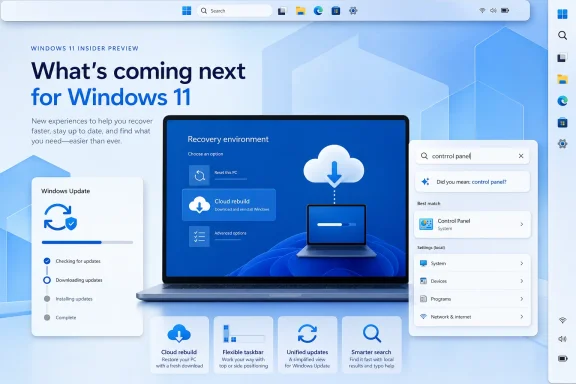
Per Microsoft’s July 6 release notes, Experimental build 26300.8772 for Windows 11 version 26H2 introduces Cloud rebuild. The option appears in WinRE under Troubleshoot and can reinstall Windows even if the installed OS will not boot. Unlike the existing cloud-based Reset this PC path, it downloads both the selected Windows image and device drivers from Windows Update, avoiding the need for installation media or a custom recovery image.
That convenience comes with the usual clean-install consequence: the disk is erased. The PC also needs a working wired or Wi-Fi connection inside WinRE. For administrators and enthusiasts dealing with a machine that will not start, it could be a useful last-resort option before reaching for a USB installer.
The same Experimental build enables Windows settings backup and restore by default on eligible Microsoft Entra joined and hybrid-joined commercial devices running 26H2. Microsoft says existing policy settings retain priority, and restore remains opt-in and administrator-managed. The practical change is that user settings and the Microsoft Store app list should be captured without admins first deploying a dedicated backup policy.
Microsoft also refreshed the Start menu’s Account Control flyout. It now foregrounds account status, subscription information, storage details, and available benefits. This is a visual change rather than a new management capability, but it is clearly aimed at making Microsoft 365 subscription status more visible.
The implementation is unfinished. Microsoft says touch gestures, the Search box, and Ask Copilot support are still being worked on for alternate positions; auto-hide and the touch-optimized taskbar are not yet supported there.
That build also adds a genuinely smaller taskbar mode. Setting “Show smaller taskbar buttons” to Always now reduces both icon size and the taskbar’s height, rather than shrinking buttons alone.
For eligible K–12 tenants, Microsoft is also offering a no-cost upgrade path from Windows 11 Home to Pro Education. The process requires a local sign-in, an elevated Command Prompt running
Finally, Microsoft began a controlled rollout of Windows Search changes on July 13 for Experimental build 26300.8772. As reported by Windows Central, the work includes a simpler Search home screen, stronger local-result ranking, typo handling, and controls for web and Store results.
All of these changes are Insider-only experiments for now, so production PCs should wait for a supported release.
Per Microsoft’s July 6 release notes, Experimental build 26300.8772 for Windows 11 version 26H2 introduces Cloud rebuild. The option appears in WinRE under Troubleshoot and can reinstall Windows even if the installed OS will not boot. Unlike the existing cloud-based Reset this PC path, it downloads both the selected Windows image and device drivers from Windows Update, avoiding the need for installation media or a custom recovery image.
That convenience comes with the usual clean-install consequence: the disk is erased. The PC also needs a working wired or Wi-Fi connection inside WinRE. For administrators and enthusiasts dealing with a machine that will not start, it could be a useful last-resort option before reaching for a USB installer.
 Recovery and management changes
The same Experimental build enables Windows settings backup and restore by default on eligible Microsoft Entra joined and hybrid-joined commercial devices running 26H2. Microsoft says existing policy settings retain priority, and restore remains opt-in and administrator-managed. The practical change is that user settings and the Microsoft Store app list should be captured without admins first deploying a dedicated backup policy.Microsoft also refreshed the Start menu’s Account Control flyout. It now foregrounds account status, subscription information, storage details, and available benefits. This is a visual change rather than a new management capability, but it is clearly aimed at making Microsoft 365 subscription status more visible.
Taskbar flexibility returns—partly
Experimental 26H1 build 28120.2387 restores the ability to place the taskbar at the top, left, or right side of the display, in addition to its standard bottom position. Tooltips, flyouts, and animations adapt to the selected edge, and most existing customization settings continue to apply.The implementation is unfinished. Microsoft says touch gestures, the Search box, and Ask Copilot support are still being worked on for alternate positions; auto-hide and the touch-optimized taskbar are not yet supported there.
That build also adds a genuinely smaller taskbar mode. Setting “Show smaller taskbar buttons” to Always now reduces both icon size and the taskbar’s height, rather than shrinking buttons alone.
Updates, education, and Search
Beta build 26220.8764 begins testing a unified Windows Update cycle that coordinates driver, .NET, and firmware updates with the monthly quality update. Microsoft’s stated goal is to reduce this to one restart per month where possible.For eligible K–12 tenants, Microsoft is also offering a no-cost upgrade path from Windows 11 Home to Pro Education. The process requires a local sign-in, an elevated Command Prompt running
ClipUpgrade.exe, and verification with an eligible school account. Microsoft notes that the upgrade is one-way without a clean reinstall.Finally, Microsoft began a controlled rollout of Windows Search changes on July 13 for Experimental build 26300.8772. As reported by Windows Central, the work includes a simpler Search home screen, stronger local-result ranking, typo handling, and controls for web and Store results.
All of these changes are Insider-only experiments for now, so production PCs should wait for a supported release.
References
- Primary source: Windows Central
Published: 2026-07-16T17:17:46+00:00
Loading…
www.windowscentral.com - Official source: blogs.windows.com
Announcing new builds for July 6 2026
Hello Windows Insiders, We have new releases today with builds across Beta and Experimental. New builds this week Today we are releasing new Windows 11 Insider Preview Builds. As a reminder, all Insiders can find the relblogs.windows.com - Official source: learn.microsoft.com
Windows 11 Insider Experimental Preview Build 26300.8772 - Windows Insider Program | Microsoft Learn
Release notes for Windows 11 Insider Experimental Preview Build 26300.8772learn.microsoft.com