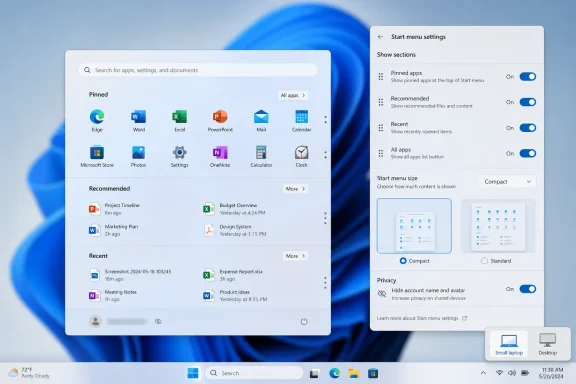
Microsoft is preparing another Windows 11 Start menu redesign for later in 2026, with Insider builds showing a smaller layout option, section-hiding controls, privacy tweaks, and performance work aimed at making the menu feel faster and less intrusive on everyday PCs. The change is not just cosmetic. It is Microsoft admitting, without quite saying so, that the Windows 11 Start menu has spent five years being more of a corporate strategy surface than a user-controlled launcher. The next version looks like a course correction, but also a test of whether Windows can still revise itself around user habit rather than product ambition.
The Start menu has always carried more emotional weight than its square footage suggests. It is only a launcher, until Microsoft changes it; then it becomes a referendum on whether the company understands how people actually use Windows. Windows 11 made that tension worse by replacing the familiar left-anchored, dense, configurable Windows 10 Start experience with a centered panel that looked cleaner but often felt less useful.
The latest reporting says Microsoft is preparing yet another iteration, expected around Windows 11 26H2 in October 2026. The current redesign still rolling out through 24H2 and 25H2 brought a larger Start menu with pinned apps, recommendations, and an app list living together in a more expansive layout. That approach made sense on paper: fewer clicks, more visible content, a Start menu that adapted to modern screen sizes.
But Windows users are rarely asking for more Start menu. They are asking for the right things to appear quickly, predictably, and without taking over the desktop. The criticism that the new menu is simply too large is not a nitpick; it is a complaint about proportionality. A launcher that consumes too much space begins to feel less like a control surface and more like a modal interruption.
That is why the next redesign matters. Microsoft appears to be moving from a single opinionated Start menu toward a menu that can be made smaller, simpler, and less personally revealing. In Windows terms, that is almost radical restraint.
The “Recommended” area has been the emblem of that fight. Microsoft frames it as convenience: recent files, newly installed apps, suggested items, and a fast path back to work. Many users experience it as wasted space, an awkward privacy exposure during screen sharing, or a place where Microsoft’s idea of relevance competes with their own.
The 2025-era redesign tried to bring more into view by merging pinned apps, recommendations, and installed apps into a single larger structure. That addressed one old complaint — the extra click to reach “All apps” — while creating another. The Start menu became more comprehensive, but also more visually demanding.
This is a familiar Microsoft pattern. The company often solves a navigation complaint by increasing surface area: more panes, more feeds, more adaptive sections, more context. Power users then ask for density, predictability, and off switches. The next Start menu revision suggests Microsoft has heard that second half more clearly this time.
The Large preset appears aimed at users who like the newer model: more pinned apps, bigger category sections, more visible navigation, fewer trips into secondary views. That can be useful on high-resolution monitors, touch-forward devices, and PCs where Start acts as a dashboard rather than a quick launcher. For some users, the Windows 11 Start menu is not too big; it is finally broad enough to expose the system.
The Small preset is the more revealing addition. It acknowledges that the same design does not work equally well on compact laptops, low-resolution displays, remote sessions, virtual machines, and enterprise desktops where the Start menu is opened hundreds of times a week for one narrow reason. On those machines, every extra pixel is friction.
The best Windows customization options are not ornamental. They let the same operating system serve contradictory habits without requiring third-party shell replacements. If Microsoft gets this right, the Start menu can be a larger app discovery surface for one person and a compact launch strip for another.
A Start menu with only pinned apps is not a fringe request. It is the cleanest expression of what many users want from Start: a personally curated set of launch targets, with search available when memory fails. A Start menu without Recommended is not a rejection of productivity; it is a rejection of Microsoft’s assumption that recent activity deserves permanent real estate.
The ability to hide the account name and profile image is also more than cosmetic. Windows PCs are used in classrooms, conference rooms, streaming setups, help-desk calls, courtrooms, hospitals, and shared family spaces. A Start menu that exposes identity by default can be awkward in precisely the places where Windows is supposed to be a dependable professional tool.
The tension is that Microsoft likes adaptive surfaces because they create room for services, intelligence, and cross-device continuity. Users like static surfaces because they create trust. The new toggles are Microsoft conceding that a shell feature cannot earn trust if it cannot be pared back.
Windows 11 has suffered from a perception problem around responsiveness. On capable hardware, it is usually fast enough; on older or lower-end systems, small delays in File Explorer, context menus, Settings, widgets, and Start can make the whole OS feel less immediate than Windows 10. That impression is hard to shake because shell latency is encountered constantly.
The reported Low Latency Profile fits into that same campaign. The idea is straightforward: briefly push CPU behavior toward responsiveness during interactive shell tasks, such as opening the Start menu or launching common UI surfaces. This is not the same as making Windows fundamentally lighter, but it can make the machine feel more awake when the user asks for something.
There is a risk here. If responsiveness depends on momentary CPU boosting, skeptics will say Microsoft is papering over bloat rather than removing it. But the native WinUI work points in the healthier direction: reduce the overhead, then use scheduling tricks to polish the remaining edge cases.
Microsoft’s incentives are obvious. Start is valuable because it can shape behavior. Put recommendations there, and users may reopen recent files. Put Store suggestions there, and app discovery improves. Put account affordances there, and Microsoft’s identity layer becomes harder to ignore. Put phone integration there, and Windows becomes the hub in a broader device graph.
Users’ incentives are simpler. They want the Start menu to open quickly, show what they asked it to show, and get out of the way. When those goals collide, Microsoft tends to describe the result as personalization while users describe it as clutter.
The 2026 redesign appears to be an attempt to reconcile those incentives without fully abandoning Microsoft’s broader strategy. The company is not returning to the Windows 7 Start menu, nor is it reviving Live Tiles. It is instead adding escape hatches to the Windows 11 model: smaller size, fewer sections, less identity exposure, and better performance.
That may be the only politically realistic path inside Microsoft. The old Start menu is not coming back wholesale. But the new one can become less stubborn.
The new customization controls could help, but only if they are manageable. A Start menu that users can tailor is good for personal PCs; a Start menu that enterprises can standardize is good for fleets. Microsoft’s challenge is to expose enough policy and provisioning control that organizations can decide whether employees see Recommended, All apps, account identity, and large layouts by default.
There is also the matter of rollout timing. Windows 11 feature delivery has become less tied to the old annual-release mental model and more dependent on controlled rollouts, enablement packages, cumulative updates, and Insider-to-stable promotion. That makes the question “when does this arrive?” more slippery than the version number suggests.
If the changes are indeed aimed at Windows 11 26H2 in October 2026, many users still may not see them on day one. Microsoft has increasingly staged features across supported versions and hardware populations. For IT departments, that means the Start menu redesign is not a single event so much as a moving target that must be tested against images, policies, accessibility requirements, and user expectations.
A Start menu redesign followed by another redesign can look like responsiveness. It can also look like churn. Users do not want Start to become a seasonal product experiment. They want to stop thinking about it.
The best version of this next update would make Start feel boring again. Not neglected, not frozen, but boring in the way reliable infrastructure is boring. Press the Windows key, see the expected items, type if necessary, launch, leave.
That is a higher bar than it sounds. It requires Microsoft to resist filling every reclaimed space with another recommendation, another account prompt, another AI-adjacent suggestion, or another “helpful” cross-device card. If the Small preset merely shrinks the same agenda, it will not solve the trust problem.
The irony is that Microsoft’s most effective upgrade argument may not be Copilot, app recommendations, or a new settings page. It may be a Start menu that opens instantly and lets users delete the parts they dislike. That is not glamorous, but Windows has always won loyalty through accumulated practical trust.
For enthusiasts, this redesign will be judged by density, speed, and whether the Recommended section can truly disappear without leaving an awkward scar. For administrators, it will be judged by policy, consistency, and whether Microsoft documents the behavior clearly enough to deploy. For ordinary users, it will be judged in a fraction of a second: does the menu feel like it belongs to me?
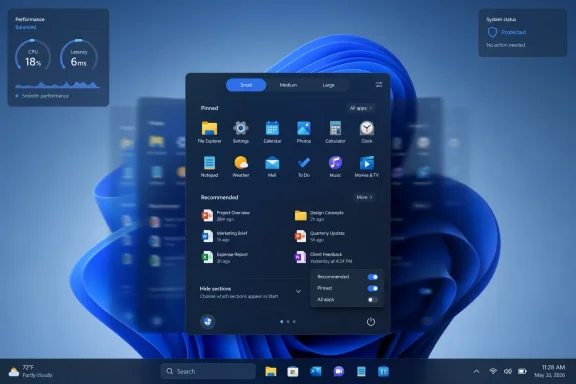 Microsoft Finally Treats the Start Menu Like a Place People Live
The Start menu has always carried more emotional weight than its square footage suggests. It is only a launcher, until Microsoft changes it; then it becomes a referendum on whether the company understands how people actually use Windows. Windows 11 made that tension worse by replacing the familiar left-anchored, dense, configurable Windows 10 Start experience with a centered panel that looked cleaner but often felt less useful.The latest reporting says Microsoft is preparing yet another iteration, expected around Windows 11 26H2 in October 2026. The current redesign still rolling out through 24H2 and 25H2 brought a larger Start menu with pinned apps, recommendations, and an app list living together in a more expansive layout. That approach made sense on paper: fewer clicks, more visible content, a Start menu that adapted to modern screen sizes.
But Windows users are rarely asking for more Start menu. They are asking for the right things to appear quickly, predictably, and without taking over the desktop. The criticism that the new menu is simply too large is not a nitpick; it is a complaint about proportionality. A launcher that consumes too much space begins to feel less like a control surface and more like a modal interruption.
That is why the next redesign matters. Microsoft appears to be moving from a single opinionated Start menu toward a menu that can be made smaller, simpler, and less personally revealing. In Windows terms, that is almost radical restraint.
The Big Menu Was a Solution to a Problem Microsoft Misread
The current Windows 11 Start menu problem is not that Microsoft redesigned it. Windows has always evolved through contested Start menu eras: Windows XP’s two-column utility cabinet, Windows 8’s full-screen revolt, Windows 10’s compromise between tiles and lists, and Windows 11’s centered minimalism. The problem is that Windows 11’s Start menu often feels designed around Microsoft’s preferred content hierarchy rather than the user’s muscle memory.The “Recommended” area has been the emblem of that fight. Microsoft frames it as convenience: recent files, newly installed apps, suggested items, and a fast path back to work. Many users experience it as wasted space, an awkward privacy exposure during screen sharing, or a place where Microsoft’s idea of relevance competes with their own.
The 2025-era redesign tried to bring more into view by merging pinned apps, recommendations, and installed apps into a single larger structure. That addressed one old complaint — the extra click to reach “All apps” — while creating another. The Start menu became more comprehensive, but also more visually demanding.
This is a familiar Microsoft pattern. The company often solves a navigation complaint by increasing surface area: more panes, more feeds, more adaptive sections, more context. Power users then ask for density, predictability, and off switches. The next Start menu revision suggests Microsoft has heard that second half more clearly this time.
Small and Large Is Really About Consent
The reported Small and Large presets sound like ordinary personalization. They are more important than that. A resizable Start menu is Microsoft giving users a degree of consent over how much of the desktop the shell is allowed to occupy.The Large preset appears aimed at users who like the newer model: more pinned apps, bigger category sections, more visible navigation, fewer trips into secondary views. That can be useful on high-resolution monitors, touch-forward devices, and PCs where Start acts as a dashboard rather than a quick launcher. For some users, the Windows 11 Start menu is not too big; it is finally broad enough to expose the system.
The Small preset is the more revealing addition. It acknowledges that the same design does not work equally well on compact laptops, low-resolution displays, remote sessions, virtual machines, and enterprise desktops where the Start menu is opened hundreds of times a week for one narrow reason. On those machines, every extra pixel is friction.
The best Windows customization options are not ornamental. They let the same operating system serve contradictory habits without requiring third-party shell replacements. If Microsoft gets this right, the Start menu can be a larger app discovery surface for one person and a compact launch strip for another.
Hiding Sections Is the Feature Users Were Really Asking For
The more consequential change is not size; it is removal. Reports say the next Start menu will let users hide sections such as Pinned, All apps, and Recommended, along with the account name and profile image. That is the kind of control Windows 11 should have shipped with from the beginning.A Start menu with only pinned apps is not a fringe request. It is the cleanest expression of what many users want from Start: a personally curated set of launch targets, with search available when memory fails. A Start menu without Recommended is not a rejection of productivity; it is a rejection of Microsoft’s assumption that recent activity deserves permanent real estate.
The ability to hide the account name and profile image is also more than cosmetic. Windows PCs are used in classrooms, conference rooms, streaming setups, help-desk calls, courtrooms, hospitals, and shared family spaces. A Start menu that exposes identity by default can be awkward in precisely the places where Windows is supposed to be a dependable professional tool.
The tension is that Microsoft likes adaptive surfaces because they create room for services, intelligence, and cross-device continuity. Users like static surfaces because they create trust. The new toggles are Microsoft conceding that a shell feature cannot earn trust if it cannot be pared back.
Native WinUI Is Microsoft’s Quiet Apology for Shell Sluggishness
The performance angle may prove just as important as the layout. PCWorld and Windows Latest describe Microsoft rebuilding the Start menu with native WinUI, moving away from pieces that have been associated with heavier, web-influenced rendering. If the result is a menu that opens faster, scrolls more smoothly, and consumes fewer resources, users will notice even if they never learn the framework name.Windows 11 has suffered from a perception problem around responsiveness. On capable hardware, it is usually fast enough; on older or lower-end systems, small delays in File Explorer, context menus, Settings, widgets, and Start can make the whole OS feel less immediate than Windows 10. That impression is hard to shake because shell latency is encountered constantly.
The reported Low Latency Profile fits into that same campaign. The idea is straightforward: briefly push CPU behavior toward responsiveness during interactive shell tasks, such as opening the Start menu or launching common UI surfaces. This is not the same as making Windows fundamentally lighter, but it can make the machine feel more awake when the user asks for something.
There is a risk here. If responsiveness depends on momentary CPU boosting, skeptics will say Microsoft is papering over bloat rather than removing it. But the native WinUI work points in the healthier direction: reduce the overhead, then use scheduling tricks to polish the remaining edge cases.
The Start Menu Has Become a Proxy War Over Modern Windows
Start menu arguments are rarely just about Start. They are about whether Windows is still primarily a user-controlled desktop operating system or a managed experience that nudges people toward Microsoft accounts, cloud files, Store apps, Copilot surfaces, and cross-device workflows. The Start menu sits at the center of that debate because it is the first system surface many users touch.Microsoft’s incentives are obvious. Start is valuable because it can shape behavior. Put recommendations there, and users may reopen recent files. Put Store suggestions there, and app discovery improves. Put account affordances there, and Microsoft’s identity layer becomes harder to ignore. Put phone integration there, and Windows becomes the hub in a broader device graph.
Users’ incentives are simpler. They want the Start menu to open quickly, show what they asked it to show, and get out of the way. When those goals collide, Microsoft tends to describe the result as personalization while users describe it as clutter.
The 2026 redesign appears to be an attempt to reconcile those incentives without fully abandoning Microsoft’s broader strategy. The company is not returning to the Windows 7 Start menu, nor is it reviving Live Tiles. It is instead adding escape hatches to the Windows 11 model: smaller size, fewer sections, less identity exposure, and better performance.
That may be the only politically realistic path inside Microsoft. The old Start menu is not coming back wholesale. But the new one can become less stubborn.
Enterprise IT Will Care Less About Beauty Than Predictability
For administrators, the Start menu is not mainly a design object. It is a support surface. Every change to layout, app grouping, search behavior, profile display, and recommendations can create documentation churn, help-desk tickets, and training friction.The new customization controls could help, but only if they are manageable. A Start menu that users can tailor is good for personal PCs; a Start menu that enterprises can standardize is good for fleets. Microsoft’s challenge is to expose enough policy and provisioning control that organizations can decide whether employees see Recommended, All apps, account identity, and large layouts by default.
There is also the matter of rollout timing. Windows 11 feature delivery has become less tied to the old annual-release mental model and more dependent on controlled rollouts, enablement packages, cumulative updates, and Insider-to-stable promotion. That makes the question “when does this arrive?” more slippery than the version number suggests.
If the changes are indeed aimed at Windows 11 26H2 in October 2026, many users still may not see them on day one. Microsoft has increasingly staged features across supported versions and hardware populations. For IT departments, that means the Start menu redesign is not a single event so much as a moving target that must be tested against images, policies, accessibility requirements, and user expectations.
The Risk Is That Microsoft Keeps Redesigning Instead of Deciding
There is a charitable reading of this story: Microsoft is listening, iterating, and improving a core Windows experience based on feedback. That is probably true. The less charitable reading is also plausible: Windows 11’s shell design is still unsettled years after launch, and the company keeps revisiting the same surfaces because it cannot decide how much control users should have.A Start menu redesign followed by another redesign can look like responsiveness. It can also look like churn. Users do not want Start to become a seasonal product experiment. They want to stop thinking about it.
The best version of this next update would make Start feel boring again. Not neglected, not frozen, but boring in the way reliable infrastructure is boring. Press the Windows key, see the expected items, type if necessary, launch, leave.
That is a higher bar than it sounds. It requires Microsoft to resist filling every reclaimed space with another recommendation, another account prompt, another AI-adjacent suggestion, or another “helpful” cross-device card. If the Small preset merely shrinks the same agenda, it will not solve the trust problem.
The October Bet Is Really a Trust Bet
The expected October 2026 timing puts the Start menu redesign in the broader shadow of Windows 11 26H2. By then, Windows 10 will be well into its post-mainstream-support era for many users, and Microsoft will be under continued pressure to make Windows 11 feel like the natural destination rather than the unavoidable one. Shell quality matters more in that context than spec sheets do.The irony is that Microsoft’s most effective upgrade argument may not be Copilot, app recommendations, or a new settings page. It may be a Start menu that opens instantly and lets users delete the parts they dislike. That is not glamorous, but Windows has always won loyalty through accumulated practical trust.
For enthusiasts, this redesign will be judged by density, speed, and whether the Recommended section can truly disappear without leaving an awkward scar. For administrators, it will be judged by policy, consistency, and whether Microsoft documents the behavior clearly enough to deploy. For ordinary users, it will be judged in a fraction of a second: does the menu feel like it belongs to me?
The Next Start Menu Has to Prove Microsoft Can Still Subtract
The most concrete lesson from this redesign is that Microsoft is being pushed toward subtraction, not addition. That is unusual for a company that often treats Windows as a platform for more surfaces, more services, and more assisted workflows.- Microsoft is reportedly preparing a further Start menu redesign for Windows 11 26H2, expected later in 2026.
- The new design is expected to include Small and Large layout presets, giving users more control over how much screen space Start occupies.
- Users should be able to hide major sections such as Recommended, Pinned, and All apps, making a more minimal Start menu possible.
- The option to hide the account name and profile image addresses a real privacy concern for screen sharing, streaming, and shared-device use.
- Native WinUI work and the Low Latency Profile suggest Microsoft understands that Start menu performance is now part of the Windows 11 credibility problem.
- The redesign will succeed only if Microsoft treats customization as user control, not as a temporary compromise before the next promoted surface arrives.
References
- Primary source: PCWorld
Published: Thu, 02 Jul 2026 14:34:00 GMT
Windows 11's Start menu redesign is getting a redesign | PCWorld
Microsoft is testing a resizable, more customizable Start menu for Windows 11 26H2, aimed at fixing complaints about the current design.www.pcworld.com - Official source: learn.microsoft.com
Customize the Windows 11 Start menu | Microsoft Learn
How to pin OEM apps in the Windows 11 start menulearn.microsoft.com - Related coverage: windowslatest.com
Microsoft is rewriting Windows 11 shell in native code, killing the web slop slowing your PC
To fix performance issues, Microsoft is replacing sluggish React Native and WebView components in Windows 11 shell with fast WinUI frameworks. www.windowslatest.com
- Related coverage: allthings.how
How to enable the resizable Start menu on Windows 11 (Insider)
Turn on small, large, and automatic layouts plus section toggles using Settings, ViveTool, or a registry file.allthings.how - Official source: support.microsoft.com
Dostosowywanie menu Start systemu Windows | Microsoft Support
Dowiedz się, jak dostosować menu Start systemu Windows, przypiąć lub odpiąć aplikacje, dostosować układ i spersonalizować jego wygląd, aby zwiększyć produktywność i komfort pracy.support.microsoft.com - Related coverage: windowscentral.com
Manage Start menu settings on Windows 11 | Windows Central
Although the Start menu on Windows 11 has limited functionalities, you can still configure various aspects of the experience through the Settings app, and in this guide, I'll show you how.www.windowscentral.com
- Related coverage: arstechnica.com
Back to basics: Microsoft tests overhauled Start menu in Windows 11 beta builds - Ars Technica
Redesigned Start menu would give users more control over what apps they see.arstechnica.com - Related coverage: dataconomy.com
Windows 11 update adds major Start menu customization options
Microsoft is testing updates for Windows 11 that will enhance customization options for the Start menu and taskbar, with rolloutsdataconomy.com - Related coverage: techradar.com
Windows 11 is finally getting the Start menu changes we all wanted — and a surprise bonus | TechRadar
The new Start menu looks excellent, and Microsoft is tackling issues with rusty old parts of the Windows 11 interfacewww.techradar.com - Related coverage: tomsguide.com
Microsoft reportedly redesigning Start Menu in Windows 11 after actually listening to user complaints | Tom's Guide
Microsoft is reportedly working on yet another redesign of the Start Menu in Windows.www.tomsguide.com - Related coverage: pcgamer.com
Microsoft rolls out Windows Low Latency Profile, giving older PCs a bit more snap when opening the Start Menu and apps | PC Gamer
Every little helps, even if it really is very little.www.pcgamer.com - Related coverage: fullcirclecomputing.com
What's New in Windows 11 Quick Reference
Handy What's New in Windows 11 with commonly used shortcuts, tips and tricks. Free for personal and professional training.www.fullcirclecomputing.com
- Related coverage: scscc.club
- Official source: blogs.windows.com
Announcing new builds for 12 June 2026
Hello Windows Insiders, We have a number of releases today with new builds across Beta, Experimental and Release Preview. Release notes for inbox Windows 11 apps Windows 11 inbox apps are now getting their own release notes sectioblogs.windows.com