

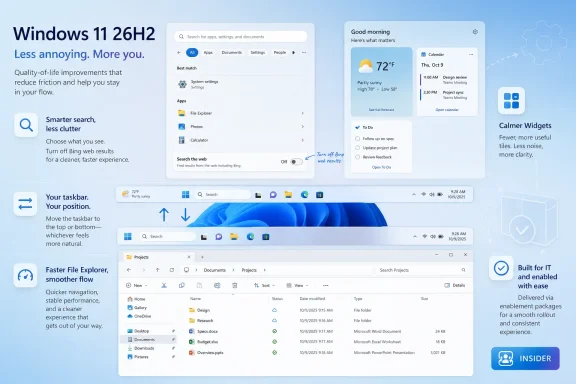
Microsoft confirmed on June 19, 2026, that Windows 11 version 26H2 is its next annual second-half feature update, now in Insider testing, with a faster enablement-package rollout and visible changes to Start, Search, Widgets, taskbar placement, File Explorer reliability, and system polish. That is the plain version of the news. The more interesting version is that Microsoft appears to be trying, belatedly and deliberately, to make Windows 11 feel less like a delivery vehicle for corporate priorities and more like an operating system shaped by the people who use it every day. If 26H2 lands as advertised, the headline feature will not be AI; it will be restraint.
For most of Windows 11’s life, Microsoft has behaved as though user frustration were a messaging problem. The centered taskbar, the rigid Start menu, the web-heavy search experience, the Widgets panel stuffed with news, the recurring prompts for Edge and Microsoft accounts — all of these were explained as modernization, simplification, or personalization. The trouble was that many users experienced them as the opposite.
Windows 11 26H2 matters because it suggests Microsoft has absorbed a lesson that power users have been shouting for years: polish is not decoration. It is trust. A desktop operating system can be technically secure, commercially successful, and strategically aligned with the cloud, while still feeling hostile in small ways dozens of times a day.
That is why the most meaningful changes in 26H2 are not necessarily the most technologically ambitious. Letting people remove Bing web results from Start menu searches is not a moonshot. Letting the taskbar move again is not a breakthrough. Making Widgets calmer and File Explorer more stable will not generate the same keynote energy as an AI agent.
But these are the changes users notice because they touch the muscle memory of computing. They are the places where Windows either gets out of the way or reminds you that someone in Redmond has a quarterly objective.
Windows 11’s Start menu has been cleaner than the tile-heavy Windows 10 design, but it has also been constrained, oddly promotional, and too eager to blend local intent with web intent. Search for an installed application and Windows might decide the web deserves a seat at the table. Look for a file and the interface may still behave as though Bing is lurking just offstage, waiting to turn a local action into an online session.
The coming ability to disable Bing web search results through Settings is therefore bigger than the checkbox itself. Registry edits have long allowed determined users to do something similar, but registry edits are not product design. When Microsoft exposes the option to normal users, it is acknowledging that “no, thank you” is a legitimate preference rather than an unsupported workaround.
There is also a competitive subtext. Search is one of the most valuable behaviors in computing, and Microsoft has repeatedly tried to use Windows as a funnel into Bing and Edge. That may make sense from a corporate strategy perspective. It makes much less sense when a user presses the Windows key expecting to find Notepad and instead feels like they have opened a tiny ad-supported portal.
That bargain never fully held. For many people, the taskbar is not a strip of pixels; it is the command rail of the desktop. On ultrawide monitors, portrait displays, multi-monitor setups, and accessibility-driven layouts, taskbar position is not cosmetic. It is workflow.
Microsoft’s willingness to restore movement suggests the company is backing away from one of Windows 11’s original sins: the idea that simplification should be enforced by removing knobs. There is a difference between designing a coherent default and pretending that one layout fits every desk, every body, and every job.
The caveat is that early implementations may not recreate the classic Windows 10 experience perfectly. That matters, but it does not erase the larger shift. Microsoft is not merely adding a feature; it is reversing a decision users never stopped resenting.
Yet the most compelling pitch for Windows 11 26H2 is not “your PC becomes an agent.” It is “your PC becomes less annoying.”
That does not mean AI is disappearing from Windows. Microsoft is still building toward a future in which the operating system can understand context, automate tasks, summarize information, and bridge local and cloud workflows. But 26H2’s emerging narrative is quieter and more practical: better performance, fewer distractions, more configurability, and a steadier File Explorer.
This is a necessary recalibration. AI features can be useful, but they do not compensate for a Start menu that feels polluted, a taskbar that refuses to move, or a file manager that stutters under everyday use. Microsoft cannot credibly sell the future of personal computing if the present feels like a negotiation.
That makes reliability work more important than it sounds. A faster, more stable File Explorer is not a minor housekeeping item. It affects every copy operation, every network share, every folder full of photos, every right-click menu, every business process that still depends on files because, despite decades of cloud rhetoric, the file system remains the foundation of personal computing.
Windows 11’s File Explorer has had a rough modernization path. The interface has become cleaner and more visually consistent, but performance complaints have lingered. Context menus, tabs, cloud integration, Gallery views, and design changes have made the app more capable in some respects while also making it feel heavier in others.
If Microsoft can reduce memory usage and improve responsiveness across Windows 11, File Explorer is where many users will decide whether the promise is real. Nobody cares how elegant a servicing model is when opening a folder feels slower than it should on modern hardware. The operating system earns credibility in milliseconds.
For consumers, that mostly means less waiting. For IT departments, it means something more important: a lower-disruption deployment path. Feature updates have always carried reputational baggage because they can mean application compatibility testing, driver concerns, help desk volume, and user confusion. A smaller enablement-style update does not eliminate those responsibilities, but it changes the risk profile.
It also reflects Microsoft’s broader desire to make Windows servicing more predictable. Enterprise administrators do not want mystery. They want known baselines, manageable timing, reliable rollback paths, and enough runway to test before broad deployment. If 26H2 behaves like a cumulative update with feature switches rather than a disruptive reinstall, that is a meaningful operational win.
The catch is that predictability cuts both ways. If Microsoft uses the same efficient servicing pipeline to ship unwanted experiences, the speed of installation becomes a liability. The best version of enablement packaging is not simply faster Windows; it is faster delivery of changes users and admins actually want.
The hardware cutoff from Windows 10 to Windows 11 remains one of the defining tensions of the current Windows era. Microsoft framed the requirements around security and reliability, especially TPM 2.0 and newer CPU generations. Many users saw a different story: perfectly functional PCs pushed toward retirement because the operating system’s support matrix moved on.
That history matters now because Windows 10 is already past its mainstream consumer era, and many organizations are still digesting migration plans. A Windows 12 launch that repeated the disruption would risk turning version churn into a trust problem. Microsoft seems to understand that the better move is to make Windows 11 more acceptable, not to ask users to start over again.
There is also a product maturity argument. Windows 11’s original design language looked modern, but the operating system often felt unfinished in the places experienced users cared about most. 26H2 is an opportunity to fill in those gaps before Microsoft tries to define the next platform.
Edge has long been technically strong. It is fast, Chromium-based, compatible with the modern web, and deeply integrated into Windows. Its problem has been trust and taste. Microsoft has too often promoted Edge with the subtlety of a mall kiosk, turning a capable browser into a symbol of operating-system nagging.
Google account sync could change the switching equation for some users. If Edge can import or sync enough of the Chrome life without forcing a Microsoft account at the front door, it becomes less of a migration and more of a trial. That is the sort of low-friction tactic that actually works.
But it also underscores the asymmetry of modern browser competition. Chrome dominates because it is tied to Google’s identity layer, Android, search, Gmail, and the broader web economy. Edge’s challenge is not rendering speed. It is convincing users that Microsoft’s browser is not another attempt to turn Windows into a funnel.
Chrome remains the default choice for much of the world, and performance benchmarks often reinforce that position. But performance is no longer the only axis that matters. Firefox is trying to modernize without surrendering its independent engine. Vivaldi is pitching customizability and a more human, less AI-saturated web. Brave is experimenting with privacy-first monetization and paid products that strip away some of its own controversial extras.
The looming loss of full uBlock Origin support in Chrome’s stable extension environment is one of those changes that can motivate a vocal minority to move. Whether that minority is large enough to dent Chrome’s dominance is another question. Browser switching is easy in theory and sticky in practice.
For Microsoft, this creates an opening but not a guarantee. Edge can benefit from Chrome fatigue only if it does not replace Google’s pressure with Microsoft’s. Users looking for less manipulation will not reward a browser that merely changes the logo on the persuasion layer.
That sounds obvious, but it has not been obvious in Windows 11. The operating system has frequently treated Microsoft services as the natural destination of user behavior. Search becomes Bing. Links become Edge. Widgets become news. Setup becomes account conversion. Recommendations become promotions.
The problem with that model is cumulative irritation. Any one prompt can be defended. Any one integration can be explained. But the overall feeling becomes one of being managed. Windows users may tolerate a great deal, but they notice when the operating system feels less like a neutral workspace and more like a sales surface.
A more configurable Windows does not require Microsoft to abandon its services. It requires Microsoft to compete for user attention inside Windows instead of assuming Windows entitles it to that attention. That is a healthier bargain, and it is one Microsoft should have made years ago.
The potential memory improvements are especially relevant at scale. Many organizations still run fleets with 8GB machines, shared workstations, or devices that were bought under pandemic-era procurement pressure. A lighter Windows 11 could extend useful life and reduce the pressure to refresh hardware solely because the OS feels heavier than the workload requires.
The same goes for update mechanics. If 26H2 arrives as a relatively fast enablement package, IT teams can treat it as a lower-friction milestone. They will still test applications, drivers, VPN clients, endpoint security, management agents, and line-of-business workflows. But the psychological and logistical difference between a major reinstall and a single-restart enablement update is substantial.
Still, admins should resist the temptation to read “enablement package” as “no risk.” The features may be staged, policy-controlled, or rolled out unevenly depending on channel, region, hardware, and Microsoft’s controlled feature rollout machinery. The modern Windows servicing model is less about one big day and more about a sequence of switches.
That matters for anyone planning around specific details such as taskbar behavior, Start menu options, or Widget changes. Microsoft’s public direction is clear: more control, less noise, better performance, and a smoother update path. The exact implementation will matter more than the slogan.
Windows history is full of features that arrived with the right intention but the wrong ergonomics. A movable taskbar that feels compromised will still frustrate users. A Bing toggle buried too deeply in Settings will still look grudging. A calmer Widgets board that continues to smuggle engagement bait into the desktop will not feel calm.
This is why 26H2 should be judged on observed behavior, not promotional language. Microsoft has chosen the correct problem. Now it has to ship the correct product.
 Microsoft Finally Admits That Annoyance Is a Product Problem
For most of Windows 11’s life, Microsoft has behaved as though user frustration were a messaging problem. The centered taskbar, the rigid Start menu, the web-heavy search experience, the Widgets panel stuffed with news, the recurring prompts for Edge and Microsoft accounts — all of these were explained as modernization, simplification, or personalization. The trouble was that many users experienced them as the opposite.Windows 11 26H2 matters because it suggests Microsoft has absorbed a lesson that power users have been shouting for years: polish is not decoration. It is trust. A desktop operating system can be technically secure, commercially successful, and strategically aligned with the cloud, while still feeling hostile in small ways dozens of times a day.
That is why the most meaningful changes in 26H2 are not necessarily the most technologically ambitious. Letting people remove Bing web results from Start menu searches is not a moonshot. Letting the taskbar move again is not a breakthrough. Making Widgets calmer and File Explorer more stable will not generate the same keynote energy as an AI agent.
But these are the changes users notice because they touch the muscle memory of computing. They are the places where Windows either gets out of the way or reminds you that someone in Redmond has a quarterly objective.
The Start Menu Was Never Just a Launcher
The Start menu has always carried more symbolic weight than its UI footprint suggests. It is the front door of Windows, the place where casual users launch apps and power users judge whether Microsoft understands the machine in front of them. When Microsoft changes Start, it is changing the emotional contract between the user and the PC.Windows 11’s Start menu has been cleaner than the tile-heavy Windows 10 design, but it has also been constrained, oddly promotional, and too eager to blend local intent with web intent. Search for an installed application and Windows might decide the web deserves a seat at the table. Look for a file and the interface may still behave as though Bing is lurking just offstage, waiting to turn a local action into an online session.
The coming ability to disable Bing web search results through Settings is therefore bigger than the checkbox itself. Registry edits have long allowed determined users to do something similar, but registry edits are not product design. When Microsoft exposes the option to normal users, it is acknowledging that “no, thank you” is a legitimate preference rather than an unsupported workaround.
There is also a competitive subtext. Search is one of the most valuable behaviors in computing, and Microsoft has repeatedly tried to use Windows as a funnel into Bing and Edge. That may make sense from a corporate strategy perspective. It makes much less sense when a user presses the Windows key expecting to find Notepad and instead feels like they have opened a tiny ad-supported portal.
A Movable Taskbar Is a Small Surrender With a Long Memory
The return of taskbar positioning is one of those features that sounds trivial until you remember how many people reorganize their entire workspace around it. Windows 10 allowed users to move the taskbar to the top or sides of the display. Windows 11 launched with a bottom-only taskbar and a long list of missing behaviors, asking users to accept a sleeker design in exchange for less control.That bargain never fully held. For many people, the taskbar is not a strip of pixels; it is the command rail of the desktop. On ultrawide monitors, portrait displays, multi-monitor setups, and accessibility-driven layouts, taskbar position is not cosmetic. It is workflow.
Microsoft’s willingness to restore movement suggests the company is backing away from one of Windows 11’s original sins: the idea that simplification should be enforced by removing knobs. There is a difference between designing a coherent default and pretending that one layout fits every desk, every body, and every job.
The caveat is that early implementations may not recreate the classic Windows 10 experience perfectly. That matters, but it does not erase the larger shift. Microsoft is not merely adding a feature; it is reversing a decision users never stopped resenting.
The Anti-AI Windows Update, Arriving in the Age of AI
The oddest thing about the 26H2 conversation is how little it appears to depend on Copilot. Over the last two years, Microsoft has positioned AI as the new gravitational center of Windows, Office, Edge, and the broader Microsoft 365 ecosystem. Copilot+ PCs were supposed to give the platform a new identity, powered by neural processing units and local AI experiences.Yet the most compelling pitch for Windows 11 26H2 is not “your PC becomes an agent.” It is “your PC becomes less annoying.”
That does not mean AI is disappearing from Windows. Microsoft is still building toward a future in which the operating system can understand context, automate tasks, summarize information, and bridge local and cloud workflows. But 26H2’s emerging narrative is quieter and more practical: better performance, fewer distractions, more configurability, and a steadier File Explorer.
This is a necessary recalibration. AI features can be useful, but they do not compensate for a Start menu that feels polluted, a taskbar that refuses to move, or a file manager that stutters under everyday use. Microsoft cannot credibly sell the future of personal computing if the present feels like a negotiation.
File Explorer Is Where Polish Becomes Proof
File Explorer rarely receives the glamorous treatment it deserves. It is not a platform story in the way Copilot is, nor a developer story in the way Windows Subsystem for Linux is. But for administrators, developers, creators, and ordinary office workers, File Explorer remains one of the most-used pieces of Windows.That makes reliability work more important than it sounds. A faster, more stable File Explorer is not a minor housekeeping item. It affects every copy operation, every network share, every folder full of photos, every right-click menu, every business process that still depends on files because, despite decades of cloud rhetoric, the file system remains the foundation of personal computing.
Windows 11’s File Explorer has had a rough modernization path. The interface has become cleaner and more visually consistent, but performance complaints have lingered. Context menus, tabs, cloud integration, Gallery views, and design changes have made the app more capable in some respects while also making it feel heavier in others.
If Microsoft can reduce memory usage and improve responsiveness across Windows 11, File Explorer is where many users will decide whether the promise is real. Nobody cares how elegant a servicing model is when opening a folder feels slower than it should on modern hardware. The operating system earns credibility in milliseconds.
The Enablement Package Tells IT Pros This Should Be Evolution, Not Surgery
The servicing detail matters. Microsoft says Windows 11 version 26H2 shares the same servicing branch as version 25H2 and will be delivered through an enablement package. In practice, that means the annual feature update should install more like a switch-flip than a full operating system replacement, requiring a single restart on eligible devices.For consumers, that mostly means less waiting. For IT departments, it means something more important: a lower-disruption deployment path. Feature updates have always carried reputational baggage because they can mean application compatibility testing, driver concerns, help desk volume, and user confusion. A smaller enablement-style update does not eliminate those responsibilities, but it changes the risk profile.
It also reflects Microsoft’s broader desire to make Windows servicing more predictable. Enterprise administrators do not want mystery. They want known baselines, manageable timing, reliable rollback paths, and enough runway to test before broad deployment. If 26H2 behaves like a cumulative update with feature switches rather than a disruptive reinstall, that is a meaningful operational win.
The catch is that predictability cuts both ways. If Microsoft uses the same efficient servicing pipeline to ship unwanted experiences, the speed of installation becomes a liability. The best version of enablement packaging is not simply faster Windows; it is faster delivery of changes users and admins actually want.
Windows 12 Can Wait Because Windows 11 Still Has Unfinished Business
The PC industry loves a new version number. It gives OEMs a sales hook, analysts a cycle to model, and Microsoft a clean narrative. But the reported lack of appetite for a Windows 12 reset makes strategic sense. Windows 11 still has too much unresolved baggage to justify another grand transition.The hardware cutoff from Windows 10 to Windows 11 remains one of the defining tensions of the current Windows era. Microsoft framed the requirements around security and reliability, especially TPM 2.0 and newer CPU generations. Many users saw a different story: perfectly functional PCs pushed toward retirement because the operating system’s support matrix moved on.
That history matters now because Windows 10 is already past its mainstream consumer era, and many organizations are still digesting migration plans. A Windows 12 launch that repeated the disruption would risk turning version churn into a trust problem. Microsoft seems to understand that the better move is to make Windows 11 more acceptable, not to ask users to start over again.
There is also a product maturity argument. Windows 11’s original design language looked modern, but the operating system often felt unfinished in the places experienced users cared about most. 26H2 is an opportunity to fill in those gaps before Microsoft tries to define the next platform.
Edge’s Google Account Move Is Not Generosity
The Edge change is separate from Windows 11 26H2, but it belongs in the same story because it reveals Microsoft’s current posture: remove just enough friction to make its ecosystem easier to enter. Allowing Edge users to sign in and sync with a Google account would be a clever move precisely because it targets Chrome’s strongest advantage. Most people do not merely use Chrome; they live inside a synced profile of passwords, bookmarks, history, extensions, and habits.Edge has long been technically strong. It is fast, Chromium-based, compatible with the modern web, and deeply integrated into Windows. Its problem has been trust and taste. Microsoft has too often promoted Edge with the subtlety of a mall kiosk, turning a capable browser into a symbol of operating-system nagging.
Google account sync could change the switching equation for some users. If Edge can import or sync enough of the Chrome life without forcing a Microsoft account at the front door, it becomes less of a migration and more of a trial. That is the sort of low-friction tactic that actually works.
But it also underscores the asymmetry of modern browser competition. Chrome dominates because it is tied to Google’s identity layer, Android, search, Gmail, and the broader web economy. Edge’s challenge is not rendering speed. It is convincing users that Microsoft’s browser is not another attempt to turn Windows into a funnel.
The Browser Wars Are Smaller Now, but the Stakes Are Sharper
Calling today’s browser competition a war can feel nostalgic, but the stakes remain real. The old Internet Explorer era was about standards, monopoly power, and whether the web would belong to one vendor’s implementation. The current era is about identity, advertising, privacy, AI, extension control, and the economic model of the open web.Chrome remains the default choice for much of the world, and performance benchmarks often reinforce that position. But performance is no longer the only axis that matters. Firefox is trying to modernize without surrendering its independent engine. Vivaldi is pitching customizability and a more human, less AI-saturated web. Brave is experimenting with privacy-first monetization and paid products that strip away some of its own controversial extras.
The looming loss of full uBlock Origin support in Chrome’s stable extension environment is one of those changes that can motivate a vocal minority to move. Whether that minority is large enough to dent Chrome’s dominance is another question. Browser switching is easy in theory and sticky in practice.
For Microsoft, this creates an opening but not a guarantee. Edge can benefit from Chrome fatigue only if it does not replace Google’s pressure with Microsoft’s. Users looking for less manipulation will not reward a browser that merely changes the logo on the persuasion layer.
The Real Feature Is Permission to Say No
Viewed together, the Windows and Edge developments point toward a more important theme than any single checkbox: Microsoft is experimenting with consent as a product feature. Disable Bing in Start. Calm down Widgets. Move the taskbar. Sync Edge without immediately pledging allegiance to a Microsoft account. These are all ways of acknowledging that the user’s preference may differ from the company’s preferred funnel.That sounds obvious, but it has not been obvious in Windows 11. The operating system has frequently treated Microsoft services as the natural destination of user behavior. Search becomes Bing. Links become Edge. Widgets become news. Setup becomes account conversion. Recommendations become promotions.
The problem with that model is cumulative irritation. Any one prompt can be defended. Any one integration can be explained. But the overall feeling becomes one of being managed. Windows users may tolerate a great deal, but they notice when the operating system feels less like a neutral workspace and more like a sales surface.
A more configurable Windows does not require Microsoft to abandon its services. It requires Microsoft to compete for user attention inside Windows instead of assuming Windows entitles it to that attention. That is a healthier bargain, and it is one Microsoft should have made years ago.
Enterprises Will Measure the Calm, Not the Keynote
For enterprise IT, 26H2’s significance will be judged less by enthusiast satisfaction and more by operational quiet. A calmer Windows is not just nicer; it is cheaper to support. Every unwanted UI change, every confusing prompt, every search result that sends a user to the web instead of a local resource can become a help desk ticket, a training note, or another exception in a configuration profile.The potential memory improvements are especially relevant at scale. Many organizations still run fleets with 8GB machines, shared workstations, or devices that were bought under pandemic-era procurement pressure. A lighter Windows 11 could extend useful life and reduce the pressure to refresh hardware solely because the OS feels heavier than the workload requires.
The same goes for update mechanics. If 26H2 arrives as a relatively fast enablement package, IT teams can treat it as a lower-friction milestone. They will still test applications, drivers, VPN clients, endpoint security, management agents, and line-of-business workflows. But the psychological and logistical difference between a major reinstall and a single-restart enablement update is substantial.
Still, admins should resist the temptation to read “enablement package” as “no risk.” The features may be staged, policy-controlled, or rolled out unevenly depending on channel, region, hardware, and Microsoft’s controlled feature rollout machinery. The modern Windows servicing model is less about one big day and more about a sequence of switches.
The Insider Channel Is a Preview, Not a Promise
The enthusiasm around 26H2 should be tempered by the usual Insider caveat. Preview builds are where Microsoft tests ideas, measures telemetry, and sometimes changes course. A feature seen in an Insider build is not automatically a guarantee of the final public experience, and a feature announced in broad terms may ship in phases.That matters for anyone planning around specific details such as taskbar behavior, Start menu options, or Widget changes. Microsoft’s public direction is clear: more control, less noise, better performance, and a smoother update path. The exact implementation will matter more than the slogan.
Windows history is full of features that arrived with the right intention but the wrong ergonomics. A movable taskbar that feels compromised will still frustrate users. A Bing toggle buried too deeply in Settings will still look grudging. A calmer Widgets board that continues to smuggle engagement bait into the desktop will not feel calm.
This is why 26H2 should be judged on observed behavior, not promotional language. Microsoft has chosen the correct problem. Now it has to ship the correct product.
The 26H2 Bet Is That Windows Can Win by Getting Out of the Way
The most concrete read on Windows 11 26H2 is not that Microsoft has suddenly become sentimental about classic desktop computing. It is that the company has recognized a strategic liability: users do not embrace advanced platform features when the basics feel imposed. The next update appears designed to reduce that tax.- Windows 11 version 26H2 is Microsoft’s next annual second-half update and is already visible in Insider testing as of June 19, 2026.
- The update is expected to use an enablement package because it shares a servicing branch with Windows 11 version 25H2.
- Microsoft is preparing user-facing controls that should make it easier to remove Bing web results from Start menu search without registry edits.
- Taskbar repositioning is returning, marking a reversal of one of Windows 11’s most unpopular simplifications.
- File Explorer reliability, memory usage, and overall responsiveness may matter more to daily users than any headline AI feature.
- Edge’s planned Google account sync support is best understood as a switching tactic aimed at reducing Chrome’s ecosystem lock-in.
References
- Primary source: PCMag Australia
Published: Wed, 24 Jun 2026 15:00:00 GMT
Windows 11 Is About to Change in a Way You'll Actually Notice
Windows 11 26H2 is shaping up to be less about flashy features and more about fixing everyday annoyances users have complained about for years.au.pcmag.com - Official source: blogs.windows.com
Announcing new builds for 19 June 2026, version 26H2 for Experimental
Hello Windows Insiders, We have new releases today with builds across Beta and Experimental, including Windows 11, version 26H2 for Experimental. Windows 11, version 26H2 Windows 11, version 26H2 represents our yearly second halfblogs.windows.com - Related coverage: windowscentral.com
I tested Windows 11’s return of taskbar positioning and resizing, and it’s not the classic Windows 10 experience | Windows Central
Windows 11 finally brings back classic Taskbar features, but the experience still falls short of Windows 10.www.windowscentral.com - Related coverage: pcworld.com
Windows 11 26H2 is coming: Meet all the new features | PCWorld
Windows 11 26H2 is the next major free update for all Windows users. Among other things, it brings improvements to Explorer, camera control, and AI. Here's an overview.www.pcworld.com - Related coverage: digitaltrends.com
Microsoft is finally fixing the most annoying thing about Windows 11 - Digital Trends
Microsoft is testing one of the biggest Windows 11 interface shakeups yet, and it quietly brings back a feature many users have missed for years. The Start menu is changing too, and some of the updates feel surprisingly thoughtful.www.digitaltrends.com - Official source: learn.microsoft.com
Customize The Start Layout For Managed Windows Devices | Microsoft Learn
Learn how to customize the Windows Start layout, export its configuration, and deploy the customization to other devices.learn.microsoft.com
- Related coverage: techspot.com
Windows 11 26H2 continues Microsoft's shift to smaller and faster updates | TechSpot
This approach dates back to Windows 11 24H2, released in October 2024, which marked the last traditional feature update. Since then, Microsoft has kept new versions on...www.techspot.com - Related coverage: pureinfotech.com
Build 26300.8553 for Windows 11 26H2 adds resizable Start menu and system tweaks - Pureinfotech
Builds 26300.8554 and 26220.8544 for Windows 11 add Start menu resizing, smarter Search, taskbar fixes, and new loading animations. pureinfotech.com
- Related coverage: techrepublic.com
Windows 11 Start Menu, Taskbar Are Getting More Customization
Microsoft is testing Windows 11 taskbar and Start menu updates, including movable taskbar positions, cleaner Start controls, and compact layout options.www.techrepublic.com
- Related coverage: elevenforum.com
KB5095058 Windows 11 Insider Experimental (26H2) build 26300.8697 - June 19 | Page 2 | Windows 11 Forum
Windows Insider Blog: Changes and improvements gradually being rolled out [General] With today’s build, Windows Insiders in the Experimental channel will...www.elevenforum.com
