

Windows 11 26H2 should not enter an Insider pilot until IT can prove that a failed test device can be recovered without improvisation: retrieve its BitLocker key, reach a healthy Windows Recovery Environment, remove an update when that is the right exit, support the user remotely, and stop the ring before a localized failure becomes a deployment incident. The point is not another generic backup reminder; it is a documented recovery runbook exercised on representative hardware before the pilot grows.
Microsoft’s July 6, 2026 experimental Windows 11 26H2 build added Cloud rebuild to Windows Recovery Environment (WinRE), giving testers another recovery path. But it is a preview capability with an explicit data-loss confirmation, not a substitute for tested credentials, recovery-key custody, boot access, or a rollback decision. As Insider update-failure reports emerge in support channels, recovery readiness is the more useful readiness metric than whether a device simply installed the build once.
Before assigning a single Windows 11 26H2 device to the pilot ring, select a small set of machines that reflects the environment you actually support: a BitLocker-protected laptop, a desktop with critical line-of-business software, a remote-only worker device, and at least one Hyper-V or virtualization-adjacent test case if that is part of the estate. The pilot should be small enough that support staff can follow every recovery action in real time.
Run this validation sequence on each device category before expanding the ring:
A recovery event is not the time to discover that support personnel can see a key but cannot disclose it under the company’s verification procedure, or that the user cannot establish enough connectivity to complete the required identity checks. The runbook should name the primary retrieval route, an approved escalation route, and the person or group accountable for exceptions.
The practical distinction matters because BitLocker recovery is not reserved for a catastrophic disk failure. Recovery tools launched manually, or a trusted recovery environment that cannot unlock the protected volume, can require the key. An update test that leaves a system bootable only into recovery has therefore become an identity and service-desk test as much as an operating-system test.
Do not record recovery keys in the pilot spreadsheet or paste them into incident notes. The document should instead capture the approved location, the retrieval workflow, the user-verification standard, and the escalation contact. That keeps the runbook useful without creating a second, unmanaged key repository.
The pilot owner should document the expected sequence in plain operational terms: what the user sees after failed boots, when the help desk asks for the BitLocker recovery key, who determines whether Startup Repair has had a reasonable chance to work, and when the case moves to a more destructive recovery choice. This is also where remote-worker procedures matter. A device stuck in recovery may have no usable corporate connectivity, no remote-control agent, and no employee nearby who knows the correct key-retrieval process.
Microsoft’s July 6 experimental 26H2 release makes Cloud rebuild relevant to this planning. The feature can offer a clean-install-style recovery workflow from WinRE, but Microsoft labels it a preview feature and requires an explicit confirmation that data will be lost. That should keep it outside the default “try this first” path. It belongs in the runbook as an approved final recovery branch, with an unambiguous owner and a confirmation that required data is already protected elsewhere.
WindowsForum readers following earlier Windows 11 24H2 recovery discussions, including coverage of KIR recovery and WSUS/SCCM update failures, will recognize the larger lesson: a remediation mechanism is valuable only when its prerequisites are already in place. Recovery tooling cannot compensate for missing access, unclear authority, or an untested process.
That is a 24H2-specific documented condition, not evidence that the identical behavior applies to 26H2. But it is exactly the type of precedent a 26H2 pilot runbook must account for. The correct recovery action depends on the build path, the installed update history, the device’s encryption state, and the available recovery route—not on a blanket instruction that rollback is always less risky than rebuild.
For each pilot incident, capture these facts before choosing a recovery path:
A workable rule can be stated in one sentence: pause new 26H2 assignments when a device enters an unrecoverable boot or sign-in state, when the approved BitLocker-key retrieval process fails, when WinRE cannot provide the expected recovery route, or when the same material failure appears on more than one representative device category. The pilot owner should have the authority to invoke that pause immediately, with later review rather than prior committee approval.
This is also where organizations should separate 26H2 planning from inherited assumptions about earlier branches. Shared servicing architecture and enablement-package discussions do not erase operational differences in experimental builds, supported recovery features, and the exact conditions of a given failure. Treat 26H2 as its own pilot target, maintain version-specific notes, and do not carry forward a rollback instruction merely because it worked on 24H2 or 25H2.
The first successful 26H2 install proves only that one device accepted one build. A recovery drill proves the organization can contain the other outcome, which is the standard that should govern whether the Insider ring expands.
Microsoft’s July 6, 2026 experimental Windows 11 26H2 build added Cloud rebuild to Windows Recovery Environment (WinRE), giving testers another recovery path. But it is a preview capability with an explicit data-loss confirmation, not a substitute for tested credentials, recovery-key custody, boot access, or a rollback decision. As Insider update-failure reports emerge in support channels, recovery readiness is the more useful readiness metric than whether a device simply installed the build once.
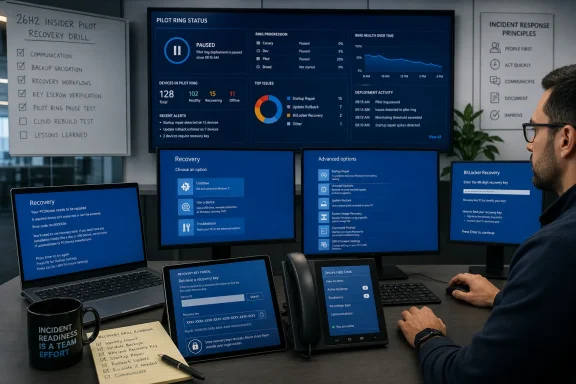 Build the pilot around a recovery drill, not a successful install
Before assigning a single Windows 11 26H2 device to the pilot ring, select a small set of machines that reflects the environment you actually support: a BitLocker-protected laptop, a desktop with critical line-of-business software, a remote-only worker device, and at least one Hyper-V or virtualization-adjacent test case if that is part of the estate. The pilot should be small enough that support staff can follow every recovery action in real time.Run this validation sequence on each device category before expanding the ring:
- Confirm the device’s BitLocker recovery information is present in the organization’s approved escrow location, either Microsoft Entra ID or Active Directory, and confirm the service desk can retrieve it under the organization’s authentication and approval rules.
- Verify that the assigned support team knows the device identity details required to locate the correct recovery key. A key that exists but cannot be matched quickly to a locked device is not operationally useful during an outage.
- Confirm that WinRE can be reached and that Startup Repair behavior is understood. Windows automatically begins Startup Repair after two failed Windows boot attempts, but manual recovery activity may prompt for a BitLocker recovery key if the protected drive cannot be unlocked by the trusted recovery environment.
- Test the organization’s remote-support path while Windows is still usable. Record who can assist when the user is off-network, whether the support tool depends on a working Windows session, and what the fallback is when it does not.
- Identify who has authority to decide whether the next action is Startup Repair, update uninstallation, Cloud rebuild, or removal of the device from the pilot. Technical access without decision authority turns a routine recovery into a stalled escalation.
- Write a stop rule for the pilot ring. The rule should state the symptom threshold that pauses new assignments, the team that can invoke the pause, and the evidence required before testing resumes.
BitLocker retrieval is the first operational dependency
Microsoft’s BitLocker guidance is clear that organizations should save recovery information in Microsoft Entra ID or Active Directory and establish helpdesk procedures for secure, rapid retrieval. For a 26H2 Insider pilot, that recommendation needs to become a pass-or-fail test rather than a policy statement.A recovery event is not the time to discover that support personnel can see a key but cannot disclose it under the company’s verification procedure, or that the user cannot establish enough connectivity to complete the required identity checks. The runbook should name the primary retrieval route, an approved escalation route, and the person or group accountable for exceptions.
The practical distinction matters because BitLocker recovery is not reserved for a catastrophic disk failure. Recovery tools launched manually, or a trusted recovery environment that cannot unlock the protected volume, can require the key. An update test that leaves a system bootable only into recovery has therefore become an identity and service-desk test as much as an operating-system test.
Do not record recovery keys in the pilot spreadsheet or paste them into incident notes. The document should instead capture the approved location, the retrieval workflow, the user-verification standard, and the escalation contact. That keeps the runbook useful without creating a second, unmanaged key repository.
WinRE must be treated as a managed recovery surface
WinRE is often discussed as a last-resort menu. For an Insider pilot, it is a critical recovery surface that needs validation before an update failure puts it under pressure. Windows will automatically start Startup Repair after two unsuccessful Windows boot attempts, but that automatic behavior does not guarantee every recovery option will be available, authorized, or able to access the encrypted system volume.The pilot owner should document the expected sequence in plain operational terms: what the user sees after failed boots, when the help desk asks for the BitLocker recovery key, who determines whether Startup Repair has had a reasonable chance to work, and when the case moves to a more destructive recovery choice. This is also where remote-worker procedures matter. A device stuck in recovery may have no usable corporate connectivity, no remote-control agent, and no employee nearby who knows the correct key-retrieval process.
Microsoft’s July 6 experimental 26H2 release makes Cloud rebuild relevant to this planning. The feature can offer a clean-install-style recovery workflow from WinRE, but Microsoft labels it a preview feature and requires an explicit confirmation that data will be lost. That should keep it outside the default “try this first” path. It belongs in the runbook as an approved final recovery branch, with an unambiguous owner and a confirmation that required data is already protected elsewhere.
WindowsForum readers following earlier Windows 11 24H2 recovery discussions, including coverage of KIR recovery and WSUS/SCCM update failures, will recognize the larger lesson: a remediation mechanism is valuable only when its prerequisites are already in place. Recovery tooling cannot compensate for missing access, unclear authority, or an untested process.
Update uninstallation needs a version-aware decision
“Uninstall the latest update” sounds like a safe universal fallback until it collides with a known rollback condition. Microsoft’s BitLocker documentation identifies a specific Windows 11 24H2 caveat: after KB5063878 or later, uninstalling a cumulative update and rolling back below build 26100.4770 can leave the device unable to unlock with a PIN until it is recovered and updated to KB5062660 or later.That is a 24H2-specific documented condition, not evidence that the identical behavior applies to 26H2. But it is exactly the type of precedent a 26H2 pilot runbook must account for. The correct recovery action depends on the build path, the installed update history, the device’s encryption state, and the available recovery route—not on a blanket instruction that rollback is always less risky than rebuild.
For each pilot incident, capture these facts before choosing a recovery path:
- Record the Windows version and build information available before the recovery action begins.
- Record whether BitLocker recovery was requested and whether the recovery key was successfully retrieved.
- Record whether the device reached WinRE automatically after failed boot attempts or entered recovery through a manual action.
- Record whether update uninstallation was attempted, completed, or failed, along with the final boot and sign-in state.
- Record whether Cloud rebuild was considered or used, including confirmation that its data-loss warning was understood.
The stop rule protects the pilot more than the update
A pilot ring without a stop rule is simply a slow rollout. The stop rule should not require a broad outage to trigger; its purpose is to prevent repeated exposure while the cause and recovery path are still uncertain.A workable rule can be stated in one sentence: pause new 26H2 assignments when a device enters an unrecoverable boot or sign-in state, when the approved BitLocker-key retrieval process fails, when WinRE cannot provide the expected recovery route, or when the same material failure appears on more than one representative device category. The pilot owner should have the authority to invoke that pause immediately, with later review rather than prior committee approval.
This is also where organizations should separate 26H2 planning from inherited assumptions about earlier branches. Shared servicing architecture and enablement-package discussions do not erase operational differences in experimental builds, supported recovery features, and the exact conditions of a given failure. Treat 26H2 as its own pilot target, maintain version-specific notes, and do not carry forward a rollback instruction merely because it worked on 24H2 or 25H2.
Frequently Asked Questions
Does Startup Repair replace the need for boot media?
No. Startup Repair begins automatically after two failed Windows boot attempts, but a recovery plan still needs a documented fallback when WinRE cannot complete the required repair or access the protected drive.Should Cloud rebuild be the default recovery action for 26H2 testers?
No. Microsoft presents Cloud rebuild in the July 6, 2026 experimental 26H2 build as a preview feature and requires an explicit data-loss confirmation. It should be a controlled final recovery option, not the first response to an update problem.Is the documented PIN rollback caveat a confirmed 26H2 issue?
No. Microsoft’s documented caveat applies to Windows 11 24H2 in the stated KB5063878 and build 26100.4770 scenario. Its relevance to 26H2 is procedural: rollback decisions must be version- and build-aware.What is the minimum evidence to collect after a failed pilot update?
Capture the device category, Windows version or build information available, BitLocker recovery status, the route into WinRE, the recovery actions attempted, and the final boot and sign-in outcome.The first successful 26H2 install proves only that one device accepted one build. A recovery drill proves the organization can contain the other outcome, which is the standard that should govern whether the Insider ring expands.
References
- Primary source: learn.microsoft.com
Windows 11 Insider Experimental Preview Build 26300.8697 - Windows Insider Program | Microsoft Learn
Release notes for Windows 11 Insider Experimental Preview Build 26300.8697learn.microsoft.com - Independent coverage: windowscentral.com
Windows 11 version 26H2: Everything you need to know Microsoft's next OS update coming this fall | Windows Central
Microsoft is hard at work on building the next version of Windows 11 that's expected to debut this fall. Here's what to expect, and when.www.windowscentral.com - Independent coverage: blogs.windows.com
Announcing new builds for 19 June 2026, version 26H2 for Experimental
Hello Windows Insiders, We have new releases today with builds across Beta and Experimental, including Windows 11, version 26H2 for Experimental. Windows 11, version 26H2 Windows 11, version 26H2 represents our yearly second halfblogs.windows.com - Independent coverage: reddit.com

Reddit - Please wait for verification
www.reddit.com
- Primary source: WindowsForum
Microsoft’s Windows 11 24H2 Update Failures and KIR Recovery: What IT Needs to Know | Windows Forum
Microsoft’s commitment to delivering reliable, timely updates for Windows 11 has once again come under the spotlight with a recent, widely reported rollout...windowsforum.com