

Windows 11’s 4GB RAM and 64GB storage requirements are real, but they are installation floors—not a promise of a comfortable modern desktop experience. A HackerNoon analysis published July 17 argues that the gap between “supported” and “usable” exposes both legitimate platform costs and avoidable Windows baggage.
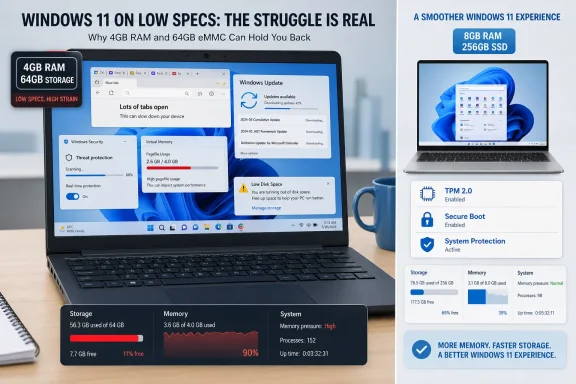
Microsoft’s current Windows 11 requirements still list 4GB of memory and 64GB of storage. The company also warns that feature updates and optional features can require additional space. In practice, a 64GB eMMC device has little room for applications, user data, rollback files and servicing overhead after Windows is installed.
Not all of Windows 11’s footprint is bloat. The platform must support a vast range of hardware, legacy applications, drivers, accessibility features and enterprise management tools. It also ships with a security baseline built around TPM 2.0, Secure Boot and, on supported hardware, virtualization-based security and memory-integrity protections.
Those protections use hardware virtualization to isolate sensitive Windows code from the main operating system. That is useful protection against kernel-level attacks, but it is not free: it adds background overhead and makes low-memory systems less forgiving.
Storage is similarly more complicated than the size of the base OS image. Windows maintains component files for servicing, temporary update data, recovery and rollback options, hibernation and paging files, plus reserved storage intended to keep updates from failing outright. Microsoft says feature updates can need 6GB to 11GB or more of free space, while monthly quality updates may need 2GB to 3GB.
The more defensible criticism is product design. Windows bundles consumer apps, promotional content and cloud-connected features that some users and administrators do not want. Even when their direct resource use is modest, they add management overhead and make a lean installation harder to achieve. OEM image customizations can make that worse.
Windows 11 also makes its minimum specification look more practical than it is. Four gigabytes is enough to boot, browse lightly and perform basic administrative work, but modern browsers, endpoint security, Teams-style collaboration clients and background update activity can exhaust it quickly. Once RAM pressure rises, the pagefile prevents crashes by moving less-active memory to disk—but responsiveness suffers, especially on slow eMMC or SATA storage.
Microsoft’s current Windows 11 requirements still list 4GB of memory and 64GB of storage. The company also warns that feature updates and optional features can require additional space. In practice, a 64GB eMMC device has little room for applications, user data, rollback files and servicing overhead after Windows is installed.
 Security and servicing are genuine costs
Not all of Windows 11’s footprint is bloat. The platform must support a vast range of hardware, legacy applications, drivers, accessibility features and enterprise management tools. It also ships with a security baseline built around TPM 2.0, Secure Boot and, on supported hardware, virtualization-based security and memory-integrity protections.Those protections use hardware virtualization to isolate sensitive Windows code from the main operating system. That is useful protection against kernel-level attacks, but it is not free: it adds background overhead and makes low-memory systems less forgiving.
Storage is similarly more complicated than the size of the base OS image. Windows maintains component files for servicing, temporary update data, recovery and rollback options, hibernation and paging files, plus reserved storage intended to keep updates from failing outright. Microsoft says feature updates can need 6GB to 11GB or more of free space, while monthly quality updates may need 2GB to 3GB.
The “bloat” case is weaker than advertised—but not imaginary
The HackerNoon piece overstates several points. It presents telemetry as a proven major CPU and RAM drain, and treats preinstalled apps as routine causes of memory leaks and SSD damage. Neither claim is established by the evidence presented. Paging is normal virtual-memory behavior, and SSD wear from occasional pagefile activity is not a useful explanation for poor performance on a 4GB machine.The more defensible criticism is product design. Windows bundles consumer apps, promotional content and cloud-connected features that some users and administrators do not want. Even when their direct resource use is modest, they add management overhead and make a lean installation harder to achieve. OEM image customizations can make that worse.
Windows 11 also makes its minimum specification look more practical than it is. Four gigabytes is enough to boot, browse lightly and perform basic administrative work, but modern browsers, endpoint security, Teams-style collaboration clients and background update activity can exhaust it quickly. Once RAM pressure rises, the pagefile prevents crashes by moving less-active memory to disk—but responsiveness suffers, especially on slow eMMC or SATA storage.
What users and admins should do
For constrained machines, the sensible response is maintenance rather than indiscriminate “debloating” scripts:- Check Settings > System > Storage and use Cleanup recommendations or Storage Sense.
- Remove unused Store and OEM applications through supported uninstall methods.
- Keep enough free space for cumulative and feature updates.
- Treat 8GB RAM and SSD storage as a practical baseline for general Windows 11 use; 16GB is preferable for multitasking.
References
- Primary source: HackerNoon
Published: 2026-07-17T00:00:00+00:00
Windows 11's High Storage and Memory Demands: Necessary for Functionality or Unneeded Bloat? | HackerNoon
Windows 11's high storage and memory requirements are justified by its complex kernel, security features, and broad use cases.hackernoon.com - Official source: learn.microsoft.com
Control the health of Windows devices | Microsoft Learn
This article details an end-to-end solution that helps you protect high-value assets by enforcing, controlling, and reporting the health of Windows devices.learn.microsoft.com - Official source: support.microsoft.com
Storage settings in Windows | Microsoft Support
Learn about storage settings in Windows and how reserved storage works to conserve disk space for temporary files, caches, and other files.support.microsoft.com