

Windows file extensions still cluster around three letters because DOS popularized the 8.3 naming convention on the IBM PC in August 1981, inheriting an eight-character base name and three-character type from CP/M while fitting each file’s metadata into a compact 32-byte directory entry designed for tiny floppy-disk systems. The restriction disappeared decades ago, but its abbreviations became a shared language among users, applications, cameras, websites, and operating systems. Windows 11 can accommodate far longer names, yet it may still create aliases such as
The familiar explanation for three-letter extensions begins with storage scarcity, and MakeUseOf’s account correctly puts the IBM PC’s modest resources at the center of the story. The machine arrived in August 1981 with only 16KB of memory in its base configuration, while early 5.25-inch floppy disks held around 160KB. Every byte spent describing a file was a byte unavailable for programs, documents, or the bookkeeping needed to locate data on disk.
IBM’s own history of the PC confirms the almost alien scale of that original configuration: 16KB of memory in a machine intended to bring computing into offices and homes. Ars Technica’s retrospective likewise emphasizes how constrained the original platform was, even before users paid for disk drives and other additions. Against that backdrop, a short, fixed-length record for every file was not an aesthetic choice; it was an economic decision made in bytes.
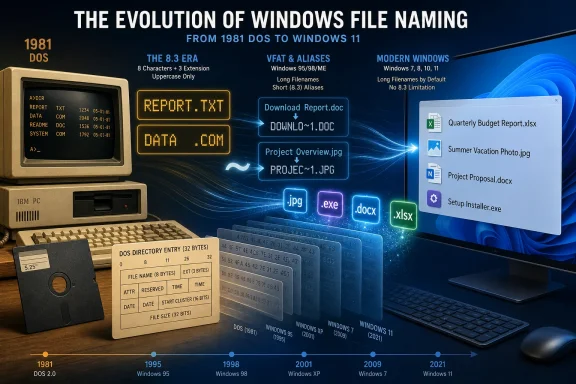
DOS represented each file or directory with a 32-byte directory entry. Early floppy disks used 512-byte sectors, and the arithmetic was pleasingly exact: a sector could hold sixteen 32-byte entries without leaving unused fragments. A directory could therefore be read and processed in sector-sized blocks, with each entry appearing at a predictable offset.
The entry needed to carry much more than a human-readable name. It also had to record attributes, dates, times, the starting cluster, the file size, and other information required to find and interpret the file. DOS allotted eight bytes to the primary filename and three to the extension, leaving the rest for that metadata.
That arrangement explains why names remained small, but it does not fully explain why the split was specifically eight plus three. Microsoft veteran Raymond Chen has written in The Old New Thing that MS-DOS used 8.3 because it was a holdover from CP/M. He also cautioned against treating the exact ratio as an inevitable consequence of the directory structure: CP/M’s format did not make eight plus three the only conceivable allocation.
That distinction matters. The hardware explains the pressure for compact, fixed records; software compatibility explains the exact 8.3 shape. Collapsing both into a generic claim that “floppy disks caused three-letter extensions” makes the history sound more deterministic than it was.
Gary Kildall’s CP/M had already adopted an eight-character filename plus a three-character file type in 1974, in the world of 8-inch floppies. When Tim Paterson wrote 86-DOS in 1980—the operating system that later became MS-DOS—he closely followed CP/M conventions, partly so that existing CP/M source code could be moved more easily.
DOS did not arrive at the IBM PC as a blank-sheet file system seeking the mathematically perfect filename. It arrived carrying assumptions from an earlier software ecosystem. IBM PC hardware gave those assumptions a vast new audience, and Microsoft’s success turned an inherited convention into the public grammar of personal computing.
The table reveals the actual trajectory. Windows did not move neatly from one naming system to another; it accumulated a second system around the first, then carried both forward where compatibility demanded it.
1980 — Tim Paterson writes 86-DOS, following CP/M closely; 86-DOS later becomes MS-DOS.
August 1981 — The IBM PC arrives, with 16KB of memory in its base form and early 5.25-inch floppy disks holding around 160KB.
Early 1990s — VFAT brings long filenames to mainstream Windows while preserving the established 32-byte directory entry.
2001 — During Microsoft’s antitrust trial, the
2007 — Microsoft rebuilds its Office formats around extensions such as
Windows 11 era — NTFS can still generate 8.3 aliases for long filenames, depending on the volume and system configuration.
A user might want
Microsoft’s solution was not to replace the old directory format outright. VFAT instead stored a long filename in additional 32-byte entries positioned directly before the ordinary short-name entry. Each extra entry could hold up to 13 characters, and as many as 20 entries could be chained together to support a name of up to 255 characters.
The design was clever because it preserved the physical rhythm of the existing file system. Windows did not demand that every disk utility and DOS application suddenly learn a wholly new directory structure. It embedded the new information in records that looked sufficiently strange to old software that they would normally be ignored.
Those long-filename entries were marked hidden, system, read-only, and volume label simultaneously. That was not a plausible combination for an ordinary file. Older programs would encounter the entries and pass over them, while Windows 95 knew to assemble their contents into the human-readable name associated with the normal entry that followed.
Official Microsoft material from the Windows 95 era described long-filename support in similar compatibility-first terms: the FAT structure was extended through directory entries that maintained the additional name information. Microsoft’s FAT specification likewise documents long names as a sequence of long-directory records associated with a conventional short entry, rather than as a clean repudiation of the old layout.
This was classic Microsoft engineering: not replacing a successful system, but building an interpretive layer around it. The new operating system saw the complete name. The old operating system saw the compact name it had always understood.
For a file called
The mechanism worked so well that its visual artifacts became jokes. During Microsoft’s 2001 antitrust trial, observers joked that if the company were divided, the resulting businesses would be called
It also demonstrated the reach of the convention. By then, 8.3 was no longer an obscure detail of a disk format. It was recognizable shorthand for Microsoft’s larger philosophy: keep the old interface alive, place the new interface on top, and make both coexist for as long as customers or applications might depend on them.
These are not the filenames Windows expects ordinary users to manage. They are alternate names generated for software that might not understand, or might not correctly process, the long form. Whether they exist depends on the file-system volume and system settings.
Microsoft’s current documentation still defines an 8.3 filename as a DOS or short name consisting of a base of no more than eight characters and an optional extension of no more than three. Its administrative documentation also describes controls for enabling, disabling, and querying short-name generation on supported volumes.
That persistence is easy to mock, but it reflects an uncomfortable reality for enterprise Windows. File paths can outlive the software, vendors, employees, and business processes that created them. An old installer, line-of-business application, batch file, or hard-coded integration may rely on a short path without documenting the dependency.
The resulting risk is asymmetrical. Keeping an alias may add directory-management overhead or preserve an awkward legacy behavior, but removing it can cause an application to fail in a way that is difficult to diagnose. An administrator may see only that an installer no longer finds a directory or that a scheduled operation suddenly reports a missing path.
Short names can also appear in diagnostic output and low-level Windows interfaces. Microsoft’s driver documentation includes path examples containing names such as
For admins, the lesson is not that 8.3 generation must always remain enabled. Microsoft provides configuration controls precisely because not every volume needs the compatibility cost. The lesson is that changing the behavior is a migration decision, not cosmetic cleanup.
A modern Windows estate may contain systems built under different defaults or configured by different images, administrators, and software vendors. One NTFS volume may generate aliases while another does not. A script that succeeds on the first can therefore fail on the second even when the visible directory structures appear identical.
That inconsistency is the price of making a legacy feature configurable. Microsoft can let newer deployments reduce dependence on short names, but it cannot retroactively guarantee that decades of Windows software never used them.
JPEG provides the cleanest example. The format’s natural abbreviation is
FileInfo’s explanation of interchangeable three- and four-letter extensions makes the same historical link: early Windows programs commonly used three-letter endings, and JPEG was compressed accordingly. Today, renaming between
The shorter spelling prevailed not because it was technically superior, but because Windows was pervasive. Applications emitted
MakeUseOf captures the transition neatly: “Three-letter extensions survived because they became a language.” The phrase gets at something a file-system diagram cannot. An extension is not merely a field in a directory record; it is a compact signal exchanged among users, interfaces, applications, security systems, and documentation.
The extension
“Once enough people, programs, cameras, websites, and manuals agreed that .jpg meant an image and .exe meant ‘be careful,’ the abbreviation stopped being a limitation. It became normal,” MakeUseOf argues. That is why the end of a technical restriction did not produce a rush toward verbose extensions.
Three characters sit at a useful human scale. They are short enough to scan and type, yet long enough to distinguish many common classes of data. Decades of exposure have made them feel less like abbreviations and more like words.
The persistence of
This is how standards often survive their original rationale. A technically arbitrary choice gains installed software, documentation, training, muscle memory, and security meaning. Removing the constraint does not remove the coordination value that accumulated around it.
The extra letter carried meaning. It helped users, administrators, and software identify that these were not simply updated versions of the same binary containers. The extension became part of the migration strategy.
Microsoft Support now describes Windows filenames as having a primary name and a three- or four-character extension, using
Other formats make the same point.
The browser-related
That freedom does not mean file extensions can grow without practical consequence. Applications, scripts, upload filters, security tools, and users still make assumptions about familiar endings. A longer extension may be technically valid while remaining poorly supported by software written around a smaller set of known types.
The lesson from Office is therefore not simply that four letters work. It is that a major vendor can normalize a longer extension when the extra character communicates a valuable distinction and when the surrounding product ecosystem is updated to recognize it.
Most formats have no comparable reason to abandon a known three-letter identity. Changing
The filename field consumed eight bytes and the extension field consumed three. The period users typed was a separator presented by the naming convention, not another flexible character that happened to split an otherwise open-ended string. The storage layout already knew which bytes represented the name and which represented the type.
This matters because it exposes the extension as a metadata convention hiding inside what looked like text. DOS did not inspect an arbitrary sentence after the last dot. It read a fixed field with three available positions.
Modern systems present filenames more fluidly, but the old mental model persists. Users still treat the final suffix as the authoritative type marker, and Windows uses it heavily for file associations and icons. Microsoft Support explains extensions in exactly those practical terms: they help indicate which application created or can open a file.
Yet the extension is not the file’s contents. Changing
That distinction has security consequences. The familiarity of
The 8.3 era strengthened this habit by making the suffix conspicuous and highly standardized. There were few characters available, so every extension had to communicate efficiently. Those abbreviations then became embedded in program launch behavior, documentation, and user training.
The legacy is therefore broader than the persistence of aliases. Even on file systems that do not store names using the original FAT directory layout, Windows culture still organizes files around the semantic weight of the extension. The bytes changed; the user model endured.
That does not mean every modern FAT-related system is trapped in the original 8.3 design. It means FAT’s long life has kept old assumptions visible in places where a wholly new desktop file system might have discarded them.
Removable media is one of the strongest forces for technological continuity because it must travel between systems that were never upgraded together. A storage device may move from a modern Windows 11 PC to an older appliance whose software has much narrower expectations. The value of the medium lies in the overlap between those implementations.
In that environment, short, established extensions are assets. A camera, image editor, website, archive utility, and operating system can all recognize
This is the same principle behind VFAT’s long-name trick, applied socially rather than structurally. VFAT preserved a short alias so old programs could keep working; the broader ecosystem preserved familiar extensions so old expectations could keep working.
Windows’ history is filled with compromises of this kind. Compatibility is rarely one dramatic switch. It is a sequence of escape hatches, aliases, translation layers, fallback behaviors, and conventions that remain after their original implementation has faded from view.
The result is an operating system whose surface appears modern while its edges reveal accumulated history. A Windows 11 user can open
That is not simply technical debt. It is also evidence of successful continuity. Files survived operating-system upgrades, applications survived file-system transitions, and users retained a recognizable vocabulary.
The cost is complexity. Administrators must understand that a visible path may have an alternate short form, that behavior can differ by volume, and that old software may rely on a feature no current employee remembers configuring. What looked like a harmless naming convention can become part of an application’s undocumented interface.
The real chain is more interesting. CP/M established eight-character names and three-character file types in 1974. Paterson carried that convention into 86-DOS in 1980, and the operating system later became MS-DOS. The IBM PC’s arrival in August 1981 placed the convention inside a platform with 16KB of base memory and severely limited floppy storage, where compact directory records were genuinely valuable.
Hardware scarcity reinforced the rule, but compatibility transmitted it. Microsoft later escaped the restriction through another compatibility mechanism, using extra 32-byte entries to build long names around the original short record. The same preference for continuity that spread 8.3 also prolonged its afterlife.
This is why the story matters beyond nostalgia. Technology is often shaped less by the theoretically best format than by the least disruptive bridge from what already exists. A legacy design becomes difficult to remove not because engineers admire it, but because nobody can confidently identify every dependency.
The Windows ecosystem rewards that caution. Businesses may run applications written for environments far older than their current PCs. Installers and scripts can encode assumptions that survive multiple ownership changes. A naming alias that seems absurd in isolation may be the only thing keeping an undocumented workflow alive.
At the same time, compatibility should not be romanticized. Every retained behavior expands the number of states administrators must test and the number of paths attackers, tools, and applications may interpret differently. The right response is not indiscriminate removal, but informed management.
Microsoft’s 8.3 controls embody this tension. Windows can reduce or disable new alias creation where the environment allows it, yet it continues to document short names as a supported concept. The feature is neither fully obsolete nor universally necessary.
That ambiguity is the natural state of a mature platform. Windows does not progress by forgetting its past. It progresses by making the past optional, then waiting—sometimes for decades—for the ecosystem to stop asking for it.
The next generation of Windows storage will continue to accommodate longer names, richer metadata, cloud-backed paths, and applications that barely expose conventional files at all, but the 8.3 legacy is unlikely to vanish in one decisive release. It will recede one dependency at a time, while
DOWNLO~1 because Microsoft chose compatibility over a clean break. The important story is not that modern Windows remains technically trapped in 1981; it is that one of personal computing’s earliest compromises became culturally permanent.
 The 8.3 Rule Was Both a Hardware Compromise and an Inheritance
The familiar explanation for three-letter extensions begins with storage scarcity, and MakeUseOf’s account correctly puts the IBM PC’s modest resources at the center of the story. The machine arrived in August 1981 with only 16KB of memory in its base configuration, while early 5.25-inch floppy disks held around 160KB. Every byte spent describing a file was a byte unavailable for programs, documents, or the bookkeeping needed to locate data on disk.IBM’s own history of the PC confirms the almost alien scale of that original configuration: 16KB of memory in a machine intended to bring computing into offices and homes. Ars Technica’s retrospective likewise emphasizes how constrained the original platform was, even before users paid for disk drives and other additions. Against that backdrop, a short, fixed-length record for every file was not an aesthetic choice; it was an economic decision made in bytes.
DOS represented each file or directory with a 32-byte directory entry. Early floppy disks used 512-byte sectors, and the arithmetic was pleasingly exact: a sector could hold sixteen 32-byte entries without leaving unused fragments. A directory could therefore be read and processed in sector-sized blocks, with each entry appearing at a predictable offset.
The entry needed to carry much more than a human-readable name. It also had to record attributes, dates, times, the starting cluster, the file size, and other information required to find and interpret the file. DOS allotted eight bytes to the primary filename and three to the extension, leaving the rest for that metadata.
That arrangement explains why names remained small, but it does not fully explain why the split was specifically eight plus three. Microsoft veteran Raymond Chen has written in The Old New Thing that MS-DOS used 8.3 because it was a holdover from CP/M. He also cautioned against treating the exact ratio as an inevitable consequence of the directory structure: CP/M’s format did not make eight plus three the only conceivable allocation.
That distinction matters. The hardware explains the pressure for compact, fixed records; software compatibility explains the exact 8.3 shape. Collapsing both into a generic claim that “floppy disks caused three-letter extensions” makes the history sound more deterministic than it was.
Gary Kildall’s CP/M had already adopted an eight-character filename plus a three-character file type in 1974, in the world of 8-inch floppies. When Tim Paterson wrote 86-DOS in 1980—the operating system that later became MS-DOS—he closely followed CP/M conventions, partly so that existing CP/M source code could be moved more easily.
DOS did not arrive at the IBM PC as a blank-sheet file system seeking the mathematically perfect filename. It arrived carrying assumptions from an earlier software ecosystem. IBM PC hardware gave those assumptions a vast new audience, and Microsoft’s success turned an inherited convention into the public grammar of personal computing.
| Era or system | Visible naming model | Directory representation | Compatibility consequence |
|---|---|---|---|
| CP/M | Eight-character filename plus three-character file type | Compact records for floppy-based systems | Established the convention DOS inherited |
| DOS on the IBM PC | 8.3 short names | One 32-byte entry per file or directory | Made three-letter extensions standard for PC software |
| VFAT-era Windows | Long name plus generated 8.3 alias | Extra 32-byte long-name entries before the normal entry | Let new Windows software and older DOS programs share a volume |
| Windows 11 on NTFS | Long names, with optional 8.3 aliases depending on settings | Modern file-system records with legacy short-name support | Keeps some old applications and paths functioning |
Timeline
1974 — CP/M uses an eight-character filename plus a three-character file type on systems associated with 8-inch floppies.1980 — Tim Paterson writes 86-DOS, following CP/M closely; 86-DOS later becomes MS-DOS.
August 1981 — The IBM PC arrives, with 16KB of memory in its base form and early 5.25-inch floppy disks holding around 160KB.
Early 1990s — VFAT brings long filenames to mainstream Windows while preserving the established 32-byte directory entry.
2001 — During Microsoft’s antitrust trial, the
MICROS~1 and MICROS~2 joke shows that generated short names have become part of computing culture.2007 — Microsoft rebuilds its Office formats around extensions such as
.docx and .xlsx, visibly moving beyond the three-character convention used by .doc and .xls.Windows 11 era — NTFS can still generate 8.3 aliases for long filenames, depending on the volume and system configuration.
Microsoft Escaped the Limit Without Breaking the Past
By the early 1990s, 8.3 names were no longer merely austere. They were becoming an obstacle to a graphical operating system intended to make files understandable to people who did not think like programmers.A user might want
Budget Q1 Projections.xls, but DOS expected something closer to BUDGETQ1.XLS. Meaning had to be compressed into eight uppercase characters, often through cryptic abbreviations understood only by the person who created the file. The extension still communicated the general type, but the base name became a miniature code.Microsoft’s solution was not to replace the old directory format outright. VFAT instead stored a long filename in additional 32-byte entries positioned directly before the ordinary short-name entry. Each extra entry could hold up to 13 characters, and as many as 20 entries could be chained together to support a name of up to 255 characters.
The design was clever because it preserved the physical rhythm of the existing file system. Windows did not demand that every disk utility and DOS application suddenly learn a wholly new directory structure. It embedded the new information in records that looked sufficiently strange to old software that they would normally be ignored.
Those long-filename entries were marked hidden, system, read-only, and volume label simultaneously. That was not a plausible combination for an ordinary file. Older programs would encounter the entries and pass over them, while Windows 95 knew to assemble their contents into the human-readable name associated with the normal entry that followed.
Official Microsoft material from the Windows 95 era described long-filename support in similar compatibility-first terms: the FAT structure was extended through directory entries that maintained the additional name information. Microsoft’s FAT specification likewise documents long names as a sequence of long-directory records associated with a conventional short entry, rather than as a clean repudiation of the old layout.
This was classic Microsoft engineering: not replacing a successful system, but building an interpretive layer around it. The new operating system saw the complete name. The old operating system saw the compact name it had always understood.
For a file called
Quarterly Budget Report.xlsx, an older program might receive an alias such as QUARTE~1.XLS. The tilde and number compensated for the fact that many files could share the same initial characters. Users no longer needed to type those aliases in normal Windows work, but they remained available as alternate identities.The mechanism worked so well that its visual artifacts became jokes. During Microsoft’s 2001 antitrust trial, observers joked that if the company were divided, the resulting businesses would be called
MICROS~1 and MICROS~2. The humor required no explanation for anyone who had fought with DOS-compatible paths.It also demonstrated the reach of the convention. By then, 8.3 was no longer an obscure detail of a disk format. It was recognizable shorthand for Microsoft’s larger philosophy: keep the old interface alive, place the new interface on top, and make both coexist for as long as customers or applications might depend on them.
Windows 11 Still Carries an Alternate Identity for Some Files
Rundir /x in Command Prompt on a Windows 11 PC and the operating system may expose the compatibility layer that File Explorer normally conceals. Alongside folders named Downloads, Documents, and Favorites, a system may display short forms such as DOWNLO~1, DOCUME~1, and FAVORI~1.These are not the filenames Windows expects ordinary users to manage. They are alternate names generated for software that might not understand, or might not correctly process, the long form. Whether they exist depends on the file-system volume and system settings.
Microsoft’s current documentation still defines an 8.3 filename as a DOS or short name consisting of a base of no more than eight characters and an optional extension of no more than three. Its administrative documentation also describes controls for enabling, disabling, and querying short-name generation on supported volumes.
That persistence is easy to mock, but it reflects an uncomfortable reality for enterprise Windows. File paths can outlive the software, vendors, employees, and business processes that created them. An old installer, line-of-business application, batch file, or hard-coded integration may rely on a short path without documenting the dependency.
The resulting risk is asymmetrical. Keeping an alias may add directory-management overhead or preserve an awkward legacy behavior, but removing it can cause an application to fail in a way that is difficult to diagnose. An administrator may see only that an installer no longer finds a directory or that a scheduled operation suddenly reports a missing path.
Short names can also appear in diagnostic output and low-level Windows interfaces. Microsoft’s driver documentation includes path examples containing names such as
Docume~1, illustrating that a path opened through an alias can remain visible to software inspecting how the file was accessed. The long and short forms are not two copies of the file; they are two routes to the same object.For admins, the lesson is not that 8.3 generation must always remain enabled. Microsoft provides configuration controls precisely because not every volume needs the compatibility cost. The lesson is that changing the behavior is a migration decision, not cosmetic cleanup.
A modern Windows estate may contain systems built under different defaults or configured by different images, administrators, and software vendors. One NTFS volume may generate aliases while another does not. A script that succeeds on the first can therefore fail on the second even when the visible directory structures appear identical.
That inconsistency is the price of making a legacy feature configurable. Microsoft can let newer deployments reduce dependence on short names, but it cannot retroactively guarantee that decades of Windows software never used them.
Action checklist for admins
- Use
dir /xin relevant application directories to determine whether short aliases are present and being exposed. - Query the current 8.3 name-creation behavior before changing a volume or system setting.
- Search scripts, installers, scheduled tasks, deployment packages, and application configuration for paths containing tildes or truncated directory names.
- Test legacy and line-of-business applications on a representative volume where new short-name creation is disabled.
- Document per-volume differences so that a successful test on one drive is not assumed to apply everywhere.
- Treat any change as a compatibility migration with a rollback plan, rather than as a routine performance tweak.
Three Letters Survived Because Everyone Learned to Read Them
If Windows has supported longer filenames for decades, why do so many extensions still stop at three characters? The answer has shifted from engineering to language.JPEG provides the cleanest example. The format’s natural abbreviation is
.jpeg, but DOS and early Windows software had room for only .jpg. Platforms without the same 8.3 ceiling could use the longer form, which is why both variants remain visible.FileInfo’s explanation of interchangeable three- and four-letter extensions makes the same historical link: early Windows programs commonly used three-letter endings, and JPEG was compressed accordingly. Today, renaming between
.jpg and .jpeg does not transform the image data. The difference is a spelling convention inherited from software compatibility.The shorter spelling prevailed not because it was technically superior, but because Windows was pervasive. Applications emitted
.jpg; users exchanged .jpg; websites documented .jpg; cameras produced .jpg; and developers tested against .jpg. Once the surrounding ecosystem accepted the abbreviation, the vanished constraint no longer mattered.MakeUseOf captures the transition neatly: “Three-letter extensions survived because they became a language.” The phrase gets at something a file-system diagram cannot. An extension is not merely a field in a directory record; it is a compact signal exchanged among users, interfaces, applications, security systems, and documentation.
The extension
.exe, for example, does more cultural work than simply labeling an executable file. It tells a Windows user that opening the file may run a program and therefore deserves scrutiny. .zip means an archive, .css indicates a style sheet, and .png signals an image format, even to people who could not expand every acronym.“Once enough people, programs, cameras, websites, and manuals agreed that .jpg meant an image and .exe meant ‘be careful,’ the abbreviation stopped being a limitation. It became normal,” MakeUseOf argues. That is why the end of a technical restriction did not produce a rush toward verbose extensions.
Three characters sit at a useful human scale. They are short enough to scan and type, yet long enough to distinguish many common classes of data. Decades of exposure have made them feel less like abbreviations and more like words.
The persistence of
.png, .svg, .css, and .zip does not mean their designers were unknowingly bound by DOS. It means new formats entered a culture where three-letter extensions already looked conventional. The historical limit became a design expectation.This is how standards often survive their original rationale. A technically arbitrary choice gains installed software, documentation, training, muscle memory, and security meaning. Removing the constraint does not remove the coordination value that accumulated around it.
Office 2007 Proved the Ceiling Was Gone
Microsoft’s Office transition in 2007 is useful because it shows the company deliberately stepping beyond three characters. The new.docx and .xlsx extensions distinguished the rebuilt formats from older binary .doc and .xls files.The extra letter carried meaning. It helped users, administrators, and software identify that these were not simply updated versions of the same binary containers. The extension became part of the migration strategy.
Microsoft Support now describes Windows filenames as having a primary name and a three- or four-character extension, using
expenses.xlsx as an example. That description reflects mainstream usage rather than a file-system ceiling. Modern Windows is not technically limited to either length.Other formats make the same point.
.html, .jpeg, .webp, .heic, and .crdownload all exceed three characters. They coexist with older and newer three-letter forms without requiring Windows to treat them as exotic exceptions.The browser-related
.crdownload extension is particularly revealing because its length would have been absurd under classic DOS. On modern Windows, it can serve as a descriptive state marker without being compressed into an opaque three-character code. Software authors can choose clarity where the ecosystem permits it.That freedom does not mean file extensions can grow without practical consequence. Applications, scripts, upload filters, security tools, and users still make assumptions about familiar endings. A longer extension may be technically valid while remaining poorly supported by software written around a smaller set of known types.
The lesson from Office is therefore not simply that four letters work. It is that a major vendor can normalize a longer extension when the extra character communicates a valuable distinction and when the surrounding product ecosystem is updated to recognize it.
.docx and .xlsx succeeded because Microsoft did not ask users to interpret arbitrary novelty. It connected the new endings to new formats, new application behavior, and an obvious contrast with .doc and .xls. The extension changed as part of a coordinated platform transition.Most formats have no comparable reason to abandon a known three-letter identity. Changing
.jpg everywhere to .jpeg would deliver little benefit while creating endless opportunities for mismatched filters, duplicated associations, and confused users. Historical neatness is rarely worth ecosystem disruption.The Directory Entry, Not the Dot, Was the Real Constraint
Discussions of 8.3 often make the period sound like a wall: eight characters, then a dot, then three more. On disk, however, the significant structure was the allocation of bytes inside the directory entry.The filename field consumed eight bytes and the extension field consumed three. The period users typed was a separator presented by the naming convention, not another flexible character that happened to split an otherwise open-ended string. The storage layout already knew which bytes represented the name and which represented the type.
This matters because it exposes the extension as a metadata convention hiding inside what looked like text. DOS did not inspect an arbitrary sentence after the last dot. It read a fixed field with three available positions.
Modern systems present filenames more fluidly, but the old mental model persists. Users still treat the final suffix as the authoritative type marker, and Windows uses it heavily for file associations and icons. Microsoft Support explains extensions in exactly those practical terms: they help indicate which application created or can open a file.
Yet the extension is not the file’s contents. Changing
.jpg to .jpeg leaves the image intact because the two names identify the same kind of encoded data. Changing an unrelated extension does not convert the underlying file; it merely alters the label Windows and applications may use when deciding what to do with it.That distinction has security consequences. The familiarity of
.jpg, .txt, .zip, and .exe gives extensions enormous signaling power, but only when users can see and trust the full name. A filename is part of the interface between the file system and human judgment, not proof of what the bytes contain.The 8.3 era strengthened this habit by making the suffix conspicuous and highly standardized. There were few characters available, so every extension had to communicate efficiently. Those abbreviations then became embedded in program launch behavior, documentation, and user training.
The legacy is therefore broader than the persistence of aliases. Even on file systems that do not store names using the original FAT directory layout, Windows culture still organizes files around the semantic weight of the extension. The bytes changed; the user model endured.
FAT’s Longevity Kept the Old Grammar in Circulation
FAT32 remains part of the FAT lineage, and removable storage has helped preserve conventions associated with that family. Compatibility across PCs, cameras, appliances, embedded devices, and other equipment rewards conservative file-system behavior.That does not mean every modern FAT-related system is trapped in the original 8.3 design. It means FAT’s long life has kept old assumptions visible in places where a wholly new desktop file system might have discarded them.
Removable media is one of the strongest forces for technological continuity because it must travel between systems that were never upgraded together. A storage device may move from a modern Windows 11 PC to an older appliance whose software has much narrower expectations. The value of the medium lies in the overlap between those implementations.
In that environment, short, established extensions are assets. A camera, image editor, website, archive utility, and operating system can all recognize
.jpg without negotiating a new label. The extension survives because it minimizes friction across generations.This is the same principle behind VFAT’s long-name trick, applied socially rather than structurally. VFAT preserved a short alias so old programs could keep working; the broader ecosystem preserved familiar extensions so old expectations could keep working.
Windows’ history is filled with compromises of this kind. Compatibility is rarely one dramatic switch. It is a sequence of escape hatches, aliases, translation layers, fallback behaviors, and conventions that remain after their original implementation has faded from view.
The result is an operating system whose surface appears modern while its edges reveal accumulated history. A Windows 11 user can open
Quarterly Budget Report.xlsx through a polished graphical interface, while an older-style alias may still exist underneath and a four-letter extension identifies a format introduced in 2007.That is not simply technical debt. It is also evidence of successful continuity. Files survived operating-system upgrades, applications survived file-system transitions, and users retained a recognizable vocabulary.
The cost is complexity. Administrators must understand that a visible path may have an alternate short form, that behavior can differ by volume, and that old software may rely on a feature no current employee remembers configuring. What looked like a harmless naming convention can become part of an application’s undocumented interface.
The Simplest Origin Story Misses the Most Important Lesson
The claim that three-letter extensions came from a 1980s hardware limit is broadly useful, but incomplete. It risks implying that engineers examined a 160KB floppy, calculated three characters, and imposed the result on the world.The real chain is more interesting. CP/M established eight-character names and three-character file types in 1974. Paterson carried that convention into 86-DOS in 1980, and the operating system later became MS-DOS. The IBM PC’s arrival in August 1981 placed the convention inside a platform with 16KB of base memory and severely limited floppy storage, where compact directory records were genuinely valuable.
Hardware scarcity reinforced the rule, but compatibility transmitted it. Microsoft later escaped the restriction through another compatibility mechanism, using extra 32-byte entries to build long names around the original short record. The same preference for continuity that spread 8.3 also prolonged its afterlife.
This is why the story matters beyond nostalgia. Technology is often shaped less by the theoretically best format than by the least disruptive bridge from what already exists. A legacy design becomes difficult to remove not because engineers admire it, but because nobody can confidently identify every dependency.
The Windows ecosystem rewards that caution. Businesses may run applications written for environments far older than their current PCs. Installers and scripts can encode assumptions that survive multiple ownership changes. A naming alias that seems absurd in isolation may be the only thing keeping an undocumented workflow alive.
At the same time, compatibility should not be romanticized. Every retained behavior expands the number of states administrators must test and the number of paths attackers, tools, and applications may interpret differently. The right response is not indiscriminate removal, but informed management.
Microsoft’s 8.3 controls embody this tension. Windows can reduce or disable new alias creation where the environment allows it, yet it continues to document short names as a supported concept. The feature is neither fully obsolete nor universally necessary.
That ambiguity is the natural state of a mature platform. Windows does not progress by forgetting its past. It progresses by making the past optional, then waiting—sometimes for decades—for the ecosystem to stop asking for it.
What the Tilde Still Tells Windows Administrators
The practical conclusions are less nostalgic than the IBM PC origin story suggests. The odd name shown bydir /x is not merely a museum exhibit; it may identify a live compatibility dependency, while the familiar three-letter extension beside it shows how thoroughly an old constraint became ordinary language.- DOS used a 32-byte directory entry, allowing sixteen entries to fit into a 512-byte floppy-disk sector.
- The eight-plus-three split came from CP/M, while IBM PC resource limits made compact records especially valuable.
- VFAT supported names up to 255 characters by chaining extra 32-byte entries ahead of the conventional short entry.
- Windows 11 may still generate 8.3 aliases on NTFS, depending on the volume and system settings.
- Administrators should audit scripts and applications before changing short-name creation behavior.
- Three-letter extensions persist mainly because their meanings became standardized, not because modern Windows requires them.
The next generation of Windows storage will continue to accommodate longer names, richer metadata, cloud-backed paths, and applications that barely expose conventional files at all, but the 8.3 legacy is unlikely to vanish in one decisive release. It will recede one dependency at a time, while
.jpg, .txt, .exe, and the occasional ~1 remain proof that in computing, a limitation can disappear long before the language it created does.References
- Primary source: MakeUseOf
Published: Sat, 11 Jul 2026 19:00:18 GMT
Windows file extensions are mostly stuck at three letters because of this 1980s hardware limit
Somewhere, an ancient file system is still quietly bossing around your PC. www.makeuseof.com
- Official source: learn.microsoft.com
[MS-FSCC]: 8.3 Filename | Microsoft Learn
An 8.3 filename (also referred to as a DOS name, a short name, or an 8.3-compliant filename) is a filename that conformslearn.microsoft.com - Related coverage: fileinfo.com

Why do some file types use both three and four-letter extensions?
Learn why many popular file types use both three and four-letter extensions. (Hint: It's mostly Microsoft's fault.)
fileinfo.com
- Official source: support.microsoft.com
Common file name extensions in Windows | Microsoft Support
Learn what file name extensions are, which extensions are common in Windows, and how to view them in File Explorer.support.microsoft.com - Related coverage: retrocomputing.stackexchange.com
Origin of the 8.3 file names scheme - Retrocomputing Stack Exchange
On microcomputers, the famously laughed 8.3 file names (by Amiga and Mac users!) were used by PC/MS-DOS, which in turn inherited this limit from CP/M. But why did Gary Kildall use this scheme of ei...retrocomputing.stackexchange.com
- Related coverage: scribd.com
- Related coverage: liquisearch.com
- Related coverage: academickids.com
Filename extension - Academic Kids
academickids.com
- Related coverage: msinc.org
- Related coverage: bitsavers.org