

Microsoft has quietly added a device‑wide Settings toggle in Windows 11 that provisions a contained runtime for on‑device AI agents — an “Agent Workspace” and per‑agent accounts — allowing Copilot Actions (and third‑party agents) to perform UI‑level tasks like opening apps, clicking buttons, and operating on files when users explicitly opt in.
Microsoft announced Copilot Actions and the underlying Agent Workspace in preview for Windows Insiders in mid‑November 2025, positioning the change as a cautious, opt‑in expansion of Copilot from suggestions into agentic automation. The primary documentation makes the sequence clear: first ship the plumbing (a Settings toggle labeled Experimental agentic features), then expose agent experiences (Copilot Actions in Copilot Labs) that use that runtime, while iterating on policy and telemetry during preview. This is not merely a Copilot UI update. The platform changes are architectural: agents are treated as distinct runtime principals — separate, standard (non‑admin) Windows accounts that run inside an isolated desktop‑like session called an Agent Workspace — so their activities are auditable, interruptible, and governable by the OS and enterprise tools. That model is intended to enable automation without conflating agent behavior with the signed‑in user’s identity.
Source: MSN https://www.msn.com/en-us/news/tech...vertelemetry=1&renderwebcomponents=1&wcseo=1]
 Background
Microsoft announced Copilot Actions and the underlying Agent Workspace in preview for Windows Insiders in mid‑November 2025, positioning the change as a cautious, opt‑in expansion of Copilot from suggestions into agentic automation. The primary documentation makes the sequence clear: first ship the plumbing (a Settings toggle labeled Experimental agentic features), then expose agent experiences (Copilot Actions in Copilot Labs) that use that runtime, while iterating on policy and telemetry during preview. This is not merely a Copilot UI update. The platform changes are architectural: agents are treated as distinct runtime principals — separate, standard (non‑admin) Windows accounts that run inside an isolated desktop‑like session called an Agent Workspace — so their activities are auditable, interruptible, and governable by the OS and enterprise tools. That model is intended to enable automation without conflating agent behavior with the signed‑in user’s identity. What the new Settings toggle does
Where it lives and how to enable it
- Settings path: Settings → System → AI components → Agent tools → Experimental agentic features. Turning the toggle on requires an administrator account and, once enabled, applies to the entire device (every user profile).
- The toggle does not itself “do” AI; it provisions the runtime components that allow agentic apps (for example, Copilot Actions) to create agent accounts and Agent Workspaces. Microsoft explicitly describes the toggle as off by default and preview‑only.
What gets provisioned
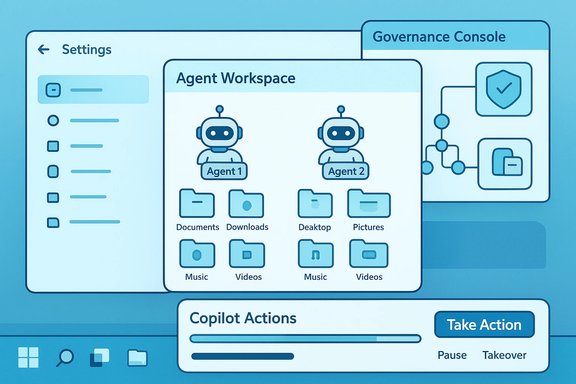
When the toggle is enabled, Windows may create:- Agent accounts: Dedicated, limited Windows accounts assigned to individual agents so each agent’s actions can be audited and governed by ACLs, Intune/MDM, and Group Policy.
- Agent Workspace: A contained, lightweight desktop session where agents run UI automation (click, type, scroll), launch apps, and operate on files within scoped permissions. Microsoft says it is lighter than a VM but stronger than in‑process automation.
- Scoped file access: By default, agents may request read/write access to six “known folders” in the user profile — Documents, Downloads, Desktop, Pictures, Music, Videos — and are otherwise blocked from arbitrary crawling of a user’s profile unless the user grants additional permission. Consent options include “Allow Always,” “Ask every time,” or “Never allow.”
How Copilot Actions uses the runtime
Copilot Actions (an experimental Copilot Labs flow) can be invoked from the Copilot composer with a “Take Action” option. Users can attach files or folders and request a multi‑step task in plain language (for example: “Extract tables from these PDFs into Excel, summarize findings, and draft an email with attachments”). Copilot then provisions an Agent Workspace and runs the agent under its dedicated account; users can monitor progress, pause, stop, or take over at any time. Microsoft warns the feature may make mistakes in preview and encourages close supervision.Why Microsoft built it this way (the rationale)
Microsoft frames the agentic model around three core goals:- Least privilege and auditability — by giving agents separate accounts and scoped folder access, their actions are visible in OS logs and can be governed by existing enterprise tools.
- Runtime isolation without heavy virtualization — Agent Workspace aims to offer a contained desktop session that enables UI automation while being lighter than a full VM. Microsoft argues that this balances performance and containment.
- Human‑in‑the‑loop controls — visible progress, pause/stop/takeover UI, and per‑agent consent dialogs are designed to keep users in control of side effects.
What it can do today — practical capabilities and limits
- Open installed desktop apps and webpages, interact with UI elements (click, type, scroll), and chain multiple steps into a single agent plan.
- Operate on files inside the known folders listed above, and (subject to user consent) attach files/folders to Copilot Actions flows.
- Run in parallel with the human session; agents present progress in an Agent Workspace UI and surface prompts for explicit confirmation on sensitive steps.
Strengths: why this design matters for users and IT
- Productivity gains — real automation of repetitive, multi‑step desktop tasks (batch photo edits, extracting tables from PDFs, preparing reports and email drafts) could save time and reduce context switching when the agent reliably performs steps on local apps and files. This is the first mainstream attempt to make generative AI do desktop work rather than only recommend it.
- Familiar governance model — treating agents as Windows accounts that obey ACLs and MDM/GPO rules lets administrators reuse existing controls (audit logs, access revocation, application whitelisting) rather than invent an entirely separate security plane. For enterprises, that consistency lowers the barrier to adoption.
- Visible, interruptible execution — the Agent Workspace and taskbar agent indicators give users real‑time visibility into what an agent is doing, which helps with trust and remediation when actions go astray.
- Extensibility through MCP and connectors — the Model Context Protocol and agent connectors provide a standardized integration surface for third‑party apps to safely expose capabilities to agents, which can be a major enabler if implemented securely.
Risks and attack surface: what keeps security teams awake at night
Microsoft’s own materials are unusually candid about new categories of risk introduced when agents can act on the desktop; the company names scenarios such as prompt‑injection style attacks (cross‑prompt injection), supply‑chain compromise of agent binaries, and unexpected privilege escalation stemming from misconfigured folder or app installations. Early reporting echoes these concerns. Key risks include:- Cross‑prompt injection (XPIA) — an agent that parses UI content or documents as instructions could be manipulated by crafted files, webpages, or UI elements to deviate from intended behavior. This is uniquely dangerous because it leverages the agent’s ability to interpret content and then act on it. Microsoft calls attention to XPIA and is designing mitigations but warns it remains an evolving threat.
- Scope creep and over‑permissioning — while default access is limited, poorly configured deployments or user consent behaviors (clicking “Allow Always” for convenience) could grant agents broader reach across profiles, network shares, or enterprise resources. Admins must audit which agents are allowed and how connectors are registered.
- Supply‑chain and signing dependence — Microsoft expects agent binaries and connectors to be cryptographically signed so they can be revoked if compromised. The security of that model depends on the integrity of signing infrastructures, update channels, and certificate revocation processes. Compromise at any point could be leveraged to push malicious agent code that the OS may treat as trusted.
- User confusion and accidental data exposure — runtime automation that clicks, types, and sends files can make mistakes. Early previews already caution that actions should be monitored; in enterprise environments, mis‑directed data transfers or automated attachments could leak sensitive information unless connectors and policies are strictly controlled.
- New forensic and SIEM challenges — while agent accounts create distinct audit trails, security operations teams will need to adapt detection logic to interpret agent‑initiated actions versus human behavior, and to correlate agent activity across endpoint, network, and cloud signals. This represents more telemetry, not less, and requires tooling updates.
Practical guidance for admins and power users
- Treat the toggle as a device‑wide feature flag — only enable experimental agentic features on test systems or after reviewing organizational policy. Enabling affects all users on the device and requires admin privileges.
- Enforce least privilege via MDM/GPO — use existing Intune, Group Policy, and ACLs to restrict which agents, apps, and connectors can run; avoid blanket “Allow Always” file permissions where possible.
- Audit agent identities and logs — update SIEM and EDR rules to ingest agent account activity and create alerts for unexpected agent behaviors (e.g., creation of new connectors, mass file movements, or unusual outbound traffic).
- Require supply‑chain controls — treat agent binaries like any other executable: require signing, vendor attestations, and code‑review / SCA workflows before allowing them in production.
- Pilot with human oversight — when testing Copilot Actions, assign users to monitor agent runs and verify outputs before scaling to production workloads. Microsoft explicitly recommends supervising experimental agentic flows.
Developer and ISV implications
For independent software vendors and enterprise ISVs, the Agent Workspace and MCP open new opportunities and responsibilities:- Agents can automate workflows that previously needed bespoke scripting or RPA tools; ISVs can expose safe, granular connectors that let agents consume app functions rather than simulate brittle UI manipulations. Proper connector design will be a differentiator.
- Apps that continue to expose sensitive functionality to “all authenticated users” by default may inadvertently grant agent access; developers should consider per‑user installation models or explicit connector-based APIs to limit agent reach.
- Security controls, signing mechanisms, and revocation pathways for connectors and agent binaries become part of the deployment contract. ISVs must design for safe, verifiable integration or risk being blocked by cautious enterprises.
How industry coverage and hands‑on previews line up
Independent reporting and community previews confirm Microsoft’s core claims about the toggle, Agent Workspace, and Copilot Actions. The Windows Insider blog and Microsoft’s support documentation present the official, implementable steps and admin constraints, while hands‑on reporting highlights the practical UI flow and caveats about errors during complex automations. Industry analysis draws attention to the novel threat surface and to the need for updated security practices. Where coverage diverges is mainly in tone and emphasis: Microsoft stresses controls, revocation, and opt‑in defaults; independent reviewers emphasize that any system that interprets content as instructions and then acts on it will necessarily invite new adversarial strategies, and that the protective model must be stress‑tested under realistic attack scenarios.Known unknowns and unverifiable claims
- Exact implementation details for how Agent Workspace isolates GPU/TPM/secure enclave access to prevent covert channels are not fully public and require deeper technical disclosures to evaluate thoroughly. Microsoft describes the workspace as “lightweight” and session‑isolated, but the precise kernel/driver/runtime boundaries have not been exhaustively published in a single technical whitepaper as of the preview announcement — this is an area to watch. Flagged as unverifiable from public materials at time of writing.
- The long‑term roadmap for third‑party agent certification, connector governance, and enterprise attestation is still evolving; Microsoft describes signing and revocation as part of the model, but operational details (who signs, which CAs are trusted, revocation latency) will determine real-world risk. Until those processes are fully documented, some supply‑chain risk remains difficult to quantify. Flagged as requiring further verification.
What to watch next
- Broader Insider telemetry and feedback cycles: Microsoft intends to iterate on the model during preview; changes to default folder scopes, additional per‑agent controls, or tighter connector governance are all plausible near‑term outcomes.
- Enterprise integration stories: how Intune, Defender for Endpoint, and third‑party EDR vendors update controls, alerts, and remediation playbooks for agent accounts will be an important barometer of enterprise readiness.
- Attack research and red‑team reports focusing on XPIA and agent exploitation scenarios — these will test whether runtime isolation plus signing and audit is sufficient to contain adversarial manipulations.
Bottom line
The new Experimental agentic features toggle marks a substantive shift in Windows 11’s trajectory: from an assistant that suggests to an operating system that hosts actors capable of making changes on behalf of users. Microsoft’s design — agent accounts, Agent Workspace, scoped file access, and human‑in‑the‑loop controls — shows a clear attempt to balance productivity with governance. If executed well, this could unlock meaningful automation on the desktop; if executed poorly, it could enlarge the attack surface in ways that outpace current detection and policy tooling. Administrators and developers should treat the preview as a limited pilot: enable it deliberately, require strong signing and supply‑chain assurances, update detection and audit tooling, and maintain human supervision for any agent‑driven workflows. The era where Windows can “do things” for you has begun in preview — the next months of telemetry, security testing, and third‑party integration will determine whether agentic Windows becomes a productivity boon or a new, complex operational headache.Source: MSN https://www.msn.com/en-us/news/tech...vertelemetry=1&renderwebcomponents=1&wcseo=1]
