

Microsoft’s latest move to make Windows 11 an “agentic” operating system — where AI agents can act on behalf of users, open apps, and manipulate files — has triggered a fierce debate about privacy, consent, and a changed security model for the desktop.
Microsoft has begun previewing a set of experimental features that let AI-driven agents run in a contained runtime called the Agent Workspace, operate under per-agent Windows accounts, and request scoped access to familiar user folders. These agentic primitives power scenarios such as Copilot Actions: multi-step workflows that can assemble documents, manipulate UI, and call cloud connectors to finish tasks with minimal human effort. Microsoft documents this architecture and openly warns that agentic features introduce “novel security risks,” including a specific adversarial class it calls cross‑prompt injection (XPIA). Early messaging and demonstrations prompted concern that agents might indiscriminately scan a user’s files. In response, Microsoft clarified that agents do not receive blanket access to personal data and that file access requires explicit, per‑agent consent in preview builds — a design change intended to restore user control. Independent trade press and community reporting corroborate both the technical surface area and Microsoft’s pivot toward consent-based controls.
Source: WebProNews Microsoft’s Windows 11 AI Agents Spark Privacy Fears and Security Risks
 Background / Overview
Microsoft has begun previewing a set of experimental features that let AI-driven agents run in a contained runtime called the Agent Workspace, operate under per-agent Windows accounts, and request scoped access to familiar user folders. These agentic primitives power scenarios such as Copilot Actions: multi-step workflows that can assemble documents, manipulate UI, and call cloud connectors to finish tasks with minimal human effort. Microsoft documents this architecture and openly warns that agentic features introduce “novel security risks,” including a specific adversarial class it calls cross‑prompt injection (XPIA). Early messaging and demonstrations prompted concern that agents might indiscriminately scan a user’s files. In response, Microsoft clarified that agents do not receive blanket access to personal data and that file access requires explicit, per‑agent consent in preview builds — a design change intended to restore user control. Independent trade press and community reporting corroborate both the technical surface area and Microsoft’s pivot toward consent-based controls. What the Agent Model Actually Does
Agent Workspace and Agent Accounts
- Agent Workspace: A lightweight, contained Windows session where an agent can run in parallel with a human user, interact with applications via UI automation (click, type, open/close windows), and perform multi-step tasks. It is designed to be more efficient than a full VM while offering stronger separation than running directly inside the primary user session.
- Agent accounts: Agents are represented as separate, low‑privilege Windows accounts. Treating agents as first‑class OS principals enables auditing, access control via ACLs, and targeted revocation without changing the human user’s identity. This separation is a core architectural move: agents become auditable actors.
Model Context Protocol (MCP) and Connectors
Microsoft adopted the Model Context Protocol (MCP) to standardize how agents discover and call tools and connectors (local and cloud). MCP makes agent interactions auditable and pluggable, but it also expands the surface through which agents can reach external services — increasing the imperative for robust authentication, RBAC, and connector governance.Scoped File Access (the “Known Folders” model)
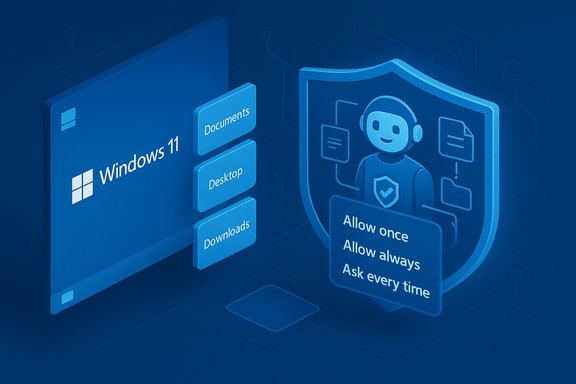
During the preview, agents may request access to a defined set of “known folders” in the user profile: Documents, Downloads, Desktop, Pictures, Music, and Videos. Microsoft’s updated guidance states agents will not have default access to those folders; instead, they must ask and the user can choose time‑boxed options (Allow once, Allow always, Ask every time). Per‑agent settings let users review and revoke granted permissions later.Privacy Concerns and the Consent Model
The strongest and most immediate worry was simple: would a native Windows agent rummage through your files without clear authority? Early signals suggested broad access, prompting a backlash that forced Microsoft to clarify behavior and add explicit consent flows.- Default denial: Agents are denied access to the six known folders unless the user or administrator grants permission. This is now the baseline in Insider preview builds.
- Per‑agent permissions: Permissions are scoped to the agent identity, meaning you can trust a productivity agent with file access while denying a less‑trusted third‑party agent. This design supports auditability and least‑privilege principles.
- Coarse folder scope today: In the current preview, folder access is an all‑or‑none grant across the six known folders rather than per-folder granularity. Microsoft and independent reporting note this is a trade‑off for simplicity during early testing; finer granularity may arrive later. Users who require strict separation should treat this limitation cautiously.
Security Risks: XPIA, Hallucinations, and New Attack Vectors
Microsoft’s own documentation explicitly names risks many vendors avoid discussing publicly. That candor is important: it reframes agentic features from novelty to a changed OS threat model.Cross‑Prompt Injection (XPIA)
XPIA describes a class of attacks where adversarial content embedded in documents, web previews, image OCR, alt text, or UI surfaces becomes an instruction channel for an agent. If an agent ingests that content as actionable context, a crafted payload could override the agent’s plan and trigger harmful outcomes like data exfiltration or software installation. Microsoft warns this is a non‑theoretical risk and calls for defenses in the MCP/agent stack. XPIA is distinct from classical prompt injection in that the agent can actually carry out actions — so content-as-command moves from a theoretical vulnerability into an operational threat. Security researchers have demonstrated proof-of-concept prompt‑injection attacks in other agentic contexts, and Microsoft treats XPIA as a first‑class problem.Hallucinations Become Operational Hazards
Large language models sometimes invent plausible-sounding facts or steps — “hallucinations.” In an agentic system, hallucinations are not only an accuracy problem; they can cause agents to perform incorrect or damaging actions (delete the wrong file, send sensitive information, or install the wrong package). Microsoft’s guidance openly acknowledges hallucination risk and recommends human‑in‑the‑loop approvals for sensitive steps.Malware and Supply‑Chain Concerns
Microsoft illustrates hypothetical malware (often discussed in press as “Xpia” in coverage) that could leverage agent permissions to exfiltrate data. The danger is two-fold:- If an agent is compromised or a connector is malicious, user‑granted permissions can be abused to read and upload local files.
- Attackers could distribute signed but malicious agent components, undermining signing-based trust if signing keys or supply‑chain processes are compromised.
Telemetry and Screenshot Retention Concerns
Some preview notes indicate Agent Workspace may capture screenshots of agent activity (an audit feature) and retain them for a time window for telemetry and debugging. Reporting references retention examples (e.g., retention configured for 30 days in some Copilot retention docs), raising privacy questions about the storage, access, and deletion of images that might contain sensitive content. These retention parameters and export/edibility semantics demand clear enterprise controls. The exact retention durations and default behaviors should be verified in the live documentation for any given build or tenant.Microsoft’s Mitigations and Controls
Microsoft’s public playbook combines engineering controls with policy guidance:- Admin gating and opt‑in: Agentic features are off by default and require an administrator to enable the device‑wide toggle. That helps prevent silent rollouts on managed fleets.
- Per‑agent identity and scoping: Agents run under dedicated accounts with scoped access to known folders and connectors. Per‑agent settings allow review and revocation of granted permissions.
- Tamper‑evident logs and visibility: Agents must surface plans and produce auditable trails so human supervisors and enterprise logs can reconstruct actions. Microsoft positions this as essential for non‑repudiation.
- Signing and revocation: Agent binaries and connectors are expected to be cryptographically signed, with revocation options for compromised components. This is intended to make supply‑chain and third‑party risks tractable.
- Runtime defenses: Copilot Studio and Microsoft Security blog posts describe runtime protections such as prompt shields, classifiers to detect injection attempts, and real‑time blocking of suspicious actions. These are meaningful but will need independent validation at scale.
Performance, Usability, and the Trade‑Offs
Agent workspaces aim to be lightweight, but any background agents that run OCR, multi‑step planners, or vision tasks will consume CPU, RAM, and potentially NPU resources on capable hardware. Reviewers and insiders report mixed performance behavior in early builds; lower‑end devices may suffer visible slowdowns if agents run heavy tasks. Microsoft’s design objective is a middle ground between full VMs (too heavy) and in‑process automation (too risky), but that trade‑off affects both security and usability. On the UX side, the risk of consent fatigue is real: frequent permission prompts can desensitize users, increasing the chance they grant permissions without due attention. Clear, informative prompts and sensible defaults (opt‑in, limited scope) are essential to prevent social engineering from becoming the dominant exploit vector.Enterprise Implications: Governance, Policy, and Incident Response
Agentic features demand that IT teams treat agents like service principals:- Inventory and allowlist agents and connectors.
- Integrate agent logs into SIEM and EDR to detect suspicious agent-originated flows.
- Map connector and OAuth scopes to prevent over-privileged connectors.
- Pilot agentic features on test devices; block on production until policy and telemetry are mature.
Legal and Regulatory Considerations
Privacy regulators — notably in the EU — will scrutinize how agentic features collect, process, and transmit personal data. GDPR principles like data minimization, purpose limitation, and explicit consent map directly onto per‑agent permissions and retention controls. Enterprises and Microsoft alike must provide clear data flows, retention policies, and the ability to honor data subject requests where applicable. Microsoft’s retention documentation for Copilot messaging demonstrates there are configurable retention windows, but organizations will need to ensure agent-generated telemetry and screenshots comply with legal obligations. These compliance requirements vary by jurisdiction and tenant configuration; consult legal counsel for deployments in regulated contexts.Practical Recommendations — What Users and Admins Should Do Now
- For consumers:
- Keep the experimental agentic features disabled on primary or sensitive machines.
- If you experiment, use “Allow once” for file access and review per‑agent settings regularly.
- Limit use to Microsoft‑published agents initially and avoid third‑party connectors until trust is established.
- For IT and security teams:
- Disable agentic features on production fleets until a controlled pilot proves safety and telemetry quality.
- Create an allowlist for agents and connectors and require signing verification for any third‑party components.
- Ingest agent logs into SIEM/EDR for detection of anomalous agent behavior and agent-originated exfiltration.
- Apply strict conditional access and token hygiene to connectors; require MFA and short-lived tokens where possible.
- Update incident response plans to include agent compromise: agent isolation, credential rotation, scope reduction, and revocation.
- For privacy teams:
- Review retention and telemetry settings for agent screenshots, prompts, and logs.
- Define data handling policies that map agent activity to lawful processing bases and ensure user-facing consent is explicit.
Critical Analysis: Strengths, Gaps, and Residual Risks
Microsoft has taken several responsible steps: explicit public warnings, admin gating, per‑agent accounts, scoped known‑folder access, signing/revocation systems, and a willingness to surface XPIA and hallucinations as first‑class problems. That transparency is a strength; it reframes the debate from marketing hype to operational risk management. However, several gaps and residual risks remain:- Coarse folder scope: Granting access as an all‑or‑none set for six known folders lacks fine granularity. Enterprises requiring strict separation may find this insufficient for now.
- Containment model verification: Agent Workspace is lighter than a VM. Claims about effective isolation should be validated by independent security researchers; details about kernel-level protections and escape hardening remain scarce in public documentation. Treat isolation claims as provisional until third‑party audits arrive.
- Human factors and consent fatigue: Frequent prompts risk desensitizing users. Great UX and education are necessary to prevent social‑engineering exploitation of approval flows.
- Operational complexity: Managing agent identities, MCP connectors, signing keys, and revocation lists introduces non‑trivial governance burdens. Many IT teams will need new tooling and expertise.
- Attack surface redistribution: XPIA converts content into a potential attack vector. Traditional EDR heuristics, focused on binaries and anomalous processes, may miss content-driven exfiltration unless tooling evolves to classify agent-originated flows.
How to Judge Progress: Metrics and Tests That Matter
For the agentic model to be trustworthy at scale, objective evidence should appear in these areas:- Independent security audits of Agent Workspace isolation and the MCP implementation.
- Public, machine‑readable policies for signing, revocation, and connector allowlists.
- Clear retention defaults and tooling to extract and purge agent‑captured screenshots and logs.
- SIEM/EDR integration guides with detection signatures for agent‑originated exfiltration patterns.
- Usability studies showing permission prompts reduce over‑permission without blocking legitimate productivity.
Conclusion
Windows 11’s AI agents mark a bold shift: from suggestion to action, from assistants to OS-level actors. Microsoft’s openness about XPIA, hallucinations, and other novel risks is commendable and unusual in product messaging; the company has paired that candor with concrete mitigations — admin gating, per‑agent identities, scoped known‑folder access, signing, and runtime protections. Those mitigations materially reduce the most alarming scenarios, but they do not eliminate a transformed threat model. The security community, enterprise IT, and regulators must all participate in hardening, auditing, and governing this new class of endpoint capability. For now, treat agentic features as experimental: pilot them in controlled environments, insist on per‑agent consent and tight connector governance, and require independent verification of containment and telemetry. The potential productivity gains are real, but so are the privacy and security trade‑offs — and the balance between them will determine whether agentic Windows becomes a trusted productivity layer or an avoidable attack surface.Source: WebProNews Microsoft’s Windows 11 AI Agents Spark Privacy Fears and Security Risks
