

Microsoft’s recent clarification changes the immediate stakes: Windows 11’s experimental “agentic” features will prompt for user consent before an AI agent can read or act on files in the six standard user folders, but that reassurance comes with important caveats and unresolved governance questions that deserve close attention.
Windows 11 is being reshaped from an operating system that “suggests” into one that can do — running AI agents that perform multi‑step workflows across apps and files. Microsoft has introduced a new runtime model (often called Agent Workspace) and a set of platform primitives—per‑agent accounts, scoped folder access, and connectors powered by the Model Context Protocol (MCP)—to make those agents auditable and controllable. These features are currently experimental and are being piloted in Windows Insider preview builds. The shift aims to unlock productivity scenarios that are difficult with a pure chat assistant: agents that open apps, extract data from documents, assemble artifacts (slides, reports, email attachments), and run repetitive tasks in the background. Microsoft positions these capabilities as opt‑in and deliberately gated behind administrative controls while the company refines the security, privacy, and management story.
Two practical UX problems stand out:
Source: TechPowerUp Windows 11 Will Ask for Permission Before AI Agents Access Personal Files
 Background / Overview
Windows 11 is being reshaped from an operating system that “suggests” into one that can do — running AI agents that perform multi‑step workflows across apps and files. Microsoft has introduced a new runtime model (often called Agent Workspace) and a set of platform primitives—per‑agent accounts, scoped folder access, and connectors powered by the Model Context Protocol (MCP)—to make those agents auditable and controllable. These features are currently experimental and are being piloted in Windows Insider preview builds. The shift aims to unlock productivity scenarios that are difficult with a pure chat assistant: agents that open apps, extract data from documents, assemble artifacts (slides, reports, email attachments), and run repetitive tasks in the background. Microsoft positions these capabilities as opt‑in and deliberately gated behind administrative controls while the company refines the security, privacy, and management story. What Microsoft has clarified — the essentials
The new consent model (what is now explicit)
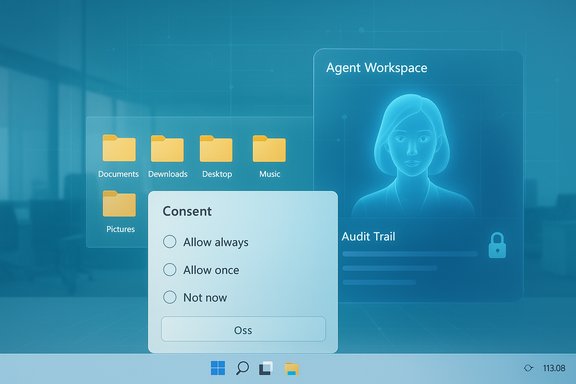
- Agents cannot read the six “known folders” by default. When an agent needs those files, Windows shows a modal consent prompt describing the request and scope. Users choose between “Allow always,” “Allow once,” or “Not now.”
- Per‑agent permissions are available. Each agent gets its own settings page so administrators and users can manage its access to Files and Connectors separately.
- Folder scope is currently the six known folders as a set. At present, Windows does not let users grant access to only one of the six folders; permission applies to all of them collectively. This is an important UX/privilege limitation.
- Experimental agentic features are off by default and admin‑gated. Enabling the master toggle provisions agent accounts and the runtime, and it must be enabled by a device administrator.
Technical anatomy: how agents, accounts, and connectors fit together
Agent Workspace and agent accounts
- Agent Workspace is a contained, visible desktop session where an AI agent runs in parallel to the interactive user session. The workspace surfaces progress, so activity is interruptible and observable.
- Agent accounts are low‑privilege Windows accounts provisioned for each agent. Running agents under separate accounts is meant to produce distinct audit trails and enable the use of existing ACLs, Intune/GPO, and SIEM tools for governance.
Model Context Protocol (MCP) and connectors
- MCP is a protocol for models and agents to discover and interact with OS services and connectors (File Explorer, System Settings, OneDrive). Connectors present a consistent interface for agents to request access to the data and tools they need.
- Agent Connectors are surfaced in the agent settings; access to connectors like File Explorer or OneDrive may be managed with the same time‑granular consent options.
Known folders model
- By default, agents request access to the following six folders: Documents, Downloads, Desktop, Music, Pictures, Videos. This is the “least privilege” baseline for the current preview. Agents are otherwise blocked from crawling the entire profile.
Why the clarification matters — immediate wins
- Visible, interruptible runtime reduces the risk of silent, headless automation acting without user awareness. Agent Workspace surfaces steps and allows users to pause or take over.
- Per‑agent identity improves auditability. Treating agents as principals (distinct accounts) simplifies attribution and mapping into existing enterprise policy frameworks.
- Admin gating and opt‑in deployment slow the surface‑area expansion: features do not suddenly appear on managed fleets without administrator action.
- Time‑boxed permissions (“Allow once” vs “Always allow”) narrow the blast radius of a single operation and offer contextual control when an agent needs a one‑off file read.
Where the safeguards fall short — practical and architectural limits
1) All‑or‑none access for the known folders
Granting access to all six known folders as a single decision is coarse. Users often keep sensitive items (credentials, private keys, unsent finance documents) in one folder but not others. The current model forces a binary choice that can over‑expose data or produce friction. Microsoft’s documentation clearly states the group scope is the present behavior, but it is a limitation worth flagging for users and admins.2) Files outside “known folders”
Microsoft’s preview controls are explicit about limiting agents to the known folders by default. However, the platform also documents that agent accounts have access to any folders that all authenticated users can read (for example, public or shared profile folders). There remains a gray area for redirected folders, mounted network shares, corporate file servers, and storage locations managed by enterprise policies. Those locations may still be reachable via connectors or by explicit permission changes and must be considered in enterprise risk assessments.3) Supply‑chain and agent authenticity risks
Agents that are allowed to run on a device will be treated as first‑class principals. If a malicious or compromised agent binary is signed or slips past vetting, the same permission model applied to legitimate agents could be abused. Microsoft’s signing and revocation mechanisms help here, but a real supply‑chain compromise or inadequate marketplace governance could create broad exposures before revocation takes effect.4) New, AI‑specific attack vectors — cross‑prompt injection (XPIA)
Security researchers and Microsoft have highlighted prompt injection or cross‑prompt injection as a novel risk where malicious content (inside a document, webpage, or email) can manipulate an agent’s planning or tasking to exfiltrate data or perform unsafe actions. The risk is magnified because agents can act, not just suggest. Microsoft warns about these attack vectors as part of the agentic OS threat model.5) Reliance on UX trust and user comprehension
Permission prompts and “Allow once” flows are only effective if users understand the consequences. The modal dialogs need exceptionally clear phrasing, examples, and an easy path to review and revoke previously granted permissions. Without excellent UX and user education, the dialogs can be clicked through, producing the very outcomes critics feared. Windows’ current per‑agent settings page helps, but for many users those controls will be opaque or buried.Enterprise implications — governance, compliance, and deployment
Enterprises face a threefold operational challenge if agentic features become part of their managed environment:- Policy integration: Agent accounts must be integrated into MDM/Intune, Active Directory/Entra policy, DLP, and EDR systems. Audit logs must be actionable and correlate agent activity with SIEM incidents. The preview explicitly makes the master toggle admin‑only, but much more orchestration is required for enterprise readiness.
- Data sovereignty and compliance: Agents that call cloud reasoning services (on non‑Copilot+ hardware) raise outbound data flow concerns. Enterprises will need policy controls that prevent sensitive content from leaving the network or define acceptable agents and connectors. Microsoft highlights a hybrid model where local inference is preferred on Copilot+ hardware to reduce cloud transit, but fleet heterogeneity complicates policy.
- Testing and supply‑chain controls: Enterprises should require vetting and allow‑listing of agent binaries, maintain rapid revocation processes, and incorporate agent behavior in incident response playbooks. The platform’s code‑signing model and planned revocation capabilities are useful, but real‑world readiness requires independent audits and red‑team validation.
- Keep the master toggle off in production until validated.
- Allowlist only vetted agents and require enterprise signing policies.
- Integrate agent logs into SIEM and enable DLP/EDR controls to block risky actions.
- Pilot on isolated test groups and hardware that supports local inference where possible.
UX, transparency, and the trust gap
The recent clarification buys Microsoft time by making consent explicit, but it does not close the broader trust gap created by earlier experiments (for example, the Recall prototype controversy) and ambiguous communication. Users and admins remember prior features that collected or processed local content in ways they did not anticipate; that history increases skepticism and reduces the benefit of the doubt for new AI experiments. The Agent Workspace architecture and consent prompts attempt to remedy that, but the long tail of trust requires transparent documentation, clear UI signals, and independent verification of containment claims.Two practical UX problems stand out:
- Consent friction vs risk trade‑offs: Coarse folder grants make users choose between convenience and safety. “Allow once” mitigates this but often increases friction and limits productivity gains.
- Revocation discoverability: Settings exist to manage agent permissions, but many users will not discover or understand them unless they are made prominent and intelligible.
Threat models and red‑flag scenarios
- Maliciously crafted document triggers agent actions: A document with embedded adversarial instructions could cause an agent to exfiltrate data if the user permits access or if the agent misinterprets intent.
- Signed, compromised agents: If an attacker compromises an agent’s supply chain or a legitimate developer account, signed malware could run under the agent model and inherit permissions.
- Credential exposure in known folders: Users sometimes store API keys, scripts, or unencrypted credentials in Documents or Desktop. A broadly granted agent could read those files unless DLP prevents it.
- Side effects from brittle UI automation: Agents that move files, click UI controls, or manipulate forms can produce destructive outcomes if an application UI changes or behaves unexpectedly.
Practical user guidance — what to do now
- Keep the default settings: experimental agentic features are off by default for a reason. Do not enable the master toggle on general‑purpose or production devices.
- Use per‑agent controls: if testing Copilot Actions or third‑party agents, use the “Ask every time” option unless a clear, audit‑able need exists to allow persistent access.
- Remove sensitive files from default directories or use encrypted containers for highly sensitive items to reduce accidental exposure through broad folder consent.
- For enterprise admins: pilot in a lab, integrate agent accounts with existing identity and DLP policies, and prepare playbooks for revocation and incident response.
Critical assessment: strengths, risks, and Microsoft’s accountability burden
Strengths
- The platform primitives — Agent Workspace, agent accounts, and connectors — are thoughtful architectural choices that make agent activity auditable and governable rather than ad‑hoc and opaque. They represent a clear improvement over earlier, more speculative messaging about “agents that can read your files.”
- Admin gating and the opt‑in model reduce the risk of accidental mass rollouts and give IT teams control over early adoption.
- Time‑granular consent offers a practical compromise between repetitive permission prompts and persistent over‑sharing.
Risks and unanswered questions
- Coarse folder scope (all six known folders at once) weakens the fine‑grained control users and enterprises need to prevent accidental leakage of narrowly located sensitive data.
- Operational maturity is currently unproven: robust DLP/EDR integrations, independent containment verification, and marketplace governance for third‑party agents are necessary before broad deployment. Microsoft’s preview documentation promises more controls but does not yet deliver the enterprise grade guarantees many organizations will require.
- Attack surface expansion is real: agents that can act on behalf of users create new, AI‑specific vectors for exploitation that standard endpoint protections may not fully detect. Microsoft’s warnings about prompt injection and related threats underline this.
Accountability and the “trust tax”
Turning Windows into an agentic OS introduces a trust tax that Microsoft must pay through transparent design, rigorous independent testing, third‑party audits, and clear, discoverable user controls. Users and enterprises will accept the productivity upside only if Microsoft demonstrates that containment, revocation, and auditing work at scale.Conclusion — balancing productivity and prudence
Microsoft’s clarification that Windows 11 will ask for permission before AI agents access personal files in the known folders is an essential and welcome corrective to earlier ambiguity. The company’s architectural choices — Agent Workspace, per‑agent accounts, connectors, and admin gating — are substantive steps toward making agentic automation manageable. However, the current model is emphatically preview-level: permissions are coarse, supply‑chain and prompt‑injection risks remain, and enterprise guardrails are not yet fully proven or widely available. Organizations and cautious users should treat the agentic features as experimental, pilot them in controlled environments, and demand independent verification of isolation guarantees before enabling them on production devices. The promise of agents that “do” rather than just “suggest” is compelling: when safe, those agents can automate tedious tasks and increase accessibility. The path to realizing that promise without unacceptable trade‑offs runs through careful UX design, robust enterprise controls, and transparent, provable containment. Until those pieces are in place and independently validated, prudence — not impatience — is the responsible posture for both consumers and IT teams.Source: TechPowerUp Windows 11 Will Ask for Permission Before AI Agents Access Personal Files
