

Microsoft’s latest clarification eases one of the most pointed privacy worries about Windows 11’s new agentic features: AI agents will not be given blanket access to your personal files by default and must explicitly ask for permission before reading or acting on content stored in the OS “known folders.”
Microsoft is previewing a family of features that treat AI agents as first‑class actors inside Windows 11. These agents — surfaced in features such as Copilot Actions and the new Agent Workspace runtime — are designed to perform multi‑step workflows on a user’s behalf: opening apps, clicking UI elements, extracting data from documents, and assembling outputs. To operate, some agents need access to local files, and that capability triggered broad concern when early messaging suggested agents could read folders like Documents and Desktop. Microsoft has now updated its documentation to clarify how file access will be controlled in preview builds.
What Microsoft is shipping in preview is an architecture with several notable primitives:
However, several long‑term implications merit close attention:
That said, the present implementation leaves some important questions unanswered: the coarse all‑or‑none known‑folders granularity, how telemetry and cloud interactions will be governed, and how well DLP/EDR tooling will defend against new exfiltration patterns. Until those gaps are closed and enterprise integrations are proven at scale, the prudent position for most users and administrators is to treat agentic features as experimental, pilot them conservatively, and rely on time‑boxed consent rather than persistent grants wherever possible.
For now, Windows 11’s agentic pivot is an important step toward more capable, context‑rich assistants — but the trust and governance work required to keep that power safe will determine whether the platform change becomes a genuine productivity win or an avoidable security burden.
Source: Windows Latest Microsoft confirms Windows 11 will ask for consent before AI agents can access your personal files, after outrage
 Background / Overview
Microsoft is previewing a family of features that treat AI agents as first‑class actors inside Windows 11. These agents — surfaced in features such as Copilot Actions and the new Agent Workspace runtime — are designed to perform multi‑step workflows on a user’s behalf: opening apps, clicking UI elements, extracting data from documents, and assembling outputs. To operate, some agents need access to local files, and that capability triggered broad concern when early messaging suggested agents could read folders like Documents and Desktop. Microsoft has now updated its documentation to clarify how file access will be controlled in preview builds.What Microsoft is shipping in preview is an architecture with several notable primitives:
- Agent accounts — per‑agent, low‑privilege Windows accounts so actions are auditable and subject to ACLs.
- Agent Workspace — a contained, visible desktop session where an agent runs, intended to isolate activity from the user’s interactive session.
- Scoped file access to known folders — agents may request access to the six common folders (Desktop, Documents, Downloads, Music, Pictures, Videos) but cannot browse the entire profile by default.
- Model Context Protocol (MCP) and Agent Connectors — a standardized way for agents to discover and call into OS services such as File Explorer or System Settings.
What Microsoft confirmed — the essentials
Microsoft’s update to its Experimental Agentic Features documentation clarifies the following, as observed in Insider preview builds:- AI agents cannot access the six known folders by default. The agent must explicitly request permission before reading or acting on files in Desktop, Documents, Downloads, Music, Pictures, and Videos.
- Per‑agent permissions are available. Each agent gets its own settings page so you can manage what that agent may access (Files, Connectors like OneDrive, and Agent Connectors such as File Explorer and System Settings).
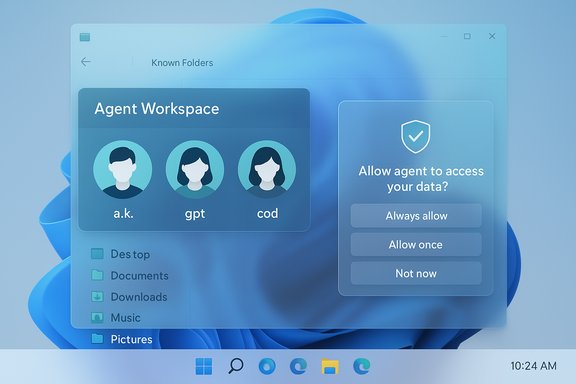
- Folder scope is currently all‑or‑none for the known folders. At present, you cannot grant an agent access to only Documents while denying Desktop; permission applies to the six known folders as a set. You do, however, get time granularity on consent: “Always allow”, “Allow once”, or “Not now”.
- Settings path and builds. These controls appear in Settings → System → AI Components → Agents (or Agent tools/Experimental agentic features in preview builds). The preview UX and specific options are present in Insider builds beginning with the 26100/26200 series and newer preview releases that include MCP and agent connectors.
How the consent prompts work (UX you’ll see)
Microsoft’s current preview UX for file access uses a short, modal consent flow when an agent needs local files to complete a task. The typical flow is:- Agent performs work and reaches a step that requires local files (for example, summarizing a set of documents).
- Windows displays a permission prompt describing the request and the scope (Files from known folders).
- The user chooses one of three options:
- Always allow — grant persistent access for that agent to the six known folders.
- Allow once — grant access for that single operation only.
- Not now or Never allow — deny access.
The good: meaningful improvements and strengths
Microsoft’s clarifications and the architectural choices in preview show several strengths worth acknowledging.- Opt‑in by default and admin gating. The experimental agentic features are off by default and require an administrator to enable the master toggle. That’s a conservative, device‑wide gating mechanism intended to prevent accidental exposure across a fleet.
- Per‑agent identity and audit trails. Treating agents as distinct OS principals simplifies auditing and governance; actions performed by agents produce separate traces that can be integrated with existing admin tooling. This is a design advantage over ad‑hoc background processes.
- Visible, interruptible runtime. Agents run in a visible Agent Workspace that users can pause, stop, or take over — a practical safety valve compared with headless automation.
- Consent and time‑boxed permissions. The choice between “Allow once” and “Always allow” gives users control over risk exposure and reduces the blast radius of a one‑off action.
- MCP and standardized connectors. Native support for the Model Context Protocol and built‑in connectors (File Explorer, Settings) creates a consistent surface for discovery and policy enforcement rather than bespoke integrations for each agent vendor. That standardization can help admins build uniform controls across agents.
The risks and unanswered questions
Despite the clarifications, important risks and gaps remain. These fall into security, privacy, UX, and enterprise governance buckets.Security risks
- Cross‑prompt injection (XPIA) and hallucinations. Microsoft explicitly calls out that agentic AI “may hallucinate and produce unexpected outputs” and warns about cross‑prompt injection attacks where content in files or UI could be interpreted as instructions. Agents that can open files and act on UI increase the attack surface in new ways.
- Data exfiltration vectors. Even with scoped known‑folder access, an agent with persistent permissions could be abused to read and export sensitive content unless additional endpoint protections (DLP/EDR) are integrated. The known folders still contain a lot of sensitive data.
- Supply‑chain and signing gaps. Microsoft plans to require signing for agents and offers revocation paths, but attackers historically find ways to abuse signing or exploit privilege escalation. The effectiveness of signing depends on certificate lifecycle management and ecosystem discipline.
Privacy and telemetry ambiguity
- Cloud vs on‑device reasoning. Some Copilot reasoning may occur in the cloud unless the device has Copilot+ local inference hardware. The preview documentation does not fully spell out telemetry and retention rules for content an agent reads on‑device but sends to cloud models. That transparency gap matters for compliance and user trust.
- All‑or‑none known‑folder permission. Current behavior requires granting access to all six known folders together or denying access entirely. That coarse granularity is surprising to many privacy‑conscious users and limits fine‑grained control over where agents can look. Microsoft could change this in future updates, but today it is an important limitation.
UX and human factors
- Consent fatigue and “Always allow” risk. Modal consent patterns are only as effective as users’ attention. Repeated prompts can train users to click “Always allow” reflexively, undermining the very protections the prompt is intended to provide.
- Potential for accidental exposure. Agents that can act on behalf of a user can be coaxed into broader actions through social engineering or cleverly crafted prompts inside documents. The visible Agent Workspace helps, but it does not eliminate the risk that an agent could perform harmful actions while appearing legitimate.
Enterprise governance and tooling gaps
- DLP/EDR integration is a must but not guaranteed yet. Enterprises should expect Microsoft to provide integrations with DLP, EDR, and SIEM vendors, but those integrations must be proven and widely adopted before agentic features are enabled broadly in production fleets.
- Policy coverage and MDM/Group Policy settings. The preview provides an admin‑only toggle; broader, granular policy controls (per‑tenant connector governance, conditional access for connectors, audit log formats) will be necessary for regulated environments. Those enterprise controls are still evolving.
Practical guidance: what users and admins should do now
The platform is in preview and evolving. The safest posture for most users and organizations is cautious, measured testing rather than broad enablement.For individual users
- Keep Experimental agentic features disabled unless you understand what an agent will do and why it needs file access.
- If you enable agents for experimentation, prefer Allow once for first uses and only escalate to Always allow when you trust the agent and the scenario.
- Review per‑agent permissions frequently via Settings → System → AI Components → Agents; revoke persistent permissions you no longer need.
- Treat agents’ access like any other app permission — move highly sensitive materials to locations agents cannot access or use encryption/password vaults for extra protection.
For IT administrators
- Keep the master toggle off by default across managed devices. Treat preview agentic features as experimental and restrict them to pilot groups.
- Require signed, vetted agent binaries from trusted publishers. Integrate agent activity logging into your SIEM and review audit trails for unexpected behavior.
- Test DLP/EDR policies against sample agent workflows to confirm they can interpose on file reads and network traffic. Don’t assume endpoint protections will automatically cover new agent APIs.
- Plan training and consent‑UX guidance for users to avoid reflexive “Always allow” behavior that could create insider‑like exposure.
Technical specifics and caveats (what’s verifiable today)
- The known folders list cited in the preview is: Desktop, Documents, Downloads, Music, Pictures, Videos. Agents request access to that set; that is the default scope in initial preview builds.
- The consent options shown in preview are Always allow, Allow once, and Not now (or Never allow). These are the time‑granularity controls delivered in the Insider experience.
- Windows exposes MCP support and native connectors (File Explorer, Settings) in recent Insider builds (the 26xxx series preview releases that include 7344 KB packages and related updates). Those builds contain the on‑device MCP registry and two built‑in connectors as demonstration plumbing. Build numbers referenced in preview reports include 26100.7344, 26200.7344 and 26220.7344 series variations depending on release channels; these numbers indicate the preview nature and have varied across updates. Administrators should check their exact Insider build notes for the specific KB ID and build number before assuming parity.
Deeper analysis: what this design choice signals for the Windows platform
The consent model and per‑agent controls reflect a pragmatic compromise: Microsoft wants agents to be useful without giving them carte blanche access to users’ entire profile. The use of Agent Workspace and agent accounts suggests the company is aiming for an auditable, revocable model that enterprises can integrate with existing tooling.However, several long‑term implications merit close attention:
- OS‑level agents blur the line between apps and principals. Treating agents as principals (with accounts, ACLs, and signed binaries) moves Windows from an app platform to a platform that orchestrates autonomous actors. That architectural shift carries governance complexity that goes beyond conventional app permissions.
- Standardization via MCP can speed ecosystem growth — and risk. If MCP becomes the de facto connector standard, third‑party agents will find it easier to integrate with Windows. That accelerates innovation but also makes consistent policy enforcement essential; a widely adopted connector protocol becomes a high‑value target for attackers.
- User trust will be the limiting factor. Even with technically sound controls, UX missteps (unclear prompts, opaque telemetry, or accidental exposures) will reduce adoption. Microsoft must keep pushing transparency: clear descriptions of what an agent will read, how long data is retained, and whether anything is uploaded to cloud models.
Conclusion
Microsoft’s confirmation that Windows 11 will ask for consent before AI agents access known folders is a timely and necessary clarification. The combination of admin gating, per‑agent permissions, visible Agent Workspaces, and MCP‑based connectors points to a considered engineering approach that attempts to enable agentic productivity while keeping human control central.That said, the present implementation leaves some important questions unanswered: the coarse all‑or‑none known‑folders granularity, how telemetry and cloud interactions will be governed, and how well DLP/EDR tooling will defend against new exfiltration patterns. Until those gaps are closed and enterprise integrations are proven at scale, the prudent position for most users and administrators is to treat agentic features as experimental, pilot them conservatively, and rely on time‑boxed consent rather than persistent grants wherever possible.
For now, Windows 11’s agentic pivot is an important step toward more capable, context‑rich assistants — but the trust and governance work required to keep that power safe will determine whether the platform change becomes a genuine productivity win or an avoidable security burden.
Source: Windows Latest Microsoft confirms Windows 11 will ask for consent before AI agents can access your personal files, after outrage
