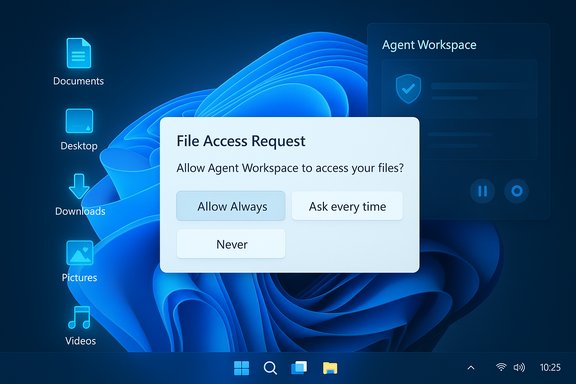
Microsoft has quietly changed the conversation about AI inside Windows 11: the operating system will now prompt for explicit permission before any on‑device AI agent can read or act on files stored in a user’s personal “known folders” — Documents, Desktop, Downloads, Pictures, Music and Videos. This clarification, added to Microsoft’s Experimental Agentic Features documentation and surfaced in recent Insider builds, marks a substantive tightening of the consent model after early messaging raised alarms that agents might be granted broad, automatic access to users’ profiles.
Windows 11 is moving from a desktop that “suggests” to a platform that can do: run autonomous AI agents that execute multi‑step workflows inside the OS. These agents — demonstrated by features such as Copilot Actions and the experimental Agent Workspace — can open apps, perform UI automation (clicking, typing, navigating), extract data from documents and produce aggregated artifacts without manual, step‑by‑step human input. The shift is intentional: Microsoft aims to convert natural‑language intent into concrete actions on behalf of users. That same capability raises unique privacy and security questions. The idea of agents reading Desktop and Documents without clear boundaries generated intense community scrutiny, prompting Microsoft to update its documentation and preview behavior to emphasize explicit consent, per‑agent controls, and runtime isolation. The company’s support page now codifies several primitives — Agent accounts, Agent Workspace, scoped file access, and the Model Context Protocol (MCP) for connectors — designed to make agents auditable, interruptible and manageable.
Windows 11’s decision to ask before agents access personal files is an essential step toward reconciling powerful on‑device automation with user privacy. The move does not eliminate risk, but it does shift the balance back toward user and administrative control — and that shift is a prerequisite for the wider, safer adoption of agentic features across consumer and enterprise environments.
Source: TechPowerUp Windows 11 Will Ask for Permission Before AI Agents Access Personal Files | TechPowerUp}
 Background
Windows 11 is moving from a desktop that “suggests” to a platform that can do: run autonomous AI agents that execute multi‑step workflows inside the OS. These agents — demonstrated by features such as Copilot Actions and the experimental Agent Workspace — can open apps, perform UI automation (clicking, typing, navigating), extract data from documents and produce aggregated artifacts without manual, step‑by‑step human input. The shift is intentional: Microsoft aims to convert natural‑language intent into concrete actions on behalf of users. That same capability raises unique privacy and security questions. The idea of agents reading Desktop and Documents without clear boundaries generated intense community scrutiny, prompting Microsoft to update its documentation and preview behavior to emphasize explicit consent, per‑agent controls, and runtime isolation. The company’s support page now codifies several primitives — Agent accounts, Agent Workspace, scoped file access, and the Model Context Protocol (MCP) for connectors — designed to make agents auditable, interruptible and manageable. What changed: the clarified consent model
Microsoft’s updated documentation and preview builds implement a clear user‑facing consent model with these core elements:- Default denial: AI agents do not get automatic access to the six known folders in a profile. When an agent requires those files, Windows presents a modal permission prompt.
- Per‑agent permissions: Each agent is treated as a distinct principal with its own settings page where file and connector access can be reviewed and changed. This makes access decisions auditable and revocable per agent.
- Folder scope (known folders only): In preview, requests are limited to Documents, Downloads, Desktop, Music, Pictures and Videos. Agents cannot, by default, roam freely through the entire user profile.
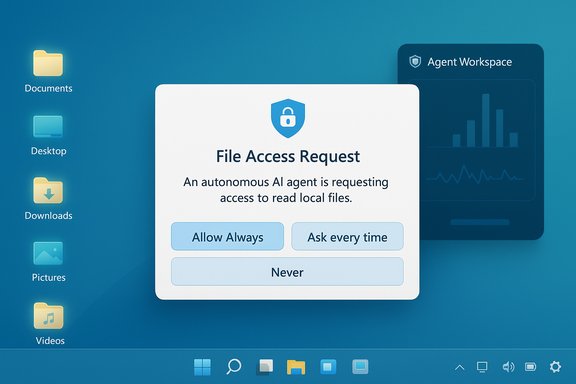
- Time‑boxed consent choices: When prompted, users can select Allow Always, Ask every time, or Never allow (effectively “Not now”) for each agent. This reduces the blast radius for one‑off operations.
- Admin gating: The entire agentic runtime is off by default and must be enabled by a device administrator through Settings → System → AI Components → Experimental agentic features. That toggle provisions agent accounts and the Agent Workspace on the device.
How the consent UX works (preview)
The preview UX is straightforward and human‑centered by design. Typical flow:- An agent reaches a step that requires local files (for example, to summarize a folder of documents).
- Windows displays a modal consent dialog explaining the request, the scope (the six known folders), and the identity of the requesting agent.
- The user chooses one of the three time‑granularity options: Allow Always, Ask every time, Never allow.
- The decision is logged and can be reviewed later on the agent’s settings page, where connectors and file access can be toggled.
The architecture behind agentic Windows — isolation, identity, and connectors
Under the hood, Microsoft has introduced several platform primitives intended to make agentic behavior governable:- Agent accounts: Agents run under per‑agent, low‑privilege local Windows accounts. Treating agents as first‑class OS principals simplifies auditing and lets administrators apply existing ACLs, Intune/GPO policies and SIEM rules to agent activity.
- Agent Workspace: Agents execute inside a contained, visible desktop session that isolates their runtime from the primary user session. The workspace surfaces progress and offers pause/stop/takeover controls, so users can intervene in real time.
- Model Context Protocol (MCP) and Agent Connectors: MCP standardizes how models discover and invoke OS services (File Explorer, System Settings, OneDrive). Connectors form a policyable surface — agents must request use of connectors and those connectors can be subject to the same consent model.
- Signing and revocation: Agents are expected to be digitally signed to enable revocation and supply‑chain controls if a component becomes compromised. Microsoft aims to integrate tamper‑evident logs for auditing.
What this actually means for end users
- You keep control by default. Agentic features stay off unless an administrator enables them. When enabled, file access still requires consent from the user for each agent (or for each agent under the selected time‑granularity).
- Permission scope is coarse but constrained. The current model treats the six known folders as a set: you cannot grant an agent access to one of those six without granting the others. That is an important UX and security limitation: the choice is all‑or‑none for the known folders.
- Visibility and human intervention are built in. Agents operate in Agent Workspace and their actions appear in a visible session with controls. That reduces the risk of silent, headless automation acting without awareness.
- You can review and revoke access. Each agent has its own settings page under System → AI Components → Agents where file access and connector permissions can be changed. This enables retrospective control.
Strengths: meaningful design wins
Microsoft’s preview contains several design choices that materially improve the safety posture for agentic automation:- Opt‑in and admin gating reduces surprise rollouts on managed fleets and forces conscious adoption decisions.
- Per‑agent identity and audit trails permit mapping agent actions to standard enterprise controls and SIEM pipelines, supporting incident response and compliance.
- Visible runtime and interruption controls provide a human‑in‑the‑loop safety valve — users see actions and can pause, stop or take over. This is a practical improvement over invisible background automation.
- Time‑boxed consent choices (Allow once / Always) reduce long‑term exposure from one‑off tasks and give users nuanced choices about convenience vs. risk.
- Standardized connectors via MCP create a consistent surface for discovery and policy enforcement, enabling uniform governance across agents and vendors.
Risks, limitations and unanswered questions
Even with these measures, several important risks and practical limitations remain:- Coarse folder granularity: Granting access to the six known folders as a single decision is too crude for many users. Sensitive files are often mixed across folders; a binary grant increases exposure or forces users to deny access and forgo useful automations. The model needs finer granularity (per‑folder or per‑path) and content‑aware controls to be enterprise‑grade.
- Cross‑prompt injection (XPIA): Microsoft explicitly names cross‑prompt injection — where malicious content embedded in documents or UI elements can be interpreted as instructions by an agent — as a novel threat. Agents acting on parsed content are susceptible to being manipulated into performing unintended actions, including exfiltration. Mitigations under development (signing, tamper‑evident logs, human approval steps) are necessary but not yet independently validated.
- Persistent background agents expand attack surface: An always‑running agent with file access behaves differently from a short‑lived app. That persistence amplifies the consequences of credential theft, privilege escalation, or agent compromise. Enterprise DLP and EDR must integrate with the agent model to provide real‑time policy enforcement.
- Coexistence with cloud processing: Microsoft envisions a hybrid model: Copilot+ hardware with high‑performance NPUs can run sensitive inference locally (Copilot+ PCs with 40+ TOPS NPUs), while other devices rely on cloud reasoning. That hybridism raises questions about telemetry, what data leaves the device, and how cloud‑side safeguards align with local consent. The Copilot+ hardware baseline is documented by Microsoft but exact behavior depends on the agent, vendor policies and license terms.
- Operational trust needs independent validation: The architecture promises tamper‑evident logs, signing, and revocation, but these controls must be tested at scale and audited by independent red teams to prove their effectiveness. Until such validation exists, the model remains promising, not proven.
Enterprise and compliance considerations
Enterprises must approach agentic features as a new category of endpoint principal with unique governance needs:- Keep the master toggle off by default for production fleets. Enable only in controlled pilot rings. The master toggle provisions agent accounts device‑wide.
- Treat agents like service accounts. Apply ACLs, Intune/GPO, and SIEM monitoring to agent accounts to capture actions and make them auditable.
- Integrate with DLP and EDR. Ensure data‑loss prevention can intercept and block inappropriate agent access or outbound flows. Validate how agent logs are surfaced and consumed by existing monitoring pipelines.
- Define supplier governance. Require digitally signed agents from vetted vendors, certificate revocation processes, and incident response plans tied to agent compromise.
- Pilot under a governance framework. Use a staged rollout with KPIs, independent audits and red‑team exercises before broad enablement. The technology requires operational maturity, not just technical capability.
Practical advice for everyday users
- Keep agentic features off unless explicitly needed; confirm the device toggle (Settings → System → AI Components → Experimental agentic features) is disabled for sensitive profiles.
- When an agent prompts for file access, prefer Ask every time or Allow once unless the agent is from a trusted vendor and the workflow is frequent and low‑risk.
- Review the per‑agent settings page regularly and revoke persistent access for agents that no longer need it.
- Avoid storing highly sensitive artifacts (private keys, unencrypted backups, credential stores) in the six known folders or use encrypted containers that agents cannot read without separate, explicit authorization.
- For managed devices, consult IT before enabling agentic features — enterprise policy should drive the decision.
Verification, cross‑checks and caveats
This feature summary cross‑references Microsoft’s official Experimental Agentic Features support article and developer guidance (the authoritative statement of behavior in preview), contemporary reporting from technical outlets, and community hands‑on notes from insider builds. Microsoft’s support article documents the per‑agent settings, the known folders list, the Settings path and the admin gating, and explicitly notes that preview builds starting with the 26100/26200 series surfaced these controls. Where third‑party reporting and early hands‑on posts diverge — for example, on whether some folders were reachable without prompts in specific Canary snapshots — those discrepancies appear to stem from Canary/Canary‑channel experiments, staged rollouts, or misunderstandings of preview toggles. The updated Microsoft documentation is the current canonical description for preview builds; if behavior differs on a specific Insider build, verify the build number and channel before assuming broader behavior. Flag any such divergent, single‑report claims as provisional until corroborated by Microsoft or independent audits. One practical example of an independently verifiable, high‑confidence technical claim: Microsoft’s Copilot+ hardware baseline requiring NPUs capable of 40+ TOPS is documented in Microsoft’s Copilot+ developer guidance and device pages — a fact corroborated across Microsoft Learn and device guidance pages. That hardware baseline explains why Microsoft expects feature parity to differ between Copilot+ PCs (local inference) and non‑Copilot devices (cloud‑backed inference).Final assessment — promise guarded by prudence
The clarified consent model is a meaningful and necessary corrective: Microsoft’s support article and preview behavior show a deliberate attempt to embed consent, visibility, isolation and auditability into agentic features. Those are important and pragmatic design wins that directly address the core privacy concern — automatic, blanket access to a user’s personal files. However, the technology remains experimental and the protections are not yet a turnkey guarantee. The coarse “known folders as a set” permission, the novel attack vectors such as cross‑prompt injection, and the operational complexity of revocation, logging and DLP integration mean that adoption should be cautious. Enterprises must treat agents as new principals requiring the same — or more stringent — governance as service accounts and third‑party integrations. Independent testing, public red‑team reports and hardened integrations with endpoint controls are prerequisites for broad, production enablement. For end users and administrators, the best posture right now is defensive and deliberate: leave agentic features disabled on sensitive machines, pilot capabilities in controlled rings, prefer ephemeral permissions, demand signed and auditable agents, and require monitoring and DLP integration before trusting always‑on automation with critical data. When those elements are in place and independently validated, the agentic model can deliver real productivity gains — but the trust bar must be earned, not assumed.Windows 11’s decision to ask before agents access personal files is an essential step toward reconciling powerful on‑device automation with user privacy. The move does not eliminate risk, but it does shift the balance back toward user and administrative control — and that shift is a prerequisite for the wider, safer adoption of agentic features across consumer and enterprise environments.
Source: TechPowerUp Windows 11 Will Ask for Permission Before AI Agents Access Personal Files | TechPowerUp}