

Microsoft’s U‑turn on agentic file access lands squarely between reassurance and reality: Windows 11 will now ask for explicit user consent before any AI‑powered agent or tool can read or act on files stored in a user’s personal “known folders,” a change Microsoft is surfacing in Insider previews to address the backlash over autonomous AI behaviors on the desktop.
Microsoft’s recent work to make Windows an “agentic OS” has introduced a family of new primitives—Agent Workspace, per‑agent accounts, agent connectors, and native support for the Model Context Protocol (MCP)—so AI assistants can discover, request and operate on system resources in a governed way. These capabilities are being previewed through Windows Insider channels and Microsoft’s developer preview surfaces. The controversy began when demonstrations and early messaging suggested AI agents embedded in Windows could access local files and act on them automatically. That framing generated intense community and enterprise concern: the idea of an OS agent scanning Documents, Desktop or Downloads without clear, granular control triggered a privacy backlash. Microsoft moved to clarify the behavior and to add explicit consent controls into the preview experience.
This clarification is not merely a cosmetic change. It reshapes the threat and trust model for agentic features by making permission, auditability and runtime separation central to how agents interact with a user’s data.
Microsoft’s choice to ask first is a necessary step toward balancing innovation with trust. It does not eliminate the new security surface that agentic AI introduces, but it shifts agency back to users and administrators—and that shift is the single most important prerequisite for safely adopting AI that can do rather than merely suggest on our behalf.
Source: livemint.com Microsoft responds to AI backlash: Windows 11 will ask before file access | Mint
 Background / Overview
Microsoft’s recent work to make Windows an “agentic OS” has introduced a family of new primitives—Agent Workspace, per‑agent accounts, agent connectors, and native support for the Model Context Protocol (MCP)—so AI assistants can discover, request and operate on system resources in a governed way. These capabilities are being previewed through Windows Insider channels and Microsoft’s developer preview surfaces. The controversy began when demonstrations and early messaging suggested AI agents embedded in Windows could access local files and act on them automatically. That framing generated intense community and enterprise concern: the idea of an OS agent scanning Documents, Desktop or Downloads without clear, granular control triggered a privacy backlash. Microsoft moved to clarify the behavior and to add explicit consent controls into the preview experience.This clarification is not merely a cosmetic change. It reshapes the threat and trust model for agentic features by making permission, auditability and runtime separation central to how agents interact with a user’s data.
What Microsoft changed — the consent model explained
Key elements of the new consent model
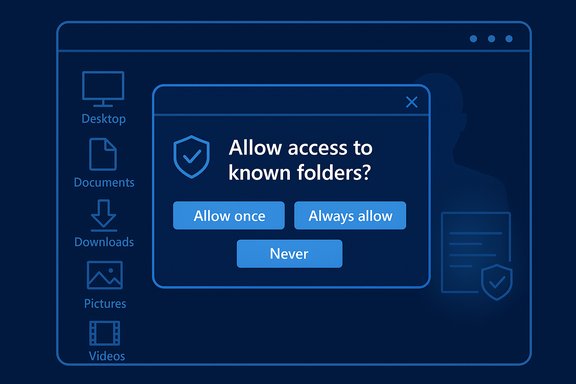
Microsoft’s preview documentation and Insider builds now enforce a user‑facing consent flow whenever an agent requests access to local files in the six standard known folders (Desktop, Documents, Downloads, Pictures, Music, Videos). The consent model includes:- Default denial — agents do not have automatic access to known folders; permission must be requested.
- Per‑agent permissions — each agent gets its own identity and settings page where granted permissions can be reviewed and revoked.
- Time‑boxed consent — dialogs provide options such as Allow once, Always allow, or Never/Not now to reduce persistent over‑exposure.
- Admin gating — agentic features are off by default and must be enabled by an administrator (Settings → System → AI Components → Experimental agentic features).
How the prompt will appear (preview UX)
In early Insider builds the flow is straightforward: an agent initiates a task that requires local files, Windows surfaces a modal permission dialog describing the request and its scope (i.e., known folders), and the user selects a time‑granularity option. Decisions are logged and can be changed later from the per‑agent settings page. This pattern applies to Microsoft’s own agents such as Windows Copilot and to third‑party agents registering through the platform’s connector model.How it works: Agent Workspace, MCP, File Explorer connector
Agent Workspace and per‑agent accounts
A central architectural shift is treating agents as first‑class principals on the OS. Each agent runs under a dedicated, low‑privilege Windows account and typically executes inside an Agent Workspace—a visible, contained runtime that is auditable, pauseable and interruptible. This separation provides distinct audit trails, allows standard ACLs and Group Policy to apply to agents, and makes revocation practical. The workspace is intentionally lighter than a full virtual machine but stronger than running code directly in the interactive user session: it balances performance and containment while keeping users in the loop.Model Context Protocol (MCP) and the File Explorer connector
Microsoft has adopted the open Model Context Protocol (MCP) so agents can discover and call tools and connectors in a standardized way. On Windows, agent connectors (MCP servers) are registered into a secure on‑device registry (ODR) that exposes limited, policy‑controlled capabilities (for example, the File Explorer connector and a Settings connector). The MCP proxy layer mediates calls, enforcing authentication, authorization and audit logging. The File Explorer connector is the primary mechanism for agents to request permission to read or manage local files without a manual upload flow. Once consent is granted, the agent may operate on allowed folders inside its workspace; whether processing remains local or is forwarded to cloud services depends on the agent’s implementation and user choices.Packaging, manifests and signing
To appear in the on‑device registry, connectors and agents must meet packaging and identity requirements: signed binaries, declared capabilities in manifests, and confinement expectations. Microsoft’s “secure by default” policy aims to prevent unsigned or tampered components from being discoverable to agents. Developers can test with relaxed policies in developer mode, but production discoverability remains guarded.Timeline and rollout — What to expect and what’s still uncertain
Microsoft began surfacing these features and clarifications through Windows Insider previews in late 2025 and at Ignite 2025, with public and private previews for MCP and Agent Workspace respectively. The company has described the primitives and provided documentation and SDKs for developers. Industry reporting and some outlets have projected that a broader, customer‑facing rollout of agentic features and related consent UX may arrive as part of major Windows feature waves in 2026, with earlier testing continuing via the Insider Program. That expectation is plausible given Microsoft’s staged preview approach, but a specific retail date for general availability and which features will require Copilot+ hardware or Microsoft 365 entitlements has not been definitively published by Microsoft; treat any precise 2026 release claims as provisional until Microsoft confirms them.Strengths — why this matters for users and IT
- User control restored: The modal prompt and per‑agent settings put consent front and center instead of treating file use as implicit. This is both a legal and trust improvement for personal and enterprise users.
- Auditability and governance: Agent identities and audit trails make automation actions attributable and visible to SIEM and compliance tools, which is essential for enterprise adoption.
- Containment by design: Agent Workspaces reduce silent, headless automation and give users a visible runtime to pause or take over, lowering the risk of undetected changes.
- Open standards enable interoperability: MCP encourages an ecosystem where multiple agent implementations can safely reuse connectors without bespoke integrations, lowering friction for developers.
Risks, gaps and unresolved questions
Despite clear progress, the preview model has structural limitations and open questions that matter for security, privacy and enterprise governance.Coarse permission granularity
The preview limits agent requests to the set of six known folders as a unit; you cannot currently grant an agent access to only Documents without also granting Desktop, Downloads, Pictures, Music and Videos. That all‑or‑none approach is a coarse control that can over‑expose files or force users into a riskier “Allow once” pattern to avoid persistent broad grants.Consent fatigue and “Always allow” risk
Frequent prompts are a usability hazard: repeated modal dialogs encourage reflexive approvals. The presence of an “Always allow” option, while convenient, risks eroding the protection model if users habitually choose convenience over caution. Designing consent flows that are informative, contextual and hard to game will be crucial.Cloud transit and telemetry transparency
Microsoft’s architecture permits hybrid execution: some reasoning can run locally (especially on Copilot+ hardware with NPUs), while other steps or model calls may forward content to cloud services. The platform does not fully standardize how agents must treat forwarded content—what telemetry is captured, retention rules, or whether downstream services can reuse data for training—so agent implementations remain the weak link. For high‑sensitivity uses, “consent to read” is not the same as “guaranteed on‑device processing.” Independent verification and clearer telemetry policies will be necessary.DLP/EDR integration and enterprise controls
Enterprises need demonstrable integrations between Windows agent logs and their Data Loss Prevention (DLP) and Endpoint Detection & Response (EDR) tooling. Microsoft has signaled Intune/Group Policy and SIEM hooks, but broad, proven vendor integration and standardized audit formats are still maturing. Until these integrations are widely deployed and stress‑tested, production enablement across regulated environments remains risky.New attack surfaces: adversarial content and cross‑prompt injection
Agents that read documents create a new class of attack surface: adversarial or crafted content embedded in files could be interpreted as instructions by an agent (a form of prompt‑injection tailored to agentic workflows). Microsoft has acknowledged novel risks such as cross‑prompt injection and is building mitigations, but defenders will need robust detection, hardened parsing, and process controls to reduce exposure.What this means for enterprises, admins and power users
For IT and security teams
- Treat agents like service accounts: apply least‑privilege, monitoring and lifecycle management identical to other machine principals.
- Keep agentic features off by default in production rings until DLP/EDR integrations and audit pipelines are validated.
- Pilot in controlled environments and require “Allow once” for early use cases to limit persistent risk exposure.
For consumers and power users
- Prefer Allow once for one‑off operations and reserve Always allow for trusted agents and low‑risk workflows.
- Avoid storing highly sensitive artifacts in the known folders (private keys, unencrypted backups); use encrypted containers when possible.
Practical recommendations and a short checklist
- Turn off Experimental Agentic Features on machines used for sensitive work until your organization has validated the security posture.
- Use Intune/Group Policy to gate the feature for managed fleets; require admin enablement and staging.
- Enforce logging and SIEM ingestion for agent actions; treat agent events as high‑priority alerts during incident response.
- Audit connectors and require code signing and manifest reviews for any agent connector deployed in your estate.
- Educate users about consent semantics and the meaning of Allow once vs Always allow; reduce reflexive acceptance.
Technical deep dive: how MCP proxy, ODR and agent identity help enforce policies
- The MCP proxy acts as a trusted gateway between agents and connectors, authenticating the agent, validating connector identity, enforcing policies and logging every interaction. This central mediation prevents direct, uncontrolled agent‑to‑app calls and gives the OS the power to apply consistent policy.
- The on‑device registry (ODR) limits discoverability to components that meet minimum security bars—packaging, signing, manifested capabilities—so only vetted connectors are returned to agents. This is an important supply‑chain control.
- Agent user accounts permit conventional Windows security primitives—ACLs, tokens, auditing—to govern agent behavior and give IT tools (Intune, Group Policy, Entra) the levers they already know how to use.
Responsible AI: policy, principles and the regulatory frame
Microsoft’s design choices intentionally echo core Responsible AI expectations—safety, transparency, consent and accountability—and Azure/Microsoft guidance recommends explicit, auditable controls when agents access private data. Still, operationalizing responsible AI on millions of consumer PCs and corporate endpoints is non‑trivial: it demands product clarity about telemetry and retention, developer obligations for data handling, and enterprise alignment to legal/regulatory regimes (GDPR, CCPA, sectoral rules). Organizations should insist on explicit guarantees and contractual commitments when integrating third‑party agents into production workflows.Final assessment — progress, but the trust bar remains high
Microsoft’s prompt‑before‑file‑access change is an essential corrective that responds to legitimate privacy concerns and moves the platform closer to a governable agent model. The introduction of Agent Workspaces, per‑agent accounts, MCP and an on‑device registry marks a substantive engineering effort to make agentic automation auditable, revocable and policy‑controlled. That said, the safeguards are not yet a completed story. The coarse known‑folder permission model, the specter of consent fatigue, incomplete telemetry clarity around cloud transit, and the need for robust DLP/EDR integration mean organizations and cautious users should treat agentic features as experimental until independent audits, vendor integrations and hardened controls are in place. Pilot early, require ephemeral permissions, and demand signed, auditable agents before you grant persistent access.Microsoft’s choice to ask first is a necessary step toward balancing innovation with trust. It does not eliminate the new security surface that agentic AI introduces, but it shifts agency back to users and administrators—and that shift is the single most important prerequisite for safely adopting AI that can do rather than merely suggest on our behalf.
Quick reference: where to look next
- Check Settings → System → AI Components on Insider builds to inspect the agents UI and per‑agent settings.
- Follow Microsoft’s Agentic and MCP developer pages for packaging, registration and security requirements.
- Keep an eye on Windows Insider release notes and enterprise security blogs for updated DLP/EDR integrations and audit formats as preview telemetry matures.
Source: livemint.com Microsoft responds to AI backlash: Windows 11 will ask before file access | Mint
