

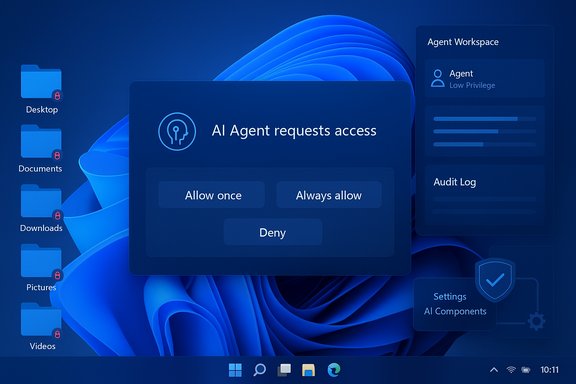
Microsoft’s reversal on AI file access in Windows 11 marks a sharp course correction: AI agents will no longer be granted blanket access to a user’s personal folders and must request explicit permission before reading or acting on files in Desktop, Documents, Downloads, Music, Pictures, or Videos.
Background / Overview
Windows 11 has been evolving from a traditional operating system into an “agentic” platform where AI agents can perform multi-step workflows on the user’s behalf — opening apps, automating UI interactions, extracting data from documents, and producing summarized outputs. This agentic ambition is visible across Copilot features, the Agent Workspace preview, and experimental runtime primitives Microsoft is testing in Insider builds.The promise is clear: translate natural-language intent into concrete actions on the desktop to save time and reduce repetitive tasks. The problem — which surfaced loudly in community forums and tech reporting — was less about capability and more about control. Early messaging and preview behavior left many users worried that agents might silently scan personal files, triggering a privacy backlash that forced Microsoft to clarify and tighten the consent model.
What Microsoft Changed: The New Consent Model
Microsoft’s updated approach centers on four practical elements designed to limit surprise and increase accountability.- Default denial for known folders. AI agents will not have automatic access to the six common user “known folders” (Desktop, Documents, Downloads, Pictures, Music, Videos). When an agent requires files from those locations, Windows surfaces a modal permission prompt.
- Per-agent permissions. Each agent is treated as a separate principal with its own settings page. Users can grant or revoke file and connector access per agent, making decisions auditable and revocable.
- Time‑boxed consent choices. Consent dialogs offer “Allow once,” “Always allow,” or “Never/Not now,” giving users the balance of convenience and control. Decisions are logged and can be reviewed later.
- Admin gating and isolation. The experimental agentic runtime is off by default and must be enabled by a device administrator. Agents run under dedicated, low‑privilege agent accounts inside an Agent Workspace that aims to isolate activity from a user’s interactive session.
How the Consent UX Works (Preview)
The user flow
When an AI agent needs local files to complete a task — for example, summarizing documents in a folder — Windows displays a modal consent prompt that:- Identifies the requesting agent by name and identity.
- Describes the scope of the request (files from the six known folders).
- Offers granular timing options: Allow once, Always allow, or Ask every time / Deny.
Per-agent settings and auditability
Post-consent, each agent gets a settings page under Settings → System → AI Components (or the Agents page in preview builds) where owners can:- Review which folders and connectors the agent can access.
- Revoke permissions or change timing behavior.
- Inspect audit logs or activity summaries produced by the agent runtime.
The Architecture: Isolation, Identity, and Connectors
Microsoft’s preview exposes a few platform primitives that underpin the consent model and agent behavior.- Agent accounts. Each agent runs under a separate, low‑privilege Windows account so its file operations and UI automation are auditable through normal ACLs and SIEM tooling.
- Agent Workspace. Agents run inside a contained desktop session with visible progress indicators and intervention controls (pause, stop, takeover), which aims to separate agent activity from the user’s session.
- Model Context Protocol (MCP) and connectors. MCP standardizes how agents discover and request access to system services and connectors (File Explorer, Settings, cloud connectors). This is intended to provide a single mediating layer for permissioning and logging.
Why the Backlash Happened and What This Fix Addresses
The backlash was the product of several converging issues:- Ambiguous early messaging. Phrases like “agentic OS” suggest initiative-taking behavior, which many users perceived as a threat to control. That semantic framing amplified fear even as Microsoft worked on technical controls.
- Historical context (Recall and other experiments). Past features that captured screen contents or indexed user activity created a low-trust baseline; users were primed to worry about background surveillance by design.
- Permission fatigue and UX risk. Repeated consent dialogs have their own hazard: if users are continually asked to permit agents, they may start granting access reflexively, eroding the value of consent. Independent analyses warned that “consent fatigue” is a plausible social‑engineering vector.
Strengths of the New Model
- Clear, just‑in‑time consent. The modal permission prompt clarifies when and why an agent needs files, helping users make informed decisions. This is a practical baseline for privacy-preserving automation.
- Per-agent separation and auditability. Distinct agent accounts and a dedicated settings page make it possible to treat misbehaving agents as discrete security incidents rather than amorphous “AI” problems. Audit trails allow enterprise monitoring and incident response.
- Admin gating and staged rollout. Shipping these primitives as opt‑in, admin‑enabled features in Insider builds reduces the chance of a surprise mass rollout and allows enterprises to pilot the technology in controlled environments.
- Scoped folder coverage. Limiting requests to the six known folders reduces the blast radius relative to giving agents carte blanche across a user profile or system. That scope matches user mental models about where personal content lives.
Remaining Risks and Open Questions
Despite clear improvements, the fix does not eliminate all concern. Several structural and procedural gaps remain.Permission granularity and scope
Currently, the preview applies folder access as a set: granting access applies to the six known folders together rather than allowing per-folder granularity (for example, Documents but not Desktop). That coarser scope reduces the precision of consent and may force users into broader concessions than they intend.Consent fatigue and UX design
Even well‑designed modal prompts can degrade into routine clicks. The “Ask every time” option mitigates over‑permission but repeated dialogs across many agents or frequent workflows may still normalize approval. Microsoft and UX researchers will need to study real‑world patterns to prevent a new consent‑fatigue vector.Supply‑chain and agent integrity
The security model depends on signing, revocation, and provisioning controls for agents. If agent binaries or connectors are compromised, per‑agent consent is necessary but not sufficient — a compromised agent with granted access could exfiltrate data. Strong signing, revocation lists, and monitoring are essential, and they remain a material attack surface.Data flow transparency
When agents do act on files, it is not always obvious whether processing happens locally or in the cloud. Many advanced Copilot or Microsoft 365 features involve cloud inferencing; enterprises will want machine‑readable indicators that show where data was processed and whether content left the device. The current preview documents gating and conveys intentions, but operational transparency is still an area enterprises will press for.Regulatory & compliance exposure
Agentic features that access user files intersect with privacy regimes and, in enterprise contexts, data loss prevention (DLP) requirements. The European AI Act and data protection laws require transparency and human oversight for many AI uses; organizations must map agent behavior to legal obligations and maintain incident‑reporting processes. Microsoft will need to provide enterprise policy controls (Group Policy/MDM) at scale to meet compliance needs.Hardware and marketing claims (caveat)
Microsoft has referenced hardware classes — Copilot+ PCs and local NPU baselines around “40+ TOPS” — as performance targets for on‑device inference that reduces cloud transit of sensitive data. These figures are vendor targets and marketing thresholds rather than universal requirements; they should be treated cautiously and validated by independent benchmarking for specific OEM models. This claim is therefore flagged as potentially unverifiable without model‑level tests.Practical Guidance for Users and IT
For individual users
- Treat agentic features as experimental until you are comfortable with settings and behavior. Keep the experimental runtime off by default.
- When prompted, prefer “Allow once” if you are trying a new workflow or working with potentially sensitive files. Use “Always allow” only for trusted agents you rely on frequently.
- Review per‑agent settings regularly and revoke permissions for agents you no longer use. Audit logs, where available, can help you confirm what an agent actually accessed.
For IT and security teams
- Pilot agentic features in a controlled ring (Insider preview) and validate the interaction with your DLP and SIEM stacks.
- Expect Microsoft to expose Intune/Group Policy controls; prioritize blocking agentic connectors on regulated endpoints until governance and auditing are firmly in place.
- Require agent signing and revocation validation in your device hardening checklist. Treat agent binaries like any other privileged client component in your supply‑chain threat model.
- Update your acceptable‑use policy and user training to cover when it’s safe to allow agents access to corporate files and when manual handling is mandatory.
Broader Context: Is This Enough to Restore Trust?
Microsoft’s consent prompts and per‑agent controls are an important step toward responsible AI deployment in Windows 11. By defaulting to denial, adding clear prompts, and making agents auditable, Microsoft has closed the most obvious privacy gap that the community criticized. For many users, that alone will reduce anxiety and restore a baseline of control.However, restoring trust requires more than a single UX fix. It demands sustained commitments in several areas:
- Machine‑readable, per‑action data‑flow disclosures so users and admins can tell where processing occurred.
- Fine‑grained permissioning (per‑folder, per‑connector) to match real user expectations.
- Enterprise-grade management, logging, and red‑teamed security proofs for MCP, connectors, and the Agent Workspace.
- Independent audits and public findings so external researchers can validate Microsoft’s claims and mitigations.
What to Watch Next
- How Microsoft exposes Group Policy and Intune controls for agents and connectors; enterprise adoption depends on manageable central controls.
- The evolution of permission granularity — whether Microsoft moves from an “all-known-folders” model toward per-folder grants.
- Independent security audits of MCP, Agent Workspace, and connector signing/revocation workflows. Public red‑team results would be a strong signal.
- Clarified, machine‑readable statements about local vs. cloud processing for each AI Action so auditors and admins can trace data egress.
Conclusion
Microsoft’s addition of explicit consent prompts and per‑agent permissioning is a practical and necessary correction to the initial rollouts of agentic AI in Windows 11. The changes address the headline privacy concern — agents silently scanning known folders — and implement sensible platform primitives like agent accounts and runtime isolation.Yet the solution is a foundational, not final, step. Real-world trust will depend on deeper transparency about data flows, stronger enterprise controls, finer permission granularity, and independent security validation. Until these follow‑throughs are demonstrably in place, prudent users and IT teams should treat agentic features as experimental and enforce conservative policies on sensitive endpoints. The consent prompts reduce the immediate risk of surprise access, but they do not absolve Microsoft or adopters from the larger task of proving that agentic Windows can be both powerful and safe.
Source: Windows Report Windows 11 AI File Access Triggers Backlash, Microsoft Adds Consent Prompts
